Windows 95 and the multimedia revolution
After the wild release of Windows 95, with celebrity commercials, dancing, and a healthy dose of excess, behind the scenes Microsoft was…
Windows 95 and the multimedia revolution

Windows 95 with Microsoft Plus! running YAMP
After the wild release of Windows 95, with celebrity commercials, dancing, and a healthy dose of excess, behind the scenes Microsoft was painting a much bigger picture, dwarfing the operating system release. Windows 95 was the official start of the 32 bit computing migration. It also marked the mainstreaming of the Internet, with the birth of Internet Explorer. And it also marked the beginning of the PC multimedia revolution.
Part of this revolution was the evolving MPEG media standard, which gave the ubiquitous and universal MP3 format, the Intel MMX instruction set which could make the MP3 playable on the PC, and the new and strange Direct X, targeting games initially but redefining how Windows dealt with all media formats and graphical content. Hiking on all this, developers saw a new challenge and a new opportunity: a brand new type of software, the media player.
It all starts with Windows 95

Installing Windows 95 in 86Box
It’s difficult to understand the Windows 95 experience. It’s not that we don’t have emulators or virtual machines that can run it, but just looking at the screenshot above brings back a strange world, so alien to ours today. The weird colors, spacing and controls you see above were not from underpaid designers working in Paint. They were from professionals building the very first PC graphical setup programs, under severe hardware limitations.
The initial Windows 95 release, buggy, slow and unstable, gave way to new iterations and updated software. But the biggest difference was made by Internet Explorer 4:

Installing Internet Explorer 4 for Windows 95
Internet Explorer 4 was more than just an Internet browser. It morphed into an expanded operating system shell, taking over the usual Windows 95 desktop. It changed the task bar, the desktop capabilities, the networking stack, and yes, brought a better Internet experience. Another such example was Microsoft Plus, an expansion and theming pack for Windows 95:

Starting Windows 95 with Microsoft Plus
Microsoft Plus brought several new features to Windows 95: a desktop theming manager, improved desktop settings, a few games and a great selection of themes, among which this was my favorite:
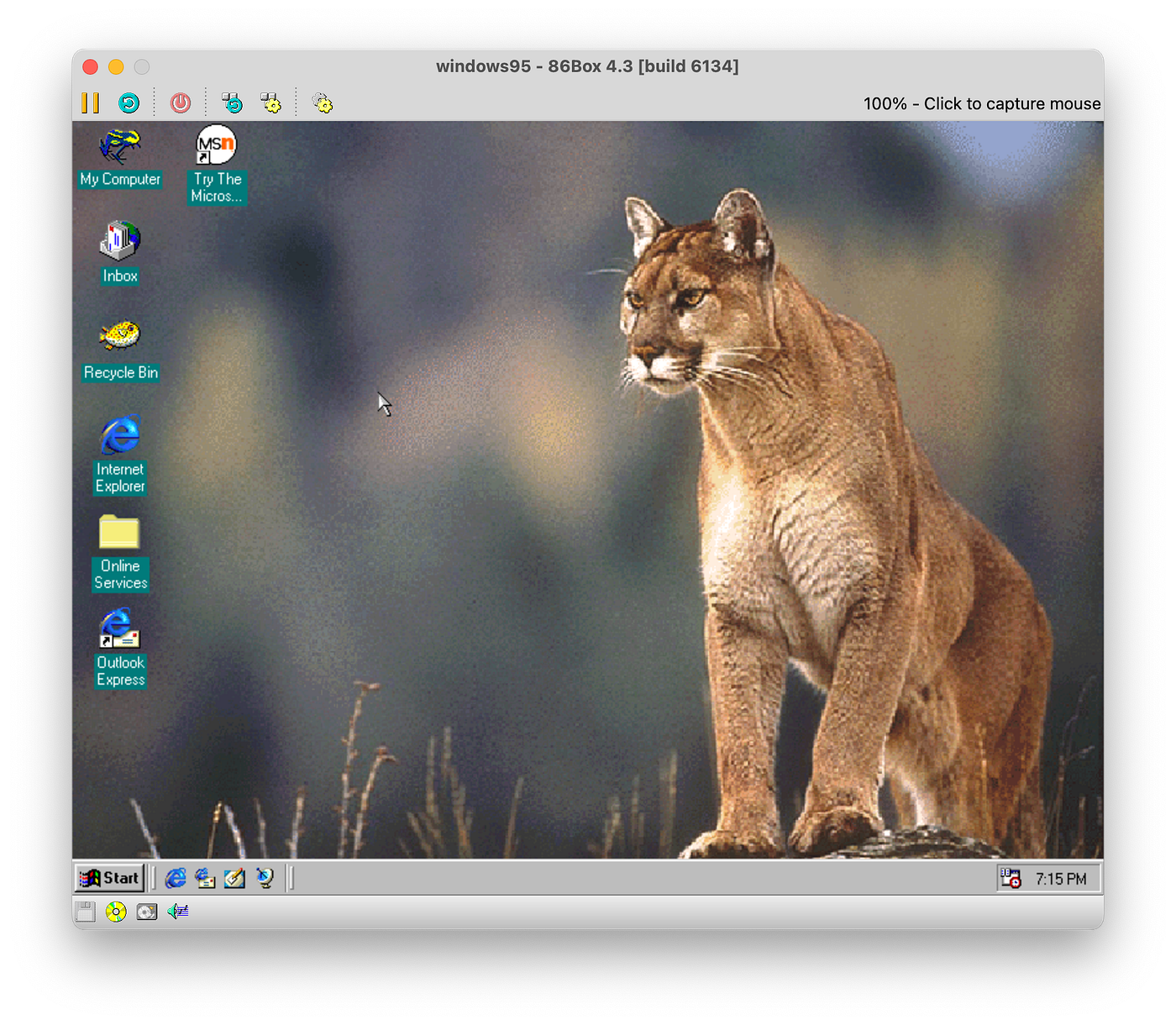
The Windows 95 jungle theme brought by Microsoft Plus
You may not think much about these themes and features, but Microsoft knew that multimedia means the whole user experience. It was not just about playing MP3s and watching short videos. It was about the whole Windows 95 desktop. That’s why they worked so diligently to improve it with every occasion.
Back then, Internet Explorer was not just about browsing the web, it was about integrating the web into the daily experience, bringing its features to the desktop. And it was visible everywhere: window and taskbar design, browsing files, browsing the web, theming, everything. That’s why the new themes from Microsoft Plus featured system sounds prominently. All tasks and actions had a sound associated with them. It was a strong signal that PCs were ready to enter the age of multimedia.
So how were media players back then?
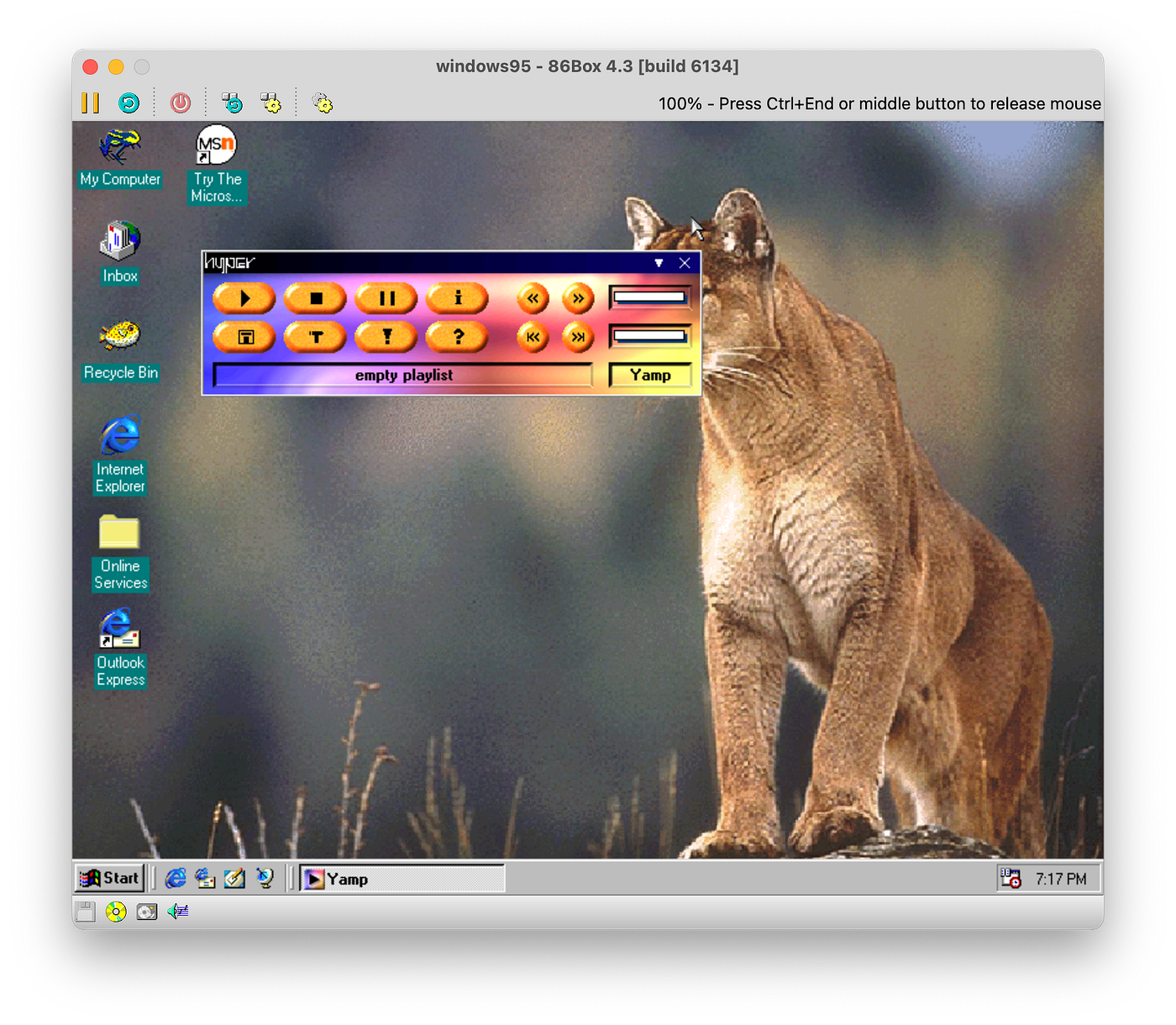
Windows 95 running YAMP, a media player
Like all software, media players had rough beginnings. Nobody knew what they were doing, how they should look and what features they should have. A few ideas became common sense: a media player should have a playlist. The general buttons should be the ones found on any cassette player, even if it didn’t map directly to digital media.
Everything else? Wilderness. Looking at YAMP in the screenshot above, we can clearly see how developers experimented with everything: colors, style, button placement, turning trivial applications into alien artifacts:
Another theme for YAMP running under Windows 95
The above example probably means nothing to us today, but windows with internal transparent zones were completely wild back then. Not only they were technically difficult to create, but nobody ever thought there would be any use for them. Well, media players changed that:

Another wacky theme for YAMP running under Windows 95
We can see above another example of such a theme, along with the playlist window and the file open window. Check out the gray window background with the paper or gravel texture. While outrageous today, this was common in the Windows 95 era, especially for media players. But we could see such window eccentricities in other applications too like WinZIP and WinACE, two popular archival tools of the time. Here is the settings dialog for YAMP, with a bunch of tabs and confusing interactions:

The YAMP configuration window
Another one: Sonique
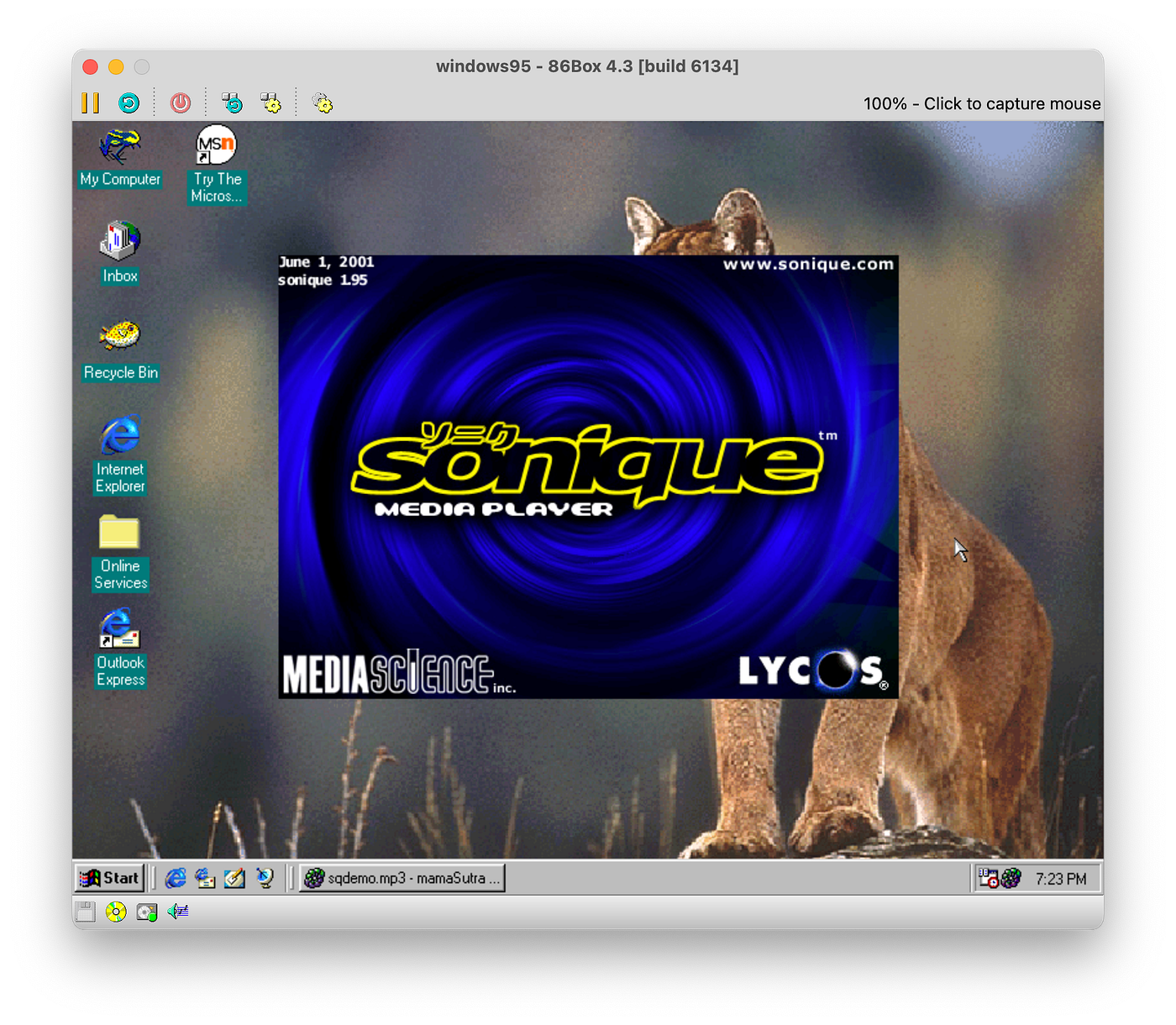
Sonique startup splash screen
Another brave media player was Sonique. This one had a different take on what a user interface should be. Sonique incorporated the weird window look, with custom shapes and controls, but created the interactions to act like a web browser:

The Sonique media player running under Windows 95
We can see above how the player buttons make way for an activity browser of sorts, with useful links on the right sidebar and helpful tools in the make belief footer. The nice part was that all interactions included transitioning animations, in a style reminiscent of the Microsoft Zune media player. Way ahead of its time. It featured a respectable equalizer:

The Sonique audio equalizer
And a very comprehensive set of options, covering graphics, animations, sound, and as we see in the screenshot above, Internet settings. It’s like we said at the beginning: the Internet was redefining the whole multimedia experience, even though it was just a collateral exercise.

Sonique configuration options
Media players back then had tons of features, including redirecting the output to a file. In the screenshot below, we can see Sonique showing two output options: to the Windows Audio engine, producing sound, or to the WAV Writer, producing a WAV audio file. This was quite common, other media players offering even MP3 encoding:
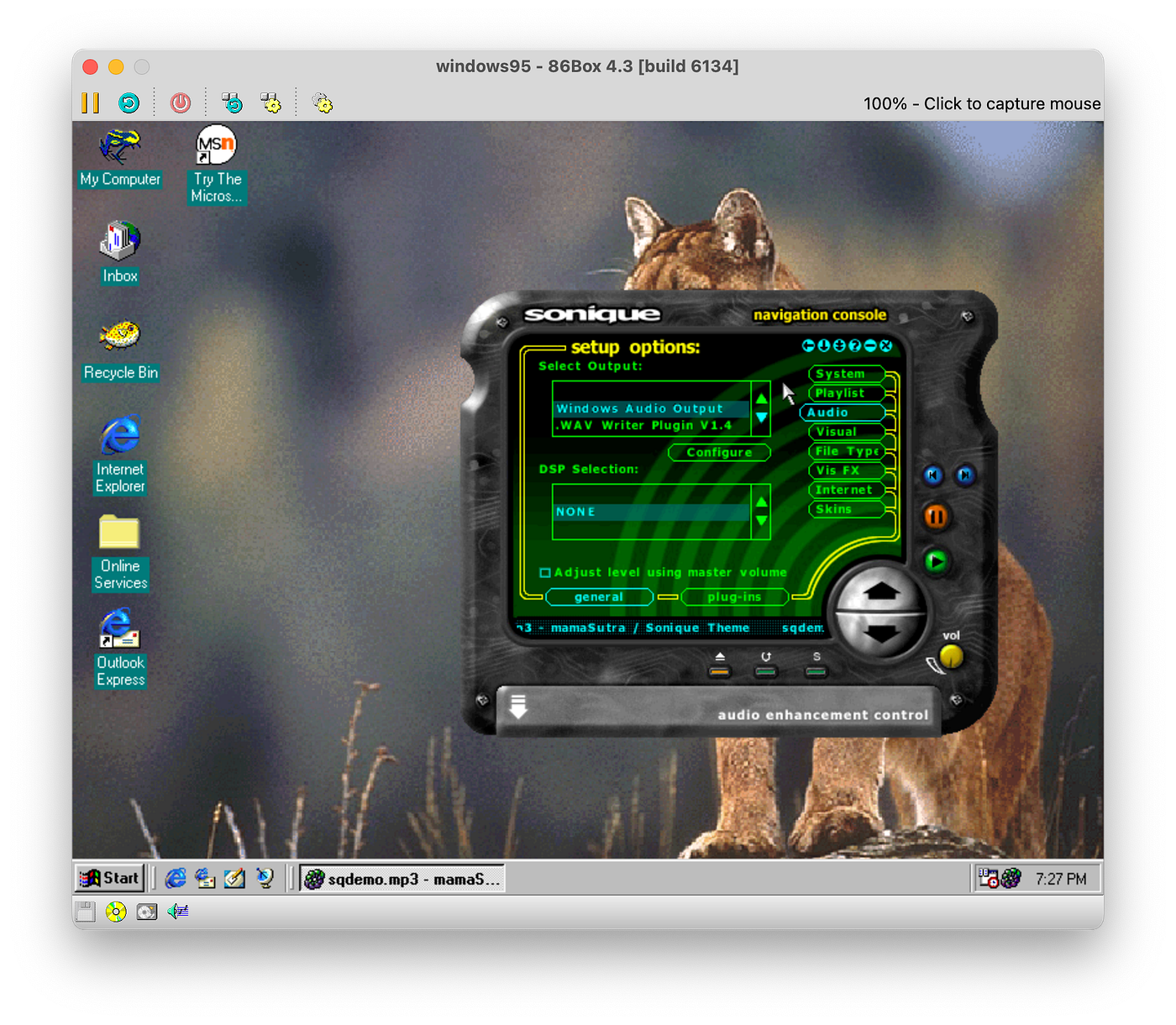
Sonique audio output configuration
In the screenshot below we have the visual options, allowing us to set up how much blur and smoke and other UI effects we wanted to have. They were configurable because it was still the nineties, and computers were expensive, and powerful graphics cards were even more expensive and unusual. So sometimes users wanted to cut back a bit on the flash:

Configuring animation options for Sonique
And lastly, here is the Internet configuration screen, quite comprehensive and thoughtful, allowing us to configure even the streaming options:

Sonique Internet configuration screen
And finally, the classic: Winamp

The main Winamp user interface
As a side note, there is a lot of AMP going on in many media players. Some say it was an acronym of Another Music Player. YAMP for example was Yet Another Music Player. Winamp could have been Win Another Music Player but it’s not really settled. Either way, Winamp was so packed with features and bringing such an easy and intuitive user interface, that it instantly was set to become a classic.
Winamp went through several versions, and here is version 1.9.something, with the playlist and the equalizer:

Winamp with the equalizer and the playlist open
Winamp 1 and 2 added support for various media formats. And it was not just a few. Basically everything that was playable could be handled by Winamp. This made it very convenient, and very versatile, securing its place in the hall of fame of media players. It was much like VLC, which has support for all media formats without resorting to third party plugins.
And Winamp went further. Version 3 added support for video, although it was not very well received. Probably because of the full rewrite it required, because of many bugs and many delays, and maybe because it needed a little bit of extra to work:

Starting Windows 98
Yes, Winamp 3 dropped compatibility with Windows 95. Other than that, it looked better, offering a streamlined version of what was before:

Winamp 3 running under Windows 98
Much like Sonique, Winamp 3 also boasted a comprehensive options dialog and didn’t cut back on anything:

Configuration options for Winamp 3
It too had options controlling the interface and its animations:

Winamp 3 display options
And it also offered CD playback support, Direct X audio output and many more:

CD playback options in Winamp 3
From version 3, it skipped a beat straight to version 5, bringing a redesign that balanced version 1 and 3, trying to be both familiar and modern at the same time, without taking away the ease of use:

Winamp 5 user interface
The options were again many, even more than before, now that almost all its features were modularized into plugins:

Configuration options for Winamp 5
Here are the input plugins, covering MIDI, DirectShow filters, LineIn to capture audio from the sound card, MP4, OGG, and many more:

Input options for Winamp 5
And configuring an input plugin was no joke either. Check out the many options available for the main module decoder:

Module Decoder input plugin options for Winamp 5
It even had digital signal processing built right in. We don’t even know what the configuration options are by looking at the interface:

The DSP configuration for Winamp 5
But those were different times. An application had to supply everything a user could possibly need, at the best possible quality, with the easiest and most intuitive interface. The competition was between indie developers, small software shops, script kiddies and hackers. Everybody wanted more features for the user, and to boast their programming skills.
Nobody knew that in a few years, Microsoft would slowly work on its Media Player to crush the whole market forever. Nobody thought users will stop trying out software for the fun of it. Nobody thought that fun would largely stop in favor of convenience, ecosystem lock-ins, subscription services, and the relentless effectiveness of the cloud. With no fun left anymore, people stopped caring what media player they used: it was all the same anyway. It was all in the cloud anyway. What features do we need? None, whatever the cloud provider gives? Who cares?
Thank you for joining me in another nostalgic trip. I hope you enjoyed reading as much as I enjoyed writing and reminiscing. See you next time!
메타데이터
- post_id
- 01ec4864eccd
- slug
- windows-95-and-the-multimedia-revolution-01ec4864eccd
- url
- https://medium.com/@raduzaharia/windows-95-and-the-multimedia-revolution-01ec4864eccd
- canonical_url
- https://medium.com/@raduzaharia/windows-95-and-the-multimedia-revolution-01ec4864eccd
- author_url
- https://medium.com/@raduzaharia
- status
- ok
- fetched_at
- 2026-07-22 14:16:37