CoreDNS in OpenShift
Understanding CoreDNS, Forwarders, ndots, and Name Resolution Flow
CoreDNS in OpenShift
Understanding CoreDNS, Forwarders, ndots, and Name Resolution Flow
When it comes to OpenShift (or Kubernetes in general), DNS isn’t just a background service — it’s one of the most critical components keeping service discovery alive inside your cluster. Every Pod, Service, and Route depends on DNS resolution to communicate reliably.
In this article, we’ll take a deep technical walk through how DNS works in OpenShift, how CoreDNS handles internal and external lookups, what forward plugins, ndots, and search domains actually mean, and how to troubleshoot DNS performance issues like timeouts or failures
1. DNS Architecture in OpenShift
In OpenShift, the DNS resolution for Pods and Services is handled by CoreDNS — a scalable, cloud-native DNS server that understands Kubernetes resources.
Every cluster typically includes:
- A Service named
dns-default(ClusterIP, e.g.172.30.0.10) - Bascially the 10th IP from the cluster service network is reserved for the CoreDNS by default. (ex.
172.30.0.**10)** - One or more CoreDNS Pods (
dns-default-*) running in theopenshift-dnsnamespace - A DaemonSet called
node-resolver, which adds local host entries for certain metadata like image registry entries in the node /etc/hosts
Internal DNS domain
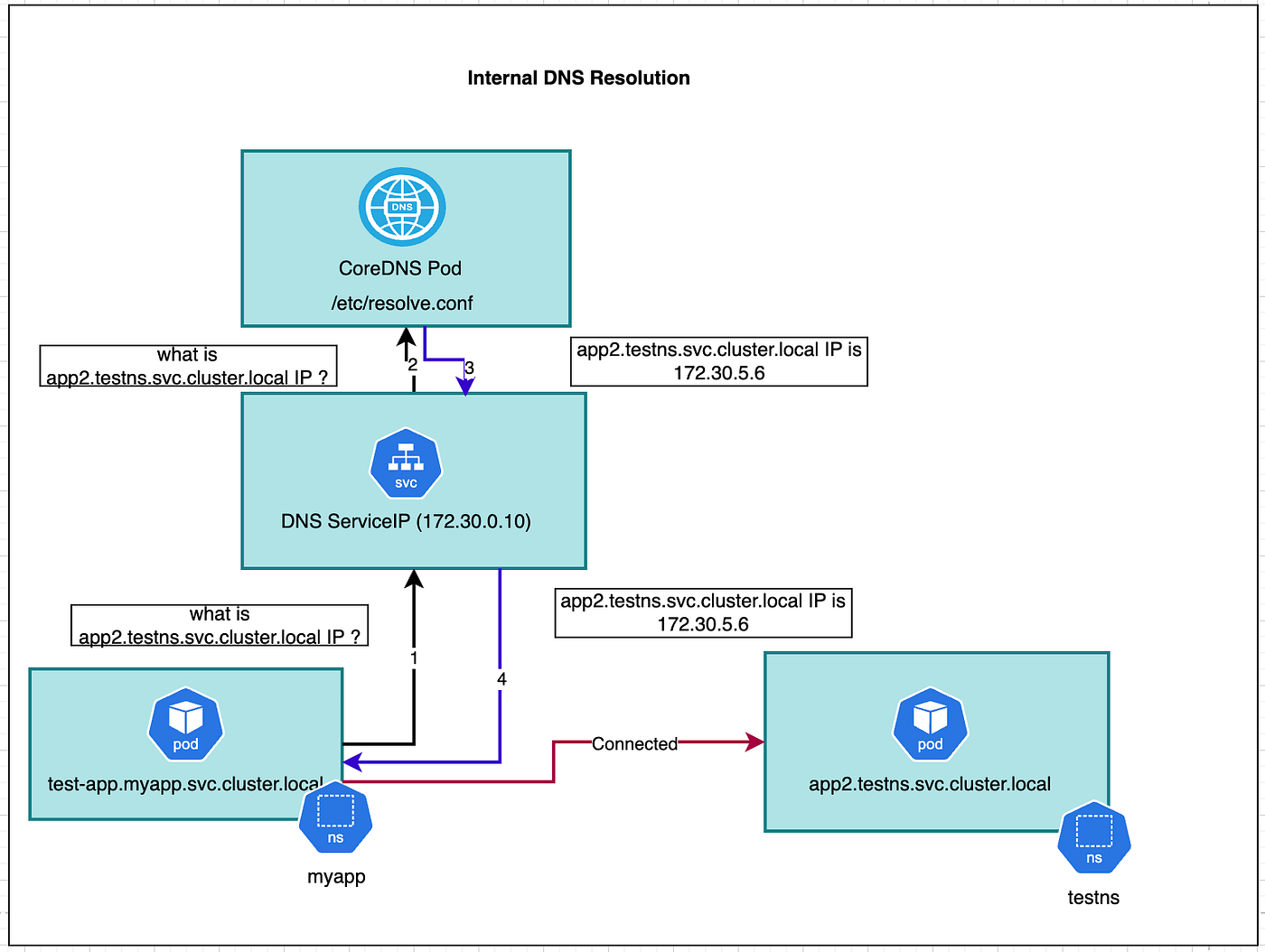
By default, all internal names end with the cluster domain:
*.svc.cluster.local (# svcname.namespace.svc.cluster.local)
*.pod.cluster.local. (# podip.namespace.pod.cluster.local)
For example:
backend.myapp.svc.cluster.local10-128-3-45.myapp.pod.cluster.local
These names are resolved by CoreDNS, not by the node’s operating system.
2. How CoreDNS Resolves Internal Names
When a Pod performs a lookup like:
backend.myapp.svcthe query first reaches the CoreDNS Service ClusterIP (e.g. 172.30.0.10).
CoreDNS checks:
- If the name belongs to
cluster.local(the internal domain) - If a matching Service, Pod, or Endpoint exists
- If found → returns the corresponding ClusterIP or Pod IP
Example: Internal resolution
Login to the test pod and execute the following command will resolve to the service clusterIP, This means the backend Service in the myapp namespace maps to ClusterIP 172.30.52.19.
$ dig backend.myapp.svc.cluster.local +short
172.30.52.19
3. The Forward Plugin & External DNS Resolution

When a Pod queries an external domain like redhat.com,or any other enterprise zone CoreDNS doesn’t know that internally — so it uses the forward plugin to send the query upstream.
Openshift provide capabilities to configure the forward plugin for the external DNS resolution via configmaps in the Openshift-dns namespace.
apiVersion: v1
kind: ConfigMap
metadata:
  name: dns-default
  namespace: openshift-dns
data:
  Corefile: |
    .:5353 {
        errors
        health
        kubernetes cluster.local in-addr.arpa ip6.arpa {
            pods insecure
            fallthrough in-addr.arpa ip6.arpa
        }
        forward . /etc/resolv.conf {
            policy sequential
        }
        cache 900
        reload
    }
forward . /etc/resolv.conf → means forward all non-cluster queries to the DNS servers listed in the CoreDNS Pod’s /etc/resolv.conf, usually the node’s upstream resolver.

This allows external DNS lookups (ex: internet or corporate domains).
Openshift CoreDNS also supports configuring the Enterprise DNS resolution configuring additional forward lookup nameservers as follows.
All queries for example.com will be sent to the specific external nameservers (192.168.1.10 and 192.168.1.11).
apiVersion: v1
kind: ConfigMap
metadata:
  name: dns-default
  namespace: openshift-dns
data:
  Corefile: |
    .:5353 {
        errors
        health
        kubernetes cluster.local in-addr.arpa ip6.arpa {
            pods insecure
            fallthrough in-addr.arpa ip6.arpa
        }

        # 1. Forwarding for Enterprise Domain (e.g., example.com)
        # All queries for example.com will be sent to the specific external nameservers (192.168.1.10 and 192.168.1.11).
        # This takes precedence over the general '.' forward below.
        example.com:5353 {
            errors
            cache 300
            forward . 192.168.1.10 192.168.1.11
        }

        # 2. General Forwarding to Node's /etc/resolv.conf
        # Queries that are NOT for Kubernetes (cluster.local) and NOT for the specific domain (example.com)
        # will be forwarded to the nameservers listed in the node's /etc/resolv.conf.
        forward . /etc/resolv.conf {
            policy sequential
        }

        cache 900
        reload
    }
One More important thing to know is in case of Static pods — like the control plane components (kube-apiserver, etcd, etc.) — are managed directly by kubelet, not the scheduler.
They use the node’s /etc/resolv.conf by default, since the cluster DNS might not be ready when they start.
4. DNS inside the Pod
Each pod inherits a DNS configuration file at /etc/resolv.conf, which defines:
- The nameserver (CoreDNS ClusterIP)
- The search domains
- The ndots setting controlling how lookups are expanded

pods resolv.conf
It is important to understand the what details are part of the pods /etc/resolv.conf file
nameserver 172.30.0.10 → Points to the CoreDNS service inside the cluster.
search domains → Suffixes automatically appended to names with fewer dots. if any external forwards configured in the coredns it will be also be part of the search domain like example.com
search myapp.svc.cluster.local svc.cluster.local cluster.local example.com
nameserver 172.30.0.10
options ndots:5
options ndots:5 → Any query with fewer than 5 dots will go through multiple search domain expansions before being sent to external DNS.
Real DNS Resolution Scenarios
Let’s explore how DNS behaves in practice, using two common scenarios.
Scenario 1 — Resolving an External Domain (redhat.com)
The application Pod is trying to resolve redhat.com as part of this testing , if we can inspect the the pod's /etc/resolv.conf as discussed earlier we can able to find the all the search domains and nameserver which is ClusterIP of coreDNS and ndots default values.
search myapp.svc.cluster.local svc.cluster.local cluster.local example.com
nameserver 172.30.0.10
options ndots:5

##testing to resolve the redhat.com from the test pod in myapp namespace
#oc exec -it -n myapp dns-test -- ping redhat.com
Resolution flow:
- CoreDNS first attempts:
redhat.com.default.svc.cluster.localredhat.com.svc.cluster.localredhat.com.cluster.localredhat.com.example.com
All fail (NXDOMAIN) Finally, redhat.com is queried externally through the forward plugin
Example CoreDNS logs ( ensure the CoreDNS log levels are configured to all capture the lookup logs)
[INFO] 10.128.3.25:49243 - 49753 "A IN redhat.com.default.svc.cluster.local. udp 58 false 512" NXDOMAIN qr,aa,rd 151 0.0185s
[INFO] 10.128.3.25:51179 - 1194 "A IN redhat.com.svc.cluster.local. udp 50 false 512" NXDOMAIN qr,aa,rd 143 0.0003s
[INFO] 10.128.3.25:39281 - 47418 "A IN redhat.com.cluster.local. udp 46 false 512" NXDOMAIN qr,aa,rd 139 0.0008s
[INFO] 10.128.3.25:56661 - 17114 "A IN redhat.com.example.com. udp 43 false 512" NXDOMAIN qr,rd,ra 43 0.0082s
[INFO] 10.128.3.25:46659 - 26128 "A IN redhat.com. udp 32 false 512" NOERROR qr,rd,ra 62 0.0839s
Key Observation to note down here is One query from the pod resulted in five DNS lookups due to ndots:5
The ndots configuration determines how many dots (".") must appear in a domain name before the resolver treats it as a fully qualified domain name (FQDN). If ndots is set to 5, the resolver will only consider a domain as fully qualified if it contains five or more dots. Otherwise, it will append the search domains from the search list one by one, trying each in order until the query resolves successfully.
Note: If the communication is happening within the same namespace, the application pod doesn’t need to use the full FQDN of the service — just the service name is enough for DNS resolution. However, if the application needs to connect to a service in a different namespace, it should use the fully qualified domain name (FQDN) of that service to ensure faster and more reliable name resolution.
Scenario 2 — Resolving a Fully Qualified Domain Name (FQDN)
oc exec -it -n myapp dns-test -- ping test-app.myapp.svc.cluster.local.
oc exec -it -n myapp dns-test -- dig redhat.com.
Notice the trailing dot (local.)— this makes it a fully qualified domain name.CoreDNS immediately queries the exact name once, without appending any search domains.
[INFO] 10.128.3.25:48320 - 6962 "A IN test-app.myapp.svc.cluster.local. udp 58 false 512" NOERROR qr,aa,rd 114 0.0026sWhy ndots:5 Matters
The ndots setting determines when a query is treated as “absolute” vs “relative.”
5 (default) → Try up to 5 search domain expansions before direct lookup
1–3 (tuned) → Fewer retries, faster lookups for external domains
0 → Always query exact name directly
If your applications frequently connect to external domains (e.g. APIs, SaaS endpoints), you can reduce unnecessary DNS lookups by lowering ndots to 3 or using FQDNs in configuration.
Can You Override ndots per Pod or per Application?
you can control ndots and other DNS options at the pod level using the dnsConfig field in your Deployment, Pod, or StatefulSet manifest.
apiVersion: apps/v1
kind: Deployment
metadata:
  name: sample-web
  namespace: test
spec:
  replicas: 1
  selector:
    matchLabels:
      app: sample-web
  template:
    metadata:
      labels:
        app: sample-web
    spec:
      containers:
      - name: web
        image: registry.access.redhat.com/ubi9/ubi-minimal
        command: ["sleep", "3600"]
      dnsPolicy: ClusterFirst
      dnsConfig:
        options:
        - name: ndots
          value: "3"
        searches:
        - test.svc.cluster.local
        - svc.cluster.local
        - cluster.local
        - example.com
With ndots:3, the pod treats as more likely an external domain, so it skips the first few internal lookups and reaches the external resolver faster.
Common Issues and Solutions
Now lets look into some of the common issues and troubleshooting steps.
1. DNS Query Timeouts
# CoreDNS pod logs
[ERROR] plugin/errors: 2 backend.myapp.svc.cluster.local. A: read udp 10.128.3.12:54121->172.30.0.10:53: i/o timeout
Troubleshooting steps
1.Make sure to check all the coredns pods are healthy in openshift-dns namespace

#oc get pods -n openshift-dns

2. Check if the POD can able to resolv the coreDNS clusterIP address

NAMESPACE=<your-namespace>

for POD in $(oc get pods -n $NAMESPACE -o jsonpath='{.items[*].metadata.name}'); do
  echo "------ $POD ------"
  oc exec -n $NAMESPACE $POD -- cat /etc/resolv.conf
  echo
done

## Test
NAMESPACE=myapp
[test@upi-0 ~]$ for POD in $(oc get pods -n $NAMESPACE -o jsonpath='{.items[*].metadata.name}'); do
>   echo "------ $POD ------"
>   oc exec -n $NAMESPACE $POD -- cat /etc/resolv.conf
>   echo
> done
------ test-app-788cf69d54-c6drg ------
search myapp.svc.cluster.local svc.cluster.local cluster.local
nameserver 172.30.0.10
options ndots:5

------ test-app-788cf69d54-m7pv8 ------
search myapp.svc.cluster.local svc.cluster.local cluster.local
nameserver 172.30.0.10
options ndots:5

------ test-app-788cf69d54-pmkcs ------
search myapp.svc.cluster.local svc.cluster.local cluster.local
nameserver 172.30.0.10
options ndots:5

In this senerio the pod is able to pod resolver is pointing to DNS Service IP:
Check if the pods can be able to resolve the internal services endpoint of the pod
###
HOST_ADDR=test-app-service.myapp.svc.cluster.local

for dnspod in $(oc get pods -n openshift-dns -l dns.operator.openshift.io/daemonset-dns=default -o name --no-headers); do
  dnsip=$(oc get pod -n openshift-dns ${dnspod#pod/} -o jsonpath='{.status.podIP}')
  echo -ne "$dnspod querying $HOST_ADDR via $dnsip ->\t"
  oc exec -n openshift-dns $dnspod -- dig @$dnsip $HOST_ADDR -p 5353 +short 2>/dev/null
done

pod/dns-default-8s2hb querying test-app-service.myapp.svc.cluster.local via 10.130.0.12 -> 172.30.132.168
pod/dns-default-jc6gt querying test-app-service.myapp.svc.cluster.local via 10.131.0.6 -> 172.30.132.168
pod/dns-default-p7hpr querying test-app-service.myapp.svc.cluster.local via 10.129.2.6 -> 172.30.132.168
pod/dns-default-qwk2l querying test-app-service.myapp.svc.cluster.local via 10.128.0.38 -> 172.30.132.168
pod/dns-default-xkdbl querying test-app-service.myapp.svc.cluster.local via 10.129.0.10 -> 172.30.132.168
pod/dns-default-z5gn9 querying test-app-service.myapp.svc.cluster.local via 10.128.2.5 -> 172.30.132.168
This helps confirm if the CoreDNS service and the kubelet DNS forwarding are behaving consistently
In case of Upstream DNS Error resolutions check if the Upstream servers are access and no firewall issues and validate the ports are opened to communicate on both TCP and UDP
# Define upstream DNS target
UPSTREAM_DNS_IP="110.68.5.26"
UPSTREAM_DNS_PORT="53"
TARGET_DOMAIN="redhat.com"

echo -e "\n=== Testing DNS Resolution from Each CoreDNS Pod ==="
echo "Target Domain: $TARGET_DOMAIN"
echo "Upstream DNS:  ${UPSTREAM_DNS_IP}:${UPSTREAM_DNS_PORT}"
echo "Protocol: TCP and UDP\n"

# Iterate once through each DNS pod
for dnspod in $(oc get pods -n openshift-dns -l dns.operator.openshift.io/daemonset-dns=default -o name); do
  echo "----- Pod: $dnspod -----"

  # TCP lookup
  echo -e "TCP lookup:"
  oc exec -n openshift-dns -c dns $dnspod -- \
    dig @$UPSTREAM_DNS_IP $TARGET_DOMAIN -p $UPSTREAM_DNS_PORT +tcp +short 2>/dev/null || echo "TCP lookup failed"

  # UDP lookup
  echo -e "\nUDP lookup:"
  oc exec -n openshift-dns -c dns $dnspod -- \
    dig @$UPSTREAM_DNS_IP $TARGET_DOMAIN -p $UPSTREAM_DNS_PORT +notcp +short 2>/dev/null || echo "UDP lookup failed"

  echo -e "---------------------------------------------\n"
done

[test@upi-0 ~]$ ./test.sh

=== Testing DNS Resolution from Each CoreDNS Pod ===
Target Domain: redhat.com
Upstream DNS:  110.68.5.26:53
Protocol: TCP and UDP\n
----- Pod: pod/dns-default-8s2hb -----
TCP lookup:
152.200.142.250
134.235.198.240

UDP lookup:
134.235.198.240
152.200.142.250
---------------------------------------------

----- Pod: pod/dns-default-jc6gt -----
TCP lookup:
152.200.142.250
134.235.198.240

UDP lookup:
134.235.198.240
152.200.142.250
---------------------------------------------- Outbound DNS connectivity from each CoreDNS pod to the specified upstream DNS server.
- Protocol consistency — whether both TCP and UDP DNS queries succeed.
- Network path validation — if certain nodes have egress or firewall restrictions affecting DNS traffic.
- Pod-level verification — confirms that each CoreDNS pod can forward queries correctly.
ns="openshift-dns"

echo -e "\n=== Counting 'i/o timeout' occurrences in CoreDNS pods ==="
echo -e "Namespace: $ns\n"

# Collect counts of i/o timeouts per CoreDNS pod, sort by descending count
for pod in $(oc -n $ns get pods -l dns.operator.openshift.io/daemonset-dns=default -o jsonpath='{.items[*].metadata.name}'); do
  count=$(oc -n $ns logs -c dns $pod | grep -c 'i/o timeout')
  printf "%-40s %5d\n" "$pod" "$count"
done | sort -k2 -nr

=== Counting 'i/o timeout' occurrences in CoreDNS pods ===
Namespace: openshift-dns

dns-default-4fx2d                           132
dns-default-nxk8r                            87
dns-default-p6g5t                            22
dns-default-bmv7l                             0
This command helps you quickly identify:
- Which CoreDNS pods are facing the most DNS forwarding timeouts, possibly due to:
- Node-level network latency or packet loss.
- Unreachable upstream DNS servers.
- Pod scheduling location on nodes with poor egress connectivity.
- Resource starvation (CPU throttling) causing delayed responses.
If the issue is cluster-wide or node-specific — if only one or two pods consistently show more timeouts.
ns="openshift-dns"
pod="dns-default-pkp7m"   # Replace with the pod that had the most timeouts from previous test

echo -e "\n=== Analyzing 'i/o timeout' events in $pod ===\n"

oc -n $ns logs -c dns $pod \
  | awk '$0 ~ "i/o timeout"{print $5, $9}' \
  | sed 's/100.*->//' \
  | sort | uniq -c | sort -rn

Output
   82  10.10.10.10 redhat.com.
   47  10.10.10.11 example.com.
   12  10.10.10.10 updates.redhat.com.
    3  10.10.10.12 registry.access.redhat.com.
This tells you:
- Which upstream DNS server (
10.10.10.10,10.10.10.11, etc.) CoreDNS was forwarding queries to. - Which domains were being queried when the timeouts occurred.
- The count of such timeout events per upstream or domain combination.
From the example above:
- Most timeouts occurred while CoreDNS tried to reach 10.10.10.10 to resolve
redhat.com— likely meaning network latency or unreachability toward that upstream. - You can now focus your troubleshooting on connectivity from that node (where this CoreDNS pod runs) to 10.10.10.10:53 (UDP/TCP).
ns="openshift-dns"

echo -e "\n=== Aggregating 'i/o timeout' instances across all CoreDNS pods ===\n"

for pod in $(oc -n $ns get pods -l dns.operator.openshift.io/daemonset-dns=default \
  -o jsonpath='{.items[*].metadata.name}'); do
  oc -n $ns logs -c dns $pod | awk '$0 ~ "i/o timeout"{print $5, $9}'
done | sed 's/100.*->//' | sort | uniq -c | sort -rn

  155 redhat.com. 10.10.10.10
   87 example.com. 10.10.10.11
   26 updates.redhat.com. 10.10.10.10
    5 registry.access.redhat.com. 10.10.10.12
This output gives you cluster-wide visibility into where DNS queries are failing due to network or forwarding issues.
- Column 1: Count of timeout instances.
- Column 2: FQDN that CoreDNS was attempting to resolve.
- Column 3: Upstream DNS server it tried to reach.
From the example above:
- Most timeouts occurred when querying redhat.com via upstream 10.10.10.10.
- Fewer failures occurred for example.com via 10.10.10.11.
- This pattern immediately highlights that 10.10.10.10 might be slow, unreachable, or dropping UDP packets.
oc exec -n myapp test-app-788cf69d54-c6drg -- bash -c '
while true; do
  echo -n "$(date)  ";
  curl -s -o /dev/null -w "%{time_namelookup} %{time_total} %{http_code}\n" https://www.redhat.com -k;
  sleep 25;
done'

Wed Oct 15 11:03:00 SGT  0.015 0.482 200
Wed Oct 15 11:03:25 SGT  2.054 2.112 000
Wed Oct 15 11:03:50 SGT  0.012 0.496 200

time_namelookup = 2.054 (DNS lookup took more than 2 seconds (timeout threshold)).

time_total = 2.112 (Total request time was slightly longer — meaning the bottleneck was DNS resolution itself.

http_code = 000 No HTTP response (DNS lookup likely failed or timed out).
Measure query time (latency) for both A (IPv4) and AAAA (IPv6) DNS lookups directly from within a pod
oc exec -n myapp test-app-788cf69d54-c6drg -- bash -c '
while true; do
  echo -n "$(date)  ";
  dig A www.redhat.com +stats | grep "Query time";
  dig AAAA www.redhat.com +stats | grep "Query time";
  sleep 10;
done'
This test we can able to measure any issue with A lookup or AAAA lookup and query time.
Useful Queries
# Test with dig (comprehensive)
oc exec -it <pod-name> -- dig redhat.com +trace          # Full resolution trace
oc exec -it <pod-name> -- dig redhat.com +short +stats   # Quick with timing
oc exec -it <pod-name> -- dig redhat.com +tcp            # Force TCP
oc exec -it <pod-name> -- dig redhat.com +timeout=2      # Set timeout
oc exec -it <pod-name> -- dig redhat.com @172.30.0.10    # Query specific server

# Test SOA record (Start of Authority)
oc exec -it <pod-name> -- dig google.com SOA +short

# Test with specific query types
oc exec -it <pod-name> -- dig redhat.com A +short        # IPv4
oc exec -it <pod-name> -- dig redhat.com AAAA +short     # IPv6
oc exec -it <pod-name> -- dig redhat.com MX +short       # Mail servers
oc exec -it <pod-name> -- dig redhat.com TXT +short      # Text records
oc exec -it <pod-name> -- dig redhat.com NS +short       # Nameservers
Official Documentation
- **Kubernetes DNS for Services and Pods**
- **OpenShift DNS Operator (CoreDNS)**
- **OpenShift CoreDNS ConfigMap & Forwarding**
Disclaimer:
The views and insights expressed in this piece are solely those of the author and do not represent the beliefs of their employer. These reflections are firmly based on personal experience. While every attempt has been made to ensure the information is accurate, the author cannot guarantee its correctness; it is ultimately the reader’s responsibility to verify and apply the content wisely. All trademarks mentioned are the property of their respective owners.
메타데이터
- post_id
- 01f3142bde25
- slug
- coredns-in-openshift-01f3142bde25
- url
- https://medium.com/@arjun0451/coredns-in-openshift-01f3142bde25
- canonical_url
- https://medium.com/@arjun0451/coredns-in-openshift-01f3142bde25
- author_url
- https://medium.com/@arjun0451
- status
- ok
- fetched_at
- 2026-06-22 05:41:33




