Snowpipe Doesn’t Pick Up Files Even Though They Exist in The Stage
A simulation of S3 event notification type
Snowpipe Doesn’t Pick Up Files Even Though They Exist in The Stage
A simulation of S3 event notification types
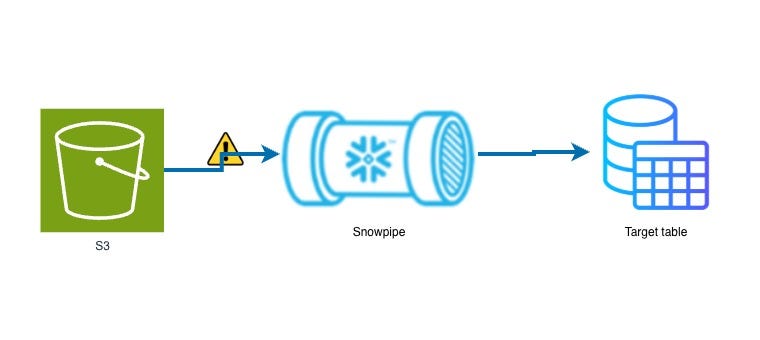
Silent snowpipe failure
If your S3 event notification is set to specific object create events such as s3:ObjectCreated:Put or s3:ObjectCreated:CompleteMultipartUpload or s3:ObjectCreated:Post instead of all events s3:ObjectCreated:* , you might run into a situation where your Snowpipe stops receiving file notification if the upload type changes abruptly. Perhaps a backend team changed file upload method to a browser based process.
Not a Medium member? Click here to read this article for free!
And the funny thing is: you might find that when you refresh the Snowpipe it will pick up whatever unloaded files are in the Snowflake stage.
In this article, I wanted to document a short simulation I did to see how Snowpipe would behave when S3 event notification is configured for one type of object creation event, yet files are getting written into S3 with a different event type.
It could be a nice little troubleshooting tool if you lack visibility to logs or configuration that would tell you why your Snowpipe isn’t auto ingesting files even though it seems fine.
Summary of Key Concepts
Here are a couple ideas to keep in mind while going through this simulation.
- S3 Event Notifications: Activities in S3 generate events for which notifications can be set up and directed to an SQS queue which Snowflake generates when you create a Snowpipe object. When AUTO_INGEST is set to TRUE in the Snowpipe definition, Snowpipe can be triggered if run conditions are met.
**s3:ObjectCreated:Put**: This gets triggered when an object is created via a standard PUT request (often used by scripts/SDKs).**s3:ObjectCreated:Post**: This gets triggered when an object is created via an HTTP POST request (often used by browser-based uploads).**SYSTEM$PIPE_STATUS**: This Snowflake function contains metadata showing messages received and latest file processed. It can be a quick way to discover the lag between latest file in the Snowflake stage and the last file that was processed by Snowpipe (lastForwardedMessageTimestamp) .- Pipe refresh: Doing a manual refresh (
ALTER PIPE…. REFRESH) may temporarily bypass Snowpipe run conditions and ingest files directly from the stage. - Presigned URL: For this simulation I will upload files to my S3 bucket via one time authenticated access.
Demo
Now let’s get into the simulation.
Set Up
I’m using demo accounts for this simulation so I have privileges beyond what you might have in your production environment.
I will be using AWS, Snowflake, a Python IDE/Terminal and Postman.
- Before you start, set up your bucket for this simulation or use an existing one.
- Create a Snowflake stage for this demo, and point it to the S3 path you want.
create or replace stage obi_demo
URL = 's3://demo-obi-20240808/snf-load/'
  STORAGE_INTEGRATION = s3_int
FILE_FORMAT = (TYPE = CSV);- Create a Snowpipe for this demo and point it to the stage you have created.
create or replace pipe demo_pipe
auto_ingest=true as
copy into obinna.landing_table
from @obinna.obi_demo;- Modify event notification for this bucket by going to the Properties tab, scrolling down to Event Notifications and setting up a new notification. For this simulation I’m only selecting
s3:ObjectCreated:Putas the notification to notify Snowflake.

Choose event type
- Within the Event Notification configuration, set the ARN of the SQS queue to be notified to the notification_channel value in the output of a
describe pipecommand
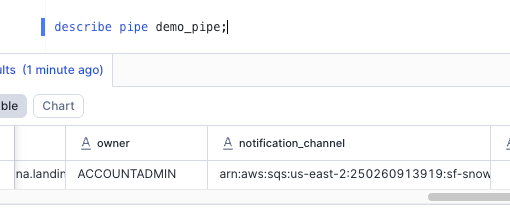
describe pipe
Simulating the PUT request
First create a pre-signed URL
import boto3

# Create S3 client
s3 = boto3.client(
    "s3",
    aws_access_key_id = "XXXXXXXXXXXXXXXX",
    aws_secret_access_key = "XXXXXXXXXXXXXXXX",
    region_name="us-east-1"
)

# generate url
url = s3.generate_presigned_url(
    ClientMethod="put_object",
    Params={
        "Bucket": "your_bucket_name",
        "Key": "prefix/file1.txt",
        "ContentType": "text/plain"
    },
    ExpiresIn=3600
)

print(url)
Run the PUT request via Postman.
- Set method to PUT and paste in the URL.
- Add key
Content-Typein Headers with value oftext/plain - In the Body tab, select binary then choose the file from your local system
- Run the request
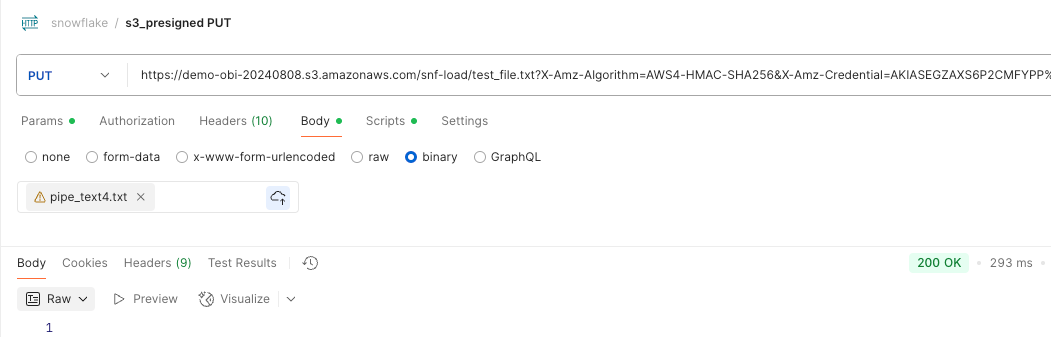
When you get the 200 OK response, you’ll notice the file is written into the bucket

Now check snowpipe status
select parse_json(system$pipe_status('demo_pipe'));The results will be something like this:
{
  "executionState": "RUNNING",
  "lastForwardedFilePath": "demo-obi-20240808/snf-load/test_file.txt",
  "lastForwardedMessageTimestamp": "2026-01-13T21:34:15.505Z",
  "lastIngestedFilePath": "test_file.txt",
  "lastIngestedTimestamp": "2026-01-13T21:34:15.013Z",
  "lastPulledFromChannelTimestamp": "2026-01-13T21:53:04.822Z",
  "lastReceivedMessageTimestamp": "2026-01-13T21:34:14.859Z",
  "notificationChannelName": "arn:aws:sqs:us-east-2:250260913919:sf-snowpipe-AIDATURFWP372WVQKP3E2-s-K9Z0IqjiNu-eb1onGd0g",
  "numOutstandingMessagesOnChannel": 1,
  "pendingFileCount": 0,
  "pendingHistoryRefreshJobsCount": 0
}
You’ll notice that lastIngestedFilePath is the file that was just uploaded.
Simulating the POST request
Set up server side script like this
import boto3

# Create S3 client
s3 = boto3.client(
    "s3",
    aws_access_key_id = "XXXXXXXXXXXXXXXX",
    aws_secret_access_key = "XXXXXXXXXXXXXXXX",
    region_name="us-east-1"
)

response = s3.generate_presigned_post(
    Bucket="your_bucket_name",
    Key="snf-load/${filename}",
    Fields={
        "acl": "private",
        "Content-Type": "text/plain"
    },
    Conditions=[
        ["starts-with", "$key", "snf-load/"],
        ["starts-with", "$Content-Type", "text/plain"],
        ["content-length-range", 1, 10485760]  # up to 10 MB
    ],
    ExpiresIn=3600
)

print(response)
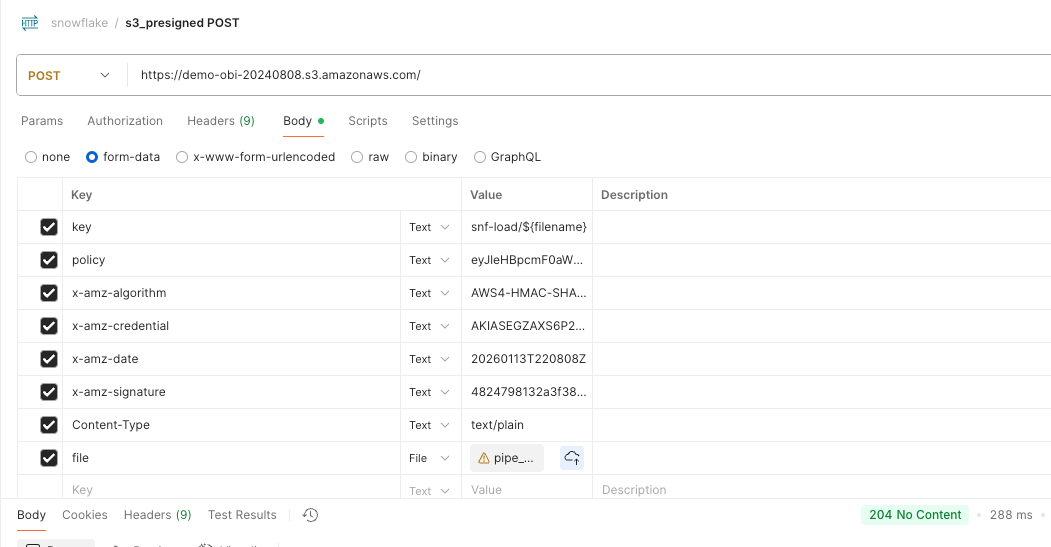
Fill out Headers in your Postman POST request by using the values from the python script response. It will look something like this:
{
  "url": "https://my-bucket.s3.amazonaws.com/",
  "fields": {
    "key": "prefix/${filename}",
    "policy": "...",
    "x-amz-algorithm": "...",
    "x-amz-credential": "...",
    "x-amz-date": "...",
    "x-amz-signature": "...",
    "Content-Type": "text/plain",
    "acl": "private"
  }
}
After you run the request, confirm the upload in s3
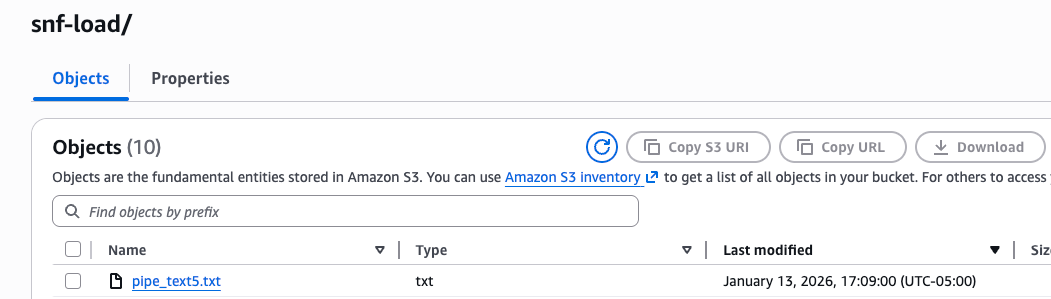
Check snow pipe status and notice that the file uploaded via POST wasn’t picked up. Remember your S3 event notification configuration does not include s3:ObjectCreated:Post.
{
  "executionState": "RUNNING",
  "lastForwardedFilePath": "demo-obi-20240808/snf-load/test_file.txt",
  "lastForwardedMessageTimestamp": "2026-01-13T21:34:15.505Z",
  "lastIngestedFilePath": "test_file.txt",
  "lastIngestedTimestamp": "2026-01-13T21:34:15.013Z",
  "lastPulledFromChannelTimestamp": "2026-01-13T22:14:19.651Z",
  "lastReceivedMessageTimestamp": "2026-01-13T21:34:14.859Z",
  "notificationChannelName": "arn:aws:sqs:us-east-2:250260913919:sf-snowpipe-AIDATURFWP372WVQKP3E2-s-K9Z0IqjiNu-eb1onGd0g",
  "numOutstandingMessagesOnChannel": 1,
  "pendingFileCount": 0,
  "pendingHistoryRefreshJobsCount": 0
}
Even though lastPulledFromChannelTimestamp has updated, lastForwardedMessageTimestamp and lastIngestedFilePath still relate to the test_file.txt that was uploaded earlier.
Some Errors I encountered while uploading to S3 with POST
- The request signature we calculated does not match the signature you provided. Check your key and signing method
x-amz-datecould be wrong. In my case I didn’t update it to the current time in one instance.keycould be wrong. In my case the key I passed in headers didn’t match what the policy expected. When I used a variable${filename}in post the server script and client side it worked well. Refer to my code snippets above. - Invalid according to Policy: Policy expired I made a call after the expiry time had elasped.
- Invalid according to Policy: Extra input fields: acl
To get this to work I simply excluded
aclfrom the headers in Postman, even if it’s part of the server side script in python. Use what is appropriate when dealing with your production systems.
Solution to this Silent Failure?
If it’s no trouble, you can simply use the wildcard configuration s3:ObjectCreated:*.
If not, then you’ll have to get specific with notification configuration. One example would be enabling s3:ObjectCreated:CompleteMultipartUpload if your pipeline misses large files.
Let’s know in the comments, how have you resolved similar issues?
메타데이터
- post_id
- 024bb686adc8
- slug
- snowpipe-doesnt-pick-up-files-even-though-they-exist-in-the-stage-024bb686adc8
- url
- https://medium.com/towards-data-engineering/snowpipe-doesnt-pick-up-files-even-though-they-exist-in-the-stage-024bb686adc8
- canonical_url
- https://medium.com/towards-data-engineering/snowpipe-doesnt-pick-up-files-even-though-they-exist-in-the-stage-024bb686adc8
- author_url
- https://medium.com/@oeonyema
- status
- ok
- fetched_at
- 2026-06-24 11:06:28