🔐 OAuth PKCE Explained: The Secret Delivery Code That Protects Your Login
📦 The Secret Package Delivery Story
🔐 OAuth PKCE Explained: The Secret Delivery Code That Protects Your Login
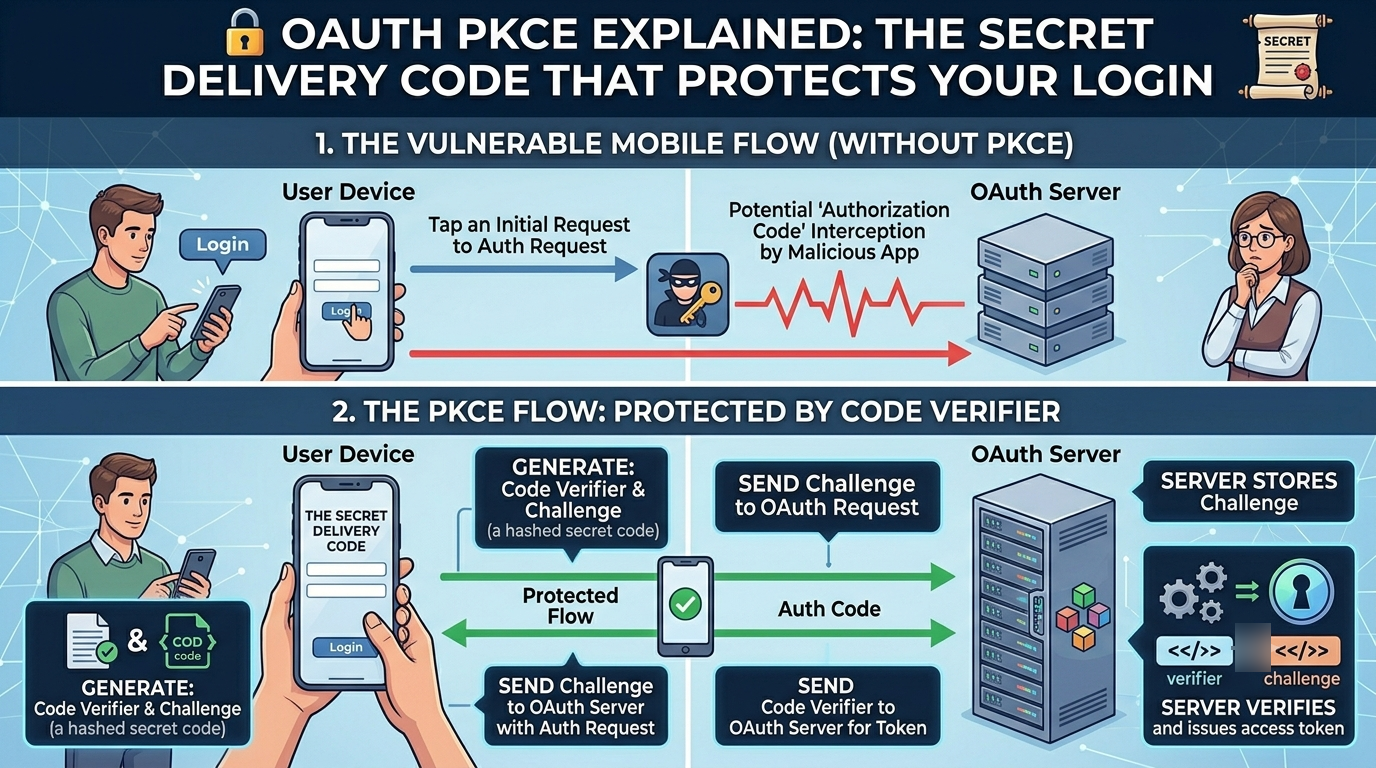
📦 The Secret Package Delivery Story
Imagine you’re expecting an important package.
A delivery company sends a package to your house.
But there is a problem.
What if someone intercepts the package before it reaches you?
To solve this, the delivery company gives you a secret code before shipping.
When the package arrives, the delivery person asks:
“Can you tell me the secret code?”
If you provide the correct code:
✅ You receive the package.
If you don’t know the code:
❌ No package for you.
Even if someone steals the package during delivery, they cannot open it because they don’t know the secret code.
This is exactly the idea behind OAuth PKCE (Proof Key for Code Exchange).
It adds a secret verification step that protects users from attackers trying to steal authorization codes.
🤔 Why Was PKCE Created?
Before PKCE existed, OAuth authorization flows had a weakness.
Imagine a mobile app or single-page web application.
The app redirects users to log in.
After successful authentication, the authorization server returns an Authorization Code.
But what if an attacker intercepts that code?
The attacker could exchange it for an access token and impersonate the user.
🚨 Account compromise
🚨 Unauthorized access
🚨 Data theft
This became a major concern for:
📱 Mobile applications
🌐 Single Page Applications (SPAs)
💻 Public clients
PKCE was introduced to solve this problem.
🔍 What is OAuth PKCE?
PKCE stands for:
Proof Key for Code Exchange
It is an extension to OAuth 2.0.
PKCE ensures that the same application that starts the login process is the one that finishes it.
Think of it as:
🔑 A temporary secret password created during login
Only the original application knows this secret.
Even if someone steals the authorization code, they cannot use it.
🏗️ The Characters in Our Story
Let’s understand the main players.
👤 User
📱 Mobile App or Web App
🔐 Authorization Server
🛠️ Resource Server (API)
The Authorization Server is responsible for verifying identities.
The API provides protected resources.
PKCE acts as a security guard between them.
🚀 How OAuth PKCE Works
Let’s walk through the complete process.
Step 1: Generate a Secret Code Verifier
Before login starts, the application creates a random secret string.
Example:
xK92LmQ7aBc9PzT8YdEf123This is called the:
🔑 Code Verifier
Only the application knows it.
It remains private.
Step 2: Create a Code Challenge
The application transforms the Code Verifier.
Usually using SHA-256 hashing.
Result:
Q8gYtR7wN4mZ...This becomes the:
🔐 Code Challenge
The challenge is safe to send publicly.
Step 3: User Logs In
The application redirects the user to the authorization server.
It sends:
✅ Client ID
✅ Redirect URI
✅ Code Challenge
The user enters credentials and successfully signs in.
Step 4: Authorization Code is Returned
The authorization server returns:
📄 Authorization Code
Example:
auth_code_abc123At this stage, an attacker could potentially steal the authorization code.
But PKCE is about to stop them.
Step 5: Exchange the Code
The application now sends:
📄 Authorization Code
🔑 Original Code Verifier
to the authorization server.
Step 6: Verification Happens
The authorization server performs the same hashing operation.
It compares:
🔐 Generated Code Challenge
with
🔐 Original Code Challenge
If they match:
✅ Access Token issued
If they don’t match:
❌ Request rejected
Even if an attacker steals the authorization code, they cannot complete the exchange because they do not know the original Code Verifier.
🎭 Why PKCE Is So Powerful
Without PKCE:
🚨 Stolen authorization code = Account compromise
With PKCE:
✅ Stolen authorization code is useless
The attacker still needs the Code Verifier.
And only the original application has it.
🏢 Real-World Corporate Example #1
📱 Banking Mobile Applications
Imagine a banking app.
When users sign in:
🏦 User opens app
🔐 App redirects to identity provider
👤 User authenticates
📄 Authorization code returned
🔑 PKCE verification occurs
🎟️ Access token issued
Even if someone intercepts network traffic, the stolen authorization code cannot be used.
This significantly improves security.
🏢 Real-World Corporate Example #2
☁️ Enterprise Single Sign-On (SSO)
Large companies use SSO solutions.
Employees log in through:
🔑 Corporate Identity Providers
🌐 Internal Web Applications
📱 Mobile Applications
PKCE protects authentication flows across devices.
This prevents attackers from abusing intercepted authorization codes.
🏢 Real-World Corporate Example #3
🛒 E-Commerce Mobile Apps
Popular shopping apps use OAuth authentication.
Examples include:
🛍️ Customer login
💳 Payment authorization
🎁 Loyalty programs
PKCE helps secure customer sessions and access tokens.
Millions of users authenticate safely every day using this mechanism.
🏢 Real-World Corporate Example #4
☁️ Cloud Platforms
Cloud services frequently implement PKCE.
Examples:
📂 File sharing platforms
📊 Analytics dashboards
🤖 SaaS applications
📧 Email platforms
PKCE protects access to highly sensitive customer data.
🔒 Why Modern Applications Prefer PKCE
Historically, applications used Client Secrets.
But public clients cannot safely store secrets.
Examples:
📱 Mobile apps
🌐 Browser applications
💻 Desktop applications
Attackers can often extract embedded secrets.
PKCE solves this problem.
Benefits include:
✅ No permanent client secret required
✅ Better security
✅ OAuth 2.1 recommendation
✅ Protection against code interception attacks
✅ Easy integration
🌍 PKCE in Popular Identity Platforms
Many modern identity providers support PKCE by default.
Examples include:
🔹 Okta
🔹 Auth0
🔹 Microsoft Entra ID
🔹 Google Identity Platform
🔹 Ping Identity
Today, PKCE is considered a security best practice rather than an optional feature.
🚨 Common Misconceptions
Many beginners think:
“PKCE encrypts tokens.”
Not exactly.
PKCE does not encrypt tokens.
Instead, it protects the authorization code exchange process.
Another misconception:
“PKCE is only for mobile apps.”
Not anymore.
Today PKCE is recommended for:
✅ Mobile apps
✅ Single Page Applications
✅ Desktop applications
✅ Modern web applications
🎯 Final Thoughts
OAuth made delegated authorization possible.
PKCE made it significantly safer.
Think back to our package delivery story.
📦 Authorization Code = Package
🔑 Code Verifier = Secret Pickup Code
🛡️ PKCE = Security Check Before Delivery
Even if someone steals the package, they cannot claim it without the secret code.
That simple idea has become one of the most important security improvements in modern authentication.
The next time you log into a banking app, cloud platform, or enterprise portal, there’s a good chance OAuth PKCE is quietly working behind the scenes to keep your account safe.
메타데이터
- post_id
- 0265a606dc2f
- slug
- oauth-pkce-explained-the-secret-delivery-code-that-protects-your-login-0265a606dc2f
- url
- https://medium.com/@natarajanck2/oauth-pkce-explained-the-secret-delivery-code-that-protects-your-login-0265a606dc2f
- canonical_url
- https://medium.com/@natarajanck2/oauth-pkce-explained-the-secret-delivery-code-that-protects-your-login-0265a606dc2f
- author_url
- https://medium.com/@natarajanck2
- status
- ok
- fetched_at
- 2026-06-20 20:29:01




