A Story of Clean Code: An ML Use Case — Part I
This is the first part of a three-part series diving into the code architecture of my repository: Data Augmentation Benchmark: Optimize…
A Story of Clean Code: An ML Use Case — Part I
This is the first part of a three-part series diving into the code architecture of my repository: Data Augmentation Benchmark: Optimize TensorFlow Performance. Check out part 2 here.
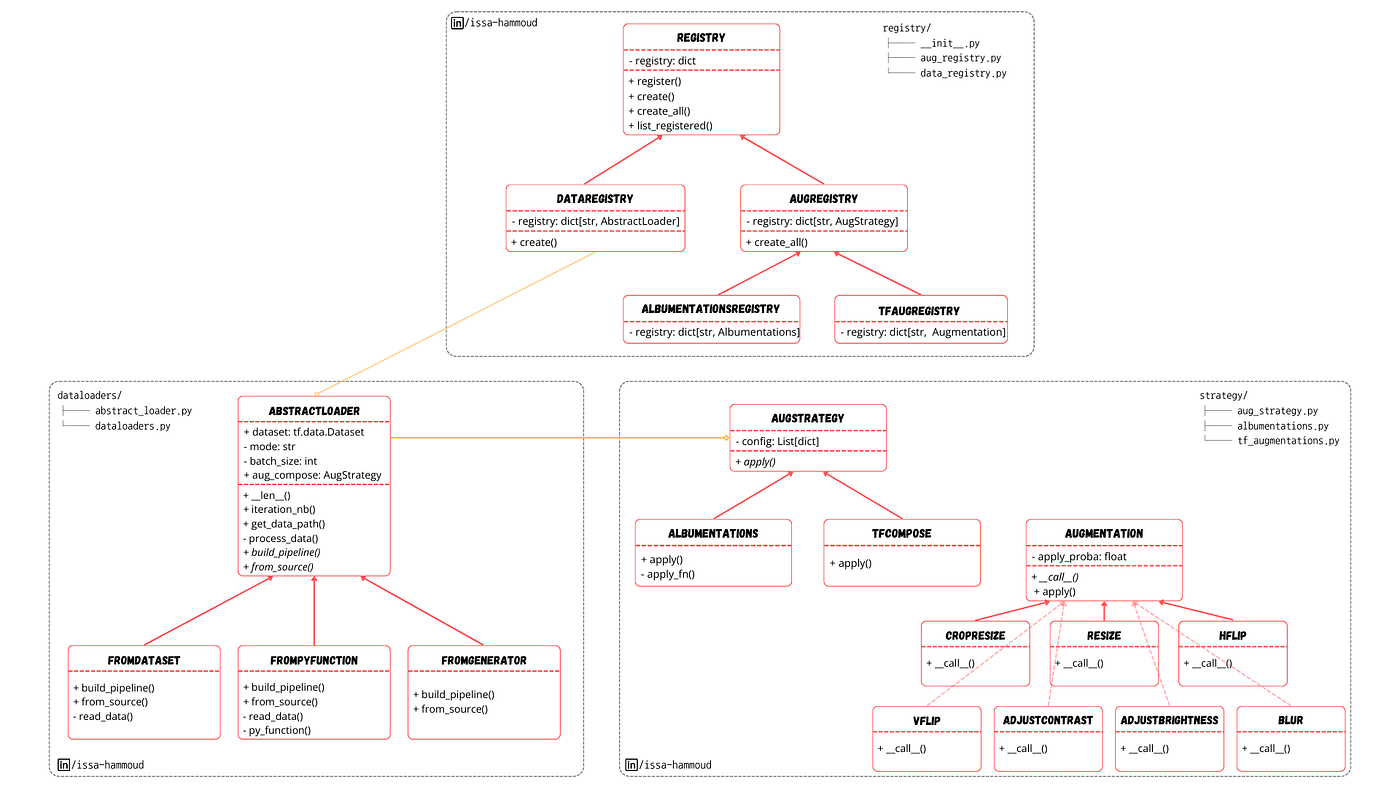
The code architecture
In this repository, I conducted a data augmentation benchmark on the Cityscapes dataset to compare the execution times of different TensorFlow operations and the use of Albumentations.
The repository and accompanying articles are part of my ***Intuitive Deep Learning*** course, where I aim to explain deep learning concepts in an intuitive yet rigorous manner, focusing on foundational knowledge.
To meet the code requirements, I employed three main design patterns: Abstraction and Composition, Strategy, and Registry patterns.
The class diagrams, as you’ll see, might appear a bit complex at first glance. That’s why I’m writing this series — to break down each part of the architecture step by step.
Today, we’ll focus on the backbone of any ML pipeline: the data loader.
Requirements
Before diving into the implementation, let’s outline the requirements for our dataloader class. We want a dataloader that:
- Initializes a dataset from data paths.
- Supports multiple implementations (TensorFlow-native vs. Python operations).
- Process and Batches data efficiently.
It’s important to note that this class does not handle data augmentation, adhering to the Single Responsibility Principle.
TensorFlow Datasets 101
In TensorFlow, we use tf.data.Dataset to create datasets, map functions, batch data, and so on.
Unlike PyTorch, which separates the dataset and dataloader into distinct components, TensorFlow’s tf.data.Dataset creates a graph of operations. This means no function is executed until the data is consumed (similar to PySpark).
*As a result, every part of the dataloader must be a TensorFlow operation to maintain the static graph.*
With this in mind, we’ll explore different ways to create a dataset in TensorFlow and analyze their impact on execution time. Note that a dataset object always runs on the CPU.
AbstractLoader Class
Let’s start with the common components of our dataloader class.
We need from the user the path to the images and masks directories, the mode (train/val/test), and the batch size in order to create a dataloader.
We’ll use a @classmethod for alternative construction and build the pipeline (reading data, applying processing, and batching) directly in the constructor.
import os
import re
import glob
import tensorflow as tf
from abc import ABC, abstractmethod

class AbstractLoader(ABC):
    def __init__(
        self,
        dataset: tf.data.Dataset,
        data_len: int,
        mode: str,
        batch_size: str,
    ):
        self.dataset = dataset
        self._mode = mode
        self._length = data_len
        self._batch_size = batch_size
        self.build_pipeline()

    def __len__(self):
        return self._length

    @property
    def iteration_nb(self):
        return self._length // self._batch_size

    @staticmethod
    def get_data_path(imgs_path: str, gts_path: str, mode: str):
        all_images_paths = glob.glob(os.path.join(imgs_path, mode, "**/*"))

        all_gt_paths = []
        for img_path in all_images_paths:
            directory, name = img_path.split("/")[-2:]
            gt_name = re.sub("leftImg8bit", "gtFine_labelIds", name)
            gt_path = os.path.join(gts_path, mode, directory, gt_name)
            all_gt_paths.append(gt_path)

        return all_images_paths, all_gt_paths

    def _process_data(self, img: tf.Tensor, mask: tf.Tensor):
        img = tf.cast(img, tf.float32) / 255
        mask = tf.cast(mask, tf.int32)

        return img, mask

    @classmethod
    @abstractmethod
    def from_source(cls, imgs_path: str, gts_path: str, mode: str, **kwargs):
        raise NotImplementedError

    @abstractmethod
    def build_pipeline(self):
        raise NotImplementedError
The key differences between the child classes will lie in how they create the dataset (from_source) and how they build the pipeline.
The get_data_path function retrieves the paths for each image and its corresponding mask. You’ll see why it’s a static method later.
Data processing is consistent across all cases: casting data to the correct type and normalizing images. We could also add a resize step here, but we’ll leave that to the data augmentation phase.
FromDataset Loader
Let’s start with the most efficient way to create a dataset in TensorFlow.
import tensorflow as tf
from src.dataloaders.abstract_loader import AbstractLoader

class FromDataset(AbstractLoader):

    @classmethod
    def from_source(cls, imgs_path: str, gts_path: str, mode: str, **kwargs):
        data_path_list = AbstractLoader.get_data_path(imgs_path, gts_path, mode)
        dataset = tf.data.Dataset.from_tensor_slices(data_path_list)
        return cls(dataset, len(data_path_list[0]), mode, **kwargs)

    def _read_data(self, img_path: tf.Tensor, mask_path: tf.Tensor):
        img = tf.io.decode_png(tf.io.read_file(img_path), channels=3, dtype=tf.uint8)
        mask = tf.io.decode_png(tf.io.read_file(mask_path), channels=1, dtype=tf.uint8)
        return img, mask

    def build_pipeline(self):
        self.dataset = self.dataset.map(
            self._read_data, num_parallel_calls=tf.data.AUTOTUNE
        )
        self.dataset = self.dataset.map(
            self._process_data, num_parallel_calls=tf.data.AUTOTUNE
        )
        self.dataset = self.dataset.batch(
            self._batch_size, num_parallel_calls=tf.data.AUTOTUNE
        )
Here, we’ve defined only the necessary methods, inheriting from AbstractLoader.
The from_source method is a @classmethod, meaning it has access to cls instead of self and can construct an object. Since it doesn’t have access to self, we defined get_data_path as a @staticmethod so it can be accessed externally (it could also be defined as a @classmethod).
In from_source, we create a dataset from the data paths using tf.data.Dataset.from_tensor_slices and return a call to cls, which invokes the AbstractLoader constructor. At this point, we have a dataset of paths, so we need to read the actual data (images and masks). As mentioned earlier, once the dataset is created, we can only use TensorFlow operations.
The _read_data method accepts image and mask paths and uses TensorFlow operations to read and return the images. Finally, build_pipeline connects all parts together. Building the pipeline doesn’t mean we’re reading and processing the data yet—we’re just creating a graph of connected operations to be executed later (when the dataset is consumed).
The map function applies an input function to the dataset in parallel. For example, dataset.map(self._read_data) applies the _read_data method to the dataset’s contents. Initially, the dataset contains data paths, so the input parameters of _read_data are paths. Note that the input type is tf.Tensor because str isn’t a native TensorFlow type.
Both map and batch methods return a dataset object and can run in parallel. tf.data.AUTOTUNE automatically determines the level of parallelism based on available resources.
FromPyFunction Loader
Now, imagine the reading operation is complex and needs to be done in Python (e.g., creating masks from a JSON file). In this case, using TensorFlow operations might be difficult or even impossible. TensorFlow provides a way to integrate Python operations into the graph using the tf.py_function wrapper. Here’s how the code changes:
import cv2
import tensorflow as tf
from src.dataloaders.abstract_loader import AbstractLoader

class FromPyFunction(AbstractLoader):

    @classmethod
    def from_source(cls, imgs_path: str, gts_path: str, mode: str, **kwargs):
        data_path_list = AbstractLoader.get_data_path(imgs_path, gts_path, mode)
        dataset = tf.data.Dataset.from_tensor_slices(data_path_list)
        return cls(dataset, len(data_path_list[0]), mode, **kwargs)

    def _read_data(self, img_path: tf.Tensor, mask_path: tf.Tensor):
        img = cv2.imread(img_path.numpy().decode("ascii"), -1)[..., ::-1]
        mask = cv2.imread(mask_path.numpy().decode("ascii"), -1)[..., np.newaxis]
        return img, mask

    def _py_function(self, img_path: tf.Tensor, mask_path: tf.Tensor):
        img, mask = tf.py_function(
            self._read_data, inp=[img_path, mask_path], Tout=[tf.uint8, tf.uint8]
        )
        img.set_shape(tf.TensorShape([None, None, 3]))
        mask.set_shape(tf.TensorShape([None, None, 1]))
        return img, mask

    def build_pipeline(self):
        self.dataset = self.dataset.map(
            self._py_function, num_parallel_calls=tf.data.AUTOTUNE
        )
        self.dataset = self.dataset.map(
            self._process_data, num_parallel_calls=tf.data.AUTOTUNE
        )
        self.dataset = self.dataset.batch(
            self._batch_size, num_parallel_calls=tf.data.AUTOTUNE
        )
The from_source method remains the same. We create a dataset from the data paths and now want to read the data using Python functions. The _read_data method converts tf.Tensor inputs to strings for use with cv2. The _py_function method wraps _read_data using tf.py_function. This wrapping process loses the data shape, so we need to set it manually.
The build_pipeline is similar, except it uses _py_function instead of _read_data. In this case, we’ve created a dataset in the same way as before but changed how we read the data.
FromGenerator Loader
The from_generator approach uses a Python generator to create a dataset. This is the least recommended method due to its inefficiency.
import cv2
import tensorflow as tf
from src.dataloaders.abstract_loader import AbstractLoader

class FromGenerator(AbstractLoader):

    @classmethod
    def from_source(cls, imgs_path: str, gts_path: str, mode: str, **kwargs):
        data_path_list = AbstractLoader.get_data_path(imgs_path, gts_path, mode)

        def generator():
            for img_path, mask_path in zip(*data_path_list):
                img = cv2.imread(img_path, -1)[..., ::-1]
                mask = cv2.imread(mask_path, -1)[..., np.newaxis]

                yield img, mask

        dataset = tf.data.Dataset.from_generator(
            generator,
            output_signature=(
                tf.TensorSpec(shape=(None, None, 3), dtype=tf.uint8),
                tf.TensorSpec(shape=(None, None, 1), dtype=tf.uint8),
            ),
        )
        return cls(dataset, len(data_path_list[0]), mode, **kwargs)

    def build_pipeline(self):
        self.dataset = self.dataset.map(
            self._process_data, num_parallel_calls=tf.data.AUTOTUNE
        )
        self.dataset = self.dataset.batch(
            self._batch_size, num_parallel_calls=tf.data.AUTOTUNE
Here, we create a generator function inside from_source that iterates over the data paths, reads them, and feeds this generator to tf.data.Dataset.from_generator. In this case, the dataset object contains the data itself, not the paths. However, the generator is only executed when we start consuming the dataset.
The build_pipeline simply calls the _process_data method. This approach is the easiest to implement but the least optimized.
Results
In this article, we’ve explored the dataloader component, represented by the following class diagram:
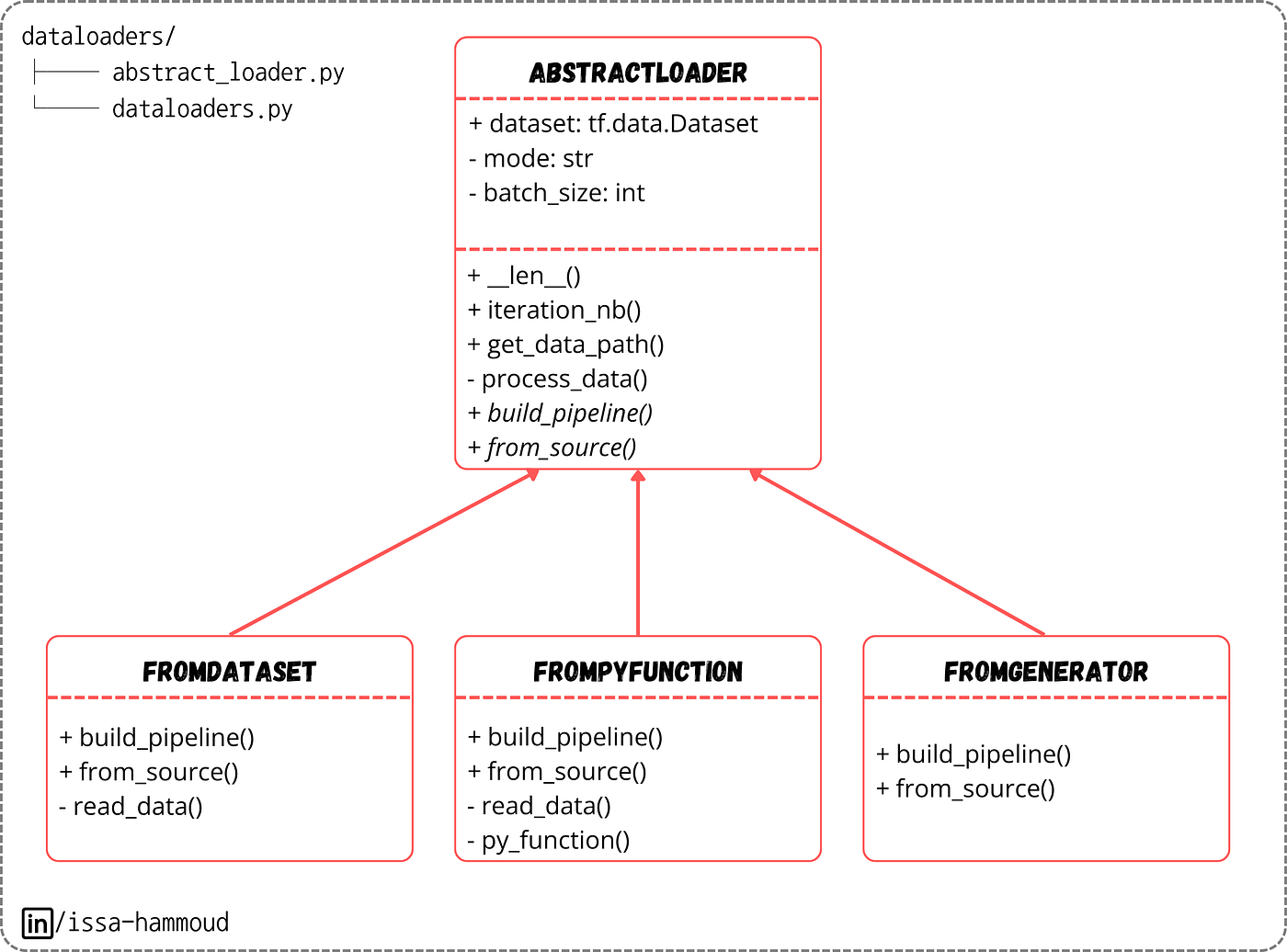
The class diagram of dataloaders
To evaluate the differences between each implementation, we consumed all the training data from the Cityscapes dataset over five runs and took the average time. Consuming a dataset looks like this:
from src.dataloaders.dataloaders import FromDataset

fromdataset_loader = FromDataset.from_source(imgs_path, gts_path, mode="train", batch_size=8)

def cosume(dataset):
    for _ in dataset:
        pass

cosume(fromdataset_loader.dataset)
The results (with data augmentation applied) showed that the pure TensorFlow approach (the first one) was 2.3x faster than the second approach and 7x faster than the third.
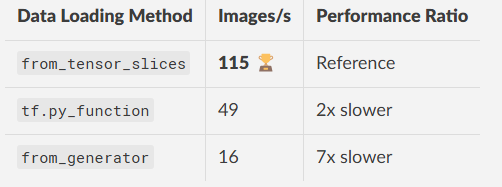
Results comparing different data loading approaches
Note that we didn’t apply shuffling, which would significantly slow down the last approach.
Conclusion
In this article, we’ve explored multiple ways to create a TensorFlow data pipeline. Each method has its advantages and trade-offs in terms of speed and complexity. Choose the one that best fits your use case.
Stay tuned for the next part of this series, where we’ll dive deeper into the architecture!
If you found this content valuable, visit my website for a more comprehensive and intuitive approach to mastering Deep Learning.
메타데이터
- post_id
- 0287cde363fe
- slug
- a-story-of-clean-code-an-ml-use-case-0287cde363fe
- url
- https://medium.com/@intuitivedl/a-story-of-clean-code-an-ml-use-case-0287cde363fe
- canonical_url
- https://medium.com/@intuitivedl/a-story-of-clean-code-an-ml-use-case-0287cde363fe
- author_url
- https://medium.com/@intuitivedl
- status
- ok
- fetched_at
- 2026-07-08 00:36:00




