5 Python Libraries Every Data Engineer Needs Before Building With AI
The data foundation layer that makes everything else work
5 Python Libraries Every Data Engineer Needs Before Building With AI
The data foundation layer that makes everything else work
AI is increasingly showing up in data pipelines. You might be building a pipeline that calls an LLM to classify incoming records, extracting information from documents before loading them into a warehouse, or setting up a search layer on top of your data.
However, none of that works well if the data going in is messy, slow to process, or stuck in the wrong format.
Before you wire up any AI, you need a solid data layer first.
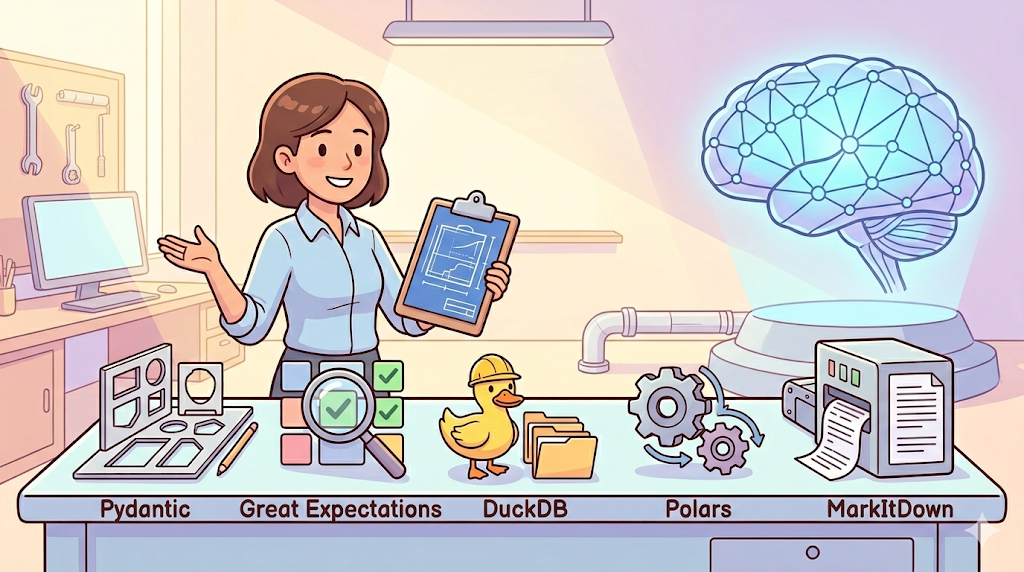
In this article, we will go through five Python libraries that help you build exactly that. These are the tools you reach for first when starting a data engineering project that will eventually touch AI:
- Pydantic—make sure your data is the right shape before it goes anywhere
- Great Expectations—catch bad data before it reaches your model
- DuckDB — query your files like a database, no setup needed
- Polars—faster DataFrames when pandas starts to slow down
- MarkItDown—pull clean text out of messy documents
Each library solves a specific problem that comes up early in any data engineering project. Get familiar with these five, and the AI layer you build on top of them will be much more reliable.
Let’s get started!
5 Libraries for AI Data Engineering
Pydantic — Make Sure Your Data Is the Right Shape
Data quality is one of the core responsibilities of a data engineer.
You spend a lot of time making sure data arrives in the right shape before it enters your warehouse or feeds the next step in a pipeline. When it comes to AI, this becomes even more important.
Data going into and coming out of an LLM tends to be messy—the model might return a number as a word, skip a field entirely, or format a date in a way your database does not accept.
Pydantic is a Python library that lets you define exactly what your data should look like, and it will tell you immediately when something does not match.
As a data engineer, you will use Pydantic:
- to check LLM outputs before they hit your database
- to validate API responses that your pipeline is pulling in
- to define the shape of your pipeline’s configuration objects.
Think of it as a contract for your data—you write down what you expect, and Pydantic enforces it.
Here is an example of using Pydantic
from pydantic import BaseModel, ValidationError
from typing import Optional

# Define the expected shape of your data — this is your contract
class CustomerRecord(BaseModel):
    customer_id: str
    email: str
    age: int                        # Must be a number, not a string
    account_tier: Optional[str] = None

# Simulating raw LLM output — the model returned age as a word, not a number
raw_output = {
    "customer_id": "C-10294",
    "email": "alice@example.com",
    "age": "thirty-two",
    "account_tier": "premium"
}

# Pydantic checks the data when you create the object
try:
    record = CustomerRecord(**raw_output)
except ValidationError as e:
    print(e)  # Tells you exactly which field failed and why
In the example above, you will get a validation error because age was expected to be a number, but the LLM returned the word "thirty-two" instead.
Pydantic caught that before the record got into your database. You define the expected shape once using BaseModel, and every time you create a record from it, Pydantic checks the data automatically.
This matters because you often have no control over what the upstream system sends you — an API might change its response format, or an LLM might describe a value instead of returning it.
When Pydantic catches a problem, you can decide what to do next: log the bad record, send it to a separate table for review, or trigger an alert. Either way, nothing bad makes it downstream.
Great Expectations — Catch Bad Data Before It Reaches Your Model
Even with Pydantic checking individual records, you still need a way to watch your data at the batch level. A model that suddenly starts seeing empty values where it expected a category, or ages jumping to 999, will either crash or quietly produce wrong results.
Great Expectations is a Python library for writing data quality checks as code.
You describe what your data should look like—column types, value ranges, allowed values—and it runs those checks automatically and tells you what failed.
It fits well when you want to check a whole batch of records before they go into feature engineering, when you want your pipeline to stop and alert you if the incoming data looks wrong, or when you need to keep a record that your data met certain quality standards.
Here is an example:
import great_expectations as gx
import pandas as pd

# A batch of customer records heading into an ML feature pipeline
# Row 4 has a missing customer_id — we want to catch this before it goes further
df = pd.DataFrame({
    "customer_id": ["C-001", "C-002", "C-003", None],  # None = missing value
    "age":         [34, 27, 41, 29],
    "account_tier":["gold", "silver", "gold", "platinum"]
})

# Set up a Great Expectations context and load the DataFrame
context = gx.get_context()
datasource = context.sources.add_pandas("inline_source")
asset = datasource.add_dataframe_asset("customer_batch")
batch = asset.build_batch_request(dataframe=df)

# Create a suite — a named group of checks
suite = context.add_expectation_suite("customer_checks")
validator = context.get_validator(batch_request=batch, expectation_suite_name="customer_checks")

# Define your expectations: what should be true about this data?
validator.expect_column_values_to_not_be_null("customer_id")
validator.expect_column_values_to_be_between("age", min_value=18, max_value=100)
validator.expect_column_values_to_be_in_set("account_tier", ["silver", "gold", "platinum"])

# Run all the checks
results = validator.validate()
print(f"Validation passed: {results.success}")
print(f"Failed checks:     {sum(1 for r in results.results if not r.success)}")
You will get a failed check because there is one missing customer_id. Great Expectations found it before that record could travel further into your pipeline.
In production, you would connect this to your orchestration tool — if the check fails, stop the run and send an alert instead of letting the bad data reach your model.
The checks themselves are saved as files, so you can track them in version control alongside the rest of your pipeline code.
You may ask — both Pydantic and Great Expectations are about data validation, so what is the difference?
Pydantic checks one record at a time—it is the right tool when data is flowing through your code as individual objects, like LLM outputs or API responses.
By contrast, Great Expectations checks a whole batch at once — it is better suited for validating a DataFrame or a file before a pipeline step runs.
Think of it this way: Pydantic is the bouncer at the door checking each person’s ID, while Great Expectations is the health inspector checking the whole kitchen before service starts.
Photo by Ravi Singh on Unsplash
DuckDB — Query Your Files Like a Database, No Setup Needed
AI workflows produce a lot of files—inference outputs, embeddings, evaluation results, and feature tables. When you need to query them quickly, DuckDB is the tool for the job.
It runs directly inside your Python script, so there is no server to set up, no connection string to configure, and no loading everything into memory before you can ask a single question.
You might wonder why not just use a vector database if you are already building an AI pipeline.
Vector databases are built for one specific job: storing embeddings and finding the ones closest in meaning to a query.
DuckDB handles everything else—filtering rows, joining tables, aggregating logs, and checking data quality with SQL. Most AI pipelines need both.
import duckdb

con = duckdb.connect()  # Runs entirely in memory — no files written to disk

# Simulating LLM inference logs that would normally be stored as Parquet
# In practice, replace the VALUES block with: FROM 'inference_logs/*.parquet'
con.execute("""
    CREATE TABLE inference_logs AS
    SELECT * FROM (VALUES
        ('2024-03-01', 'summarise', 'gpt-4o', 0.82, 1200),
        ('2024-03-01', 'extract',   'gpt-4o', 0.91,  850),
        ('2024-03-01', 'classify',  'gpt-4o', 0.67,  430),
        ('2024-03-02', 'summarise', 'gpt-4o', 0.78, 1350),
        ('2024-03-02', 'extract',   'gpt-4o', 0.88,  920)
    ) t(run_date, task_type, model, confidence_score, token_count)
""")

# Run a standard SQL aggregation across the logs
result = con.execute("""
    SELECT
        task_type,
        COUNT(*)                          AS runs,
        ROUND(AVG(confidence_score), 2)   AS avg_confidence,
        SUM(token_count)                  AS total_tokens
    FROM inference_logs
    GROUP BY task_type
    ORDER BY avg_confidence DESC
""").df()  # .df() returns the result as a pandas DataFrame

print(result)
Looking at the result, you can see why this matters in an AI context. You have three task types—extract, summarize, and classify—and you can immediately see that extract has the highest average confidence score (0.90) while classify is the weakest (0.67).
If you were running this pipeline in production, this tells you where your LLM is performing well and where it might need a better prompt or a stronger model.
This kind of check takes two lines of SQL in DuckDB. Without it, you would have no visibility into how your AI steps are actually performing across runs.
Photo by Hans-Jurgen Mager on Unsplash
Polars — Faster DataFrames When Pandas Starts to Slow Down
Once your pipeline starts handling large batches—millions of rows of feature data, large embedding tables, or big LLM output logs—pandas starts to feel slow.
Polars runs much faster because it uses all your CPU cores at once and only processes the data it actually needs. The syntax is similar to pandas, so the learning curve is not steep.
Like DuckDB, Polars works with regular tabular data—if you need to store and search embeddings, that is what a vector database is for. I will cover this in another article.
Here is an example of polars
import polars as pl

# Simulating a large batch of customer records enriched by an LLM
# In production this could be millions of rows
df = pl.DataFrame({
    "customer_id": [f"C-{i:05d}" for i in range(1, 6)],
    "segment":     ["enterprise", "smb", "enterprise", "startup", "smb"],
    "churn_score": [0.12, 0.74, 0.08, 0.91, 0.55],  # LLM-predicted churn probability
    "tokens_used": [1200, 890, 1450, 600, 740]
})

# .lazy() tells Polars to build a query plan before running anything
# This lets it optimise the query and skip data it does not need
result = (
    df.lazy()
    .filter(pl.col("churn_score") > 0.5)          # Keep only high-risk customers
    .group_by("segment")                           # Group by customer segment
    .agg([
        pl.count("customer_id").alias("at_risk_customers"),
        pl.mean("churn_score").alias("avg_churn_score").round(2)
    ])
    .collect()  # .collect() runs the query and gives you the result
)

print(result)
The lazy() call tells Polars to build a plan before running anything. It looks at your whole query, figures out the most efficient way to run it, and only then processes the data.
On large datasets, this can make a big difference in both speed and memory use. If you are already using pandas and want a quick win on a slow pipeline step, swapping in Polars is usually one of the easiest changes you can make.
MarkItDown—Pull Clean Text Out of Messy Documents
Before you can do anything useful with a document—embed it, classify it, feed it to an LLM—you need the text. The problem is that your documents are rarely clean text files.
In most enterprise pipelines, you are dealing with PDFs, Word documents, PowerPoint slides, and Excel files, all coming in through the same job.
MarkItDown is a Microsoft open-source library that converts all of these into clean Markdown using a single function.
One library, all formats, consistent output.
You will reach for it when building a document ingestion pipeline for a RAG system, when you need to pre-process mixed-format files before embedding them, or when other tools are producing garbled output from your Excel or PowerPoint files.
Here is what the difference looks like in practice. Imagine a raw PDF invoice that arrives looking like this:
INVOICE\nACME CORP\n123 Business Rd\nInvoice #: INV-2024-0042   Date: 2024-03-15
Item Description Qty Unit Price Total
Data Pipeline Setup 1 $5,000.00 $5,000.00
Cloud Storage (monthly) 12 $200.00 $2,400.00
Support & Maintenance 3 $750.00 $2,250.00
SUBTOTAL $9,650.00   TAX (8%) $772.00   TOTAL DUE $10,422.00
Payment due within 30 days.
After running MarkItDown, you can get the following:

And here is the code to achieve it
from markitdown import MarkItDown

# Create the converter — works the same way for PDF, DOCX, PPTX, and XLSX
md = MarkItDown()

# Convert a file — MarkItDown detects the format from the file extension
result = md.convert("invoice_acme_march2024.pdf")

# result.text_content is clean Markdown, ready for chunking and embedding
print(result.text_content)
md.convert() does all the work—it reads the file, figures out the format, and gives you back clean Markdown in result.text_content.
That output is ready to be chunked and passed to an embedding model or an LLM.
In a real ingestion pipeline, you loop through a folder of mixed-format files, run each one through MarkItDown, and feed the output into the next step. The messy part is handled, and the rest of your pipeline stays clean.
Conclusion
These five libraries give you a solid foundation: your data is validated, your files are fast to process, and your documents are ready for whatever AI step comes next.
The natural next step is piping that clean data into an actual AI workflow—calling LLMs, extracting structured information from text, building a search layer, and running all of it on a reliable schedule.
Thanks for reading until here. I hope you learned something today.
If you like this article and want to show some love:
- Clap 50 times — each one helps more than you think! 👏
- **Follow me**, so you won’t miss it when a new article is published
- You can buy m**e a Coffee** to support me further.
- Let’s connect with me at **LinkedIn or lhungen@gmail.com to chat more about data!**
If you’d like to go deeper into data engineering and AI, here are some articles I’d recommend:
메타데이터
- post_id
- 032aa476473c
- slug
- 5-python-libraries-every-data-engineer-needs-before-building-with-ai-032aa476473c
- url
- https://medium.com/data-science-collective/5-python-libraries-every-data-engineer-needs-before-building-with-ai-032aa476473c
- canonical_url
- https://medium.com/data-science-collective/5-python-libraries-every-data-engineer-needs-before-building-with-ai-032aa476473c
- author_url
- https://medium.com/@lhungen
- status
- ok
- fetched_at
- 2026-06-14 16:15:44