The Spice Rack vs. The Recipe Box: Understanding Python Lists and Dictionaries
In our last post, we looked at how a Python variable is just like a labeled Tupperware container holding a single ingredient.
The Spice Rack vs. The Recipe Box: Understanding Python Lists and Dictionaries
In our last post, we looked at how a Python variable is just like a labeled Tupperware container holding a single ingredient.
But what happens when you have a whole collection of items? You can’t just buy fifty individual containers and leave them scattered all over the counter. You need structure.
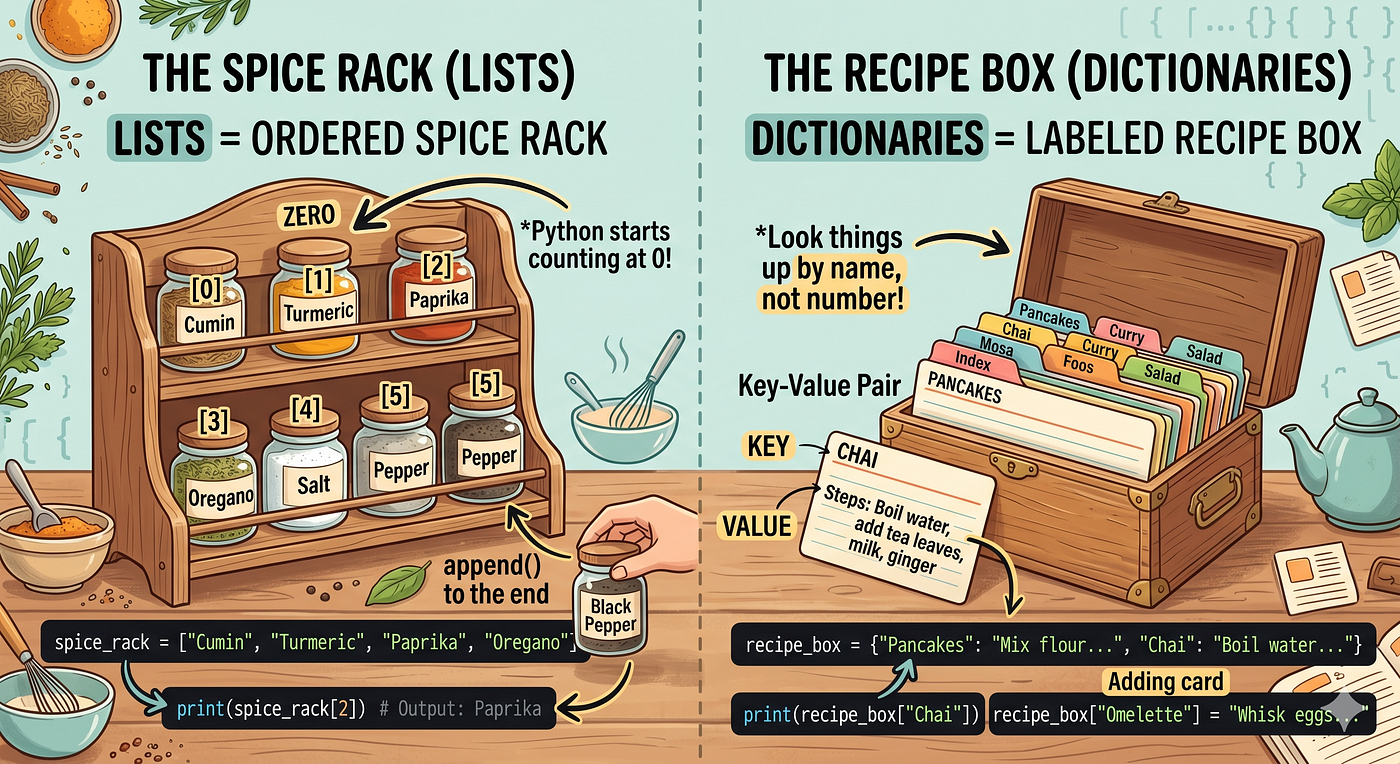
Lists vs. Dictionaries explained simply using everyday kitchen organization.
In the coding kitchen, you will constantly handle groups of data — like a collection of user names, a list of product prices, or a set of configuration settings. To manage these, Python gives us two incredibly powerful data structures: Lists and Dictionaries.
Let’s look at how they work using a spice rack and a recipe box.
1. Python Lists = The Spice Rack
Imagine a long, single-row spice rack mounted on your kitchen wall.
[ Row 0: Cumin ] [ Row 1: Turmeric ] [ Row 2: Paprika ] [ Row 3: Oregano ]A spice rack keeps your jars in a strict, predictable order. If you want to grab the Paprika, you don’t look for a label from across the room; you simply reach for the third slot in the row.
In Python, a List is exactly like this spice rack. It holds multiple items in a specific order, wrapped inside square brackets [].
The Golden Rule: Python Starts Counting at Zero
Computers are a bit quirky. When counting positions (which programmers call indexes), Python doesn’t start at 1. It starts at 0.
Let’s see what this looks like in code:
# Creating our spice rack list
spice_rack = ["Cumin", "Turmeric", "Paprika", "Oregano"]

# Reaching for the very first item (Index 0)
print(spice_rack[0])
# Output: Cumin

# Reaching for the third item (Index 2)
print(spice_rack[2])
# Output: Paprika
Adding and Removing Spices
Lists are dynamic. If you buy a new spice, you can easily append it to the end of your rack:
# Adding a new spice to the end of the list
spice_rack.append("Black Pepper")
print(spice_rack)
# Output: ['Cumin', 'Turmeric', 'Paprika', 'Oregano', 'Black Pepper']
2. Python Dictionaries = The Recipe Box
Now, imagine a wooden index card box sitting on your counter. Inside are dozens of recipe cards.
If you want to bake a cake, you don’t care if the cake recipe is the 5th card or the 12th card in the box. You don’t look it up by its position. Instead, you flip through the cards looking for the specific title written at the top: “Chocolate Cake”. Once you find that label, it unlocks the recipe steps inside.
In Python, a Dictionary stores data in Key-Value pairs, wrapped inside curly braces {}.
- The Key is the unique label you look up (like the recipe name).
- The Value is the data attached to that label (like the recipe instructions or a price).
Let’s look at a code example:
# Creating a recipe box dictionary
recipe_box = {
    "Pancakes": "Mix flour, eggs, and milk. Fry on a pan.",
    "Chai": "Boil water, add tea leaves, milk, and ginger."
}

# Looking up the value using its exact Key
print(recipe_box["Chai"])
# Output: Boil water, add tea leaves, milk, and ginger.
Updating Your Recipe Box
Unlike a spice rack, order doesn’t matter here. You look things up by their name. If you want to add a new recipe or update an existing one, you just reference the key:
# Adding a brand new key-value pair
recipe_box["Omelette"] = "Whisk eggs, pour in a hot pan, flip."

# Changing an existing recipe
recipe_box["Chai"] = "Boil water, add extra ginger, tea leaves, and milk."
When Should You Use Which?
Choosing between a List and a Dictionary is one of the most common decisions you will make as a developer.
- Use a List when the order of the items matters, or when you have a simple collection of similar things (e.g., a list of daily temperatures, a shopping list).
- Use a Dictionary when you want to connect a specific label to a piece of data, or when you are describing a complex item with different traits (e.g., describing a user with keys like
"username","email", and"age").
The Cheat Sheet Recap

메타데이터
- post_id
- 0391afda024a
- slug
- the-spice-rack-vs-the-recipe-box-understanding-python-lists-and-dictionaries-0391afda024a
- url
- https://medium.com/@FullStackSoftwareDeveloper/the-spice-rack-vs-the-recipe-box-understanding-python-lists-and-dictionaries-0391afda024a
- canonical_url
- https://medium.com/@FullStackSoftwareDeveloper/the-spice-rack-vs-the-recipe-box-understanding-python-lists-and-dictionaries-0391afda024a
- author_url
- https://medium.com/@FullStackSoftwareDeveloper
- status
- ok
- fetched_at
- 2026-06-09 15:37:30



