Seedr.cc: The Smarter Alternative to Traditional Torrent Clients
If you have ever downloaded files using BitTorrent, you already know the usual process: install a torrent client, find a torrent file or…
Seedr.cc: The Smarter Alternative to Traditional Torrent Clients
If you have ever downloaded files using BitTorrent, you already know the usual process: install a torrent client, find a torrent file or magnet link, wait for peers to connect, keep your PC running, and hope your internet provider does not throttle your connection. For many users, torrenting feels unnecessarily complicated.
That is exactly where Seedr.cc comes in.
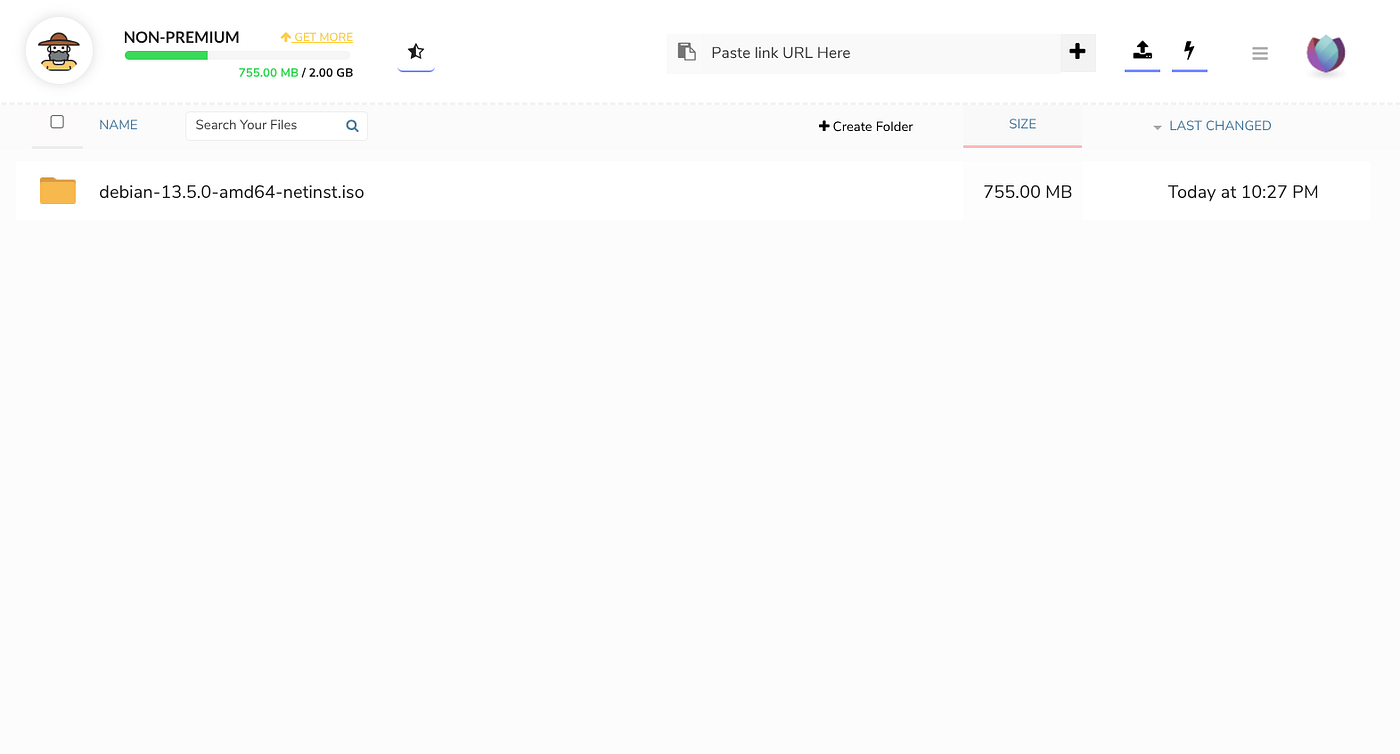
Seedr.cc is a cloud-based torrent downloading platform that lets users download torrents directly to remote servers instead of their own computer. Once the files are downloaded to Seedr’s cloud storage, you can stream or download them to any device using only a web browser.
In simple terms, Seedr combines the convenience of cloud storage with the power of torrent downloading.
This article will explain:
- What Seedr.cc is
- Why it is useful
- The advantages over traditional torrent clients
- How to create an account
- How to use the platform
- Helpful public torrent trackers for beginners
- Tips for staying safe and organized
By the end, you will understand why many people are moving away from regular torrent software and toward cloud torrenting services like Seedr.
What Is Seedr.cc?
Seedr.cc is a cloud torrent downloader. Instead of downloading torrent files directly to your device, Seedr downloads them on its own servers.
After the download finishes, the files appear in your Seedr account where you can:
- Stream videos directly
- Download files to your device
- Organize folders
- Access files from phones, tablets, or computers
- Share links with others
Unlike traditional torrent clients such as qBittorrent or uTorrent, Seedr does not require any software installation. Everything happens inside your browser.
This makes it extremely beginner-friendly.
Think of it like Dropbox or Google Drive combined with a torrent downloader.
Why Seedr.cc Became Popular
Torrenting itself is not new. The BitTorrent protocol has existed for decades and remains one of the most efficient methods for distributing large files.
However, traditional torrent clients have several drawbacks:
- They consume bandwidth
- They expose your IP address to peers
- They require local storage space
- They can slow down your computer
- They often require port forwarding or configuration
- They continue running in the background
Seedr solves many of these issues by moving the heavy work into the cloud.
According to Seedr’s own documentation, files are downloaded on Seedr’s servers instead of your local machine.
This creates a much cleaner and easier experience.
The Biggest Benefits of Seedr Over Traditional Torrent Clients
1. No Software Installation Required
Traditional torrenting requires installing a torrent client.
Examples include:
- qBittorrent
- Transmission
- Deluge
- uTorrent
With Seedr, you only need a browser.
You paste a magnet link or upload a torrent file, and everything else happens remotely.
This is especially useful for:
- Chromebooks
- School computers
- Work devices
- Tablets
- Smartphones
- Shared computers
Because there is no installation, setup takes only minutes.
2. Your IP Address Is Hidden From Peers
In normal torrenting, your IP address becomes visible to everyone connected to the torrent swarm.
This is how peer-to-peer technology works.
With Seedr, the torrent swarm only sees Seedr’s servers, not your home connection.
For many users, this adds an extra layer of privacy.
That does not mean users should ignore copyright laws or local regulations, but it does reduce direct exposure compared to traditional torrenting.
3. Stream Files Without Downloading Them First
One of Seedr’s most impressive features is streaming.
Instead of downloading a massive video file to your computer, you can stream it directly from Seedr’s servers.
This works similarly to Netflix or YouTube.
According to Seedr, users can stream content from almost any device, including phones, TVs, tablets, and desktop browsers.
This is incredibly useful for:
- Watching videos instantly
- Saving disk space
- Avoiding long downloads
- Accessing media on multiple devices
4. Saves Local Storage Space
Large torrents can quickly fill your hard drive.
Modern games, Blu-ray movies, and software archives can easily exceed 50GB or even 100GB.
Since Seedr stores files in the cloud, your local device remains clean.
You only download what you actually need.
This is especially valuable for users with:
- Small SSDs
- Phones with limited storage
- Lightweight laptops
- Tablets
5. Works Across Multiple Devices
Traditional torrent clients are usually tied to one machine.
Seedr is cloud-based, meaning your files are accessible anywhere.
You can:
- Add a torrent from your desktop
- Watch it later on your phone
- Download it to your tablet
- Stream it to your TV
Seedr specifically promotes this “access anywhere” approach.
6. Better for Mobile Users
Torrenting on mobile devices can be frustrating.
Battery drain, overheating, unstable connections, and huge storage usage are common problems.
Seedr avoids this because your phone is not doing the downloading. Seedr’s servers handle the heavy work.
Your phone simply streams or downloads the finished file afterward.
7. Easier for Beginners
Many new users find torrent clients intimidating.
Settings like:
- Port forwarding
- Encryption
- Seeding ratios
- Peer limits
- DHT
- UPnP
can feel overwhelming.
Seedr removes nearly all technical complexity.
Paste link → wait → stream/download.
That simplicity is a huge reason for its popularity.
How Seedr.cc Works
The workflow is surprisingly simple.
Step 1: Find a Torrent or Magnet Link
You locate a torrent online.
This can be:
- A Linux ISO
- Public domain media
- Open-source software
- Game patches
- Creative Commons content
You copy the magnet link or download the .torrent file.
Step 2: Add It to Seedr
Paste the link into Seedr’s interface or upload the torrent file.
Seedr’s servers begin downloading immediately.
Step 3: Wait for Download Completion
Seedr downloads the content remotely.
Depending on:
- Seed availability
- File size
- Server load
this may take seconds or hours.
Popular torrents are often cached already, making downloads nearly instant.
Step 4: Stream or Download
Once complete, you can:
- Stream media
- Download files
- Organize folders
- Share links
Everything happens through the browser.
How To Sign Up for Seedr.cc
Creating an account is easy.
Step 1: Visit the Website
Go to:
Seedr.cc Official Website
Step 2: Click “Sign Up”
You can create an account using:
- Google account
- Facebook account
Step 3: Verify Your Email
Seedr may ask you to confirm your email address.
Click the verification link sent to your inbox.
Step 4: Log In
After verification, you can access your dashboard immediately.
Free accounts usually include limited cloud storage for testing the service.
How To Use Seedr.cc
Once logged in, the interface is extremely simple.
Adding a Magnet Link
- Copy a magnet link
- Paste it into Seedr
- Press Enter
- Wait for processing
That is all.
Uploading a Torrent File
You can also upload .torrent files manually.
- Download the torrent file
- Click upload
- Select the file
- Seedr begins downloading
Streaming Content
If the file is media-based, Seedr often enables direct streaming.
This means:
- No waiting for a full local download
- No VLC setup required
- Immediate playback
Downloading Files
After Seedr finishes downloading:
- Open the folder
- Click the file
- Download it to your device
Simple.
Public Torrent Trackers for Beginners
A torrent tracker helps peers find each other.
Public trackers are open to everyone and do not require registration.
Here are some popular public trackers beginners often encounter.
OpenTrackr
OpenTrackr
A widely used public BitTorrent tracker known for reliability.
Academic Torrents
Academic Torrents
Excellent for legal academic datasets and research files.
Linux Tracker Resources
Many Linux distributions provide official torrents directly.
Examples include:
- Ubuntu Downloads
- Fedora Downloads
- Debian Downloads
These are great beginner-friendly examples of legitimate torrent usage.
Important Safety Tips
Torrenting itself is legal in many places.
However, downloading copyrighted material without permission may violate laws in your country.
Always make sure you have the legal right to download content.
Good uses for torrents include:
- Linux ISOs
- Public domain films
- Open-source software
- Educational datasets
- Game mods
- Creative Commons media
Seedr Premium Plans
Seedr offers free and paid plans.
Paid plans generally include:
- More storage
- Faster speeds
- Higher streaming quality
- Additional features
- Priority downloads
According to Seedr’s documentation, premium plans may also include WebDAV, FTP access, automation tools, and enhanced streaming support.
For casual users, the free tier is usually enough to test the service.
Are There Any Downsides?
No service is perfect.
Potential drawbacks include:
Limited Free Storage
Free accounts are restrictive.
Heavy users may need a subscription.
Dependency on Seedr Servers
If Seedr experiences downtime, downloads may pause. Some Reddit users have reported occasional reliability issues or limitations with private trackers.
Not Ideal for Hardcore Private Tracker Users
Some advanced torrent users prefer dedicated seedboxes instead.
Certain private trackers may block shared cloud torrent services.
Seedr vs Traditional Torrent Clients
FeatureTraditional Torrent ClientSeedr.ccRequires InstallationYesNoUses Local StorageYesMostly CloudExposes IP to SwarmYesReduced ExposureMobile FriendlyLimitedExcellentStreaming SupportUsually NoYesBrowser BasedNoYesCross-Device AccessLimitedExcellentEasy for BeginnersModerateVery Easy
Final Thoughts
Seedr.cc represents a modern approach to torrent downloading.
Instead of turning your personal device into a constantly running torrent machine, Seedr shifts the process into the cloud.
The result is:
- Simpler setup
- Better convenience
- Easier streaming
- Cross-device access
- Reduced local resource usage
For beginners especially, Seedr can remove many of the frustrations associated with traditional torrent clients.
While advanced users may still prefer dedicated seedboxes or self-hosted solutions, Seedr offers an appealing middle ground between simplicity and functionality.
If you have never tried cloud torrenting before, Seedr is one of the easiest places to start.
메타데이터
- post_id
- 047f848fa2d4
- slug
- seedr-cc-the-smarter-alternative-to-traditional-torrent-clients-047f848fa2d4
- url
- https://medium.com/@8cd658fca1/seedr-cc-the-smarter-alternative-to-traditional-torrent-clients-047f848fa2d4
- canonical_url
- https://medium.com/@8cd658fca1/seedr-cc-the-smarter-alternative-to-traditional-torrent-clients-047f848fa2d4
- author_url
- https://medium.com/@8cd658fca1
- status
- ok
- fetched_at
- 2026-07-10 09:52:19