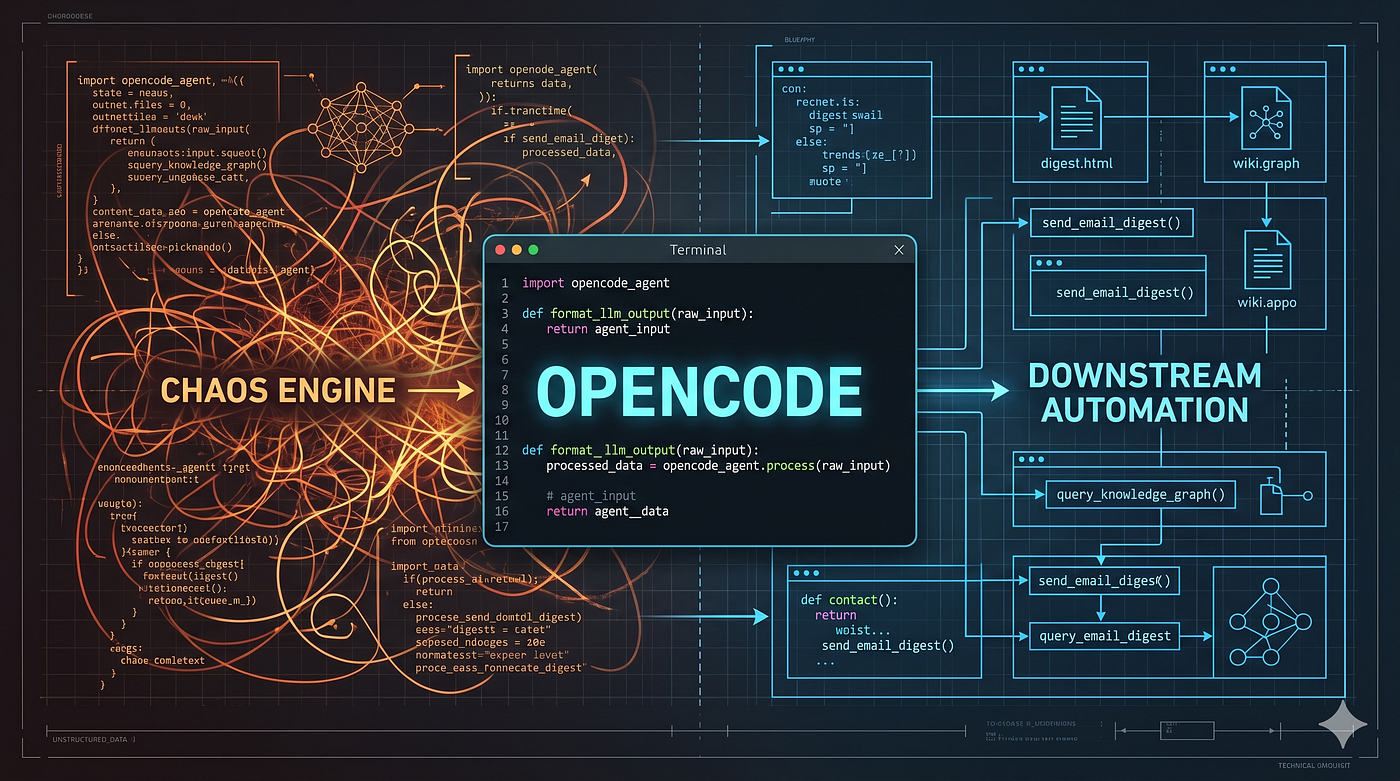
All you need is a MCP gateway — part 2
The moment everything with my AI agents fell apart and how I solved with Bifrost MCP gateway the infrastructure issue, not the model one.
All you need is a MCP gateway — part 2
The moment everything with my AI agents fell apart and how I solved with Bifrost MCP gateway the infrastructure issue, not the model one.

This is part 2 of the series. If you missed part 1 you can find it here.
With all type of Agents and harness, there is a clear problem: the default execution model!
The default MCP execution model has a cost problem. I lived it.
Let’s say you connect 5 servers with 30 tools each. You’re sending 150 tool definitions before the model even sees your prompt.
At that scale, token cost is the majority of your spend.
The usual advice is to “trim your tool list”… which I’ve already told you isn’t a solution. It’s giving up capability to control cost.
So Bifrost built something different. They call it Code Mode.
The Paradigm shift: Code Mode
The idea of having agents write code to interact with MCP tools rather than calling them directly is not new. Cloudflare explored it with a TypeScript runtime. Anthropic’s engineering team wrote about it showing context dropping from 150,000 tokens to 2,000 for a Google Drive to Salesforce workflow.
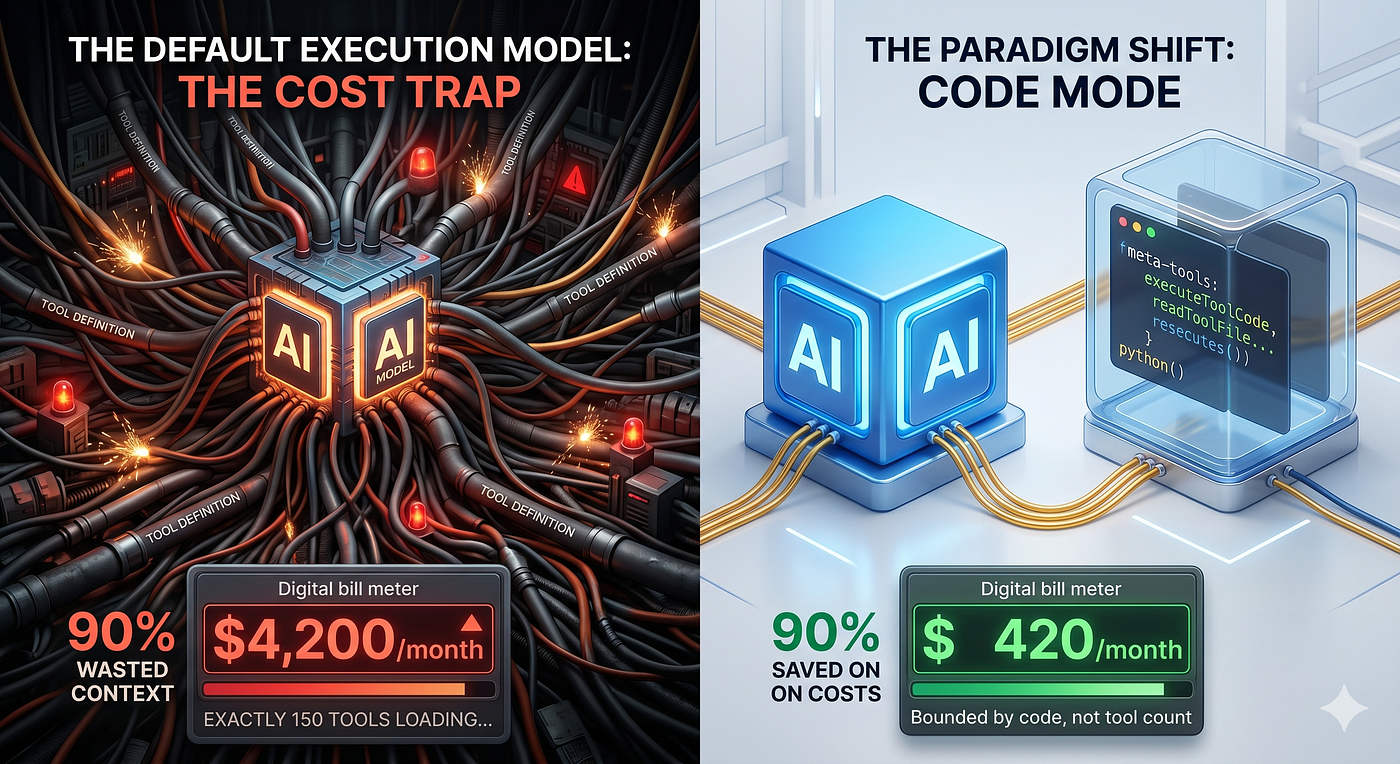
Bifrost found the approach compelling enough to build it natively, but with two differences:
- They chose Python over JavaScript because LLMs are inherently trained on more Python data than JavaScript.
- They added a dedicated documentation tool to the meta-tool set to further reduce the context.
Instead of dumping every tool definition into context, Code Mode exposes your MCP servers as a virtual filesystem of lightweight Python stub files.
The model reads only what it needs, writes a short script to orchestrate the tools, and Bifrost executes it in a sandboxed Starlark interpreter.
The Four Meta-Tools
Code Mode provides four meta-tools to the AI:
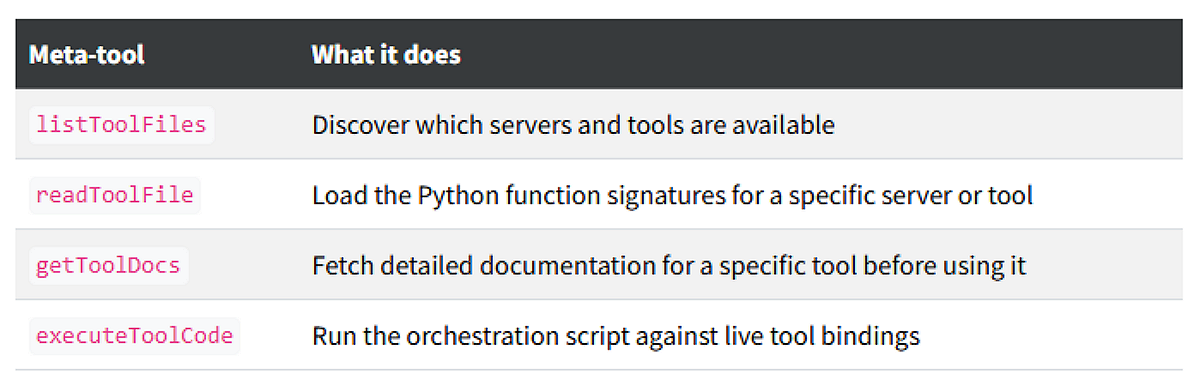
Instead of loading 150 tool definitions, the model loads a stub file, writes a few lines of code, and runs it.
The context stays small regardless of how many MCP servers you have connected.
What this looks like in practice
Take a multi-step workflow: look up a customer, check their order history, apply a discount, send a confirmation.
Classic MCP➡️ full tool list in context on every single turn:
Each turn carries the full tool list. The tokens stack up fast. Every intermediate result flows back through the model.
Code Mode ➡️ model reads what it needs, writes once, executes once:
The model submits something like this:
customer = crm.lookup_customer(email="john@example.com")
orders = crm.get_order_history(customer_id=customer["id"], limit=5)
discount = billing.calculate_discount(customer_tier=customer["tier"], order_count=len(orders))
billing.apply_discount(customer_id=customer["id"], discount_pct=discount["pct"], order_count=len(orders))
email.send_confirmation(to=customer["email"], discount_pct=discount["pct"])
Bifrost executes this in the Starlark sandbox, calling each tool in sequence. The model never sees the intermediate results — it only gets the final output. The full tool list never touches the context.
Same task. 90% reduction in cost. 40% faster.
The Real impact: my estimated numbers
Bifrost ran benchmarks with Code Mode on and off, scaling tool count to measure how savings change as MCP footprint grows.
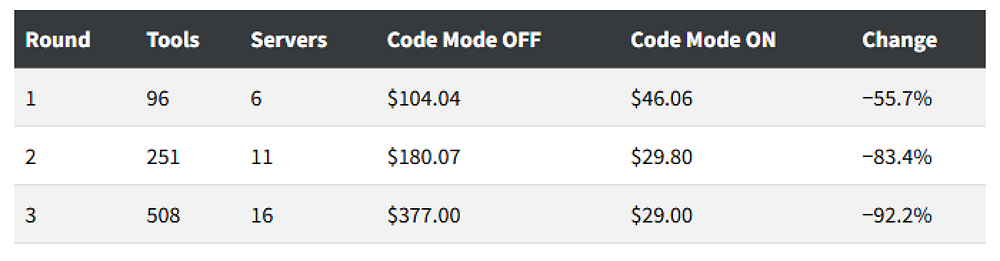
The savings are not linear at all: they compound as you add MCP servers. With around 500 tools attached, you save more than 90% of your tokens.
Classic MCP loads every tool definition on every request, so connecting more servers makes the problem worse. Code Mode’s cost is bounded by what the model actually reads, not by how many tools exist.
The benchmarks also confirm that accuracy isn’t traded away. Pass rate held at 100% in both modes.
But what does “pass rate” actually mean here?
In these benchmarks, “pass rate” means the percentage of test queries that were completed successfully without errors. Both Classic MCP and Code Mode achieved essentially perfect completion rates (meaning Code Mode doesn’t sacrifice reliability for cost savings).
The benchmarks also showed:
- Input tokens dropped 58–93% depending on tool count
- LLM turns reduced 3–4x — Fewer back-and-forth exchanges
- Latency improved 40% — Fewer turns means faster completion
This is the part that sold me. I could either:
- Keep Classic MCP and accept that every tool definition loads on every request, paying exponentially more as we scale
- Enable Code Mode and cut costs by 90%+ while keeping the same capabilities
Real-World use cases
Let me give you a few examples of where MCP Gateway and Code Mode actually matter in production. All the example are from the studies by the Bifrost team at maxim:
Use Case 1: E-Commerce Assistant
A multi-step workflow: look up a customer, check their order history, apply a discount, send a confirmation.
Classic MCP flow:
- Turn 1: Prompt + search query + [all 150 tool definitions]
- Turn 2: Prompt + search result + [all 150 tool definitions]
- Turn 3: Prompt + customer data + [all 150 tool definitions]
- Turn 4: Prompt + order history + [all 150 tool definitions]
- Turn 5: Prompt + discount calculation + [all 150 tool definitions]
- Turn 6: Prompt + confirmation result + [all 150 tool definitions]
**Total: 6 LLM calls. ~600+ tokens in tool definitions alone.**Code Mode flow:
- Turn 1: Prompt + 4 tools (listToolFiles, readToolFile, getToolDocs, executeToolCode)
- Turn 2: Prompt + server list + 4 tools
- Turn 3: Prompt + selected definitions + 4 tools + [EXECUTES CODE in sandbox]
[customer lookup, order history, discount calculation, email send all happen in sandbox]
- Turn 4: Prompt + final result + 4 tools
**Total: 3–4 LLM calls. ~50 tokens in tool definitions.**The model writes one Python script. All orchestration happens inside the sandbox. Only the compact result returns to the model.
Use Case 2: Developer Workflows
Development teams use MCP servers to give AI agents access to:
- GitHub repositories for code search and PR creation
- Jira or Linear for ticket management
- CI/CD systems for build and deployment status
- Documentation sites for technical reference
- Email client
- Calendar tasks
- ticket booking
A developer can ask their AI: “Find all TODO comments in the auth module, create tickets for each, and link them to the relevant code.”
With Classic MCP, that’s 4+ tool calls, each dragging all tool definitions. With Code Mode, one script executes everything in the sandbox.
Use Case 3: Financial Analysis
Financial institutions use MCP to connect AI agents to:
- Database servers exposing client portfolios and risk metrics
- CRM servers for client interaction history
- Document servers for searching memos and contracts
- Compliance tools for regulatory checks
An analyst might ask: “Show me clients in the Northeast with over $1M AUM whose risk scores increased 10%+ last quarter, plus their account manager’s last note.”
The AI coordinates across multiple MCP servers to compile this answer. In Classic MCP, that’s dozens of tool definitions on every turn. In Code Mode, one script, one result.
Setting it up: my actual experience
Here’s the honest truth about what it took to get this running:
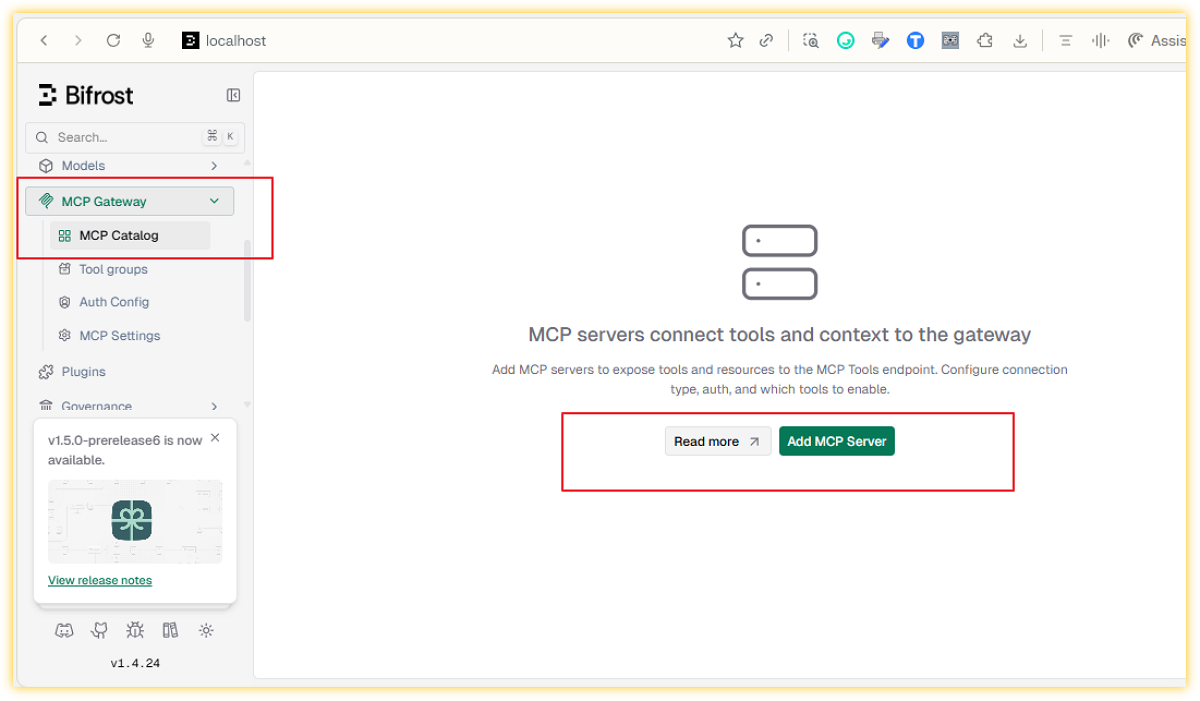
Step 1: Add an MCP Client
Navigate to the MCP section in the Bifrost dashboard and add your first MCP server. Give it a name, choose the connection type (HTTP, SSE, or STDIO), and enter the endpoint or command.
For HTTP and SSE servers, you can add any headers the upstream server requires like API keys, auth tokens, or custom metadata directly in the UI.
Once saved, Bifrost connects to the server, discovers its tools, and starts syncing them on the configured interval.
⚠️ Note: for locally running MCP servers always use
*STDIO*. If the server is not continuously running as a service, but called on demand, it will disappear from the list after 5 attempts to connect to it! In that case, configure it in your harness of choice (Claude Code, Opencode…)
Let’s have a look at the GitHub official remote MCP server.
To use it you need an account on GitHub and a GitHub Personal Access Token (also known as PAT).
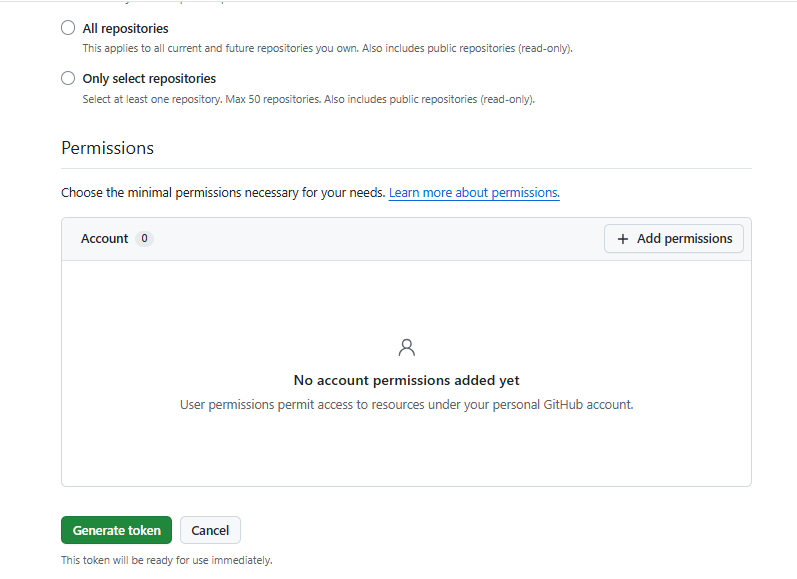
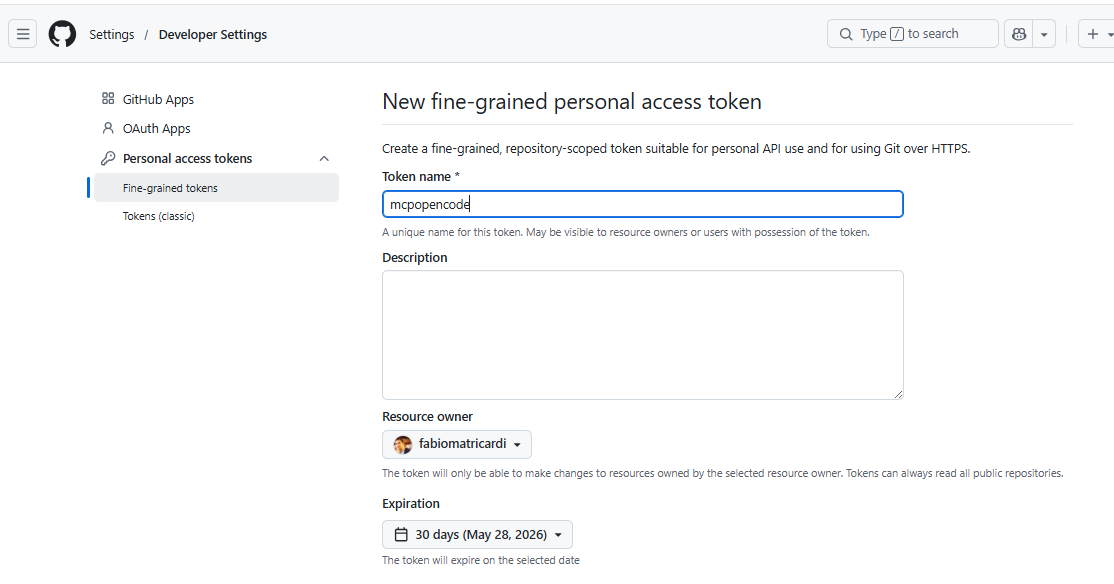
personal access token for GitHub at https://github.com/settings/personal-access-tokens/new
To create the PAT go to https://github.com/settings/personal-access-tokens/new
Fill the sections, add permissions or fine-grained control and click on Create new token
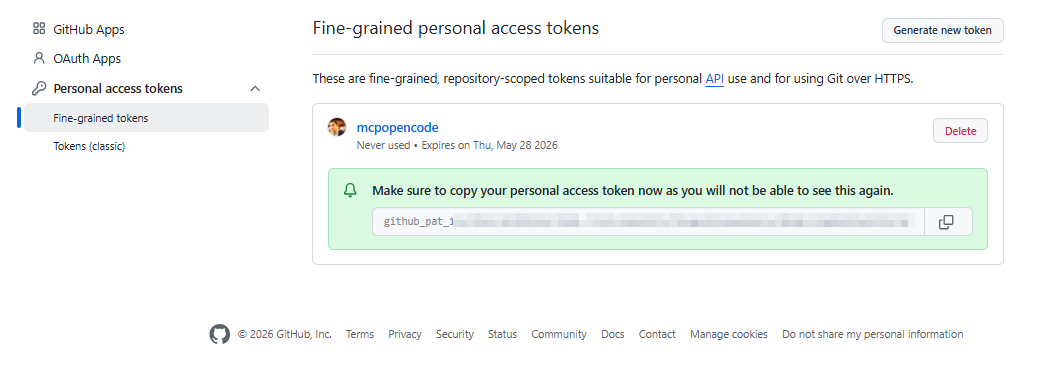
⚠️ Remember to save somewhere safe!
Now we con go to Bifrost (usually at localhost:8080) in the MCP section and add a new MCP connection
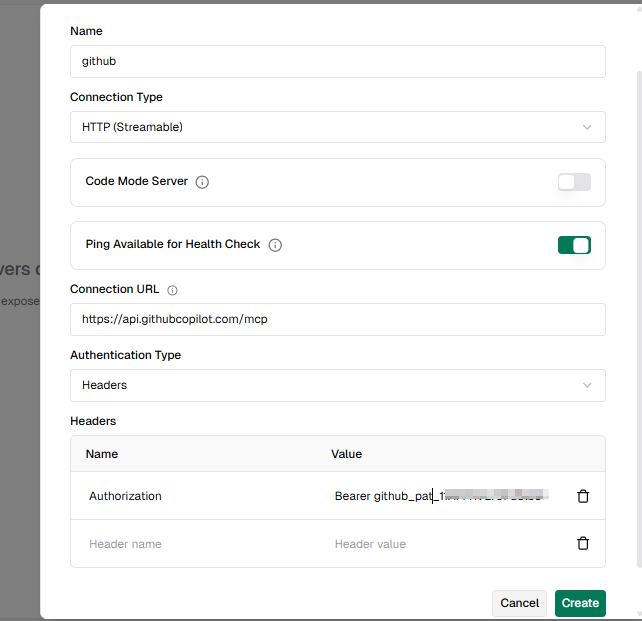
Note that in our scenario we are using PAT Authentication Type, that requires to be passed in the headers (I am following the official examples here)
{
"type":"http",
  "url":"https://api.githubcopilot.com/mcp",
  "headers":{"Authorization":"Bearer YOUR_GITHUB_PAT"}
}
👉 Bifrost help us to do all of it without any JSON manual configuration.
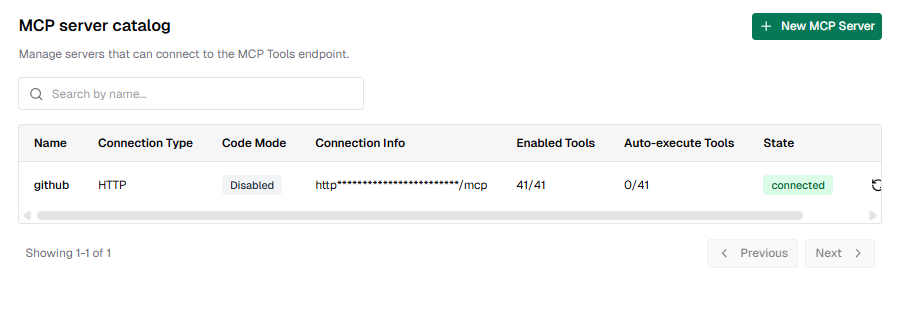
You will see now an MCP server connected. If you click on it many details will be displayed, including the number of available tools.
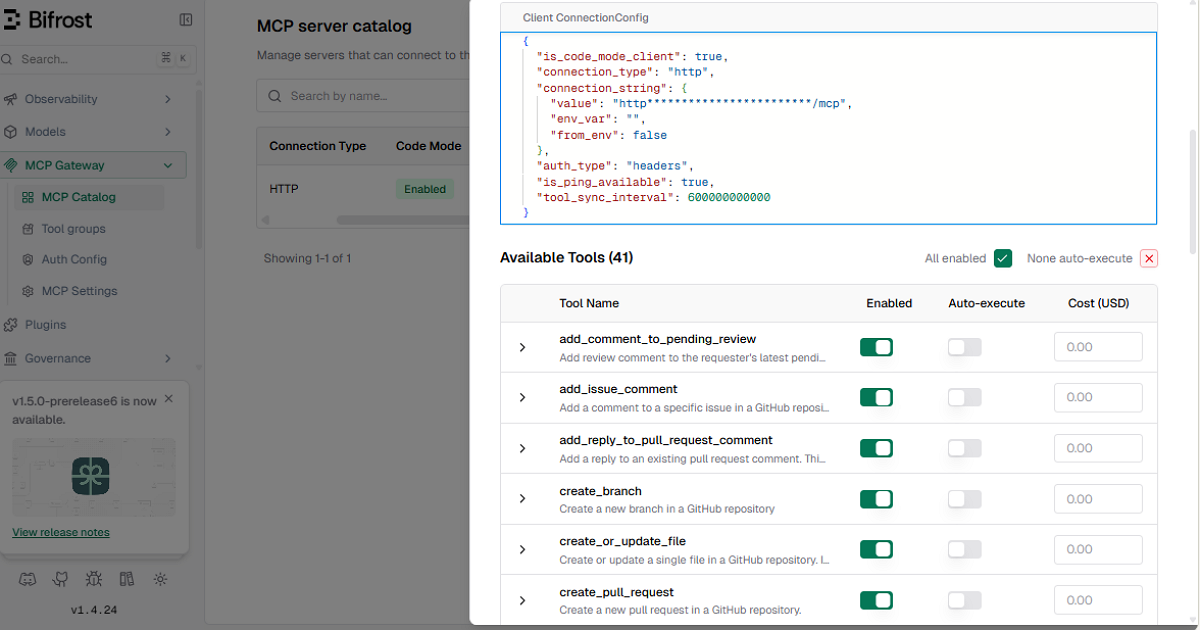
41 tools!!!
Imagine how many tokens and context are burnt only to handle all of them
The Bifrost MCP gateway, in Code Mode, will handle all the routing, saving up to 90% of the struggles (and costs).
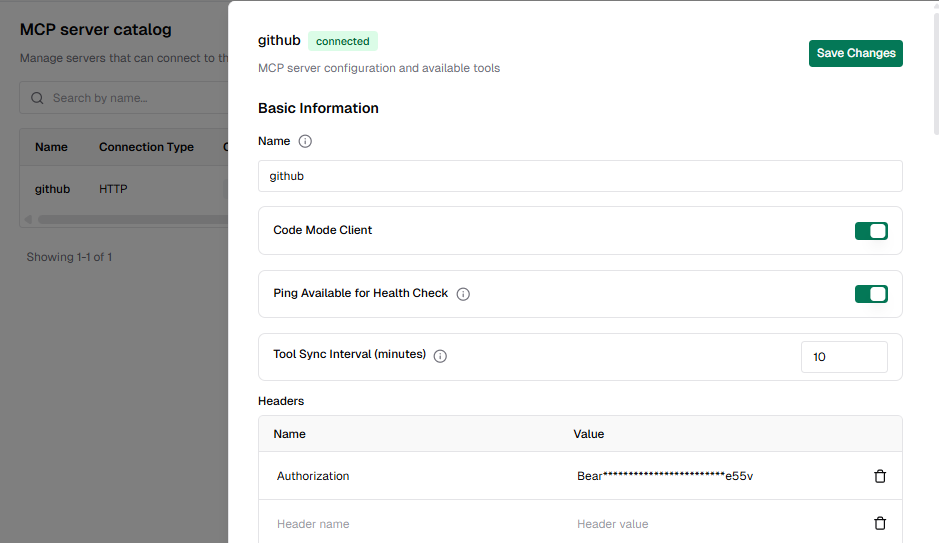
Step 2: Enable Code Mode
Open the client settings and toggle Code Mode on. That’s it. No schema changes, no redeployment.
From that point on, instead of injecting every tool definition into context, Bifrost exposes the four meta-tools, and the model navigates the tool catalog on demand. Token usage drops immediately.
Step 3: Set Tools to Auto-Execute
By default, tool calls require manual approval. To let the agent loop run autonomously, open the auto-execute settings and add the tools you want to allowlist.
You can allowlist at the tool level: filesystem_read can be auto-executed while filesystem_write stays behind an approval gate.
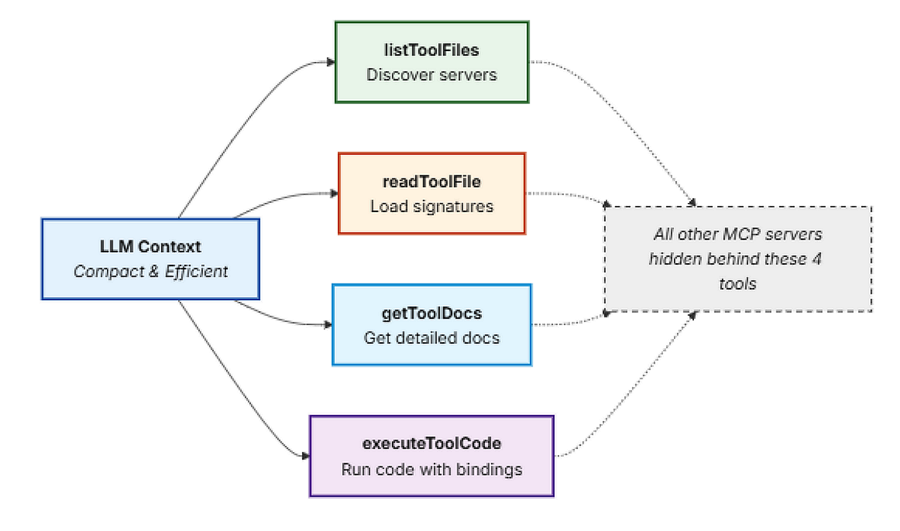
In Code Mode, listToolFiles, readToolFile, and getToolDocs are always auto-executable since they're read-only. executeToolCode becomes auto-executable only when every tool the generated script calls is on your auto-executable list.
Step 4: Restrict Access with Virtual Keys
Go to the Virtual Keys section and create a key for who you want to scope: a user, a team, a customer integration.
Under MCP settings, select which tools that key is allowed to call. The scoping is per-tool, not per-server: you can grant crm_lookup_customer without granting crm_delete_customer from the same server.
Any request with that key will only see the tools it’s been granted. The model never receives definitions for tools outside its scope.
Step 5: Connect Opencode to Bifrost MCP Gateway
Bifrost exposes all connected MCP servers through a single /mcp endpoint. To connect Opencode, open your opencode MCP settings and add Bifrost as an MCP server using that URL.
Opencode will discover every tool from every MCP server connected to Bifrost, governed by the virtual key you configure through a single connection. Add new MCP servers to Bifrost and they appear in Claude Code automatically.
But the easiest way is to use bifrost-CLI!

Bonus: Bifrost CLI
If you want to launch coding agents like Opencode, Claude Code, Codex CLI, or Gemini CLI through Bifrost, the CLI handles everything automatically.
It configures keys, base URLs, and model settings so every request routes through Bifrost from the first session. No manual configuration files or environment variables to manage.
The CLI:
- Auto-configures your gateway connection
- Supports tabbed sessions for working with multiple agents simultaneously
- Automatically registers Bifrost’s MCP server when launching Opencode
- Stores virtual keys securely in your OS keyring
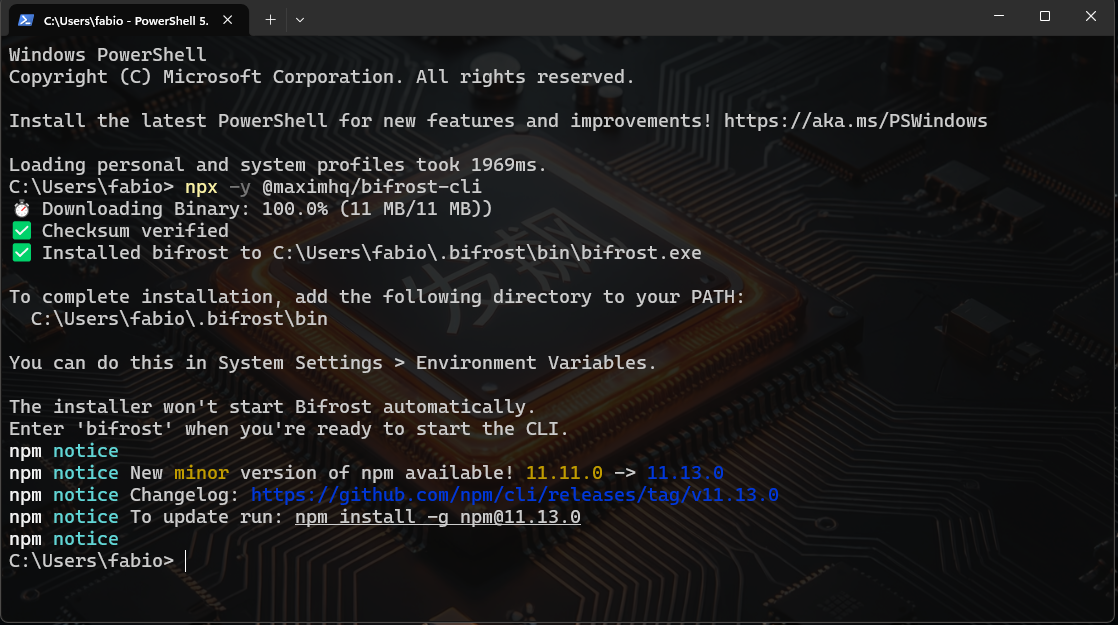
One command: npx @maximhq/bifrost-clito install it, and then from everywhere (if you set the installation dir to PATH) you can call it simply typing bifrost.
Note that Opencode is still not handled to be automatically connected to the MCP gateway, as you can see here below
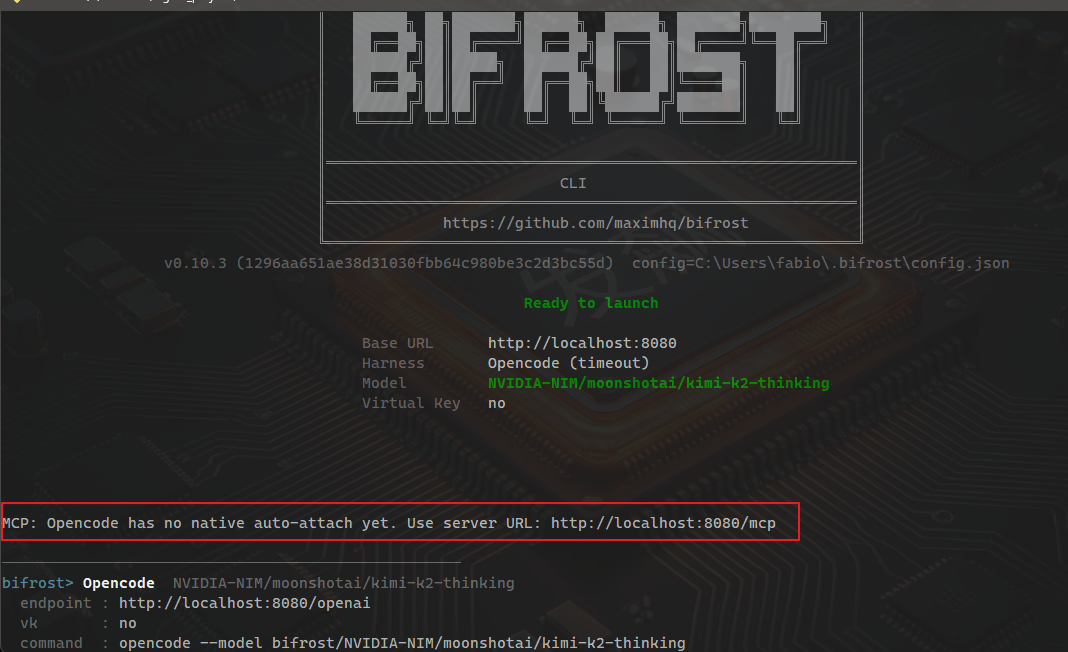
So we can do it manually, in the opencode.json for the local project, following the official docs here.
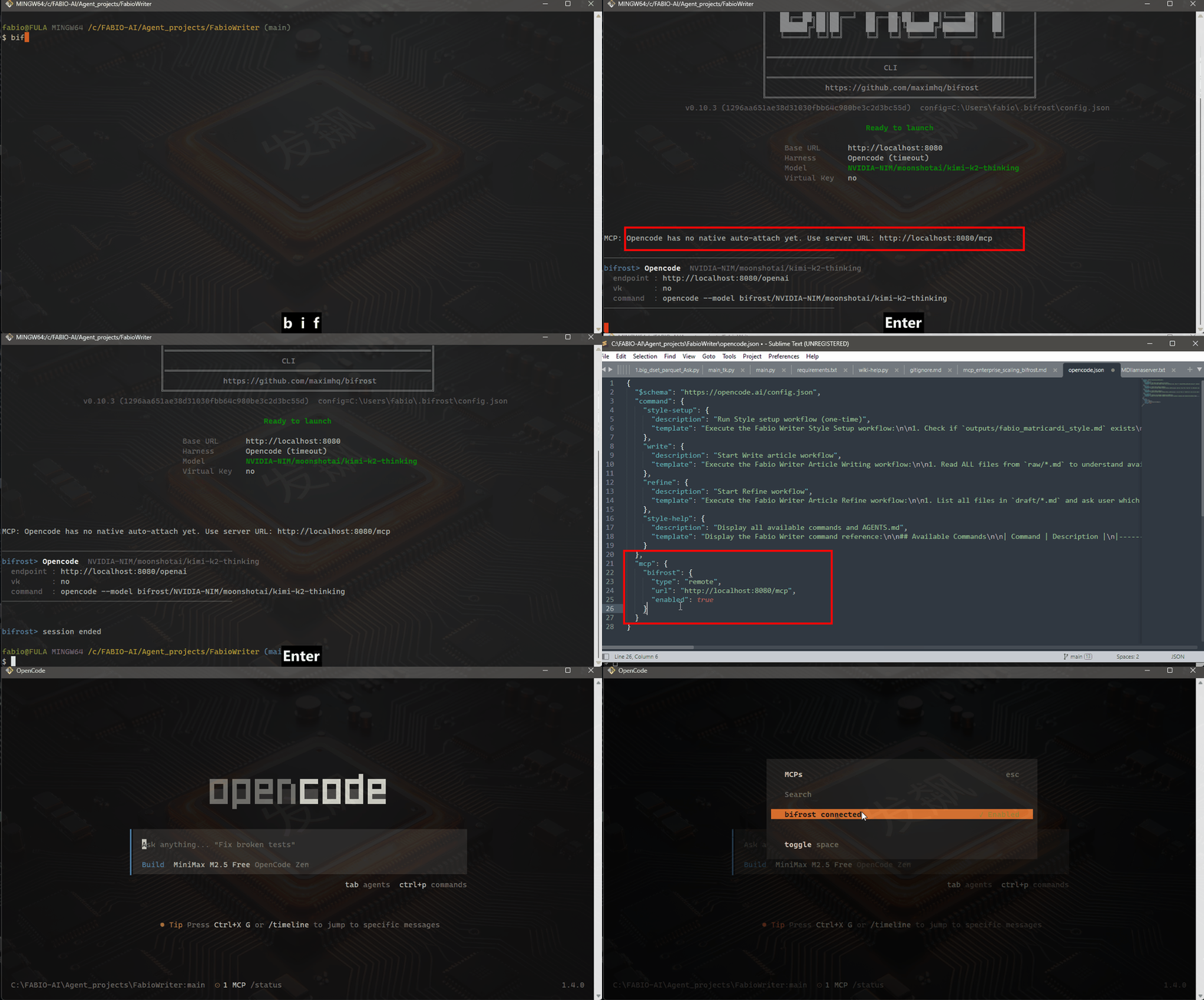
You’re ready to code in under 60 seconds.
In case you missed, here the JSON part to add:
"mcp": {
    "bifrost": {
      "type": "remote",
      "url": "http://localhost:8080/mcp",
      "enabled": true
    }
  }
A honest ending
I wish I could tell you I figured this out on my own. I didn’t.
I wasted three months and hundreds of dollars because I didn’t understand what was happening under the hood. I assumed “connecting MCP servers” meant “make them available” — not “inject everything into every single context.”
This is happening not only to hobbyist like me. Most teams are making this same mistake right now. They’re wondering why their AI costs are exploding. They’re wondering why adding tools makes everything slower. They’re wondering why their model seems to “forget” things between turns.
The answer: you’re probably not using anything like Code Mode. You’re paying for tool definitions to be loaded over and over and over again for every single request. The model is not the problem.
That’s an infrastructure problem.
Since I am a follower of the maxim team at Bifrost, I read few days ago their blog and I finally get the hints I was waiting for:
[embed]Bifrost The fastest LLM Gateway in the marketwww.getmaxim.ai
So I couldn’t but write about it for all of you!
Bifrost MCP Gateway (or something like it) is the layer that handles both. It gives you:
- Scoped access via virtual keys
- Tool governance with MCP Tool Groups
- Full audit trails for every tool call
- Per-tool cost visibility alongside LLM usage
- Code Mode to cut context cost without cutting capability
All behind a single /mcp endpoint.
This is where the industry is heading. Agents aren’t just calling models anymore. They’re orchestrating systems. And that needs infrastructure.
When your LLM call and your tool calls flow through the same gateway, you get a complete picture of every agent run. Model tokens and tool costs together, under a single access control model, in one audit log.
This is what production looks like. This is what I should have had from day one.
TL;DR — The Bottom Line
If you’re running MCP in production:
- Default MCP is [a cost trap ](https://www.getmaxim.ai/bifrost/alternatives)➡️ Every tool definition loads on every request. At 500+ tools, you’re spending more on tools than prompts.
- Code Mode is the fix ➡️ Instead of loading everything, the model reads what it needs, writes orchestration code, and executes it in a sandbox. 90%+ token savings demonstrated.
- Virtual keys + audit logging = governance ➡️ You wouldn’t run production without access control. Your AI agents shouldn’t either.
- **There’s a platform for this now** ➡️ Bifrost MCP Gateway is purpose-built for production AI systems. The open-source version handles enough for most teams.
The future of AI isn’t just smarter models. It’s smarter infrastructure around those models. MCP is the connector. And you need a gateway to manage it at scale.
Don’t wait until your $4,200 bill arrives to figure this out. Trust me: I learned it the hard way (even if my bill was not that big).
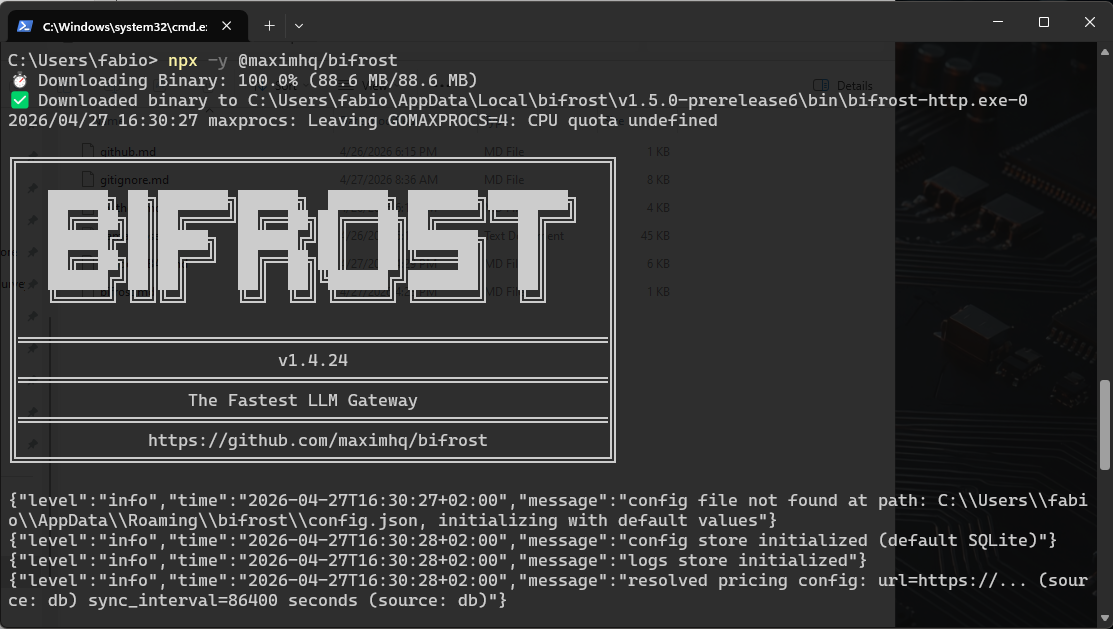
Your Turn
Try this:
- Run
npx @maximhq/bifrost-cliand see what your current setup looks like - Check how many tools you’re actually exposing vs. how many you use regularly
- Calculate token costs in your last 30-day billing cycle
The gap between those numbers is probably your optimization opportunity.
Now go fix it before next month’s bill shows up.
I hope this article gives you a comprehensive yet accessible overview of Bifrost and why it’s such an exciting tool for both personal and enterprise use.
Leave your comments, and let me know how it works for you!
If this story provided value and you wish to show a little support, you could:
- Clap a lot of times for this story
- Highlight the parts more relevant to be remembered (it will be easier for you to find them later and for me to write better articles)
- Join my totally free weekly Substack newsletter here
- Follow me on Medium
- Follow my publication https://medium.com/artificial-intel-ligence-playground
If you want to read more, here are some ideas:
Part #1 of the series:
All about Bifrost:
[embed]Bifrost The fastest LLM Gateway in the marketwww.getmaxim.ai
메타데이터
- post_id
- 04964a7f3130
- slug
- all-you-need-is-a-mcp-gateway-part-2-04964a7f3130
- url
- https://medium.com/artificial-intel-ligence-playground/all-you-need-is-a-mcp-gateway-part-2-04964a7f3130
- canonical_url
- https://medium.com/artificial-intel-ligence-playground/all-you-need-is-a-mcp-gateway-part-2-04964a7f3130
- author_url
- https://medium.com/@fabio.matricardi
- status
- ok
- fetched_at
- 2026-06-09 15:37:30