Implementing Enterprise Web SSO with Keycloak, OAuth2, and JWT in Spring Boot — A Practitioner’s…
The Problem We Were Solving
Implementing Enterprise Web SSO with Keycloak, OAuth2, and JWT in Spring Boot — A Practitioner’s Guide
The Problem We Were Solving
We were building an internal event management platform — think of it as a corporate Eventbrite for employees. Users needed to:
-
Sign in with their corporate Active Directory credentials (no separate password)
-
Get automatically assigned roles (admin, organizer, speaker, governance, audience)
-
Have registered events automatically appear in their Outlook calendar Receive email notifications via Microsoft Graph
The challenge? We needed one login to unlock access to our application AND Microsoft’s APIs — without ever seeing or storing user passwords.
This is the classic enterprise SSO problem, and Keycloak + OAuth2 turned out to be the elegant solution.
Architecture Overview
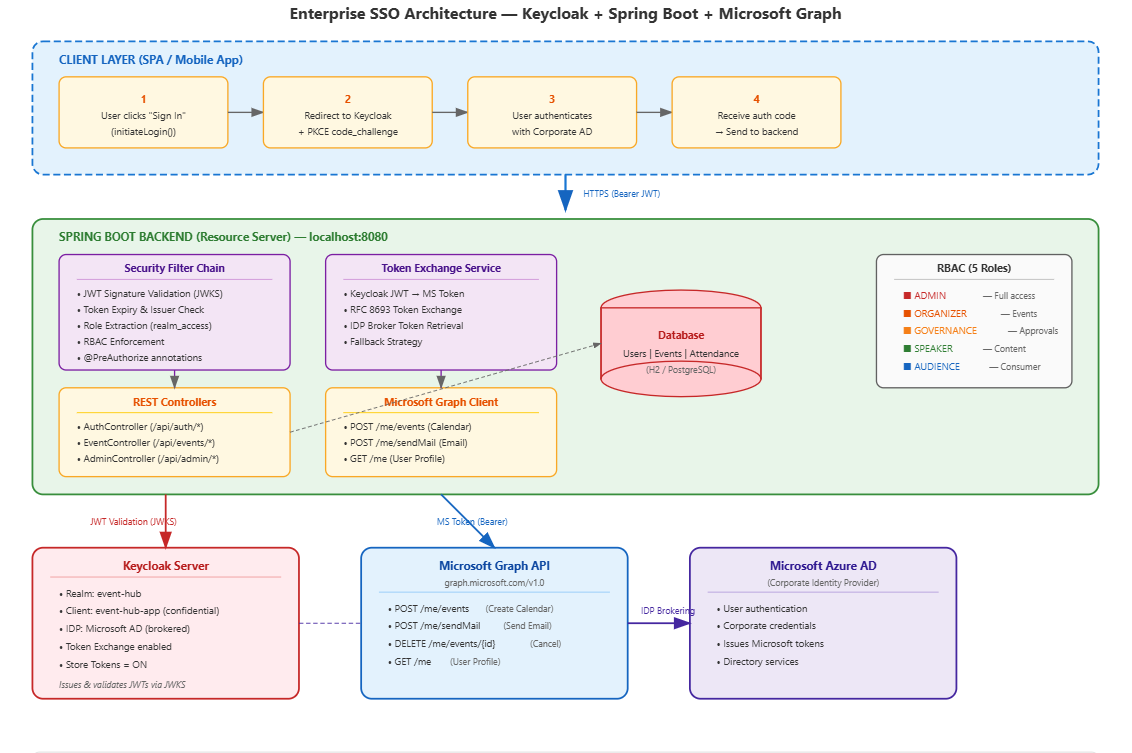
high-level architecture we implemented
The key insight: Keycloak acts as an identity broker. It doesn’t store corporate passwords — it delegates authentication to Microsoft AD. But it issues its own JWT tokens that our application trusts. When we need to call Microsoft APIs, we exchange the Keycloak token for a Microsoft token using either Token Exchange (RFC 8693) or the IDP Broker Token endpoint.
Key Concepts Before We Dive In

OAuth2 Authorization Code Flow
What’s in a Keycloak JWT?
{
  "exp": 1719756000,
  "iat": 1719752400,
  "iss": "https://keycloak.example.com/realms/event-hub",
  "sub": "f47ac10b-58cc-4372-a567-0e02b2c3d479",
  "realm_access": {
    "roles": ["organizer", "default-roles-event-hub"]
  },
  "resource_access": {
    "event-hub-app": {
      "roles": ["manage_events", "send_notifications"]
    }
  },
  "email": "john.doe@company.com",
  "name": "John Doe",
  "preferred_username": "john.doe"
}
PKCE (Proof Key for Code Exchange)
PKCE prevents authorization code interception attacks. The client generates a random code_verifier, sends its SHA-256 hash (code_challenge) during authorization, and proves possession of the original verifier during token exchange. This is mandatory for public clients (SPAs, mobile apps) and recommended for all clients.
Setting Up the Spring Boot Project
Dependencies (Maven)
<?xml version="1.0" encoding="UTF-8"?>
<project xmlns="http://maven.apache.org/POM/4.0.0"
         xmlns:xsi="http://www.w3.org/2001/XMLSchema-instance"
         xsi:schemaLocation="http://maven.apache.org/POM/4.0.0
         https://maven.apache.org/xsd/maven-4.0.0.xsd">
    <modelVersion>4.0.0</modelVersion>

    <parent>
        <groupId>org.springframework.boot</groupId>
        <artifactId>spring-boot-starter-parent</artifactId>
        <version>3.3.0</version>
    </parent>

    <groupId>com.example</groupId>
    <artifactId>event-hub</artifactId>
    <version>1.0.0</version>
    <name>EventHub SSO Backend</name>

    <properties>
        <java.version>21</java.version>
    </properties>

    <dependencies>
        <dependency>
            <groupId>org.springframework.boot</groupId>
            <artifactId>spring-boot-starter-web</artifactId>
        </dependency>


        <dependency>
            <groupId>org.springframework.boot</groupId>
            <artifactId>spring-boot-starter-oauth2-resource-server</artifactId>
        </dependency>


        <dependency>
            <groupId>org.springframework.boot</groupId>
            <artifactId>spring-boot-starter-oauth2-client</artifactId>
        </dependency>


        <dependency>
            <groupId>org.springframework.boot</groupId>
            <artifactId>spring-boot-starter-webflux</artifactId>
        </dependency>


        <dependency>
            <groupId>org.springframework.boot</groupId>
            <artifactId>spring-boot-starter-data-jpa</artifactId>
        </dependency>


        <dependency>
            <groupId>com.h2database</groupId>
            <artifactId>h2</artifactId>
            <scope>runtime</scope>
        </dependency>


        <dependency>
            <groupId>org.projectlombok</groupId>
            <artifactId>lombok</artifactId>
            <optional>true</optional>
        </dependency>
    </dependencies>
</project>
Application Configuration
server:
  port: 8080

spring:
  security:
    oauth2:
      resourceserver:
        jwt:

          jwk-set-uri: ${KEYCLOAK_URL}/realms/${KEYCLOAK_REALM}/protocol/openid-connect/certs
          issuer-uri: ${KEYCLOAK_URL}/realms/${KEYCLOAK_REALM}

keycloak:
  url: ${KEYCLOAK_URL:http://localhost:8180}
  realm: ${KEYCLOAK_REALM:event-hub}
  client-id: ${KEYCLOAK_CLIENT_ID:event-hub-app}
  client-secret: ${KEYCLOAK_CLIENT_SECRET:}
  idp-alias: ${KEYCLOAK_IDP_ALIAS:microsoft}

microsoft:
  graph:
    base-url: https://graph.microsoft.com/v1.0
What’s happening here?
Spring Security’s oauth2-resource-server auto-configures JWT validation. It fetches Keycloak’s public keys from the JWKS endpoint and uses them to cryptographically verify every incoming token. No manual decoding needed.
Configuring Spring Security with Keycloak
This is where the magic happens. We configure Spring Security to:
-
Validate JWTs from Keycloak
-
Extract roles from the Keycloak token structure
-
Enforce role-based access on endpoints
package com.example.eventhub.config;

import org.springframework.context.annotation.Bean;
import org.springframework.context.annotation.Configuration;
import org.springframework.core.convert.converter.Converter;
import org.springframework.security.authentication.AbstractAuthenticationToken;
import org.springframework.security.config.annotation.method.configuration.EnableMethodSecurity;
import org.springframework.security.config.annotation.web.builders.HttpSecurity;
import org.springframework.security.config.annotation.web.configuration.EnableWebSecurity;
import org.springframework.security.config.http.SessionCreationPolicy;
import org.springframework.security.core.authority.SimpleGrantedAuthority;
import org.springframework.security.oauth2.jwt.Jwt;
import org.springframework.security.oauth2.server.resource.authentication.JwtAuthenticationConverter;
import org.springframework.security.web.SecurityFilterChain;

import java.util.*;
import java.util.stream.Collectors;

@Configuration
@EnableWebSecurity
@EnableMethodSecurity
public class SecurityConfig {

    @Bean
    public SecurityFilterChain securityFilterChain(HttpSecurity http) throws Exception {
        http
            .csrf(csrf -> csrf.disable()) /
            .sessionManagement(session ->
                session.sessionCreationPolicy(SessionCreationPolicy.STATELESS))
            .authorizeHttpRequests(auth -> auth

                .requestMatchers("/api/auth/config").permitAll()
                .requestMatchers("/api/auth/token").permitAll()
                .requestMatchers("/actuator/health").permitAll()


                .requestMatchers("/api/admin/**").hasRole("ADMIN")


                .requestMatchers("/api/events/notify").hasAnyRole("ADMIN", "ORGANIZER", "SPEAKER")


                .anyRequest().authenticated()
            )
            .oauth2ResourceServer(oauth2 -> oauth2
                .jwt(jwt -> jwt.jwtAuthenticationConverter(keycloakJwtAuthenticationConverter()))
            );

        return http.build();
    }

    private Converter<Jwt, AbstractAuthenticationToken> keycloakJwtAuthenticationConverter() {
        JwtAuthenticationConverter converter = new JwtAuthenticationConverter();
        converter.setJwtGrantedAuthoritiesConverter(jwt -> {
            String clientId = "eventhub";
            Collection<String> clientRoles = extractClientRoles(jwt, clientId);

            return clientRoles.stream()
                    .map(role -> new SimpleGrantedAuthority("ROLE_" + role))
                    .collect(Collectors.toList());
        });
        return converter;
    }

    @SuppressWarnings("unchecked")
    private Collection<String> extractClientRoles(Jwt jwt, String clientId) {
        Map<String, Object> resourceAccess = jwt.getClaimAsMap("resource_access");
        if (resourceAccess == null) return Collections.emptyList();

        Map<String, Object> clientAccess = (Map<String, Object>) resourceAccess.get(clientId);
        if (clientAccess == null) return Collections.emptyList();

        Object roles = clientAccess.get("roles");
        if (roles instanceof Collection<?>) {
            return (Collection<String>) roles;
        }
        return Collections.emptyList();
    }
}
The OAuth2 Authorization Code Flow — How It Actually Works
The Token Proxy Endpoint
Browsers can’t call Keycloak’s token endpoint directly due to CORS restrictions. Our backend acts as a proxy — receiving the authorization code from the frontend and exchanging it with Keycloak server-to-server.
package com.example.eventhub.config;

import org.springframework.context.annotation.Bean;
import org.springframework.context.annotation.Configuration;
import org.springframework.core.convert.converter.Converter;
import org.springframework.security.authentication.AbstractAuthenticationToken;
import org.springframework.security.config.annotation.method.configuration.EnableMethodSecurity;
import org.springframework.security.config.annotation.web.builders.HttpSecurity;
import org.springframework.security.config.annotation.web.configuration.EnableWebSecurity;
import org.springframework.security.config.http.SessionCreationPolicy;
import org.springframework.security.core.authority.SimpleGrantedAuthority;
import org.springframework.security.oauth2.jwt.Jwt;
import org.springframework.security.oauth2.server.resource.authentication.JwtAuthenticationConverter;
import org.springframework.security.web.SecurityFilterChain;

import java.util.*;
import java.util.stream.Collectors;

@Configuration
@EnableWebSecurity
@EnableMethodSecurity
public class SecurityConfig {

    @Bean
    public SecurityFilterChain securityFilterChain(HttpSecurity http) throws Exception {
        http
            .csrf(csrf -> csrf.disable())
            .sessionManagement(session ->
                session.sessionCreationPolicy(SessionCreationPolicy.STATELESS))
            .authorizeHttpRequests(auth -> auth
                .requestMatchers("/api/auth/config", "/api/auth/token", "/actuator/health").permitAll()
                .requestMatchers("/api/admin/**").hasRole("ADMIN")
                .requestMatchers("/api/events/notify").hasAnyRole("ADMIN", "ORGANIZER", "SPEAKER")
                .anyRequest().authenticated()
            )
            .oauth2ResourceServer(oauth2 -> oauth2
                .jwt(jwt -> jwt.jwtAuthenticationConverter(keycloakJwtAuthenticationConverter()))
            );

        return http.build();
    }

    private Converter<Jwt, AbstractAuthenticationToken> keycloakJwtAuthenticationConverter() {
        JwtAuthenticationConverter converter = new JwtAuthenticationConverter();
        converter.setJwtGrantedAuthoritiesConverter(jwt -> {
            String clientId = "eventhub";
            Collection<String> clientRoles = extractClientRoles(jwt, clientId);

            return clientRoles.stream()
                    .map(role -> new SimpleGrantedAuthority("ROLE_" + role))
                    .collect(Collectors.toList());
        });
        return converter;
    }

    @SuppressWarnings("unchecked")
    private Collection<String> extractClientRoles(Jwt jwt, String clientId) {
        Map<String, Object> resourceAccess = jwt.getClaimAsMap("resource_access");
        if (resourceAccess == null) return Collections.emptyList();

        Map<String, Object> clientAccess = (Map<String, Object>) resourceAccess.get(clientId);
        if (clientAccess == null) return Collections.emptyList();

        Object roles = clientAccess.get("roles");
        if (roles instanceof Collection<?>) {
            return (Collection<String>) roles;
        }
        return Collections.emptyList();
    }
}
What’s Happening Under the Hood

Token Proxy flow
JWT Validation — Production-Grade Token Verification
package com.example.eventhub.config;

import org.springframework.beans.factory.annotation.Value;
import org.springframework.context.annotation.Bean;
import org.springframework.context.annotation.Configuration;
import org.springframework.security.oauth2.core.DelegatingOAuth2TokenValidator;
import org.springframework.security.oauth2.core.OAuth2TokenValidator;
import org.springframework.security.oauth2.jwt.*;
import java.time.Duration;

@Configuration
public class JwtConfig {

    @Value("${spring.security.oauth2.resourceserver.jwt.issuer-uri}")
    private String issuerUri;


    @Bean
    public JwtDecoder jwtDecoder(
        @Value("${spring.security.oauth2.resourceserver.jwt.jwk-set-uri}") String jwkSetUri) {

        NimbusJwtDecoder decoder = NimbusJwtDecoder.withJwkSetUri(jwkSetUri).build();

        OAuth2TokenValidator<Jwt> validators = new DelegatingOAuth2TokenValidator<>(
            JwtValidators.createDefaultWithIssuer(issuerUri),
            new JwtTimestampValidator(Duration.ofSeconds(30))
        );

        decoder.setJwtValidator(validators);
        return decoder;
    }
}
Role-Based Access Control (RBAC) with Keycloak Roles
Our system uses 5 roles with a strict permission hierarchy
package com.example.eventhub.model;

public enum UserRole {
    ADMIN,        // Full access – user management, event lifecycle
    ORGANIZER,    // Create events, send notifications, view attendees
    GOVERNANCE,   // Approve/reject events, view attendees
    SPEAKER,      // Create events (need approval), manage own events
    AUDIENCE      // Register for events, mark attendance
}
Applying RBAC to Controllers
package com.example.eventhub.controller;

import com.example.eventhub.model.UserRole;
import com.example.eventhub.service.EventService;
import com.example.eventhub.service.UserService;
import lombok.RequiredArgsConstructor;
import org.springframework.http.ResponseEntity;
import org.springframework.security.access.prepost.PreAuthorize;
import org.springframework.security.core.annotation.AuthenticationPrincipal;
import org.springframework.security.oauth2.jwt.Jwt;
import org.springframework.web.bind.annotation.*;

@RestController
@RequestMapping("/api/events")
@RequiredArgsConstructor
public class EventController {

    private final EventService eventService;
    private final UserService userService;

    // All authenticated users can browse approved events
    @GetMapping
    public ResponseEntity<?> getEvents(@AuthenticationPrincipal Jwt jwt) {
        var user = userService.getOrCreateUser(jwt);
        var events = eventService.getVisibleEvents(user);
        return ResponseEntity.ok(events);
    }

    // Only ADMIN, ORGANIZER, SPEAKER can create events
    @PostMapping
    @PreAuthorize("hasAnyRole('ADMIN','ORGANIZER','SPEAKER')")
    public ResponseEntity<?> createEvent(
        @AuthenticationPrincipal Jwt jwt,
        @RequestBody CreateEventRequest request) {

        var user = userService.getOrCreateUser(jwt);
        String initialStatus = user.getRole() == UserRole.SPEAKER ? "proposed" : "approved";

        var event = eventService.createEvent(request, user, initialStatus);
        return ResponseEntity.status(201).body(event);
    }

    // Any authenticated user can register for an approved event
    @PostMapping("/{eventId}/register")
    public ResponseEntity<?> registerForEvent(
        @AuthenticationPrincipal Jwt jwt,
        @PathVariable String eventId) {

        var user = userService.getOrCreateUser(jwt);
        var result = eventService.registerUser(eventId, user, jwt.getTokenValue());
        return ResponseEntity.ok(result);
    }

    // Only ADMIN, ORGANIZER, SPEAKER can send notifications
    @PostMapping("/{eventId}/notify")
    @PreAuthorize("hasAnyRole('ADMIN','ORGANIZER','SPEAKER')")
    public ResponseEntity<?> sendNotification(
        @AuthenticationPrincipal Jwt jwt,
        @PathVariable String eventId,
        @RequestBody NotificationRequest request) {

        var user = userService.getOrCreateUser(jwt);
        var event = eventService.getEvent(eventId);

        // Speakers can only notify for their own events
        if (user.getRole() == UserRole.SPEAKER && !event.getCreatedBy().equals(user.getId())) {
            return ResponseEntity.status(403)
                .body(Map.of("message", "You can only notify for events you created"));
        }

        eventService.sendNotification(eventId, request, jwt.getTokenValue());
        return ResponseEntity.ok(Map.of("message", "Notifications sent"));
    }
}
Admin Controller with Strict Access Control
package com.example.eventhub.controller;

import com.example.eventhub.service.UserService;
import lombok.RequiredArgsConstructor;
import org.springframework.http.ResponseEntity;
import org.springframework.security.access.prepost.PreAuthorize;
import org.springframework.web.bind.annotation.*;

import java.util.Map;

@RestController
@RequestMapping("/api/admin")
@PreAuthorize("hasRole('ADMIN')")
@RequiredArgsConstructor
public class AdminController {

    private final UserService userService;

    @GetMapping("/users")
    public ResponseEntity<?> getAllUsers() {
        return ResponseEntity.ok(userService.getAllUsers());
    }

    @PutMapping("/users/{userId}/role")
    public ResponseEntity<?> updateUserRole(
        @PathVariable String userId,
        @RequestBody Map<String, String> body) {

        String newRole = body.get("role");
        var updated = userService.updateRole(userId, newRole);
        return ResponseEntity.ok(updated);
    }

    @DeleteMapping("/users/{userId}")
    public ResponseEntity<?> deleteUser(
        @PathVariable String userId,
        @AuthenticationPrincipal Jwt jwt) {

        String currentEmail = jwt.getClaimAsString("email");
        var targetUser = userService.getUserById(userId);

        if (targetUser.getEmail().equalsIgnoreCase(currentEmail)) {
            return ResponseEntity.badRequest()
                .body(Map.of("message", "Cannot delete your own account"));
        }

        userService.deleteUser(userId);
        return ResponseEntity.ok(Map.of("message", "User deleted"));
    }
}
Token Exchange — Accessing Downstream APIs (Microsoft Graph)
This is the most powerful part of the architecture. When a user registers for an event, we want to create a calendar entry in their Outlook calendar. But we only have a Keycloak token — Microsoft Graph needs a Microsoft token.
Solution: OAuth2 Token Exchange (RFC 8693)
package com.example.eventhub.service;

import com.example.eventhub.config.KeycloakProperties;
import lombok.RequiredArgsConstructor;
import lombok.extern.slf4j.Slf4j;
import org.springframework.http.MediaType;
import org.springframework.stereotype.Service;
import org.springframework.util.LinkedMultiValueMap;
import org.springframework.util.MultiValueMap;
import org.springframework.web.reactive.function.BodyInserters;
import org.springframework.web.reactive.function.client.WebClient;

import java.util.Map;

@Slf4j
@Service
@RequiredArgsConstructor
public class TokenExchangeService {

    private final KeycloakProperties keycloakProperties;
    private final WebClient webClient;


    public String exchangeForMicrosoftToken(String keycloakToken) {
        log.info("Initiating Token Exchange for Microsoft token...");

        String tokenEndpoint = String.format("%s/realms/%s/protocol/openid-connect/token",
            keycloakProperties.getUrl(), keycloakProperties.getRealm());

        MultiValueMap<String, String> formData = new LinkedMultiValueMap<>();
        formData.add("grant_type", "urn:ietf:params:oauth:grant-type:token-exchange");
        formData.add("client_id", keycloakProperties.getClientId());
        formData.add("client_secret", keycloakProperties.getClientSecret());
        formData.add("subject_token", keycloakToken);
        formData.add("subject_token_type", "urn:ietf:params:oauth:token-type:access_token");
        formData.add("requested_token_type", "urn:ietf:params:oauth:token-type:access_token");
        formData.add("requested_issuer", keycloakProperties.getIdpAlias());

        try {
            Map<String, Object> response = webClient.post()
                .uri(tokenEndpoint)
                .contentType(MediaType.APPLICATION_FORM_URLENCODED)
                .body(BodyInserters.fromFormData(formData))
                .retrieve()
                .bodyToMono(Map.class)
                .block();

            String msToken = (String) response.get("access_token");
            if (msToken == null || msToken.isBlank()) {
                throw new RuntimeException("Token exchange did not return access_token: " + response);
            }

            log.info("Token Exchange succeeded – Microsoft token obtained (length: {})", msToken.length());
            return msToken;
        } catch (Exception e) {
            log.error("Token Exchange failed: {}", e.getMessage());
            throw new RuntimeException("Failed to exchange token for Microsoft access", e);
        }
    }

    public String retrieveIdpBrokerToken(String keycloakToken) {
        log.info("Retrieving IDP broker token from Keycloak...");

        String brokerEndpoint = String.format("%s/realms/%s/broker/%s/token",
            keycloakProperties.getUrl(), keycloakProperties.getRealm(),
            keycloakProperties.getIdpAlias());

        try {
            Map<String, Object> response = webClient.get()
                .uri(brokerEndpoint)
                .header("Authorization", "Bearer " + keycloakToken)
                .retrieve()
                .bodyToMono(Map.class)
                .block();

            String msToken = (String) response.get("access_token");
            if (msToken == null || msToken.isBlank()) {
                throw new RuntimeException("Broker endpoint did not return access_token");
            }

            log.info("IDP broker token retrieved successfully (length: {})", msToken.length());
            return msToken;
        } catch (Exception e) {
            log.warn("IDP broker retrieval failed: {} – falling back to Token Exchange", e.getMessage());
            return exchangeForMicrosoftToken(keycloakToken);
        }
    }

    public String getMicrosoftToken(String keycloakToken) {
        try {
            return retrieveIdpBrokerToken(keycloakToken);
        } catch (Exception e) {
            log.info("Broker retrieval failed, attempting Token Exchange...");
            return exchangeForMicrosoftToken(keycloakToken);
        }
    }
}
The Token Exchange Flow Visualized

Token Exchange
IDP Broker Token Retrieval — The Alternative Path
Keycloak offers two ways to get the upstream provider’s token:
Token Exchange: (RFC 8693). POST /token with grant_type=token-exchange . When you need fine-grained control, or the stored token is expired
IDP Broker Token: GET /broker/{idp}/token. Simpler — retrieves the token Keycloak stored during login
In our implementation, we try the broker endpoint first (it’s a simple GET request with the Keycloak token as Bearer), and fall back to Token Exchange if it fails.
Putting It All Together — The Complete Flow
Microsoft Graph integration using the exchanged token
package com.example.eventhub.service;

import lombok.RequiredArgsConstructor;
import lombok.extern.slf4j.Slf4j;
import org.springframework.beans.factory.annotation.Value;
import org.springframework.http.MediaType;
import org.springframework.stereotype.Service;
import org.springframework.web.reactive.function.client.WebClient;

import java.time.LocalDateTime;
import java.time.format.DateTimeFormatter;
import java.util.List;
import java.util.Map;

@Slf4j
@Service
@RequiredArgsConstructor
public class MicrosoftGraphService {

    private final TokenExchangeService tokenExchangeService;

    @Value("${microsoft.graph.base-url}")
    private String graphBaseUrl;

    public Map<String, Object> createCalendarEvent(
        String keycloakToken,
        String subject,
        LocalDateTime start,
        LocalDateTime end,
        String body,
        String location,
        boolean isOnlineMeeting) {

        // Step 1: Get Microsoft token
        String msToken = tokenExchangeService.getMicrosoftToken(keycloakToken);

        // Step 2: Build payload
        Map<String, Object> eventPayload = Map.of(
            "subject", subject,
            "body", Map.of("contentType", "HTML", "content", body),
            "start", Map.of(
                "dateTime", start.format(DateTimeFormatter.ISO_LOCAL_DATE_TIME),
                "timeZone", "Asia/Kolkata"
            ),
            "end", Map.of(
                "dateTime", end.format(DateTimeFormatter.ISO_LOCAL_DATE_TIME),
                "timeZone", "Asia/Kolkata"
            ),
            "location", Map.of("displayName", location),
            "isOnlineMeeting", isOnlineMeeting
        );

        // Step 3: Call Graph API
        WebClient graphClient = WebClient.builder()
            .baseUrl(graphBaseUrl)
            .defaultHeader("Authorization", "Bearer " + msToken)
            .build();

        try {
            Map<String, Object> createdEvent = graphClient.post()
                .uri("/me/events")
                .contentType(MediaType.APPLICATION_JSON)
                .bodyValue(eventPayload)
                .retrieve()
                .bodyToMono(Map.class)
                .block();

            log.info("Calendar event created: {}", createdEvent.get("id"));
            return createdEvent;
        } catch (Exception e) {
            log.error("Failed to create calendar event: {}", e.getMessage());
            return Map.of("error", "Calendar event creation failed", "reason", e.getMessage());
        }
    }


    public void sendEmail(String keycloakToken, List<String> recipients,
                          String subject, String htmlBody) {

        String msToken = tokenExchangeService.getMicrosoftToken(keycloakToken);

        List<Map<String, Object>> toRecipients = recipients.stream()
            .map(email -> Map.<String, Object>of(
                "emailAddress", Map.of("address", email)
            ))
            .toList();

        Map<String, Object> payload = Map.of(
            "message", Map.of(
                "subject", subject,
                "body", Map.of("contentType", "HTML", "content", htmlBody),
                "toRecipients", toRecipients
            ),
            "saveToSentItems", false
        );

        WebClient graphClient = WebClient.builder()
            .baseUrl(graphBaseUrl)
            .defaultHeader("Authorization", "Bearer " + msToken)
            .build();

        graphClient.post()
            .uri("/me/sendMail")
            .contentType(MediaType.APPLICATION_JSON)
            .bodyValue(payload)
            .retrieve()
            .toBodilessEntity()
            .block();
    }
}
The User Service — Auto-Creating Users on First Log
package com.example.eventhub.service;

import com.example.eventhub.model.User;
import com.example.eventhub.model.UserRole;
import com.example.eventhub.repository.UserRepository;
import lombok.RequiredArgsConstructor;
import lombok.extern.slf4j.Slf4j;
import org.springframework.beans.factory.annotation.Value;
import org.springframework.security.oauth2.jwt.Jwt;
import org.springframework.stereotype.Service;

import java.util.List;

@Slf4j
@Service
@RequiredArgsConstructor
public class UserService {

    private final UserRepository userRepository;

    @Value("${app.admin-emails:}")
    private List<String> adminEmails;


    public User getOrCreateUser(Jwt jwt) {
        String email = jwt.getClaimAsString("email");
        if (email == null) {
            email = jwt.getClaimAsString("preferred_username");
        }
        String name = jwt.getClaimAsString("name");
        return getOrCreateUser(email, name, jwt);
    }

    public User getOrCreateUser(String email, String name, Jwt jwt) {
        String normalizedEmail = email.toLowerCase().trim();

        return userRepository.findByEmailIgnoreCase(normalizedEmail)
            .orElseGet(() -> {
                UserRole role = adminEmails.contains(normalizedEmail)
                    ? UserRole.ADMIN
                    : UserRole.AUDIENCE;

                User newUser = User.builder()
                    .email(normalizedEmail)
                    .name(name == null ? normalizedEmail.split("@")[0] : name)
                    .role(role)
                    .build();

                log.info("Auto-created user: {} ({}, role: {})",
                    newUser.getEmail(), newUser.getName(), newUser.getRole());

                return userRepository.save(newUser);
            });
    }

    public List<User> getAllUsers() {
        return userRepository.findAll();
    }

    public User getUserById(String userId) {
        return userRepository.findById(userId)
            .orElseThrow(() -> new RuntimeException("User not found: " + userId));
    }

    public User updateRole(String userId, String newRole) {
        User user = getUserById(userId);
        user.setRole(UserRole.valueOf(newRole.toUpperCase()));
        return userRepository.save(user);
    }

    public void deleteUser(String userId) {
        userRepository.deleteById(userId);
    }
}
Lessons Learned & Production Considerations
After building this first as a Node.js hackathon prototype and then redesigning it for Java/Spring, here are the key takeaways:
1. Never Skip JWT Signature Verification
Our prototype did Buffer.from(token.split(‘.’)[1], ‘base64’) — a simple decode. This works in a trusted network but offers zero protection against forged tokens. Spring Security’s resource server module handles this correctly out of the box.
2. Token Exchange Has Prerequisites
RFC 8693 Token Exchange isn’t enabled by default in Keycloak. You need:
-
Token Exchange feature flag enabled in realm settings
-
The external IDP (Microsoft) configured with “Store Tokens” = ON
-
Fine-grained permissions granting
token-exchangeto your client -
The
requested_issuermust match the IDP alias exactly
If any of these are missing, you’ll get cryptic error messages.
3. IDP Broker Token is Simpler But Has Limits
The /broker/{idp}/token endpoint is a simple GET request — much easier than Token Exchange. However:
-
The stored Microsoft token may have expired (Microsoft tokens often last ~1 hour)
-
It only works for the IDP the user authenticated through
-
Keycloak must have “Store Tokens” enabled on the IDP
Our strategy: Try broker token first, fall back to Token Exchange.
4. CORS Is Real — Proxy the Token Endpoint
Browsers block cross-origin requests to Keycloak’s token endpoint. Your backend MUST proxy this call. We learned this the hard way when the frontend couldn’t exchange the authorization code directly.
5. PKCE is Non-Negotiable for SPAs
Even if your client is “confidential” (has a client_secret), PKCE adds defense-in-depth. For public clients (SPAs), PKCE is the ONLY way to protect the authorization code. Spring Security’s OAuth2 client handles PKCE automatically when configured.
6. Auto-Create Users on First Login
Don’t require a registration step. When a user logs in via SSO for the first time, create their account automatically using JWT claims (email, name). Assign a default role and let admins upgrade later.
7. Graceful Calendar/Email Failures
When Microsoft Graph API calls fail (token expired, permissions insufficient, network issues), DON’T fail the primary operation. A user’s event registration shouldn’t fail because the calendar API is down. Log the error, return partial success, and retry later.
Conclusion
Building enterprise SSO isn’t just about the authentication flow — it’s about the ecosystem that emerges once you have identity in place:
1.One login → User identity across your entire application
-
JWT roles → Fine-grained access control without a separate permissions database
-
Token Exchange → Seamless access to downstream APIs (Microsoft Graph, Google APIs, etc.)
-
No password storage → Your application never touches sensitive credentials
The combination of Keycloak (identity broker) + Spring Security (token validation & RBAC) + Token Exchange (downstream API access) creates a powerful, standards-based authentication architecture that scales from hackathon prototypes to production enterprise systems.
The key difference between our prototype and the production implementation? The prototype trusted tokens; the production system verifies them. In security, that distinction is everything.
메타데이터
- post_id
- 04a7d88dbc3a
- slug
- implementing-enterprise-web-sso-with-keycloak-oauth2-and-jwt-in-spring-boot-a-practitioners-04a7d88dbc3a
- url
- https://medium.com/@pradeepchirumamilla01/implementing-enterprise-web-sso-with-keycloak-oauth2-and-jwt-in-spring-boot-a-practitioners-04a7d88dbc3a
- canonical_url
- https://medium.com/@pradeepchirumamilla01/implementing-enterprise-web-sso-with-keycloak-oauth2-and-jwt-in-spring-boot-a-practitioners-04a7d88dbc3a
- author_url
- https://medium.com/@pradeepchirumamilla01
- status
- ok
- fetched_at
- 2026-07-13 06:23:13