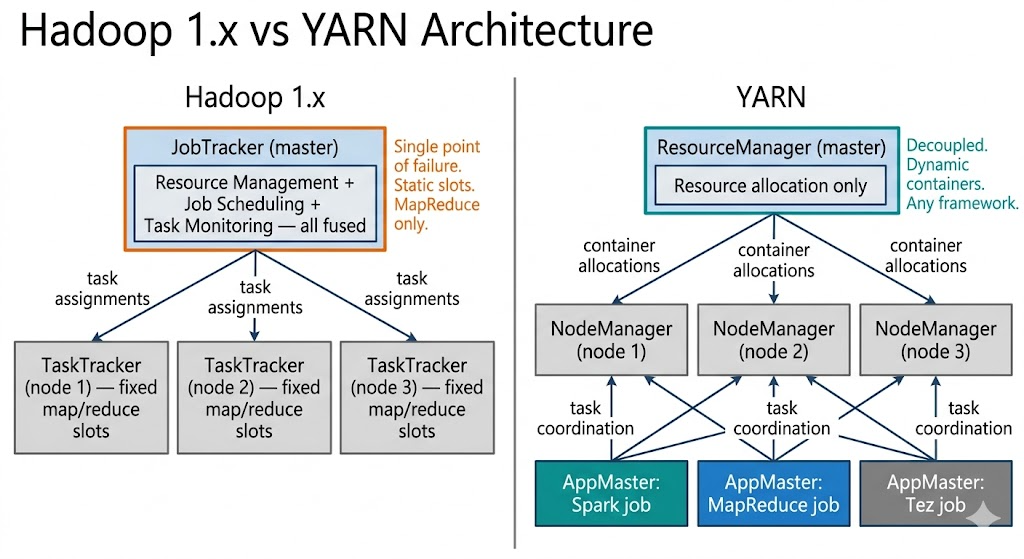
YARN Capacity Scheduler Deep Dive: How to Stop Jobs From Starving Each Other
Shared clusters without queue isolation are just a race condition with a nice UI.
YARN Capacity Scheduler Deep Dive: How to Stop Jobs From Starving Each Other
Shared clusters without queue isolation are just a race condition with a nice UI.
The first time a data engineering team runs a high-priority production job on a shared Hadoop cluster, something predictable happens. An analyst submitted a large exploratory query ten minutes earlier. That query is holding most of the cluster’s resources. The production job sits in the queue, waiting. The SLA countdown runs. Someone escalates. Someone else manually kills the analyst’s job. The production job finally runs, 20 minutes late.
The answer to “how do we prevent this” is usually “we’ll add more nodes.” It works, briefly. Then the cluster is bigger and the same race condition plays out at a larger scale, with more jobs competing, more escalations, and the occasional nuclear option of killing whichever job is most politically safe to kill.
None of this is a resource problem. It’s a scheduling problem. The cluster had capacity. What it didn’t have was a policy that governed how that capacity was shared — which workloads get resources first, how much any single job can consume, what happens when demand exceeds supply. YARN’s Capacity Scheduler is the mechanism for expressing that policy, and most teams that use it either configure it too superficially to matter or copy a configuration from a blog post without understanding what the knobs actually do.
This article is about the knobs. Not all of them — the full Capacity Scheduler surface area is enormous — but the ones that actually determine whether production jobs starve, whether batch jobs get fair access, and whether the cluster degrades gracefully under load or collapses into a scheduling free-for-all.
The Capacity Scheduler’s Core Abstraction: Queues
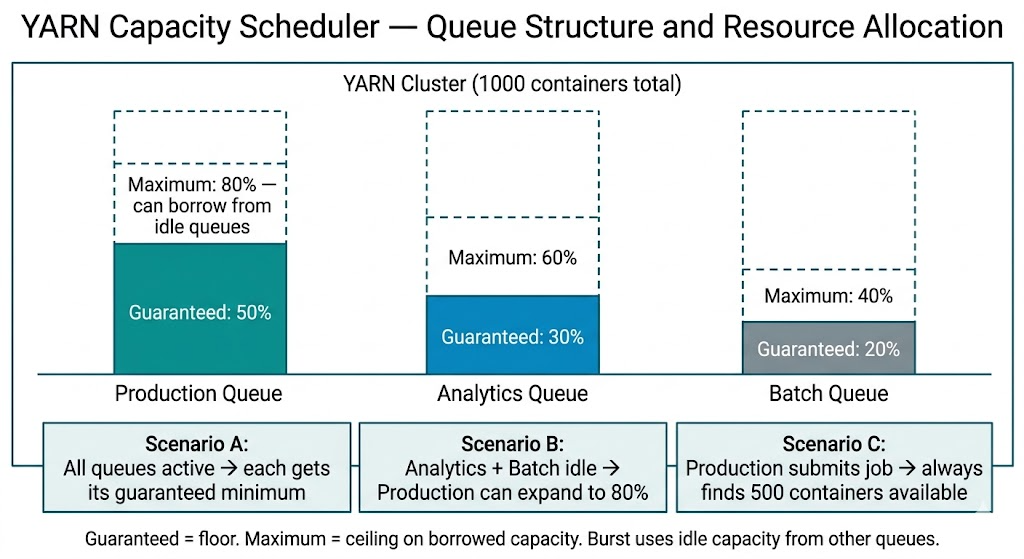
The Capacity Scheduler divides cluster resources into queues, each with a guaranteed minimum capacity and an optional maximum capacity ceiling. Jobs are submitted to queues. The scheduler allocates resources to jobs from their queue’s allocation, respecting the guarantees of other queues.
The foundational property: a queue’s guaranteed capacity is a floor, not a ceiling. If the cluster has 1,000 containers worth of capacity and the engineering queue has a 40% guarantee, the engineering queue always gets at least 400 containers — even if analytics and ETL queues are completely empty. But if analytics and ETL have idle capacity, engineering can use beyond its 400 container guarantee, up to whatever maximum capacity is configured.
This is the property that separates queue-based scheduling from a free-for-all. The guarantee means a production job submitted to a protected queue will always find resources available, regardless of what other queues are doing. Not infinite resources — just its guaranteed share, immediately.
The Capacity Scheduler configuration lives in capacity-scheduler.xml. A minimal three-queue setup:
<configuration>
  <!-- Define root's child queues -->
  <property>
    <name>yarn.scheduler.capacity.root.queues</name>
    <value>production,analytics,batch</value>
  </property>

  <!-- Guaranteed capacities — must sum to 100 -->
  <property>
    <name>yarn.scheduler.capacity.root.production.capacity</name>
    <value>50</value>
  </property>
  <property>
    <name>yarn.scheduler.capacity.root.analytics.capacity</name>
    <value>30</value>
  </property>
  <property>
    <name>yarn.scheduler.capacity.root.batch.capacity</name>
    <value>20</value>
  </property>

  <!-- Maximum capacities — how much a queue can borrow from idle queues -->
  <property>
    <name>yarn.scheduler.capacity.root.production.maximum-capacity</name>
    <value>80</value>
  </property>
  <property>
    <name>yarn.scheduler.capacity.root.analytics.maximum-capacity</name>
    <value>60</value>
  </property>
  <property>
    <name>yarn.scheduler.capacity.root.batch.maximum-capacity</name>
    <value>40</value>
  </property>
</configuration>
The production queue’s 50% guarantee means: even if analytics and batch are running jobs that collectively want every available container, production still gets 50%. The 80% maximum capacity means: if analytics and batch are idle, production can expand to use up to 80% of the cluster — leaving the remaining 20% available for any jobs that arrive in the other queues.
Guaranteed capacities must sum to exactly 100 across sibling queues. Maximum capacities can each be up to 100 — the scheduler enforces that actual total usage stays within cluster capacity. The maximum isn’t a promise; it’s a ceiling on how much any single queue can borrow.
Hierarchical Queues: Organising by Team and Workload Type
A flat three-queue structure works at small scale. As the number of teams and workload types grows, flat queues become too coarse — you can’t give a team internal SLA structure without creating separate top-level queues for every workload category. Hierarchical queues solve this.
In a hierarchical structure, parent queues aggregate child queue capacities. Resources flow top-down: the parent gets its capacity allocation, and its children divide that allocation among themselves. A team’s parent queue gets 40% of the cluster; within that 40%, the team’s sub-queues (high-priority jobs, standard jobs, experimental work) divide the allocation according to their own configured proportions.
<!-- Parent queues -->
<property>
  <name>yarn.scheduler.capacity.root.queues</name>
  <value>engineering,data-platform,shared</value>
</property>

<!-- Engineering gets 45% of cluster -->
<property>
  <name>yarn.scheduler.capacity.root.engineering.capacity</name>
  <value>45</value>
</property>

<!-- Engineering's child queues — percentages of parent's 45% -->
<property>
  <name>yarn.scheduler.capacity.root.engineering.queues</name>
  <value>prod,staging,experimental</value>
</property>
<property>
  <name>yarn.scheduler.capacity.root.engineering.prod.capacity</name>
  <value>60</value>  <!-- 60% of 45% = 27% of total cluster -->
</property>
<property>
  <name>yarn.scheduler.capacity.root.engineering.staging.capacity</name>
  <value>30</value>  <!-- 30% of 45% = 13.5% of total cluster -->
</property>
<property>
  <name>yarn.scheduler.capacity.root.engineering.experimental.capacity</name>
  <value>10</value>  <!-- 10% of 45% = 4.5% of total cluster -->
</property>
The key insight: child queue percentages are relative to the parent, not to the total cluster. The engineering team manages their own sub-queue allocation policy independently — they can rebalance between prod and staging without touching the top-level queue configuration that affects other teams.
This structure also enables elasticity within a team’s allocation: when the experimental sub-queue is idle, staging and prod can borrow from it. When the engineering parent queue is idle, data-platform and shared can borrow from the engineering allocation. Elasticity is hierarchical — borrowing happens at every level.
User and Application Limits: Preventing One Job From Eating Everything
Queue capacity guarantees protect queues from each other. They don’t protect against a single user or application within a queue consuming all of that queue’s allocation. Without per-user limits, a single analyst submitting a poorly-written query that requests 200 containers can starve every other user in the analytics queue, even though the queue itself has plenty of capacity.
Two settings govern this:
**minimum-user-limit-percent** — the minimum percentage of the queue capacity that any single user can be guaranteed. If set to 25% on an analytics queue with 30% cluster capacity, no single user gets less than 25% of the analytics queue's resources — but also no single user gets more than their fair share when multiple users are active.
The behavior is dynamic: with one user, they can use 100% of the queue. With two users, each gets at least 50%. With four users, each gets at least 25%. With five or more users, the limit kicks in and the queue is divided equally.
<property>
  <name>yarn.scheduler.capacity.root.analytics.minimum-user-limit-percent</name>
  <value>25</value>
</property>**user-limit-factor** — a multiplier on the minimum user limit that sets the maximum any single user can consume. With minimum-user-limit-percent=25 and user-limit-factor=2, a single user can use up to 50% of the queue capacity when others are active. Without this limit, an active user with many jobs can monopolise idle queue capacity even when other users are waiting.
<property>
  <name>yarn.scheduler.capacity.root.analytics.user-limit-factor</name>
  <value>2</value>
</property>**maximum-am-resource-percent** — caps the fraction of a queue's capacity that can be used by ApplicationMasters (the per-job coordinator processes). ApplicationMasters consume resources but don't do actual work — they're overhead. If 80% of a queue's containers are consumed by ApplicationMasters for queued jobs, only 20% remains for actual task execution. Setting this to 10–20% ensures that ApplicationMaster overhead doesn't crowd out actual work.
<property>
  <name>yarn.scheduler.capacity.root.analytics.maximum-am-resource-percent</name>
  <value>0.15</value>  <!-- 15% of queue capacity for ApplicationMasters -->
</property>
This last setting is the one most teams discover after an incident. A queue that accepts hundreds of job submissions can accumulate enough ApplicationMaster containers to exhaust its allocation, leaving no room for the map and reduce tasks those jobs need to actually run. The queue looks busy, jobs are queued, nothing completes. The fix — reducing maximum-am-resource-percent or increasing queue capacity — is obvious in hindsight and invisible until it bites.
Preemption: Taking Resources Back From Low-Priority Queues
Queue capacity guarantees are enforced at submission time — a job submitted to the production queue will get its guaranteed allocation. But what happens when production has been idle for an hour, batch has expanded to use the full cluster, and a production job suddenly arrives?
Without preemption, the production job waits. The batch jobs running on borrowed capacity don’t release it voluntarily. The production job is entitled to its guaranteed 50% of the cluster, but it can’t use it until batch containers finish naturally and release resources.
With preemption enabled, the scheduler actively reclaims resources. When a queue is below its guaranteed capacity and has pending work, the scheduler identifies containers in over-allocated queues and requests their termination. The jobs holding those containers are interrupted, their completed work is preserved, and the released resources go to the under-allocated queue.
<!-- Enable preemption globally -->
<property>
  <name>yarn.resourcemanager.scheduler.monitor.enable</name>
  <value>true</value>
</property>
<property>
  <name>yarn.resourcemanager.scheduler.monitor.policies</name>
  <value>org.apache.hadoop.yarn.server.resourcemanager.monitor.capacity.ProportionalCapacityPreemptionPolicy</value>
</property>

<!-- How aggressively to preempt -->
<property>
  <name>yarn.resourcemanager.monitor.capacity.preemption.monitoring_interval</name>
  <value>3000</value>  <!-- Check every 3 seconds -->
</property>
<property>
  <name>yarn.resourcemanager.monitor.capacity.preemption.max_wait_before_kill</name>
  <value>15000</value>  <!-- Wait 15s for voluntary release before killing -->
</property>
<property>
  <name>yarn.resourcemanager.monitor.capacity.preemption.total_preemption_per_round</name>
  <value>0.1</value>  <!-- Preempt at most 10% of cluster capacity per round -->
</property>
The max_wait_before_kill setting is the grace period: the scheduler first signals to the over-allocated job that it should voluntarily release containers (via an application-level notification). If the job doesn't release within the wait period, the scheduler kills the containers. Well-behaved YARN applications save intermediate state and checkpoint before releasing, preserving work. Poorly-written applications lose progress.
total_preemption_per_round prevents aggressive preemption from destabilising the cluster. Preempting 50% of the cluster in one round to restore a queue to its guaranteed capacity would interrupt far more work than necessary. The proportional policy releases resources gradually, enough to restore the queue to its guarantee without overshooting.
Preemption has a cost. Killed containers represent lost work — if the job didn’t checkpoint, that task has to rerun from scratch. For short-running batch tasks, this overhead is small. For long-running Spark stages mid-computation, it can add significant total execution time. The trade-off is between SLA protection for high-priority queues and computational efficiency for lower-priority jobs.
The configuration decision: enable preemption for clusters with clear SLA tiers (production jobs that must run within N minutes of submission) and accept the overhead. Disable it for clusters where all workloads have equal priority and throughput efficiency matters more than response time guarantees.

Queue States and the Operational Controls You Actually Need
Beyond capacity configuration, the Capacity Scheduler exposes operational controls that matter during incidents and maintenance:
Queue state — RUNNING vs STOPPED
<property>
  <name>yarn.scheduler.capacity.root.experimental.state</name>
  <value>STOPPED</value>
</property>
A STOPPED queue accepts no new job submissions. Existing jobs continue to run until completion. This is the mechanism for graceful queue maintenance: stop accepting new work, wait for running jobs to finish, reconfigure the queue, resume. Critical for cluster migrations and capacity rebalancing without killing in-flight work.
Dynamic queue refresh — Capacity Scheduler configuration can be reloaded without restarting the ResourceManager. After editing capacity-scheduler.xml:
yarn rmadmin -refreshQueuesThis applies the new configuration to any queue that hasn’t changed its capacity hierarchy. Adding new child queues, adjusting capacity percentages, changing user limits — all take effect immediately without downtime. Structural changes (adding or removing parent queues) require a ResourceManager restart.
Queue monitoring via YARN REST API
# Get current queue status, usage, and pending applications
curl http://resourcemanager:8088/ws/v1/cluster/scheduler | python3 -m json.tool

# Useful fields per queue:
# usedCapacity — current percentage of queue capacity in use
# absoluteUsedCapacity — percentage of total cluster in use by this queue
# numPendingApplications — jobs waiting for resources
# numActiveApplications — jobs currently running
numPendingApplications climbing in a specific queue while usedCapacity is below the guaranteed capacity indicates a scheduling issue — the queue should be getting resources but isn't. Common causes: maximum-am-resource-percent exhausted (too many ApplicationMasters), node-level constraints (label-based scheduling excluding available nodes), or a minimum allocation mismatch (jobs requesting more memory than available per container).
The Configuration That Actually Prevents Starvation
Bringing the pieces together: a cluster configuration that prevents production jobs from starving, limits individual job monopolisation, and degrades gracefully under load combines four elements.
First, separated queues with guaranteed capacities that reflect organisational priority. Production workloads get a floor that can’t be taken by exploratory or batch work. The guarantee is sized to the maximum realistic production demand, not average demand — if peak production load needs 40% of the cluster, guarantee 40%.
Second, bounded maximum capacities that prevent any queue from monopolising idle resources. A production queue with a 50% guarantee and a 90% maximum will eventually crowd out everything else if it’s always running at high utilisation. Set maximums to leave headroom for other queues to get at least some burst capacity.
Third, user limits that prevent a single user or application from consuming an entire queue. Analysts sharing the analytics queue should each get a fair share when the queue is contested, not have their jobs starved by whoever submitted first.
Fourth, preemption enabled for queues with SLA requirements and disabled for queues where throughput efficiency matters more than response time. Preemption is the mechanism that makes capacity guarantees meaningful when the cluster is under sustained load — without it, guarantees apply at submission time but not during execution.
These four elements together define a scheduling policy. Without them, the cluster has a queue structure that looks organised but doesn’t actually enforce anything — it’s a race condition with queue names attached.
The work of configuring the Capacity Scheduler is the work of making the organisation’s priorities explicit in code. Which workloads matter most? How much of the cluster do they deserve when everything is competing? What happens to lower-priority work when higher-priority work arrives? Those are organisational decisions, and the Capacity Scheduler enforces whatever answers the cluster operators choose to give them.
Quick Reference

메타데이터
- post_id
- 056cf2ebc290
- slug
- yarn-capacity-scheduler-deep-dive-how-to-stop-jobs-from-starving-each-other-056cf2ebc290
- url
- https://medium.com/@niteshthakur498/yarn-capacity-scheduler-deep-dive-how-to-stop-jobs-from-starving-each-other-056cf2ebc290
- canonical_url
- https://medium.com/@niteshthakur498/yarn-capacity-scheduler-deep-dive-how-to-stop-jobs-from-starving-each-other-056cf2ebc290
- author_url
- https://medium.com/@niteshthakur498
- status
- ok
- fetched_at
- 2026-06-22 05:41:33