A Comprehensive Guide to Proxy IP Types in 2026
Datacenter, residential, mobile, or ISP? Pick the wrong proxy type and you’re blocked in 30 seconds. Here’s how to match each one to the…
A Comprehensive Guide to Proxy IP Types in 2026
Datacenter, residential, mobile, or ISP? Pick the wrong proxy type and you’re blocked in 30 seconds. Here’s how to match each one to the job in 2026.
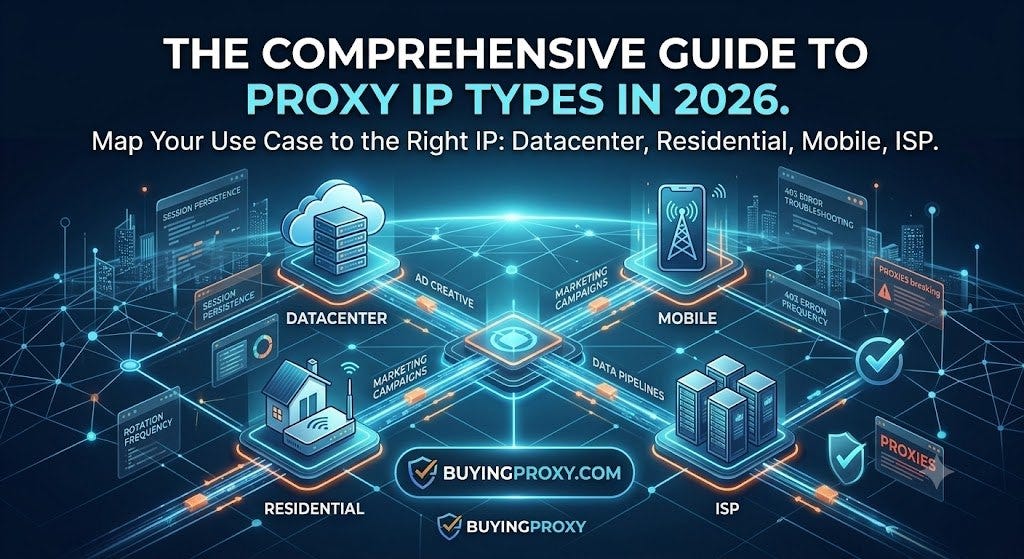
Who actually needs this guide? Developers scraping competitor ad creative at scale. Marketing teams running 100-account Reddit campaigns. DevOps engineers building data pipelines that pull from a dozen feeds daily. By the end of this guide, you’ll be able to identify which proxy IP type maps to your specific use case, recognize the hidden costs and failure modes of each, and configure your stack to avoid the session-token disasters and 403 errors that plague poorly-architected proxy setups.
The Four Core Proxy IP Types
Every proxy IP falls into one of four categories based on where the IP address originates and how it’s allocated. Understanding these distinctions matters because a datacenter IP that works for price scraping will get you blocked in under 30 seconds on Ticketmaster.
Datacenter Proxies
Datacenter IPs come from cloud providers and hosting companies. They’re fast, cheap, and completely detached from any physical residence. A single AWS or Azure region can serve millions of requests per minute. The tradeoff: every major anti-bot system flags datacenter ranges aggressively. Reddit users on r/ExperiencedDevs note that LLMs struggle to distinguish between a 403 caused by domain blocking versus credential issues — datacenter proxies produce exactly that kind of ambiguous failure.
Best for: Bulk data collection where speed matters more than stealth. API scraping with proper rate limiting. Load testing.
Avoid for: Social media automation, ticket purchasing, any site using Cloudflare or DataDome.
Residential Proxies
Residential IPs are assigned by ISPs to actual households. They appear to target websites as legitimate home users. The pool is enormous — millions of IPs across thousands of ISPs globally. This is the category where most proxy providers compete, and where pricing varies wildly.
The critical differentiator is how the provider sources these IPs. Some use peer-to-peer networks where users install software on their home routers. Others negotiate direct relationships with ISPs. Reddit marketing agencies have documented providers showing spreadsheets of hundreds of aged accounts with post history and karma — those accounts run on residential proxies. For comparison, Buyingproxy sources residential IPs from direct ISP relationships, so the abuse contact on RIPE shows the actual ISP.
Best for: Social media management, sneaker copping, ticket purchasing, geo-restricted content access.
Avoid for: High-bandwidth downloads. Residential bandwidth is someone’s home internet connection.
Mobile (3G/4G/5G) Proxies
Mobile proxies route traffic through cellular carrier IP pools. These are the hardest IPs to block because mobile carriers use carrier-grade NAT, meaning thousands of users share the same public IP. Anti-bot systems that block datacenter and even residential IPs often let mobile traffic pass.
The catch: mobile proxies are expensive and slow. Latency is higher, bandwidth is capped, and you’re competing with actual phone traffic on the carrier’s network.
Best for: Ad verification, app store scraping, any target that blocks everything except mobile.
Avoid for: Any task requiring sustained throughput above 10 Mbps.
ISP (Static Residential) Proxies
ISP proxies are a hybrid — they use IP addresses registered to ISPs but hosted in datacenters. You get the residential-looking IP without the bandwidth limitations of actual home connections. These are the premium option in 2026, used by enterprises running high-stakes scrapers.
How Proxy Architecture Affects Performance
The proxy type alone doesn’t determine success. The architecture around it matters more than most buyers realize.
Session Persistence
Sticky sessions keep you on the same IP for the duration of a task. When you’re logged into a platform, switching IPs mid-session triggers security flags. One r/webdev post documented a user who recovered their site only to find they were logged in as a different user — a month-old session token from a random user stored in Aurora RDS. That’s the kind of session confusion that proxy rotation can cause if not managed carefully.
Rotation Frequency
Some providers rotate IPs on every request. Others rotate every 10 minutes. The right choice depends on your target. Sites like Google and Facebook track session behavior and flag rapid IP changes. A workflow scraping close to 100 different AI news stories per day across a dozen feeds needs moderate rotation — every 5–10 minutes — to avoid triggering rate limits while maintaining fresh IP coverage.
Concurrency Limits
Most residential proxy providers limit concurrent connections per IP. If you’re running 50 parallel requests through a single IP, expect rate limiting within seconds. Distributing those requests across a pool of 50 IPs at 1 connection each keeps you under the radar.
Use Case Mapping: Which Proxy for Which Job
Ad Creative Analysis
Teams analyzing competitor video ads frame-by-frame using Gemini 2.5 Pro’s video understanding API need residential or ISP proxies. The API calls are bandwidth-heavy but must appear as legitimate user traffic. Datacenter IPs get blocked at the CDN layer before the video even loads.
Reddit Account Management
The Reddit marketing agency that showed a spreadsheet of controlled accounts across different industries was running those accounts on residential proxies with aged post history and karma. Each account needs a dedicated IP or a small pool of 2–3 rotating IPs. Using datacenter IPs for Reddit automation results in instant shadowbans.
AI News Aggregation
The n8n workflow that scrapes close to 100 AI news stories daily across a dozen feeds uses residential proxies with 5-minute rotation. The key insight from that setup: the proxy pool needs to be larger than the number of concurrent feeds. If you have 12 feeds running simultaneously, you need at least 12 IPs in rotation.
E-commerce Price Monitoring
Retailers block datacenter IPs aggressively. Residential proxies with geo-targeting to the specific city or region of the target store work best. For Amazon specifically, mobile proxies outperform residential because Amazon’s bot detection is tuned to residential patterns.
Vendor Landscape and Pricing Reality
The proxy market in 2026 is fragmented. Here’s what you actually pay.
Datacenter proxies: $0.50-$3 per IP per month. Unlimited bandwidth. The cheap option, but increasingly blocked.
Residential proxies: $0.50-$2 per GB of traffic. The pricing trap: many providers advertise low per-GB rates but charge for every byte, including connection overhead. Bright Data’s $8/GB surprise pricing is a known pattern — the advertised rate applies only to large monthly commitments.
Mobile proxies: $3-$15 per GB. The premium tier. Only worth it for targets that block everything else.
ISP proxies: $5-$20 per IP per month. Fixed cost, no bandwidth charges. Best for long-running scraping projects.
When evaluating vendors, check three things: IP pool size (not just total, but unique /24 subnets), rotation control (do you control when rotation happens?), and geo-targeting granularity (city-level or just country-level).
Setup Patterns That Actually Work
The Kubernetes Pattern
ConfigMaps store configuration outside containers, allowing the same proxy image to run in dev, staging, and production with different proxy pools. This is the standard pattern for teams running scrapers at scale. The kat tool allows defining profiles for different manifest generators with automatic selection based on CEL expressions — meaning you can deploy the same scraper with different proxy configurations per environment.
The Strongly-Typed Pipeline
Using strongly typed code with constructor injection and return types helps editors catch silly mistakes before they cost you proxy bandwidth. One Reddit user on r/PHP noted that proper typing catches errors at compile time rather than after burning through 10 GB of residential traffic.
The Batch Production Model
Video ad production teams batch produce 4–5 ads from the same template with different hooks. One editor produces 5 ads in a day, spending 6 hours, billed as 20. The same principle applies to proxy configuration: batch your requests, reuse connections, minimize handshake overhead.
Troubleshooting Common Proxy Failures
403 Errors That Aren’t Credential Issues
LLMs struggle to understand that a 403 error originates from domain blocking rather than lack of credentials. If you’re getting 403s on a residential proxy but not on your home connection, the proxy IP is flagged. Switch to a different subnet or provider.
Session Token Confusion
The AWS session token stored in Aurora RDS that belonged to a different user is a cautionary tale. When using rotating proxies with session-based authentication, ensure your application handles session tokens independently of IP addresses. A session token bound to one IP that suddenly appears from another IP triggers security alerts.
Pipeline Caching Wrecks
DeepEqual.Generator storing INamedTypeSymbol in Target values across pipeline steps can wreck pipeline caching. In proxy contexts, caching resolved DNS entries or proxy authentication tokens across IP rotations causes stale connections and authentication failures.
The Check Scam Pattern
The fake check scam relies on inter-bank detection delays — same-bank checks are blocked immediately if the account is fake. Proxy providers use similar detection: if your traffic pattern matches known abuse, you get blocked regardless of IP type. Residential proxies from peer-to-peer networks are especially vulnerable because the same IPs that served legitimate users yesterday might be flagged today.
Edge Cases: When Standard Proxies Break
Government and Corporate Networks
External contractors face difficulty filing change requests in large corporate change management systems because technical and business contacts are different per project, hard to find, and the process changes without notification. Proxies don’t help here — the problem is organizational, not technical.
Legacy Infrastructure
In a factory built in the 1960s, circuit breaker labeling was incomplete and some breakers were located in different buildings. Similarly, some target websites have proxy detection that predates modern anti-bot systems. They block based on ASN rather than IP reputation, meaning entire ISP ranges are inaccessible.
Multi-Product Environments
A company with 18 products, all different tech stacks and cloud teams, creates a nightmare environment for DevOps. The same applies to proxy management: different teams using different proxy pools, different rotation policies, different authentication methods. Centralizing proxy management under a single provider reduces complexity.
Cheat Sheet: Quick Reference for Proxy Selection
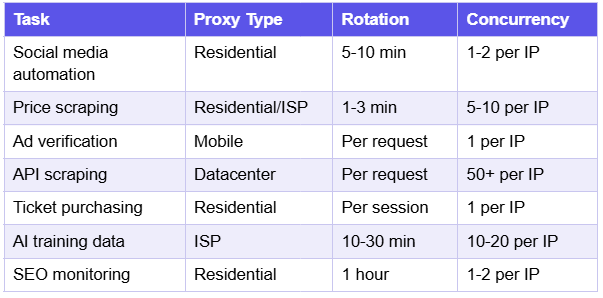
The golden rule: Use the least expensive proxy type that doesn’t get blocked. Start with datacenter. If blocked, move to residential. If still blocked, ISP. Only use mobile as a last resort.
If you’re tired of overpriced residential proxies, Buyingproxy starts at $0.95/GB with no monthly commitment.
메타데이터
- post_id
- 058f6b96fbdd
- slug
- a-comprehensive-guide-to-proxy-ip-types-in-2026-058f6b96fbdd
- url
- https://medium.com/@mariajohnson580iglisalghmxn/a-comprehensive-guide-to-proxy-ip-types-in-2026-058f6b96fbdd
- canonical_url
- https://medium.com/@mariajohnson580iglisalghmxn/a-comprehensive-guide-to-proxy-ip-types-in-2026-058f6b96fbdd
- author_url
- https://medium.com/@mariajohnson580iglisalghmxn
- status
- ok
- fetched_at
- 2026-07-27 06:40:12