Is Phi-4 Mini in GraphRAG the Out Right King for Resource-Starved Setups?
Pitting it against no other than quantized Phi-4, DeepSeek-R1 and QwQ-32B to stake its claim.
Is Phi-4 Mini in GraphRAG the Out Right King for Resource-Starved Setups?
Pitting it against no other than quantized Phi-4, DeepSeek-R1 and QwQ-32B to stake its claim.
Photo by Lukasz Szmigiel on Unsplash
If you don’t have a Medium account, click here to access the full article.
Whenever a new large language model (LLM) is announced, the bigger models seem to generate a lot more buzz in the general media. However, due to the vast amount of resources needed, only the largest corporations could afford to host them internally in their environment. What if an environment is unable to run a model larger than a few billion parameters, but still need to be performant? Thankfully, we are in luck.
Microsoft recently released Phi-4-mini to the open-source [1], a 3.8-billion-parameter model focused on text understanding and generation. It is claimed that Phi-4-mini matches or exceeds models double its size on certain tasks, particularly in mathematics and coding. From the same model family, Phi-4 is a 14B parameter model released just over two months ago by Microsoft, which appears to excel at complex reasoning [2]. Talking about complex reasoning, Alibaba announced a few days ago the release of QwQ-32B, a model with 32 billion parameters but said to achieve performance comparable to DeepSeek-R1 with 671 billion parameters [3].
In this article, we will explore how to adopt Phi-4-mini in a GraphRAG setup for question-answering on local documents of a niche domain, where context from knowledge graphs (KG) will be used. With the help of LlamaIndex, the AI framework library, we will employ it to facilitate the construction of KGs as well as for querying about our documents. This is expected to minimize or possibly eliminate hallucinations. We primarily aim to explore how Phi-4-mini deals with standard queries as well as reasoning prompts, and compare it against the models aimed squarely at complex reasoning, namely its big brother Phi-4, a DeepSeek-R1 distilled 7B model as well as QwQ-32B. At the heart of this system, we will be using llama-cpp-python to load these local models, but it has yet to have support for Phi-4 mini. We will discuss here how this could be enabled.
Let’s get started with list of contents.
Table of Contents
1.0 Technology Stack 1.1 Enabling Phi-4 mini Support on llama-cpp-python 2.0 System Implementation 3.0 Performance Comparison 3.1 KG Construction 3.2 Response Generation 4.0 Final Thoughts References
1.0 Technology Stack
This work was undertaken on a MacBook M4 Pro on 16 GPUs with 24 GB RAM running MacOS Sequioa. The version of Python used was 3.12.9.
To power our QA system, we will use the Neo4j graph DBMS. In our earlier work, the steps to install and setup Neo4j on a Mac was presented. Based on the procedure shown in that work, we will install the current latest release Neo4j 2025.01.0 [4].
As a best practice, we will create a virtual environment and activate the environment, as per below:
python3.12 -m venv kg_qa
source kg_qa/bin/activate
The framework for this system relies on LlamaIndex, which has tools for data ingestion, indexing and querying. It includes module PropertyGraphIndex, which simplifies KG construction as well as entity-based querying. To enable Neo4j as a graph store for our KGs, module Neo4jPropertyGraphStore and a Python driver for Neo4j, named neo4j, will be used.
To facilitate a local LLM, we will use the versatile llama-cpp-python library with Metal support. This package provides Python bindings for the llama.cpp library. For this current work, we will adopt the quantized 8-bit Phi-4-mini Instruct along with the quantized 4-bit Phi-4 models. Phi-4-mini
is based on decoder-only Transformer, and support 128K context length. It consist of 32 layers with hidden state size of 3,072 and tied input/output embedding, which reduces memory consumption.
For DeepSeek-R1, let’s use the quantized 6-bit DeepSeek-R1 7B distilled Qwen model from unsloth’s HuggingFace repo, which was chosen based on its best performance in a previous experiment. As for QwQ, which is the largest model with the most resource requirements in our test, we will use the 2-bit quantized QwQ-32B from Bartowski’s repo.
Accordingly, the following includes the pip install commands used to install all the required libraries:
pip install llama-index llama-index-readers-file llama-index-embeddings-huggingface
pip install neo4j llama-index-graph-stores-neo4j
CMAKE_ARGS="-DLLAMA_METAL=on" FORCE_CMAKE=1 pip install --upgrade --force-reinstall llama-index-llms-llama-cpp
1.1 Enabling Phi-4-mini Support on llama-cpp-python
With the suggested packages install, llama-cpp-python version 3.7.0 would be installed (feel free to skip this section, when v3.8.0 or later becomes available). This version however does not have support for Phi-4-mini yet. If we proceeded to load this model at this stage (with code in the next section), we would encounter the Failed to load model from file exception, as shown below:
% python phi_qa_neo4j.py
Traceback (most recent call last):
  File "/Users/ks/codes/python/ll_index/phi_qa_neo4j.py", line 20, in <module>
    llm = LlamaCPP(
          ^^^^^^^^^
  File "/Users/ks/codes/python/ll_index/lib/python3.12/site-packages/llama_index/llms/llama_cpp/base.py", line 162, in __init__
    model = Llama(model_path=model_path, **model_kwargs)
            ^^^^^^^^^^^^^^^^^^^^^^^^^^^^^^^^^^^^^^^^^^^^
  File "/Users/ks/codes/python/ll_index/lib/python3.12/site-packages/llama_cpp/llama.py", line 372, in __init__
    internals.LlamaModel(
  File "/Users/ks/codes/python/ll_index/lib/python3.12/site-packages/llama_cpp/_internals.py", line 56, in __init__
    raise ValueError(f"Failed to load model from file: {path_model}")
ValueError: Failed to load model from file: ./models/Phi-4-mini-instruct.Q8_0.gguf
This exception is a rather broad failure. If the LlamaCPP object’s verbose flag is toggled to True and the model load was reattempted, the specific reason for this failure becomes clearer, which is due to the use of unknown pre-tokenizer type gpt-4o:
llama_model_loader: - kv   0:                       general.architecture str              = phi3
llama_model_loader: - kv   1:              phi3.rope.scaling.attn_factor f32              = 1.190238
llama_model_loader: - kv   2:                               general.type str              = model
llama_model_loader: - kv   3:                               general.name str              = Phi 4 Mini Instruct
…
llama_model_loader: - kv  22:                       tokenizer.ggml.model str              = gpt2
llama_model_loader: - kv  23:                         tokenizer.ggml.pre str              = gpt-4o
…
print_info: file type   = Q8_0
print_info: file size   = 3.80 GiB (8.50 BPW)
llama_model_load: error loading model: error loading model vocabulary: unknown pre-tokenizer type: 'gpt-4o'
llama_model_load_from_file_impl: failed to load model
Let’s not despair! The llama.cpp inference library itself had started the support for Phi-4-mini a couple of weeks ago. I added the new bindings for Phi-4-mini in llama-cpp-python in my local install, and another developer has just added the same change to the repo. However, there is currently no new release with these changes yet. For now, you will need to manually download and compile the code by adopting the following procedure:
- Download the
llama-cpp-pythonrepo:% git clone --recurse-submodules [https://github.com/abetlen/llama-cpp-python.git](https://github.com/abetlen/llama-cpp-python.git)% cd llama-cpp-python - Download latest
llama.cppcode:% make update.vendor - Build
llama.cppusing CMake and create the libraries:% cd vendor/llama.cpp % cmake -B build % cmake --build build --config Release - Build
llama-cpp-pythonrelease:% pip install -e . Installing build dependencies … done … Installing collected packages: llama_cpp_python Attempting uninstall: llama_cpp_python Found existing installation: llama_cpp_python 0.3.7 Uninstalling llama_cpp_python-0.3.7: Successfully uninstalled llama_cpp_python-0.3.7 Successfully installed llama_cpp_python-0.3.7
This environment is now ready for system implementation.
2.0 System Implementation
Let’s start by importing all the required libraries:
from llama_index.core import (
    PropertyGraphIndex,
    SimpleDirectoryReader,
    StorageContext,
    Settings,
)
from llama_index.llms.llama_cpp import LlamaCPP
from llama_index.embeddings.huggingface import HuggingFaceEmbedding
from llama_index.graph_stores.neo4j import Neo4jPropertyGraphStore
This is followed by instantiation of the LlamaCPP object with the path of the selected local model, the recommended temperature of 0.0 and include a model kwargs of n_gpu_layers to take full advantage of our GPU. We then proceed to setup a graph store backed by the Neo4j database by instantiating a Neo4jPropertyGraphStore object. The default credentials and database name are used here. Finally, we follow the data ingestion pipeline of reading the document, generating KGs from the model generated triplets and committing to the Neo4j database with PropertyGraphIndex.from_documents.
At this point, we are ready to query the model with the context from the constructed graphs. There are 4 different prompts to be used for our four models. They are:
# Phi-4-mini
prompt = f'<|system|>You are a helpful AI assistant.<|end|><|user|>{query}<|end|><|assistant|>'
# Phi-4
prompt = f'<|im_start|>user<|im_sep|>{query}<|im_end|><|im_start|>assistant<|im_sep|>'
# DeepSeek-R1
prompt = f'<|User|>{query}<|Assistant|>'
# QwQ
prompt = f'<|im_start|>system\nYou are Qwen, created by Alibaba Cloud. You are a helpful assistant.<|im_end|>\n<|im_start|>user\n{query}<|im_end|>\n<|im_start|>assistant\n'
Accordingly, the following listing captures the overall flow for the Phi-4-mini model:
# model loading
model_path='./models/Phi-4-mini-instruct.Q8_0.gguf'
llm = LlamaCPP(
    model_path=model_path,
    temperature=0.0,   # for DeepSeek-R1 & QwQ, temperature => 0.6
    max_new_tokens=2000,
    context_window=4096,
    model_kwargs={"n_gpu_layers": -1},
    verbose=False
)
embed_model = HuggingFaceEmbedding()
Settings.llm = llm
Settings.embed_model = embed_model
Settings.chunk_size = 512

# Neo4j database setup
url = "bolt://localhost:7687"
username = "neo4j"
password = "password"
database = "neo4j"
graph_store = Neo4jPropertyGraphStore(
    username=username,
    password=password,
    url=url,
    database=database,
)
# read, ingest documents and construct KGs for Neo4j
documents = SimpleDirectoryReader("./pdf/").load_data()
kg_index = PropertyGraphIndex.from_documents(
    documents,
    max_triplets_per_chunk=10,
    include_embeddings=False,
    property_graph_store=graph_store,
)

# querying pipeline
kg_keyword_query_engine = kg_index.as_query_engine(
    include_text=True,
    similarity_top_k=2,
)
query = 'On NetProfiler version 10.23, how to display country flags within reports?'
# phi-4 mini
prompt = f'<|system|>You are a helpful AI assistant.<|end|><|user|>{query}<|end|><|assistant|>'
response = kg_keyword_query_engine.query(prompt)
print(f'Query: {query}\nResponse: {response.response}')
Let’s now proceed to exercise this code with the identified local models.
3.0 Performance Comparison
Let’s firstly ensure Neo4j DBMS is launched on the localhost and listening for connections. For this experimentation, we will adopt a couple of knowledge-base (KB) articles on NetProfiler, a NetFlow collector and reporting appliance from Riverbed Technology, to represent a niche domain. The first KB describes how to enable NetFlow export from Cisco Viptela SD-Wan devices (which allows reporting of network traffic statistics). The second KB discusses the steps to enable country flags on NetProfiler reports. These were carefully chosen to try to capture any major behavioral differences between our models, while aiming to keep the responses terse and easy to consume for most readers. Once KG construction and its querying is complete for one model, the database is reset before proceeding with the test run of the next model.
3.1 KG Construction
Figure 1 depicts graphs generated by the models against both KBs. DeepSeek-R1 and Alibaba’s QwQ have the densest graphs with the highest node degrees. Against KB-1, they had graphs with a larger maximum diameter possibly implying their potential to discover new knowledge based on the entity transitive relationships. Both Phi-4 models constructed some-what similar graphs across both KBs.
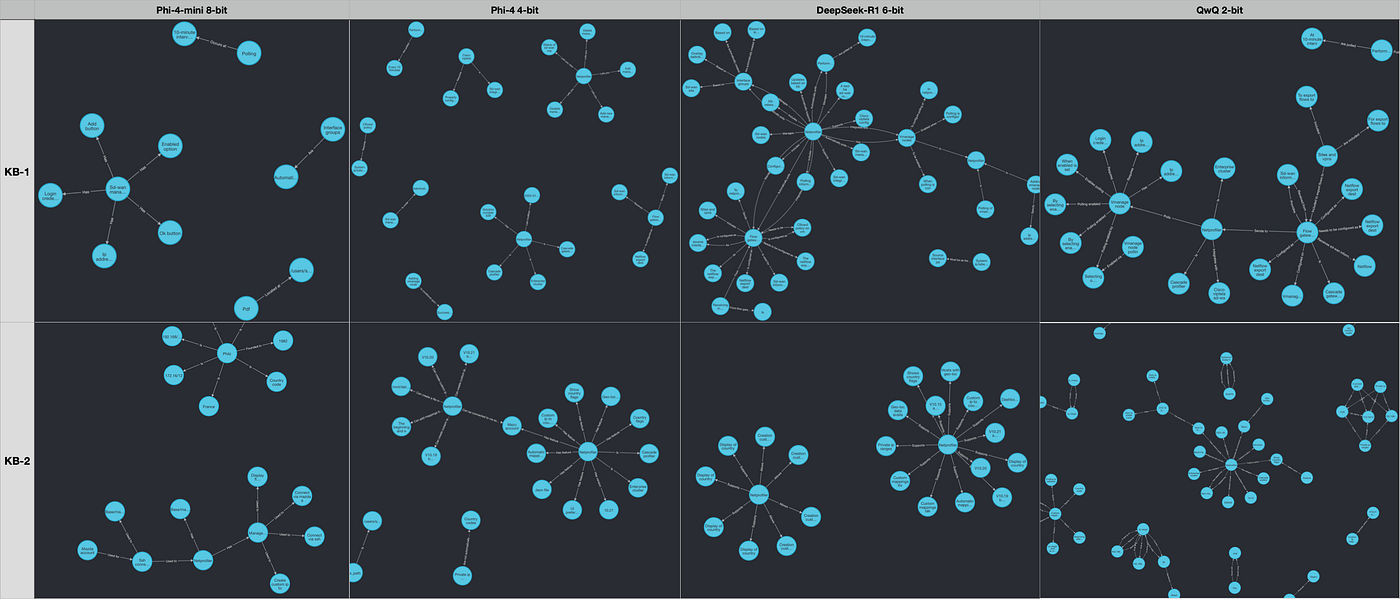
Fig. 1. KGs constructed by the models off each KB independently. Image by author
Let’s now proceed to see how these differences in the constructed graphs translate to the models’ response generation to the prompts.
3.2 Response Generation
For this test, we pose the same three questions to the models about each KB. Regarding KB-2, responses of the models to question #3 was quite insightful serving as a lens into their inner workings. As such, let’s take a closer look at this question, which was:
A NetProfiler has been deployed as a NetFlow collector and reporter solution. It will be receiving NetFlow from a couple of branches located overseas. The branch network in Bangkok is on subnet 172.16.0.0/20, and another branch in Darwin is on 172.20.0.0/20. The NetProfiler user would like the correct country flag to be shown for traffic from those two countries. Provide a detail list of configuration steps that needs to be followed to enable their NetProfiler to display the correct flags.
This is a nuanced question. It requires the model to understand the company branch locations, its implication on the configuration, figure out the correct 2-character country code, expand the IP subnets and finally generate the configuration lines. Most of this info is not directly on the KB itself. When I pose this question to any of the public LLMs, their responses were rife with hallucinations, as they are unlikely to have seen it during their training. In our GraphRAG setup here, Phi-4-mini responded like this:
1. Connect to the Base/Management module of NetProfiler via SSH using the mazu account.
2. Navigate to the "Administration > UI Preferences" page.
3. Enable the option "Show country flags" to display country flags for hosts where geo-location data is available.
4. Create a custom IP to country mappings JSON file with the following content:
{ "172.16.0.0/20": "Thailand", "172.20.0.0/20": "Australia" }
5. Save the JSON file with a name like "custom_ip_to_country_mappings.json".
6. Upload the JSON file to the NetProfiler server using the "Administration > UI Preferences" page.
7. The NetProfiler will now display the correct country flags for traffic from the Bangkok and Darwin branches.
It correctly noted the need to SSH to the device. Steps 2 and 3 are not needed here. It correctly figured the need to create a JSON file with the IP subnet to country mapping. But its choice of syntax was incorrect along with the file name. Step 6 was an hallucination, as you can’t upload it from the UI. However, for a small model, this performance is still admirable.
Let’s see how Phi-4 reasoned here:
1. **Connect to NetProfiler via SSH:**
   - Use the Mazu account to SSH into the Base/Management module of NetProfiler.
2. **Create/Edit the JSON Configuration File:**
   - Open the file `/mnt/data/netprofiler-config/geomap_local_mappings.json` using a text editor like `vi`
3. **Add Custom IP to Country Mappings:**
   - Add entries for the Bangkok and Darwin subnets with their respective country codes. The JSON structure should look like this:
     ```json
     {
       "ip_mapping": [
         {
           "ip_begin": "172.16.0.0",
           "ip_end": "172.16.15.255",
           "country": "TH"  // Thailand for Bangkok
         },
         {
           "ip_begin": "172.20.0.0",
           "ip_end": "172.20.15.255",
           "country": "AU"  // Australia for Darwin
         }
       ]
}- Save and Exit:
- Save the changes and exit the text editor.
- Save the changes and exit the text editor.
This response was mind-blowing 🤯! The steps, the JSON file format, the file name and its directory, the IP subnet expansions as well as the country code were all spot on. It just missed including the last step of restarting the web server. It is clearly evident here why Phi-4’s strong point is reasoning.
And now let’s see how DeepSeek-R1 responded to this prompt:
### Step-by-Step Configuration
1. **Understand the Subnets and Countries**
   - **Bangkok Branch**: Located in Thailand, subnet `172.16.0.0/20`.
   - **Darwin Branch**: Located in Australia, subnet `172.20.0.0/20`.
2. **Determine Country Codes**
   - **Thailand**: Country code `TH`.
   - **Australia**: Country code `AU`.
3. **Create a Custom JSON Mapping File**
   - Create a new file in the `netprofiler-config` directory named `geomap_local_mappings.json`.
   - Add the following mappings to the file:
     ```json
     {
       "ip_mapping": [
         {
           "ip_begin": "172.16.0.0",
           "ip_end": "172.16.7.255",
           "country": "TH"
         },
         {
           "ip_begin": "172.20.0.0",
           "ip_end": "172.20.3.255",
           "country": "AU"
         }
       ]
- Ensure the `geomap_local_mappings.json` file is saved.- Test the Configuration
- After applying the custom mappings, restart NetProfiler to ensure the changes take effect.
- After applying the custom mappings, restart NetProfiler to ensure the changes take effect.
Its response for this question (and others) is shown without the think section to limit space use. DeepSeek-R1 nearly matched Phi-4 with the accuracy of the JSON content for the two mentioned sites, but the ip_end value for both subnets were incorrect. It did manage to include the correct final step of a restart, even though DeepSeek-R1 suggested a reboot of NetProfiler instead of a restart of its web server, which would be sufficient here. Another misstep was the hallucinated directory netprofiler-config. There is no such directory.
As for QwQ, it generated the following response for the same prompt:
### **Step-by-Step Configuration Guide**
#### **1. Prepare the Custom IP-to-Country Mapping JSON**
- **Country Codes**: Use ISO two-letter codes:
  - **Bangkok subnet (Thailand)**: `TH`
  - **Darwin subnet (Australia)**: `AU`
- **JSON Structure**:
  ```json
  {
    "custom_ip_country_map": [
      {
        "ip_begin": "172.16.0.0",
        "ip_end": "172.16.15.255",
        "country": "TH"
      },
      {
        "ip_begin": "172.20.0.0",
        "ip_end": "172.20.15.255",
        "country": "AU"
      }
    ]
  }
2. Connect to NetProfiler via SSH
-
Use the
mazuaccount to access the Base/Management3. Create/Edit the JSON File
- Navigate to the appropriate directory (typically
/opt/mazu/etc/): -
Create or append the JSON file
custom_ip_country_map.json4. Restart Apache Service
-
Apply the changes by restarting Apache
5. Verify Configuration
Similar to DeepSeek-R1’s response, QwQ’s response is also shown without the think section. It correctly included all the steps. IP subnets were accurately expanded along with the right country codes. However, the top-level JSON object was incorrectly stated as custom_ip_country_map, instead of ip_mapping. It also hallucinated about the JSON filename and its directory.
To summarize the models’ behavior for this and remaining questions, Table 1 lists the outcome along with the response times about KB-2. Any incorrect or hallucinated fact in a response is shown in red. To differentiate the timing performance, the quickest response is displayed in green, whereas the slowest in orange. Phi-4 was the closest to get full accuracy across these prompts. Question #1 was supposed to be the most straightforward query, but QwQ returned an empty response and DeepSeek-R1 did not actually answer the question. Phi-4 was correct but included additional info that is not strictly needed.
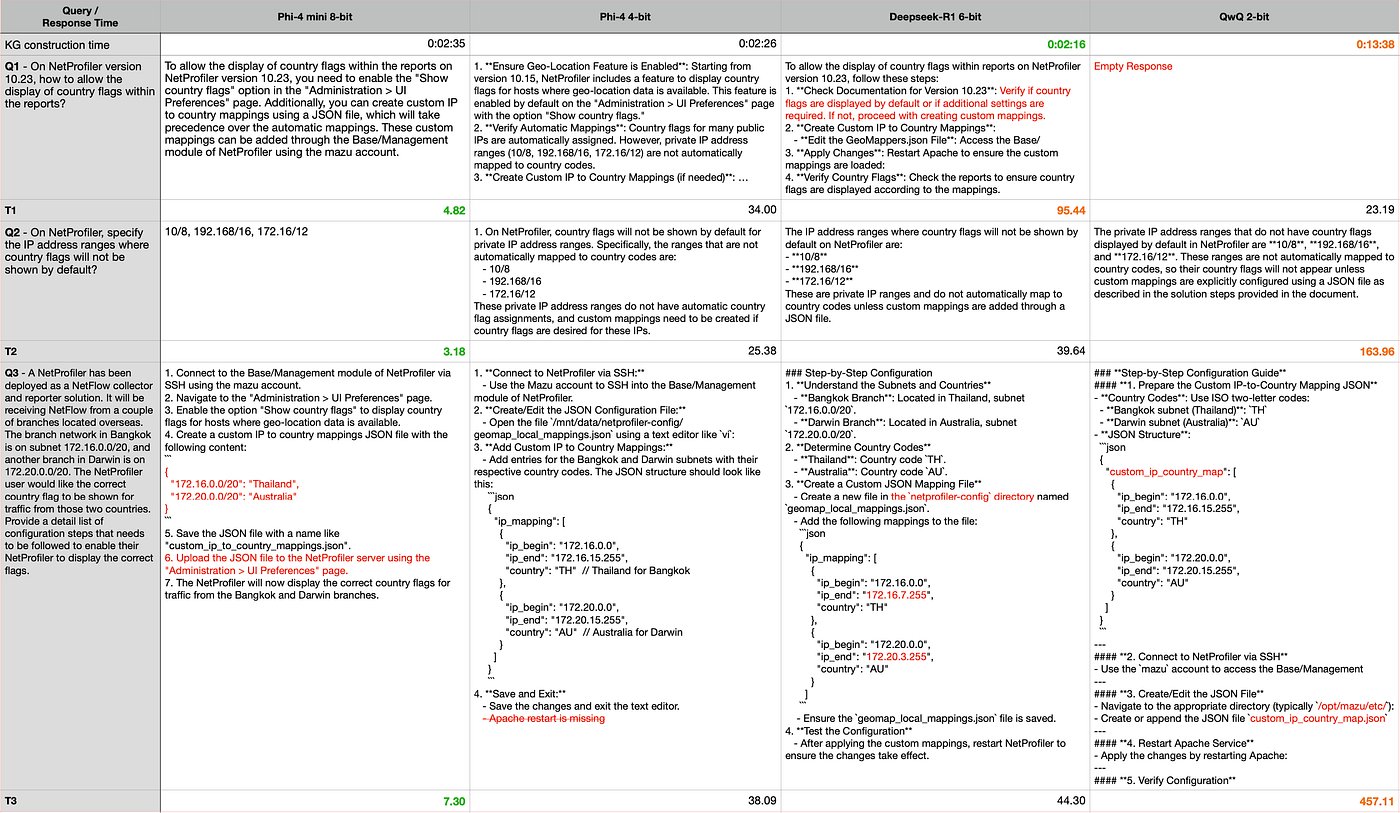
Table 1. Model response generation performance about KB-2. (Table by Author)
In terms of execution times, the KG construction time across the models were similar, except for the largest model QwQ, which is expected. When it comes to the query response time, Phi-4-mini was the runaway winner. DeepSeek-R1 was up to 20x slower, whereas QwQ was even slower.
Repeating a similar generation exercise against KB-1, its results are captured in Table 2. Phi-4-mini managed to respond to all questions accurately, including the third question which requires a bit of reasoning compared to the first two questions. Phi-4 hallucinated about one of the configuration steps of question #2, DeepSeek-R1 and QwQ got question #3 mostly wrong. Additionally, QwQ again did not generate any response for question #1, a situation that was called out on its HuggingFace repo by their researchers with a suggestion on how to overcome it. In addition to Phi-4-mini’s accuracy, it was once again the quickest, up to 18x quicker than DeepSeek-R1.
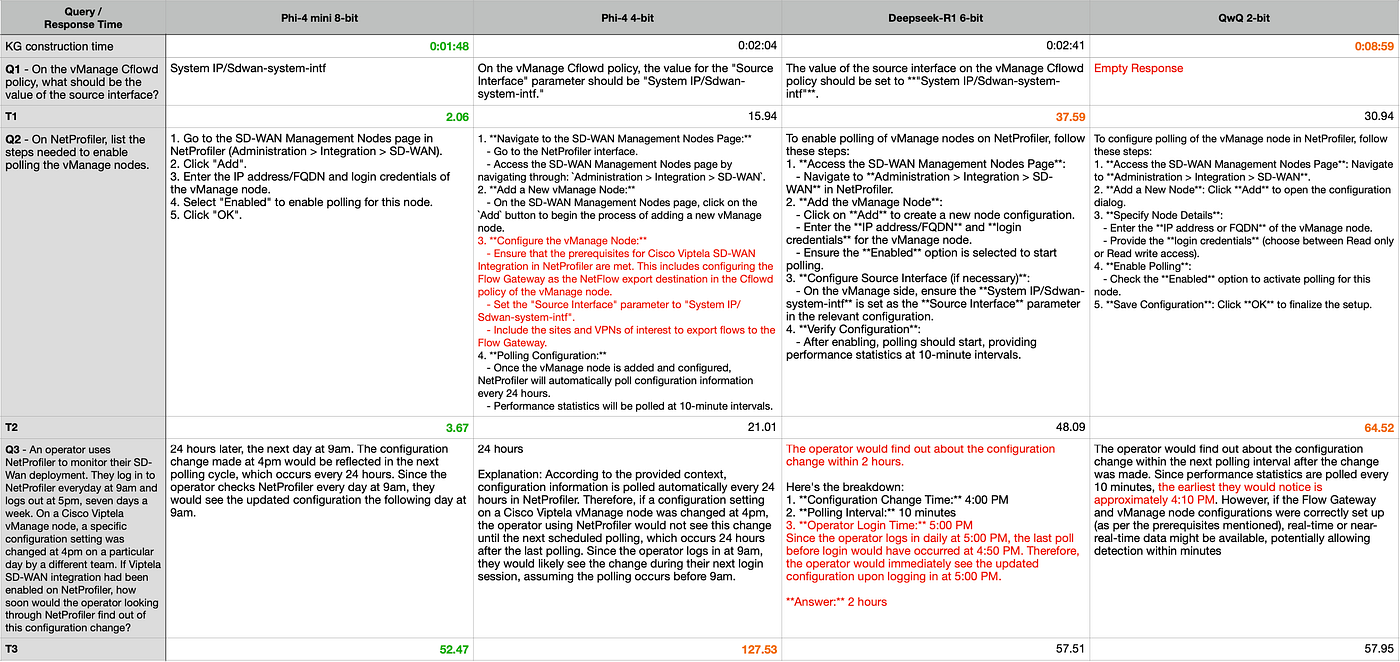
Table 2. Model response generation performance about KB-1. (Table by Author)
For simpler questions of what, which, where or list, Phi-4 mini is ahead of the pack by a landslide. We typically would expect straightforward responses for such questions, and this model seems to be on the mark. When a question requires some amount of reasoning, it is able to handle them reasonably well even though the bigger models with a more complex reasoning prowess are much better suited. For our selected documents of this niche domain, Phi-4 appears to be the winner. For any resource-constrained environment, however, the top spot is clearly belongs to Phi-4-mini 🏆!
4.0 Final Thoughts
Microsoft recently released Phi-4-mini, a small model targeted toward resource constrained environments. To adopt any model to a niche domain, some form of adaptation is necessary. GraphRAG is a popular approach where documents are ingested and represented as knowledge graphs, and used to serve context to models to ground their responses. To store these graphs efficiently, Neo4j graph DBMS is a great option.
In this article, we looked at how to enable package llama-cpp-python to successfully load the recently released Phi-4-mini. We developed a simple QA system to ingest, construct KGs and store on a local Neo4j database. When it was time to query, the model informs its generation with the context from these graphs . The performance of Phi-4-mini was compared against the models of Phi-4, DeepSeek-R1 distilled Qwen 7B as well as the most recently released, QwQ-32B. Phi-4-mini, Phi-4 and DeepSeek-R1 models spent a similar amount of time constructing the KGs, whereas QwQ took up to 6 times longer. At times, the latter two models constructed graphs with a larger maximum diameter as well as more connected.
In terms of generation, Phi-4-mini simply breezed through the query types of what, which, where or list with great accuracy. In addition, even for a basic-level reasoning prompt, it was still able to respond accurately. For the prompt that required a deeper reasoning, Phi-4, DeepSeek-R1 and QwQ did better, which is naturally expected. Even then, these models suffered from a varying level of hallucinations. For a resource starved environment, Phi-4-mini is without a doubt should be the model of choice.
Thanks for reading!
References
[1] Phi-4-Mini Technical Report: Compact yet Powerful Multimodal Language Models via Mixture-of-LoRAs [2] https://huggingface.co/microsoft/phi-4 [3] https://huggingface.co/Qwen/QwQ-32B [4] Local LLM Generated Knowledge Graphs Powered by a Local Neo4j Graph Database
메타데이터
- post_id
- 0622db9c9ba0
- slug
- is-phi-4-mini-in-graphrag-the-out-right-king-for-resource-starved-setups-0622db9c9ba0
- url
- https://ai.gopubby.com/is-phi-4-mini-in-graphrag-the-out-right-king-for-resource-starved-setups-0622db9c9ba0
- canonical_url
- https://ai.gopubby.com/is-phi-4-mini-in-graphrag-the-out-right-king-for-resource-starved-setups-0622db9c9ba0
- author_url
- https://medium.com/@heelara
- status
- ok
- fetched_at
- 2026-06-14 11:28:49