Designing an AI-Native Developer Hub
As organizations adopt AI at scale, one challenge becomes increasingly clear: we don’t just need more AI — we need visibility, structure…
Designing an AI-Native Developer Hub
As organizations adopt AI at scale, one challenge becomes increasingly clear: we don’t just need more AI — we need visibility, structure, and governance around it.
Models, agents, prompts, tools, and orchestration logic are being created across teams, repositories, and platforms. Without a clear system of record, the AI landscape quickly becomes fragmented.
In this article, I describe how I approached this problem by combining:
- **C4 architecture thinking** to structure the platform
- A Developer Hub as the control plane
- Cataloging the entire AI estate as first-class assets
- Dynamically importing agents from Watson Orchestrate, exposed through MCP
Starting with C4: A Simple Way to Design a Developer Hub
The C4 model provides a simple mental framework by progressively zooming in:
- Context — Who uses the system and why?
- Containers — What runs the system?
- Components — What are the main building blocks?
- Code — How is it implemented?
This approach keeps discussions grounded in purpose rather than technology.
At the context level, the need is straightforward:Developers and AI agents need a single place to discover, understand, and interact with the organization’s AI capabilities.That “single place” is the Developer Hub.
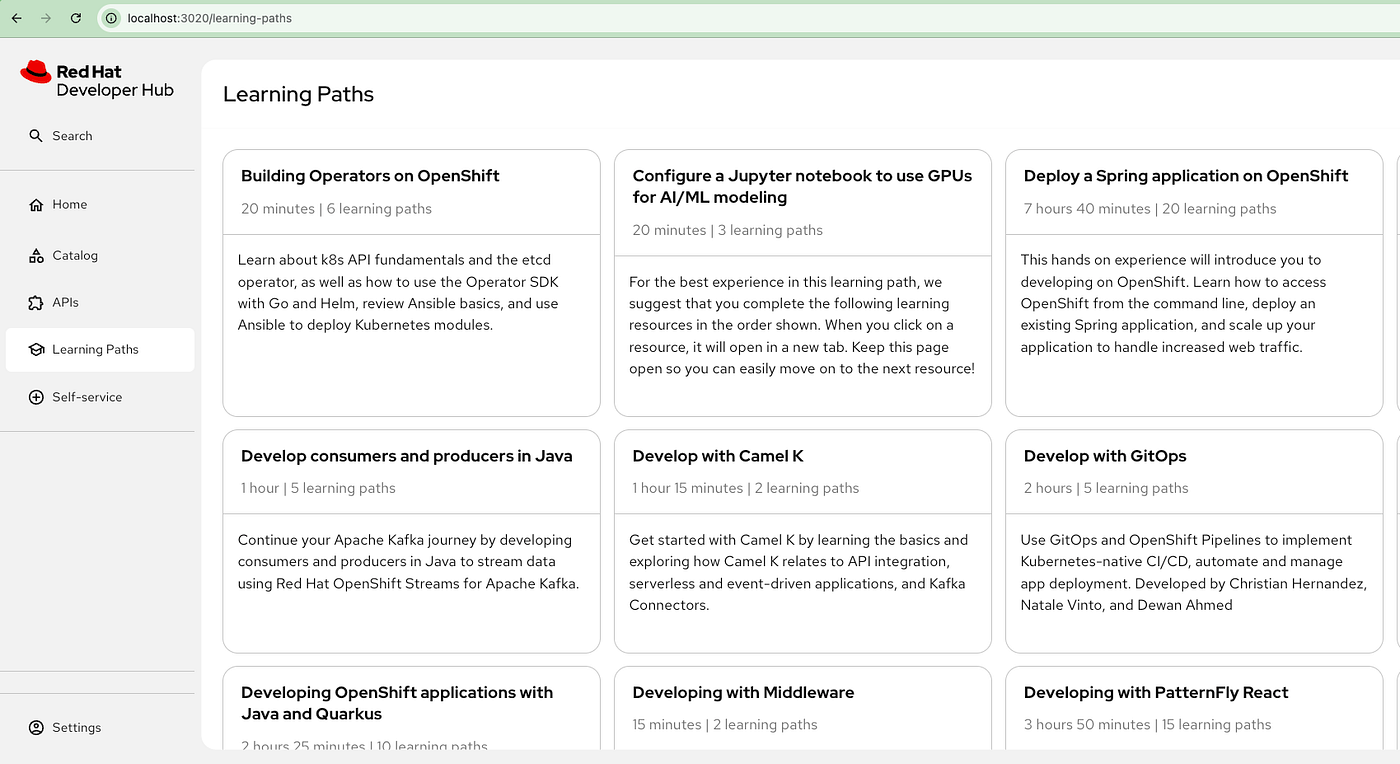
Red Hat Developer Hub is a customizable developer portal with enterprise-level support and a centralized software catalog that one can use to build high-quality software efficiently in a streamlined development environment.It’s upstream project is backsatge.
Installing Red Hat Developer Hub
This blog is more focussed on installing in developer mode .
- Clone https://github.com/redhat-developer/rhdh
- start the Backend
yarn - cwd packages/backend start- Start the Front-End
yarn --cwd packages/app start - Above command open the page in the browser.
Cataloging the Entire AI Estate
This is the pivotal shift:AI is not a special case — it is part of the software estate.Cataloging the AI estate means treating AI assets the same way we treat services, APIs, and infrastructure.
What does “AI estate” include?
- Foundation models
- AI agents
- MCP Tool integrations
Each of these becomes a first-class entity in the Developer Hub.
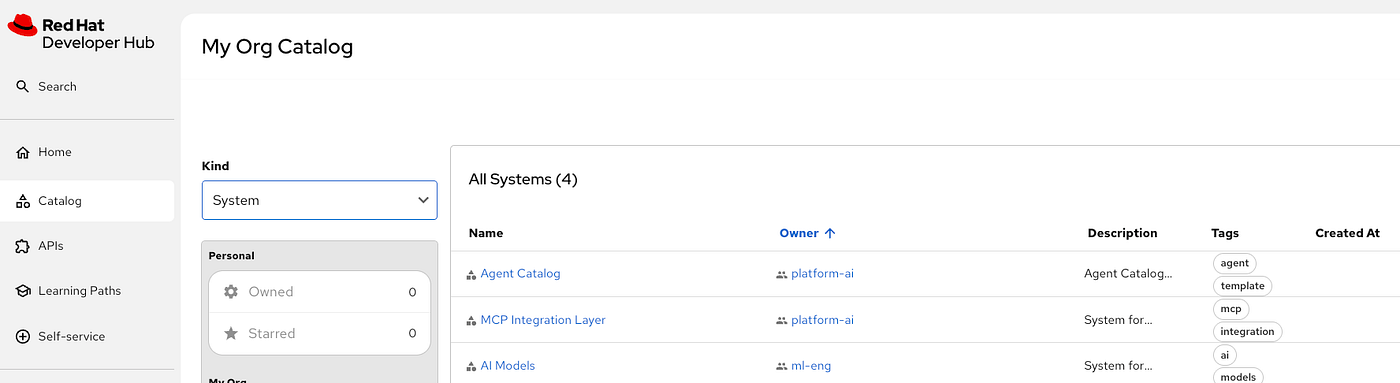
- Define the System Definition for ai-models.
apiVersion: backstage.io/v1alpha1
kind: System
metadata:
  name: ai-models
  title: AI Models
  description: System for model services & artifacts.
  tags: [ai, models]
spec:
  owner: group:ml-eng
lifecycle: production- Same way define it for Agent Catalog and MCP Integration Layer.Edit the app-config.local.yaml file and edit this as location.
catalog:
  database:
    client: better-sqlite3
    connection:
      filename: ./database/catalog.sqlite
  import:
    entityFilename: catalog-info.yaml
    pullRequestBranchName: backstage-integration
  rules:
    - allow: [Component, System, Group, Resource, Location, Template, API]
  locations:
    - type: file
      target: ../../catalog-entities/all.yaml
    - type: url
target: https://github.com/shrishs/ai-platform-catalog/blob/main/catalog/location.yaml - Restart the servers and you see all the System displayed
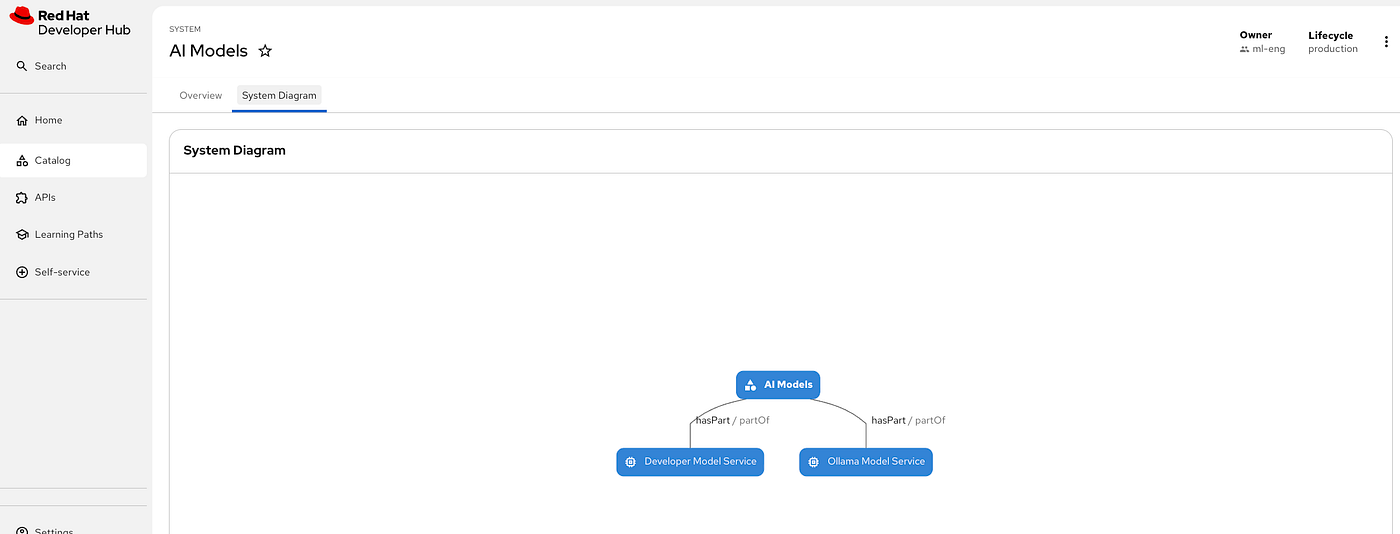
- Create the component for model as explained in this articles.And define your catalog-info.yaml and link it with the existing system(ai-models).
apiVersion: backstage.io/v1alpha1
kind: Component
metadata:
  name: developer-model-service
  annotations:
    backstage.io/techdocs-ref: dir:./
  description: 'A vLLM and 3scale-based model service providing models for developer tools. A single model (IBM Granite Code 8b) is deployed on it through Red Hat OpenShift AI, and accessed over a secured API.'
  links:
    - url: https://model-service.apps.domain.com
      title: Access
      type: website
      icon: WebAssett
    - url: https://ibm-granite-8b-code-instruct-vllm.apps.domain.com
      title: API URL
      type: website
      icon: WebAsset
  tags:
    - genai
    - ibm-granite
    - vllm
    - llm
    - developer-model-service
    - authenticated
    - gateway
spec:
  type: model-server
  owner: group:ml-eng
  system: ai-models
  lifecycle: production
  providesApis:
    - model-service-api
  dependsOn:
    - resource:ibm-granite-8b-code-instruct
    - api:model-service-api
  profile:
displayName: "Developer Model Service"- Now click on AI Model and ,it displays all the model listed.
- Define the component of for MCP Server.
Templates to Intelligent Agents: Scaffolding AI Agents with watsonx Orchestrate **Agent development Kit**
To scale agent development, manual creation is not enough. Agent creation can be standardized through templates that define structure, skills, tooling, and metadata upfront. These templates act as scaffolding, enabling developers to rapidly bootstrap new agents in a consistent and governed way. Integrated into the Developer Hub, this approach turns agent creation into a repeatable, self-service workflow rather than a bespoke engineering effort.
- Create a template.
apiVersion: scaffolder.backstage.io/v1beta3
kind: Template
metadata:
  name: orchestrate-agent
  title: Create a watsonx Orchestrate Agent
  description: A simple Backstage template to scaffold a watsonx Orchestrate ADK agent definition.
  tags: [watsonx, orchestrate, adk]
spec:
  type: template
  lifecycle: development
  owner: group:platform-ai
  system: ai-agent
  parameters:
    - title: Agent information
      required: [agentName, description]
      properties:
        agentName:
          title: Agent Name
          type: string
          description: Name of the agent (e.g., hello-agent)
        description:
          title: Description
          type: string
          description: What does this agent do?
        lifecycle:
          title: Choose Environment
          type: string
          enum: [development, staging ,production]
          default: development
        mcpServer:
          title: Choose MCP Server
          type: string
          description: Select an available MCP server from the catalog
          ui:field: EntityPicker
          ui:options:
            catalogFilter:
              kind: Component
              spec.type: mcp-server
            defaultKind: Component
        model:
          title: Choose Model
          type: string
          description: Select an available model from the catalog
          ui:field: EntityPicker
          ui:options:
            catalogFilter:
              kind: Resource
              spec.type: ai-model
            defaultKind: Resource
        owner:
          title: Owner
          type: string
          description: Backstage owner entity (e.g., group:platform)
        repoUrl:
          title: Repository
          type: string
          description: github.com?owner=your-org&repo={{ parameters.agentName }}

  steps:
    - id: fetch
      name: Fetch skeleton
      action: fetch:template
      input:
        url: ./skeleton
        values:
          agentName: ${{ parameters.agentName }}
          description: ${{ parameters.description }}
          lifecycle: ${{ parameters.lifecycle }}
          mcpServer: ${{ parameters.mcpServer }}
          model: ${{ parameters.model }}
          owner: ${{ parameters.owner }}
          repoUrl: ${{ parameters.repoUrl }}

    - id: publish
      name: Publish to GitHub
      action: publish:github
      input:
        repoUrl: github.com?owner=${{ parameters.owner }}&repo=${{ parameters.agentName }}
        defaultBranch: main
        repoVisibility: private

    - id: register
      name: Register in Backstage
      action: catalog:register
      input:
        repoContentsUrl: ${{ steps.publish.output.repoContentsUrl }}
        catalogInfoPath: /catalog-info.yaml

  output:
    links:
      - title: Repository
        url: ${{ steps.publish.output.remoteUrl }}
      - title: Backstage entity
url: ${{ steps.register.output.entityRef }}- Define the Agent skelton.
spec_version: v1
kind: native
name: ${{ values.agentName }}
description: ${{ values.description }}
instructions: "This agent uses ${{ values.mcpServer }} with available tools: {% for tool in values.mcpTools %}{{ tool.name }}{% if not loop.last %}, {% endif %}{% endfor %}"
llm: ${{ values.model }}
mcp_server: ${{ values.mcpServer }}
lifecycle: ${{ values.lifecycle }}
style: default
collaborators: []
tools:
{% for tool in values.mcpTools %}
  - name: {{ tool.name }}
    description: {{ tool.description | replace('\n', ' ') }}
    type: mcp
    server: ${{ values.mcpServer }}
{% endfor %}- Go to developer Hub portal and create a agent using the template.
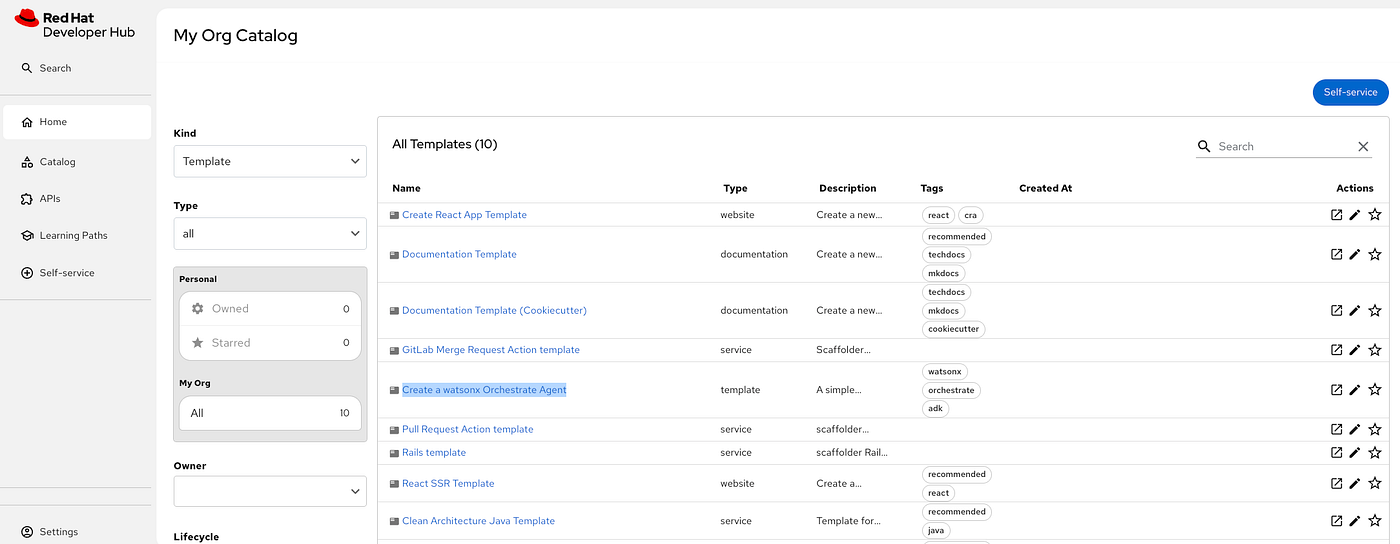
- Launch the template.
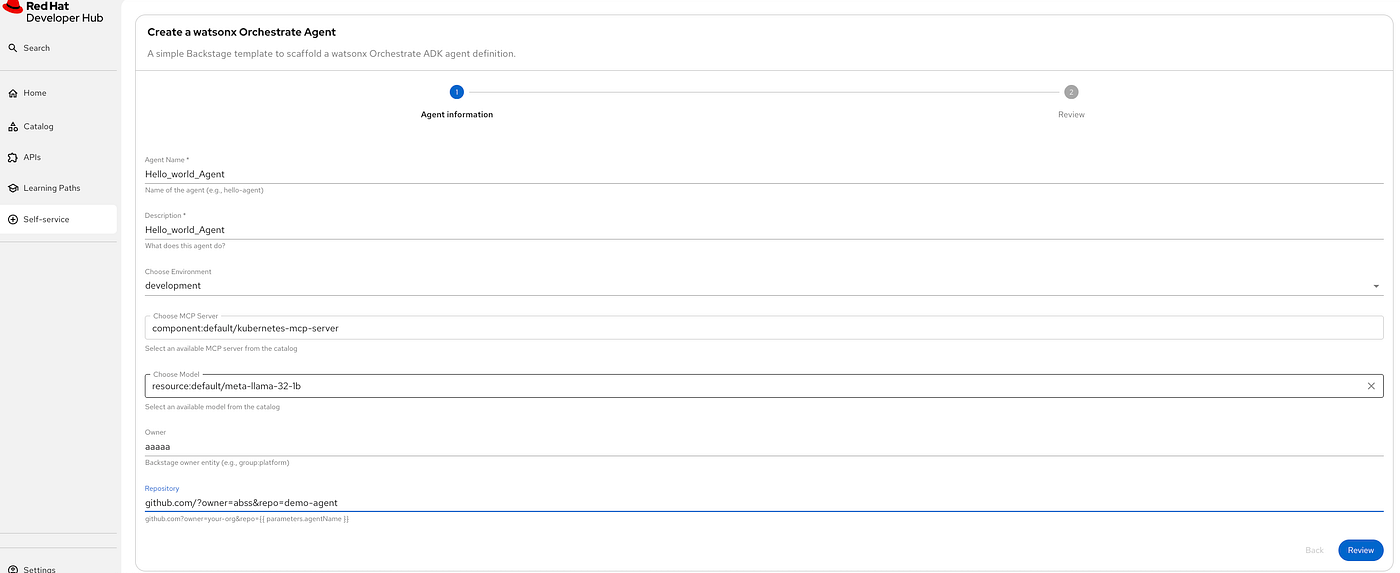
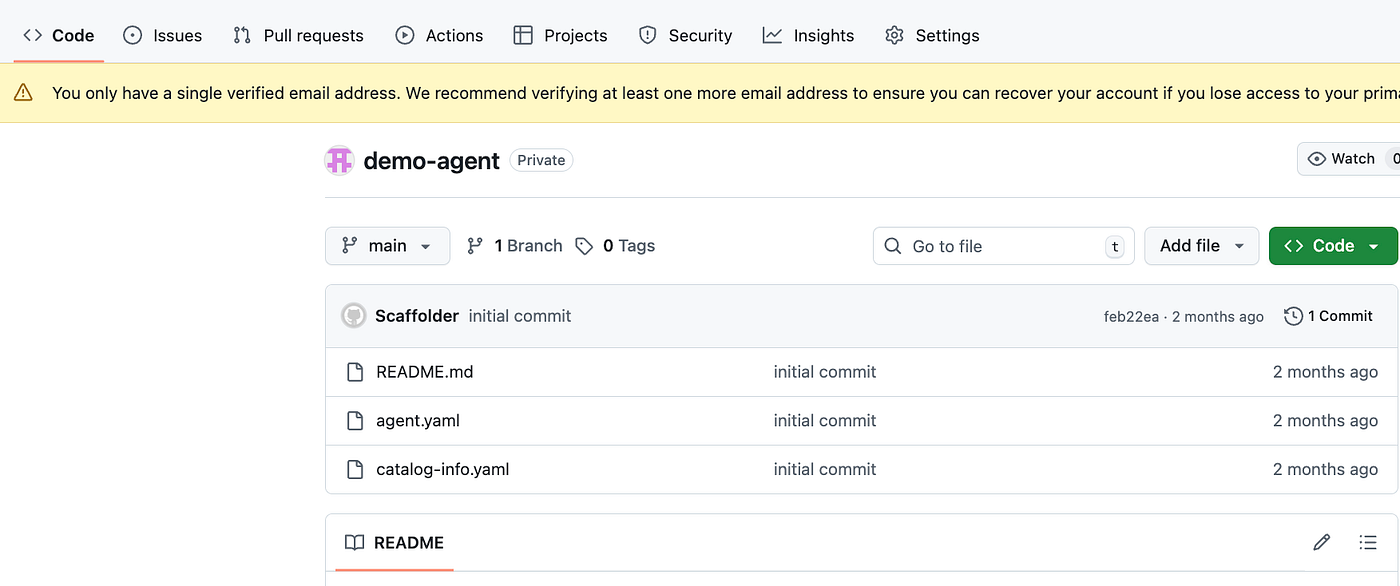
- This creates all the required scaffolding in your github repo and is ready to be imported in watsonx orchestrate.This is detailed in my previous article.
Retrieving watsonx Orchestrate Agents in Red Hat Developer Hub (RHDH)
It is implemented using a custom Backstage EntityProvider that:
- Calls the watsonx Orchestrate Agents API
- Transforms each agent into a Backstage
Resource - Registers those resources dynamically with the Catalog
- Periodically refreshes them using the Backstage scheduler
- Create backend/src/modules/OrchestrateAgentsEntityProvider.ts
import { EntityProvider, EntityProviderConnection } from '@backstage/plugin-catalog-node';
import { LoggerService } from '@backstage/backend-plugin-api';

type OrchestrateAgent = {
  id?: string; name?: string; displayName?: string; description?: string; version?: string;
};

export default class OrchestrateAgentsEntityProvider implements EntityProvider {
  private connection?: EntityProviderConnection;

  constructor(
    private readonly opts: { id: string; baseUrl: string; token: string; logger: LoggerService }
  ) {}

  getProviderName() {
    return `orchestrate-agents-provider:${this.opts.id}`;
  }

  async connect(connection: EntityProviderConnection) {
    this.connection = connection;
    this.opts.logger.info('[orchestrate] Catalog connection established');
  }

  private async fetchAgents(): Promise<OrchestrateAgent[]> {
    const url = `${this.opts.baseUrl.replace(/\/$/, '')}/api/v1/orchestrate/agents?include_hidden=false`;
    this.opts.logger.info(`[orchestrate] Fetching agents from ${url}`);

    const res = await fetch(url, {
      headers: { accept: 'application/json', authorization: `Bearer ${this.opts.token}` },
    });
    if (!res.ok) {
      const body = await res.text().catch(() => '');
      throw new Error(`Orchestrate API ${res.status}: ${body}`);
    }

    const data = await res.json();
    const arr =
      (Array.isArray(data) && data) ||
      data?.agents ||
      data?.items ||
      data?.data ||
      [];

    const count = Array.isArray(arr) ? arr.length : 0;
    this.opts.logger.info(`[orchestrate] Normalized to ${count} agent(s)`);
    return Array.isArray(arr) ? arr : [];
  }

  async run() {
    if (!this.connection) {
      this.opts.logger.warn('[orchestrate] run() called before catalog connection established');
      return;
    }

    this.opts.logger.info('[orchestrate] Starting sync run...');
    try {
      const agents = await this.fetchAgents();
      this.opts.logger.info(`[orchestrate] Received ${agents.length} agent(s) from Orchestrate`);

      const entities = agents.map((a, i) => {
        const id = a.id ?? `no-id-${i}`;
        const title = a.displayName ?? a.name ?? `Agent ${id}`;
        const desc = a.description ?? 'watsonx Orchestrate agent';
        const metadataName = `orch-agent-${String(id).toLowerCase().replace(/[^a-z0-9-]/g, '-')}`.slice(0, 63);

        return {
          apiVersion: 'backstage.io/v1alpha1',
          kind: 'Resource',
          metadata: {
            name: metadataName,
            title,
            description: desc,
            annotations: {
              'orchestrate.ibm.com/agent-id': String(id),
              'orchestrate.ibm.com/version': a.version ?? 'unknown',
              'backstage.io/managed-by-location': `url:orchestrate-provider/${id}`,
              'backstage.io/managed-by-origin-location': `url:orchestrate-provider/${id}`,
            },
            tags: ['watsonx', 'orchestrate', 'agent'],
          },
          spec: { type: 'agent', owner: 'orchestrate', system: 'ai-agent' },
        };
      });

      await this.connection.applyMutation({
        type: 'full',
        entities: entities.map(entity => ({ entity, locationKey: this.getProviderName() })),
      });

      this.opts.logger.info(`[orchestrate] Synced ${entities.length} agent(s) into the catalog`);
    } catch (e) {
      this.opts.logger.error(
        `[orchestrate] Failed to refresh Orchestrate agents: ${e instanceof Error ? e.message : String(e)}`
      );
    }
  }
}- Create a Module backend/src/modules/orchestrateAgentsModule.ts
import { coreServices, createBackendModule } from '@backstage/backend-plugin-api';
import { catalogProcessingExtensionPoint } from '@backstage/plugin-catalog-node/alpha';
import OrchestrateAgentsEntityProvider from './OrchestrateAgentsEntityProvider';

const orchestrateAgentsModule = createBackendModule({
  pluginId: 'catalog',
  moduleId: 'orchestrate-agents',
  register(env) {
    env.registerInit({
      deps: {
        config: coreServices.rootConfig,
        logger: coreServices.logger,
        scheduler: coreServices.scheduler,
        processing: catalogProcessingExtensionPoint,
      },
      async init({ config, logger, scheduler, processing }) {
        const baseUrl = config.getString('orchestrate.baseUrl');
        const token = config.getString('orchestrate.token');

        const provider = new OrchestrateAgentsEntityProvider({
          id: 'default',
          baseUrl,
          token,
          logger,
        });

        // Register with the catalog first (so connect() is called)
        processing.addEntityProvider(provider);

        // Periodic refresh
        await scheduler.scheduleTask({
          id: 'orchestrate-agents-refresh',
          frequency: { minutes: 5 },
          timeout: { minutes: 2 },
          fn: async () => provider.run(),
        });

        // Kick off a first run shortly after startup so the connection is ready
        setTimeout(() => {
          logger.info('[orchestrate] Triggering first sync after catalog startup');
          provider.run();
        }, 3000);
      },
    });
  },
});

export default orchestrateAgentsModule;- Update this module in backend/src/modules/index.ts
export * from './authProvidersModule';
export * from './rbacDynamicPluginsModule';
export * from './healthcheck';
export { default as orchestrateAgentsModule } from './orchestrateAgentsModule';- Also add this in backend/src/index.ts
const backend = createBackend();
backend.add(import('@backstage/plugin-mcp-actions-backend'));
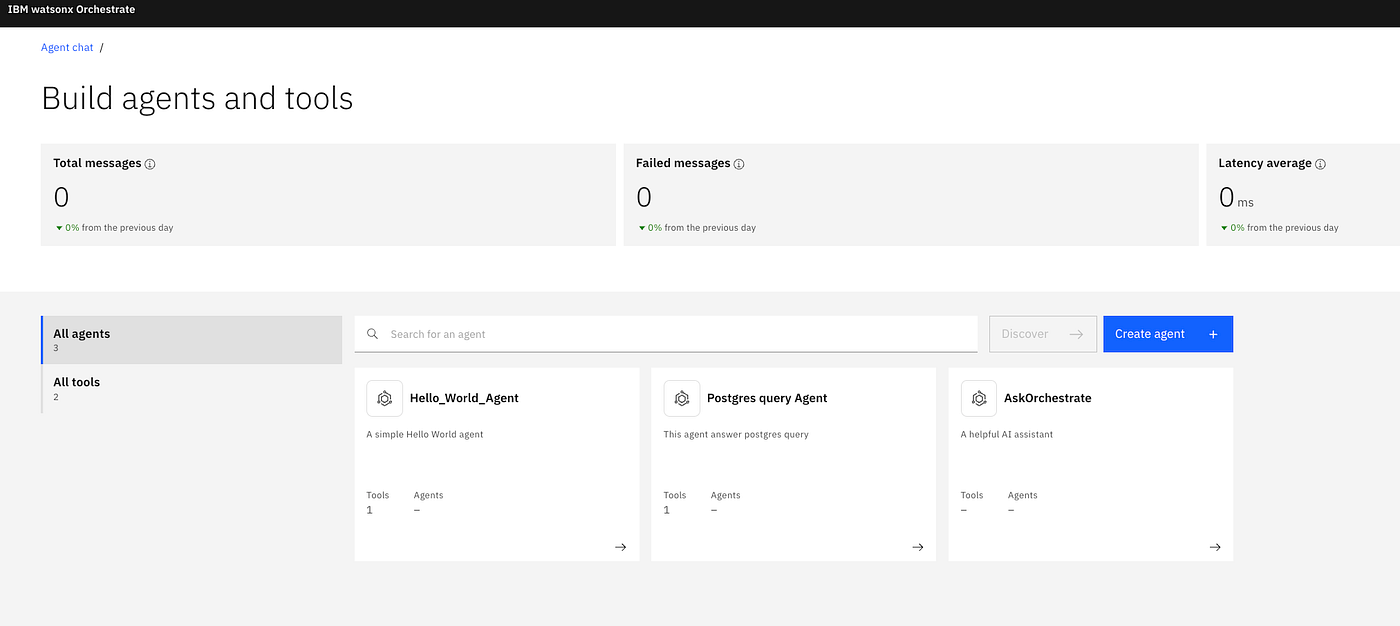
backend.add(orchestrateAgentsModule);- Verify how many Agents are running in watsony Orchestrate.
- Restart the backend and in the log you see agents are getting retrieved.
yarn --cwd packages/backend start
25-12-26T20:09:07.768Z search warn Postgres search engine is not supported, skipping registration of search-backend-module-pg
2025-12-26T20:09:07.769Z search info Added DefaultCatalogCollatorFactory collator factory for type software-catalog
2025-12-26T20:09:07.800Z events info Database is not PostgreSQL, using memory store
2025-12-26T20:09:07.828Z auth info Enabled Provider Factories : {}
2025-12-26T20:09:07.828Z auth info Configuring "database" as KeyStore provider
2025-12-26T20:09:07.839Z catalog info Created new signing key 84808d16-2e99-4c47-9ac3-db467a12a916
2025-12-26T20:09:07.844Z catalog info Task worker starting: orchestrate-agents-refresh, {"version":2,"cadence":"PT5M","timeoutAfterDuration":"PT2M"} task="orchestrate-agents-refresh"
2025-12-26T20:09:07.846Z catalog info Performing database migration
2025-12-26T20:09:07.851Z auth info Configuring auth provider: guest
2025-12-26T20:09:07.898Z catalog info [orchestrate] Catalog connection established
2025-12-26T20:09:07.913Z permission warn RBAC backend plugin was disabled by application config permission.enabled: false
2025-12-26T20:09:07.913Z permission warn Permission backend started with permissions disabled. Enable permissions by setting permission.enabled=true.
2025-12-26T20:09:07.914Z search info Starting all scheduled search tasks.
2025-12-26T20:09:07.915Z backstage info Plugin initialization complete, newly initialized: 'mcp-actions', 'healthcheck', 'proxy', 'search', 'events', 'dynamic-plugins-info', 'scalprum', 'translations', 'licensed-users-info', 'scaffolder', 'auth', 'user-settings', 'app', 'catalog', 'permission' type="initialization"
2025-12-26T20:09:07.917Z catalog info Task worker starting: catalog_orphan_cleanup, {"version":2,"cadence":"PT30S","timeoutAfterDuration":"PT24S"} task="catalog_orphan_cleanup"
2025-12-26T20:09:07.994Z search info Task worker starting: search_index_software_catalog, {"version":2,"cadence":"PT10M","initialDelayDuration":"PT3S","timeoutAfterDuration":"PT15M"} task="search_index_software_catalog"
2025-12-26T20:09:08.012Z rootHttpRouter info [2025-12-26T20:09:08.012Z] "GET /api/catalog/.backstage/auth/v1/jwks.json HTTP/1.1" 200 994 "-" "node" type="incomingRequest" date="2025-12-26T20:09:08.012Z" method="GET" url="/api/catalog/.backstage/auth/v1/jwks.json" status=200 httpVersion="1.1" userAgent="node" contentLength=994 trace_id="a72d0940a1c70fecb743ef63af08bf73" span_id="7d6f13f16fc31de2" trace_flags="01"
2025-12-26T20:09:08.019Z rootHttpRouter info [2025-12-26T20:09:08.019Z] "GET /api/catalog/.backstage/auth/v1/jwks.json HTTP/1.1" 200 994 "-" "jose/v5.10.0" type="incomingRequest" date="2025-12-26T20:09:08.019Z" method="GET" url="/api/catalog/.backstage/auth/v1/jwks.json" status=200 httpVersion="1.1" userAgent="jose/v5.10.0" contentLength=994 trace_id="a72d0940a1c70fecb743ef63af08bf73" span_id="486b2adc863ceed0" trace_flags="01"
2025-12-26T20:09:08.021Z rootHttpRouter info [2025-12-26T20:09:08.021Z] "PUT /api/events/bus/v1/subscriptions/catalog.catalog HTTP/1.1" 201 0 "-" "node" type="incomingRequest" date="2025-12-26T20:09:08.021Z" method="PUT" url="/api/events/bus/v1/subscriptions/catalog.catalog" status=201 httpVersion="1.1" userAgent="node" trace_id="a72d0940a1c70fecb743ef63af08bf73" span_id="1e6f01db3b4dc9b0" trace_flags="01"
2025-12-26T20:09:10.845Z catalog info [orchestrate] Triggering first sync after catalog startup
2025-12-26T20:09:10.845Z catalog info [orchestrate] Starting sync run...
2025-12-26T20:09:10.845Z catalog info [orchestrate] Fetching agents from http://localhost:4321/api/v1/orchestrate/agents?include_hidden=false
2025-12-26T20:09:10.887Z catalog info [orchestrate] Normalized to 3 agent(s)
2025-12-26T20:09:10.887Z catalog info [orchestrate] Received 3 agent(s) from Orchestrate
2025-12-26T20:09:10.887Z catalog info [orchestrate] Synced 3 agent(s) into the catalog 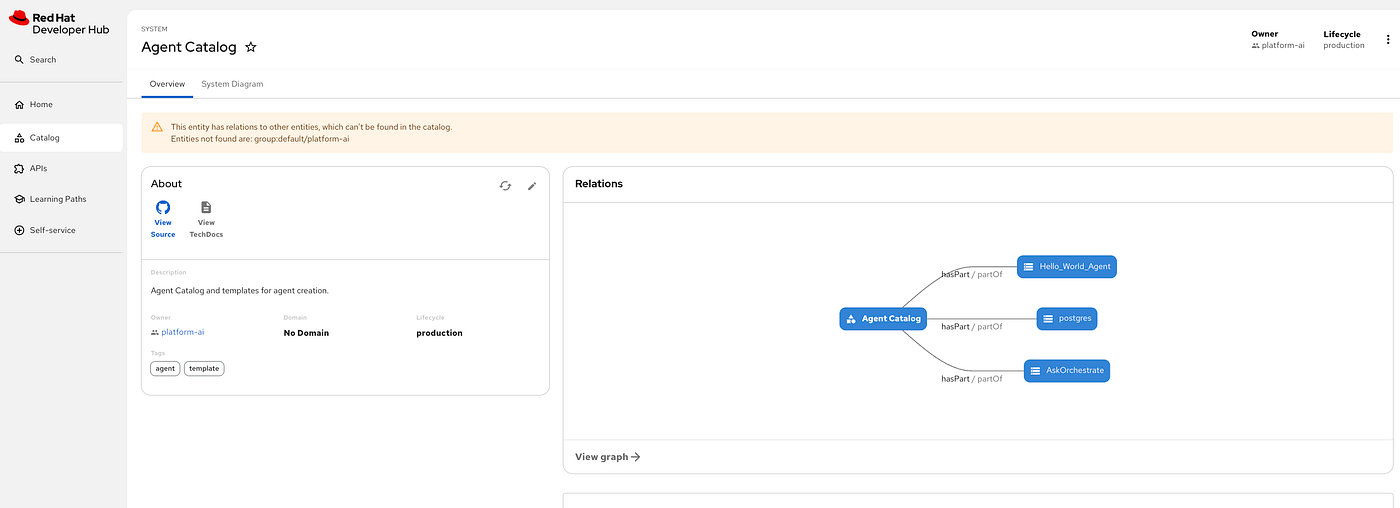
메타데이터
- post_id
- 06942a5d05ab
- slug
- designing-an-ai-native-developer-hub-06942a5d05ab
- url
- https://medium.com/@shrishs/designing-an-ai-native-developer-hub-06942a5d05ab
- canonical_url
- https://medium.com/@shrishs/designing-an-ai-native-developer-hub-06942a5d05ab
- author_url
- https://medium.com/@shrishs
- status
- ok
- fetched_at
- 2026-07-14 04:18:11