DP-900 Prep Blog: Deep Dive into Azure Cloud Storage
Welcome back to our DP-900 preparation series. In this post, we explore the backbone of Azure’s data infrastructure — Azure Storage…
DP-900 Prep Blog: Deep Dive into Azure Cloud Storage
Welcome back to our DP-900 preparation series. In this post, we explore the backbone of Azure’s data infrastructure — Azure Storage. Whether you’re storing structured tables, unstructured blobs, or syncing files across hybrid environments, understanding these services is essential for passing DP-900 and architecting real-world solutions.
Azure Blob Storage: Scalable, Flexible, and Tiered
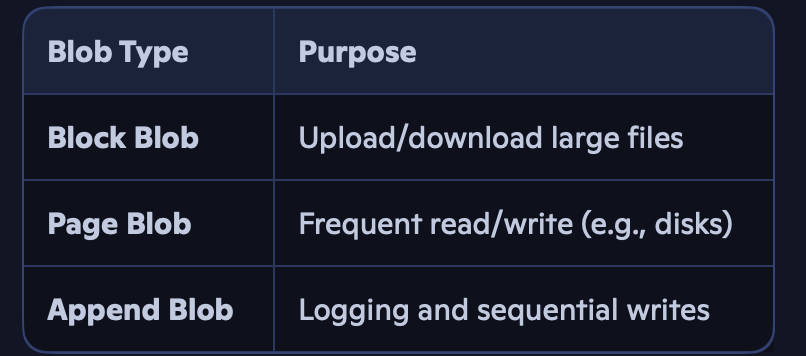
Azure Blob Storage is designed for storing unstructured data — think images, videos, logs, backups, and documents. It’s highly scalable and supports multiple access tiers to optimise cost and performance.
Blob Storage Access Tiers
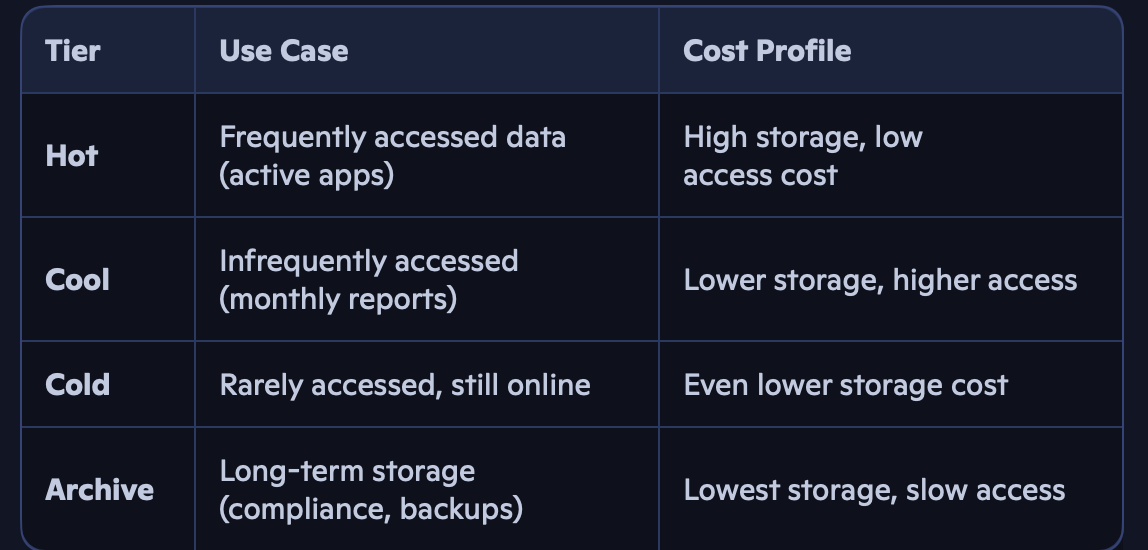
These tiers let you balance performance and cost based on how often data is accessed
Static Website Hosting with Blob
Blob Storage supports static website hosting by serving HTML, CSS, JS directly from containers. You simply enable the feature, upload your files, and Azure provides a public endpoint — perfect for hosting documentation, landing pages, or dashboards.
Encryption and Performance
• Encryption at rest: Enabled by default using Microsoft-managed keys or customer-managed keys.
• High performance: Supports SSD-backed storage, parallel uploads, and large-scale ingestion.
- Blob Change Feed: Tracks changes to blobs over time — useful for auditing, analytics, and event-driven architectures.
Tools for Blob Management
• Azure Storage Explorer: GUI tool to manage blobs, files, queues, and tables across subscriptions.
• File Sharing:
◦ Via URL: Generate SAS tokens for secure, time-bound access.
◦ Via SMB: Mount Azure Files as a network share on Windows/Linux.
Pros and Cons of Blob Storage

Azure Table Storage: NoSQL Simplicity
Azure Table Storage is a key-value NoSQL store for semi-structured data. It’s ideal for storing metadata, logs, user profiles, and telemetry.
Key Concepts
• Partition Key + Row Key: Composite key for fast lookups
• Schema-less: Each row can have different columns
• Scalable: Automatically partitions data for performance
Use Cases
• IoT device logs
• User preferences
• Audit trails
• Lightweight metadata stores
Table Storage is simple, fast, and scales automatically — but lacks relational features like joins, indexes, or stored procedures.
AzCopy: Fast, Reliable File Transfers
AzCopy is a command-line utility for copying data to/from Azure Storage. It’s optimized for large-scale transfers, including:
• Uploading terabytes of data to Blob or File storage
• Syncing folders between local and cloud
- Automating backups and migrations
Example: azcopy copy “C:\data” “https://<storageaccount>.blob.core.windows.net/<container>?<SAS>” — recursive
AzCopy supports parallelism, retries, and resumable uploads — making it ideal for enterprise-grade data movement.
Azure File Sync: Hybrid File Management
Azure File Sync lets you centralise file shares in Azure while keeping local copies on-premises. It’s ideal for organisations with branch offices or hybrid work setups.
🧠 How It Works
-
Install the Azure File Sync agent on Windows Server
-
Register the server with Azure
-
Create a sync group linking the Azure File share and the local path
-
Cloud tiering: Frequently used files stay local; others are offloaded to Azure
💡 Benefits
• Centralised management with local performance
• Reduces on-prem storage footprint
• Supports backup, DR, and multi-site sync
• Seamless integration with SMB and NTFS permissions
Azure File Sync bridges the gap between cloud scalability and on-prem responsiveness — a must-know for DP-900 and real-world architecture.
Wrapping Up
Azure Storage is more than just a place to stash data — it’s a strategic layer in your cloud architecture. Whether you’re hosting static sites, syncing hybrid files, or managing semi-structured logs, mastering Blob, Table, and File storage is essential for DP-900 and beyond.
메타데이터
- post_id
- 06bc73a7e7e2
- slug
- dp-900-prep-blog-deep-dive-into-azure-cloud-storage-06bc73a7e7e2
- url
- https://medium.com/@maheswararedypr/dp-900-prep-blog-deep-dive-into-azure-cloud-storage-06bc73a7e7e2
- canonical_url
- https://medium.com/@maheswararedypr/dp-900-prep-blog-deep-dive-into-azure-cloud-storage-06bc73a7e7e2
- author_url
- https://medium.com/@maheswararedypr
- status
- ok
- fetched_at
- 2026-07-17 11:39:37