WorkManager Deep Dive: System Architecture, Doze Mode, and Production Challenges
Deep Dive: WorkManager & JobScheduler — Under the Hood
WorkManager Deep Dive: System Architecture, Doze Mode, and Production Challenges
Deep Dive: WorkManager & JobScheduler — Under the Hood
Let me provide you with a comprehensive understanding of how WorkManager and JobScheduler work at the system level.
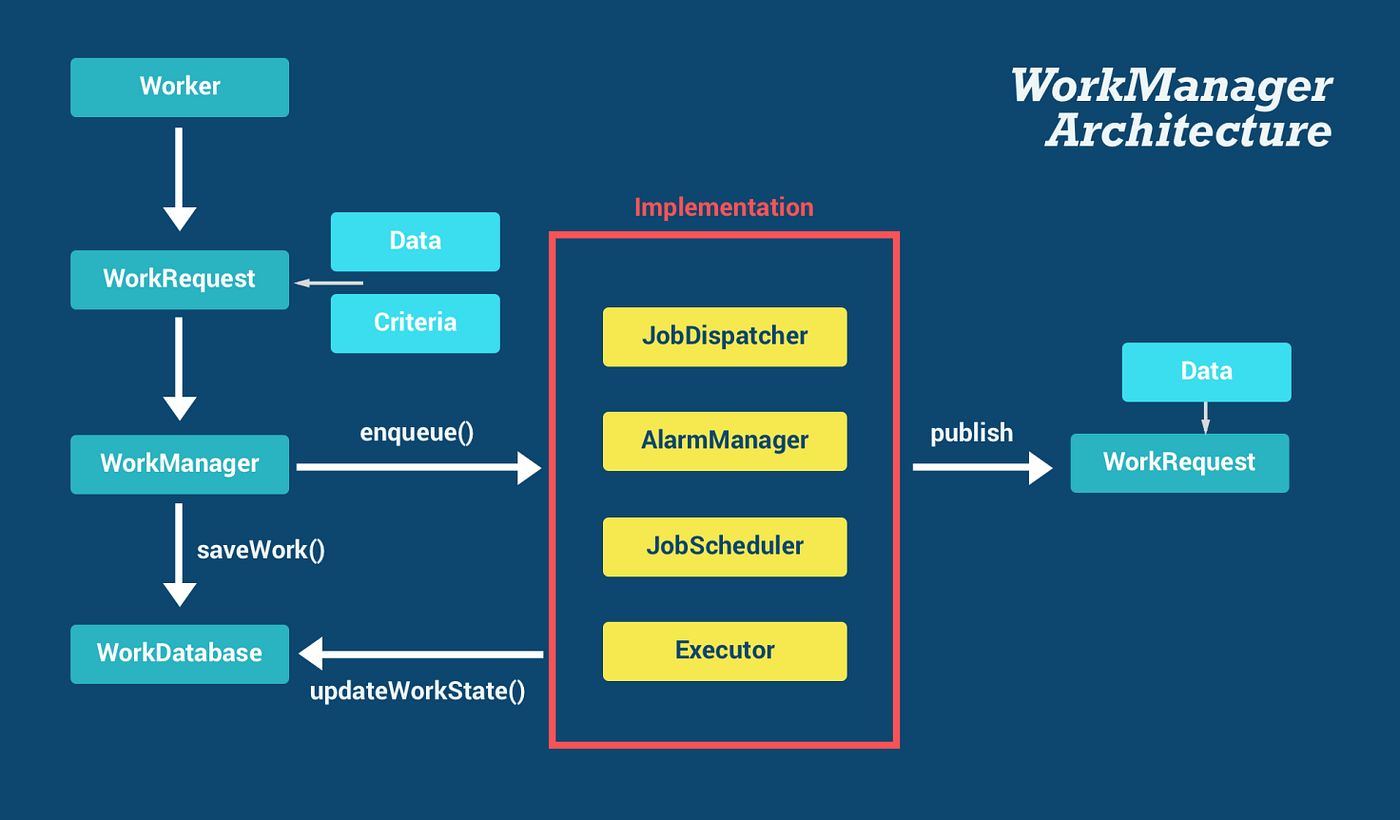
Part 1: The Big Picture — How It All Connects
WorkManager Architecture Stack
Your App Code (WorkRequest)
        ↓
WorkManager Library (Compatibility Layer)
        ↓
    ┌───────────────────────────────┐
    │   API 23+: JobScheduler       │
    │   API 14-22: AlarmManager +   │
    │              BroadcastReceiver│
    │   API 28+: JobScheduler (for  │
    │            guaranteed work)   │
    └───────────────────────────────┘
        ↓
Android System Services
        ↓
Linux Kernel (Alarms, Wakelocks)
Part 2: JobScheduler — The Deep Mechanics
Q1: How does JobScheduler work at the system level?
Answer:
JobScheduler is a system service (JobSchedulerService) that runs in the system_server process. Here's how it works:
1. Job Registration Phase
Your App → JobScheduler.schedule(JobInfo)
                ↓
        JobSchedulerService (system_server)
                ↓
        JobStore (persists to /data/system/job/jobs.xml)
                ↓
        Controllers Monitor (Battery, Connectivity, Idle, etc.)
When you schedule a job:
- JobInfo object is serialized and sent via Binder IPC to
system_server - JobSchedulerService validates the job and assigns a unique job ID
- Job is persisted to disk in
/data/system/job/jobs.xml - Various StateControllers start monitoring constraints
— — — — — — — — — — — — — — — — — — — — — — — — — — —
2. The Controller System
JobScheduler uses multiple controllers to monitor different constraints:

— — — — — — — — — — — — — — — — — — — — — — — — — — —
3. Job Execution Decision Tree
Every time a constraint changes:
    ↓
JobSchedulerService.maybeRunPendingJobsLocked()
    ↓
For each pending job:
    ├─→ Are ALL constraints satisfied? NO → Skip
    ├─→ Is device idle (if required)? NO → Skip
    ├─→ Is battery sufficient? NO → Skip
    └─→ YES to all → Execute Job
                ↓
        startJobLocked()
                ↓
        Bind to JobService in your app
                ↓
        Call onStartJob() on main thread
Q2: How does the system track jobs even when the app is killed?
Answer:
This is the brilliant part! The jobs are NOT stored in your app’s memory. Here’s the persistence mechanism:
Persistence Layer [.xml]
<!-- /data/system/job/jobs.xml -->
<job-info
    jobid="1001"
    package="com.example.app"
    class="com.example.MyJobService"
    constraints="CONNECTIVITY|CHARGING"
    periodic="900000"
    flex="300000">
    <extras>
        <!-- Serialized PersistableBundle data -->
    </extras>
</job-info>
Key Points:
- System-level storage: Jobs are stored in system partition, not your app’s data directory
- Survives app death: Even if your app is force-stopped, the job metadata remains
- Boot persistence: On device reboot,
JobSchedulerServicereads from this XML - Restoration: Jobs are restored and controllers start monitoring again
Boot Sequence
Device Boot
    ↓
system_server starts
    ↓
JobSchedulerService.onStart()
    ↓
JobStore.readJobMapFromDisk()
    ↓
Parse /data/system/job/jobs.xml
    ↓
Reconstruct all pending jobs
    ↓
Start all StateControllers
    ↓
Begin monitoring constraints
Q3: How does execution work across different app states?
Answer:
- Foreground App
Constraint Met → JobScheduler binds to JobService
                      ↓
                App already running
                      ↓
                onStartJob() called immediately
                      ↓
Work executes normally- Background App
Constraint Met → JobScheduler checks if app is cached
                      ↓
                Start app process (if killed)
                      ↓
                Bind to JobService
                      ↓
                Acquire PARTIAL_WAKE_LOCK
                      ↓
                onStartJob() executes
                      ↓
Wake lock held until jobFinished() called- Killed/Force-Stopped App
Constraint Met → JobScheduler attempts to start process
                      ↓
                PackageManager.isAppStopped()?
                      ↓
            YES: Skip execution (user explicitly stopped)
                      ↓
NO: Start process normally and executeImportant: If user force-stops the app via Settings, JobScheduler will NOT execute jobs until the app is launched again by the user.
Q4: Why doesn’t JobScheduler work in Doze Mode?
Answer:
This requires understanding Doze Mode mechanics:
Doze Mode Phases
Screen Off + Unplugged + Stationary
    ↓
Wait 30 minutes (SENSING)
    ↓
IDLE_PENDING (few minutes)
    ↓
IDLE (Doze Mode Active)
    ↓
┌─────────────────────────────────────┐
│  Maintenance Window (few minutes)   │ ← Jobs CAN run here
└─────────────────────────────────────┘
    ↓
IDLE (back to doze)
    ↓
(Maintenance windows get progressively longer intervals)
What Happens in Doze
// In JobSchedulerService
public boolean isReadyToBeExecutedLocked(JobStatus job) {
    // Check if device is in deep doze
    if (mDeviceIdleJobsController.isDeviceIdle()) {
        // Only allow whitelisted apps
        if (!isWhitelisted(job.getSourcePackageName())) {
            return false; // ← Job blocked!
        }
    }
    // ... other checks
}
Why This Happens:
- Battery Preservation: System aggressively conserves battery
- CPU/Network Freeze: Most wake-locks and network access denied
- Alarm Batching: AlarmManager delays alarms (except
setAndAllowWhileIdle()) - JobScheduler Deferral: Non-critical jobs deferred to maintenance windows
Exceptions (What DOES Work)
- High-priority FCM messages (delivered immediately)
- Alarms set with
setExactAndAllowWhileIdle()(limited quota) - Apps in whitelist (via
**REQUEST_IGNORE_BATTERY_OPTIMIZATIONS**) - Maintenance windows (periodic, increasing intervals)
Part 3: The Timing Mechanism — How System Knows WHEN to Run Jobs
Q5: How does the system track timing for scheduled jobs?
Answer:
JobScheduler uses a multi-layered timing system:
Layer 1: AlarmManager Integration
// Inside JobSchedulerService
private void maybeUpdateAlarmServicesLocked(JobStatus job) {
    long nextDelayTime = job.getLatestRunTimeElapsed();

    AlarmManager alarmManager = getAlarmManager();
    alarmManager.set(
        AlarmManager.ELAPSED_REALTIME_WAKEUP,
        nextDelayTime,
        TAG,
        mTimeControllerAlarmListener,
        mHandler
    );
}
How it works:
Job scheduled with 15-minute delay
            ↓
JobScheduler calculates deadline:
    currentTime + 15 minutes = deadline
            ↓
Sets AlarmManager alarm for deadline
            ↓
AlarmManager uses Linux kernel timerfd
            ↓
Kernel timer expires → AlarmManager callback
            ↓
AlarmManager wakes up system_server
            ↓
JobSchedulerService.onAlarmFired()
            ↓
Check if constraints still satisfied
            ↓
Execute job (or reschedule)
Layer 2: Kernel Timers
AlarmManager
    ↓
/dev/alarm (Kernel Driver)
    ↓
timerfd_create() + timerfd_settime()
    ↓
Kernel maintains timer in hardware RTC
    ↓
Timer expires → Kernel raises interrupt
    ↓
Wakes CPU from suspend
    ↓
Callback to AlarmManager
Layer 3: Wake Locks
Alarm fires (CPU woken)
            ↓
AlarmManager acquires PARTIAL_WAKE_LOCK
            ↓
Delivers intent to JobSchedulerService
            ↓
JobScheduler acquires wake lock
            ↓
Binds to your JobService
            ↓
Your job executes (CPU stays awake)
            ↓
jobFinished() called
            ↓
Release wake lock → CPU can sleep
Real-World Problem Statements & Solutions
Problem 1: Job Not Running on Xiaomi/Huawei Devices
Scenario: You’ve scheduled a periodic job, but it doesn’t run on MIUI/EMUI devices even though constraints are met.
Root Cause: Chinese OEMs have aggressive battery optimization that kills background processes and ignores JobScheduler.
Solution:
class WorkaroundHelper(private val context: Context) {

    fun isManufacturerRestrictive(): Boolean {
        val manufacturer = Build.MANUFACTURER.lowercase()
        return manufacturer in listOf("xiaomi", "huawei", "oppo", "vivo", "oneplus")
    }

    fun requestBatteryOptimizationExemption() {
        if (Build.VERSION.SDK_INT >= Build.VERSION_CODES.M) {
            val intent = Intent().apply {
                action = Settings.ACTION_REQUEST_IGNORE_BATTERY_OPTIMIZATIONS
                data = Uri.parse("package:${context.packageName}")
            }
            context.startActivity(intent)
        }
    }

    fun scheduleWithFallback() {
        // Primary: Use WorkManager
        val workRequest = PeriodicWorkRequestBuilder<MyWorker>(
            15, TimeUnit.MINUTES,
            5, TimeUnit.MINUTES // flex interval
        ).setConstraints(
            Constraints.Builder()
                .setRequiredNetworkType(NetworkType.CONNECTED)
                .build()
        ).build()

        WorkManager.getInstance(context).enqueue(workRequest)

        // Fallback: Use AlarmManager for critical tasks
        if (isManufacturerRestrictive()) {
            scheduleAlarmManagerFallback()
        }
    }

    private fun scheduleAlarmManagerFallback() {
        val alarmManager = context.getSystemService(AlarmManager::class.java)
        val intent = Intent(context, FallbackReceiver::class.java)
        val pendingIntent = PendingIntent.getBroadcast(
            context, 0, intent,
            PendingIntent.FLAG_UPDATE_CURRENT or PendingIntent.FLAG_IMMUTABLE
        )

        if (Build.VERSION.SDK_INT >= Build.VERSION_CODES.M) {
            alarmManager.setExactAndAllowWhileIdle(
                AlarmManager.RTC_WAKEUP,
                System.currentTimeMillis() + 15 * 60 * 1000,
                pendingIntent
            )
        }
    }
}
Problem 2: Job Delayed Too Long During Doze
Scenario: You need to sync data every hour, but during Doze mode, the job doesn’t run for 6+ hours.
Root Cause:
Doze maintenance windows increase exponentially: 1 hour → 2 hours → 4 hours → 6 hours.
Solution Strategy:
class DozeAwareWorkScheduler(private val context: Context) {

    fun scheduleWork() {
        // For non-critical work: Standard WorkManager
        val normalWork = PeriodicWorkRequestBuilder<SyncWorker>(
            1, TimeUnit.HOURS
        ).build()

        WorkManager.getInstance(context)
            .enqueueUniquePeriodicWork(
                "normal_sync",
                ExistingPeriodicWorkPolicy.KEEP,
                normalWork
            )

        // For critical work: Use FCM + setExactAndAllowWhileIdle
        scheduleCriticalSync()
    }

    private fun scheduleCriticalSync() {
        // Option 1: Use FCM high-priority message
        // Server sends FCM with priority: high
        // This WILL wake device in Doze

        // Option 2: Hybrid approach with AlarmManager
        val alarmManager = context.getSystemService(AlarmManager::class.java)

        val intent = Intent(context, CriticalSyncReceiver::class.java)
        val pendingIntent = PendingIntent.getBroadcast(
            context, 1, intent,
            PendingIntent.FLAG_UPDATE_CURRENT or PendingIntent.FLAG_IMMUTABLE
        )

        if (Build.VERSION.SDK_INT >= Build.VERSION_CODES.M) {
            // Limited to ~9 alarms per 15 minutes
            alarmManager.setExactAndAllowWhileIdle(
                AlarmManager.RTC_WAKEUP,
                System.currentTimeMillis() + 60 * 60 * 1000,
                pendingIntent
            )
        }
    }
}
class CriticalSyncReceiver : BroadcastReceiver() {
override fun onReceive(context: Context, intent: Intent) {
// Use goAsync() to prevent ANR
val pendingResult = goAsync()
CoroutineScope(Dispatchers.IO).launch {
try {
// Quick sync operation (< 10 seconds)
performQuickSync()
// Reschedule next alarm
scheduleNextAlarm(context)
} finally {
pendingResult.finish()
}
}
}
}Problem 3: Job Runs Too Frequently, Draining Battery
Scenario: You set a 15-minute periodic job, but users complain about battery drain.
Root Cause: WorkManager minimum interval is 15 minutes, but constraints might cause it to run more often than needed.
Solution:
class BatteryFriendlyScheduler(private val context: Context) {

    fun scheduleIntelligentSync() {
        val constraints = Constraints.Builder()
            // Only sync when charging (for non-urgent data)
            .setRequiresCharging(true)
            // OR only when on WiFi
            .setRequiredNetworkType(NetworkType.UNMETERED)
            // AND battery not low
            .setRequiresBatteryNotLow(true)
            .build()

        val syncWork = PeriodicWorkRequestBuilder<SmartSyncWorker>(
            15, TimeUnit.MINUTES,
            5, TimeUnit.MINUTES  // Flex interval: run anywhere in last 5 min
        )
            .setConstraints(constraints)
            // Backoff policy for failures
            .setBackoffCriteria(
                BackoffPolicy.EXPONENTIAL,
                10, TimeUnit.MINUTES
            )
            .build()

        WorkManager.getInstance(context)
            .enqueueUniquePeriodicWork(
                "smart_sync",
                ExistingPeriodicWorkPolicy.KEEP,
                syncWork
            )
    }
}
class SmartSyncWorker(
context: Context,
params: WorkerParameters
) : CoroutineWorker(context, params) {
override suspend fun doWork(): Result {
// Check battery level programmatically
val batteryStatus = getBatteryPercentage()
if (batteryStatus < 20) {
// Skip work if battery too low
return Result.success()
}
// Adaptive sync based on data freshness
val lastSyncTime = getLastSyncTime()
val dataFreshness = System.currentTimeMillis() - lastSyncTime
return when {
dataFreshness < 10 * 60 * 1000 -> {
// Data synced recently, skip
Result.success()
}
dataFreshness > 60 * 60 * 1000 -> {
// Data stale, full sync
performFullSync()
Result.success()
}
else -> {
// Incremental sync
performIncrementalSync()
Result.success()
}
}
}
private fun getBatteryPercentage(): Int {
val batteryManager = applicationContext
.getSystemService(Context.BATTERY_SERVICE) as BatteryManager
return batteryManager.getIntProperty(
BatteryManager.BATTERY_PROPERTY_CAPACITY
)
}
}Problem 4: Job Data Lost After Process Death
Scenario: You pass data to Worker, but after app is killed and job runs, the data is lost.
Root Cause: Using non-persistable data types in Data object.
class DataPersistenceHelper {

    // WRONG: This will fail
    fun scheduleWorkWrong() {
        val complexObject = MyComplexObject(...)

        val data = workDataOf(
            "object" to complexObject  // ❌ Won't survive process death
        )
    }

    // CORRECT: Use persistable types
    fun scheduleWorkCorrect() {
        val complexObject = MyComplexObject(id = 123, name = "Test")

        // Serialize to JSON
        val json = Json.encodeToString(complexObject)

        val data = workDataOf(
            "object_json" to json,  // ✅ String is persistable
            "id" to complexObject.id,  // ✅ Primitives are persistable
            "timestamp" to System.currentTimeMillis()
        )

        val workRequest = OneTimeWorkRequestBuilder<MyWorker>()
            .setInputData(data)
            .build()

        WorkManager.getInstance(context).enqueue(workRequest)
    }
}
class MyWorker(context: Context, params: WorkerParameters)
: CoroutineWorker(context, params) {
override suspend fun doWork(): Result {
// Deserialize data
val json = inputData.getString("object_json") ?: return Result.failure()
val obj = Json.decodeFromString<MyComplexObject>(json)
// Process
processData(obj)
return Result.success()
}
}Problem 5:- Job Runs Multiple Times on Boot
Scenario: After device reboot, your one-time job runs multiple times.
Root Cause: WorkManager reschedules jobs after boot, but if you also have BOOT_COMPLETED receiver, it duplicates scheduling.
class BootReceiver : BroadcastReceiver() {
    override fun onReceive(context: Context, intent: Intent) {
        if (intent.action == Intent.ACTION_BOOT_COMPLETED) {
            // DON'T schedule work here if using WorkManager
            // WorkManager automatically handles boot rescheduling

            // Only do this if you need immediate boot-time work
            scheduleImmediateWork(context)
        }
    }

    private fun scheduleImmediateWork(context: Context) {
        // Use unique work to prevent duplicates
        val workRequest = OneTimeWorkRequestBuilder<BootWorker>()
            .setInitialDelay(5, TimeUnit.SECONDS)  // Small delay
            .build()

        WorkManager.getInstance(context)
            .enqueueUniqueWork(
                "boot_work",
                ExistingWorkPolicy.KEEP,  // ✅ Keep existing, don't duplicate
                workRequest
            )
    }
}
Key Takeaways & Mental Model
The System Flow (Complete Picture)
Your App                    System Server              Kernel
   │                              │                       │
   │ schedule(JobInfo)            │                       │
   │──────────────────────────────>│                      │
   │                              │                       │
   │                              │ Persist to XML        │
   │                              │ Start Controllers     │
   │                              │                       │
   │                              │ Set Alarm             │
   │                              │──────────────────────>│
   │                              │                       │
   │                              │                   [Timer Running]
   │                              │                       │
   │                              │<──────────────────────│
   │                              │   Timer Expired       │
   │                              │                       │
   │                              │ Wake CPU              │
   │                              │ Check Constraints     │
   │                              │                       │
   │<─────────────────────────────│                       │
   │   Bind to JobService         │                       │
   │                              │                       │
   │ onStartJob()                 │                       │
   │                              │                       │
   │ [Work Executing]             │                       │
   │                              │                       │
   │ jobFinished()                │                       │
   │──────────────────────────────>│                      │
   │                              │                       │
   │                              │ Release Wake Lock     │
   │                              │──────────────────────>│
Critical Understanding Points
- Jobs live in system_server, not your app — That’s why they survive app death
- AlarmManager is the timing backbone — Even JobScheduler uses it internally
- Wake locks keep CPU awake — From alarm fire to jobFinished()
- Doze mode is aggressive — System prioritizes battery over background work
- OEM modifications break things — Always test on multiple manufacturers
- Persistence is limited — Only primitives and small data survive
- Constraints are AND conditions — All must be met for execution
This should give you a comprehensive understanding of the entire system! Let me know if you want me to dive deeper into any specific aspect.
메타데이터
- post_id
- 06bf2267a032
- slug
- workmanager-deep-dive-system-architecture-doze-mode-and-production-challenges-06bf2267a032
- url
- https://medium.com/@mayank1807.singh/workmanager-deep-dive-system-architecture-doze-mode-and-production-challenges-06bf2267a032
- canonical_url
- https://medium.com/@mayank1807.singh/workmanager-deep-dive-system-architecture-doze-mode-and-production-challenges-06bf2267a032
- author_url
- https://medium.com/@mayank1807.singh
- status
- ok
- fetched_at
- 2026-07-14 13:03:24






