One Runtime for Many Agents: Running LangGraph, .NET,
Learn how three AI agents in different frameworks run as one pipeline on Azure Container Apps, using isolated Sandboxes and Microsoft…
One Runtime for Many Agents: Running LangGraph, .NET, and Copilot SDK Together on Azure Container Apps
Learn how three AI agents in different frameworks run as one pipeline on Azure Container Apps, using isolated Sandboxes and Microsoft Foundry.
One Runtime for Many Agents: Running LangGraph, .NET, and Copilot SDK Together on Azure Container Apps
This article is a technical breakdown of an open-source multi-agent system called the Content Agent Factory, a project that runs three AI agents, each built on a different framework and a different language, as one coordinated pipeline on Azure Container Apps. I will walk through the full architecture: how the agents discover and talk to each other, how they execute AI-generated code inside isolated Sandboxes, how the system keeps API keys away from that code, and how every component reports into a single observability plane.
By the end, you will understand each moving part well enough to clone the repository and deploy it yourself, and you will have a reusable pattern for running agents from different frameworks side by side without losing control of cost, security, or visibility.
Reference here.
Why so many agent projects stall in production
Gartner forecasts that 40 percent of agentic AI projects will be canceled by the end of 2027. When I read that, the interesting part was not the number, it was the cause. It is not that the models cannot reason. Reasoning is the part that already works. Projects stall because the runtime underneath the model cannot keep up.

Once you start running agents for real, five failure modes show up again and again:
- Budgets that burn unattended. You spin something up to test it, deploy it a few times, and days later resources are still running and still billing. Agents make this worse, because an agent can provision compute on your behalf with no human clicking a button.
- Untrusted code with nowhere safe to run. The moment you execute what a model wrote, you have handed a language model a shell on whatever machine runs the agent. Running that next to your application is a risk few teams accept.
- Cold starts that throttle the loop. When an agent makes a tool call or hands work to another agent, waiting a full minute for infrastructure to warm up breaks the interaction.
- Workspaces that die on every restart. Agentic work is not always short. Long running tasks need state that survives, which means snapshots and the ability to resume from a known point.
- Tooling stitched together by hand. The space moves fast, so most teams hand roll their own isolation, state, and lifecycle logic, then own that glue forever.
That framing is what makes the rest of this worth reading. The Content Agent Factory is not a story about clever prompts. It is a story about giving agents a runtime that turns those five failures into platform defaults.
The runtime: Azure Container Apps Sandboxes
The piece that makes all of this practical is Azure Container Apps Sandboxes, which shipped in public preview at Build 2026.

A Sandbox is a first class Azure resource type (Microsoft.App/SandboxGroups) that gives you fast, secure, ephemeral compute with built in suspend and resume. It sits alongside Apps, Jobs, Functions, and Dynamic Sessions in the Container Apps family, and it is the same infrastructure layer that powers Cloud Sandbox in GitHub Copilot, Foundry Hosted Agents, and Azure Container Apps Express.
Here is why it is the right primitive for agents, mapped straight back to the five failures:
- Execute securely by default. Each sandbox runs in its own hardware isolated boundary (a microVM), so agent generated code never runs next to your application. A compromised session cannot read another session’s file system, memory, or network. That is a platform guarantee, not something you bolt on.
- Resume instantly. Snapshots capture the complete state of a running sandbox: memory pages, disk, and running processes. When a sandbox goes idle it snapshots and suspends automatically, and resume is sub second, so it comes back with every process and in memory value intact.
- Pay nothing while idle. A suspended sandbox holds no live compute, so you are not billed for it. The agent creates infrastructure, uses it, and lets it fall asleep. That is the direct fix for budgets that burn unattended.
- Burst to hyperscale. Sandboxes provision from prewarmed pools, so an agent that fans out across many parallel tool calls gets near instant capacity instead of a cold start penalty.
- Managed lifecycle. Idle timeout, snapshot mode (memory or disk), and auto delete are configuration, not code you maintain. The Sandbox Group is the management boundary where you set shared policy such as egress rules, identity, and lifecycle.
There is a sibling primitive worth naming. Azure Container Apps Express is the agent first, HTTP first path that provisions in seconds and scales from zero to one in about a second, with no environment to provision. Express is built on the same Sandbox capacity underneath. If Sandboxes are the empty, secure compute pool an agent invokes as a tool, Express is the fastest way to stand up the agents and endpoints themselves.
Official Sandboxes documentation: https://learn.microsoft.com/en-us/azure/container-apps/sandboxes-overview?WT.mc_id=AZ-MVP-5000671
You can create one in the portal at https://sandboxes.azure.com
The system: three agents, three frameworks, one management plane
The design choice here mirrors how agents actually enter an organization.
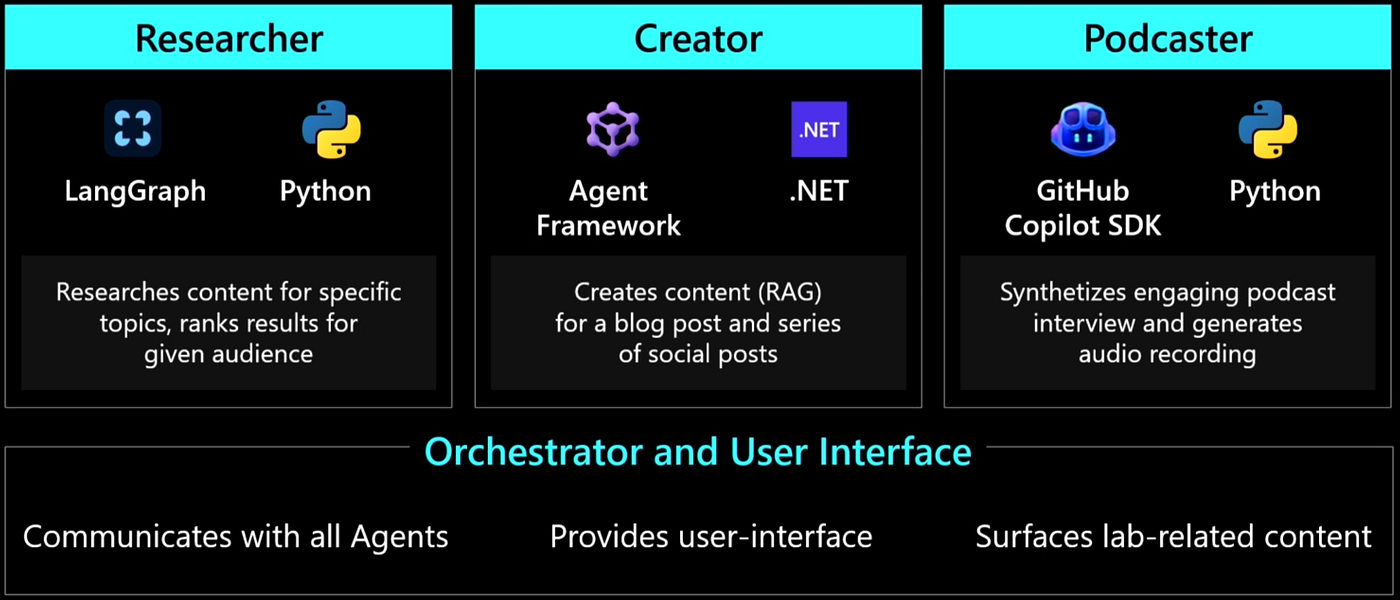
They arrive from the grassroots. One team likes Python and LangGraph. Another is a .NET shop. A third wants to prototype fast with whatever is easiest.

Instead of pretending everyone will standardize, the Content Agent Factory embraces the mix and proves you can still run, secure, and observe all of it from one place.
Three agents work as a pipeline. A topic goes in, and finished multi format content comes out.
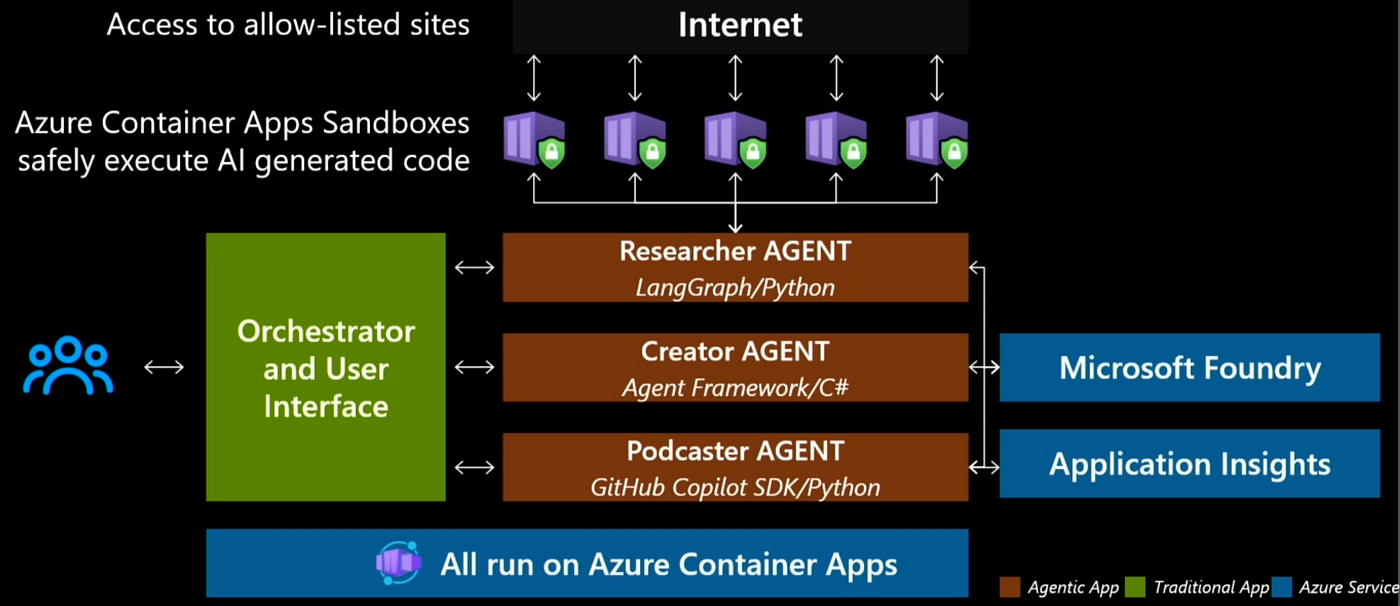
Agent 1: the Researcher (LangGraph, Python)
The first agent researches a topic and produces a research brief. In the repository it searches Microsoft Learn, the Azure Blog, Tech Community, Azure Updates, and GitHub. It uses the model for intent detection, ranks sources by relevance for the target audience, fetches full content from the top hits, follows depth one links from trusted domains, and synthesizes everything into a brief the next agent can build on. LangGraph gives it a graph based control flow, which fits the “search, rank, fetch, follow, summarize” loop cleanly.
LangGraph, the open source graph runtime from the LangChain team: https://github.com/langchain-ai/langgraph
Agent 2: the Creator (Microsoft Agent Framework, .NET)
The second agent takes the research brief and writes. It produces an original blog post plus a set of social posts (a LinkedIn post and a Twitter thread in the repo), all grounded in the real sources the researcher found, which keeps the output anchored to evidence rather than invention. It is written in C# on .NET 10 using the Microsoft Agent Framework, the open source successor to Semantic Kernel and AutoGen. Agent Framework combines AutoGen’s simple multi agent abstractions with Semantic Kernel’s enterprise features such as state management, type safety, telemetry, and broad model support, and it adds explicit workflow control for multi agent execution paths.
Microsoft Agent Framework overview: https://learn.microsoft.com/en-us/agent-framework/overview/?WT.mc_id=AZ-MVP-5000671
The open source repository: https://github.com/microsoft/agent-framework
Agent 3: the Podcaster (GitHub Copilot SDK, Python)
The third agent turns the written content into a podcast, generating both the interview style script and the audio recording. It is built on the GitHub Copilot SDK, which exposes the same production tested agent runtime that sits behind Copilot CLI, so you get planning, tool invocation, and session management without building your own orchestration. In the repo, audio is produced with Azure OpenAI text to speech, with an option to use a custom XTTS v2 voice server on serverless GPUs for the richer experience.
The most instructive detail is the model choice. The SDK runs in “bring your own model” mode. It does not use the model behind GitHub Copilot. It points at a Microsoft Foundry model instead. That is the whole point of a good harness: the agent framework and the model are separable, and you should be able to swap either one.
GitHub Copilot SDK: https://github.com/github/copilot-sdk
How Agent Framework integrates the Copilot SDK as a provider: https://learn.microsoft.com/en-us/agent-framework/agents/providers/github-copilot?WT.mc_id=AZ-MVP-5000671
The Orchestrator, the Dev UI, and how the agents talk
An orchestrator with a lightweight web front end (the “dev UI”) sits in front of all three agents. It communicates with each agent, drives the workflow, and surfaces the results. The agents do not share a runtime or a language. They communicate through the A2A (Agent to Agent) protocol. Each agent publishes a discovery card at /.well-known/agent.json and accepts task submissions at a /a2a JSON-RPC endpoint. Each agent runs as its own container on Azure Container Apps. This contract based design is what lets a Python LangGraph agent, a C# Agent Framework agent, and a Python Copilot SDK agent behave like one coherent system.
Agent Framework provider list, including A2A: https://learn.microsoft.com/en-us/agent-framework/agents/providers/?WT.mc_id=AZ-MVP-5000671
Architecture reference
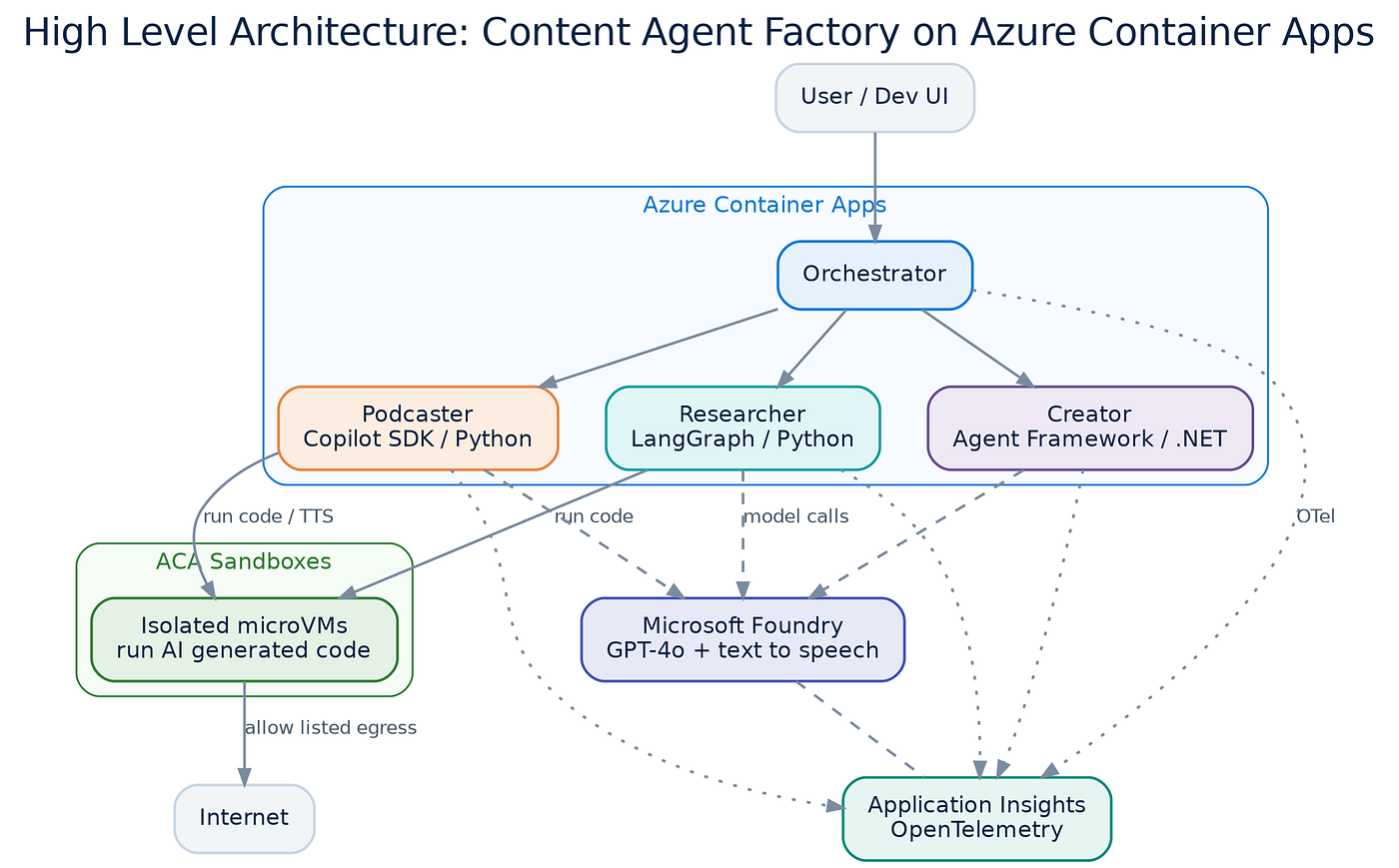
The whole system runs on Azure Container Apps. The three agents plus the orchestrator are long running Container Apps. When an agent needs to run AI generated code, it reaches into Azure Container Apps Sandboxes, which execute that code in isolation and only reach the internet through allow listed egress. Microsoft Foundry provides the models and the management plane, and all telemetry lands in Application Insights.
Azure Container Apps overview: https://learn.microsoft.com/en-us/azure/container-apps/overview?WT.mc_id=AZ-MVP-5000671
A concrete example: a match simulation
To make the pipeline easy to reason about, one of the example scenarios simulates a World Cup style soccer match between two national teams. It is a fun way to exercise the runtime, and it makes the interesting parts visible.

When you submit a scenario (a “what if this striker is in top form” style prompt, or your own), the researcher and simulator agent decides to run a set of web searches. Instead of calling a fixed search API, the agent writes Python code to go fetch lineups, latest news, and injury reports. That code does not run inside the agent. Each query spins up a fresh sandbox, ships the Python into it, executes it, retrieves the result, and lets the sandbox idle. Then another sandbox runs the simulation itself, passing all of that gathered context into a model call that decides how the match plays out. A narration agent turns the result into commentary, generated end to end by the model.
Two details are what separate a toy from a production pattern:
- The sandboxes are not provisioned at deploy time. You deploy the whole thing with one command, and the agent creates the sandbox infrastructure dynamically at run time, keeps it alive only as long as it is needed, and lets it fall asleep afterward. The agent is provisioning its own compute as a tool.
- One GUID equals one sandbox equals one unit of isolated infrastructure. In the portal, each line item is a sandbox fired for a specific purpose. The sandboxes have no friendly names because they are managed by code and by agent, so you look them up by GUID. When you open one, it is already idle, already snapshotted, already costing nothing.
The security model, one problem at a time
The security story is the part I want every reader to keep, because it is where homegrown agent platforms tend to go wrong.

Isolation: untrusted code runs somewhere else
Every piece of agent written code runs in a sandbox with its own microVM boundary, so it never executes next to the application. If a model writes something hostile or simply wrong, the blast radius is a throwaway environment, not your service. That is the fix for “untrusted code with nowhere safe to run,” turned into a platform default.
Egress policy: control what the code can reach
Each sandbox has an egress policy you define per sandbox or per Sandbox Group. It works both ways. You can default deny and allow list specific destinations, or default allow and deny list specific ones. It supports domain based allow or deny rules and CIDR based network rules. In practice, this is how you stop agent written code from calling anything you did not sanction.
The secret problem, and two real fixes
Here is the sharp part. To run the simulation, the code inside the sandbox needs to call a model, which means it needs to reach a large language model endpoint. The naive approach is to pass the API key into the sandbox as an environment variable. If you do that, the agent written code can simply read the key and log it. Handing a secret to code a model wrote is not safe, no matter how convenient it feels.
There are two better ways, and the project uses both:
- Managed Identity for Azure services. Because the sandboxes run inside Azure, the code can authenticate to Cosmos DB, Foundry, or Azure OpenAI using a managed identity, with no key ever present. This is the default answer whenever the target service lives in Azure.
- Egress transform for everything else. Some services are not in Azure and still need a key. Sandboxes solve this with a feature of the egress policy called transform. The key idea is that the part of the platform with the final say on outbound calls is a different part from the one that runs your code. The code in the sandbox has no access to the secret. The code makes a call, and the egress gateway, which lives outside the sandbox, intercepts that call and injects the API key as a header, but only for calls to the endpoint you configured. Run the same code with a key that was never present in it, and it still works, because the gateway attaches the credential on the way out. The agent never sees the secret, and it cannot.
That separation, code in one place and credential authority in another, is the pattern most self built agent platforms miss. Here it is a first class feature.
Azure Container Apps Dynamic Sessions, the related managed code interpreter model, is documented here if you want the simpler abstraction: https://learn.microsoft.com/en-us/azure/container-apps/session-pool?WT.mc_id=AZ-MVP-5000671
Observability and governance across three frameworks
A multi-framework agent system is only governable if you can see it. The Content Agent Factory instruments every agent and the orchestrator with OpenTelemetry. Because every component emits OTel traces and metrics, you get one consistent stream regardless of whether the emitter is Python or C#, LangGraph or Agent Framework or the Copilot SDK.
Azure Container Apps ships a managed OpenTelemetry agent at the environment level. Different container apps stream telemetry to that managed agent, which routes it into Application Insights. From there the data is visible in the Azure portal and, more usefully for governance, in Microsoft Foundry. The managed agent runs at no additional compute cost to you; you only pay the destination service.
Collect and read OpenTelemetry data in Azure Container Apps: https://learn.microsoft.com/en-us/azure/container-apps/opentelemetry-agents?WT.mc_id=AZ-MVP-5000671
The Foundry side is where multi-framework governance becomes real. You can register all three agents in Foundry even though they are built on different technologies, because they speak A2A or otherwise expose a contract.
Once registered, Foundry gives you distributed tracing across every model call, tool invocation, and agent decision (built on OpenTelemetry semantic conventions and Application Insights), continuous evaluation of production traffic against built in and custom evaluators, and a monitoring dashboard for token usage, latency, and success rates. You get one management plane over framework diversity, which is exactly what the architecture set out to prove.
Microsoft Foundry Agent Service overview: https://learn.microsoft.com/en-us/azure/foundry/agents/overview?WT.mc_id=AZ-MVP-5000671
Observability in Microsoft Foundry: https://learn.microsoft.com/en-us/azure/foundry/concepts/observability?WT.mc_id=AZ-MVP-5000671
Agent tracing concepts: https://learn.microsoft.com/en-us/azure/foundry/observability/concepts/trace-agent-concept?WT.mc_id=AZ-MVP-5000671
Agent evaluators reference: https://learn.microsoft.com/en-us/azure/foundry/concepts/evaluation-evaluators/agent-evaluators?WT.mc_id=AZ-MVP-5000671
Agent monitoring dashboard: https://learn.microsoft.com/en-us/azure/foundry/observability/how-to/how-to-monitor-agents-dashboard?WT.mc_id=AZ-MVP-5000671
Deploy it yourself
The entire system is open source and deploys with the Azure Developer CLI.
azd upThat single command provisions Microsoft Foundry (with a GPT-4o deployment and a text to speech model), Azure Container Registry, an Azure Container Apps environment, Log Analytics, a Storage Account, and a Container App for each of the three agents plus the dev UI. If you would rather run it on your laptop first, there is a Docker Compose path that starts the three agents and the UI locally.

Here is the shipped tech stack, straight from the repository, so you know exactly what you are cloning:
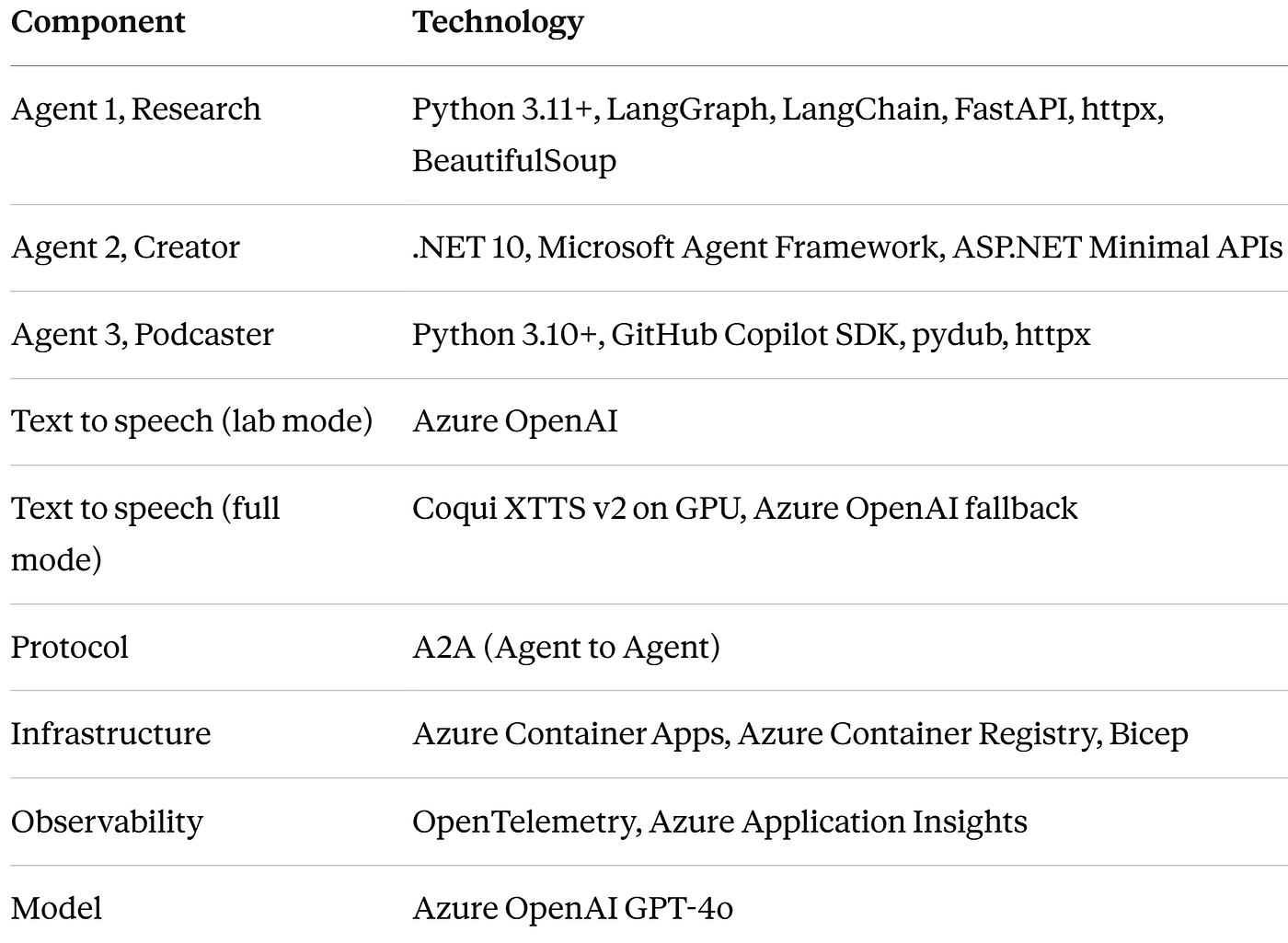
The demo repository: https://github.com/jkalis-MS/Content-Agent-Factory
The full lab manual: https://github.com/jkalis-MS/Content-Agent-Factory/blob/main/Lab/docs/lab-manual.md
Final Thoughts
The runtime is what decides whether an agent project reaches production. The models are ready. What holds teams back is everything around the model: where the code runs, what it can reach, how much it costs when nobody is watching, and whether you can see what it did.
Isolated Sandboxes give the agent written code a safe place to run and let it disappear when the work is done, so idle costs nothing. Managed Identity and egress transform keep your secrets in a place the code cannot reach. A2A contracts and shared OpenTelemetry let agents from three different frameworks act like one system, and Microsoft Foundry gives you a single plane to trace, evaluate, and monitor all of them.
Resources
Microsoft Learn:
- Azure Container Apps overview: https://learn.microsoft.com/en-us/azure/container-apps/overview?WT.mc_id=AZ-MVP-5000671
- Azure Container Apps Sandboxes overview: https://learn.microsoft.com/en-us/azure/container-apps/sandboxes-overview?WT.mc_id=AZ-MVP-5000671
- Azure Container Apps Dynamic Sessions (session pools): https://learn.microsoft.com/en-us/azure/container-apps/session-pool?WT.mc_id=AZ-MVP-5000671
- Collect and read OpenTelemetry data in Azure Container Apps: https://learn.microsoft.com/en-us/azure/container-apps/opentelemetry-agents?WT.mc_id=AZ-MVP-5000671
- Microsoft Agent Framework overview: https://learn.microsoft.com/en-us/agent-framework/overview/?WT.mc_id=AZ-MVP-5000671
- Agent Framework providers overview: https://learn.microsoft.com/en-us/agent-framework/agents/providers/?WT.mc_id=AZ-MVP-5000671
- Agent Framework GitHub Copilot provider: https://learn.microsoft.com/en-us/agent-framework/agents/providers/github-copilot?WT.mc_id=AZ-MVP-5000671
- Microsoft Foundry Agent Service overview: https://learn.microsoft.com/en-us/azure/foundry/agents/overview?WT.mc_id=AZ-MVP-5000671
- Observability in Microsoft Foundry: https://learn.microsoft.com/en-us/azure/foundry/concepts/observability?WT.mc_id=AZ-MVP-5000671
- Agent tracing concepts in Foundry: https://learn.microsoft.com/en-us/azure/foundry/observability/concepts/trace-agent-concept?WT.mc_id=AZ-MVP-5000671
- Agent evaluators reference: https://learn.microsoft.com/en-us/azure/foundry/concepts/evaluation-evaluators/agent-evaluators?WT.mc_id=AZ-MVP-5000671
- Agent monitoring dashboard: https://learn.microsoft.com/en-us/azure/foundry/observability/how-to/how-to-monitor-agents-dashboard?WT.mc_id=AZ-MVP-5000671
GitHub and product portals:
- Content Agent Factory demo repository: https://github.com/jkalis-MS/Content-Agent-Factory
- Content Agent Factory lab manual: https://github.com/jkalis-MS/Content-Agent-Factory/blob/main/Lab/docs/lab-manual.md
- Microsoft Agent Framework: https://github.com/microsoft/agent-framework
- GitHub Copilot SDK: https://github.com/github/copilot-sdk
- LangGraph: https://github.com/langchain-ai/langgraph
- Azure Container Apps Sandboxes portal: https://sandboxes.azure.com
- Azure Container Apps Express portal: https://containerapps.azure.com
메타데이터
- post_id
- 06c79d689de7
- slug
- one-runtime-for-many-agents-running-langgraph-net-06c79d689de7
- url
- https://blog.devops.dev/one-runtime-for-many-agents-running-langgraph-net-06c79d689de7
- canonical_url
- https://blog.devops.dev/one-runtime-for-many-agents-running-langgraph-net-06c79d689de7
- author_url
- https://medium.com/@daverendon
- status
- ok
- fetched_at
- 2026-07-08 17:17:42