Why a Wide Monitor Setup Pulls You Off-Centre
His shoulders were never square. A colleague noticed it on a video call, the way he sat slightly turned, one shoulder forward, as if he…
Why a Wide Monitor Setup Pulls You Off-Centre
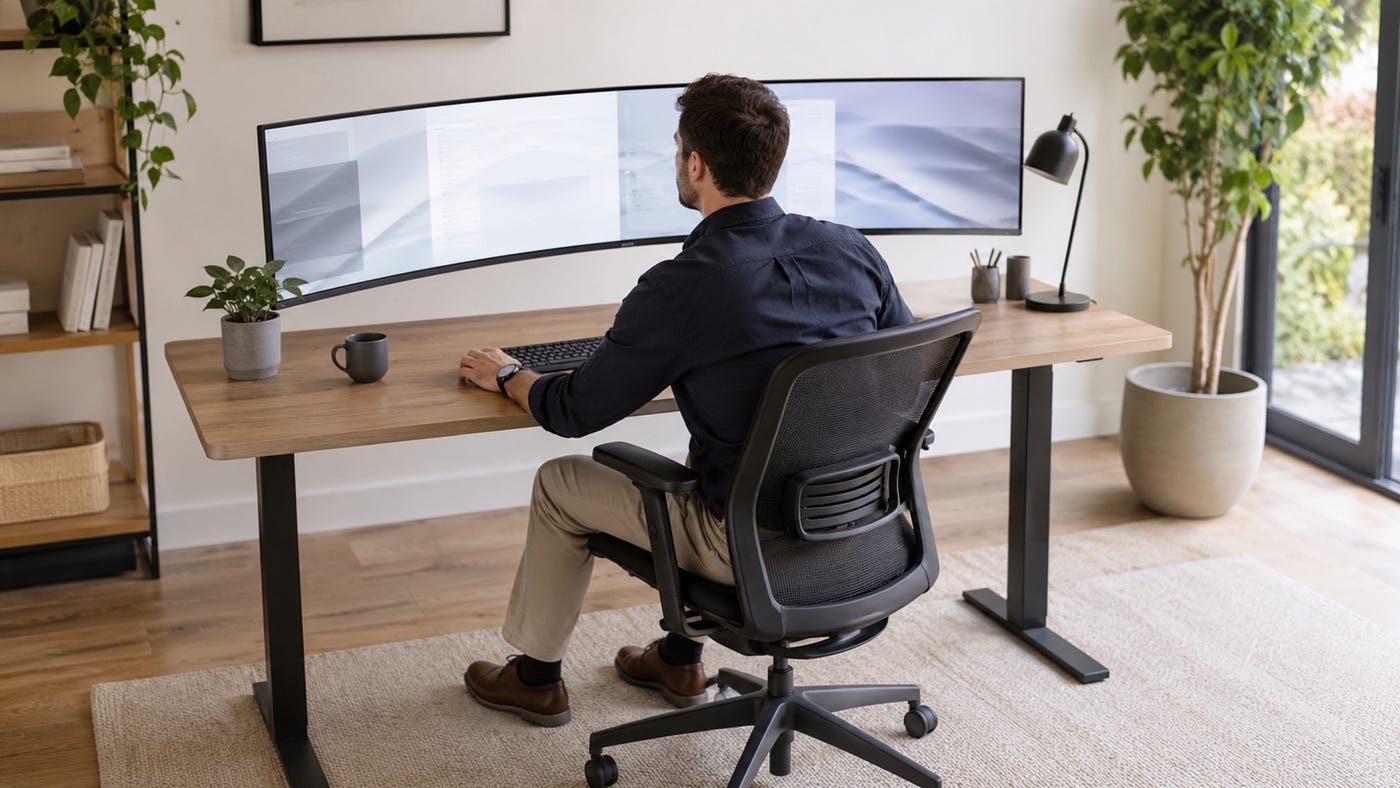
His shoulders were never square. A colleague noticed it on a video call, the way he sat slightly turned, one shoulder forward, as if he were listening to something off to his left. He was, in a sense. His main work lived on a screen to the left of centre, and over months of facing it his whole upper body had settled into a permanent slight rotation, so far the default that sitting square now felt wrong. His hips faced the desk; his spine faced the screen; and the gap between the two had become his posture.
That gap is what a wide monitor setup does to a body, and it is a bigger problem than most people credit. An ergonomic office chair is often chosen to fight a forward slump, but a two-screen or ultrawide desk introduces a different enemy, a sideways twist, that the same chair has to handle. Ergonomics research documented well before 2026 keeps flagging sustained asymmetric posture, where the trunk is held rotated or shifted to one side for long periods, as a distinct load pattern, because a twisted spine distributes stress unevenly in a way a symmetric forward lean never does. A wide setup does not slump you; it turns you, and the turning is the part that lasts.
Why Width Breaks the Centreline
A single centred screen keeps everything in a line: eyes, keyboard, hips, and spine all point the same way, and the body stays balanced. Widen the setup, whether with a second monitor or one very wide panel, and the work spreads sideways beyond that centreline. Now the thing you are reading is often to the left or the right of where your hips point, and your body closes the gap the only way it can, by rotating the upper spine toward the work while the hips stay put.
The rotation feels like nothing in the moment, which is exactly why it lasts. There is no sharp signal telling you to stop, just a small comfortable turn toward the screen you are using, held and repeated until it becomes your resting shape. Over weeks the muscles on one side shorten to the habit and sitting square starts to feel effortful. How the position of your screen quietly dictates the position of your spine is argued in why your screen and spine decide your posture.
Why the Load Lands on One Side
A neutral spine shares its work evenly. Both sides of each disc carry a similar share of the compression, and the muscles on the left and right flanks balance each other. Rotation ends that balance. When the trunk twists toward a side screen, one side of each disc compresses while the other stretches, and one flank of muscle holds the position while the other slackens, so the working side is loaded every hour of every day.
Because a wide setup pulls you the same way each time, toward the screen you favour, the imbalance never gets a chance to even out. The same side works, the same side tires, and the ache that eventually appears is one-sided and predictable. It is not a mystery injury; it is the accumulated cost of holding a rotation the body was never built to hold for a full working day.
Why It Creeps In Unnoticed
The reason a wide-setup twist does so much damage is that it never announces itself. A forward slump at least feels like slouching, and you correct it when you notice. A sideways rotation toward a screen feels like paying attention, so there is nothing to correct, and the posture deepens under cover of looking productive. You are not slumping; you are leaning in, and leaning in toward an off-centre screen is a twist by another name.
This slow creep is why people are surprised by the one-sided ache. Nothing dramatic happened, no single bad day, just months of a small comfortable rotation that never triggered a warning until the loaded side finally complained. The screen that felt harmless because it was easy to read was reshaping the spine the whole time, which is the same quiet mechanism that makes a badly placed laptop punishing, as explained in why laptop screens cause more neck strain than desktop monitors.
Why Facing Square Starts to Feel Wrong
Once a rotation becomes habitual, the body recalibrates around it. The muscles that hold the twist shorten, the ones on the opposite side lengthen, and the brain resets its sense of straight to match the position you actually hold. So when you deliberately sit square, it feels unnatural, even uncomfortable, because your body now treats the twist as home and neutral as the deviation.
That recalibration is why a wide-setup posture is so persistent. You cannot fix it by simply deciding to sit straight, because straight no longer feels straight to you. The fix has to change the geometry that created the twist, so that facing your work and facing forward become the same direction again, rather than relying on willpower to hold a position your body has learned to resist.
What a Wide Setup Does to the Body
A wider desk is sold as more room to work, and it is, but the extra width comes with a postural bill that a centred setup never sends. Setting the two side by side shows where the cost lands.

The left column is the desk your posture was probably fine on. The right column is the desk that slowly turns you without ever setting off an alarm, which is why the strain arrives as a surprise.
Why the Fix Is Geometry, Not Effort
Because the twist is built into where the screen sits, the durable fix is to change the geometry rather than to fight it with posture reminders. If the work you spend most of your day on sits where your hips already point, there is no gap for your spine to close and no rotation to hold. Move the dominant screen toward centre, and the sideways pull that has been reshaping you simply stops being applied.
Effort alone cannot beat geometry, because a body will always drift back toward the position its surroundings reward. Willpower keeps you square for an hour; the screen placement decides where you sit for the other seven. Communities around ergonomic office chairs in Australia are a useful place to see how people arrange wide setups so the main screen stays central and the twist never gets started.
When a Wide Setup Does Not Twist You
A wide desk is not automatically a problem. If your dominant screen sits dead centre and the second panel is used only occasionally, glanced at rather than worked on, your spine spends the day facing forward and the rare turn to the side never accumulates into strain. Width becomes harmless when the work you actually do stays on the centreline and the extra space is reference rather than focus.
The twist also stays away if you turn your whole body to face a side screen instead of just your spine, so hips and shoulders rotate together and the trunk never twists in the middle. What the off-centre load punishes is the common arrangement, a heavily used screen parked to one side and read with a rotated spine for hours. When the main work is central or you turn as a whole, a wide setup is just more room. When the dominant screen sits off to the side, it is a full day of quiet twisting.
Common Mistakes
The first mistake is putting the screen you use most off to one side because the centre spot went to a second monitor or a laptop. The dominant screen belongs on the centreline, and giving that spot to something you barely look at guarantees a daily twist toward the thing you actually read.
The second is mistaking the twist for concentration. Leaning in toward an off-centre screen feels like focus, so nothing tells you to stop, and the rotation deepens while you think you are simply working hard. Recognising that a sideways lean is a twist, not a virtue, is the start of fixing it.
The third is trying to correct the posture with willpower alone. Once your body has learned the rotation, sitting square feels wrong, and no amount of reminding yourself will hold against a screen that keeps pulling you sideways for seven hours. The geometry has to change, not just the intention.
The fourth is turning only the neck to reach a side screen. Rotating the head alone loads the same side of the neck every time, while turning the whole body keeps the spine neutral, so the habit of turning as a unit matters as much as where the screens sit.
Conclusion
A wide monitor setup sells itself as more room and quietly delivers a permanent slight rotation, because the extra screen sits off your centreline and your spine keeps twisting toward it to read. The load lands on one side, the same side every hour, and because the twist feels like focus rather than slouching, nothing warns you until the loaded flank finally aches. Over months the body recalibrates around the rotation until sitting square feels wrong, which is why the posture is so hard to shake by willpower.
The durable answer is to fix the geometry so that facing your work and facing forward become the same direction again. Put the screen you use most on the centreline, turn as a whole rather than twisting your spine, and support your lower back so it stays anchored through the turns you do make. The best office chairs for back support keep that anchor in place, but the first move is to stop the wide desk from pulling you off your own centre in the first place.
Frequently Asked Questions
Why do I sit slightly turned even when I try to face forward?
Because a screen off to one side has trained your spine to rotate toward it for hours a day, and your muscles have shortened to that habit. Over time the body resets its sense of straight to match the twist, so facing forward feels effortful while the rotation feels natural, even though it is the position doing the harm.
How is a sideways twist different from a forward slump?
A slump loads the spine forward but fairly evenly, and it feels like slouching, so you correct it. A twist rotates the trunk, concentrating load on one side of each disc and one flank of muscle, and it feels like focus rather than bad posture, so nothing prompts you to fix it and it quietly deepens.
Why is the ache always on the same side?
Because a wide setup pulls you the same direction every time, toward the screen you use most. The same side of your spine and neck is loaded hour after hour with no chance to even out, so the strain accumulates on that one flank and shows up as a predictable one-sided ache rather than general fatigue.
Can I fix it just by reminding myself to sit up straight?
Rarely, because your body has learned the rotation and now treats it as home, so square feels wrong. Willpower holds for an hour while the screen pulls you sideways for the other seven. The lasting fix is to move your main screen to centre so facing your work and facing forward become the same thing.
Where should my most-used screen go?
On the centreline, directly in front of your hips and keyboard. Give the centre spot to whatever you spend most of the day reading, and let any secondary screen sit to the side for occasional reference, so your spine faces forward for the bulk of the day instead of twisting toward off-centre work.
Is a very wide single monitor as much of a problem as two screens?
It can be, if the part you work on most sits off to one side of the panel. What matters is not the number of screens but where your active work lives relative to your hips. Keep the busy zone centred and an ultrawide is fine; let it drift to one edge and it twists you the same way a side monitor does.
메타데이터
- post_id
- 06f1f435d3c5
- slug
- why-a-wide-monitor-setup-pulls-you-off-centre-06f1f435d3c5
- url
- https://medium.com/@sophielane.corpo/why-a-wide-monitor-setup-pulls-you-off-centre-06f1f435d3c5
- canonical_url
- https://medium.com/@sophielane.corpo/why-a-wide-monitor-setup-pulls-you-off-centre-06f1f435d3c5
- author_url
- https://medium.com/@sophielane.corpo
- status
- ok
- fetched_at
- 2026-08-21 19:20:34