I Scanned 50 Small Business Domains for Security Issues. Most Got an F.
Your domain is leaking more about your security posture than you think. I built a free tool to grade it.
I Scanned 50 Small Business Domains for Security Issues. Most Got an F.
Your domain is leaking more about your security posture than you think. I built a free tool to grade it.
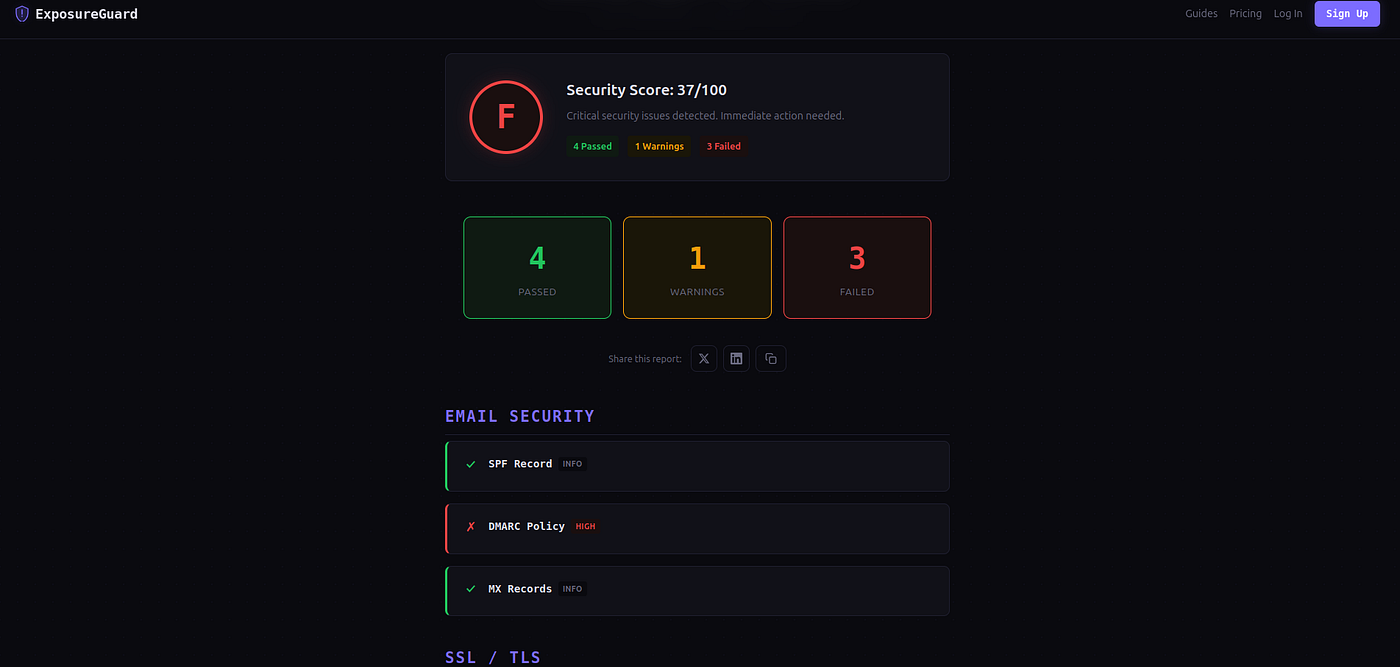
This business had SSL. They thought they were secure.
— -
Last week I ran security scans against 50 domains belonging to small businesses — local agencies, SaaS startups, e-commerce shops, even nonprofits. These aren’t careless people. Most had SSL certificates. Some even had formal privacy policies.
But when I checked the full picture — email authentication, security headers, DNSSEC, exposed ports — the results were brutal.
34 out of 50 scored a D or F.
Only 3 earned an A.
What does a “domain security scan” actually check?
When a security researcher or attacker looks at your domain, they’re not trying to guess your password. They’re reading what your domain publicly broadcasts about itself. It’s all there in DNS records, HTTP headers, and open ports — visible to anyone who knows where to look.
Here’s what I check:
1. SPF Record (Email Security)
SPF tells email servers which IP addresses are allowed to send email on behalf of your domain. Without it, anyone can send emails that look like they’re from you. This is how business email compromise (BEC) attacks start — and BEC cost businesses $2.7 billion in 2023.
2. DMARC Policy (Email Security)
DMARC builds on SPF and tells receiving servers what to do when an email fails authentication: nothing, quarantine it, or reject it. Most small businesses either have no DMARC record at all, or have it set to p=none — which is the same as not having it.
3. MX Records (Email Security)
Basic check: does your domain actually have mail servers configured? Surprisingly, some domains that actively send email have misconfigured or missing MX records.
4. SSL Certificate (SSL/TLS)
Is your certificate valid, not expired, and issued by a trusted authority? An expired or self-signed cert is one of the fastest ways to lose visitor trust.
5. HTTPS Redirect (HTTP Security)
If someone visits http://yourdomain.com, do they get redirected to HTTPS? If not, their first connection is unencrypted and vulnerable to interception.
6. Security Headers (HTTP Security)
Headers like Strict-Transport-Security, Content-Security-Policy, X-Frame-Options, and X-Content-Type-Options tell browsers how to protect your visitors. Most small business sites have zero security headers configured.
7. DNSSEC (DNS)
DNSSEC cryptographically signs your DNS records to prevent tampering. Without it, an attacker could redirect your domain’s traffic to a malicious server. Adoption is still low — most domains don’t have it.
8. Open Ports (Network)
Are services like SSH (22), databases (3306, 5432), or remote desktop (3389) publicly accessible? Every open port is an attack surface.
Why small businesses fail these checks
It’s not because they don’t care. It’s because:
Nobody told them. Web hosts set up SSL and call it done. Nobody mentions SPF, DMARC, or security headers. These aren’t part of the “launch your website” checklist.
The tools are intimidating. Checking DNS records means using dig or nslookup in a terminal. Checking headers means using curl with specific flags. Small business owners aren’t going to do this.
”It works” feels like enough. The site loads, email sends and receives, customers can check out. Everything seems fine — until it isn’t.
Security is invisible until it fails. Nobody notices a missing DMARC record until their domain gets spoofed and a client gets phished. Nobody notices missing security headers until they fail a vendor security questionnaire and lose a deal.
Real examples from my scans
I won’t name specific businesses, but here are patterns I saw repeatedly:
The “everything looks fine” site (Grade: D, Score: 42/100)
-
Valid SSL certificate (pass)
-
HTTPS redirect works (pass)
-
No SPF record (fail — high severity)
-
No DMARC record (fail — high severity)
-
Zero security headers (fail — medium severity)
-
No DNSSEC (warn)
-
SSH port open to the internet (warn)
This business had a professional website, valid SSL, and HTTPS working. But their email domain was completely unprotected — anyone could send emails pretending to be them. Their server had SSH exposed to the public internet. And their site offered zero browser-side protections.
The “we just use Google Workspace” site (Grade: C, Score: 68/100)
-
Google configured SPF and MX automatically (pass)
-
DMARC set to p=none (warn — monitoring only, no enforcement)
-
Valid SSL (pass)
-
HTTPS redirect (pass)
-
Missing HSTS and CSP headers (fail)
-
No DNSSEC (warn)
Google Workspace gets you halfway there by setting up SPF and MX correctly. But DMARC defaults to p=none (monitor-only), security headers depend on your web host, and DNSSEC requires action from your domain registrar.
The well-configured site (Grade: A, Score: 93/100)
-
SPF with
-all(hard fail) -
DMARC with
p=reject(pass) -
Valid SSL, strong cipher (pass)
-
HTTPS redirect with HSTS (pass)
-
CSP, X-Frame-Options, X-Content-Type-Options all present (pass)
-
DNSSEC enabled (pass)
-
Only ports 80 and 443 open (pass)
This was a SaaS company that had clearly thought about security. Everything locked down. No unnecessary ports. Email authentication fully enforced. The difference was night and day.
So I turned it into a free tool
After running these scans manually, I packaged everything into ExposureGuard — a free domain security scanner that runs all 8 checks in under 30 seconds and gives you a letter grade (A through F) with a numeric score out of 100.
For each check, you get:
-
Pass/Warn/Fail status with severity rating
-
What we found — the specific configuration (or lack of it)
-
How to fix it — step-by-step recommendations
The free scan shows all findings and your grade. No signup required.
Try it: getexposureguard.com
How to fix the most common failures
If you scan your domain and get a bad grade, here are the highest-impact fixes:
Add an SPF record (5 minutes)
Add a TXT record to your DNS:
v=spf1 include:_spf.google.com ~all
(Replace the include with your actual email provider’s SPF domain.)
Set up DMARC (5 minutes)
Add a TXT record at _dmarc.yourdomain.com:
v=DMARC1; p=quarantine; rua=mailto:dmarc@yourdomain.com
Start with p=quarantine, monitor the reports, then move to p=reject.
Add security headers (10–30 minutes)
If you’re on Cloudflare, use Transform Rules. On Nginx, add to your server block:
add_header Strict-Transport-Security “max-age=31536000; includeSubDomains” always;

add_header X-Content-Type-Options “nosniff” always;

add_header X-Frame-Options “DENY” always;

add_header Referrer-Policy “strict-origin-when-cross-origin” always;
Enable DNSSEC (5 minutes)
Most registrars (Cloudflare, Namecheap, Google Domains) have a one-click DNSSEC toggle. It’s free. Just turn it on.
Close unnecessary ports
If you have SSH (22) open to the internet, restrict it to your IP or put it behind a VPN. Database ports (3306, 5432, 27017) should never be publicly accessible.
Why this matters more than you think
Vendor security questionnaires are everywhere now. If you sell B2B, your prospects will check your security posture. Failing basic checks like DMARC and security headers can lose you deals.
Cyber insurance is getting stricter. Insurers are starting to scan applicant domains before issuing policies. Bad email authentication or exposed services can increase premiums or get you denied.
Google and Yahoo now enforce email authentication. As of 2024, bulk senders must have valid SPF, DKIM, and DMARC. If you send marketing emails without these, deliverability tanks.
It’s the lowest-hanging fruit. Unlike complex application security, domain security is mostly configuration. Most fixes take 5–30 minutes and are free. The ROI is enormous.
The bottom line
Your domain’s security configuration is public information. Attackers check it. Vendors check it. Email providers check it. The question is whether you’ve checked it.
Most small businesses haven’t. That’s why most score a D or F.
The good news: fixing it is straightforward, usually free, and takes an afternoon at most. The hard part is knowing what to check — and that’s what ExposureGuard does for you in 30 seconds.

— -
Scan your domain free at getexposureguard.com. No signup, results in under 30 seconds.
— -
메타데이터
- post_id
- 06fafb9d0e72
- slug
- i-scanned-50-small-business-domains-for-security-issues-most-got-an-f-06fafb9d0e72
- url
- https://medium.com/@0xn0rd/i-scanned-50-small-business-domains-for-security-issues-most-got-an-f-06fafb9d0e72
- canonical_url
- https://medium.com/@0xn0rd/i-scanned-50-small-business-domains-for-security-issues-most-got-an-f-06fafb9d0e72
- author_url
- https://medium.com/@0xn0rd
- status
- ok
- fetched_at
- 2026-08-10 06:42:06


