Databricks Autoloader: Schema Evolution vs Schema Inference
A practical guide for Spark engineers stepping into streaming pipelines
Databricks Autoloader: Schema Evolution vs Schema Inference
A practical guide for Spark engineers stepping into streaming pipelines
Modern data pipelines rarely fail because Spark is slow — they fail because the data suddenly decided to “evolve” at 2 AM without informing anyone. One day your amount column is an INT, the next day it becomes a nested JSON object, a vendor casually adds 14 new columns to a CSV feed, dashboards start breaking, streaming jobs fail, and suddenly everyone in the company remembers the data engineering team exists. Schema drift has quietly become one of the most common and frustrating problems in modern data warehousing, especially in large-scale semi-structured ingestion systems. And honestly, this is where Databricks Autoloader feels less like a feature and more like therapy for data engineers. With capabilities like Schema Inference, Schema Evolution, rescued data handling, and incremental cloud ingestion, Autoloader was built specifically for the chaotic reality of modern data — where schemas change constantly, upstream systems do whatever they want, and production pipelines somehow still need to keep running.
First: What Is Autoloader?
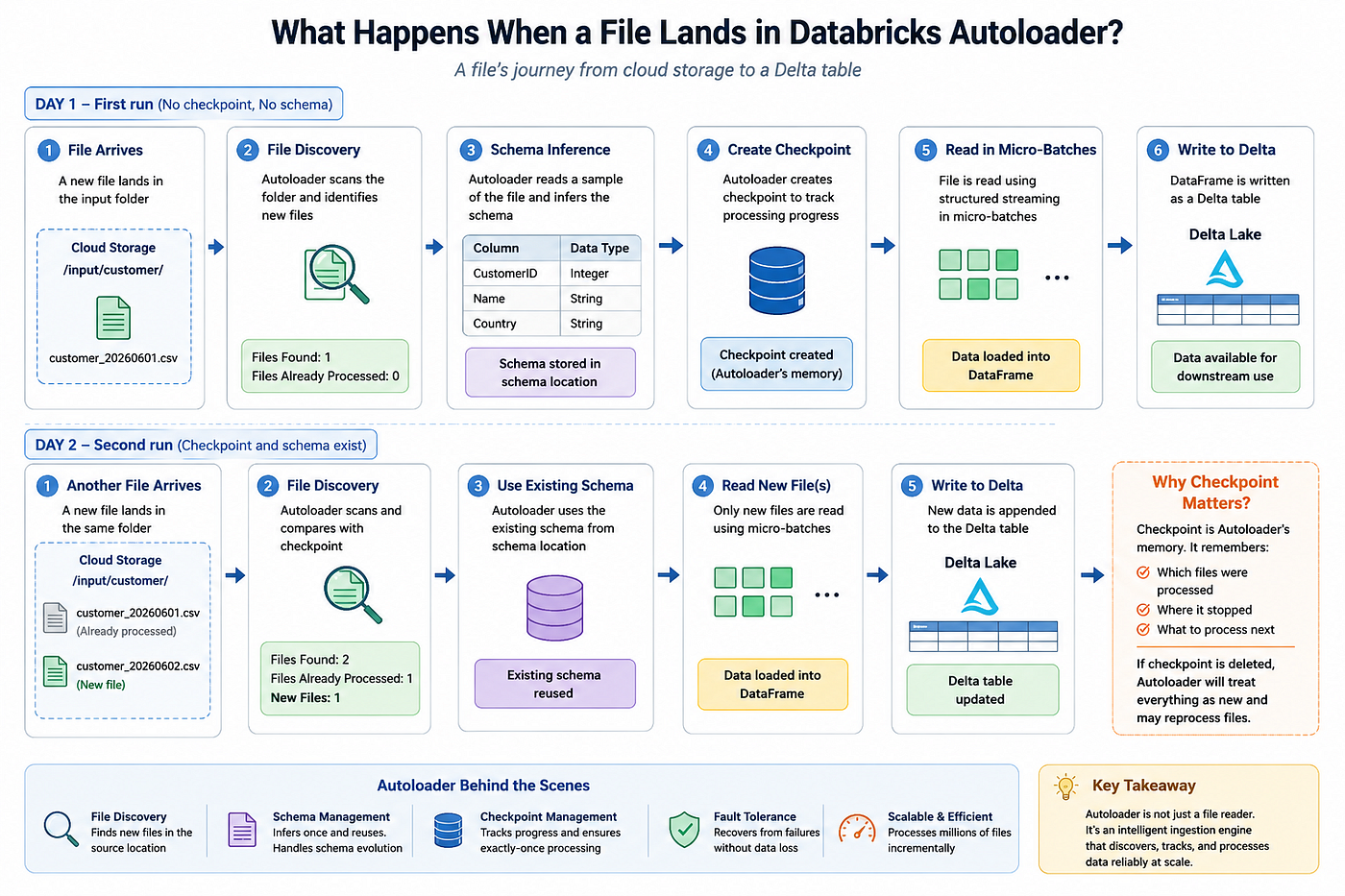
Autoloader (cloudFiles) is Databricks' native solution for incrementally ingesting files from cloud storage (S3, ADLS, GCS) into Delta Lake. It tracks which files have already been processed using checkpoints, supports structured streaming, and scales elegantly to millions of files.
df = (
    spark.readStream
    .format("cloudFiles")
    .option("cloudFiles.format", "json")
    .option("cloudFiles.schemaLocation", "/mnt/schema/_checkpoint")
    .load("/mnt/data/landing/")
)
Two things make Databricks Autoloader especially powerful for production ingestion: it can automatically infer your schema, and it can evolve that schema as the incoming data changes over time. While these features sound similar, they operate at completely different stages of the ingestion lifecycle — and confusing them is exactly where many production bugs, schema mismatch failures, and broken streaming pipelines begin. One helps Autoloader understand the structure of incoming data during initial ingestion, while the other helps pipelines survive real-world schema drift when new columns or datatype changes appear later in production. On top of that, Autoloader’s ability to handle schema changes dynamically and on the fly is what makes it so valuable in modern lakehouse architectures, where upstream systems evolve constantly but downstream production pipelines are still expected to keep running reliably without manual intervention every single time the data changes.
Schema Inference: A One-Time Bootstrapping Act
Schema inference is what happens the first time Autoloader runs (or when the schema location is empty). It samples a portion of your source files and derives a schema from them.
df = (
    spark.readStream
    .format("cloudFiles")
    .option("cloudFiles.format", "json")
    .option("cloudFiles.schemaLocation", "/mnt/schema/_checkpoint")
    .option("cloudFiles.inferColumnTypes", "true")   # infer actual types, not everything as string
    .load("/mnt/data/landing/")
)
Autoloader writes the inferred schema to your schemaLocation. From that point on, it reuses the stored schema on every subsequent run — it does not re-infer from scratch on restart.
This is the key insight people miss:
Schema inference is a bootstrapping step. It runs once. After that, the stored schema is the source of truth.
If you delete the schema checkpoint and restart, inference runs again. If you leave it in place, Autoloader reads the saved schema and moves forward from there.
What gets inferred
By By default, without cloudFiles.inferColumnTypes, Databricks Autoloader treats most columns in JSON and CSV files as strings during ingestion. When you enable cloudFiles.inferColumnTypes=true, Autoloader performs an initial schema inference pass where it samples the incoming data and attempts to automatically promote fields into appropriate datatypes such as integers, doubles, booleans, timestamps, arrays, or nested structs. To control how much data is scanned during schema inference, Autoloader provides two important configuration options: spark.databricks.cloudFiles.schemaInference.sampleSize.numFiles, which limits the number of files sampled, and spark.databricks.cloudFiles.schemaInference.sampleSize.numBytes, which limits the total amount of data scanned during inference. These settings are especially useful in large-scale production environments where scanning massive directories just to infer schemas can increase startup latency and compute costs unnecessarily.
Schema Evolution: An Ongoing Runtime Policy
Schema evolution is a completely separate concept. It governs what Autoloader does at runtime, when incoming data no longer matches the stored schema — specifically when new columns appear.

This is controlled by cloudFiles.schemaEvolutionMode. There are four modes:
1. addNewColumns (Default for most formats)
When a new column is detected in incoming data, Autoloader adds it to the stored schema and restarts the stream. The new column is available going forward.
.option("cloudFiles.schemaEvolutionMode", "addNewColumns")This is the “batteries included” setting. It handles organic schema growth gracefully, but be aware: the stream restart means your downstream sink must tolerate micro-batch replays or idempotent writes.
2. rescue
New or mismatched columns are not added to the schema. Instead, they get packed into a special _rescued_data column as raw JSON. Your main schema stays locked; no restarts happen.
.option("cloudFiles.schemaEvolutionMode", "rescue")This is ideal when you own a strict contract schema and want to catch unexpected data without breaking your pipeline. You can audit _rescued_data separately and decide what to promote later.
3. failOnNewColumns
If a new column arrives, the stream throws an exception and stops.
.option("cloudFiles.schemaEvolutionMode", "failOnNewColumns")Use this when schema changes require explicit human approval — regulated environments, strict data contracts, or when downstream systems can’t handle surprises.
4. none
New columns are silently dropped. The stream keeps running as if those columns never existed.
.option("cloudFiles.schemaEvolutionMode", "none")This is the most dangerous mode for production. It gives you no signal that data is being lost. Only use it if you genuinely don’t care about unknown columns.
The Mental Model: Inference vs Evolution
Here’s the clearest way to think about both concepts together:
Schema Inference Schema Evolution When First run (schema location empty) Every run (when new columns appear) What it does Samples files → derives → saves schema Checks incoming data against saved schema Controlled by inferColumnTypes, schemaHints schemaEvolutionMode Frequency Once (until schema is deleted) Continuously, on every micro-batch
Think of it this way: inference gives you a schema to start with; evolution decides what happens when reality drifts from that starting point.
Schema Widening: Type Promotion Rules
Schema widening is a subset of evolution — it specifically refers to what happens when the type of an existing column changes, not just when new columns arrive.
Autoloader follows a safe promotion hierarchy:
byte → short → int → long → float → double → decimal → stringFor example, if a column was inferred as int and a new file contains values that overflow into long, Autoloader can safely widen the column type without data loss.
# Example: column "user_id" was inferred as int
# New files arrive with user_id values like 9876543210 (requires long)
# Autoloader widens int → long automatically
What Autoloader will not do automatically:
- Promote
string→int(narrowing, potentially lossy) - Promote incompatible types like
timestamp→double - Any promotion that could silently corrupt existing data
When a type conflict can’t be resolved safely, Autoloader either rescues the conflicting value (if rescue mode is active) or raises an error, depending on your schemaEvolutionMode.
Using schemaHints to guide inference
If you already know some columns will come in as strings but should be treated as timestamps, you can nudge the inference step:
.option("cloudFiles.schemaHints", "event_time TIMESTAMP, amount DOUBLE")schemaHints override the inferred type for specific columns during that initial bootstrapping pass. They do not affect evolution for already-stored schemas.
The Rescued Data Column
The _rescued_data column deserves its own mention because it functions as a safety net across all evolution modes. Even if you're on addNewColumns or failOnNewColumns, you can explicitly enable it:
.option("rescuedDataColumn", "_rescued_data")Any value that doesn’t fit the current schema — whether it’s a new column, a type mismatch, or a malformed value — gets captured as raw JSON in _rescued_data. It's nullable, so rows with no rescued data show null.
This column is invaluable for debugging. In production, persist it alongside your main data and set up a monitor on it:
from pyspark.sql.functions import colrescued = df.filter(col("_rescued_data").isNotNull())
rescued.writeStream.format("delta").save("/mnt/audit/rescued/")
MergeSchema: The Feature That Saves Pipelines When New Columns Suddenly Appear
If schema drift is inevitable in modern data systems, then mergeSchema is one of the biggest reasons Delta Lake pipelines remain manageable in production environments. One of the most common ingestion problems in real-world data engineering happens when upstream systems suddenly introduce new columns without warning. Yesterday your pipeline was processing perfectly fine, and today an API team, vendor, or application release silently adds additional fields to the payload. Suddenly your Bronze ingestion starts failing with schema mismatch errors, dashboards stop refreshing, and everyone starts investigating the “data issue.”
Imagine your incoming JSON initially looks like this:
{
  "order_id": 101,
  "amount": 500
}
Your Delta table schema is created successfully, the ingestion pipeline stabilizes, and everything works as expected. But the next day, the source system evolves and starts sending:
{
  "order_id": 101,
  "amount": 500,
  "discount": 20,
  "coupon_code": "SAVE20"
}
Without schema evolution support, Delta Lake strictly validates incoming writes against the existing table schema. Since the target table does not yet contain the newly introduced columns, the write operation can fail entirely. In traditional warehouse systems, this often means manual schema changes, pipeline downtime, emergency fixes, and frustrated engineering teams trying to restore ingestion quickly.
This is exactly where mergeSchema becomes incredibly valuable. By enabling:
.option("mergeSchema", "true")Delta Lake can automatically evolve the table schema during the write operation itself. Instead of failing the pipeline, the new columns are appended safely into the existing table structure while preserving older data and keeping ingestion running uninterrupted.
Example:
df.write \
  .format("delta") \
  .option("mergeSchema", "true") \
  .mode("append") \
  .save("/mnt/delta/orders")
Now, instead of breaking the pipeline:
discountgets added automaticallycoupon_codebecomes part of the Delta schema- previous records remain unchanged
- downstream ingestion continues successfully
This ability to evolve schemas incrementally is one of the reasons modern lakehouse architectures are significantly more resilient than older ETL ecosystems, where even a small schema change could disrupt entire nightly workflows.
However, one important misconception needs to be clarified here: mergeSchema is not a universal solution for every kind of schema drift. It works extremely well for adding new columns and certain compatible datatype widening operations, but it cannot automatically resolve fundamentally incompatible datatype changes.
For example, changes like:
INT → BIGINT
FLOAT → DOUBLE
are generally considered safe widening operations and can often be handled automatically. But semantic datatype mutations such as:
INT → STRING
STRING → STRUCT
ARRAY → MAP
usually fail because these changes alter the meaning and interpretation of the data itself. Delta Lake intentionally prevents many of these operations to preserve schema consistency, analytical correctness, and downstream reliability.
This distinction becomes extremely important in production architectures because adding a new column is very different from changing the meaning of an existing column. One is schema evolution, while the other is closer to schema migration — and those require very different operational strategies.
In practice, mergeSchema works best when combined with:
- Databricks Autoloader
- Schema Evolution
- Bronze layer ingestion
- Rescue data handling
- Explicit schema enforcement in Silver tables
Used correctly, it becomes one of the most powerful features for building ingestion pipelines that can survive real-world schema drift without constantly requiring manual intervention from data engineering teams.
overwriteSchema
Replaces the entire Delta table schema with the incoming DataFrame’s schema. This is destructive — columns that exist in the table but not in the new DataFrame are permanently removed.
# Batch overwrite (not streaming) - only valid with .mode("overwrite")
(
    df.write
    .format("delta")
    .option("overwriteSchema", "true")
    .mode("overwrite")
    .save("/mnt/delta/events")
)
overwriteSchema is not available in streaming mode — it's a batch operation only. Use it deliberately, typically during a migration or a full table rebuild. Never use it on a table where downstream consumers depend on column stability.
Side-by-side comparison
mergeSchema overwriteSchema Effect Adds new columns Replaces full schema Existing columns Preserved Dropped if not in new data Streaming support Yes No (batch only) Risk level Low High — data loss possible Use case Organic column growth Full table migration/rebuild
Putting It All Together: A Production Pattern
Here’s a complete, battle-tested Autoloader setup that combines everything covered above:
from pyspark.sql.functions import col, current_timestamp
# Read with inference + evolution + rescue
raw_df = (
    spark.readStream
    .format("cloudFiles")
    .option("cloudFiles.format", "json")
    .option("cloudFiles.schemaLocation", "/mnt/schema/events")
    .option("cloudFiles.inferColumnTypes", "true")
    .option("cloudFiles.schemaEvolutionMode", "addNewColumns")
    .option("rescuedDataColumn", "_rescued_data")
    .load("/mnt/landing/events/")
)
# Add ingestion metadata
enriched_df = raw_df.withColumn("_ingested_at", current_timestamp())
# Write to Delta with mergeSchema to handle evolved columns
(
    enriched_df.writeStream
    .format("delta")
    .option("mergeSchema", "true")
    .option("checkpointLocation", "/mnt/checkpoints/events")
    .trigger(availableNow=True)   # batch-style trigger for cost control
    .start("/mnt/delta/events")
)
# Separately, monitor rescued data
rescued_monitor = (
    raw_df
    .filter(col("_rescued_data").isNotNull())
    .writeStream
    .format("delta")
    .option("checkpointLocation", "/mnt/checkpoints/rescued")
    .start("/mnt/delta/rescued_audit")
)
Key Takeaways
- Schema inference is a one-time act. It samples your data, writes a schema to
schemaLocation, and doesn't repeat unless you clear the checkpoint. - Schema evolution is an ongoing runtime policy.
addNewColumns,rescue,failOnNewColumns, andnoneeach have valid use cases — choose deliberately, not by default. - Schema widening follows a safe promotion hierarchy. Autoloader widens types when it’s lossless; it rescues or fails when it’s not.
- The
_rescued_datacolumn is your production safety net. Always enable it in environments where upstream data sources are not fully controlled. **mergeSchemais additive;overwriteSchemais destructive.** UsemergeSchemain streaming pipelines, reserveoverwriteSchemafor deliberate batch rebuilds.
The confusion between inference and evolution is understandable — Databricks’ docs treat them as a continuous feature rather than two distinct mechanisms. But once you see them separately, building resilient ingestion pipelines becomes much more predictable.
메타데이터
- post_id
- 070190a4e23f
- slug
- databricks-autoloader-schema-evolution-vs-schema-inference-070190a4e23f
- url
- https://medium.com/@divyanshgoyal8989/databricks-autoloader-schema-evolution-vs-schema-inference-070190a4e23f
- canonical_url
- https://medium.com/@divyanshgoyal8989/databricks-autoloader-schema-evolution-vs-schema-inference-070190a4e23f
- author_url
- https://medium.com/@divyanshgoyal8989
- status
- ok
- fetched_at
- 2026-06-09 15:37:30