I’m a Web Developer Who Was Scared of Mobile. React Native in 2026 Changed That.
For years I told myself mobile “wasn’t my thing.” It turns out the wall I was avoiding had quietly been torn down — and most of it was made…
I’m a Web Developer Who Was Scared of Mobile. React Native in 2026 Changed That.
For years I told myself mobile “wasn’t my thing.” It turns out the wall I was avoiding had quietly been torn down — and most of it was made of JavaScript I already knew.
For about six years, my answer to “can you build the mobile app too?” was a practiced, slightly apologetic no. I shipped React on the web. I knew my hooks, my useEffect dependency arrays, my Flexbox. But mobile was a different country — Xcode, provisioning profiles, Swift, Gradle files that failed for reasons no Stack Overflow answer ever fully explained. I'd opened a React Native project exactly once, in 2021, hit a native build error on line zero, and quietly closed the tab.
So when a side project this year actually needed an iOS and Android app, I braced for the same wall. I’d budgeted a month just to feel stupid.
It took an afternoon. Not because I got smarter, but because the thing I’d been scared of had quietly stopped existing. The gap between web React and mobile React Native in 2026 is the smallest it has ever been — and almost everything that used to make the jump painful has been either automated away or removed from the framework entirely. This is the article I wish someone had handed me in 2021, written for the version of me who assumed mobile was for other people.
Why the wall fell (and when)
The fear wasn’t irrational — it was just out of date. React Native really was rough for a long time. The thing that made it slow and fiddly had a name: the bridge, an asynchronous channel that serialized every message between your JavaScript and the phone’s native code into JSON and shipped it across. It worked, but it stuttered, and debugging it felt like shouting across a canyon.
That canyon is gone. Per the official React Native release notes, version 0.82 made the New Architecture the only runtime option, and version 0.84 — released in February 2026 — removed the legacy bridge code from builds entirely and made Hermes V1 the default JavaScript engine. The replacement, JSI (the JavaScript Interface), lets JavaScript hold direct references to native objects with no serialization step. Callstack, summarizing Meta’s own framing, put it bluntly: the New Architecture is now just the architecture.
The numbers behind that shift are real, and worth attributing carefully because the marketing around them gets loud. Shopify’s published production migration — cited across multiple 2026 write-ups including AgileSoftLabs’ migration guide — reported roughly 43% faster cold starts, 39% faster rendering, and around 25–26% lower memory use after moving to the New Architecture. Those are one company’s figures from one large app, not a universal guarantee. But the direction is consistent everywhere the numbers are independently reported.
The framework that ships in 2026 is genuinely different from what it was even eighteen months ago. If you’ve been holding off because of React Native’s old reputation, that reputation is stale. — a sentiment echoed across the 2026 ecosystem, from the React Native 0.84 release notes to practitioner write-ups
For a web developer, here’s why that matters: the reason the framework was hard to get into was that you had to care about native internals to get acceptable performance. In 2026 the good defaults are the defaults. You mostly just don’t undo them.
The one mental-model shift that actually matters
I’ll be honest about the single thing that tripped me up, because it’s the same thing that trips up every web developer and almost no tutorial says it plainly: there is no DOM.
On the web, you reach for <div>, <span>, <p>, and you style them with CSS files. In React Native, as the official docs and the 2026 tutorials both stress, there is no HTML, no DOM, and no CSS files. Instead you use a small set of core components that map to real native UI elements, and you style them with JavaScript objects.
It sounds like a lot. It’s actually a vocabulary swap of about five words. Here’s the entire translation that got me productive:
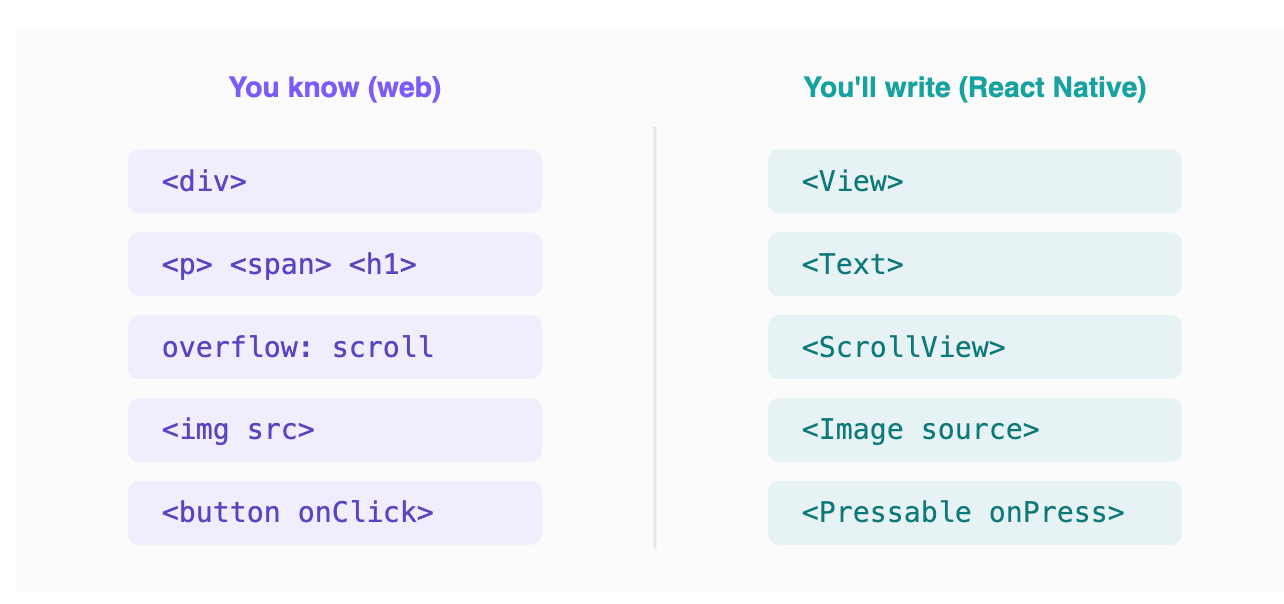
The whole translation table. Web on the left, React Native on the right. div→View, text always wrapped in Text, onClick→onPress, src→source, and long lists use FlatList/FlashList instead of CSS overflow. Tap any row for the gotcha that bit me. (Tap-info won't survive a PNG export, so every note also lives here in the caption.)
That’s it. That’s the wall. Your hooks work. Your component composition works. Your props and state and context work identically. useEffect fires the same way. The mental model you already paid for transfers almost completely — you're learning a new standard library, not a new language.
Styling: it’s just JavaScript objects
The other thing I dreaded was styling, and it turned out to be the part I liked most. There’s no CSS file. You write style as a JavaScript object, and the property names are the camelCase versions of the CSS you already know.
import { View, Text, Pressable, StyleSheet } from 'react-native';

export default function TapCard({ label, onPress }) {
  return (
    <Pressable style={styles.card} onPress={onPress}>
      <Text style={styles.label}>{label}</Text>
    </Pressable>
  );
}
// flexDirection defaults to 'column' here, not 'row' like the web -
// the one Flexbox surprise worth memorizing.
const styles = StyleSheet.create({
  card:  { padding: 16, borderRadius: 12, backgroundColor: '#7B5CFA' },
  label: { color: 'white', fontSize: 16, fontWeight: '600' },
});
If you’ve ever written a styled-component or a Tailwind class, this is familiar within minutes. padding, borderRadius, backgroundColor — same names, no units string for the common cases, all Flexbox under the hood. The single gotcha worth tattooing on your hand: Flexbox defaults to column, not row, because phones are tall. That one default caused about 80% of my early "why is this stacked wrong" moments.
What transfers, and what genuinely doesn’t
It’s worth being precise about the line, because “you already know React” is true in a way that’s easy to over-read. Let me split it honestly.
What transfers almost untouched: the entire React mental model. Components, props, and one-way data flow. Every hook — useState, useEffect, useMemo, useContext, custom hooks you wrote yourself. Conditional rendering, list rendering with .map() and keys, lifting state up. Your data layer comes along for free too: fetch, async/await, React Query, Zustand, Redux Toolkit all behave identically because they're just JavaScript with no DOM dependency. If you wrote it on the web and it didn't touch window or document, it very likely runs unchanged on a phone.
What’s a genuine swap but easy: the component vocabulary in the table above, the styling-as-objects shift, and onPress in place of onClick. A day of friction, no more.
What is genuinely new and costs real time: navigation between screens, because mobile navigation has platform conventions a web router never has to think about — the iOS swipe-back gesture, the Android hardware back button, native stack transitions. Then there’s the physical reality of phones: safe-area insets so your header doesn’t hide under a notch, keyboard avoidance so the input you’re typing into isn’t covered by the keyboard, and permissions prompts for the camera or location. None of that has a web equivalent, and no amount of React experience shortcuts it. This is the honest middle of the learning curve, and it’s where the “an afternoon” framing stops being true.
Your actual first screen
To make the transfer concrete, here’s a complete screen — a tiny tappable counter — that a web React developer can read top to bottom with zero new concepts except the component names. Notice how much is just React.
import { useState } from 'react';
import { View, Text, Pressable, StyleSheet } from 'react-native';
import { SafeAreaView } from 'react-native-safe-area-context';

export default function CounterScreen() {
  // This line is identical to the web. Your hooks just work.
  const [count, setCount] = useState(0);
  return (
    // SafeAreaView keeps content clear of the notch - the one
    // new idea here that has no web equivalent.
    <SafeAreaView style={styles.screen}>
      <Text style={styles.count}>{count}</Text>
      <Pressable style={styles.btn} onPress={() => setCount(c => c + 1)}>
        <Text style={styles.btnText}>Tap me</Text>
      </Pressable>
    </SafeAreaView>
  );
}
const styles = StyleSheet.create({
  screen:  { flex: 1, alignItems: 'center', justifyContent: 'center' },
  count:   { fontSize: 64, fontWeight: '700' },
  btn:     { marginTop: 24, paddingVertical: 12, paddingHorizontal: 28,
             borderRadius: 12, backgroundColor: '#0FA3A3' },
  btnText: { color: 'white', fontSize: 16, fontWeight: '600' },
});
Read that again as a web developer. The useState line, the updater function, the event handler, the component composition — all of it is muscle memory you already have. The only three genuinely new tokens are View, Pressable, and SafeAreaView. That ratio — mostly things you know, a few things you swap — is the whole experience of crossing over in 2026.
The part that actually disappeared: the toolchain
Here’s the real reason 2021-me failed and 2026-me succeeded, and it has nothing to do with the code. It’s that I never had to touch Xcode or Android Studio to get started.
The thing that makes React Native approachable for a web developer in 2026 isn’t React Native — it’s Expo, the toolchain that sits on top of it. Multiple 2026 guides describe Expo as having become to mobile what Next.js is to React on the web: the default way you actually start a project. You run one command, you get a project that runs on a real device through a QR code, and the native build machinery lives in the cloud instead of on your machine.
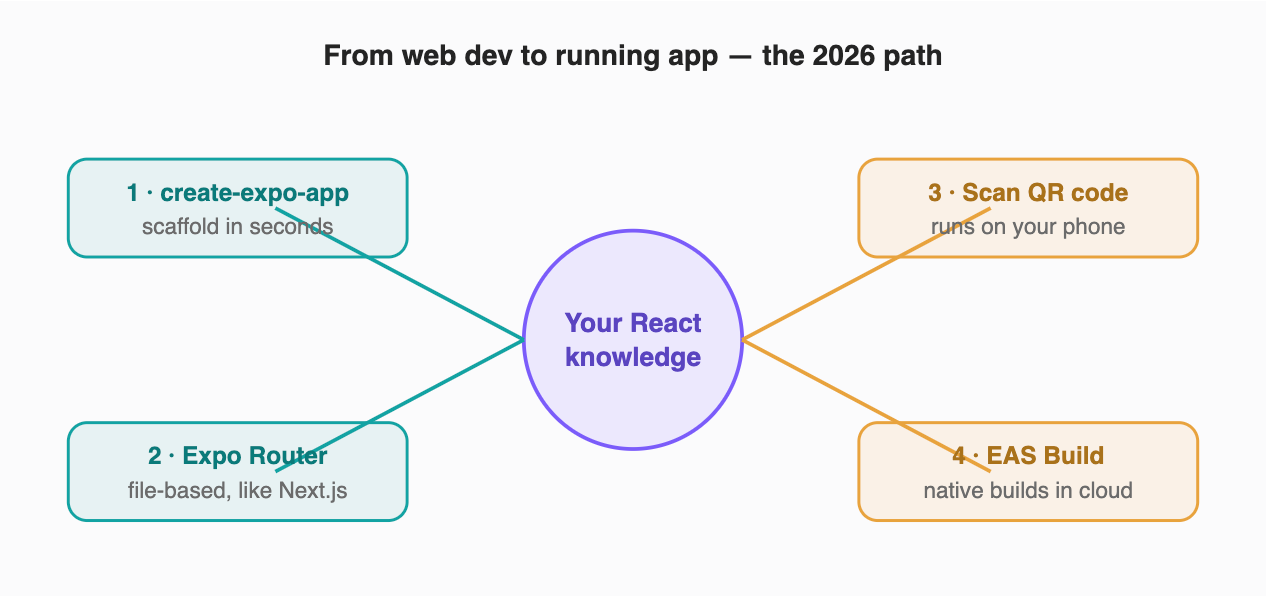
The onboarding path, hub-and-spoke. You start from the React knowledge you already have (center). Teal steps are the code you write; amber steps are the native machinery that used to live on your laptop and now lives in the cloud. The QR-code step is the one that removes the original wall — you see your app on your own phone without ever opening Xcode.
That cloud-build piece is the quiet hero. The errors that defeated me in 2021 — signing, provisioning, Gradle — still exist, but per Expo’s own positioning they now run on EAS Build, a hosted service, rather than on your machine on day one. You can ship a real app to TestFlight before you’ve ever opened Xcode. For a web developer, that’s the difference between “mobile is a separate career” and “mobile is Tuesday.”
The honest counter argument: it is not all free
If I stopped here I’d be selling you the same frictionless fantasy that burned me in 2021. So let me steelman the case against what I just told you, because it’s stronger than the hype admits.
The toolchain hides the wall; it doesn’t delete it. Expo Go runs JavaScript-only projects beautifully, but the moment you need a native module Expo doesn’t bundle — a specific Bluetooth library, a niche SDK — you hit a “development build,” and now the Xcode and Gradle world you were promised you’d avoid is back. It arrives later and gentler than in 2021, but it arrives. Anyone who tells you that you will never touch native tooling is selling a course.
“You already know everything” is generous. You know the language and the component model. You do not yet know mobile’s actual hard parts: navigation that respects platform back-gesture conventions, keyboard avoidance, safe-area insets around notches, the App Store and Play Store review gauntlets, and push notifications. None of that is web knowledge. The igmGuru and Class Central learning guides are blunt that real React Native fluency is months of work, not an afternoon — and they’re right. My afternoon got me a running app, not a shippable product.
And the benchmark numbers deserve a raised eyebrow. The 43%/39%/26% figures come from a vendor-adjacent migration story and are repeated across blogs that, in several cases, end in a sales pitch for migration services. The gains are real and directionally consistent, but treat any single dramatic percentage as one team’s result on one app, not a promise about yours.
Here’s why I still think the wall is down despite all that: every one of those objections is about depth, not entry. In 2021 the wall was at the front door — you couldn’t even get a hello-world running without native pain. In 2026 the front door is open, and the hard parts are where they should be: deeper in, learnable, the same way the web’s hard parts were once ahead of you too.
Practical takeaways
- Start with Expo, not bare React Native. Run
npx create-expo-appand use Expo Router for navigation. Bare React Native is a deliberate choice you make later, not a starting point. - Learn exactly five component swaps first.
div→View, text always insideText,onClick→onPress,img src→Image source, andFlatList/FlashListfor long lists. That vocabulary covers most screens. - Memorize one Flexbox default.
flexDirectioniscolumn, notrow. This single fact prevents most early layout confusion. - Test on your own phone on day one. Install Expo Go, scan the QR code, and feel your code running on real hardware before you touch a single native build setting.
- Make sure you’re on the New Architecture. A fresh Expo project in 2026 ships with it and Hermes V1 by default — the performance you read about is the baseline, so mostly don’t undo the defaults.
- Budget real time for the genuinely-new parts. Navigation conventions, safe areas, push notifications, and store submission are not web skills. Expect them to take weeks, and you won’t be blindsided like I almost was.
What I actually keep from this
The thing I keep isn’t a framework. It’s a small, slightly embarrassing lesson about how fear ages.
My “mobile isn’t my thing” wasn’t a real assessment of mobile. It was a snapshot of one bad afternoon in 2021 that I’d quietly let calcify into an identity. The technology moved on for five years while my belief about it sat perfectly still. The wall I was so sure about had been demolished, the rubble cleared, and a door installed — and I almost missed all of it because I’d already decided how the story ended.
If there’s a developer-shaped thing worth taking from this, it’s that the frameworks you “decided” about years ago are not the frameworks that exist today. It costs an afternoon to check. I’m very glad I finally did.
Follow React Native Journal if you’re a web developer eyeing the mobile jump — every piece is written to get you from “that’s not my thing” to shipping, honestly and without the hype.
One specific ask for the comments: tell me the moment your React Native attempt died the first time. Was it Xcode? Gradle? A native build error on line zero like mine? I want to know which wall stopped you — and whether 2026 has torn it down too.
메타데이터
- post_id
- 074ce9d9856c
- slug
- im-a-web-developer-who-was-scared-of-mobile-react-native-in-2026-changed-that-074ce9d9856c
- url
- https://medium.com/react-native-journal/im-a-web-developer-who-was-scared-of-mobile-react-native-in-2026-changed-that-074ce9d9856c
- canonical_url
- https://medium.com/react-native-journal/im-a-web-developer-who-was-scared-of-mobile-react-native-in-2026-changed-that-074ce9d9856c
- author_url
- https://medium.com/@sureshdotariya
- status
- ok
- fetched_at
- 2026-07-09 13:32:43