Best OCR APIs — Why Open-Source Falls Short for Devs
Optical Character Recognition (OCR) seems simple until you actually build it. You need to extract text from receipts, invoices, documents…
Best OCR APIs — Why Open-Source Falls Short for Devs
Optical Character Recognition (OCR) seems simple until you actually build it. You need to extract text from receipts, invoices, documents, handwritten notes, or photos of signs — and it needs to work reliably across languages, orientations, and image quality levels.
Most developers start with open-source: Tesseract, EasyOCR, or PaddleOCR. Free, well-documented, easy to set up. But once you move beyond clean scans of English text, the limitations become painfully obvious.
Curious how your images perform? Try the OCR API on your own data and compare the results yourself.
The Open-Source OCR Landscape
Tesseract
The most widely used open-source OCR engine. Originally developed by HP in the 1980s, later maintained by Google. Supports 100+ languages, runs locally.
- Pros: Free, 100+ languages, large community, runs offline
- Cons: Poor on handwriting, sensitive to image quality (rotation, shadows, blur), requires manual preprocessing, no language auto-detection
EasyOCR
Python library using deep learning for text detection. Supports 80+ languages, handles scene text better than Tesseract.
- Pros: Better on scene text, simple Python API, GPU acceleration
- Cons: Slower than Tesseract on CPU, 1–2 GB model downloads, still struggles with handwriting, requires PyTorch
PaddleOCR
From Baidu — newest major open-source OCR toolkit. State-of-the-art accuracy on many benchmarks.
- Pros: Best accuracy among open-source, good multilingual support, active development
- Cons: Heavy dependency (PaddlePaddle framework), complex setup, limited community outside China
Where Open-Source OCR Fails
Handwritten Text
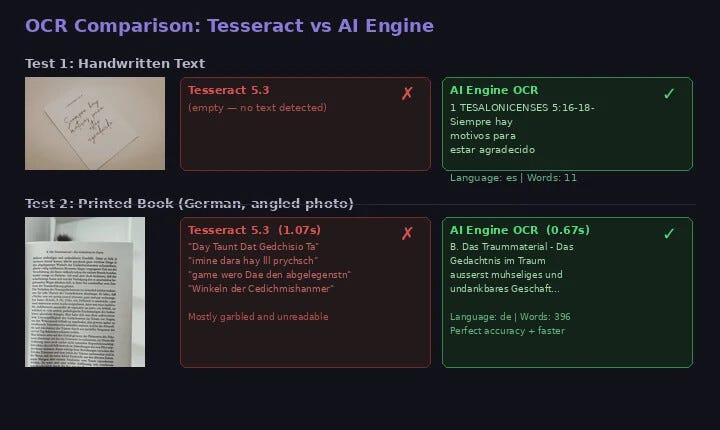
This is the biggest gap. Tesseract has near-zero accuracy on handwriting. We tested Tesseract 5.3 against a cloud OCR API on a handwritten note:
# Tesseract on handwritten cursive text
$ tesseract handwritten_note.jpg stdout
# (empty output — zero text detected)
# Cloud OCR API on the same image
# Result: "1 TESALONICENSES 5:16-18 Siempre hay motivos
# para estar agradecido"
# Language detected: Spanish | Words: 11Tesseract returned nothing. The API extracted every word correctly and auto-detected Spanish.
Angled and Poorly Lit Photos
When text is photographed at an angle, open-source OCR accuracy drops dramatically. We tested on a German book page taken at an angle:
# Tesseract — 1.07 seconds
"Day Taunt Dat Gedchisio Ta"
"imine dara hay lll prychsch game wero Dae"
→ Mostly garbled, unreadable
# Cloud OCR API — 0.67 seconds
"B. Das Traummaterial - Das Gedächtnis im Traum
äußerst mühseliges und undankbares Geschäft..."
→ Language: German | Words: 396 | Perfect accuracyThe API was 37% faster and dramatically more accurate — proper umlauts, special characters, everything.
Multilingual Documents
Tesseract requires you to specify the language upfront (-l eng+fra). Mixing more than 2–3 languages degrades accuracy. The German book page contained a French passage — the API extracted both languages perfectly. Tesseract mangled both.
No Language Auto-Detection
Building an app that accepts documents in any language? With Tesseract, you need to detect the language first — itself a non-trivial problem. A cloud OCR API detects the language automatically and returns it in the response.
When Open-Source OCR Is Enough
To be fair, open-source OCR works for specific scenarios:
- Clean scans of printed English text — High-resolution, flat, well-lit scans? Tesseract performs well.
- Offline or air-gapped environments — No external API calls allowed? Local OCR is your only option.
- Extremely high volume with simple text — Millions of identical images (serial numbers on a production line)? A tuned Tesseract setup works.
For everything else — handwriting, photos, multilingual documents, receipts, IDs, angled captures — an API delivers dramatically better results.
See for yourself — run the same benchmarks on your images with the full code examples and visual comparisons.
The API Approach
What a managed OCR API offers over open-source:
- Handwriting support — Reads cursive and informal handwritten text
- Automatic language detection — No configuration needed
- Angle and lighting tolerance — Handles photos taken at angles, in low light, with shadows
- Word-level bounding boxes — Position of every detected word
- Zero infrastructure — No models, no dependencies, no GPU
A free tier (100 requests/month) lets you test on your own images before committing.
Code Examples
Python
import requestsAPI_URL = "https://ocr-wizard.p.rapidapi.com/ocr"
HEADERS = {
"x-rapidapi-host": "ocr-wizard.p.rapidapi.com",
"x-rapidapi-key": "YOUR_API_KEY",
}with open("document.jpg", "rb") as f:
response = requests.post(
API_URL,
headers=HEADERS,
files={"image": ("doc.jpg", f, "image/jpeg")},
)result = response.json()
print(f"Language: {result['body']['detectedLanguage']}")
print(f"Full text: {result['body']['fullText']}")for word in result["body"]["annotations"]:
print(f" '{word['text']}' at {word['boundingPoly']}")Compare Tesseract vs API on Your Images
import subprocess, requestsdef compare_ocr(image_path, api_key):
# Tesseract
tess = subprocess.run(
["tesseract", image_path, "stdout"],
capture_output=True, text=True,
)
print("--- Tesseract ---")
print(tess.stdout.strip() or "(no text detected)") # Cloud OCR API
with open(image_path, "rb") as f:
resp = requests.post(
"https://ocr-wizard.p.rapidapi.com/ocr",
headers={
"x-rapidapi-host": "ocr-wizard.p.rapidapi.com",
"x-rapidapi-key": api_key,
},
files={"image": f},
)
data = resp.json()
print(f"\n--- Cloud OCR API ---")
print(f"Language: {data['body']['detectedLanguage']}")
print(data["body"]["fullText"])compare_ocr("your_test_image.jpg", "YOUR_API_KEY")Run this on 10–20 representative images from your use case. The difference will speak for itself.
Decision Framework
- Clean printed scans → Tesseract: Good | API: Excellent
- Handwritten text → Tesseract: Fails | API: Good
- Angled photos → Tesseract: Poor | API: Excellent
- Multilingual docs → Tesseract: Manual config | API: Auto-detect
- Receipts / IDs → Tesseract: Inconsistent | API: Reliable
- Setup time → Tesseract: Hours | API: Minutes
- Maintenance → Tesseract: You manage everything | API: Zero
- Offline support → Tesseract: Yes | API: No
Real-World Use Cases
- Receipt & Invoice Processing — Extract amounts, dates, vendor names from crumpled, faded receipts. Tesseract struggles with thermal paper and small fonts.
- Document Digitization — Convert paper archives to searchable text. Any language, handwritten annotations, photos instead of scans.
- ID & Card Reading — Handle varied layouts, fonts, security patterns, holograms.
- Accessibility — Read text aloud from menus, street signs, product labels, handwritten notes.
Bottom Line
Open-source OCR engines have their place, but their limitations are real. If your application processes anything beyond clean printed scans, a cloud OCR API delivers dramatically better accuracy, automatic language detection, and handwriting support.
The best way to decide is to test both on your actual images. The difference in output quality will tell you everything you need to know.
Read the full guide with JavaScript examples, visual comparisons, and detailed benchmarks on ai-engine.net.
Originally published at ai-engine.net
메타데이터
- post_id
- 076a4242b5c0
- slug
- best-ocr-apis-why-open-source-falls-short-for-devs-076a4242b5c0
- url
- https://medium.com/@ai-engine/best-ocr-apis-why-open-source-falls-short-for-devs-076a4242b5c0
- canonical_url
- https://medium.com/@ai-engine/best-ocr-apis-why-open-source-falls-short-for-devs-076a4242b5c0
- author_url
- https://medium.com/@ai-engine
- status
- ok
- fetched_at
- 2026-06-20 20:29:01