Hermes Agent Setup: Run an Always-On AI Agent With No Claude Rate Limits
Hermes Agent setup on an cheap VPS with OpenRouter: cut your AI bill around 95% and run always-on, with no Claude rate limits.
AI AGENTS SETUP
Hermes Agent Setup: Run an Always-On AI Agent With No Claude Rate Limits
Hermes Agent setup on an cheap VPS with OpenRouter: cut your AI bill around 95% and run always-on, with no Claude rate limits.

A Claude subscription runs about $100 a month, and the moment you lean on it for real work you hit the five-hour rate limit and sit waiting for the meter to reset.
A Hermes Agent setup on a small cloud server fixes both problems at once: it’s cheap, and because it routes through OpenRouter instead of Claude’s subscription tiers, you never hit those caps.
The agent also gets better the longer it runs, since it writes its own reusable skills and remembers your preferences across sessions, so it stops feeling like a stranger every time you open it.
By the end of this guide you’ll have one deployed, connected to cheap models, and running while your laptop is closed, along with the model choices that do most of the saving.
Why Hermes Agent Beats Claude Code or OpenClaw on Cost
Three tools keep getting compared in the same breath even though they solve different problems, so the comparison only works once you know what each one is actually for.
Claude Code is a terminal coding tool. It’s good, it runs around $100 a month on the higher tiers, and it forgets everything between sessions unless you bolt on a memory rig yourself.
OpenClaw is more of a messaging hub, and it has the largest integration ecosystem of the three.
Hermes Agent sits in a different lane, a self-hosted agent that writes a reusable skill for anything you do twice and carries your preferences across sessions.
It starts slower than a polished SaaS tool, and it gets noticeably sharper the longer it runs.
That last part is the actual reason to bother.
The agent hits a reflection checkpoint every so often, looks at what worked and what failed, and saves a SKILL.md file it can reuse later.
So the work you do this week makes next week cheaper and faster, instead of starting from a blank slate every morning.
The social proof is hard to ignore too. Hermes went from roughly zero to about 130k GitHub stars in around two months, and it currently ranks as one of the most-used agents on OpenRouter.
Both numbers move every week though, so treat them as a late-May-2026 snapshot rather than a fixed fact.
Local vs VPS: which Hermes Agent Setup Fits You
You can run Hermes on your own machine or on a VPS, which is just a small cloud server that stays on whether your laptop is open or not.
Running it locally is free if you already have the hardware, and it keeps everything on your own disk, which some people prefer for privacy.
The catch is that a local agent only runs when your machine is on, so the always-on, works-while-you-sleep part disappears the second you close the lid.
A VPS flips that. The agent lives on a server that never sleeps, so scheduled jobs and overnight research actually happen.
For most people who want an assistant running 24/7, the VPS is the version that delivers the thing you came here for.
Step 1: Deploy Your Hermes Agent VPS in Three Minutes
Most VPS hosts now offer a one-click Hermes template, so this step is genuinely fast.
**Click here first** then then go to the Hermes Agent VPS plan.
A mid-tier plan is plenty for a single agent (KVM 2 or KVM 4)
If you plan to run Hermes plus OpenClaw plus other tools side by side on the same box, step up to a larger plan with more RAM.
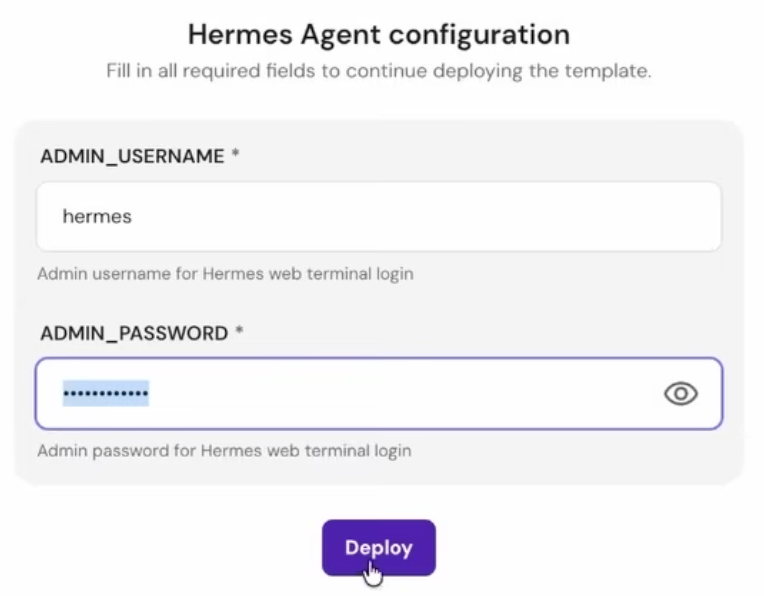
From there it’s mechanical: set your admin username and password, deploy, wait a couple of minutes for it to provision, and sign in.

Step 2: Connect OpenRouter To Your Hermes Agent
The first time you sign in, Hermes runs a setup wizard and asks which model provider you want.
You’ll see Anthropic, OpenAI, and OpenRouter as the top options.

Pick OpenRouter.
One key gives you access to hundreds of models across many providers, cheap workhorses and top-tier models alike, which is exactly what the cost strategy in the next step depends on.
Tie yourself to a single provider and you lose the ability to send cheap tasks to cheap models.
Grab your key from the **OpenRouter dashboard **under Workspace, then API keys.
Before you paste it in, do one thing that saves you from a nasty surprise: set a weekly credit limit on the key.
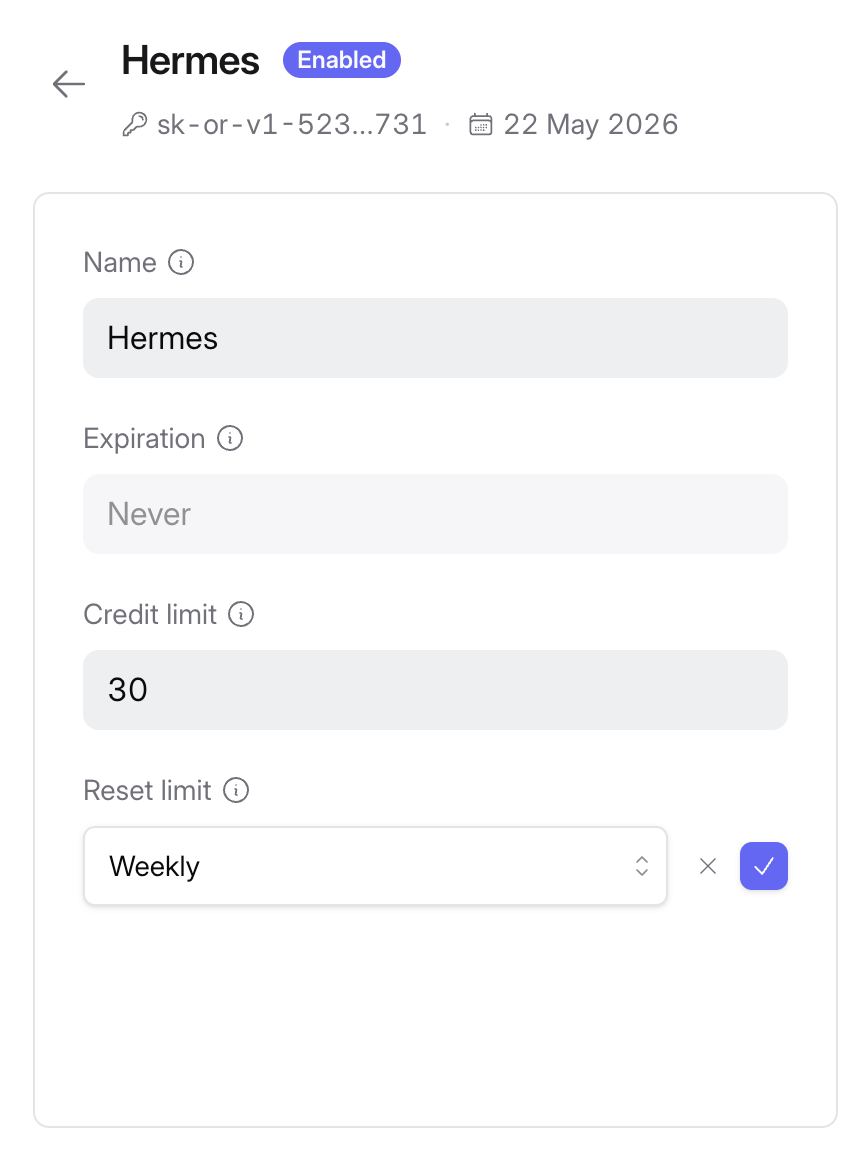
A runaway loop or a bad cron job can’t drain more than the cap you set, and that’s the single most important habit when you’re handing an autonomous agent a payment method.
Paste the key into the wizard, and the connection is done.
Step 3: The Hermes Agent Model Selection That Cuts Your Bill ~95%
This is the part that does most of the saving, and it’s basically one setting.
Most agents default to a single expensive model for everything, scanning a file, planning a task, and writing the answer all on the same premium model.
The thing is, a lot of agent work is grunt work that a cheap model handles fine.
Routing the simple stuff to cheap models can mean paying up to 30 times less for tasks that never needed the brainpower in the first place.
That ratio is where the roughly 95% cut comes from.
OpenRouter shows an input cost and an output cost column for every model, and you want to read both before you commit, because a model that looks cheap on input can be expensive on output, and agents generate a lot of output.
As a rough starting map:
Model prices change constantly, so treat this as a starting point and check OpenRouter’s live pricing before you lock anything in.
Switch the active model with hermes model <name> or the /model command, and confirm what's running in the status bar.
Step 4: Build a Multi-model Cascade and Dodge Rate Limits
A single cheap model everywhere is the blunt version of the strategy. The sharper version is a cascade that routes by task type.
The pattern is simple.
Scanning and planning go to a cheap model like Minimax 2.7 or DeepSeek V4, and the actual hard reasoning, the step where quality genuinely matters, goes to a stronger model like one of the Kimi K2 variants.
You also set a fallback order, so if one model is busy or rate-limited the next one picks up.
The result is top-tier quality only on the steps that need it, and cheap throughput on everything else.
Once it’s wired up, sanity-check it.
Ask the agent what model it’s running and confirm it reports the one you expect, then confirm the context window looks right, since Hermes wants a decent context size and you don’t want to starve it.
Now do the real test: run a normal task, then open the OpenRouter dashboard and read your actual spend.
A full setup-and-test session typically runs around 20 cents, and that’s the number that makes the $100 subscription feel silly.
Three Hermes Agent Workflows You Can Run Tonight
The setup is only worth it if you actually put the agent to work, so here are three that earn their keep fast.
Weekly trend scout
Ask Hermes to research the top trending tools in your niche, written in your voice, then tell it to save that as a reusable skill.
Schedule it with a cron job using plain language or the /cron command, and it runs itself every week from then on.
The 7 a.m. creator brief
Have it pull your channel comments, scan a few competitors, check the relevant subreddits, and fold all of it into one short brief: audience signals, what competitors are winning with, and the topics starting to trend.
It’s waiting for you before your first coffee.
Persistent memory researcher
Point it at a few topics you track, and it collects sources into a memory file over time, then answers newest-first with dated citations.
This is the thing a plain chatbot can’t do, because it remembers across sessions instead of starting empty every time.
Each of these gets faster the second time you run it, because the agent saved a skill the first time it did the work.
Conclusion
The whole thing is shorter than it looks: deploy a VPS, run the wizard, connect OpenRouter with a capped key, pick cheap default models, and wire a cascade so quality only costs you on the steps that need it.
Verify the model, watch the meter on your first real task, and you’re running an always-on agent for roughly the price of two coffees a month.
Start with one workflow, the weekly trend scout is the easiest, and let the agent save its first skill.
That’s the moment the compounding starts, and it’s the part no subscription gives you.
메타데이터
- post_id
- 07821a5392c0
- slug
- hermes-agent-setup-run-an-always-on-ai-agent-with-no-claude-rate-limits-07821a5392c0
- url
- https://medium.com/ai-systems-lab/hermes-agent-setup-run-an-always-on-ai-agent-with-no-claude-rate-limits-07821a5392c0
- canonical_url
- https://medium.com/ai-systems-lab/hermes-agent-setup-run-an-always-on-ai-agent-with-no-claude-rate-limits-07821a5392c0
- author_url
- https://medium.com/@0xmega
- status
- ok
- fetched_at
- 2026-06-10 10:12:36