ColdFusion Queue Processing Delayed Under Heavy Traffic
Why Heavy Traffic Stalls Your ColdFusion Queue — And How to Keep It Flowing
ColdFusion Queue Processing Delayed Under Heavy Traffic
Why Heavy Traffic Stalls Your ColdFusion Queue — And How to Keep It Flowing
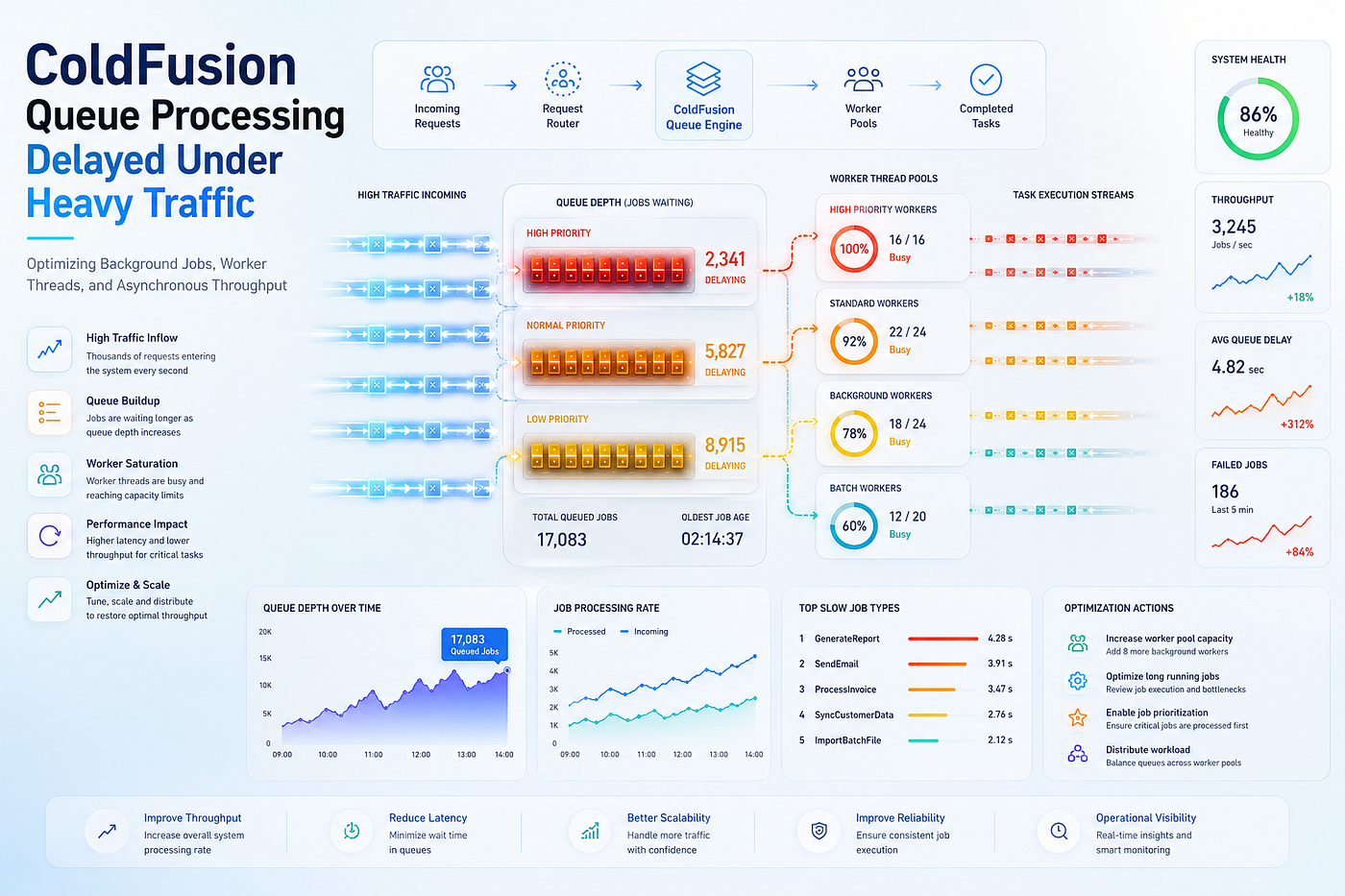
ColdFusion Queue Processing Delayed Under Heavy Traffic
Your ColdFusion application runs smoothly under normal traffic. Then a spike arrives, and processing grinds to a crawl. Requests pile up, response times balloon, and background jobs fall behind. Meanwhile, the server CPU sits surprisingly idle.
Queue delays under load are deceptive and damaging. The application looks healthy on a quiet day. Then peak traffic exposes a hidden bottleneck instantly. Consequently, users wait, transactions stall, and the business loses momentum.
The delay usually traces to how ColdFusion queues work under pressure. The server can only run so many requests at once. Excess requests wait in a queue for an open slot. Therefore, heavy traffic fills that queue faster than it drains.
This guide explains exactly why ColdFusion queue processing slows under load. Moreover, it provides verified settings, CFML patterns, and architectural fixes. We will move from the request queue to durable background processing. **Lucid Outsourcing Solutions** has scaled high-traffic ColdFusion applications across many enterprise deployments. Therefore, this article reflects real production experience, not theory.
How Does ColdFusion Process and Queue Requests?
ColdFusion processes each request on a thread from a pool. The web server passes the request to the connector. Then ColdFusion assigns a thread to run the CFML. Therefore, the thread pool size limits true concurrency.
A hard limit caps how many requests run at once. The ColdFusion Administrator sets this Simultaneous Request Limit. When all slots are full, new requests must wait. Consequently, they enter a queue until a slot frees up.
The request flow involves two distinct stages:
- Queued stage — The request waits for an available thread slot.
- Running stage — The request executes its CFML code on a thread.
A delay can occur in either stage. The queue can grow long under heavy traffic. Alternatively, running requests can hold their threads too long. Therefore, diagnosing the stage is the first step.
What Is the Simultaneous Request Limit?
The Simultaneous Request Limit is the core capacity constraint. It defines how many requests execute concurrently. The ColdFusion Administrator controls this value. Therefore, it directly governs throughput under load.
The default value depends on the edition:
- Enterprise edition — Defaults to 50 simultaneous requests.
- Standard edition — Defaults to 10 simultaneous requests.
- Developer edition — Defaults to 5 simultaneous requests.
When traffic exceeds this limit, requests queue. Therefore, the queue absorbs the overflow temporarily. However, a sustained overflow makes the queue grow unbounded. Consequently, wait times climb and processing appears delayed.
Each running request consumes memory and resources. Therefore, raising the limit increases both throughput and pressure. A limit too low queues requests needlessly. A limit too high exhausts memory and CPU. As a result, you must tune the limit to your hardware.
Why Does Queue Processing Slow Under Heavy Traffic?
Heavy traffic exposes the weakest link in your request pipeline. The queue grows when requests arrive faster than they complete. Therefore, the delay reflects a throughput bottleneck somewhere in the stack.
The most common causes include:
- The simultaneous request limit set too low for the traffic.
- Slow requests holding thread slots far too long.
- External resource calls blocking threads while they wait.
- Database connection pool exhaustion stalling queries.
- The queue timeout interacting badly with the request timeout.
- Synchronous heavy work running inside user requests.
- Lock contention serializing requests behind a shared resource.
- No separation between fast and slow request workloads.
Let us examine each cause carefully. Additionally, we will pair every cause with a verified fix.
Why Do Slow Requests Cause Queue Backlogs?
This is the most common cause of queue delays. A slow request holds its thread slot for its entire duration. Therefore, that slot is unavailable to any waiting request. Consequently, slow requests reduce the effective capacity.
The math compounds quickly under load. Imagine a limit of 50 with many slow requests. Each slow request ties up a slot for seconds. Therefore, the queue fills as fast requests wait behind slow ones.
A classic pattern reveals the danger clearly. A page that calls an external resource often waits. The thread blocks while the resource responds. Therefore, that thread cannot serve any other request meanwhile.
Adobe’s performance guidance documents this exact behavior. When a third-party resource call hangs, the thread waits. If many threads wait, the simultaneous limit fills. Then the server appears to hang while the queue rises. Consequently, the CPU sits idle even as requests pile up.
How Do You Identify a Blocked-Thread Bottleneck?
A specific signature reveals blocked threads under load. The running requests sit at the simultaneous limit. The queued requests rise steadily. Meanwhile, CPU usage drops near zero. Therefore, this pattern points to threads waiting on external resources.
Watch for this diagnostic signature:
- Running requests — Pinned at the simultaneous request limit.
- Queued requests — Rising steadily as new requests wait.
- CPU usage — Near zero despite the apparent overload.
- Response times — Climbing sharply for all requests.
This signature confirms threads are waiting, not working. Therefore, the bottleneck is a slow external dependency. A database, an API, or a mail server is likely responsible. Consequently, you target that dependency, not the CPU or memory.
How Do Timeouts Affect Queued Requests?
ColdFusion applies two separate timers to a request. One timer limits how long a request waits in the queue. The other limits how long a request runs once started. Therefore, understanding both timers is essential.
The queue wait timeout governs the waiting stage. The request timeout governs the running stage. These two timers operate independently. Consequently, their interaction produces subtle, confusing behavior under load.
How Does the Queue Timeout Interact With the Request Timeout?
The interaction follows a clear but surprising rule. A request first waits in the queue for a slot. If the wait exceeds the queue timeout, the request fails immediately. Therefore, it times out before it ever runs.
Consider a request that needs 25 seconds to execute. The average queue wait is 30 seconds under load. The queue timeout is set to 20 seconds. Therefore, the request times out in the queue and never runs.
Once a request enters the running pool, the timer resets. The request timeout then governs its execution. Therefore, a request that survives the queue gets a fresh execution window. Consequently, the two timers must be tuned together.
Set the queue timeout lower than the request timeout. Therefore, an overloaded server fails fast instead of hanging. A fast failure gives users quicker feedback. As a result, users are not left waiting indefinitely.
<!--- Override the request timeout for a specific long-running page --->
<cfsetting requesttimeout="120">
Configure the queue timeout in the ColdFusion Administrator. Therefore, set it based on acceptable user wait times. Users typically abandon requests after 10 to 30 seconds. Consequently, a queue timeout in that range balances patience and feedback.
Why Does Synchronous Heavy Work Delay the Queue?
Many applications run heavy work inside the user request. The request waits while the heavy task completes. Therefore, it holds its thread slot for the entire duration. Consequently, heavy synchronous work directly shrinks capacity.
Consider a request that generates a large report. It might take 30 seconds to complete. During that time, it occupies a thread slot. Therefore, under load, many such requests exhaust the pool.
This is an architectural antipattern under heavy traffic. The user-facing request should return quickly. Heavy work belongs outside the request cycle. Therefore, decoupling the work restores capacity for fast requests.
How Do You Move Heavy Work to a Background Thread?
The cfthread tag moves work off the request thread. Therefore, the request returns without waiting for the work. The thread runs the heavy task in the background. Consequently, the user-facing request stays fast and responsive.
<cfthread name="reportJob" action="run">
    <cftry>
        <cfset generateLargeReport()>
        <cfcatch type="any">
            <cflog file="queue_errors" text="Report failed: #cfcatch.message#">
        </cfcatch>
    </cftry>
</cfthread>
<cfoutput>Your report is being generated.</cfoutput>
This pattern returns immediately to the user. Therefore, the request slot frees up quickly. The heavy work continues in the background thread. As a result, the request queue drains faster under load.
However, fire-and-forget threads have limits at scale. They consume thread pool resources of their own. Therefore, a flood of background threads can exhaust the pool too. Consequently, a durable queue suits high-volume work better.
How Do You Build a Durable Job Queue in ColdFusion?
A database-backed job queue decouples work from requests entirely. The request inserts a job and returns instantly. A background process then handles the job later. Therefore, the user never waits for the heavy work.
This architecture completely separates the two concerns. The user request stays fast and lightweight. The processing happens independently at a controlled pace. Consequently, traffic spikes no longer delay user-facing requests.
How Do You Design the Job Queue Table?
A simple table stores the queued jobs durably. Therefore, the jobs survive restarts and traffic spikes. Each row represents one unit of work to process. The status column tracks each job through its lifecycle.
CREATE TABLE job_queue (
    job_id      VARCHAR(50) PRIMARY KEY,
    job_type    VARCHAR(50) NOT NULL,
    payload     TEXT,
    status      VARCHAR(20) DEFAULT 'queued',
    priority    INT DEFAULT 5,
    created_at  DATETIME DEFAULT CURRENT_TIMESTAMP,
    processed_at DATETIME
);
The request inserts a job and returns immediately:
<cffunction name="queueJob" access="public" returntype="string">
    <cfargument name="jobType" type="string" required="true">
    <cfargument name="payload" type="struct" required="true">
<cfset var jobId = createUUID()>
    <cfquery datasource="myDB">
        INSERT INTO job_queue (job_id, job_type, payload, status, created_at)
        VALUES (
            <cfqueryparam value="#jobId#" cfsqltype="cf_sql_varchar">,
            <cfqueryparam value="#arguments.jobType#" cfsqltype="cf_sql_varchar">,
            <cfqueryparam value="#serializeJSON(arguments.payload)#" cfsqltype="cf_sql_varchar">,
            'queued',
            <cfqueryparam value="#now()#" cfsqltype="cf_sql_timestamp">
        )
    </cfquery>
    <cfreturn jobId>
</cffunction>
This function queues a job in milliseconds. Therefore, the user request returns almost instantly. The heavy work waits safely in the database. As a result, traffic spikes never stall the user experience.
How Do You Process the Queue With a Scheduled Task?
A scheduled task drains the queue at a controlled pace. Therefore, it processes jobs independently of user traffic. The task runs at a regular interval, such as every minute. It picks up queued jobs and processes a batch.
<cffunction name="processQueue" access="public" returntype="void">
    <cfset var batchSize = 10>
<!--- Claim a batch of queued jobs --->
    <cfquery name="jobs" datasource="myDB">
        SELECT TOP (<cfqueryparam value="#batchSize#" cfsqltype="cf_sql_integer">) *
        FROM job_queue
        WHERE status = 'queued'
        ORDER BY priority ASC, created_at ASC
    </cfquery>
    <cfloop query="jobs">
        <cftry>
            <cfquery datasource="myDB">
                UPDATE job_queue SET status = 'processing'
                WHERE job_id = <cfqueryparam value="#jobs.job_id#" cfsqltype="cf_sql_varchar">
            </cfquery>
            <cfset processJob(jobs.job_type, deserializeJSON(jobs.payload))>
            <cfquery datasource="myDB">
                UPDATE job_queue SET status = 'complete',
                    processed_at = <cfqueryparam value="#now()#" cfsqltype="cf_sql_timestamp">
                WHERE job_id = <cfqueryparam value="#jobs.job_id#" cfsqltype="cf_sql_varchar">
            </cfquery>
            <cfcatch type="any">
                <cfquery datasource="myDB">
                    UPDATE job_queue SET status = 'failed'
                    WHERE job_id = <cfqueryparam value="#jobs.job_id#" cfsqltype="cf_sql_varchar">
                </cfquery>
                <cflog file="queue_errors" text="Job #jobs.job_id# failed: #cfcatch.message#">
            </cfcatch>
        </cftry>
    </cfloop>
</cffunction>
This task processes a controlled batch each run. Therefore, the queue drains at a steady, predictable rate. A traffic spike enlarges the queue, not the user wait. As a result, the system stays responsive under any load.
Process a fixed batch size to control resource use. Therefore, the task never overwhelms the database or server. The batch size caps the work per interval. Consequently, you tune throughput against available capacity.
How Does the CFML Event Gateway Help With Queues?
ColdFusion includes a built-in asynchronous event gateway. The CFML event gateway invokes CFC methods asynchronously. Therefore, a request can trigger processing without waiting. The gateway queues the message for background handling.
Adobe documents the gateway’s purpose clearly. It suits batch processes that take substantial time. It also suits logging large amounts of data. Therefore, it fits exactly the heavy work that delays queues.
The gateway uses its own configurable processing queue. Therefore, you control its threads and queue size separately. The Administrator sets the gateway’s processing threads. Consequently, you isolate background work from the request thread pool.
How Do You Send a Message to the Event Gateway?
The SendGatewayMessage function queues an asynchronous message. Therefore, the calling request returns without waiting. The gateway delivers the message to a CFC method. That method then processes the work in the background.
<cfset messageData = {
    "jobType": "processOrder",
    "orderId": orderId
}>
<cfset queued = SendGatewayMessage("MyAsyncGateway", messageData)>
<cfif queued>
    <cfoutput>Order processing started.</cfoutput>
<cfelse>
    <cflog file="queue_errors" text="Failed to queue order #orderId#">
</cfif>
The function returns true when it queues the message. Therefore, you confirm the work was accepted. However, it does not guarantee processing completion. Consequently, save results to a database for the user to retrieve later.
Note one important caveat about the gateway. It does not provide direct feedback to the user. Therefore, the CFC must store its results externally. A database or file holds the outcome. As a result, the user retrieves the result on a later request.
How Do You Debug Queue Delays Under Load?
Effective debugging captures the bottleneck during the load. First, monitor the running and queued request counters. Then correlate them with CPU and dependency latency. Therefore, the metrics reveal the true bottleneck.
Follow this structured debugging sequence:
- Monitor running and queued request counts during peak load.
- Check whether running requests sit at the simultaneous limit.
- Correlate the queue depth with CPU usage.
- Identify slow requests holding thread slots.
- Check database connection pool usage under load.
- Capture thread dumps to find blocked threads.
How Do You Read the Queue Metrics?
The running and queued counters tell the core story. Therefore, monitor both during a traffic spike. The relationship between them reveals the bottleneck type. Each pattern points to a different root cause.
Interpret these patterns carefully:
- Running at limit, queue rising, CPU near zero — Threads blocked on external resources.
- Running at limit, queue rising, CPU high — Genuine capacity exhaustion needing more resources.
- Queue rising, requests timing out in queue — Queue timeout shorter than wait times.
- Connection pool exhausted — Database queries stalling and holding threads.
Each pattern guides a specific fix. Therefore, the metrics turn guesswork into diagnosis. A blocked-thread pattern points to a dependency. A high-CPU pattern points to capacity or code. Consequently, you fix the right layer.
What Tools Help Diagnose Queue Delays?
The right tools expose the queue behavior under load. Moreover, they confirm where the bottleneck lies.
- Running and queued request counters — Reveal the queue state in real time.
- FusionReactor — Monitor threads, queries, and queue depth live.
- The Performance Monitoring Toolset — Track request metrics and slow transactions.
- JVM thread dumps — Show exactly what blocked threads are waiting on.
- Database monitoring — Expose slow queries and pool exhaustion.
What Are the Best Practices for Queue Performance Under Load?
Prevention requires separating fast and slow work deliberately. Therefore, design the architecture to keep requests fast.
- Tune the simultaneous request limit — Match it to hardware and load.
- Set the queue timeout to fail fast — Keep it below the request timeout.
- Move heavy work to background jobs — Decouple it from user requests.
- Use a durable job queue — Survive spikes and restarts with a database queue.
- Process queues in controlled batches — Drain at a steady, safe rate.
- Set timeouts on every external call — Prevent threads from blocking forever.
- Separate fast and slow workloads — Protect quick requests from slow ones.
- Monitor queue depth proactively — Alert before the queue overflows.
How Should You Architect for High-Traffic Queue Performance?
A scalable architecture keeps user requests fast and light. Therefore, it pushes all heavy work into background queues. The request layer handles only quick, responsive work. Consequently, traffic spikes never stall the user experience.
Apply these architectural principles:
- Keep user-facing requests fast and lightweight.
- Queue all heavy work to a durable database queue.
- Process the queue with scheduled tasks or the event gateway.
- Set timeouts on every external dependency call.
- Monitor queue depth and alert before it overflows.
- Scale queue workers independently of the web tier.
This architecture isolates heavy work from user traffic. Therefore, a spike grows the background queue, not the user wait. The system degrades gracefully instead of stalling. As a result, the application stays responsive under any load.
**Lucid Outsourcing Solutions** designs high-throughput queue architectures for enterprise ColdFusion clients. Consequently, clients handle traffic spikes without delays or stalls.
Bringing It All Together for Fast Queue Processing
ColdFusion queue delays under heavy traffic come from capacity bottlenecks. Slow requests hold thread slots, and the queue fills behind them. Therefore, the fix keeps requests fast and moves heavy work to background queues. Durable queues and controlled processing prevent the stall.
Work through the solution systematically. First, tune the request limit and queue timeout to fail fast. Next, move heavy work off the request thread. Then build a durable database job queue for that work. Finally, process the queue in controlled batches and monitor depth. This disciplined approach keeps processing fast under any load.
Enterprise applications cannot tolerate stalls during traffic spikes. A delayed queue frustrates users and stalls critical transactions. Consequently, robust queue architecture is a business requirement, not an optional refinement.
Partner With ColdFusion Experts Who Master Scalability
Stop watching your queues stall every time traffic spikes. Lucid Outsourcing Solutions delivers deep ColdFusion expertise and enterprise-grade performance engineering. We diagnose queue and throughput issues fast, then we fix them at the root. Moreover, we architect your entire processing layer for scale and resilience.
Connect with Lucid Outsourcing Solutions today to:
- Resolve ColdFusion queue and performance issues completely
- Improve application scalability across high-traffic, spike-prone workloads
- Enhance long-term maintainability with clean, decoupled, modern architecture
Reach out to **Lucid Outsourcing Solutions** and turn queue delays into smooth, scalable throughput. Your users, your team, and your business will feel the difference immediately.
메타데이터
- post_id
- 0804629fe391
- slug
- coldfusion-queue-processing-delayed-under-heavy-traffic-0804629fe391
- url
- https://medium.com/@Deepak-Sir/coldfusion-queue-processing-delayed-under-heavy-traffic-0804629fe391
- canonical_url
- https://medium.com/@Deepak-Sir/coldfusion-queue-processing-delayed-under-heavy-traffic-0804629fe391
- author_url
- https://medium.com/@Deepak-Sir
- status
- ok
- fetched_at
- 2026-07-23 11:12:48