A Toolbox for Markdown Document Navigation and Content Indexing — Effortlessly Navigate Your Docs~…
VLOOK™ is a theme pack and enhancement plugin (for exported HTML files) for Typora, a cross-platform Markdown editor. It aims to co-create…
A Toolbox for Markdown Document Navigation and Content Indexing — Effortlessly Navigate Your Docs~ Elegant and Practical Typora Theme and Enhancement Plugin VLOOK™
VLOOK™ is a theme pack and enhancement plugin (for exported HTML files) for Typora, a cross-platform Markdown editor. It aims to co-create Markdown Auto-Typesetting 2.0 with Markdown enthusiasts, enhancing the practicality and joy of editing and reading Markdown documents while preserving Markdown’s simplicity.
VLOOK™ is open-source software (under the MIT License) and is also a recommended domestic open-source product by OSCHINA, and the first enhancement plugin for Typora.
This “New Ways to Play with Markdown Series” will share fun and practical mini-topics on how Typora + VLOOK can provide fresh perspectives and techniques in document layout, content navigation, presentation aid, and interactive experiences.
Today’s mini-topic: An All-in-One Toolbox for Document Navigation & Indexing — There’s One for Everyone!
Markdown is primarily for writing documents. And if you’re writing documents, you want people to read them… But as the author, have you considered how readers approach your documents?
Today, let’s talk about something that seems simple — “reading documents” — and how VLOOK™ takes it to an extreme level of excellence.
Many Markdown fans already know Typora as a powerful editor. VLOOK™ enhances Typora and Markdown, making them even more user-friendly and enjoyable to use.
As a Typora enhancement plugin, VLOOK™ provides six types of navigation tools/modes, tailored to different reading and navigation scenarios:
- Outline/Index Navigation: The most commonly used method, ideal for clearly structured documents. It adds powerful category indexing and search capabilities.
- Chapter-by-Chapter Navigation: Perfect for frequent navigation between chapters and browsing related sections.
- Paragraph-by-Paragraph Navigation: Ideal for detailed reviews or presentations, allowing both speaker and audience to focus on the same content piece.
- Image Navigation: Quickly browse all images in the document and jump to their locations.
- Library Navigation: Organize multiple documents around a topic or project — great for creating a unified documentation portal.
- Footnote Navigation: Shows footnotes in a pop-up on the current page — no more jumping back and forth.
Let’s break them down briefly:
1. Outline Navigation
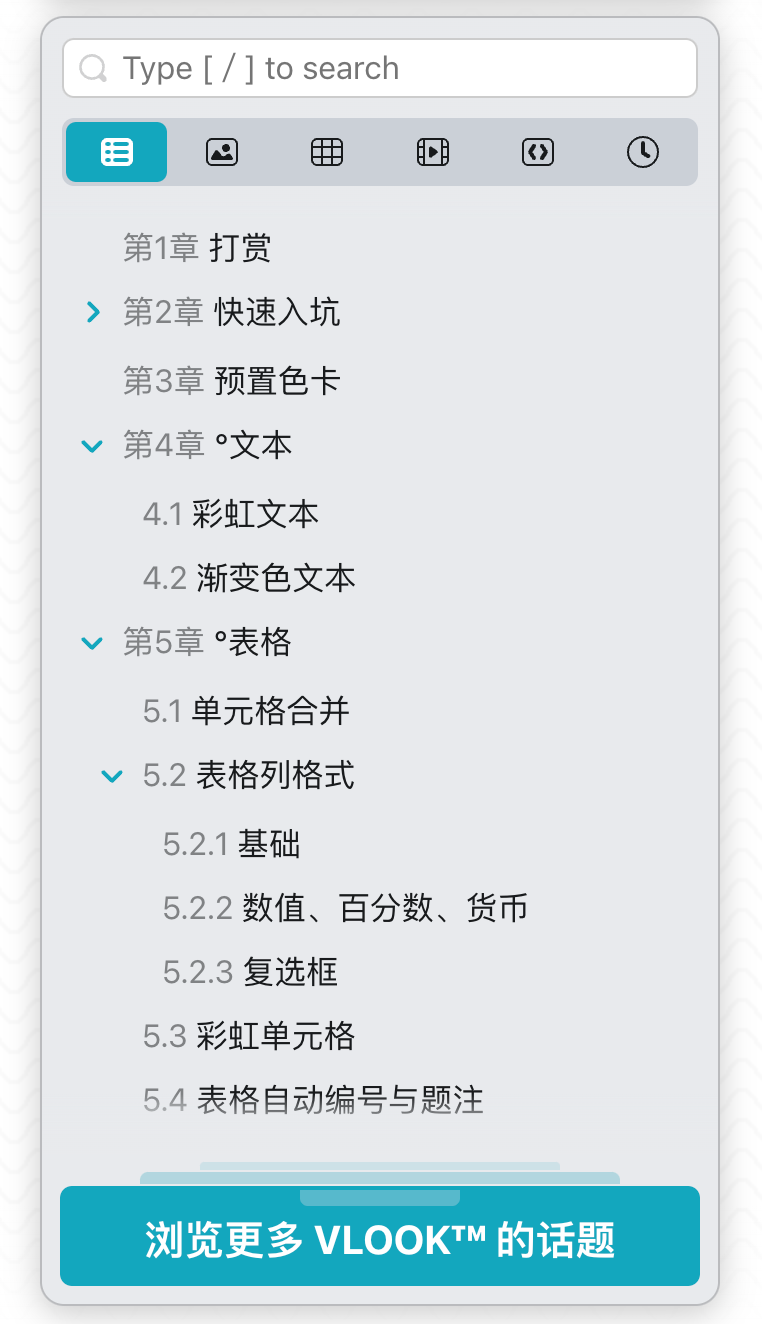
The most familiar and frequently used method. VLOOK enhances it with powerful category indexing and search features.
Includes six major indexes: Outline, Images, Tables, Multimedia, Code Blocks, and Reading History — jump directly to their locations.
2. Chapter-by-Chapter Navigation
Super handy for long documents — always know your current, previous, and next chapters at a glance. (Ideal for browsing between nearby chapters.)

Supports keyboard shortcuts: ← / → or < / >
3. Paragraph-by-Paragraph Navigation
This one’s for the geeks. Use the keyboard to browse one paragraph at a time — VI/VIM lovers, rejoice! (Perfect for content review or presentation — everyone stays focused on the same paragraph.)

Supports keyboard shortcuts: J / K / H / L
4. Image Navigation
Quickly view all the images in your document and jump straight to them.

5. Library Navigation
Assign a document as a “library index page” to easily access any document in your “documentation universe” with one click.
Example: VLOOK’s Quick Reference Guide library:

Set up is the same as any normal document — just assign it as the library. See details here >>
6. Footnote Navigation


Alright~ That’s it for today’s new Markdown perspective! If you’d like to try it out yourself or learn more about VLOOK, here are some links for you:
메타데이터
- post_id
- 09198fd2d1e4
- slug
- a-toolbox-for-markdown-document-navigation-and-content-indexing-effortlessly-navigate-your-docs-09198fd2d1e4
- url
- https://medium.com/@zmzusa/a-toolbox-for-markdown-document-navigation-and-content-indexing-effortlessly-navigate-your-docs-09198fd2d1e4
- canonical_url
- https://medium.com/@zmzusa/a-toolbox-for-markdown-document-navigation-and-content-indexing-effortlessly-navigate-your-docs-09198fd2d1e4
- author_url
- https://medium.com/@zmzusa
- status
- ok
- fetched_at
- 2026-07-19 22:08:37