Claude Code’s Official Loop Hierarchy: From Self-Verification to Lights-Out — Rethinking Agent…
Claude Code
Claude Code’s Official Loop Hierarchy: From Self-Verification to Lights-Out — Rethinking Agent Runtime Control Design
Claude Code
Disclosure: I use GPT search to collection facts. The entire article is drafted by me.
Why Claude Code’s Loop Deserves a Serious Look
Over the past few months, Loop Engineering has started appearing with increasing frequency in discussions across the AI engineering community.
It began when Anthropic systematically introduced four loop types in the Claude Code documentation — Turn-based, Goal-based, Time-based, and Proactive. Shortly after, developers like Addy Osmani and Claire Vo began sharing their own practices with Agent Loops. Meanwhile, whether it’s OpenAI’s Codex, Google’s Gemini CLI, or the growing wave of developer-facing agent tools, everyone is designing new workflows around the concept of Continuous Execution.
On the surface, this looks like Claude Code added a handful of new commands.
But pull back the timeline a little, and something more consequential is happening.
The past two years of AI coding tools can be roughly compressed into three phases.
The first phase was about Prompt. Everyone was asking: How should you write a Prompt? How do you organize context? How do you get the model to answer more accurately in a single pass?
The second phase started discussing Context. More tools began introducing mechanisms like MCP, Repository Index, Memory, and Skills — enabling the model not just to answer questions, but to understand an entire project.
Today, the conversation is entering a third phase.
The model already knows what to do. The real question has become: When should it keep working? When should it stop? And who decides?
That is exactly what Loop Engineering is trying to answer.
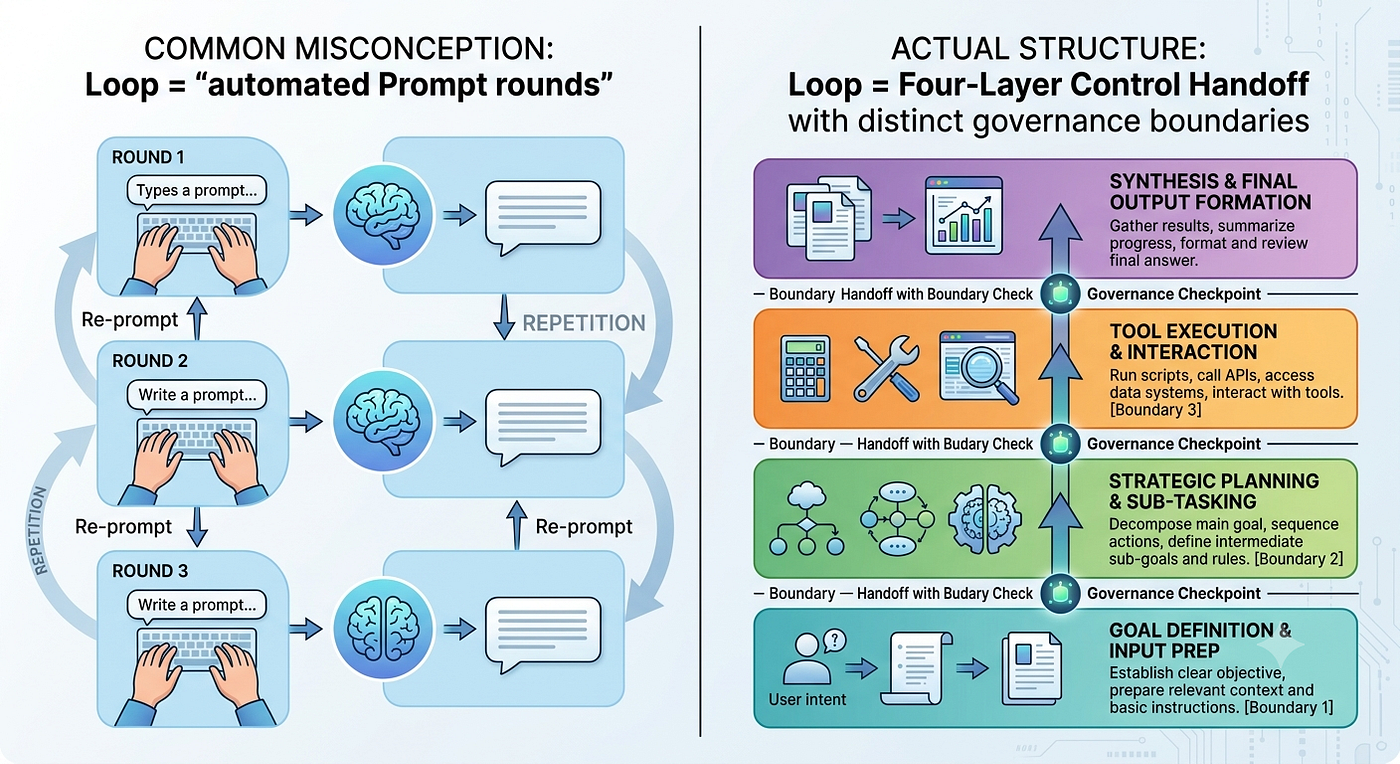
Many articles frame Loop as an upgraded version of Prompt Engineering — or describe it as “making an Agent automatically execute a few rounds of Prompts.” That reading isn’t wrong, but it misses a more important layer.
What Loop actually changes isn’t the Prompt. It’s control (Control).
From Prompt to Runtime
If you look back at the past two years of AI coding tools, they all share one structural characteristic.
Whether ChatGPT, Claude, Cursor, or Copilot — in the vast majority of cases, they follow the same interaction pattern:
User defines task
        ↓
Model completes one round of inference
        ↓
Returns result
        ↓
Waits for next Prompt
The whole system behaves like an RPC call — a Remote Procedure Call. The model answers. Whether to continue, retry, or verify the result? That’s entirely up to the human.
Consider asking Claude to fix a bug. A typical traditional flow looks like this:
- “Fix this bug.”
- Claude modifies the code.
- The engineer begins reviewing.
- Tests fail.
- Send another Prompt.
- Claude modifies again.
- Review again.
- CI fails again.
- Another round.
Claude isn’t looping here. The engineer is.
The human is continuously carrying three responsibilities:
- Deciding whether to continue
- Deciding whether it’s complete
- Deciding when to give up
The prompt is only responsible for generating content. What actually drives the entire workflow has always been the human.
Many teams have a similar experience the first time they use an AI Agent: the model writes code faster and faster, but engineers don’t actually feel significantly lighter. Not because the model can’t write code — but because an enormous amount of time starts going to a different task: managing the model.
When to continue? When to stop? When to retry? When to escalate to a human?
These questions, never previously designed as explicit concerns, begin surfacing once an Agent can work continuously. In a certain sense, Agents don’t reduce control work — they just move it from writing code to running code.
What Claude Code Is Really Trying to Solve
This is why I think Claude Code’s Loop deserves a careful read.
If you follow the official documentation linearly, it’s easy to focus on the four loop types’ commands, parameters, and stopping conditions. Turn-based syntax. How to set Goal-based completion criteria. How to configure Time-based scheduling. How to handle tasks with Proactive automation.
All of this matters, of course.
But when you observe all four loops together, you notice they’re answering the same underlying question: Which decisions should the system take over on behalf of the human?
Put differently: Claude Code didn’t add four new features. It incrementally decomposed the control responsibilities engineers have always implicitly assumed.
Previously, all of these control actions lived inside the engineer’s head. Now they’re starting to become things the Runtime can understand, execute, and audit.
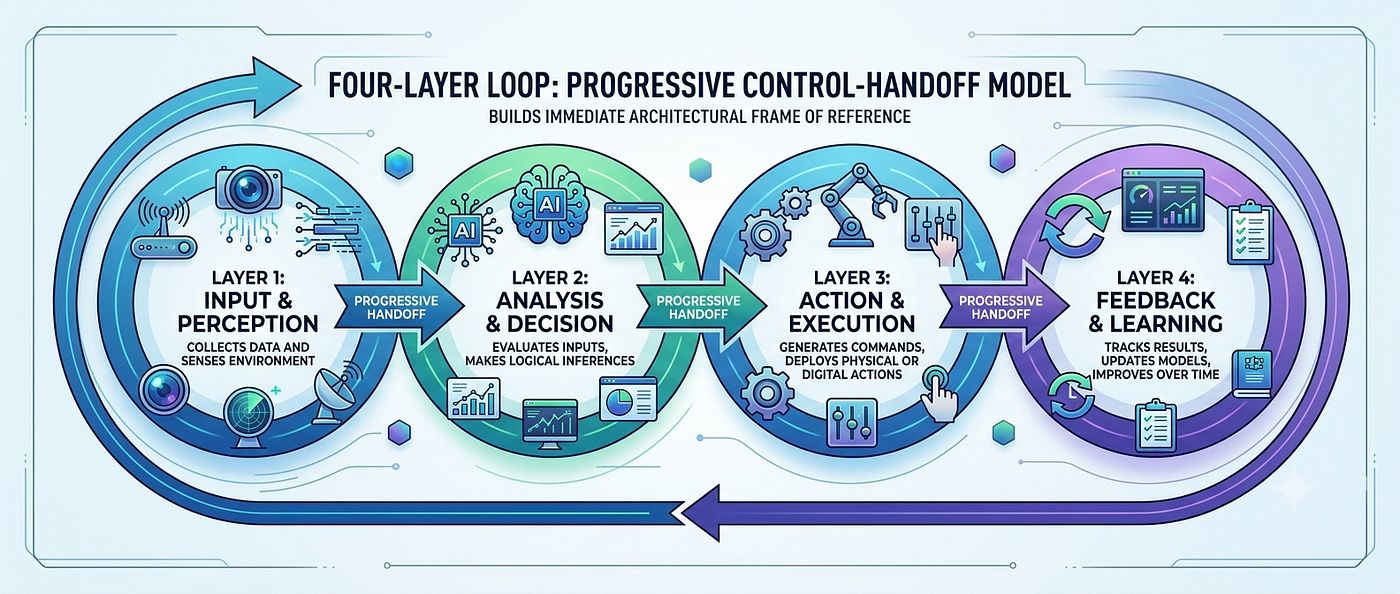
If you rearrange the four loops by the control they transfer, the relationship becomes much clearer:
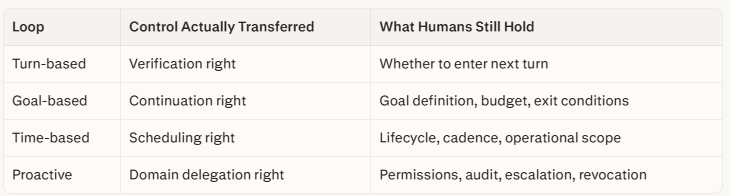
The official docs call them four types of Loop. I prefer to think of them as four layers of Runtime Control.
Each step forward reduces the degree of real-time human intervention while increasing the responsibility the system bears.
There’s a shift here that’s easy to overlook.
Prompt Engineering primarily asks: how should the model think in this round?
Loop Engineering begins asking: after this round ends, what should the system do next?
These are not the same conversation. The former belongs to Inference. The latter enters the territory of Runtime.
AI-Generated Image
What Most People Miss: Automation Never Fixed a Broken Process
Before we go deeper into each layer, there’s a foundational point worth establishing.
The real risk of Loop Engineering isn’t that agents do too much. It’s that a poorly designed runtime amplifies whatever verification quality you started with — good or bad.
This is the “garbage in, garbage out” principle applied to autonomous systems. If your verification is unreliable at Turn-based, your Goal Loop doesn’t improve it. It compounds it. The agent runs more iterations, consumes more tokens, generates more diffs — and the underlying unreliability runs through every step.
There’s an old engineering aphorism that captures this precisely: Automation never fixes a broken process. It only runs it faster.
Keep this in mind as we go layer by layer.
Turn-Based and Goal-Based — Why an Agent’s First Skill Isn’t Writing Code, It’s Proving It Did
I argued that the four loops represent four layers of control transfer — Turn-based hands over Verification, Goal-based hands over Continuation. These two stages look the most basic. Yet they nearly determine whether all subsequent automation is structurally sound.
Many teams, when first attempting an Agent workflow, focus on whether the model can write correct code. After real deployment, they discover the bigger problem isn’t Generation — it’s Verification.
Models are increasingly good at doing things. What engineering systems actually lack is something that can continuously answer three questions:
- Did it actually finish?
- Why does it think it’s finished?
- If it didn’t finish, what should it do next?
Claude Code’s first two loop layers are essentially structured answers to these three questions.
Layer One: Turn-Based — The Agent Must First Learn to Verify Itself
Many people see Turn-based Loop and think: “There’s nothing new here.”
The flow is still:
- Engineer assigns task
- Claude modifies code
- Claude returns result
- Engineer decides what’s next
It doesn’t look like automation.
But if you actually read Anthropic’s official documentation carefully, you’ll find the emphasis isn’t on “modifying code” — it’s on Verification.
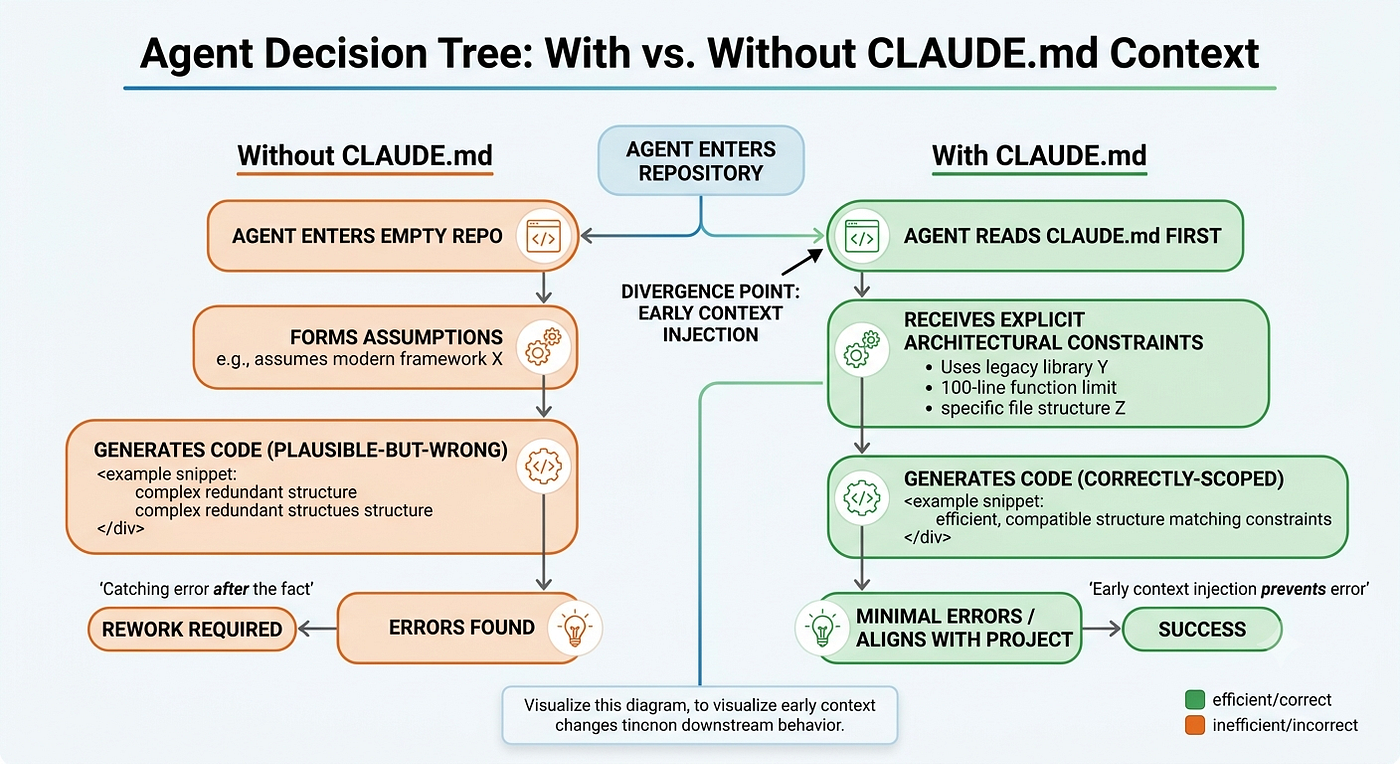
Anthropic explicitly recommends developers build verification steps into SKILL.md. A typical frontend modification might naively be written as:
Fix the button style.A mature Skill definition looks more like this:
After completing the modification, you must:
- Restart the dev server
- Open the target page
- Click through key interactions
- Check the Console for errors
- Screenshot UI for confirmation
- If performance is affected, run Lighthouse
- If any step fails, document the reason
Notice the actual change here.
Previously, these steps relied entirely on the engineer remembering to do them. Now they’re becoming part of the workflow itself. Claude isn’t just responsible for changing the code. It starts being responsible for proving the code runs.
“Completed the modification” and “completed the verification” are not the same thing.
This is the biggest misconception in most Agent workflows. A realistic example:
Prompt: Fix the login button.
Claude: Modified three React components. Submitted Diff. Done.
For a chatbot, that’s complete. For an engineering system, the real questions have just begun:
- Can the button be clicked?
- Can the API still be called?
- Are there console errors?
- Are there layout issues on mobile?
- Was event tracking affected?
- Was accessibility affected?
All of this is Verification.
In engineering practice, there’s a reliable pattern: the more mature the team, the higher the verification cost. What actually takes time isn’t writing code — it’s proving the code didn’t break everything else.
Claude Code’s Turn-based layer is essentially starting to codify this institutional knowledge into Runtime.
Skill Is Not a Prompt Template
Many people treat Skill as a Prompt template. This is a subtle but important misconception.
Prompts tell the model: “How to do it.” Skills tell the Runtime: “What counts as done.”
The crucial difference:
- Prompt is oriented toward generation
- Skill is oriented toward verification
A concrete example: assume a team maintains a payment system.
A Prompt might say: Modify the refund API.
But a Skill might require:
After modification completes, you must:
- Run all unit tests for the payment module
- Simulate the refund flow
- Check database state
- Verify log completeness
- Verify monitoring metrics
- Zero new warnings allowed
These steps represent years of institutional experience. If they always depend on an engineer to remember — the Agent never learns them. Truly mature Agent workflows don’t just feature longer Prompts. They feature an increasing number of verification rules crystallized into knowledge the Runtime can execute automatically.
A simple diagnostic: is it “modifying” or “verifying”?
When an Agent completes a task, what does it leave behind?
If it only leaves: “Modification complete.” — it’s still in the generation stage.
If it leaves:
- What was changed
- What verifications were executed
- Which verifications failed
- Which weren’t executed and why
- Next-step recommendations
…then the workflow has entered the engineering stage.
Verification logs are themselves engineering assets. Because the next time the same problem appears, the Agent can directly reuse them.
And if verification is unreliable, all subsequent automation amplifies errors, not progress. Many teams want to skip directly to Goal Loop — let Claude automatically fix bugs, retry CI. But if Turn-based hasn’t been done well, Goal Loop just runs mistakes farther. It runs busy, looks productive, and compounds the original unreliability through each iteration.
Layer Two: Goal-Based — What You’re Actually Handing Over Is the Right to Continue Working
If Turn-based answers: “How to prove completion,” then Goal-based answers: “Who decides whether to keep going.”
This is the most underestimated layer in Claude Code.
Many people think Goal Loop means: “If it doesn’t work, keep running.”
That’s not quite right.
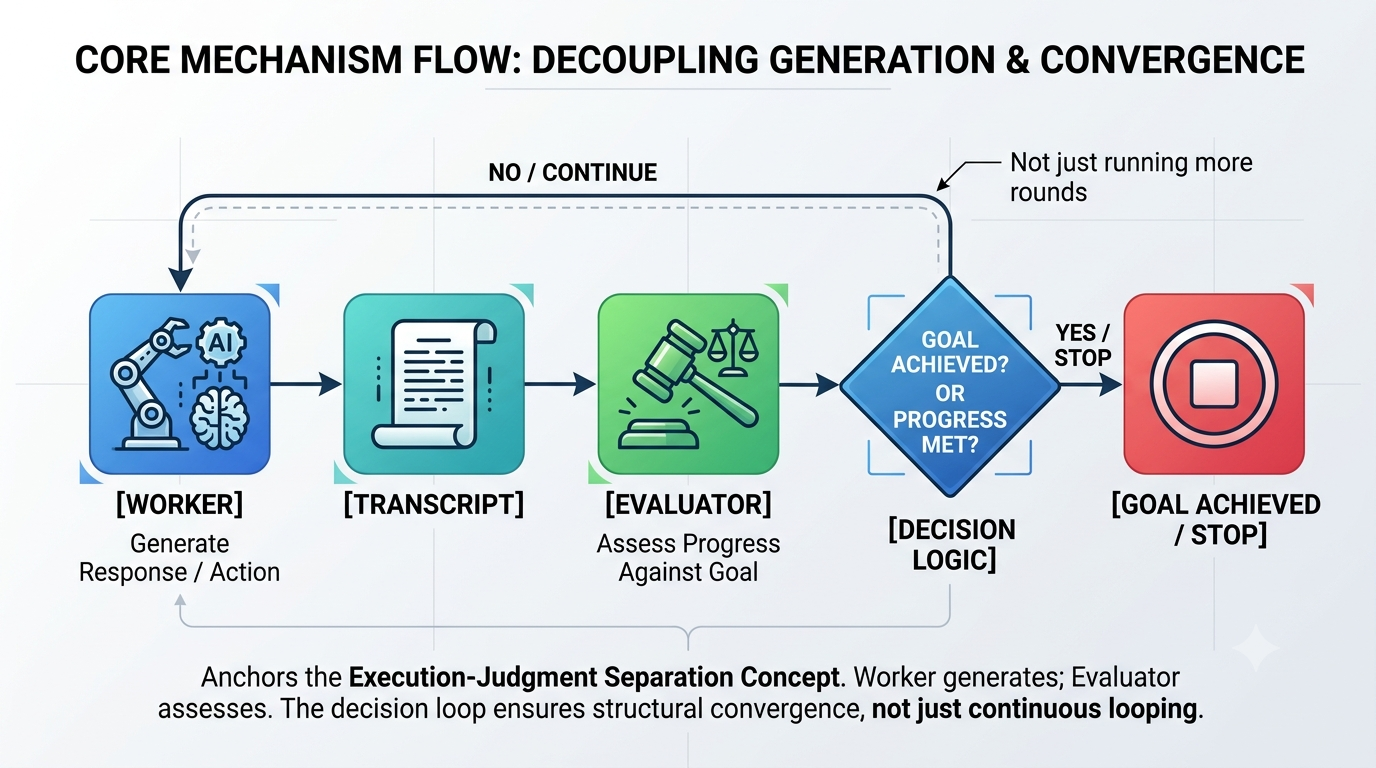
Anthropic’s official documentation designs something important: the Worker Model doesn’t directly decide “I’m done.” At the end of each round, it hands off to an Evaluator.
The flow looks more like this:
Worker
    ↓
Executes task
    ↓
Generates Transcript
    ↓
Evaluator
    ↓
Is the goal satisfied?
    ↓
Satisfied → Stop
    ↓
Not satisfied → Next round
Notice the key change: execution and judgment begin to separate. This is a design principle appearing in many Agent Runtimes — Generation handles exploration, Evaluation handles convergence. The two should not be mixed.
The most important thing about Goal Loop isn’t the Goal — it’s the Exit Condition.
Goals are easy to write beautifully:
- Improve system stability.
- Optimize code quality.
- Improve user experience.
These goals aren’t wrong. The problem is: when is it done? Nobody knows.
Many early AutoGPT projects died here. Goals kept expanding. Tasks kept splitting. The Agent always found new optimization opportunities. It kept generating, modifying, consuming tokens — with no one knowing when to stop.
Truly mature goals must be verifiable:
- All unit tests pass
- Lighthouse Performance ≥ 90
- Lint shows no new errors
- API Response Time < 200ms
- Maximum five rounds of attempts
The numbers aren’t what matters. What matters is: the Evaluator can judge.
A concrete case: Why Dependabot workflows suit Goal Loop perfectly.
Many teams receive Dependabot PRs daily:
- Upgrade dependency
- CI fails
- Fix breaking change
- Re-run
- Until it passes
This is Goal Loop’s most natural use case. The objective is clear. The evidence is clear. The exit condition is clear. Claude can work continuously — upgrade, fix, recompile, retest — for a bounded number of rounds, then output a structured failure report if it can’t succeed.
What’s automated here isn’t fixing bugs. It’s the act of continuing to try. Previously, an engineer made that decision each time. Now Runtime takes over.
What tasks don’t suit Goal Loop?
Help me optimize the architecture.
Refactor the code.
Improve maintainability.
These are counter-examples. The Evaluator has no way to know when to stop. The model will keep finding optimization opportunities. Different models will give different answers each round.
These tasks are better served by Turn-based, or by human review.
Goal Loop is best for tasks where the finish line can be proven — not tasks where the value is still under debate.
AI-Generated Image
Part Two: Time-Based and Proactive — When Runtime Starts Owning Time, the Agent Becomes a System
The first two loop layers solved two relatively contained problems. Turn-based: did I actually finish? Goal-based: should I continue?
At layer three, Claude Code starts discussing a different class of problem entirely: If no one sends a Prompt, what should the Agent do?
This sounds simple. But it means the Agent begins escaping “chat” mode and entering true Runtime.
Previously, large models were almost entirely reactive. User inputs. Model answers. Waits for next input. Even with Goal Loop, someone still needed to initiate.
But real engineering systems don’t operate this way.
PRs continuously receive new reviews. CI suddenly fails. Monitoring generates new alerts. Dependencies release new versions daily. Issues accumulate continuously.
What truly needs automation isn’t a single task — it’s time itself.
Layer Three: Time-Based — Runtime Begins Owning Its Own Schedule
Many articles describe Time-based Loop as: scheduled Prompt execution.
That’s not incorrect. Claude Code’s /loop and /schedule are fundamentally addressing periodic execution. But calling it "AI Cron" undersells it.
Cron does something simple: time arrives, script runs, ends, repeats. The whole process has almost no state, no context, no judgment.
An Agent is fundamentally different. When Claude is awakened, it doesn’t immediately execute a fixed script. It typically completes an entire Runtime behavior cycle:
Read context
    ↓
Check Git status
    ↓
Review PRs
    ↓
Analyze new comments
    ↓
Decide whether to invoke tools
    ↓
Modify code
    ↓
Re-verify
    ↓
Decide whether to conclude
What’s being scheduled isn’t a script — it’s an entire reasoning process. This is the fundamental difference between Time-based and a traditional Scheduler.
Time starts becoming a Runtime resource.
A concrete example: assume a team maintains a large GitHub repository. Every day:
- 09:12 — Reviewer leaves a comment
- 09:28 — CI fails due to a network issue
- 09:45 — Dependabot creates a new PR
- 10:03 — Another developer pushes again
If everything depends on manual monitoring, engineers might context-switch dozens of times a day. The real attention drain isn’t fixing bugs — it’s constantly checking: did anything new happen?
What many teams actually want to hand off isn’t bug-fixing. It’s: check in for me at regular intervals.
Claude Code’s Time-based Loop answers this need. It transforms “checking” itself into a Runtime capability.
A typical case: PR Review Watcher
Traditional flow: engineer opens GitHub, looks for new comments, finds nothing, closes it, opens it again thirty minutes later. Near-zero technical content, but continuous attention cost.
A Time-based workflow transforms this:
Every 20 minutes:
- Read PRs
- Check new reviews

If it's only:
- Spelling fixes
- Lint suggestions
- CI retries
→ Claude handles automatically

If it involves:
- Schema changes
- Data migrations
- Permission changes
- Payment flows
- API breaking changes
→ Stop, generate summary, notify engineer
What’s automated isn’t modification. It’s observation. This is where Monitoring and Runtime begin to converge.
A detail easily missed: Time Loops have lifecycles.
Anthropic’s documentation contains several points that are easy to overlook: current session recovery allows Loops to continue; Recurring Tasks have default expiration times; longer-term scheduling requires external tooling like GitHub Actions or Claude Desktop Scheduled Tasks.
These design choices reveal something important. Anthropic hasn’t designed Loop as a permanently running Daemon. It still has lifecycle, resume, and expiration concepts. Claude Code is already thinking about Agents using Runtime vocabulary, not Chat Session vocabulary.
Why do many Time Loops fail?
The typical mistake: writing Prompts that are longer and longer.
What actually needs to be designed is cadence:
- If a PR receives a new comment on average once per hour, and you run every minute — 99% of runs are empty.
- If an incident alert requires a 5-minute response, and you run hourly — the loop is entirely pointless.
Three things that actually need definition:
- How often does the external signal actually change?
- What does an empty run cost?
- Once something is found, how far should the Agent process it?
Without these definitions, Loop becomes: endlessly calling the model, endlessly consuming tokens, producing almost no value.
Many teams discover this: the real cost isn’t inference — it’s meaningless inference.
Layer Four: Proactive — The Agent Starts Owning Its Own Work Domain
Compared to Time-based, Proactive is more likely to generate excitement. It finally approaches what people imagine when they picture “AI working on its own.”
Anthropic’s official documentation offers a canonical example: periodically check user feedback, auto-classify, invoke multiple Sub-agents, fix code, generate reviews, and finally auto-submit. The entire process requires almost no human intervention.
Many people see this and think: The Agent can work independently now.
But what actually deserves attention isn’t the automation level — it’s something more structural: Runtime starts owning its own work domain (Domain of Responsibility).
This is a fundamental shift. Previously, an Agent had one task at a time. Today, it begins holding continuous responsibility for a slice of the business.
- Handling Issues every day
- Processing dependency upgrades every day
- Compiling daily reports
- Maintaining documentation
This means Runtime is no longer just an executor. It’s starting to occupy a role within the organization.
Why Proactive looks more like Kubernetes than ChatGPT
The most accurate engineering analogy for Proactive isn’t a chatbot. It’s Kubernetes.
Kubernetes’ most important component isn’t the Pod. It’s the Controller.
The Controller continuously observes. Continuously reconciles. Continuously corrects. Until the system returns to the desired state.
Claude Code’s Proactive Workflow increasingly resembles this pattern:
Runtime: observe environment
    ↓
Discover event
    ↓
Invoke Sub-agent
    ↓
Coordinate execution
    ↓
Verify result
    ↓
Continue observing
The whole process isn’t a single task. It’s a continuously running Control Plane. Prompt has receded into the background. What matters is: who observes? who schedules? who reclaims? who escalates?
Dynamic Workflow changes something structural
Anthropic’s Workflow documentation mentions a design choice that deserves attention. Dynamic Workflow doesn’t mean the model improvises during conversation. Claude first generates a piece of JavaScript, then Runtime executes it, with that script then scheduling multiple Sub-agents.
What looks like an implementation detail is architecturally significant:
Workflow itself starts becoming an executable asset.
It can be: saved, reviewed, version-controlled, replayed, audited.
Previously, Prompt was text. Today, Workflow is starting to become a program. This trajectory converges with GitHub Actions, Airflow, Temporal, and other Workflow Engines.
Governance becomes load-bearing when Sub-agents multiply
Many demos love showing one Agent calling ten others. It looks impressive. But after real deployment, the first problem teams encounter isn’t capability — it’s governance:
- Multiple Agents modifying the same file simultaneously?
- Two Agents giving contradictory recommendations?
- One Agent infinitely splitting tasks?
- Which Agent can access production config?
- Which Agent can delete resources?
- Which Agent can merge code?
These are no longer Prompt problems. They’re Governance problems.
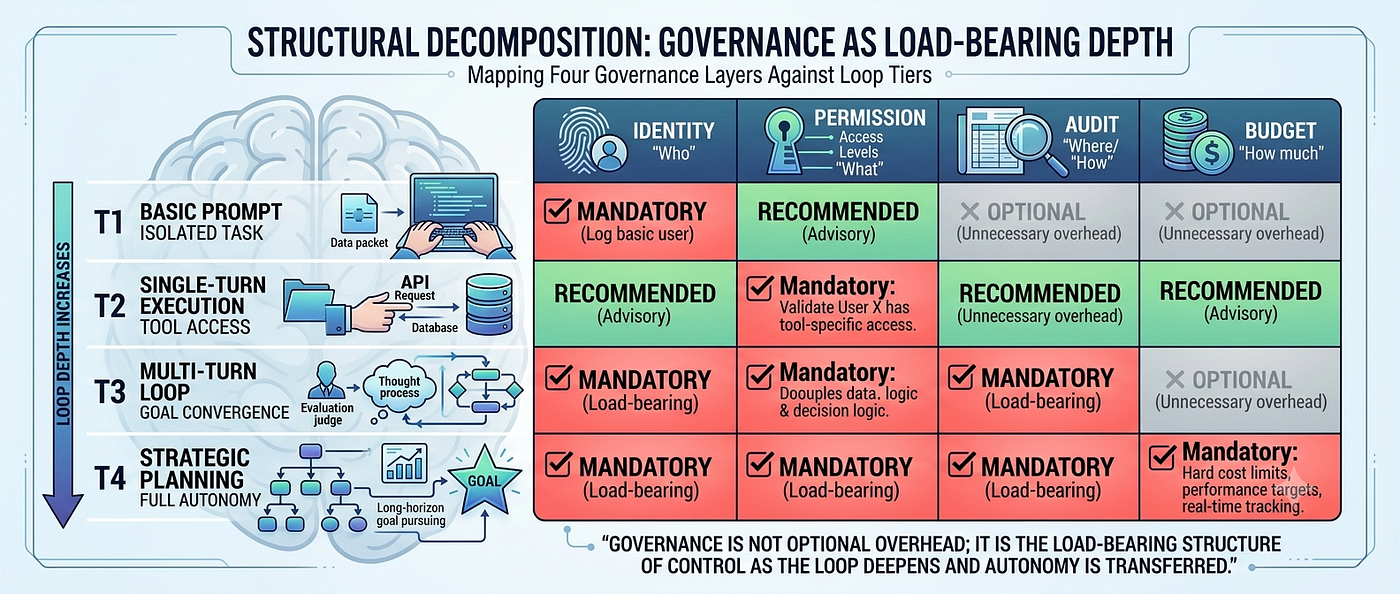
A mature Proactive Runtime needs at least four layers of constraint:
- Identity — different Agents should carry different identities
- Permission — not every Agent should call every tool
- Audit — every decision should leave a record
- Budget — tokens, time, call counts, Sub-agent counts should all have limits
Many teams initially hand all permissions to one super-Agent. Short-term efficiency looks high. Long-term, almost all teams converge on least-privilege design.
Because the more capable the Agent, the larger the blast radius of its mistakes.
A pattern worth watching: Agents are becoming cloud resources
Anthropic’s documentation quietly signals something: Dynamic Workflow will increase parallel Agent count, token consumption, tool call frequency, and runtime duration.
These signals mean: Agents have started accumulating their own operating costs.
Previously: model called once, ends. Today: Workflow may run for two hours, invoke dozens of tools, create multiple Sub-agents, consume millions of tokens.
What enterprises may find themselves managing in the near future isn’t just Kubernetes clusters — it’s Agent Runtime as infrastructure.
If that’s the direction, what enterprises will care about isn’t “which model is smarter” — it’s “which Runtime is easier to govern.” Loop Engineering, from this angle, looks less like an extension of Prompt capability and more like the operating system layer that Agents have been missing.
AI-Generated Image
Part Three: Why Most Teams Shouldn’t Chase Lights-Out Automation on Day One
If you watch only Claude Code demo videos, a certain illusion forms easily. Agent automatically analyzes Issues. Automatically decomposes tasks. Automatically coordinates Sub-agents. Automatically fixes code. Automatically submits PRs.
The natural first reaction: When can we reach Fully Autonomous?
But if you’ve actually shipped engineering systems, the reality tends to run opposite. The most mature teams don’t spend most of their time asking: “Can we automate this further?” They spend it asking: “What absolutely must not be automated?”
Over the past year, we’ve seen more and more enterprises attempt AI Agent workflows. Some put Agents in CI. Some auto-process Issues. Others tried automatic dependency upgrades, auto-generated tests, automated PR reviews.
But there’s an interesting pattern: the closer to production, the slower automation actually advances.
The reason isn’t insufficient model capability. It’s that engineering systems’ real question has never been “can it be done?” — it’s always been: what happens when it goes wrong?
This is what I see as the true value of Claude Code’s four-layer Loop. Not a roadmap toward lights-out autonomy. Precisely the opposite — a staged pathway for transferring control incrementally.
A Four-Week Deployment Trajectory That Actually Works
This isn’t the only approach, but from watching many teams’ practices, this pace tends to accumulate stable engineering experience most reliably.
Week One: Only Verification, No Automation
The only goal this week: make the Agent learn to prove it completed its work.
Every task — bug fix, UI change, test writing — must conclude with automatic execution of:
- Unit tests
- Lint
- Type checking
- Required UI verification
- Console checks
- Modification summary
The engineer still decides: continue, pause, abandon.
Don’t chase reducing human involvement yet. What needs to accumulate is: verification rules, Skills, failure logs, and checklists.
If this layer isn’t solid, every subsequent loop amplifies errors.
Week Two: Begin Transferring Continue Control
Start trying Goal Loop. But keep targets extremely narrow:
- Fix all Lint errors.
- Make all tests pass.
- Achieve a Lighthouse score of 90.
Add hard boundaries: maximum five attempts, stop after twenty minutes, exit after five tool calls, failure must generate a report.
What you’re handing over here isn’t fixing bugs — it’s continuing to try. And watch out for the classic trap: writing Goals like “improve user experience” or “optimize architecture.” These aren’t Goals. They’re wishes. Goal Loop needs targets an Evaluator can adjudicate as true or false.
Week Three: Begin Transferring Time
If the first two weeks are reasonably stable, try Time Loop.
Example: every twenty minutes, check PRs and CI. If it’s only formatting issues, CI retries, or documentation updates — Claude handles them. If it involves databases, permissions, schema, or payment flows — stop, notify the human.
One experience worth emphasizing: don’t try 24/7 operation immediately. Start with business hours only. Start with a fixed repository. Expand scope only after stability is demonstrated.
Agents and monitoring share the same scaling law: the faster the scope expands, the faster governance costs compound.
Week Four: Only Then Consider Workflow
After three stable weeks, many teams begin considering Routines, Workflows, Sub-agents, automatic classification, automatic repair, automatic Review.
But even at this stage, I’d recommend preserving human escalation paths:
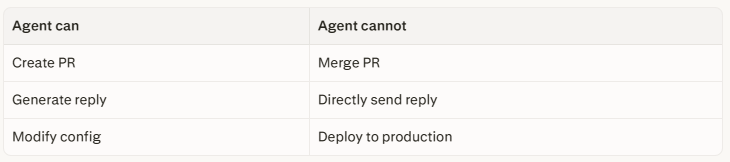
Agent canAgent cannotCreate PRMerge PRGenerate replyDirectly send replyModify configDeploy to production
Many enterprises ultimately keep Human Approval for exactly this reason — not because they don’t trust the model, but because responsibility still belongs to the organization.
Escalation Is Easy — Degradation Is More Important
Mature software systems almost all have degradation strategies. Database unavailable → read-only mode. Cache failure → fall back to database. Recommendation system error → return default sort.
Why? Because mature systems don’t assume they’re always right.
Agent Runtime should work the same way. The most overlooked capability in Loop Engineering isn’t escalation — it’s graceful degradation:
- Goal Loop consecutively fails → immediately fall back to Turn Loop
- Time Loop running empty repeatedly → suspend Scheduler
- Workflow Token consumption spikes → shut down Sub-agents
- Consecutive unknown tool errors → enter manual mode
Many demos celebrate: more and more automatic.
Production systems need: more and more controllable.
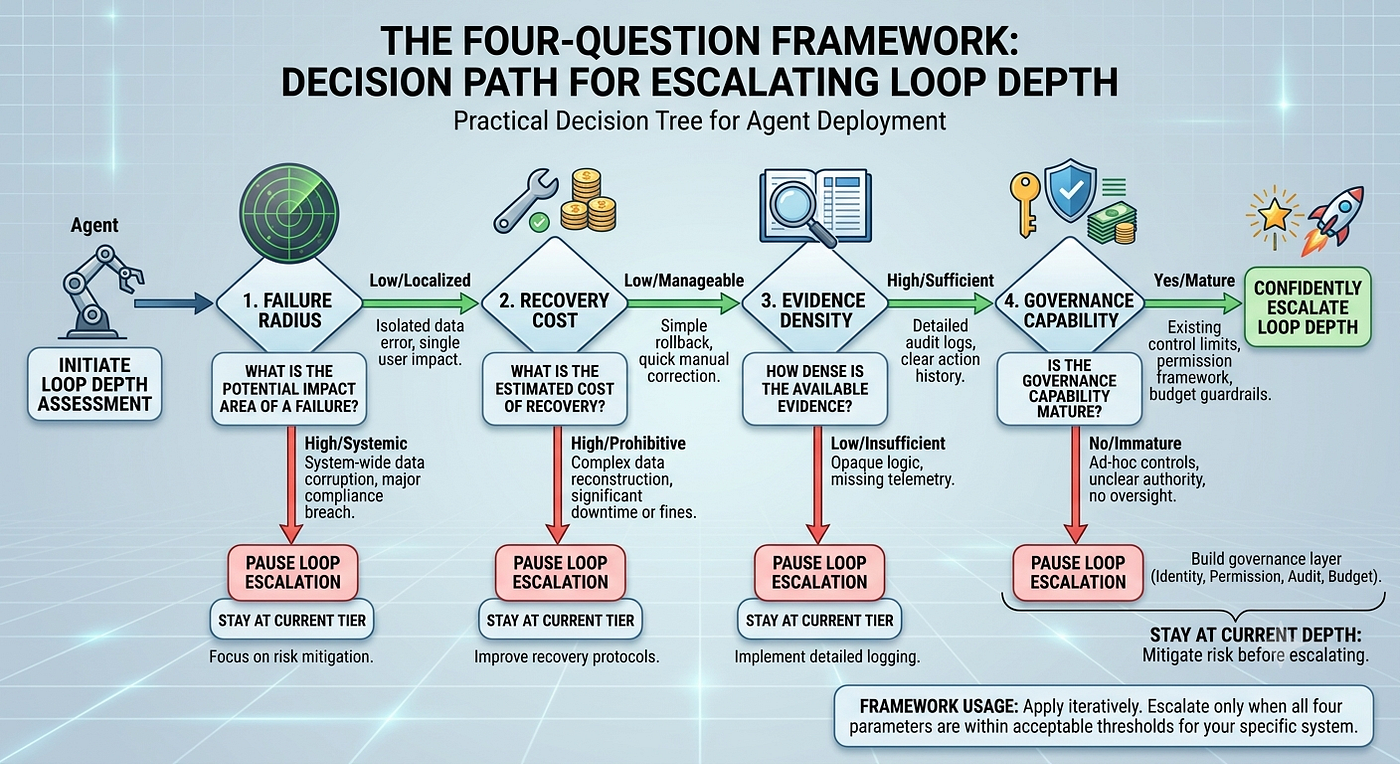
Four Metrics for Deciding When to Escalate
1. Failure Radius
If failure occurs, does it affect one file? One PR? The entire production environment?
Auto-modifying a README: near-zero failure cost. Auto-modifying payment config: potential live incident. Control should decrease as failure radius grows — not increase.
2. Recovery Cost
Git commit: one minute to recover. Database migration: potentially hours. Customer notification email: practically irreversible.
The harder the recovery, the more conservative the automation should be.
3. Evidence Density
“Complete.” — nearly worthless.
Trustworthy evidence: test logs, Diffs, screenshots, benchmarks, failed items, risk notes, next-step recommendations.
The organization isn’t trusting the Agent. It’s trusting the evidence the Agent left behind. Richer evidence → more willingness to hand over control.
4. Governance Capability
The more complex the Workflow, the more governance matters:
- Is there identity?
- Are there permissions?
- Is there audit?
- Is there budget?
- Is there a kill switch?
- Is there a human takeover path?
Without these, the smarter the Workflow, the greater the risk.
AI-Generated Image
Part Four: From Claude Loop to Agent Runtime — The Real Competition Ahead Is Control Architecture, Not Prompts
Looking back, Anthropic’s four officially documented Loops aren’t especially complex: Turn-based, Goal-based, Time-based, Proactive.
From a feature perspective, they’re just four different execution modes.
But reading Anthropic’s documentation releases over the past few months together, a single thread becomes increasingly visible: Skill, Memory, MCP, Sub-agent, Dynamic Workflow, Loop — all of these capabilities are evolving around the same question. How do you take a large model and move it from answering once to continuously operating as a system?
I increasingly believe what matters in Claude Code isn’t the new commands. It’s that it has started decomposing control actions that previously defaulted to humans, layer by layer: when to verify, when to continue, when to run again, when to escalate, when to stop.
These things, previously scattered through engineers’ intuitions, are starting to become objects that Runtime can understand, execute, and audit. That may be the part of Loop Engineering that actually deserves sustained attention.
Prompt Engineering Is Becoming Infrastructure
For two years, AI engineering conversations have orbited Prompt. How to write it. How to organize context. How to reduce hallucination. How to improve response quality.
None of that is less important. Even today, a badly written Prompt can derail an entire Workflow from step one.
But we’re also increasingly watching something else happen. Prompt’s importance hasn’t disappeared. It’s just becoming a foundation-layer capability. Like databases didn’t disappear when cloud arrived. Like network protocols didn’t become irrelevant when microservices did.
Prompt doesn’t expire when Agents emerge. It recedes one layer beneath Runtime.
Prompt determines how the model thinks in this round. Runtime determines when the whole system thinks next.
These are different questions. One is about inference. The other is about operation.
If Prompt Engineering is optimizing a function, Runtime Engineering is designing a long-running service.
Where the Real Competition Is Converging
Watching recent moves from major AI companies reveals a pattern. Anthropic is strengthening Claude Code’s Loop, Workflow, and Sub-agent. OpenAI is advancing Codex, Responses API, and Agent SDK. Google is expanding Gemini CLI, Workspace Agent, and developer workflows.
The implementations differ. But the direction is converging.
Everyone is investing heavily not just in models themselves — but in the execution infrastructure surrounding models.
Why? Because for many enterprises, a model answering 5% better than another doesn’t necessarily change how a team works. What actually changes organizational efficiency might be something different:
- Can it run continuously for eight hours?
- Can it safely invoke tools?
- Can it coordinate multiple Agents?
- Can it automatically recover from failures?
- Does it record every decision?
- Can it control its own running costs?
- Does it support human takeover?
These questions are increasingly resembling traditional software engineering, not natural language processing.
In some sense, Agents are following a development path similar to container technology. Ten years ago, discussions centered on whether Docker could run applications. What actually determined enterprise adoption speed was Kubernetes, Service Mesh, CI/CD, observability, and security governance.
Models may follow a similar arc. The future differentiation isn’t just who has the strongest model — it may be who has the most mature, most reliable, most governable Runtime.
This is observation, not prophecy. Models are still evolving rapidly. If reasoning capability sees breakthroughs, Runtime design may shift again. The two aren’t in competition — they push each other forward.
Why Runtime Is Closer to Reality Than Prompt
Many people’s first experience with AI makes Prompt feel like everything. Input, answer, done.
But real-world work rarely follows that pattern. A PR lasts days. A feature spans weeks. A system migration runs months.
The complexity isn’t in answering. It’s in:
- When to continue
- When to pause
- When to wait for someone else
- When to restart
- When to notice an anomaly
- When to escalate to the responsible person
All of this is Runtime territory.
If you place an Agent in an enterprise workflow, you’ll find Prompt is actually a small fraction of the actual operation. Most of the time, the Agent is waiting, listening, observing, recovering, coordinating, auditing, logging.
These behaviors resemble a long-running system far more than a one-time conversation.
Claude Code’s Loop makes this transition visible for the first time.
The “Digital Employee” Framing Has a Hidden Trap
Many people have started calling Agents “AI employees,” “digital colleagues,” “virtual engineers.”
These metaphors have some usefulness. But they also carry a risk of meaningful confusion.
Employees have autonomous goals. Agents don’t. Employees bear responsibility. Agents don’t. Employees can explain their decisions with accountability. Agents’ explanations still require external verification.
I prefer thinking of Agents as a new category of infrastructure, not new employees. More like: CI, Scheduler, Workflow Engine, Controller — except this infrastructure now has reasoning capability.
This framing also implies where organizational design changes might occur. What teams manage in the near future isn’t just servers, databases, and Kubernetes clusters. It also includes Runtime, Workflow, Prompt, Skill, Memory, permissions, budgets, and audit trails.
Agents may not become colleagues. But Runtime will very likely become the new foundation.
The Real Lesson Claude Code Leaves Behind
Reading Claude Code’s four-layer Loop carefully, one thing it conspicuously doesn’t promise: that AI will fully replace engineers.
Instead, what appears throughout — more frequently than “Autonomous” — is: Verification, Goal, Schedule, Workflow, Permission, Review, Human Approval.
This reflects a particular kind of engineering restraint. It doesn’t frame the Agent as an all-purpose assistant. It places it back inside the engineering system — giving it capabilities while also defining its boundaries.
From this perspective, Loop Engineering’s true design isn’t “how to let AI run indefinitely.” It’s: how to let AI run when it should, stop when it should, and know when to return control to humans.
That’s the difference between engineering systems and demos.
Demos chase capability. Engineering chases boundary.
A Code Block Worth Running
Here’s a minimal Turn-based Skill verification scaffold — the kind that should run after every Agent task completes before it’s considered “done”:
import subprocess
import json
from dataclasses import dataclass, field
from typing import List, Optional
from datetime import datetime

@dataclass
class VerificationResult:
    step: str
    passed: bool
    output: str
    timestamp: str = field(default_factory=lambda: datetime.utcnow().isoformat())
@dataclass
class TaskEvidence:
    task_id: str
    verification_steps: List[VerificationResult] = field(default_factory=list)
    overall_passed: bool = False
    escalate_to_human: bool = False
    risk_flags: List[str] = field(default_factory=list)
def run_verification_suite(task_id: str, checks: dict) -> TaskEvidence:
    """
    Executes a verification suite after an Agent task completes.
    Returns structured evidence - not just 'passed/failed'.
    """
    evidence = TaskEvidence(task_id=task_id)

    for step_name, command in checks.items():
        try:
            result = subprocess.run(
                command, shell=True, capture_output=True, text=True, timeout=30
            )
            passed = result.returncode == 0
            output = result.stdout or result.stderr
        except subprocess.TimeoutExpired:
            passed = False
            output = "Timeout exceeded"

        evidence.verification_steps.append(
            VerificationResult(step=step_name, passed=passed, output=output[:500])
        )

    failed = [s for s in evidence.verification_steps if not s.passed]
    evidence.overall_passed = len(failed) == 0

    # Flag high-risk failures that require human review
    risky_keywords = ["payment", "auth", "migration", "schema", "production"]
    for step in failed:
        if any(k in step.step.lower() for k in risky_keywords):
            evidence.escalate_to_human = True
            evidence.risk_flags.append(step.step)

    return evidence
# Example usage after a code modification:
checks = {
    "unit_tests":       "pytest tests/ -q",
    "lint":             "ruff check .",
    "type_check":       "mypy src/ --ignore-missing-imports",
    "payment_module":   "pytest tests/payment/ -v",
}
evidence = run_verification_suite(task_id="fix-login-button-001", checks=checks)
print(json.dumps(evidence.__dict__, indent=2, default=str))
This demonstrates the core principle of Turn-based Loop in code: the Agent doesn’t just produce a diff — it produces structured evidence that the system, not just the engineer, can inspect, store, and act on.
Conclusion: The Real Design Question Isn’t Prompt — It’s Control Architecture
Writing through these sections, I’ve become more convinced of one framing.
When we discussed Prompt, we asked: will the model write this correctly? When we discussed Context, we asked: does the model know this? When we discuss Loop, we ask: when should the system continue thinking?
If there’s a next layer after this — I’d guess the question becomes: which control rights can be safely handed to Runtime?
Claude Code’s four-layer Loop provides a control handoff model, not four new commands:
- First hand over verification rights
- Then hand over continuation rights
- Then hand over time
- Finally hand over a portion of the work domain
Each step forward, automation strengthens. But simultaneously — evidence, audit, permission, budget, and governance must strengthen in equal measure.
A truly mature Agent system isn’t trusted because the model is smarter. It’s trusted because it knows:
- When to continue
- When to pause
- When to ask for help
- When to exit
- When to return control to humans
That’s the most important thing Claude Code leaves for the entire field of Agent Engineering.
The future competition may not be just model parameters, leaderboard rankings, or single-pass inference quality. What may actually determine whether enterprises can truly operationalize AI is something more prosaic and more engineering-native:
How do you design an Agent Runtime that continuously runs, continuously verifies, continuously governs — and always retains the ability to be taken back?
When that day comes, and we look back at Claude Code’s four-layer Loop — it probably won’t be remembered as four commands.
It will be remembered as a signal.
That AI engineering finally began moving from generating content to running systems.
If you’d like to show your appreciation, you can support me through:
✨ **Patreon ✨ [Ko-fi](https://ko-fi.com/jinlowmedium) ✨ [BuyMeACoffee](https://buymeacoffee.com/jinlowmedium)**
Every contribution, big or small, fuels my creativity and means the world to me. Thank you for being a part of this journey!
메타데이터
- post_id
- 095dee6ff5ce
- slug
- claude-codes-official-loop-hierarchy-from-self-verification-to-lights-out-rethinking-agent-095dee6ff5ce
- url
- https://medium.com/jin-system-architect/claude-codes-official-loop-hierarchy-from-self-verification-to-lights-out-rethinking-agent-095dee6ff5ce
- canonical_url
- https://medium.com/jin-system-architect/claude-codes-official-loop-hierarchy-from-self-verification-to-lights-out-rethinking-agent-095dee6ff5ce
- author_url
- https://medium.com/@jinlow
- status
- ok
- fetched_at
- 2026-07-13 06:23:13