TARS Is the Open Source GUI Agent That Sees Your Screen Like a Human and Needs No API to Do It
Most automation tools work by reading code. They inspect the DOM, parse the accessibility tree, call the API that a developer left exposed…
TARS Is the Open Source GUI Agent That Sees Your Screen Like a Human and Needs No API to Do It
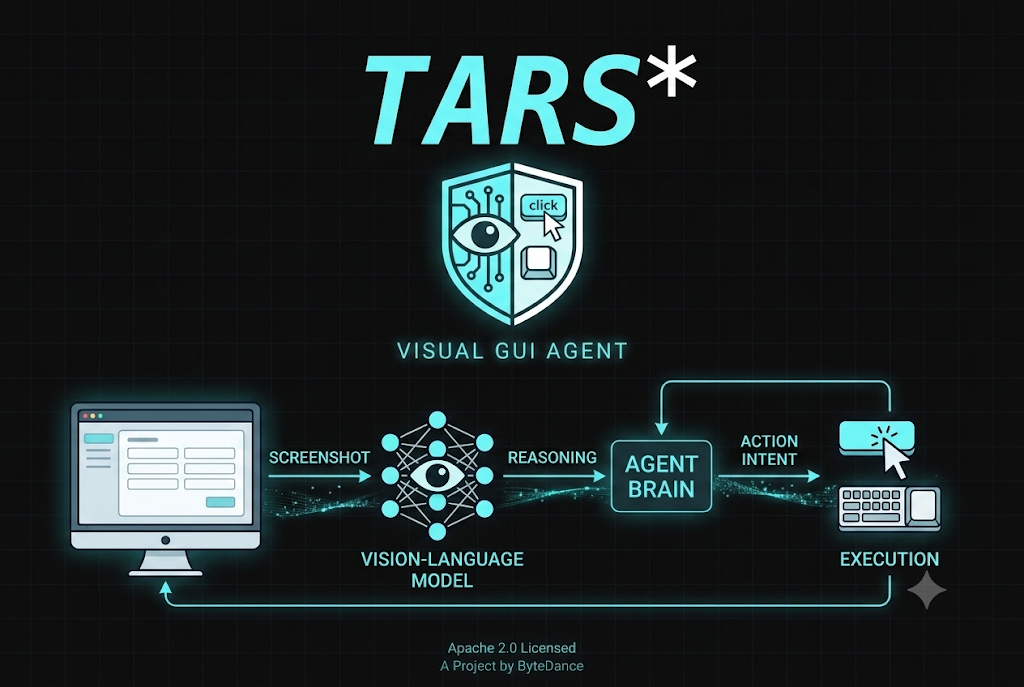
Most automation tools work by reading code. They inspect the DOM, parse the accessibility tree, call the API that a developer left exposed, or rely on element identifiers that a script was written around. This works reliably for applications that were explicitly designed to be automated. For the vast majority of software in daily use, software that was designed for people rather than for programmatic access, these methods fail quickly. The button that needs to be clicked has no stable ID. The form that needs to be filled sits behind a login flow. The application that holds the data runs as a proprietary desktop process with no public interface whatsoever. Traditional robotic process automation addresses this problem by hardcoding pixel coordinates and interface element positions, which means any visual redesign breaks the automation entirely.
ByteDance’s TARS project, released under the Apache 2.0 license in January 2025 and now carrying over 33,000 GitHub stars, approaches this problem from an entirely different direction. Rather than parsing, inspecting, or hardcoding anything, TARS looks at the screen the same way a person does. It takes a screenshot, uses a vision-language model to understand what is visible, reasons about what action to take next, and then executes that action through mouse and keyboard control. There are no accessibility hooks, no DOM inspection, no API calls into the application being controlled. The agent sees pixels, understands what they represent, and acts accordingly.
What makes visual grounding fundamentally different from traditional automation
The distinction between visual grounding and traditional automation is not a matter of implementation detail. It is a categorical difference in what the system can and cannot handle.
Traditional RPA hardcodes operation paths based on pixel coordinates or element IDs, meaning any UI change breaks the script. UI-TARS understands the semantics of UI: it knows what a save button is and where a search box should be, adapting gracefully to interface changes.
This semantic understanding is what enables the agent to generalize across applications and interface variations in a way that coordinate-based automation cannot. A save button in one application looks visually different from a save button in another, but a model trained on vast quantities of GUI screenshot data knows what a save button looks like across thousands of different visual treatments. When the interface is redesigned and the button moves, changes color, or changes its label slightly, the model can still identify it through visual reasoning rather than breaking because a hardcoded coordinate no longer points to the right pixel.
Unlike prompt-heavy frameworks relying on commercial models, UI-TARS is an end-to-end trained model incorporating System-2 reasoning, unified action modeling, and reflective online learning. The reinforcement learning component enables the model to reason through its intended sequence of actions before beginning execution, which significantly reduces the rate of mid-task failures caused by committing to an approach without considering the full chain of steps required.
The two projects that ship together
The TARS ecosystem ships two complementary products that address different use contexts while sharing the same underlying model and visual reasoning capabilities.
Agent TARS is the developer-facing component, delivered as a CLI and web UI that brings visual understanding into the terminal and product pipelines. The tool ecosystem is substantial: 314 MCP tools are accessible through the agent, covering file operations, web browsing, code execution, API calls, and a wide range of external service integrations. The kernel is built on the Model Context Protocol, which means any MCP server can be mounted to extend the agent’s tool reach without writing custom glue code. Agent TARS is the appropriate entry point for developers who want to integrate visual reasoning into automated workflows, give agents access to the browser in headless or headed configurations, or build pipelines that combine visual grounding with external services.
Starting Agent TARS requires one command:
npx @agent-tars/cli@latestFor global installation and use with a specific model provider:
npm install @agent-tars/cli@latest -g
agent-tars --provider anthropic --model claude-3-7-sonnet-latest --apiKey your-api-key
agent-tars --provider volcengine --model doubao-1-5-thinking-vision-pro-250428 --apiKey your-api-key
UI-TARS Desktop is the end-user facing component, a native desktop application that controls the local computer through natural language instructions. Users give natural language instructions, and the agent views the screen and controls the mouse and keyboard. The desktop agent supports both local inference using models from Hugging Face and remote operation, with recent updates adding free remote computer and browser control features. On macOS, it can be installed through Homebrew in a single command:
brew install --cask ui-tarsAfter installation, the application requires two permission grants on macOS through System Settings: accessibility permissions that allow it to send keyboard and mouse events, and screen recording permissions that allow it to capture screenshots for visual analysis. These are the only permissions the application needs, and they reflect the complete local nature of the processing: no screen content leaves the machine.
How the visual perception pipeline works inside the model
UI-TARS uses a Vision Transformer to analyze screenshots. The architecture includes screenshot capture of the current screen state, visual encoding that processes the image to understand UI elements, layouts, text, icons, and spatial relationships, multimodal fusion that combines visual features with text instructions, action prediction that outputs specific actions with coordinates, and execution through standard input simulation libraries. A feedback loop where the next screenshot captures the result enables iterative task completion.
This feedback loop is what allows the agent to handle multi-step tasks rather than only executing single actions. After every action, the agent takes a new screenshot, observes the result of what it just did, and decides what to do next based on the updated visual state. A task like booking a hotel involves recognizing the current state of the browser, clicking through a sequence of search and selection steps, filling form fields, handling modal dialogs, and confirming a reservation, all as a chain of visually grounded actions where each step depends on what the previous step produced.
The hybrid browser agent is one of the more technically sophisticated aspects of Agent TARS. Three browser strategies are available: GUI, DOM, and hybrid, which dynamically choose the optimal control method. This event stream architecture makes every GUI action traceable, replayable, and debuggable. The hybrid mode switches between visual targeting and DOM inspection mid-task depending on which approach is more reliable for the specific element being interacted with. For elements that have clear visual representations but poor accessibility metadata, visual grounding is used. For elements that are visually ambiguous but have rich DOM structure, DOM inspection supplements the visual understanding. The result is more reliable browser automation than either approach achieves alone.
The model family and its benchmark trajectory
The underlying model that drives TARS has gone through several significant iterations, each extending capability well beyond what the previous version could handle.
The OSWorld curve is steep. The best score in April 2024 was 12.24%. UI-TARS reached 24.6% in January 2025 at 50 steps, UI-TARS-1.5 hit 42.5% in April 2025 at 100 steps, UI-TARS-2 landed at 47.5% in September 2025. OSWorld is a benchmark that measures how well an agent can complete real computer tasks across a range of applications, and the progress across roughly eighteen months represents a rate of improvement that substantially outpaces the overall pace of progress in the broader AI capabilities landscape.
UI-TARS-1.5 achieves state-of-the-art results on over ten GUI benchmarks including OSWorld and AndroidWorld, surpassing Claude 3.7 and GPT-4o. Available in multiple sizes with the 7B model recommended for local runs, it features a dedicated UI-TARS Desktop application and MCP integration for tool-augmented workflows.
The model is available at three sizes: 2B, 7B, and 72B parameter versions. The 7B model is generally recommended for most users, balancing capability with hardware requirements that most modern laptops and desktops can meet. The 72B model delivers significantly higher performance but requires dedicated GPU hardware with substantial VRAM. The 2B model is useful for resource-constrained environments where some reduction in task success rate is acceptable in exchange for running on minimal hardware.
What sets UI-TARS apart is that it ships the whole pipeline: model, framework, desktop and browser runtime, MCP, and behavior-log store, bundled together. None of the closed players have done that. While Anthropic Computer Use, OpenAI Operator, and Google Project Mariner all sit behind closed APIs, only two camps released full GUI agent stacks under permissive licenses: ByteDance under Apache-2.0 and Microsoft Magentic-UI under MIT.
This completeness of the open release is significant for any organization that wants to embed a GUI agent into its own infrastructure without accepting a dependency on a cloud provider’s closed API. The entire stack, from the model weights through to the desktop runtime, is auditable, modifiable, and deployable on infrastructure under the organization’s own control.
Connecting to the hosted model services
For users who want to get started without deploying a local model server, two hosted model endpoints make the process straightforward.
The UI-TARS-1.5 model is available through Hugging Face Inference Endpoints. The configuration in the desktop application requires setting the VLM provider to Hugging Face for UI-TARS-1.5, then providing the base URL, API key, and model name from the endpoint page. The base URL must end with /v1/ for correct action parsing to work.
The Doubao-1.5-UI-TARS model is available through ByteDance’s Volcengine platform. The configuration follows the same pattern with different credential sources, requiring an API key from the Volcengine console and the specific model name for the Doubao variant. The VLM provider field must be set to the matching Volcengine option to ensure that the action format expected by this model variant is parsed correctly.
For local deployments, the same model weights can be served through any OpenAI-compatible inference endpoint, which means teams already running local inference infrastructure for other purposes can route TARS through the same setup.
Deploying on macOS and Windows
On macOS, after dragging the application into the Applications folder, two system permissions must be granted before the agent can function. Accessibility permissions, found under System Settings and then Privacy and Security, allow the application to send mouse and keyboard events to other applications. Screen Recording permissions in the same location allow the application to capture screenshots. Both are required, and both are standard macOS permission grants that a developer would also request for any legitimate automation tool.
On Windows, the same basic pattern applies: install the application, configure the model credentials, and begin issuing natural language instructions. The application does not require administrator privileges for standard desktop automation tasks, though certain applications that themselves require elevated privileges may not be automatable without matching privilege levels.
Remote operator capabilities were also introduced in a significant release, allowing the agent to control computers and browsers over a network connection rather than only the machine it is physically running on. This enables scenarios where an agent session runs on one machine and is directed to control resources on another, which is useful for server automation, remote desktop workflows, and distributed team configurations where the agent needs access to infrastructure that is not colocated with the operator.
What MCP integration adds to the toolkit
The integration with the Model Context Protocol turns TARS from a standalone visual automation tool into a composable component of a broader agent infrastructure. Any MCP server can be mounted alongside TARS, extending its capabilities with access to external services, databases, APIs, and specialized tools.
The event stream architecture makes every GUI action traceable, replayable, and debuggable. The purpose-built UI-TARS model achieves state-of-the-art on GUI task benchmarks: not a general model applied naively.
The event stream is the logging and debugging infrastructure that records what the agent observed, what it decided, and what action it took at each step. This traceability matters in production use cases where audit trails are required, in debugging scenarios where understanding why the agent made a particular choice is necessary for improvement, and in reproducibility contexts where the ability to replay a session from its recorded events is valuable for testing changes to the model or the task specification.
Combining visual grounding with MCP tool access means the agent can handle tasks that cross the boundary between visual interfaces and programmatic interfaces mid-task. A workflow that starts by navigating a web interface visually, extracts data from what it sees, and then calls an API to store that data, can be expressed as a single natural language instruction rather than requiring separate scripts for each boundary crossing.
Benchmark results in context, and honest limitations
The research paper claims state-of-the-art performance on ten GUI benchmarks, outperforming GPT-4o and Claude on GUI interaction tasks. These results reflect the model’s capabilities on standardized evaluation tasks, and they represent genuine progress in the field. However, production reliability on real-world tasks varies significantly from benchmark performance, and this distinction is worth understanding before committing to any deployment.
While UI-TARS-1.5 represents a significant advancement in multimodal agent capabilities, several limitations are acknowledged. Misuse risk exists because its enhanced performance in GUI tasks includes successfully navigating authentication challenges like CAPTCHA, which could potentially be misused for unauthorized access. Computational requirements remain substantial, particularly for large-scale tasks or extended scenarios. Hallucination is also a known issue: the model may occasionally generate inaccurate descriptions, misidentify GUI elements, or take suboptimal actions based on incorrect inferences.
The privacy dimension deserves direct attention because it shapes how responsibly the tool can be adopted. An agent that continuously captures screenshots of the entire screen has visual access to everything displayed on that screen, including passwords entered into browser fields, sensitive documents, financial data, and personal communications. The local processing model means this data does not leave the machine, which is a meaningful security boundary. But it also means the agent itself has access to data that should inform the decision about which tasks it is assigned and in which security contexts it is deployed.
The code is open-source and auditable, and local processing keeps data on the machine. Organizations with strict data governance requirements should evaluate this carefully and consider running the agent in an isolated environment for tasks that involve sensitive information.
Why the open release changes the competitive landscape
ByteDance opened UI-TARS-desktop in January 2025. As of mid-2026, the repository carries over 33,000 stars, making it the largest open-source GUI agent project on GitHub. While Anthropic Computer Use, OpenAI Operator, and Google Project Mariner all sit behind closed APIs, only two camps released full GUI agent stacks under permissive licenses.
This positions TARS uniquely in the GUI agent landscape. Commercial computer use agents from major providers require sending screen content to external servers for processing, creating a fundamental privacy constraint that makes them unsuitable for many enterprise deployments. TARS running locally on infrastructure that an organization controls removes that constraint entirely. Organizations building products that need to automate desktop applications, teams running sensitive internal processes that cannot be routed through third party cloud services, and researchers who need a fully auditable baseline for studying GUI agent behavior all benefit from the availability of a complete open stack.
What sets UI-TARS apart is that it ships the whole pipeline: model, framework, desktop and browser runtime, MCP, and behavior-log store, bundled together. None of the closed players have done that. The data flywheel driving continued improvement, where deployed agents generate behavior traces that feed back into model training, means that the capability gap between the open TARS stack and closed commercial alternatives is likely to continue narrowing rather than widening, which strengthens the long-term viability of building on this foundation.
Conclusion
TARS represents one of the most complete and capable open source contributions to the GUI agent space made available to date. By grounding its automation in raw visual perception rather than DOM inspection or accessibility APIs, it extends the range of applications that can be automated to include essentially anything with a screen-visible interface, regardless of whether that application was designed with programmatic access in mind.
The combination of a full local deployment option that keeps all screen content on the machine, a model family that has demonstrated strong and rapidly improving benchmark performance, deep MCP integration that connects visual automation to a broader tool ecosystem, and an Apache 2.0 license that imposes no restrictions on commercial or enterprise deployment makes TARS a serious option for any team evaluating GUI agent infrastructure in 2026.
As with any agent that has broad access to the visual state of a machine, thoughtful deployment within appropriate security boundaries remains essential, but the technology itself has reached a level of capability that warrants serious evaluation rather than dismissal.
The repository is available at: https://github.com/bytedance/UI-TARS-desktop
메타데이터
- post_id
- 09997bce4630
- slug
- tars-is-the-open-source-gui-agent-that-sees-your-screen-like-a-human-and-needs-no-api-to-do-it-09997bce4630
- url
- https://medium.com/open-intelligence/tars-is-the-open-source-gui-agent-that-sees-your-screen-like-a-human-and-needs-no-api-to-do-it-09997bce4630
- canonical_url
- https://medium.com/open-intelligence/tars-is-the-open-source-gui-agent-that-sees-your-screen-like-a-human-and-needs-no-api-to-do-it-09997bce4630
- author_url
- https://medium.com/@eng.fadishaar
- status
- ok
- fetched_at
- 2026-06-23 21:39:52