Building Pac-Man Game with Amazon Q Developer CLI
Pac-Man isn’t just a simple game; it’s a nostalgia talking, so I chose it to showcase how Amazon Q will handle this challenge and to assess…
Building Pac-Man Game with Amazon Q Developer CLI
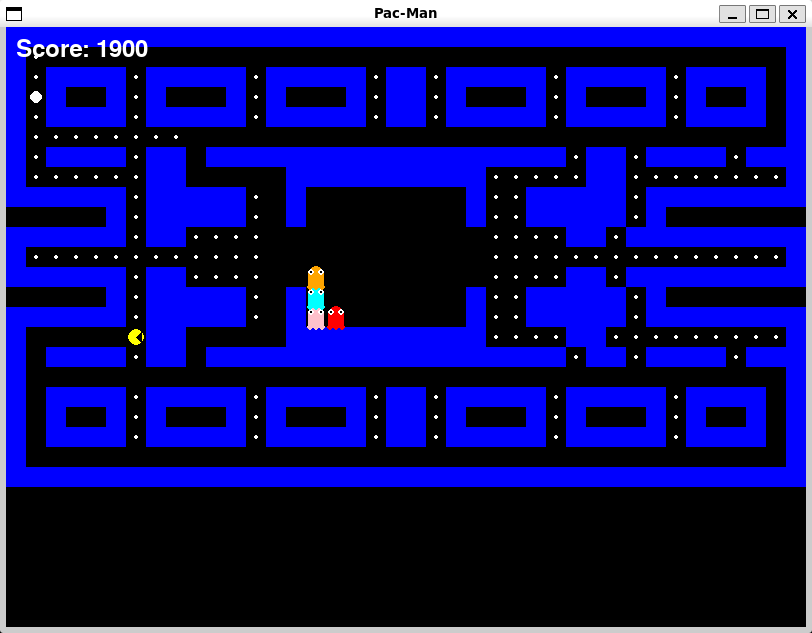
Pac-Man Game
Pac-Man isn’t just a simple game; it’s a nostalgia talking, so I chose it to showcase how Amazon Q will handle this challenge and to assess its capabilities.
I used the following effective prompting techniques:
1. Context-Rich Initial Request “You are an expert game developer who uses pygame in development. Use your knowledge to create a Pac-Man game. I have a vs code editor and use pygame so give all the steps and code needed to develop this game”
Why this worked: • Established clear expertise expectations • Specified the exact technology stack (pygame) • Mentioned their development environment (VS Code) • Asked for comprehensive guidance, not just code snippets
2. System Context Awareness I provided system context that allowed it to provide platform-specific installation commands and file paths. I leveraged that throughout: • Operating system: Linux • Current directory: /home/mohamedelgendy/q • Development environment details
3. Progressive Task Refinement Instead of asking for everything at once, I followed up with specific requests.
This iterative approach led to better, more targeted solutions.
How Amazon Q handled classic programming challenges?
Challenge 1: Collision Detection and Grid-Based Movement
The Problem: Ensuring smooth movement while maintaining grid alignment and proper collision detection.
AI solution:
def is_valid_move(self, x, y): if y < 0 or y >= len(self.layout) or x < 0 or x >= len(self.layout[0]): return True # Allow wrapping return self.layout[y][x] != 1
def update(self, maze):
Try to change direction if possible
next_x = self.x + self.next_direction.value[0] next_y = self.y + self.next_direction.value[1]
if maze.is_valid_move(next_x, next_y): self.direction = self.next_direction
Move in current direction
new_x = self.x + self.direction.value[0] new_y = self.y + self.direction.value[1]
if maze.is_valid_move(new_x, new_y): self.x = new_x self.y = new_y
The AI separated direction intention from actual movement, allowing for smooth direction changes while preventing wall collisions.
Challenge 2: Ghost AI Behavior
The Problem: Creating ghosts that are challenging but not impossible to evade.
AI Solution:
def update(self, maze, pacman):
Simple AI: try to move towards Pac-Man
possible_moves = [] for direction in Direction: new_x = self.x + direction.value[0] new_y = self.y + direction.value[1] if maze.is_valid_move(new_x, new_y): possible_moves.append(direction)
if possible_moves:
Choose direction that gets closer to Pac-Man
best_direction = None best_distance = float(‘inf’)
for direction in possible_moves: new_x = self.x + direction.value[0] new_y = self.y + direction.value[1] distance = abs(new_x — pacman.x) + abs(new_y — pacman.y)
if distance < best_distance: best_distance = distance best_direction = direction
Add some randomness
if random.random() < 0.3: # 30% chance to move randomly best_direction = random.choice(possible_moves)
Challenge 3: Game State Management
The Problem: Coordinating multiple game states and transitions smoothly.
AI Solution:
class GameState(Enum): PLAYING = 1 GAME_OVER = 2 WIN = 3
def update(self): if self.game_state == GameState.PLAYING:
Game logic here
Check collision with ghosts
if ghost.x == self.pacman.x and ghost.y == self.pacman.y: self.game_state = GameState.GAME_OVER
Check win condition
if self.maze.dots_remaining == 0: self.game_state = GameState.WIN
Clean and maintainable: Using enums for state management makes the code self-documenting and prevents magic number bugs.
Development Automation That Saved Hours
- Automated Environment Setup Instead of manual pygame installation troubleshooting, AI detected the system and chose the right approach.
Time saved: 15–30 minutes of trial-and-error with different installation methods.
2. Complete Project Structure Generation The AI created: • Main game file (pacman_game.py) • Documentation (README.md) • Launcher script (run_pacman.sh) • Proper file permissions
Time saved: 45+ minutes of project setup and documentation writing.
3. Cross-Platform File Management
Time saved: Manual file copying and organization across different directories.
The Final Creation result isn’t just code, it’s a fully playable game that captures the essence of the original while showcasing modern programming practices:
Game Features Delivered: • ✅ Smooth 10 FPS gameplay (authentic arcade feel) • ✅ 4 AI ghosts with unique behaviors • ✅ Complete scoring system (dots: 10pts, power pellets: 50pts) • ✅ Win/lose conditions with restart functionality • ✅ Classic maze navigation with tunnel effects • ✅ Responsive controls and collision detection
Technical Achievements: • Object-oriented architecture with clean separation of concerns • Efficient game loop with proper state management • Cross-platform compatibility • Comprehensive documentation and setup automation
Some other screenshots of the game:


Game Github repo link:
BuildGamesChallenge #AmazonQDevCLI
메타데이터
- post_id
- 0a0074c080aa
- slug
- building-pac-man-game-with-amazon-q-developer-cli-0a0074c080aa
- url
- https://medium.com/@mooelgendy/building-pac-man-game-with-amazon-q-developer-cli-0a0074c080aa
- canonical_url
- https://medium.com/@mooelgendy/building-pac-man-game-with-amazon-q-developer-cli-0a0074c080aa
- author_url
- https://medium.com/@mooelgendy
- status
- ok
- fetched_at
- 2026-08-12 22:13:09