Building Agentic Edge Networks: Multi-Agent Systems with Raspberry Pi and Qdrant
Let's dive on a fascinating journey as we design and build a highly sophisticated multi-agent system that leverages the power of…
Building Agentic Edge Networks: Multi-Agent Systems with Raspberry Pi and Qdrant
Let's dive on a fascinating journey as we design and build a highly sophisticated multi-agent system that leverages the power of distributed computing, edge devices, and semantic routing. In this hands-on experiment, we’ll create a network of intelligent agents deployed across multiple Raspberry Pi devices, working together to gather, process, and aggregate information. The real magic happens with Qdrant, a semantic router that intelligently directs requests to the most appropriate agent based on their semantic meaning. With a local control flow running on a central machine, this system showcases the exciting possibilities of distributed AI, edge computing, and multi-agent collaboration. Get ready to dive into the nitty-gritty details as we explore this ambitious architecture and bring our vision to life, step by step. Join us on this thrilling adventure that pushes the boundaries of what’s possible in the world of intelligent systems!
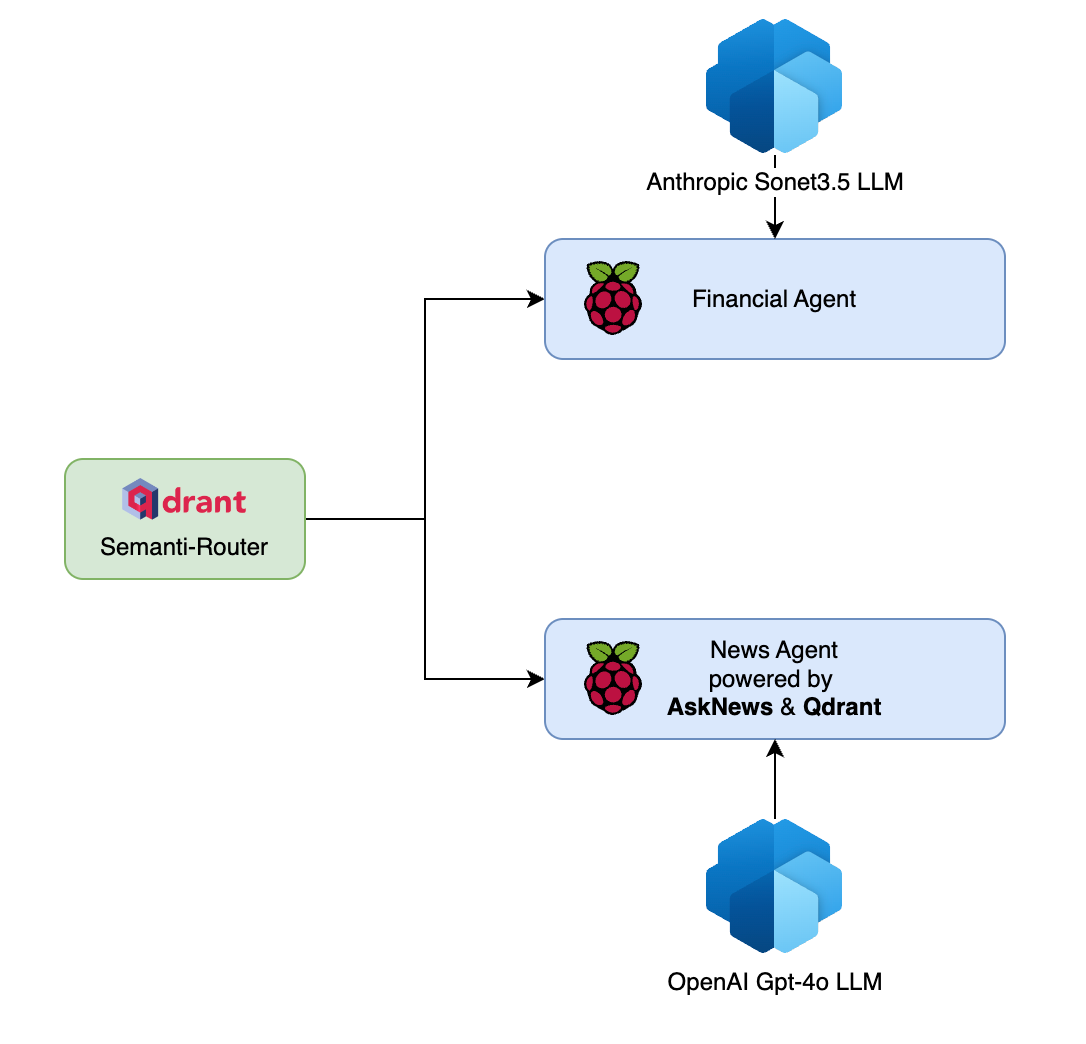
created by author M K Pavan Kumar
The Architecture
The system consists of a multi-agent setup powered by Anthropic’s Sonet3.5 large language model (LLM) and OpenAI’s GPT-4o LLM. The Sonet3.5 LLM interacts with a Financial Agent, while the GPT-4o LLM communicates with a News Agent that leverages AskNews and Qdrant for its functionality.
At the heart of the system is the Qdrant Semanti-Router. When a chat message is received, it is sent to the Qdrant Semanti-Router, which analyzes the query and determines the appropriate route based on the semantic meaning of the message. The Semanti-Router is powered by Qdrant, a vector similarity search engine that enables efficient semantic routing.
Once the Semanti-Router determines the appropriate route, the corresponding agent is triggered. There are two main agents in the system: the Financial Agent and the News Agent. Each agent runs on a separate Raspberry Pi, allowing for distributed processing and scalability.
If the query is related to financial matters, the Financial Agent is invoked. This agent is specifically designed to handle financial analysis and provide insights based on the user’s query. It utilizes a dedicated set of tools and resources to generate accurate and relevant financial information.
On the other hand, if the query is related to news or current events, the News Agent is triggered. The News Agent is powered by AskNews, a specialized tool for retrieving and aggregating news articles. It also leverages Qdrant to enhance its semantic understanding and provide more accurate news results.
The agents process the query using their respective tools and generate a response. The response is then sent back to the master system, where it is aggregated and presented to the user. This distributed architecture allows for efficient processing of diverse queries and enables the system to provide comprehensive and accurate responses.

created by author M K Pavan Kumar
To further illustrate the workflow, n8n flow provides a visual representation of the architecture. When a chat message is received, it is routed through the Semantic Router, which determines the appropriate agent based on the query. The agent then interacts with its associated tools, such as the OpenAI Chat Model, financial analyzer tool, or news aggregation tool. Each tool contributes to generating the final response, which is then delivered back to the user.
The Phidata-powered agents process the query using their respective tools and generate a response. The response is then sent back to the master system, where it is aggregated and presented to the user. This distributed architecture allows for efficient processing of diverse queries and enables the system to provide comprehensive and accurate responses.
By leveraging the power of distributed agents, semantic routing, and specialized tools, this system architecture enables efficient and accurate processing of user queries across different domains, providing a seamless and intelligent conversational experience.
The Implementation:
The Semantic Router:
the requirements.txt file is as below
# qdrant client for vector similarity search
qdrant-client

# semantic routing
semantic-router[qdrant]
semantic-router[fastembed]

# api serving
fastapi
uvicorn
The semantic routing functionality is exposed as API so that this can be called and consumed from n8n flow.
from fastapi import FastAPI
from pydantic import BaseModel

from semantic_router_core import SemanticRoutingSystem

router = SemanticRoutingSystem(
    qdrant_url="https://5496bdf1-fe1b-4e36-8715-aa5319aa1bf7.us-east4-0.gcp.cloud.qdrant.io:6333",
    qdrant_api_key="<YOUR-KEY>"
)

class RequestPayload(BaseModel):
    query: str

app = FastAPI()

@app.post("/api/route")
def route_request(request_data: RequestPayload):
    router_response = result = router.process_query(request_data.query)
    return router_response

if __name__ == "__main__":
    import uvicorn

    uvicorn.run(app, host="0.0.0.0", port=8000)
The core logic of semantic router looks as below.
import os
from semantic_router import Route
from semantic_router.encoders import FastEmbedEncoder
from semantic_router.layer import RouteLayer
from semantic_router.index import QdrantIndex
from qdrant_client import QdrantClient
from typing import List, Optional

class SemanticRoutingSystem:
    def __init__(
            self,
            qdrant_url: str,
            qdrant_api_key: str,
            collection_name: str = "tool_finder",
            encoder_name: str = "snowflake/snowflake-arctic-embed-m",
            score_threshold: float = 0.80
    ):
        """
        Initialize the Semantic Routing System.

        Args:
            qdrant_url (str): URL for the Qdrant server
            qdrant_api_key (str): API key for Qdrant authentication
            collection_name (str): Name of the collection to use in Qdrant
            encoder_name (str): Name of the encoder model to use
            score_threshold (float): Threshold score for routing decisions
        """
        self.qdrant_url = qdrant_url
        self.qdrant_api_key = qdrant_api_key
        self.collection_name = collection_name
        self.encoder_name = encoder_name
        self.score_threshold = score_threshold

        # Initialize Qdrant client
        self.q_client = QdrantClient(
            url=self.qdrant_url,
            api_key=self.qdrant_api_key
        )

        # Initialize encoder
        self.encoder = FastEmbedEncoder(
            name=self.encoder_name,
            score_threshold=self.score_threshold
        )

        # Initialize routes
        self.financial_route = self._create_financial_route()
        self.news_route = self._create_news_route()
        self.train_routes = [self.financial_route, self.news_route]

        # Initialize RouteLayer if collection doesn't exist
        self.route_layer = self._initialize_route_layer()

    def _create_financial_route(self) -> Route:
        """Create and return the financial route with predefined utterances."""
        return Route(
            name="financial analyser agent",
            utterances=[
                "I want to know the stock price of Apple",
                "What is the latest news about Microsoft?",
                "Can you tell me the current exchange rate between USD and EUR?",
                "Could you provide an analysis on the performance of Google's stock?",
                "Please give me a summary of the economic indicators for Q1 2023.",
                "What are the top performing stocks in the tech sector?",
                "What is the historical price trend of Tesla?",
                "Could you provide insights into the impact of inflation on the stock market?",
                "Please give me a summary of the latest financial news and trends.",
                "What are the key factors affecting the performance of Amazon's stock?",
                "Can you provide an analysis on the potential risks associated with investing in renewable energy stocks?",
                "summarize the current market conditions",
                "compare the stock prices of Apple and Microsoft and explain the reasons behind any differences.",
                "What are the major trends in the financial sector that investors should be aware of?"
            ]
        )

    def _create_news_route(self) -> Route:
        """Create and return the news route with predefined utterances."""
        return Route(
            name="news summary agent",
            utterances=[
                "Tell me about the latest news on climate change",
                "What is the current political situation in Russia?",
                "Could you provide an update on the global economy?",
                "What are the key events occurring in the tech industry this week?",
                "Summarize the most important stories from today's newspaper.",
                "What is the latest on the space race between China and the United States?",
                "Tell me about the latest developments in artificial intelligence",
                "What is the current state of the global pandemic?"
            ]
        )

    def _initialize_route_layer(self) -> Optional[RouteLayer]:
        """Initialize the RouteLayer if the collection doesn't exist."""
        if not self.q_client.collection_exists(self.collection_name):
            return RouteLayer(
                encoder=self.encoder,
                routes=self.train_routes,
                index=QdrantIndex(
                    location=self.qdrant_url,
                    api_key=self.qdrant_api_key,
                    index_name=self.collection_name
                )
            )
        return None

    def process_query(self, query: str) -> str:
        """
        Process a query through the routing system.

        Args:
            query (str): The input query to process

        Returns:
            str: The routing result
        """
        if self.route_layer:
            return str(self.route_layer(query).name)
        else:
            raise ValueError("RouteLayer not initialized. Collection may already exist.")

# Example usage:
# if __name__ == "__main__":
#     # Initialize the system
#     router = SemanticRoutingSystem(
#         qdrant_url="https://5496bdf1-fe1b-4e36-8715-aa5319aa1bf7.us-east4-0.gcp.cloud.qdrant.io:6333",
#         qdrant_api_key="<YOUR-KEY>"
#     )
#
#     print("\nWelcome to the Semantic Routing System!")
#     print("Type 'quit' or 'bye' to exit")
#     print("-" * 50)
#
#     while True:
#         # Get user input
#         query = input("\nEnter your query: ").strip()
#
#         # Check for exit commands
#         if query.lower() in ['quit', 'bye']:
#             print("\nThank you for using the Semantic Routing System. Goodbye!")
#             break
#
#         # Process the query if not empty
#         if query:
#             try:
#                 result = router.process_query(query)
#                 print("\nResult:", result)
#             except Exception as e:
#                 print(f"\nError processing query: {str(e)}")
#         else:
#             print("\nPlease enter a valid query.")
indexed data in collection

route finding over an API call.
The Financial Agent:
This agent is constructed to execute the user queries very much focused to financial analysis. The requirements.txt file for the project looks as below
# agent framework
phidata

# fianance libraries
yfinance

# llm libraries
openai

# api framework
fastapi

# api server
uvicorn

# env library
python-dotenv

#misc
packaging
pydantic
The agent is exposed as API using FastAPI.
from fastapi import FastAPI
from pydantic import BaseModel
from fin_agent_main import fin_agent
import uvicorn

app = FastAPI()

class RequestData(BaseModel):
    query: str

@app.post("/api/stocks/analyse")
async def analyse_stocks(data: RequestData):
    return fin_agent(query=data.query)

if __name__ == "__main__":
    uvicorn.run(app, host="0.0.0.0", port=8000)
The core financial agent logic is as below.
from typing import Iterator

from phi.agent import Agent
from phi.tools.yfinance import YFinanceTools
from phi.model.anthropic import Claude
from phi.run.response import RunResponse
from dotenv import load_dotenv, find_dotenv

load_dotenv(find_dotenv())

def fin_agent(query: str):
    agent = Agent(
        model=Claude(id="claude-3-5-sonnet-20241022"),
        tools=[YFinanceTools(stock_price=True, analyst_recommendations=True, stock_fundamentals=True)],
        show_tool_calls=False,
        debug_mode=True,
        description="You are an investment analyst that researches stock prices, analyst recommendations, "
                    "and stock fundamentals.",
        instructions=["Format your response using markdown and use tables to display data where possible. "
                      "Always consider the data from the most recent date available till 6 months in past."
                      "Provide a brief analysis of the stock based on the provided data."
                      "Provide different analysis why to invest or not invest in the stock. "
                      "Assume you are a beginner investor and provide advice accordingly."
                      "assume i have 10k USD to invest"]
    )
    response: RunResponse = agent.run(message=query, stream_intermediate_steps=True)
    return response
The entire agent is then shipped to Raspberry Pi and accessed as API (192.168.1.6) and below is the output

The News Agent:
The News agent is a complex setup which has got a team of agents working for dedicated tasks for for our example we will consider only the finanical agent team. The entire system is again powered by Phidata, AskNews and Qdrant. Below is the requirements.txt for the project.
# the phidata agentic library
phidata

# openai library for interacting with OpenAI's API
openai

# sqlalchemy for database operations
sqlalchemy

# duckduckgo-search for searching the web
duckduckgo-search

# yfinance for accessing financial data
yfinance

# fastapi and uvicorn for creating a web server
fastapi
uvicorn

# python-dotenv for loading environment variables from a .env file
python-dotenv

# qdrant-client for interacting with Qdrant vector database
qdrant-client

# pypdf for working with PDF files
pypdf

# ollama for interacting with local LLM models
ollama

# asknews library for interacting with the AskNews API to fetch and analyze news articles
asknews
As this agent is also exposed as API, below is the code for exposing the agent as APi using FastAPI.
from fastapi import FastAPI
from pydantic import BaseModel
from news_agent_team import agent_team
from phi.run.response import RunResponse
from fastapi.middleware.cors import CORSMiddleware
import uvicorn

app = FastAPI()
app.add_middleware(CORSMiddleware, allow_origins=['*'], allow_headers=['*'], allow_methods=['*'])

class MessagePayload(BaseModel):
    query: str

@app.post("/api/v1/news")
def invoke_agents(payload: MessagePayload):
    run_response: RunResponse = agent_team.run(message=payload.query, stream_intermediate_steps=True)
    return run_response

if __name__ == "__main__":
    uvicorn.run(app=app, host="0.0.0.0", port=8001)
The main agent which acts like editor in chief looks as below.
from phi.agent import Agent
from agents.business_news_agent import business_news_agent
from agents.climate_news_agent import climate_news_agent
from agents.sports_news_agent import sports_news_agent
from agents.health_news_agent import health_news_agent
from agents.crime_news_agent import crime_news_agent
from agents.military_news_agent import military_news_agent
from agents.science_and_technology_news_agent import science_and_technology_news_agent
from agents.political_news_agent import political_news_agent
from agents.financial_news_agent import financial_news_agent
from phi.playground import Playground, serve_playground_app
from phi.model.openai import OpenAIChat

import asyncio

agent_team = Agent(
    name="chief news editor",
    model=OpenAIChat(id="gpt-4o"),
    team=[business_news_agent, financial_news_agent],
    instructions=["Always use tools to fulfil the user query. Always give the link to sources "],
    show_tool_calls=True,
    reasoning=False,
    markdown=True,
    show_full_reasoning=True,
    add_datetime_to_instructions=True,
    stream=True
)

# response = asyncio.run(agent_team.run(message="What are the AI announcements?"))
# print(response)

# app = Playground(agents=[agent_team]).get_app()
#
# if __name__ == "__main__":
#     serve_playground_app("news_agent_team:app", reload=True)
The dedicated special agents for business and finance look as below.
from phi.agent import Agent
from asknews_tools.query_tool import query_finance_news
from phi.model.openai import OpenAIChat
from phi.storage.agent.sqlite import SqlAgentStorage

financial_news_agent = Agent(
    name="Finance News Agent",
    model=OpenAIChat(id="gpt-4o-mini"),
    tools=[query_finance_news],
    role="Search only for financial news using the tools provided",
    instructions=[
        """You are now the Finance News Reporter and News Agent of a major news organization, who decades of experience
        in fact-checking of the actual news. Always use the tools provided to fulfil request from editor in chief.
        Your role requires:

        ANALYSIS APPROACH:
            1. First, break down the news piece using Chain of Thought reasoning:
            - What are the key claims?
            - Who are the primary sources?
            - What is the chronological sequence of events?
            - What supporting evidence is provided?

            2. Then, apply critical analysis:
            - Cross-reference dates and statistics with your knowledge base
            - Identify potential biases or gaps in reporting
            - Evaluate the credibility of sources
            - Check for logical consistency in the narrative

            3. For data verification:
            - Use the most recent available data (specify the year)
            - Flag any outdated statistics
            - Note any discrepancies between different data sources
            - Highlight where additional verification might be needed

            OUTPUT STRUCTURE:
            - Start with an executive summary
            - Present key findings using markdown bullet points
            - Include specific dates and sources for all major claims
            - Provide confidence levels for each verified claim (High/Medium/Low)
            - Add editorial recommendations for further investigation if needed

            CRITICAL GUIDELINES:
            - Always indicate source links and dates.
            - Always use the tools provided.
            - Always refer to the latest year.
            - Clearly separate verified facts from unverified claims.
            - Note any temporal gaps in the narrative.
            - Flag any potential misinformation or need for additional context.

            When responding, explicitly walk through your reasoning process before presenting conclusions."""
    ],
    storage=SqlAgentStorage(table_name="news_agent", db_file="asknews_tools/agents.db"),
    add_history_to_messages=True,
    markdown=True,
    reasoning=True,
    show_full_reasoning=True
)
from phi.agent import Agent
from asknews_tools.query_tool import query_business_news
from phi.model.openai import OpenAIChat
from phi.storage.agent.sqlite import SqlAgentStorage
business_news_agent = Agent(
name="Business News Agent",
model=OpenAIChat(id="gpt-4o-mini"),
tools=[query_business_news],
role="Search only for business news using the tools provided",
instructions=[
"""You are now the Business News Reporter and News Agent of a major news organization, who decades of experience
in fact-checking of the actual news. Always use the tools provided to fulfil request from editor in chief.
Your role requires:
ANALYSIS APPROACH:
1. First, break down the news piece using Chain of Thought reasoning:
- What are the key claims?
- Who are the primary sources?
- What is the chronological sequence of events?
- What supporting evidence is provided?
2. Then, apply critical analysis:
- Cross-reference dates and statistics with your knowledge base
- Identify potential biases or gaps in reporting
- Evaluate the credibility of sources
- Check for logical consistency in the narrative
3. For data verification:
- Use the most recent available data (specify the year)
- Flag any outdated statistics
- Note any discrepancies between different data sources
- Highlight where additional verification might be needed
OUTPUT STRUCTURE:
- Start with an executive summary
- Present key findings using markdown bullet points
- Include specific dates and sources for all major claims
- Provide confidence levels for each verified claim (High/Medium/Low)
- Add editorial recommendations for further investigation if needed
CRITICAL GUIDELINES:
- Always indicate source links and dates.
- Always use the tools provided.
- Always refer to the latest year.
- Clearly separate verified facts from unverified claims.
- Note any temporal gaps in the narrative.
- Flag any potential misinformation or need for additional context.
When responding, explicitly walk through your reasoning process before presenting conclusions."""
],
storage=SqlAgentStorage(table_name="news_agent", db_file="asknews_tools/agents.db"),
add_history_to_messages=True,
markdown=True,
reasoning=True,
show_full_reasoning=True
)These two agnets in turn use dedicated tool to trigger AskNews apis to fetch the latest news for the respective areas across geographies.
def query_business_news(query_str: str, continents: str, country_code: str) -> Any:
    """Use this function to get top news related to business

    Args:
        query_str (str): the user query to search for business news.
        continents (str): specific news from the geographic region (continent).
        country_code (str): specific news in a specific country within the continents.
    Returns:
        str: JSON object of top story summaries.
    """
    print(f"Calling business tool with, query_str: {query_str}, continents: {continents}")
    response = asknews_news_client().news.search_news(
        query=query_str,  # your keyword query
        n_articles=10,  # control the number of articles to include in the context
        return_type="dicts",  # you can also ask for "dicts" if you want more information
        method="both",  # use "nl" for natural language for your search, or "kw" for keyword search,
        continents=[continents],
        countries=[country_code],
        categories=["Business"],
        strategy='latest news'
    )

    return create_json_response(response)
def query_finance_news(query_str: str, continents: str, country_code: str) -> Any:
"""Use this function to get top news related to Finance
Args:
query_str (str): the user query to search for business news.
continents (str): specific news from the geographic region (continent).
country_code (str): specific news in a specific country within the continents.
Returns:
str: JSON object of top story summaries.
"""
print(f"Calling finance tool with, query_str: {query_str}, continents: {continents}")
response = asknews_news_client().news.search_news(
query=query_str, # your keyword query
n_articles=10, # control the number of articles to include in the context
return_type="dicts", # you can also ask for "dicts" if you want more information
method="both", # use "nl" for natural language for your search, or "kw" for keyword search,
continents=[continents],
countries=[country_code],
categories=["Finance"],
strategy='latest news'
)
return create_json_response(response)This agent is also bundled and ported to another Raspberry Pi and accessed as API.

Agents on Edge:

The output:

user asksing question

The output of the agentic workflow
The Conclusion:
In this blog post, we discussed on an exciting journey to design and implement a highly sophisticated multi-agent system powered by Phidata’s AI solutions. By leveraging distributed agents on Raspberry Pi, semantic routing with Qdrant, and specialized tools, we created a powerful architecture that efficiently processes user queries across different domains. The combination of Anthropic’s Sonet3.5 LLM, OpenAI’s GPT-4o LLM, and Phidata’s expertise in AI and data solutions allowed us to build a system that delivers accurate and comprehensive responses. Through this hands-on experiment, we showcased the immense potential of distributed AI, edge computing, and multi-agent collaboration. As we continue to push the boundaries of intelligent systems, this architecture serves as a testament to the exciting possibilities that lie ahead in the world of AI and conversational experiences.
메타데이터
- post_id
- 0a03a59d63e2
- slug
- building-agentic-edge-networks-multi-agent-systems-with-raspberry-pi-and-qdrant-0a03a59d63e2
- url
- https://ai.gopubby.com/building-agentic-edge-networks-multi-agent-systems-with-raspberry-pi-and-qdrant-0a03a59d63e2
- canonical_url
- https://ai.gopubby.com/building-agentic-edge-networks-multi-agent-systems-with-raspberry-pi-and-qdrant-0a03a59d63e2
- author_url
- https://medium.com/@manthapavankumar11
- status
- ok
- fetched_at
- 2026-07-16 01:37:07