Azure Automation + SQL Server: Tackling the Kerberos Delegation Challenge
Introduction
Azure Automation + SQL Server: Tackling the Kerberos Delegation Challenge
Introduction
Picture this: Your Azure Automation runbook runs flawlessly on the Hybrid Worker — until it needs to query SQL Server. Suddenly, authentication fails, and you’re staring at this dreaded error:
Login failed for user 'NT AUTHORITY\ANONYMOUS LOGON'
What happened? You’ve just hit the classic Kerberos double-hop problem, a common challenge when scripts jump across multiple machines. In our case, the flow looked like this:
Azure Automation → Hybrid Runbook Worker → SQL Server VM
The credentials didn’t make it past the second hop, leaving SQL Server with no identity to authenticate. Recently, we helped a customer troubleshoot this exact scenario. Here’s why it happens and how to fix it.
Understanding the Problem
When PowerShell scripts run on Hybrid Runbook Workers (HRW), they typically execute under a local system account or a Run As account. By default, these sessions do not carry a delegated Kerberos ticket.
This becomes a problem when your script needs to make a second hop — like connecting from the Hybrid Worker to SQL Server. Kerberos cannot delegate the user’s credentials, so SQL Server sees NT AUTHORITY\ANONYMOUS LOGON instead of the actual user.
Flow of failure:
Azure Automation → Hybrid Runbook Worker (1st hop) → SQL Server VM (2nd hop)This limitation is well-documented:
Why Constrained Delegation Won’t Help
While Constrained Kerberos Delegation is often used in AD environments, it does not support WinRM’s second hop for PowerShell remoting. So, this approach won’t solve the issue in Azure Automation scenarios.
The Recommended Fix: CredSSP
The best solution is to enable Credential Security Support Provider (CredSSP), which allows credential delegation and resolves the double-hop issue.
Steps to Enable CredSSP
On the Client (Hybrid Runbook Worker):
Enable-WSManCredSSP -Role Client -DelegateComputer sqlnewdb.contoso.comOn the Server (SQL Machine):
Enable-WSManCredSSP -Role ServerSample Script Using CredSSP
Here’s a working example that verifies CredSSP and SQL connectivity:
# Get credentials from Azure Automation Credential Asset

$cred = Get-AutomationPSCredential -Name "sqldem"
$targetServerName = "sqlnewdb"
$remoteComputer = "hybridwrk"

Write-Output "Username: $($cred.UserName)"

$result = Invoke-Command -ComputerName $remoteComputer -Credential $cred -Authentication Credssp -ScriptBlock  {
    Write-Output "SELECT SYSTEM_USER, HOST_NAME(), @@SERVERNAME"
    sqlcmd -S sqlnewdb -E -Q "SELECT SYSTEM_USER, HOST_NAME(), @@SERVERNAME"
} -ArgumentList $targetServerName

Write-Output $result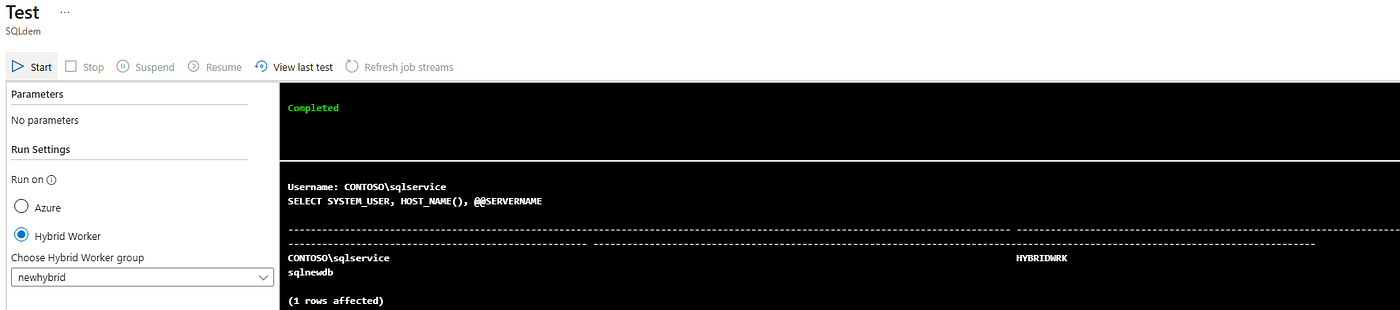
We are able to test it with the simple script, this query verifies :
SYSTEM_USER→ Which account SQL Server sees.
Here CONTOSO\Sqlservice → Indicates the SQL query executed under the intended domain account, not NT AUTHORITY\ANONYMOUS LOGON.
HOST_NAME()→ The machine initiating the SQL connection.(Hybrid worker)@@SERVERNAME→ The SQL Server instance name.
[Azure Automation] → [Hybrid Runbook Worker] → [SQL Server VM]
       (CredSSP enabled)          (CredSSP enabled)
Key Takeaways
- The error occurs due to Kerberos double-hop limitations in PowerShell remoting.
- CredSSP is the recommended approach for enabling credential delegation in this scenario.
- Always enable CredSSP on both the Hybrid Worker and the SQL Server VM.
Wrapping Up
I hope this walkthrough provides clarity and helps you resolve similar scenarios with confidence. Implementing CredSSP is a simple yet effective way to overcome the Kerberos double-hop challenge in Azure Automation Hybrid Runbooks.
Keep exploring, keep learning!
References :
메타데이터
- post_id
- 0a64b5da7bc3
- slug
- azure-automation-sql-server-tackling-the-kerberos-delegation-challenge-0a64b5da7bc3
- url
- https://medium.com/@LuciusFox22/azure-automation-sql-server-tackling-the-kerberos-delegation-challenge-0a64b5da7bc3
- canonical_url
- https://medium.com/@LuciusFox22/azure-automation-sql-server-tackling-the-kerberos-delegation-challenge-0a64b5da7bc3
- author_url
- https://medium.com/@LuciusFox22
- status
- ok
- fetched_at
- 2026-08-17 19:08:15


