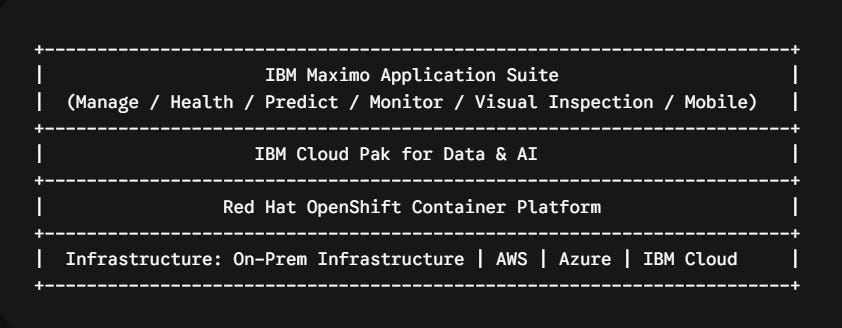
Mastering the AppPoint Economy: The Definitive Guide to IBM Maximo Application Suite (MAS)…
For decades, managing IBM Maximo licenses was relatively straightforward — and notoriously rigid. You purchased named (“Authorized”) or…
Mastering the AppPoint Economy: The Definitive Guide to IBM Maximo Application Suite (MAS) Licensing
For decades, managing IBM Maximo licenses was relatively straightforward — and notoriously rigid. You purchased named (“Authorized”) or shared (“Concurrent”) user seats for core Maximo, and if you wanted to add a specialized solution like Transportation or Spatial, you negotiated brand-new software modules.
With IBM Maximo Application Suite (MAS), IBM completely revamped this paradigm. Legacy seat licenses are replaced by Application Points (AppPoints) — a unified, flexible currency model.
Whether you are planning a migration to MAS or optimizing an existing deployment, navigating user tiers, application consumption rates, installation tokens, and generative AI content charges is critical to stretching your IT budget. Here is your deep-dive guide to MAS licensing.
1. What Are AppPoints? (The Core Engine)
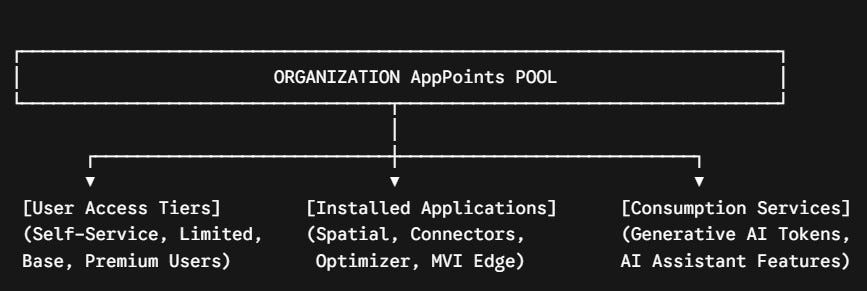
An AppPoint is a single unit of measure used to license the entire MAS portfolio. Instead of locking your budget into static module entitlements, you purchase a shared pool of AppPoints for your organization.
Your pool of AppPoints covers three operational dimensions:
- User Entitlements: Points checked out dynamically when users log in (or permanently assigned to named individuals).
- Application Installs: Fixed point allocations deducted continuously to run specific applications, connectors, or add-ons.
- Consumption Services: Variable points deducted based on operational metrics (e.g., Generative AI token usage).
2. Licensing Models: Concurrent vs. Authorized Users
When provisioning access, MAS recognizes two primary user licensing models:
- Authorized Users: A unique, named individual who is assigned dedicated access. Authorized entitlements cannot be shared among shift workers, nor can they be reassigned except for permanent role changes. Authorized users consume a lower overall number of AppPoints because the entitlement is permanently reserved.
- Concurrent Users: A dynamic license checked out by anyone currently logged into the system. When a concurrent user logs off, their AppPoints immediately return to the central pool for another colleague to use. Concurrent user tiers consume more AppPoints per user, but they offer massive efficiency for multi-shift workforces (e.g., 24/7 plant operations).
3. The 4 User Access Tiers
MAS categorizes all application access into four hierarchical user tiers. Higher tiers inherit all functional permissions of the lower tiers beneath them.

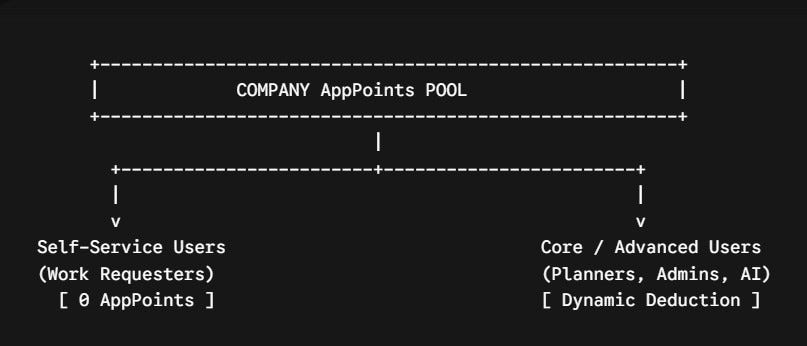
Tier 1: Self-Service Users
- Cost: 0 AppPoints
- Capabilities: Work order creation, desktop service requests, and basic self-service portal interactions.
Tier 2: Limited Users
- Cost: Low AppPoint consumption.
- Capabilities: Designed for field technicians, inspectors, or focused operators. Grants access to up to 3 specific modules within Maximo Manage, Maximo Real Estate & Facilities, or Maximo Monitor. It also unlocks Maximo Collaborate (remote expert assistance).
Tier 3: Base Users
- Cost: Standard AppPoint consumption.
- Capabilities: Unlocks broad operational access across core enterprise asset management. Includes most modules in Maximo Manage, Maximo Health, Maximo IT, and Maximo Real Estate & Facilities.
- Key Enhancements: Base users now natively include Maximo Scheduler, Maximo Spatial (GIS integration), Linear, and Calibration without requiring a higher tier upgrade.
Tier 4: Premium Users
- Cost: Highest AppPoint consumption.
- Capabilities: Total access to the entire suite. Premium tier is mandatory for reliability engineers, administrators, and power users running Maximo Predict, Maximo Visual Inspection (MVI), or specialized Industry Solutions (e.g., Oil & Gas, Aviation, Nuclear).
4. Installed Application AppPoint Costs (“Install Points”)
Beyond user logins, installing certain industry solutions, optimization engines, or external connectors reserves a fixed number of AppPoints from your pool for as long as that component remains deployed.
Here is a breakdown of major “Install” costs across the platform:

5. Industry Solutions and Service Provider Rules
When extending Maximo Manage into industry-specific verticals, unique licensing rules apply:
- Industry Solutions (Aviation, Nuclear, Oil & Gas, Transportation, Utilities, Civil): User access requires Premium or Limited AppPoint tiers. Limited users can select up to 3 modules, including the custom modules unique to that industry solution.
- Maximo Service Provider Rule: If your business uses Maximo to manage assets or provide billable services for a third-party client, IBM mandates that you must deploy Maximo Service Provider. Using standard Maximo for commercial third-party asset management without this module requires an explicit formal waiver approved by IBM executive leadership.
6. Generative AI & Content Tokens: The New Frontier
In MAS 9.2+, IBM introduced a central AI Service powered by IBM watsonx. This back-end engine drives generative AI use cases across the suite, such as natural-language maintenance assistants, automated work order summarization, and vector embedding processing.
[1 Billion Content Tokens Consumed] ──► Converts To ──► [10 AppPoints Deducted]- Content Token Metric: Instead of per-seat costs, generative AI features are measured by Content Tokens — units of input/output content (words and sub-words) processed by the AI engine.
- AppPoint Conversion Rate: Usage converts directly to AppPoints at a baseline rate of 10 AppPoints per 1 Billion Content Tokens consumed per month.
- Flexible Billing: As your technicians interact with the AI assistant, token usage is tracked monthly and billed against your central AppPoint pool.
Strategic Summary Checklist for Administrators
To get the most value out of your MAS deployment without overspending on AppPoints:
- Audit Shift Schedules: Convert fixed shift-workers (e.g., plant technicians) to Concurrent licensing, while assigning dedicated office planners to Authorized licensing.
- Leverage Included “Base” Tools: Don’t buy extra licenses for Spatial or Scheduler — they are now included natively in the Base User tier.
- Factor in Install Penalties: Budget for fixed “Install” points upfront if you plan to deploy ERP Connectors (80 pts each) or the Maximo Optimizer (220 pts).
- Monitor Token Consumption: Keep an eye on Generative AI adoption as technicians adopt AI assistant tools to ensure token consumption stays within your projected monthly AppPoint draw.
If you found this helpful, clap 👏 (Medium’s version of a high-five) and follow for more on digital transformation in facility management.
— — — — — — — — — — — — — — — — — — — — — — — — — — — — — —
Contact me on LinkedIn:
https://www.linkedin.com/in/sayed-saeed-ab3286214/
OpenShift #RedHat #CloudPak #DataEngineering #PredictiveMaintenance #IndustrialIoT #MAS9
메타데이터
- post_id
- 0a93a0c0034e
- slug
- mastering-the-apppoint-economy-the-definitive-guide-to-ibm-maximo-application-suite-mas-0a93a0c0034e
- url
- https://medium.com/@e.sayedsaeed5/mastering-the-apppoint-economy-the-definitive-guide-to-ibm-maximo-application-suite-mas-0a93a0c0034e
- canonical_url
- https://medium.com/@e.sayedsaeed5/mastering-the-apppoint-economy-the-definitive-guide-to-ibm-maximo-application-suite-mas-0a93a0c0034e
- author_url
- https://medium.com/@e.sayedsaeed5
- status
- ok
- fetched_at
- 2026-08-22 12:22:50