Dynamic Templates in Odoo 18: Using RPC, Controllers, and renderToElement
Recently, I was working on creating a custom portal dashboard in Odoo. The goal was to display a user’s sales order data on a single page…
Dynamic Templates in Odoo 18: Using RPC, Controllers, and renderToElement
Photo by Ilya Pavlov on Unsplash
Recently, I was working on creating a custom portal dashboard in Odoo. The goal was to display a user’s sales order data on a single page and implement pagination for better usability.
To solve this, I leveraged some of Odoo’s core concepts — RPC, controllers, and the
**renderToElement** function. Before diving into how I used them, let’s briefly go over what each of these means.
Before starting with the project, let me give you in brief explanation of these concepts
- RPC (Remote Procedure Call) allows communication between the client and the server. In Odoo, controllers can be accessed through RPC calls. These are built into Odoo’s framework — you just need to import and use them to fetch or send data asynchronously.
2) Controllers are basically endpoints that connect the frontend with backend logic. They allow us to retrieve or manipulate data from Python functions and expose that data to the web or portal layer.
- The
**renderToElement** function helps pass context (data) to a specific template and render it dynamically. In simple terms, it’s what lets your template display the right data based on what’s happening in the backend.
Now let's dive into its implementation
To start, we create a simple dashboard that fetches sales order data and displays it in a table. And for that, we define a basic controller:
controllers.py
from odoo import http
from odoo.http import request

class OrdersDemo(http.Controller):
    @http.route('/order',auth='public',website=True)
    def order(self):
        orders = request.env['sale.order'].sudo().search_read([('user_id','=',request.env.user.id)],['name','date_order','amount_total'])
        return http.request.render('orders_demo.orders',{'orders':orders})
Then, we render the data in a frontend template:
orders_demo.xml
<?xml version="1.0" encoding="utf-8"?>
<odoo>
    <template id="orders" name="orders demo table">
    <t t-call="portal.portal_layout">
        <table class="orders-demo-table custom-budget-table">
            <thead>
                <tr>
                    <th scope="col">Name</th>
                    <th scope="col">Date</th>
                    <th scope="col">Amount total</th>
                </tr>
            </thead>

            <tbody>
            <t t-foreach="orders" t-as="order" t-key="order.id">
                <tr>
                    <td><t t-out="order['name']"/></td>
                    <td><t t-esc="order['date_order']" t-options='{"widget":"date"}'/></td>
                    <td><t t-out="order['amount_total']"/></td>
                </tr>
            </t>
            </tbody>
        </table>
    </t>
    </template>
</odoo>
This setup displays all orders directly when visiting /order.
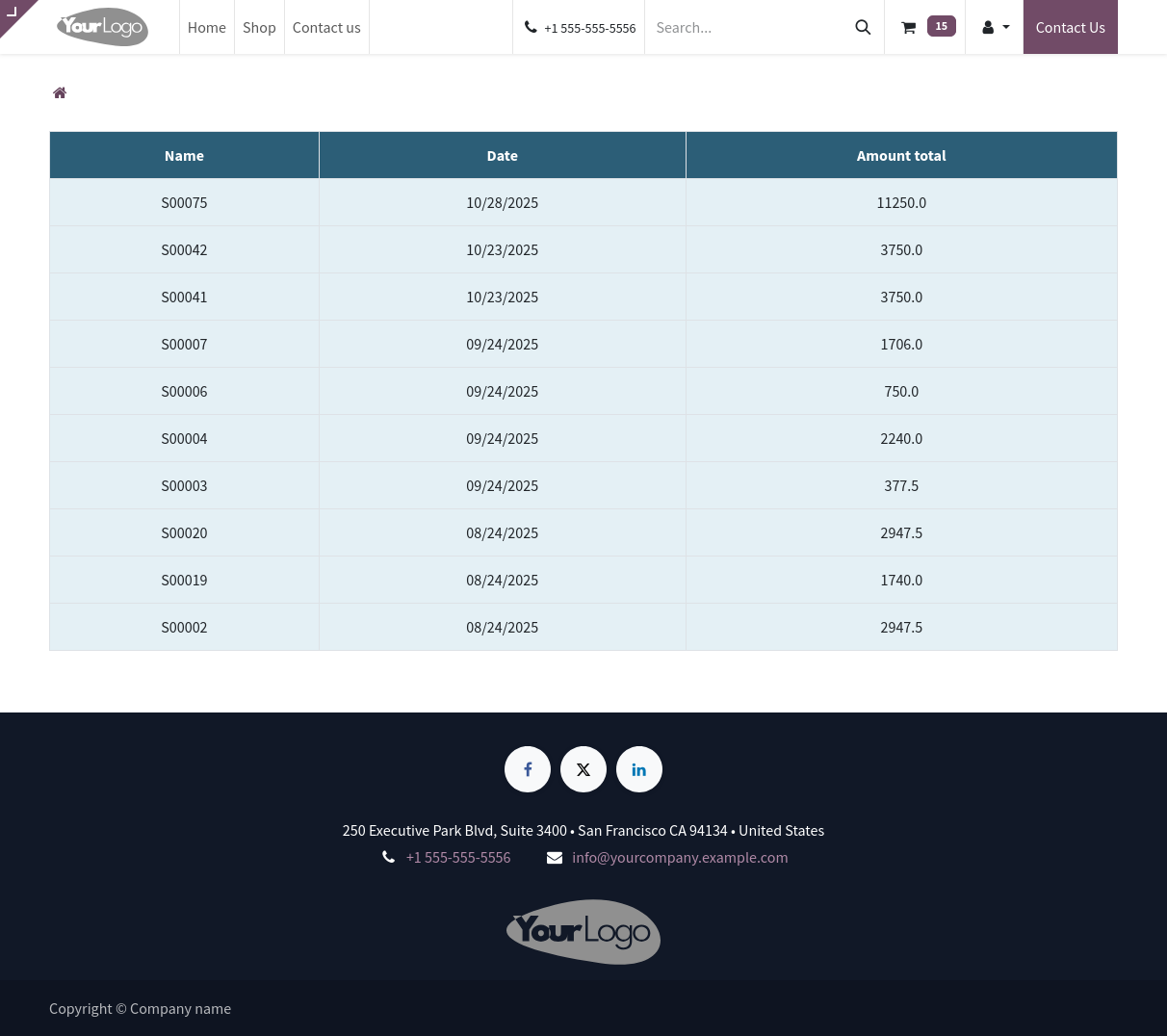
To introduce pagination, we need a more modular structure. Instead of rendering the whole table inside the main view, we create a separate template that only contains the table rows. This gives us the flexibility to rebuild just that portion whenever the user switches pages.
orders_table.xml
<?xml version="1.0" encoding="UTF-8"?>
<templates>
    <t t-name="orders.demo.template">
        <tbody>
            <t t-foreach="orders" t-as="order" t-key="order.id">
                <tr>
                    <td><t t-out="order['name']"/></td>
                    <td><t t-esc="order['date_order']" t-options='{"widget":"date"}'/></td>
                    <td><t t-out="order['amount_total']"/></td>
                </tr>
            </t>
        </tbody>
    </t>
</templates>
Notice how this template only defines the <tbody> and is registered through assets instead of the backend view system. This makes it available for dynamic rendering from JavaScript.
Now we tweak our controller setup. The main /order route will only render the page numbers, while the new /order/list endpoint will actually return the paginated sales orders.
import math

class OrdersDemo(http.Controller):
    @http.route('/order',auth='public',website=True)
    def order(self):
        page_num = request.env['sale.order'].sudo().search_count([('user_id','=',request.env.user.id)])
        dis_num = math.ceil(page_num/3)
        total_page = [each for each in range(dis_num+1)]
        return http.request.render('orders_demo.orders',{'total_page':total_page})

    @http.route('/order/list',type="json", auth='public')
    def index(self,limit=None,offset=None):
        orders = request.env['sale.order'].sudo().search_read([('user_id','=',request.env.user.id)],['name','date_order','amount_total'],limit=limit,offset=offset)
        return orders
The previous controller that we created used to render a table with data, but here we modify that controller for it to render just page numbers. We also make the another endpoint /order/listwhich handles the querying of sale.ordermodel.
We create get_orders.js
/** @odoo-module **/

import publicWidget from "@web/legacy/js/public/public_widget"
import { rpc } from "@web/core/network/rpc";
import { renderToElement } from "@web/core/utils/render";

publicWidget.registry.DemoOrders = publicWidget.Widget.extend(

    {
    selector:'.orders',

    events:{
        'click .page-number':'_newPage'
    },

    start:function(){
        this.offset=0;
        this.limit =3;
        this.firstPage()
        return this._super.apply(this.arguments);
    },

    firstPage:async function() {
        const orders = await rpc('/order/list', {
            offset: 0,
            limit: this.limit,
        });

        const container = this.el.querySelector('.order_list');
        const newTable = await renderToElement('orders.demo.template', { orders });
        container.replaceWith(newTable);
    },

    _newPage:async function(ev){
        const page = parseInt(ev.currentTarget.dataset.page)
        this.offset = (page-1) *this.limit;
        const oldTable = $(`.order_list`)

        const orders = await rpc('/order/list', {
                offset: this.offset,
                limit: this.limit,
            });

       const newTable = await renderToElement('orders.demo.template',{orders:orders})
       oldTable.replaceWith(newTable)

    }

    }
)
Here’s where the magic happens. The JS widget handles:
- Initial data load
- Click events on pagination
- RPC requests for each page
- DOM patching using
renderToElement
The firstPage() method loads the initial records. When the user clicks a page number, _newPage() runs, fetches the data for that page, generates a fresh <tbody> using our XML template, and replaces the old one.
Finally, our __manifest__.xmlwould look something like this
# -*- coding: utf-8 -*-
{
    'name': "orders_demo",

    'summary': "Short (1 phrase/line) summary of the module's purpose",

    'description': """
Long description of module's purpose
    """,

    'author': "My Company",
    'website': "https://www.yourcompany.com",
    'category': 'Uncategorized',
    'version': '0.1',

    'depends': ['base','website'],

    'data': [
        'views/orders_demo.xml'
    ],
    'assets':{
        'web.assets_frontend':[
            'orders_demo/static/src/xml/orders_table.xml',
            'orders_demo/static/src/js/get_orders.js',
            'orders_demo/static/src/css/orders_table.css',
        ]
    }
}
In the web.assets_frontend bundle, we register the dynamic table template, the JS handler, and the CSS. This ensures everything is loaded when the portal page is rendered.
With this setup, you get a smooth, dynamic dashboard where pagination happens instantly through RPC calls and template rendering — no reloads, no clutter. It’s a lightweight pattern you can reuse for any kind of dynamic frontend element in Odoo 18.

This is what the final result looks like — a clean, paginated table that loads new records instantly as you click through the page numbers. No reloads, no lag. Just smooth, dynamic updates as you move through your data.
Thanks for reading through — and feel free to drop your thoughts or questions in the comments!
메타데이터
- post_id
- 0af788c40ecc
- slug
- dynamic-templates-in-odoo-18-using-rpc-controllers-and-rendertoelement-0af788c40ecc
- url
- https://medium.com/@saksham.khanal01/dynamic-templates-in-odoo-18-using-rpc-controllers-and-rendertoelement-0af788c40ecc
- canonical_url
- https://medium.com/@saksham.khanal01/dynamic-templates-in-odoo-18-using-rpc-controllers-and-rendertoelement-0af788c40ecc
- author_url
- https://medium.com/@saksham.khanal01
- status
- ok
- fetched_at
- 2026-07-15 09:03:25





