From 2D to 3D: SAM 3D on NVIDIA DGX Spark
How to run SAM 3D on aarch64 when prebuilt wheels don’t exist
From 2D to 3D: SAM 3D on NVIDIA DGX Spark
How to run SAM 3D on aarch64 when pre-built wheels don’t exist
Meta’s SAM 3D is a exciting new way to extract clean textured 3D models from a single image. But it requires a NVIDIA GPU with more than 32 GB of video memory to run, typically only available on expensive cloud providers.
Things changed with the new NVIDIA DGX Spark, which comes with 128GB of memory. It bridges the gap between high-end gaming graphics cards and very expensive datacenter GPU’s such as the H100.
The Spark might have all the hardware specs we need, but comes with a caveat. NVIDIA’s Grace CPUs are based on AARCH64 (aka ARM64)
TL;DR
- Clone my fork at https://github.com/tlangmo/sam-3d-objects-spark
- Open VS Code and the included DevContainer
- Use the Jupyter Notebook to generate meshes 🎉

About Python Binary packages (wheels)
We all got used to the niceties of modern open source software development. Even complex ML projects seemingly can get off the ground quickly
Take this example, using the Huggingface transformers library.
from transformers import pipeline

classifier = pipeline(
    "zero-shot-image-classification",
    model="openai/clip-vit-base-patch32"
)

classifier(
    "https://images.unsplash.com/photo-1546182990-dffeafbe841d",
    candidate_labels=["dog", "cat", "car"]
)
A few lines of code to perform state-of-the-art computer vision! However, when looking at the transformers repository, you can see that this is not some magic, but sophisticated software engineering.
While pure Python code by itself is truly portable and easy to run, things look very different for ML projects. Numpy, torch, scikit — all are written in compiled languages such as C++, for speed and compatibility.
Native compilation needs a myriad of software dependencies and compiler flags adapted to the target machine. Open source software maintainers try their best supply the community with pre-compiled “binaries” for various platforms like Win64, MacOS and Linux. Conda-Forge is a popular source of those downloads.
But with limited time and resources, maintainers need to pick which platforms to support — a new and more exotic one like the Spark is likely missing out.
A first look at SAM 3D
The official setup suggest the use of mamba/conda to create a virtual environment. A quick look at setup.md and other files reveals that this avenue is a no-go on the Spark. They mention Cuda 12.x, and linux-64.
We need Cuda 13.x and linux-aarch64.
At this point, we should take a step back and first create a safe and reproducible development environment. If we start to apt install or pip install our way out, we will soon have a host system which is filled with corrupt or incompatible system libraries.
Instead, we will create a Development Container first, and attack our problems step by step.
The Docker Development Container
If you are not familiar with Dev Containers, I suggest you head over to https://containers.dev/ and learn about them.
They’re an excellent way to develop code while working in an environment that closely mirrors — if not exactly matches — a production deployment.
Our SAM3D container will be based on the official Nvidia container for the Spark
nvcr.io/nvidia/cuda:13.0.1-devel-ubuntu24.04
It already comes with all the CUDA Toolkits and compilation toolchains installed.
Once we have our dev container up and running, we can tackle the dependencies of SAM3D one by one.
Identify what is broken
SAM3D lists over 100 Python packages as its dependencies. We need a strategy…
First, we identify which packages might already work, albeit maybe with a newer version. Most dependencies mentioned in SAM 3D are “pinned”, e.g. autoflake==2.3.1. While this is generally good practice, it also stands in our way.
Most package try to stay compatible in their API, so we do not really care whether we use autoflake 2.5.1, as long as it is available for aarch64 and our Python version.
After removing all version identifies we can start installing the dependencies via the requirements.txt. If one fails, simply comment it out and try to install the rest again. This “brute force” method works surprisingly well, and we are left only with a handful packages which we need to take care of.
- Open 3D
- Kaolin
- Pytorch 3D
- cumm, spconv
- diff-gaussian-rasterization
- xatlas, usd-core [cpu only]
Building the wheels, one project at a time
We need suitable binary wheels for each one, but the approach to get them differs for each project. It might involves code patches and yet more dev containers.
Still, for each one we can follow a simple recipe:
- Fork the original repo and create a new branch, e.g. tl/spark
- Make the necessary code changes
- Build the wheel
Some care has to be taken to keep them all compatible. We stick to Pytorch 2.9.x, Cuda 13.0 and Python 3.12
Head over to my Github https://github.com/tlangmo/ to see the exact changes which have been necessary.
A Index to rule them all
Instead of manually copying these wheels around, we can create a custom Python Package Index, to make installation easy. Hosting one is actually quite easy — it is not more than a webpage with links.
If we put everything in a repo on Github, it is conveniently hosted for us.
https://tlangmo.github.io/dgx-spark-wheels/index/
This github repo is also a great way to see exactly from what repo/branch the wheels are coming from
https://github.com/tlangmo/dgx-spark-wheels/blob/main/packages.json
Bringing it all together
Equipped with our extra index, we can now fly through the installation.
1. Clone the repo which has the Spark changes
# git clone git@github.com:tlangmo/sam-3d-objects-spark.git

2. Open VS Code and open Dev container
# CTRL-P-O "Open Dev Container"

3. Open a Notebook and execute
# E.g. /workspace/notebook/demo_single_object_mesh.ipynb


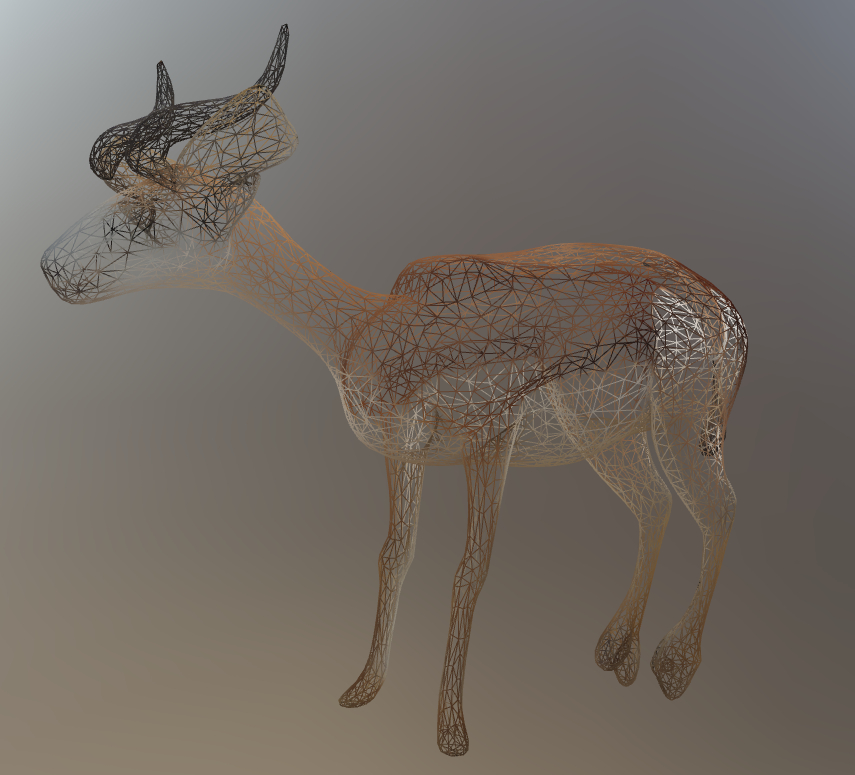
SAM3D generated mesh file on Spark DGX
Conclusion
Running complex ML projects on home hardware can be very rewarding. Without cloud bills to worry about, you’re free to experiment. Things may not work out of the box — but who doesn’t enjoy a bit of a challenge?
메타데이터
- post_id
- 0afbc0465ee2
- slug
- from-2d-to-3d-sam-3d-on-nvidia-dgx-spark-0afbc0465ee2
- url
- https://medium.com/@tobias_84452/from-2d-to-3d-sam-3d-on-nvidia-dgx-spark-0afbc0465ee2
- canonical_url
- https://medium.com/@tobias_84452/from-2d-to-3d-sam-3d-on-nvidia-dgx-spark-0afbc0465ee2
- author_url
- https://medium.com/@tobias_84452
- status
- ok
- fetched_at
- 2026-07-08 20:12:56






