Creating Gitlab runners using Docker Containers and using Docker commands within gitlab-ci jobs
In this segment, I will be covering 2 parts. One is using docker containers to setup Gitlab runners and the other part is how we can use…
Creating Gitlab runners using Docker Containers and using Docker commands within gitlab-ci jobs
In this segment, I will be covering 2 parts. One is using docker containers to setup Gitlab runners and the other part is how we can use docker commands like docker build,docker run in our Gitlab-ci jobs. Before that, lets refresh on how Docker works.
How Docker works
As we know, Docker is a platform that allows developers to package applications and their dependencies into a portable unit called a container. Containers are lightweight and provides an isolated environment for applications to operate and hence prevent dependency issues.
At the heart of Docker is the Docker Engine, a client-server application with:
- A daemon (
dockerd) that runs in the background and manages containers. - A CLI client (
docker) that users interact with. - A REST API that tools and scripts can use to communicate with the daemon.
**docker.sock is** a UNIX domain socket used as the communication channel between client and daemon

Fig1. How Docker communicates with Daemon
Lets give a scenario where a user types “docker run nginx”. Following Fig 1 above,
- Docker client will send this request by translating into a REST API request.
- By default it send this request to /var/run/docker.sock. docker.sock is a bridge and a UNIX socket file (like a TCP/IP socket, but for local IPC).
- The daemon(dockerd) listens on that socket and processes the request that is received. In this case it will pull the nginx image from DockerHub, create the container and start the container
- The daemon sends the result (success, error, logs, etc.) back through
docker.sockto the client.
Why is docker.sock sensitive?
/var/run/docker.sock is a direct interface to the Docker daemon.If you give someone access to it, they can control the entire Docker engine, which is nearly the same as root access.
For example, if you mount /var/run/docker.sock to a container, this allows the container to run Docker commands on the host. We will be doing when creating a gitlab runner.
How Gitlab runner works
A GitLab Runner is an application/process that works with GitLab CI/CD to run jobs in a pipeline. The default runner used are the gitlab instance runners which are shared by everyone else using Gitlab. Its better to create gitlab runner in our own machines to improve performance and prevent latency issues. Here is a sequence diagram from the Gitlab documentation website on how Gitlab runners work:
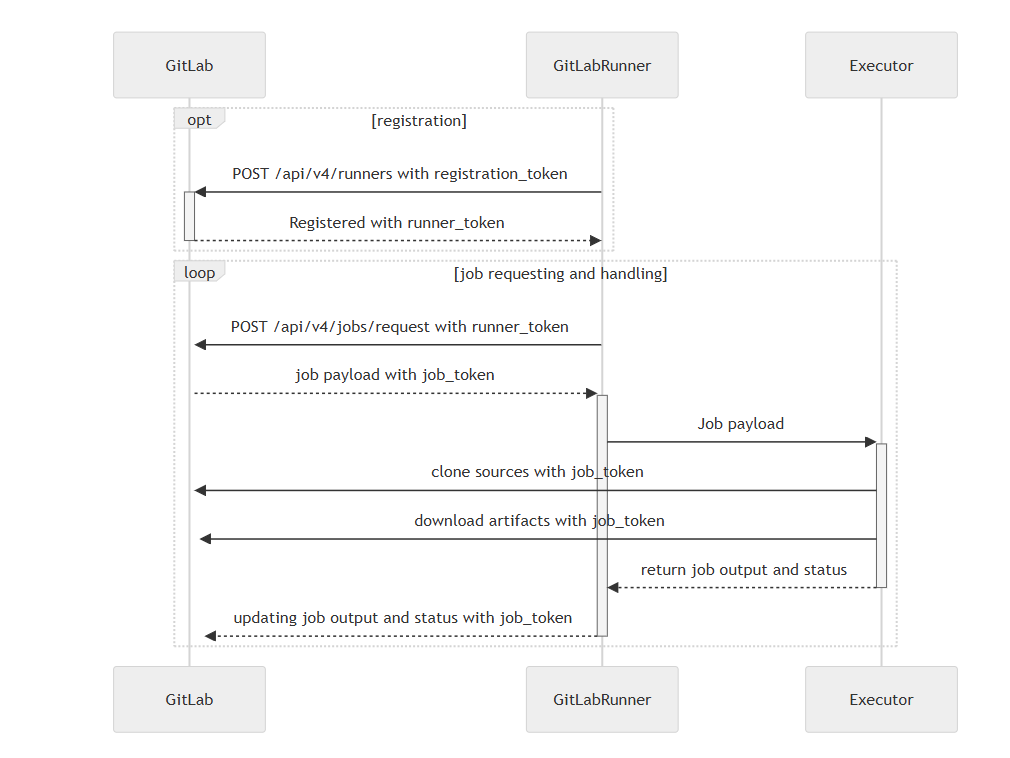
Fig 2. How Gitlab runners work
Executors are mechanisms that runs your CI/CD jobs — it defines how and where the job’s commands are executed. You can use docker, shell or kubernetes as the executor to run a job. In our case, we will be using Docker.
Gitlab-runner Setup
I will be using an AWS EC2 ubuntu 24.04 machine, t2.medium instance type because you need a minimum of 2 vCPUs and 4–8 GB of RAM to run gitlab runner effectively. I have uploaded the steps in the README.md of my gitlab repo: https://gitlab.com/devops6972650/gitlab_runner_tester.
In this repo, I have a gitlab-ci.yml file to test our gitlab runner.
Docker installation
We will be using docker-ce instead of docker.io.Here are the steps:
- sudo apt update && sudo apt upgrade
- sudo apt install — no-install-recommends apt-transport-https ca-certificates wget curl gnupg2 vim
- -source /etc/os-release
- curl -fsSL https://download.docker.com/linux/${ID}/gpg | sudo apt-key add -
- echo “deb [arch=amd64] https://download.docker.com/linux/${ID} ${VERSION_CODENAME} stable” | sudo tee /etc/apt/sources.list.d/docker.list
- sudo apt update && sudo apt upgrade
- sudo apt install docker-ce
- sudo usermod -aG docker $USER
- sudo visudo
- %docker ALL=(ALL) NOPASSWD: /usr/bin/dockerd
Retrieving SSL certs
We need SSL certs to communicate with Gitlab(see Fig 2). Take note there are companies host their own GitLab instance. Hence the command is :
openssl s_client -showcerts -connect gitlab.<mycompany>.com:443 </dev/null 2>/dev/null \
| awk ‘/BEGIN CERTIFICATE/,/END CERTIFICATE/’ > gitlab-full-chain.crt
If you do not have any company, just use gitlab.com.
Creating gitlab-runner folder
This folder will be mounted on the gitlab runner when it runs. The steps are as follows:
- mkdir -p ~/gitlab-runner/config/certs
-
mv gitlab-full-chain.crt ~/gitlab-runner/config/certs
-
touch ~/gitlab-runner/config/certs/config.toml
Now we are all set to create our very first runner.
Getting registration token and enabling runner
In the Gitlab UI, go to settings->CI/CD->Runners.
Disable the instance runner and enable group runner. You may create a project runner just for this repo.Its up to you. For now I will be using group runners.
Go to this url: https://gitlab.com/groups/<project_id>/-/runners to get the registration token. We will be using this later.

Fig 3 Gitlab UI
Bringing up the runner
- docker run -d — name gitlab-runner — restart always \
-v /var/run/docker.sock:/var/run/docker.sock \
-v ~/gitlab-runner/config:/etc/gitlab-runner \
gitlab/gitlab-runner:latest
We are mounting docker.sock so that containers can be spun up when executing gitlab ci jobs.
Runner Registration
docker run — rm -it \
-v ~/gitlab-runner/config:/etc/gitlab-runner \
-v /var/run/docker.sock:/var/run/docker.sock \
gitlab/gitlab-runner:latest register
When registering you will be prompted to key in the gitlab url, registration token which you got from the UI, description(optional), tag, executor which is Docker, and the docker image to use which will be alpine:latest and you are registered. Once registered, you should be able to see a runner on the Gitlab UI like the one shown above in Fig 3.
Executing Gitlab-ci jobs using your runner
Now we will be able to execute simple jobs in our Gitlab.ci. However, you will run into issues when executing docker commands like docker build and docker run. You will see an error as shown below:

This is caused because the privilged setting in our config.toml is set to false. In order to use docker in docker containers, it needs privileged access to the file system, networking and volume mounting etc. Plus we need to add the use docker:dind under services in our job.

To edit our config.toml file, we have to access the file in our container. Here is how we can do this:
- docker ps -a
This step is to find our container running gitlab runner.

- docker exec -it <container name> bash
This part will allow to enter the container and execute shell commands.
-
cd /etc/gitlab-runner
-
sed -i ‘s/privileged = false/privileged = true/’ ~/gitlab-runner/config/config.toml
Here we are not able to use vim or nano to edit the file.Hence we have to use sed.
- cat config.toml to verify configuration
Now we will be able to use docker commands in our gitlab-ci jobs.
Conclusion
Hence, you can see that its not very difficult to setup your very own gitlab runner. Having our very own runners allow us to have dedicated resources for our gitlab-ci jobs. The jobs do not have to wait in a global queue allowing for faster job start times. There are far more benefits that I have not listed down. Thank you for reading my post and have fun setting up your runner. In the next post, I might be discussing how to setup runners behind a proxy setup which will require more tedious configurations.
메타데이터
- post_id
- 0b16f0bc412d
- slug
- creating-gitlab-runners-using-docker-containers-and-using-docker-commands-within-gitlab-ci-jobs-0b16f0bc412d
- url
- https://medium.com/@muhammadzahir/creating-gitlab-runners-using-docker-containers-and-using-docker-commands-within-gitlab-ci-jobs-0b16f0bc412d
- canonical_url
- https://medium.com/@muhammadzahir/creating-gitlab-runners-using-docker-containers-and-using-docker-commands-within-gitlab-ci-jobs-0b16f0bc412d
- author_url
- https://medium.com/@muhammadzahir
- status
- ok
- fetched_at
- 2026-07-23 00:52:37



