Mastering AutoGen: A Deep Dive into Tools, Agents, and API Integrations
Tools — Custom, In-Built and 3rd(third) Party tool integrations
Mastering AutoGen: A Deep Dive into Tools, Agents, and API Integrations
Tools — Custom, In-Built and 3rd(third) Party tool integrations
Why AutoGen?
If you’re exploring the agent space and automation with LLMs, chances are you’ve bumped into AutoGen — a solid framework from Microsoft for building AI agents that can actually get things done.
Non members can read it here
I recently did a deep dive into how AutoGen handles tools, agent setup, and API integrations. This post captures exactly that — straightforward, practical, and hands-on.
Whether you’re a dev looking to extend LLM functionality, someone playing around with APIs, or just curious about how agents really work, this will walk you through how to get up and running with AutoGen the right way.
1. Tools in AutoGen:
In AutoGen, tools = power-ups for your agents. These allow agents to execute functions, fetch data, and even access the web.
Let’s break them into 3 types:
Resources were provided at the bottom section.
1.1 Custom Function Tools
Your own Python functions. These are super handy when you want to expose internal logic, transform inputs, or even call internal APIs.
You can check out my previous post which is dedicated on this.
1.2 Inbuilt Tools
AutoGen gives a few built-in tools out of the box:
HTTPTool– Make API calls
There are so many inbuilt tools we will explore the HTTP Tool in this for more pls check the documentation.
They’re simple, but get the job done for most basic tasks. Just keep in mind — they’re not as mature as what LangChain offers.
1.3 Third-Party Tools
Here’s where things get interesting.
You can bring in tools from frameworks like LangChain — no need to build everything from scratch. I integrated:
Google Search (Serper API)Wikipedia Search
Just install the relevant package and pass it as a tool — AutoGen doesn’t care where it came from, as long as it implements the tool interface.
2. Using the HTTPTool —Implemetation
Let’s make this real. I used the free Cat Facts API (https://catfact.ninja/fact) as a demo.
mkdir agInbuiltTools
cd agInbuiltTools
uv init
uv venv
source .venv/bin/activate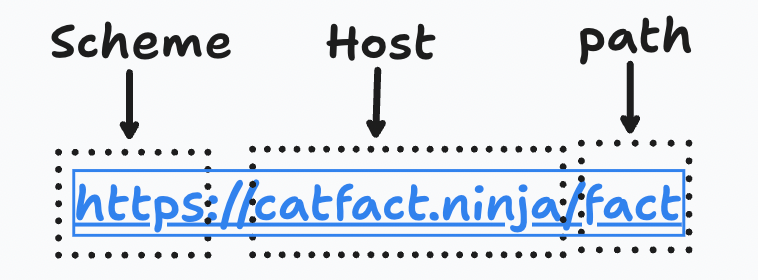
HTTP Tool Schema
Here’s the flow:
Step 1: Define the Schema
Make sure your agent knows what to expect:
{
  "fact": "Cats sleep for 70% of their lives",
  "length": 42
}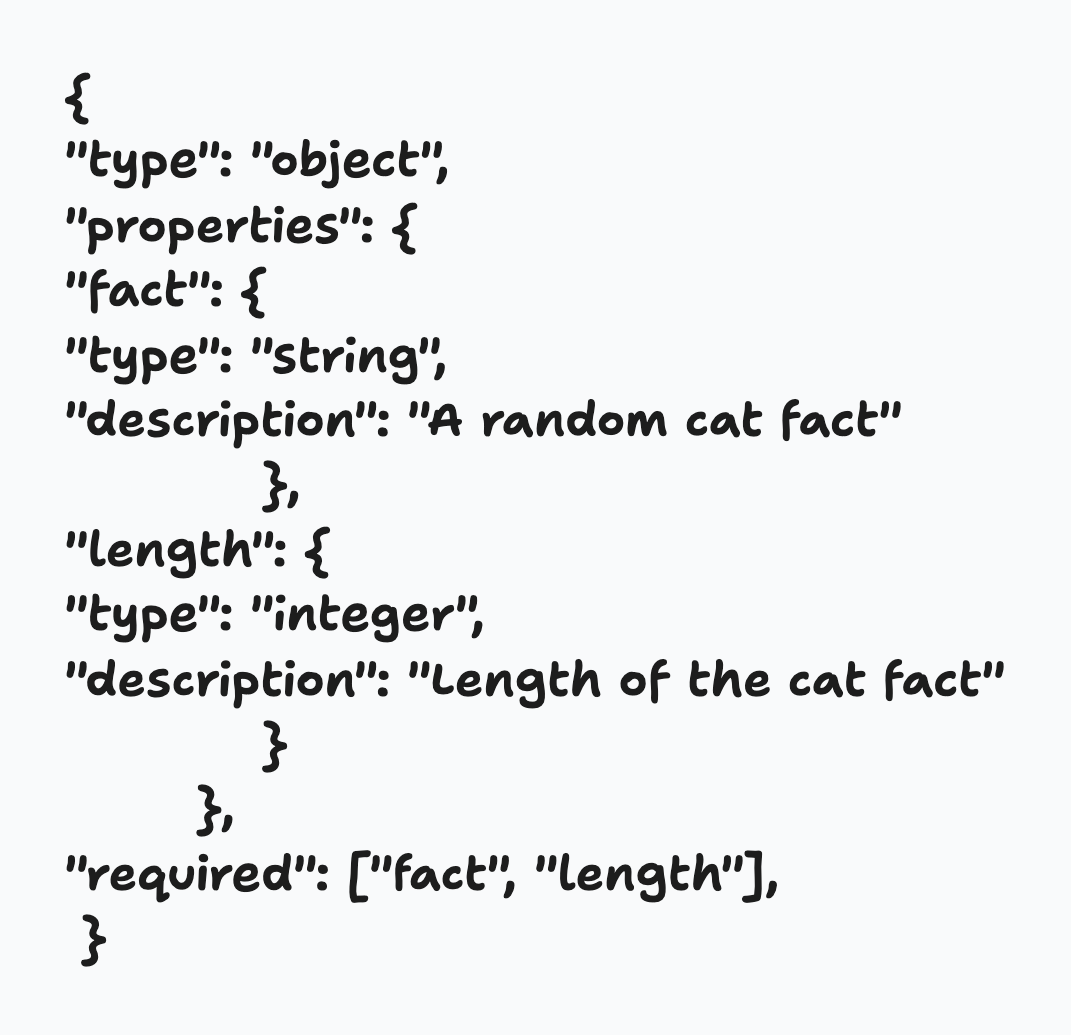
JSON SCHEMA
Step 2: Full Implementation — InBuilt Tool
import asyncio
from autogen_agentchat.agents import AssistantAgent
from autogen_ext.models.openai import OpenAIChatCompletionClient
from autogen_core.tools import FunctionTool
import os
from dotenv import load_dotenv
from autogen_ext.tools.http import HttpTool

# Load environment variables
load_dotenv()
api_key = os.getenv("OPENAI_API_KEY")
if not api_key:
    raise ValueError("Please set the OPENAI_API_KEY environment variable.")

model_client = OpenAIChatCompletionClient(model='gpt-4-1106-preview', api_key=api_key)

schema = {
        "type": "object",
        "properties": {
            "fact": {
                "type": "string",
                "description": "A random cat fact"
            },
            "length": {
                "type": "integer",
                "description": "Length of the cat fact"
            }
        },
        "required": ["fact", "length"],
    }

http_tool = HttpTool(
    name="cat_facts_api",
    description="get a cool cat fact",
    scheme="https",
    host="catfact.ninja",
    port=443,
    path="/fact",
    method="GET",
    return_type="json",
    json_schema= schema
)

agent = AssistantAgent(
    name="CatFactsAgent",
    model_client=model_client,
    system_message='You are a helpful assistant that can provide cat facts using the cat_facts_api tool. Give the result with summary',
    tools=[http_tool],
    reflect_on_tool_use=True
)

async def main():
    result = await agent.run(task = 'Give me a random cat fact')

    print(result.messages)

if (__name__ == "__main__"):
    asyncio.run(main())
3. Implementation of third party tools (LangChain Tools)
AutoGen’s tools are great, but if you want access other 3rd party tools also it supports for example we use LangChain’s GoogleSerperAPIWrapper here.
mkdir agthirdpartyTools
cd agthirdpartyTools
uv init
uv venv
source .venv/bin/activate
import asyncio
from autogen_agentchat.agents import AssistantAgent
from autogen_ext.models.openai import OpenAIChatCompletionClient
from autogen_core.tools import FunctionTool
import os
from autogen_core.tools import FunctionTool
from dotenv import load_dotenv
from langchain_community.utilities import GoogleSerperAPIWrapper
from autogen_ext.tools.http import HttpTool
# Load environment variables
load_dotenv()
api_key = os.getenv("OPENAI_API_KEY")
if not api_key:
raise ValueError("Please set the OPENAI_API_KEY environment variable.")
model_client=OpenAIChatCompletionClient(model='gpt-4o',api_key=api_key)
os.environ['SERPER_API_KEY']='Your Key'
search_tool_wrapper = GoogleSerperAPIWrapper(type='search')
def search_web(query:str) ->str:
"""Search the web for the given query and return the results."""
try:
results = search_tool_wrapper.run(query)
return results
except Exception as e:
print(f"Error occurred while searching the web: {e}")
return "No results found."
search_agent = AssistantAgent(
name="SearchAgent",
model_client=model_client,
tools=[search_web],
description="An agent that can search the web for information.",
system_message="You are a helpful assistant that can search the web for information using the search_web tool." \
"Please make sure that you use the search_web tool to find information before you return the answer.",
reflect_on_tool_use=True,
)
async def run_serper_search():
"""Run the search agent with a sample query."""
query = "Who won the IPL in 2025 ?"
print(f"Querying: {query}")
result = await search_agent.run(task=query)
print(result.messages[-1].content)
if __name__ == "__main__":
asyncio.run(run_serper_search())Best Practices:
1. Build Custom Tools When Needed
Not everything can be fetched or executed via external APIs. You’ll often need your own functions — don’t hesitate to wrap them into tools.
2. Use Existing Ecosystems (LangChain)
LangChain has mature integrations. Use them to save time. No point redoing what’s already working well.
3. Prompt Clearly
Tell your agent exactly what to do.
“Use the search tool to get the latest info, not your memory.”
Little tweaks make a huge difference in output quality.
4. Schema = Safety
If you’re using HTTPTool or custom tools, define schemas. Otherwise, you’ll end up debugging broken dict keys or malformed responses.
Resources:
- AutoGen GitHub
- AutoGen Tools
- HTTP Tool
- Langchain Modules in AutoGen
- LangChain Tools
- Serper (Free Google Search API)
Conclusion:
AutoGen is seriously underrated for building AI-powered workflows. With the right tools, prompts, and integrations, you can build smart, modular systems that feel like actual AI assistants — not just chatbots.
If you’re already building with LangChain or OpenAI, AutoGen fits right in. You can scale up fast and prototype even faster.
메타데이터
- post_id
- 0b576c6daab8
- slug
- mastering-autogen-a-deep-dive-into-tools-agents-and-api-integrations-0b576c6daab8
- url
- https://pub.towardsai.net/mastering-autogen-a-deep-dive-into-tools-agents-and-api-integrations-0b576c6daab8
- canonical_url
- https://pub.towardsai.net/mastering-autogen-a-deep-dive-into-tools-agents-and-api-integrations-0b576c6daab8
- author_url
- https://medium.com/@saibhargavr
- status
- ok
- fetched_at
- 2026-07-08 00:36:00