Dictionaries in Python: A Complete Beginner’s Guide
Imagine you’re building a student management system that needs to store details like a student’s name, age, course, and marks.
Dictionaries in Python: A Complete Beginner’s Guide
Imagine you’re building a student management system that needs to store details like a student’s name, age, course, and marks.
Would you create separate variables for each piece of information?
name = "Ram"
age = 20
course = "Python"
marks = 85
This may work for one student, but what if you need to manage hundreds of students? Keeping track of multiple variables becomes difficult, and updating or accessing information can quickly turn into a challenge.
Is there a better way to store related information together?
Yes — and that powerful data structure is called a Dictionary in Python.
Introduction
By the end of this article, the reader will be able to understand:
- What is a Dictionary in Python
- How to Create a Dictionary
- How to Access Dictionary Values
- How to Add, Update, and Delete Data
- Common Dictionary Methods
- Nested Dictionaries
- Dictionary Comprehensions
- Conclusion
What is a Dictionary?
A Dictionary in Python is a collection of data stored in key-value pairs.
Each key acts like a label, and each value represents the information associated with that label.
student = {
    "name": "Ram",
    "age": 20,
    "course": "Python"
}
In the above example:
"name"is the key and"Ram"is its value."age"is the key and20is its value."course"is the key and"Python"is its value.
Unlike lists, dictionaries store data using meaningful keys rather than numerical indexes.
Why Use Dictionaries?
1. Organized Data Storage
Dictionaries allow related information to be grouped together.
student = {
    "name": "Ram",
    "age": 20,
    "course": "Python"
}
2. Fast Data Access
Values can be retrieved instantly using their keys.
print(student["name"])Output:
Ram3. Easy Updates
Information can be modified without affecting the rest of the data.
student["age"] = 214. Dynamic Structure
New data can be added whenever needed.
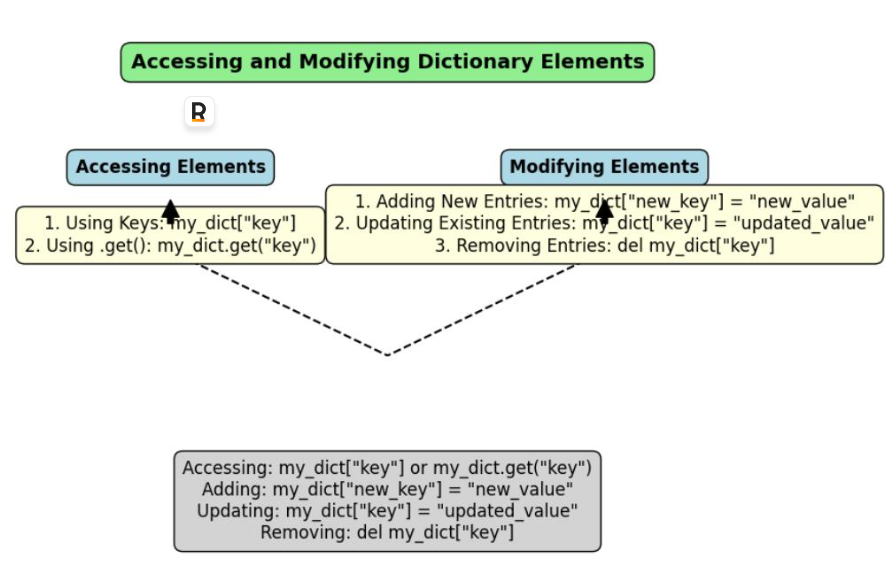
5.Dictionary Operations Workflow
6. Widely Used in Real Applications
Dictionaries are used in:
- Student Management Systems
- Employee Records
- Configuration Settings
- API Responses
- Database Operations
- Web Development
Creating a Dictionary
A dictionary is created using curly braces {}.
Syntax
dictionary_name = {
    key1: value1,
    key2: value2,
    key3: value3
}
Example
student = {
    "name": "Ram",
    "age": 20,
    "course": "Python"
}print(student)Output:
{'name': 'Ram', 'age': 20, 'course': 'Python'}Accessing Dictionary Values
Dictionary values can be accessed using their keys.
Using Square Brackets
student = {
    "name": "Ram",
    "age": 20
}print(student["name"])Output:
RamUsing get()
print(student.get("age"))Output:
20Why Use get()?
If a key doesn’t exist, get() returns None instead of generating an error.
print(student.get("city"))Output:
NoneAdding New Data
New key-value pairs can be added easily.
student = {
    "name": "Ram",
    "age": 20
}
student["course"] = "Python"print(student)Output:
{'name': 'Ram', 'age': 20, 'course': 'Python'}Updating Existing Data
Existing values can be modified by assigning a new value to the key.
student["age"] = 21print(student)Output:
{'name': 'Ram', 'age': 21, 'course': 'Python'}Removing Data
Using pop()
student.pop("age")print(student)Output:
{'name': 'Ram', 'course': 'Python'}Using del
del student["course"]Using clear()
student.clear()print(student)Output:
{}Common Dictionary Methods
keys()
Returns all keys in the dictionary.
student = {
    "name": "Ram",
    "age": 20
}print(student.keys())Output:
dict_keys(['name', 'age'])values()
Returns all values.
print(student.values())Output:
dict_values(['Ram', 20])items()
Returns all key-value pairs.
print(student.items())Output:
dict_items([('name', 'Ram'), ('age', 20)])update()
Updates multiple values at once.
student.update({
    "age": 21,
    "course": "Python"
})print(student)Output:
{'name': 'Ram', 'age': 21, 'course': 'Python'}Iterating Through a Dictionary
Loop Through Keys
for key in student:
    print(key)
Output:
name
age
course
Loop Through Values
for value in student.values():
    print(value)
Output:
Ram
21
Python
Loop Through Key-Value Pairs
for key, value in student.items():
    print(key, value)
Output:
name Ram
age 21
course Python
Nested Dictionaries
A dictionary can contain another dictionary as its value.
students = {
    "student1": {
        "name": "Ram",
        "age": 20
    },
    "student2": {
        "name": "Shyam",
        "age": 21
    }
}
Accessing nested values:
print(students["student1"]["name"])Output:
RamNested dictionaries are useful when dealing with structured data such as employee records, product catalogs, and user profiles.
Dictionary Comprehension
Dictionary comprehension provides a concise way to create dictionaries.
Syntax
{key:value for item in iterable}Example
squares = {
    x: x*x
    for x in range(1, 6)
}print(squares)Output:
{1: 1, 2: 4, 3: 9, 4: 16, 5: 25}Dictionary comprehensions make code shorter, cleaner, and easier to read.
Real-World Example: Student Profile
student = {
    "name": "Ram",
    "age": 20,
    "course": "Python",
    "skills": ["Python", "SQL"]
}
print("Name :", student["name"])
print("Course :", student["course"])
print("Skills :", student["skills"])Output:
Name : Ram
Course : Python
Skills : ['Python', 'SQL']
This approach keeps all information related to a student organized in a single structure.
Conclusion
Dictionaries are one of Python’s most powerful and widely used data structures. They store information as key-value pairs, making data organized, easy to access, and simple to manage.
By understanding dictionary creation, value access, updates, deletion, iteration, nested dictionaries, and dictionary comprehensions, developers can write cleaner and more efficient programs.
From beginner projects to enterprise-level applications, dictionaries play a vital role in handling structured data. Mastering dictionaries is an essential step toward advanced Python topics such as JSON processing, APIs, data analysis, and web development.
As you continue your Python journey, you’ll find dictionaries appearing everywhere — and for good reason. They provide a flexible, efficient, and intuitive way to work with data.
메타데이터
- post_id
- 0b66a37cd684
- slug
- dictionaries-in-python-a-complete-beginners-guide-0b66a37cd684
- url
- https://medium.com/@kuchivenkatasai/dictionaries-in-python-a-complete-beginners-guide-0b66a37cd684
- canonical_url
- https://medium.com/@kuchivenkatasai/dictionaries-in-python-a-complete-beginners-guide-0b66a37cd684
- author_url
- https://medium.com/@kuchivenkatasai
- status
- ok
- fetched_at
- 2026-06-15 20:49:13



