How to Write an Academic Paper in Markdown and Skip learning Latex (Citations, Figures, and more)
LaTeX gives you full control but costs you weeks of setup. Google Docs breaks at the first citation. Here is the middle path.
How to Write an Academic Paper in Markdown and Skip learning Latex (With Citations, Figures, and a Real Bibliography)
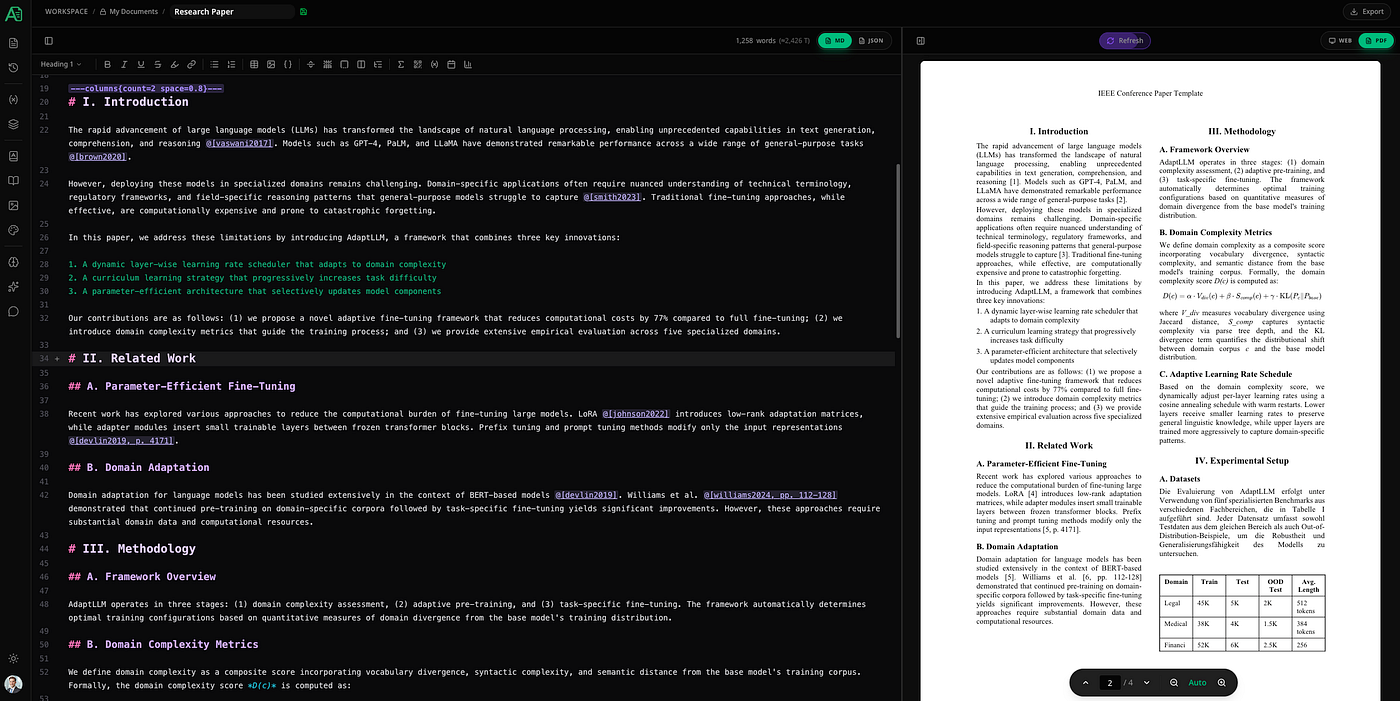
TL;DR: Writing academic papers should not require mastering a 40-year-old typesetting language or fighting with broken citation plugins. With Autype’s extended Markdown, you get two-column layouts, block LaTeX equations, BibTeX import, automatic bibliography, numbered figures, a table of contents, and a properly paginated PDF export. The syntax is readable. The output is publication-ready.
Every researcher eventually reaches the same crossroads. LaTeX produces beautiful output but demands a significant time investment just to get a blank document compiling without errors. Google Docs is fast but collapses under the weight of proper citation management and two-column layouts. Word is familiar but becomes unpredictable the moment you add equations or try to share the file across operating systems.
The irony is that the actual writing, the ideas and arguments and evidence, takes the same amount of time regardless of which tool you choose. The tool should not be the bottleneck. For most researchers, it is.
Extended Markdown is a different approach. Write in plain text with a syntax you already mostly know. Get a live PDF preview as you work. Export a properly formatted paper when you are done. No compilation step, no plugin chain, no format negotiation with co-authors using different software versions.
Here is how the full workflow looks in Autype.
Document Setup: Page Size, Margins, and Two-Column Layout
An academic paper is not a blog post. It has specific layout requirements: A4 or Letter page size, specific margins, typically a two-column body with a full-width abstract, consistent fonts, headers with the paper title, page numbers in the footer.
All of this lives in autype.json:
{
  "document": {
    "type": "pdf",
    "size": "A4",
    "orientation": "portrait",
    "marginTop": 2.5,
    "marginBottom": 2.5,
    "marginLeft": 2.0,
    "marginRight": 2.0,
    "title": "My Paper Title"
  },
  "defaults": {
    "fontFamily": "Times New Roman",
    "fontSize": 10,
    "lineHeight": 1.2,
    "header": {
      "center": { "type": "text", "content": "My Paper Title" }
    },
    "footer": {
      "center": { "type": "text", "content": "{{pageNumber}}" }
    }
  }
}
The two-column layout itself is a single directive in the Markdown:
---columns{count=2 space=1.5 separate=true}---Your paper body goes here. All content inside this
block flows into two columns automatically.---/columns---The abstract and title section typically sit outside the columns block so they span the full page width. This is the standard academic paper structure and it maps directly to Autype’s page layout model.
Table of Contents, List of Figures, and List of Tables
These three indices are one line each and update automatically as the document changes:
::toc{title="Contents" maxLevel=3}::listOfFigures{title="List of Figures"}::listOfTables{title="List of Tables"}Page numbers are inserted on export. When you add a new figure or section heading, the indices update without any manual intervention. This is one of those things that sounds trivial until you have spent twenty minutes manually updating a table of contents in Word before submitting a revised draft.
Math Equations
LaTeX math syntax works inside Autype’s extended Markdown, rendered directly into the PDF or DOCX. Block equations using $$ are supported. Basic Example:
$$
\int_{-\infty}^{\infty} e^{-x^2} dx = \sqrt{\pi}
$$
Block equations default to left alignment. There are two ways to set alignment depending on whether the equation is on one line or multiple lines.
Single-line (content on the same line as $$): use the :align shorthand:
$$:center E = mc^2$$$$:right \sum_{n=1}^{\infty} \frac{1}{n^2} = \frac{\pi^2}{6}$$Multi-line (content between opening and closing $$): use {align=...} attributes on the opening $$:
$${align=center}
\int_{-\infty}^{\infty} e^{-x^2} dx = \sqrt{\pi}
$$
Attributes can be combined. Add renderAsImage=true for pixel-perfect output in PDF exports, regardless of the viewer's font support:
$${align=center renderAsImage=true}
\int_{0}^{\infty} e^{-x^2} dx = \frac{\sqrt{\pi}}{2}
$$
Citations and Bibliography
This is where most Markdown-to-PDF solutions fall apart. Autype handles the complete citation workflow natively.
Step 1: Import your bibliography.
Export from Zotero, Mendeley, or any reference manager as BibTeX (.bib) or CSL-JSON. Import into Autype via the Citations panel with a single file upload. All sources are parsed and available immediately.
You can also add sources by DOI lookup: paste a DOI, the fields populate automatically. The same works for ISBN. Or enter sources manually field by field.

Add a new Citation in Autype`s Citation Management
Step 2: Cite inline.
This result has been replicated in multiple studies @[jones2022].Smith @[-smith2019, p. 42] showed that the effect is statistically
significant @[smith2019, pp. 44-46].The - prefix suppresses the author name (useful when the author is already mentioned in the text, like "Smith @[-smith2019, p. 42]" renders as "Smith (2019, p. 42)" instead of "Smith (Smith, 2019, p. 42)"). Page locators use p. and pp.. The syntax is minimal and readable in plain text.
Step 3: Insert the bibliography.
::bibliography{title="References"}One line. The bibliography renders in the configured citation style, includes only sources actually cited in the document, and updates automatically when citations are added or removed. Broken citations (references to undefined sources) are flagged in real time in the editor.
Changing citation style is a single dropdown in the document settings. Switch from APA 7 to IEEE to Chicago without touching a line of text.

Citation Management in Autype
Numbered Figures with Cross-References
Figures in academic papers need captions, numbers, and cross-references that survive edits. Autype handles all three:
{width=400 align=center anchor="fig-performance"}As shown in [Figure {num}](#fig-performance), the runtime scales linearly
for inputs below 10,000 elements.The alt text automatically becomes the figure caption and triggers auto-numbering for the list of figures. The anchor attribute enables cross-references from anywhere in the document. {num} in the reference text is replaced with the actual figure number at render time.
Charts and Diagrams from Code
For papers that include empirical results, Autype generates charts directly from inline data using the :::chart directive:
:::chart{type="line" title="Training Loss Over Epochs" caption="Model convergence during training" anchor="chart-loss"}
labels: 1, 5, 10, 20, 50, 100
dataset: Baseline | 2.4, 1.8, 1.4, 1.1, 0.8, 0.6 | #94a3b8
dataset: Proposed | 2.4, 1.6, 1.1, 0.7, 0.4, 0.2 | #3b82f6
:::
Supported chart types: bar, line, pie, doughnut, radar, polarArea, scatter, bubble.
Diagrams from Code Blocks
Autype also renders diagrams from text-based diagram languages using fenced code blocks. Write your diagram code with the language identifier, and it renders as an image in the PDF:
```mermaid{caption="Research Methodology Flow" anchor="fig-methodology"}
graph TD
    A[Literature Review] --> B[Hypothesis Formation]
    B --> C[Experiment Design]
    C --> D[Data Collection]
    D --> E[Analysis]
    E --> F[Conclusions]
Supported diagram languages: **Mermaid** (flowcharts, sequence diagrams, class diagrams, Gantt charts), **PlantUML** (UML diagrams), **GraphViz/DOT** (graph visualizations), **Structurizr** (C4 architecture), **BlockDiag**, **SeqDiag**, **ActDiag**, **NwDiag**, **PacketDiag**, **C4 with PlantUML**, **DBML** (ER diagrams), **Ditaa**, **ERD**, **TikZ**, **UMlet**, **Vega**, and **WireViz**.

Both charts and diagrams with `caption` attributes are auto-numbered and appear in the list of figures. Reference them with `[Figure {num}](#anchor-id)`.

# Abbreviations

Long papers typically define abbreviations on first use and then use the short form throughout. Mark abbreviations with single tildes:
The ~NLP~ model was trained on a large corpus. The ~WHO~ recommends regular exercise. According to the ~EU~ directive (~GDPR~), data must be protected.
The abbreviation definitions (what each abbreviation stands for) are managed in your document settings. A list of abbreviations can be auto-generated:
::listOfAbbreviations{title="List of Abbreviations"}
or short
::loa{title="Abbreviations" sortOrder=alphabetical}
# The Export
When the paper is ready, export to PDF with one click. The output is a properly paginated document with the configured fonts, margins, headers, footers, and layout. No post-processing required.
Export to DOCX if a journal submission requires a Word file. The same source, a different output format. The content and structure translate correctly, and the DOCX is editable for co-authors who prefer Word.
Here is the Example from the Preview Image exported to Docx (Word):

*Exported Word Document*
# Why This Beats the Alternatives
**LaTeX** gives you one of the best typographic outputs available. It also requires learning a complex language, managing package dependencies, and debugging cryptic compilation errors. Render times on large documents can run for many seconds per compile cycle, which makes iteration slow. And LaTeX rendering is not always clean: spacing artefacts, overflowing lines, and hyphenation glitches appear without warning and require manual intervention with low-level commands. Collaborating with people who have different TeX distributions or package versions adds another layer of unpredictability. The output is worth it for certain contexts (journals that require `.tex` source, heavy mathematical typesetting). For everything else, the overhead is hard to justify.
**Google Docs** is fast to start but breaks on citations, lacks real two-column layout, has no equation support worth mentioning, and produces PDFs that look like web pages printed to file.
**Word** works for many academics who know it well. But Word becomes noticeably slow and unstable on long documents: scrolling lags, styles behave inconsistently, and section formatting changes in one place silently affect others. The equation editor is separate from the text flow, citation management requires Zotero or Mendeley plugins that break with Word updates, and the `.docx` binary format does not version-control cleanly. Tracking what changed between two versions of a Word document is essentially impossible without dedicated tools.
**Extended Markdown in Autype** is plain text with a minimal syntax layer on top. The source file is readable without a special editor, version-controllable with git, and diffable. The syntax is also a natural fit for working with LLMs: a language model can read, write, and edit extended Markdown without needing to understand complex LaTeX commands or navigate Word’s document model.
One more practical difference: Autype validates your document before rendering. Broken cross-references, undefined citation keys, invalid attributes, and structural errors are flagged in the editor in real time. With LaTeX you find out at compile time, often buried in a wall of log output. With Autype the feedback loop is immediate.
The tradeoff is that it is not LaTeX. If your journal requires `.tex` source files, this workflow is not for you. For everything else, it is the cleaner path.
[*Autype](https://autype.com) supports the full academic paper workflow: BibTeX import, six citation styles, two-column layouts, LaTeX equations, numbered figures, and automatic bibliography. Free to get started at [app.autype.com](https://app.autype.com).*메타데이터
- post_id
- 0b889ebc7c40
- slug
- how-to-write-an-academic-paper-in-markdown-and-skip-learning-latex-citations-figures-and-more-0b889ebc7c40
- url
- https://medium.com/@code-whisperer/how-to-write-an-academic-paper-in-markdown-and-skip-learning-latex-citations-figures-and-more-0b889ebc7c40
- canonical_url
- https://medium.com/@code-whisperer/how-to-write-an-academic-paper-in-markdown-and-skip-learning-latex-citations-figures-and-more-0b889ebc7c40
- author_url
- https://medium.com/@code-whisperer
- status
- ok
- fetched_at
- 2026-06-09 15:37:30




