Stop the Guessing Game: Using Schema Registry as a Single Source of Truth
Currently, my project is building an application aimed at micro-services with more than 40 sub-domains. Due to the nature of…
Stop the Guessing Game: Using Schema Registry as a Single Source of Truth
Currently, my project is building an application aimed at micro-services with more than 40 sub-domains. Due to the nature of micro-services, there is a lot of data transmission and reception through mutual interfaces, and we use Kafka as the main platform for one of those interfaces. At first, we built an interface based on simple kafka transmission and reception.
However, as the project gradually grew, the following problems occurred.
Managers of other modules were guiding existing API specs and usage methods through mutual verbal communication or methods such as spreadsheets. This was non-platform-oriented, and it was impossible to know the provided APIs unless you directly visited the person in charge.
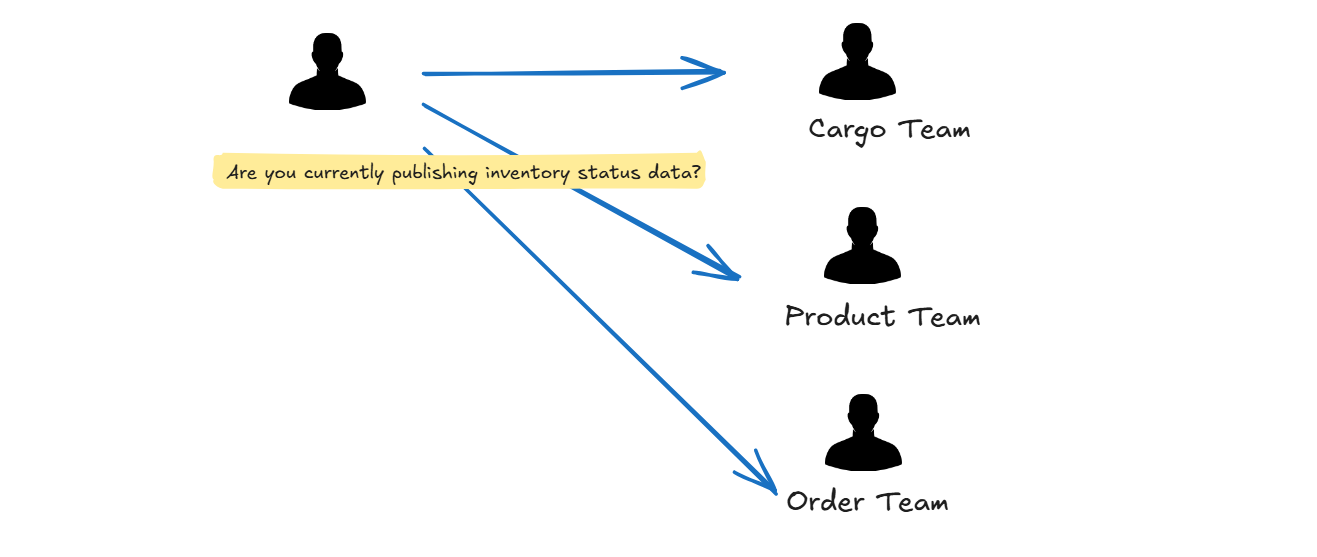
And another problem was that spreadsheet-based organization quickly became outdated and was not updated well. This is understandable. There is no way to know if this spreadsheet version is the latest, and if it doesn’t align well with multiple versions of documents and the development life cycle, it becomes a useless document.
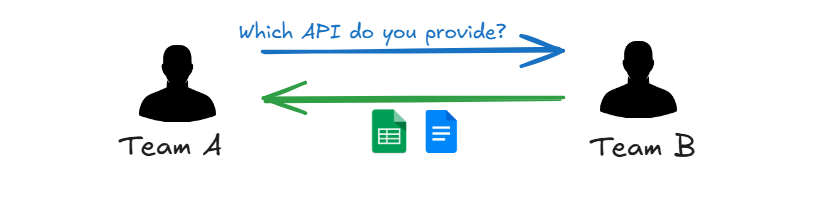
Also, cases frequently occurred where the dataset received by the consumer side one day was different from the existing dataset without prior notice. This is because there was no mutual agreement between the Producer and Consumer, and there was no dataset management process for data providers.

To solve this, we chose the following approach.
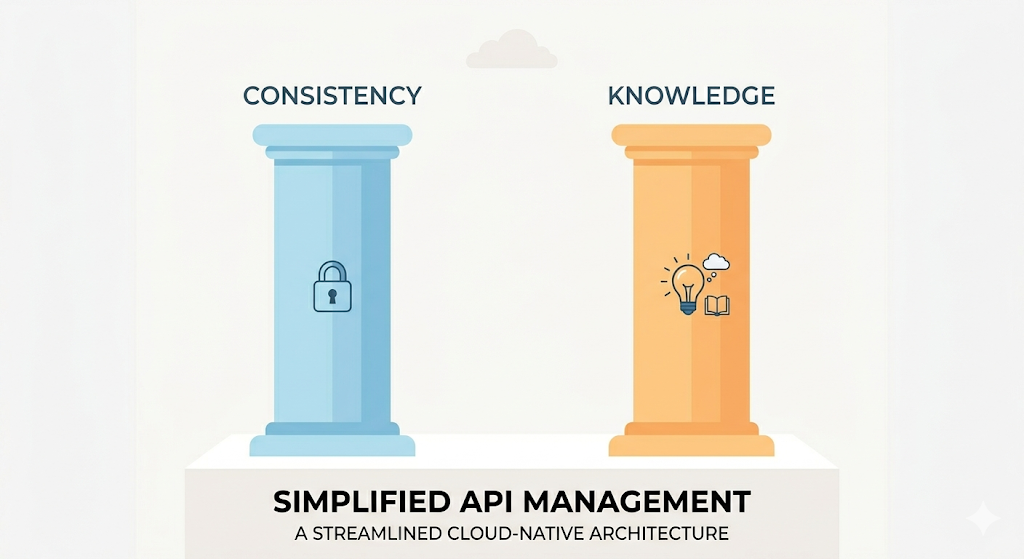
Solution : Schema Registry integration + Internal Developer Portal
The solution solved the above Pain Points as follows.
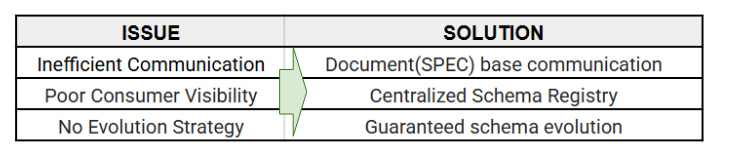
So, we made a major transition like this.
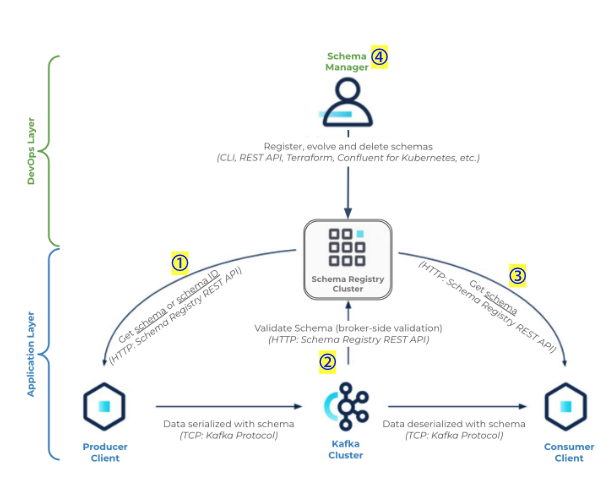
① A producer client needs to communicate with both Schema Registry and Kafka clusters. When serializing the message, the producer will get the schema from the Schema Registry, serialize the message as per schema, and then produce the binary data to the Kafka cluster.
② Kafka brokers communicate with Schema Registry for validation through a process known as broker-side schema validation. This process allows the broker to verify that data produced to a Kafka topic is using a valid schema ID in Schema Registry that is registered according to the subject naming strategy.
③ A consumer client also communicates with both Schema Registry and Kafka clusters. However, it will first get the binary data from the Kafka cluster (serialized message), extract the schema ID, and based on it, get its corresponding schema from Schema Registry and only then deserialize the message.
④ Schema manager: Although a schema can be registered/managed by the producer clients themselves, it is good practice to have that done as part of a CI/CD pipeline. Using this method, the producer and consumer clients would have read-only access to the Schema Registry and hence “abide” by the data contract (schema) as defined, which will help ensure data quality and consistency.
It works like this inside the code.
First, the Schema ID is managed as a constant.
// src/common/constants/kafka-topics.constant.ts
export const SCHEMA_REGISTRY_VERSION = {
  SUBJECT_A_ID : process.env.SCHEMA_A || 100126,
};
And in addition to the existing KAFKA Client Configuration, a configuration for the Schema Registry is required.
KAFKA_BROKER = 'your-broker'
KAFKA_API_KEY= 'your-api-key'
KAFKA_API_SECRET= 'your-api-secret'
KAFKA_GROUP_ID = 'your-group'

SCHEMA_REGISTRY_URL= 'your-url-registry'
SCHEMA_REGISTRY_API_KEY= 'your-registry-api-key'
SCHEMA_REGISTRY_API_SECRET= 'your-registry-api-secret'
SCHEMA_A= 'your-schema-id'
During encoding, the Avro Schema is fetched from Schema Registry using the above Schema ID, and it is serialized with this fetched schema.
/**
   * Encode message with specific schemaId for producer
   * @param topic : string - Kafka topic name
   * @param payload : any - The message payload to encode
   * @param schemaId : number - The schema ID to use for encoding from producer
   * @returns {Promise<Buffer>}
   * @throws Error if encoding fails
   * Usage:
   * const encoded = await schemaService.encodeMessage('my-topic', myPayload, 100126);
   */
  async encodeMessage(
    topic: string,
    payload: any,
    schemaId: number,
    onSchemaError?: SchemaValidationErrorCallback,
  ): Promise<Buffer> {
    const sid = new SchemaId('AVRO', schemaId);
    const subject = `${topic}-value`;
    // Fetch schema by ID
    const schemaInfo = await this.registry.getBySubjectAndId(subject, schemaId);
    if (!schemaInfo?.schema) {
      throw new Error(
        `Schema not found for subject ${subject} and ID ${schemaId}`,
      );
    }
    // Parse schema and create Avro type
    const schema: Schema = JSON.parse(schemaInfo.schema) as Schema;
    const type = Type.forSchema(schema);
    // validate payload with schema
    const errors = this.getSchemaErrors(type, payload);
    // You can log or send email or handle errors suitably with your use case
    if (errors.length > 0) {
      this.logger.error('Schema validation failed:', errors);
       if (onSchemaError) {
        onSchemaError(errors);
      }
      throw new Error(errors.join('; '));
    }
    try {
      // Validate payload against schema
      const payloadBuffer = type.toBuffer(payload);
      // Serialize with schema ID
      return this.serializer.serializeSchemaId(topic, payloadBuffer, sid);
    } catch (error) {
      this.logger.error('Error encoding message:', error);
      throw error;
    }
  }
Decoding is simple. It performs all necessary functions for deserialization. Since SchemaID information is included in the payload, the Avro Schema is fetched from SR(SchemaRegistry) through that information within the payload.
/**
   * Decode a message using the normal deserialization process.
   * @param topic : string - Kafka topic name
   * @param payload : Buffer - The message payload to decode
   * @returns {Promise<Record<string, any>>}
   * @throws Error if decoding fails
   * Usage:
   * const decoded = await schemaService.decodeMessageNormal('my-topic', messageBuffer);
   */
  async decodeMessageNormal(
    topic: string,
    payload: Buffer,
  ): Promise<Record<string, any>> {
    try {
      // Deserialize the message
        return (await this.deserializer.deserialize(topic, payload)) as Record<
          string,
          any
        >;
    } catch (error) {
      this.logger.error('Error decoding message:', error);
      throw error;
    }
  }
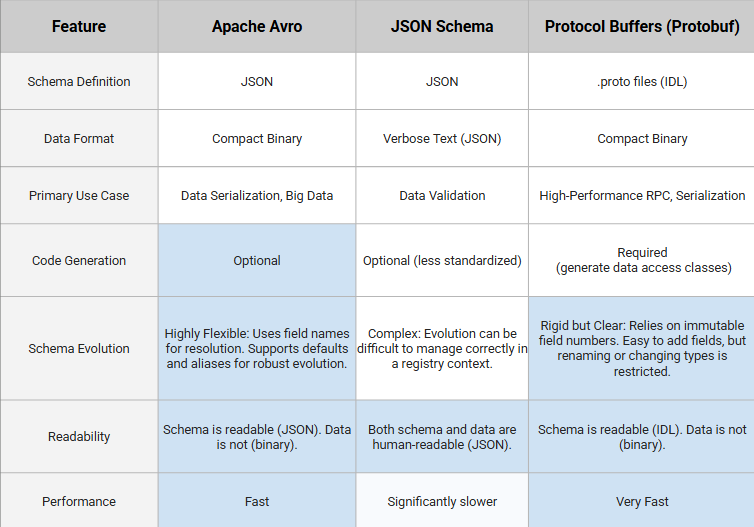
Why we choosed Avro as schema standard
For reference, the reasons why we chose Avro as the standard schema are as follows: Avro is compliant in terms of performance, has high utility in the market, and is flexible in terms of schema management.
Deep dive into Evolution and violation
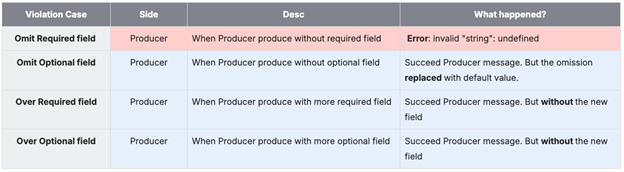
Dataset violation case The verification results for cases where the Schema and Input Dataset are different are as follows. Basically, verification takes place during the Producer’s serialization process. For optional fields, the Producer processes the work giving priority to the schema’s format. For requried fields are omitted and sent, there is no way to correct it, so an error is generated.
Evolution Strategy And we also tested for the evolution case. This Evolution Strategy is a scenario applicable when using SR.
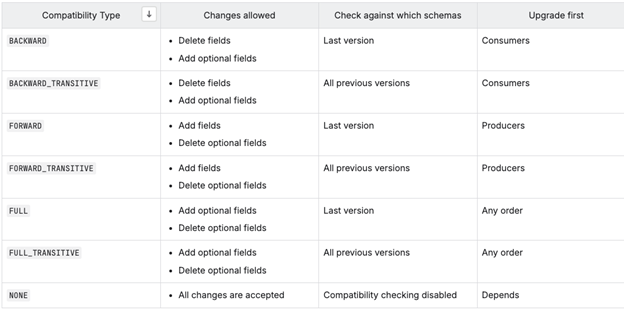
Real scenario of Schema Evolutions
- In the two transition scenarios below, it is better to disable
Broker side validation
Case) If you need to Deletefield

-
- Modify the Compatibility Mode in Confluent according to the changed content.
-
- Renew Avro.
-
- Update the logic of the Consumer Application (the part that uses data).
-
- Update the Producer Application’s logic (the part that creates the DTO) and update the Schema ID to issue messages of the new data set.
Case) If you need to Add**field**

-
- Modify the Compatibility Mode in Confluent according to the changed content.
-
- Renew Avro.
-
- Update the Producer Application’s logic (the part that creates the DTO) and update the Schema ID to issue messages of the new data set.
-
- Update the logic of the Consumer Application (the part that uses data).
Convert the specifications into a document, and spread broadcast.
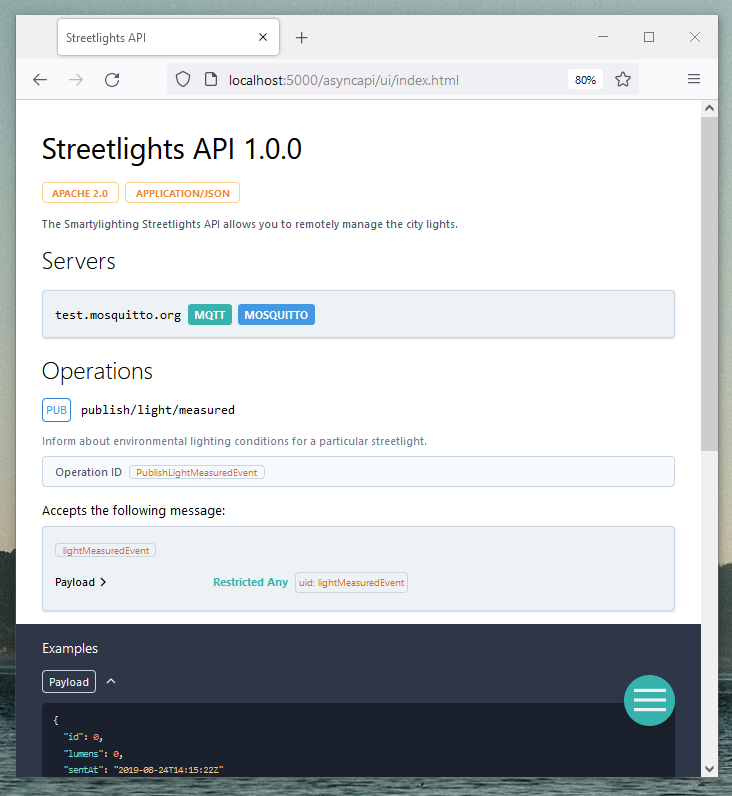
In my case, I exported the AsyncAPI standard documentation from Confluent and shared it via Backstage.
Export an AsyncAPI specification for a specific topic.
confluent asyncapi export --topics "my-topic,prefix-*"I then registered the exported AsyncAPI in Backstage to make it visible to other developers.
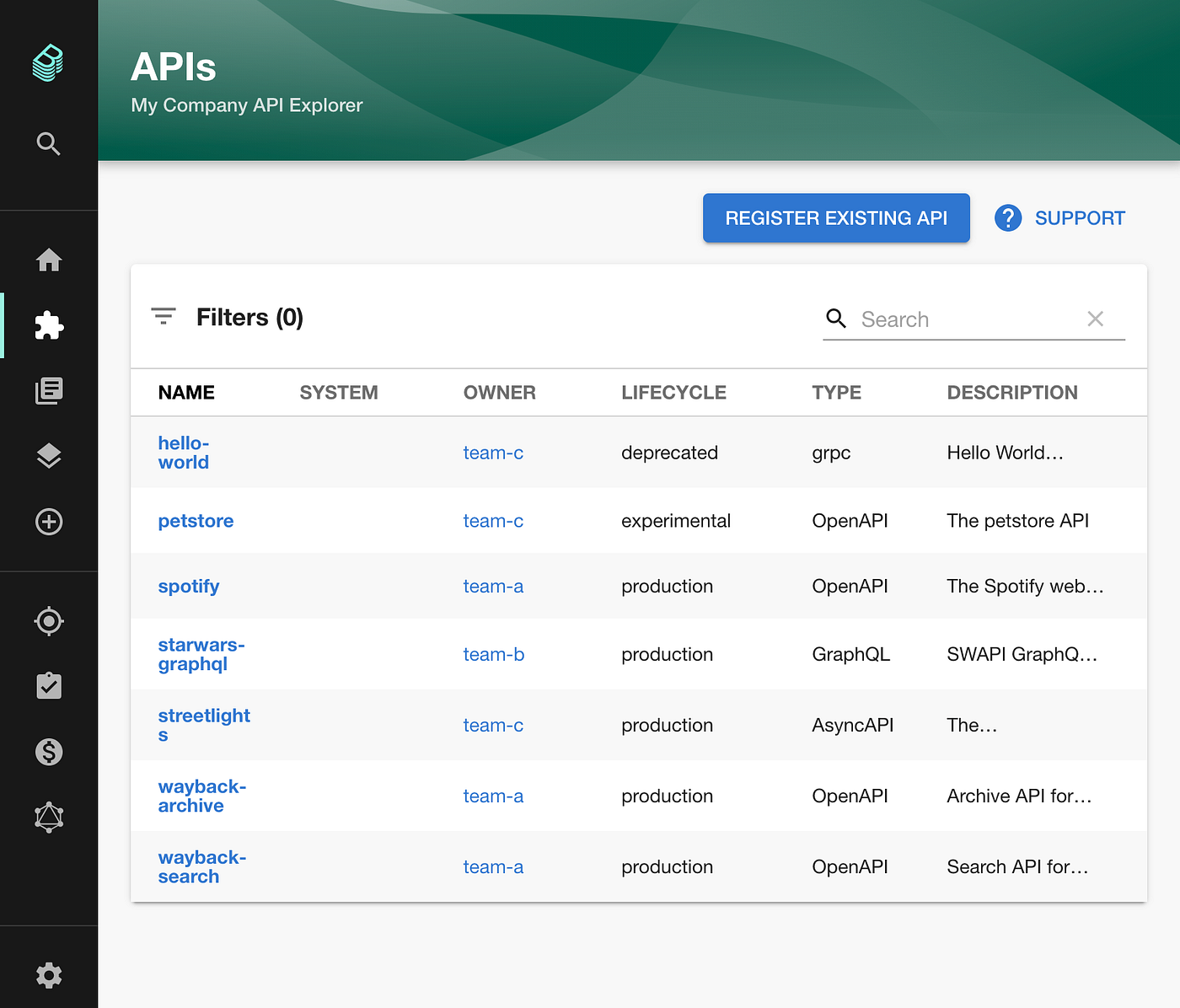
Backstage represents the AsyncAPI with a look and feel similar to the UI we see in Swagger. Since developers are familiar with this interface, they can easily use this information to identify which domain is providing the data.
메타데이터
- post_id
- 0b99b0dfd921
- slug
- kafka-schema-registry-as-a-strategic-gatekeeper-0b99b0dfd921
- url
- https://medium.com/@armyost1/kafka-schema-registry-as-a-strategic-gatekeeper-0b99b0dfd921
- canonical_url
- https://medium.com/@armyost1/kafka-schema-registry-as-a-strategic-gatekeeper-0b99b0dfd921
- author_url
- https://medium.com/@armyost1
- status
- ok
- fetched_at
- 2026-06-09 15:37:30