pgvector is All You Need: Replacing Expensive Vector DBs in Spring Boot
Dedicated vector databases are overpriced and introduce unnecessary network latency. Here is how to implement Retrieval-Augmented…
pgvector is All You Need: Replacing Expensive Vector DBs in Spring Boot
Dedicated vector databases are overpriced and introduce unnecessary network latency. Here is how to implement Retrieval-Augmented Generation (RAG) using standard PostgreSQL, the pgvector extension, and Spring AI.
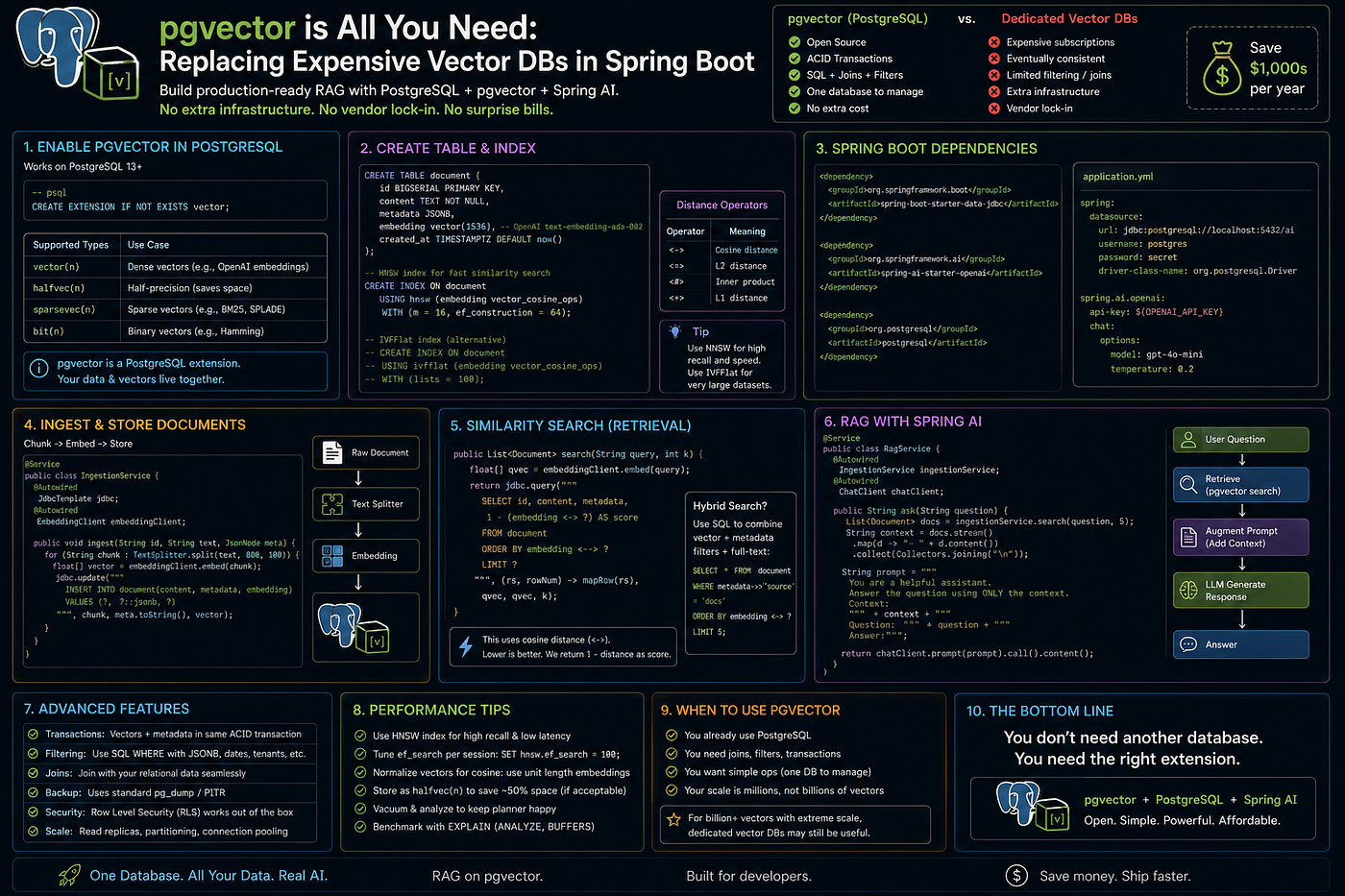
The rush from the enterprise world to develop Retrieval-Augmented Generation (RAG) applications resulted in huge demand for dedicated vector databases.
Dedicated vendors will have you pay sky-high prices for computation and memory to hold your embeddings. And worse, by creating a separate vector database for yourself, you break the principle of data locality. You keep your business data in PostgreSQL, but semantic embeddings in some third-party SaaS, which forces you to develop complex synchronization systems to maintain data alignment.
In 95% of cases, enterprises don’t need a dedicated vector database at all. All you need is PostgreSQL and free pgvector extension on top of that. With Spring AI on top of everything, you can create an enterprise-ready RAG pipeline right in your relational database.
1. The Database: Enabling pgvector
pgvector is an open source native extension for PostgreSQL that adds a new vector data type and supports exact/approximate nearest-neighbor search (such as HNSW and IVFFlat).
Instead of adding new cloud infrastructure, you only need to replace your existing Postgres Docker image with one that has the extension enabled:
# Start Postgres with the pgvector extension pre-installed
docker run -d -p 5432:5432 \
  -e POSTGRES_USER=myuser \
  -e POSTGRES_PASSWORD=secret \
  -e POSTGRES_DB=mydb \
  pgvector/pgvector:pg16
Inside your database, enable the extension:
CREATE EXTENSION IF NOT EXISTS vector;2. The Spring Boot Configuration
Spring AI comes with a native and highly abstracted VectorStore implementation for pgvector.
Add the official Spring AI starter to your pom.xml first:
<dependency>
    <groupId>org.springframework.ai</groupId>
    <artifactId>spring-ai-pgvector-store-spring-boot-starter</artifactId>
</dependency>
Now, configure the vector store in your application.yml file. Spring AI will connect automatically to your existing spring.datasource and optionally initialize the required schema.
spring:
  ai:
    vectorstore:
      pgvector:
        initialize-schema: true
        # Hierarchical Navigable Small World (HNSW) is the fastest index for read-heavy RAG
        index-type: HNSW
        # Match this to your embedding model (e.g., 1536 for OpenAI text-embedding-3-small)
        dimensions: 1536
        distance-type: COSINE_DISTANCE
3. Implementing the RAG Pipeline
As Spring AI allows abstraction of the database syntax, interaction with pgvector does not need any custom SQL. Just inject the VectorStore interface to the service.
Below is a production-ready RAG service that looks up semantic similarity from Postgres and then queries the LLM:
import org.springframework.ai.chat.client.ChatClient;
import org.springframework.ai.document.Document;
import org.springframework.ai.vectorstore.SearchRequest;
import org.springframework.ai.vectorstore.VectorStore;
import org.springframework.stereotype.Service;
import java.util.List;
import java.util.stream.Collectors;
@Service
public class EnterpriseRagService {
    private final VectorStore vectorStore;
    private final ChatClient chatClient;
    public EnterpriseRagService(VectorStore vectorStore, ChatClient.Builder chatClientBuilder) {
        this.vectorStore = vectorStore;
        this.chatClient = chatClientBuilder.build();
    }
    public String askCorporateKnowledgeBase(String userQuestion) {
        // 1. Perform semantic search natively inside PostgreSQL via pgvector
        List<Document> similarDocuments = vectorStore.similaritySearch(
            SearchRequest.query(userQuestion).withTopK(3)
        );
        // 2. Extract the context
        String context = similarDocuments.stream()
            .map(Document::getContent)
            .collect(Collectors.joining("\n\n"));
        // 3. Hydrate the prompt and call the LLM
        String systemPrompt = """
            You are a corporate assistant. Answer the user's question using ONLY the provided context.
            Context: %s
            """.formatted(context);
        return chatClient.prompt()
            .system(systemPrompt)
            .user(userQuestion)
            .call()
            .content();
    }
}
Summary
Because you standardize on pgvector, you:
- Avoid vendor lock-in: Your vectors live in plain Postgres tables that can be queried using standard SQL.
- Maintain data locality: You can do joins between your user table and your vector table in a single ACID transaction
- Save money: You remove any network latency and subscription costs from managed SaaS vector databases.
메타데이터
- post_id
- 0bcef066c53a
- slug
- pgvector-is-all-you-need-replacing-expensive-vector-dbs-in-spring-boot-0bcef066c53a
- url
- https://blog.stackademic.com/pgvector-is-all-you-need-replacing-expensive-vector-dbs-in-spring-boot-0bcef066c53a
- canonical_url
- https://blog.stackademic.com/pgvector-is-all-you-need-replacing-expensive-vector-dbs-in-spring-boot-0bcef066c53a
- author_url
- https://medium.com/@ganeshlawand2002
- status
- ok
- fetched_at
- 2026-08-12 17:08:17