Load Testing and E2E Testing Shouldn’t Live in Two Different Worlds
Most testing setups I’ve seen split into two disconnected silos: a load-testing tool (k6, JMeter, Gatling) running somewhere in CI or a…
Load Testing and E2E Testing Shouldn’t Live in Two Different Worlds
Most testing setups I’ve seen split into two disconnected silos: a load-testing tool (k6, JMeter, Gatling) running somewhere in CI or a spare EC2 box, and a browser-automation tool (Playwright, Cypress) running somewhere else — different pipelines, different dashboards, different people owning each one. If you want to know “did the checkout flow survive 50 concurrent users and does it still render correctly in a real browser,” you’re stitching together two tools’ worth of tribal knowledge by hand.
I built a small, self-hosted platform to close that gap: a single web UI where a team can write, run, and review both k6 load tests and Playwright browser tests, backed by Grafana/Prometheus for metrics and running on infrastructure you fully own — your AWS account, or just Docker on your laptop.
Login Page
The problem this solves
Teams doing serious testing usually hit the same wall from two directions:
- Load testing tools are CLI-first. k6 is excellent, but handing a teammate a terminal and a
k6 runcommand with a dozen--envflags is not how most QA folks want to work day to day. - Browser testing tools live in CI, not in a shared space. Playwright specs run great in a pipeline, but there’s no easy “run this one test against staging right now and show me the report” experience for someone who isn’t comfortable in a terminal.
- Metrics and results end up scattered. k6 JSON output here, a Playwright HTML report there, some numbers in a Slack message. Nobody has one place to look.
So the platform does three things:
- One web UI (k6-gui) — upload or edit test files (Monaco editor, same as VS Code), run them, watch logs stream in real time, browse historical results, export reports as PDF.
- Both test types, same workflow. Drop in a
.jsfile and it runs as a k6 load test. Drop in a*.spec.jsand it auto-detects it as a Playwright test and runs it in a dedicated browser container. - Real metrics, not just logs. k6 pushes to Prometheus via remote-write (native histograms included), visualized in pre-built Grafana dashboards — p95/p99 latency, error rates, request throughput, all in one screen.
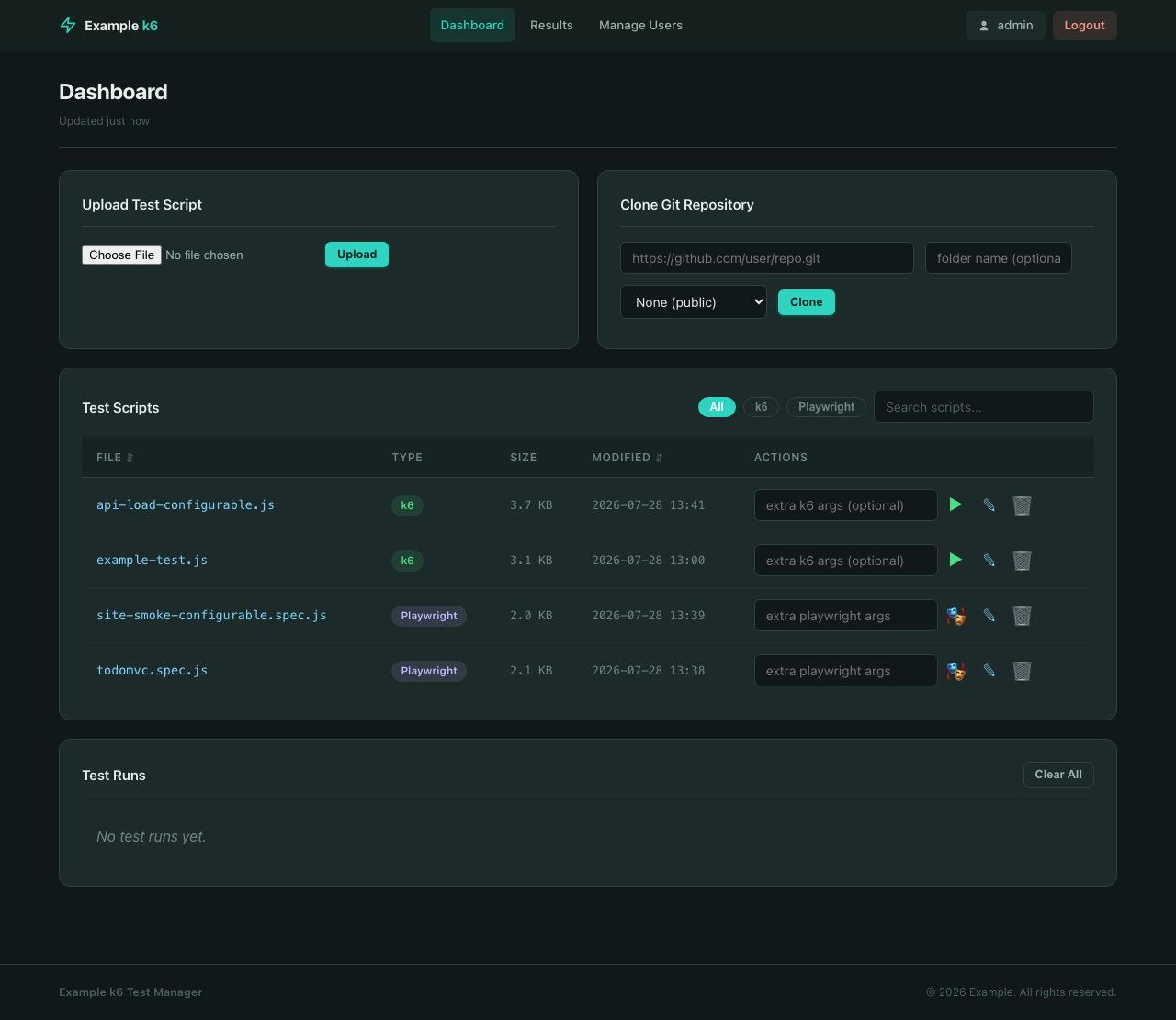
Dashboard Page
How it’s built
The whole thing is Terraform-provisioned: an EC2 instance running Docker Compose with six services —
- k6-gui — a small Flask app (intentionally boring stack: Python, Jinja2, HTMX/Alpine on the frontend, no heavy JS framework) that manages test files, orchestrates runs, and serves results.
- k6 — runs on demand via
docker compose run, exporting metrics straight to Prometheus. - playwright-runner — a long-running container k6-gui shells into via
docker compose execto fire Playwright runs, so there's no cold-start cost per test. - Prometheus + Grafana — metrics storage and dashboards, pre-provisioned so there’s zero manual setup.
- Postgres — optional, for k6 tests that need a database backend.
The interesting engineering bit is how k6-gui triggers test runs: it mounts the host’s Docker socket and shells out to docker compose on the host's daemon (Docker-outside-of-Docker), rather than trying to run Docker-in-Docker. That's what lets a lightweight web container orchestrate sibling containers without nested virtualization headaches — the same pattern you'd use for CI runners that need to spin up other containers.
Everything is one Terraform module (ec2-k6) with feature toggles — enable/disable Postgres, Grafana, the GUI, CloudFront in front of it — so a dev environment and a hardened production environment reuse the exact same code with different variable values.
You don’t need AWS to try it
This was important to me: the whole stack also runs locally with a single Docker Compose file, no cloud account required.
git clone https://github.com/jacksmartv/K6-PW-test-management-platform.git
cd K6-PW-test-management-platform
docker compose -f docker-compose.local-full.yml up -d --build
That’s it — k6-gui, Grafana, Prometheus, and the Playwright runner all come up on your machine. Open the UI, pick one of the included example tests (a k6 API load test, a Playwright TodoMVC test), and run it. It’s a fully working sandbox to poke at before you ever think about deploying to AWS.
What’s in the repo
- Terraform modules for networking, the EC2+Docker stack, CloudFront, and DNS — dev and prod environment configs included.
- The k6-gui source (Flask, layered architecture:
core → repositories → runners → services → api), fully documented per-module. - Example k6 and Playwright tests, both a fixed version that runs against public test endpoints out of the box, and a configurable version you can point at your own app via environment variables.
- A local-only Docker Compose file for zero-AWS experimentation.
Repo: https://github.com/jacksmartv/K6-PW-test-management-platform
If your team is duct-taping together a load-testing pipeline and a separate E2E pipeline, this might save you the trouble of building that duct tape yourselves. Feedback, issues, and PRs are welcome.
메타데이터
- post_id
- 0bd83d57a8ae
- slug
- load-testing-and-e2e-testing-shouldnt-live-in-two-different-worlds-0bd83d57a8ae
- url
- https://medium.com/@jackpelorus/load-testing-and-e2e-testing-shouldnt-live-in-two-different-worlds-0bd83d57a8ae
- canonical_url
- https://medium.com/@jackpelorus/load-testing-and-e2e-testing-shouldnt-live-in-two-different-worlds-0bd83d57a8ae
- author_url
- https://medium.com/@jackpelorus
- status
- ok
- fetched_at
- 2026-07-31 03:08:37


