Complete Implementation of MySQL Clustering with MySQL Router
MySQL Clustering with Routing enables high availability, scalability, and load balancing by combining a group of MySQL server instances…
Complete Implementation of MySQL Clustering with MySQL Router

Ideal Architecture for MySQL Clustering with MySQL Routing
MySQL Clustering with Routing enables high availability, scalability, and load balancing by combining a group of MySQL server instances (configured in Group Replication) with MySQL Router. The cluster maintains data consistency across nodes using synchronous replication, ensuring automatic fail-over and redundancy. MySQL Router intelligently routes client connections to the appropriate node, balancing read/write operations and redirecting traffic in case of node failures, making it ideal for mission-critical applications that require fault tolerance and minimal downtime.
DEPENDENCIES AND RESOURCES
- Minimum 3 nodes/VMs with same MySQL Server version (8.0.35 in current implementation).
- group_replication plugin installed on each MySQL DB.
- MySQL Shell installation on any machine that can access all database servers.
- MySQL Router where needed.
- All tables must have a primary key or an equivalent non-null unique key.
IMPLEMENTATION STEPS:
- Update MySQL Configuration (
my.ini) files on each node:
server-id=1  # Different for each node

gtid_mode=ON
enforce-gtid-consistency=ON

report_host = <IP>
report_port = <Port>

log_bin=C:/ProgramData/MySQL/MySQL Server 8.0/Data/mysql-bin
binlog_format=ROW- Check group_replication plugin on each node:
SELECT * FROM information_schema.plugins WHERE plugin_name = 'group_replication';if not installed, install plugin on each node using command:
INSTALL PLUGIN group_replication SONAME 'group_replication.dll';- Install MySQL Shell on any of the node (from where all the nodes can be accessed) to configure the Cluster:
Open MySQL shell and connect to Primary node:
\connect <user>@<ip>:<port>- Check instances configuration:
dba.checkInstanceConfiguration()                      # For current node
dba.checkInstanceConfiguration('<user>@<ip>:<port>')  # For other nodes
if all the tables have not primary key or equivalent non-null unique key, it will give the names of those tables, make them as per requirement. If some other configurations needed, it will prompt to run this command:
dba.configureInstance()                        # For current node
dba.configureInstance('<user>@<ip>:<port>') # For other nodes- Create cluster:
var cluster = dba.createCluster('MyCluster');Note: The instance on which cluster is created is by default Primary node.
- Add other instances (If recovery method is ‘clone’, then it will clone the whole data from Primary node to this node for the first time, and then the replication is incremental for the changes afterwards):
cluster.addInstance("<user>@<ip>:<port>", {recoveryMethod: "clone"});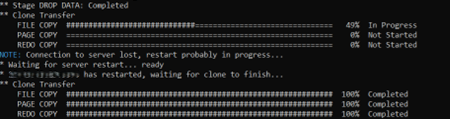
Cloning progress
- After cloning, you can check the status of the cluster:
var cluster = dba.getCluster();
cluster.status();- Install MySQL Router (from MySQL Installer) through which services or applications can access the database:
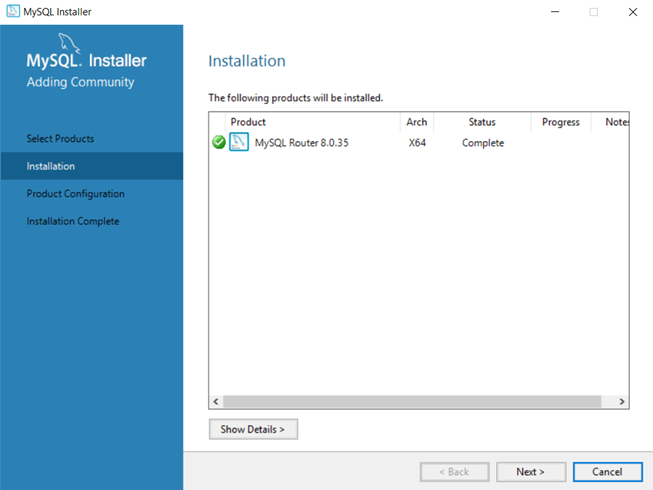
MySQL Router Installation
- Configure MySQL Router. Enter the credentials of Primary node to register the MySQL Router with the cluster. Default ports for MySQL Router is 6446, but it can be customised. Ensure that the all four configured ports are not already engaged:

MySQL Router Configuration
MySQL Router will be installed as a service, you can check in services.msc
- Check whether MySQL Router is listening on the configured port:
netstat -an | findstr 6446You can configure as much routers as you need. Routers registered with cluster can be checked by:
var cluster = dba.getCluster();
cluster.listRouters();- Now you can change the connection strings in your applications and services. IP and Port of the MySQL shell and user and password of the Primary node in the connection string.
Summary:
This blog provides a step-by-step guide for implementing a MySQL Cluster with MySQL Router, focusing on high availability and fault tolerance. It begins with installing and configuring multiple MySQL instances using Group Replication to form a cluster. The guide then details the necessary changes to each node’s configuration files (my.ini), including server IDs, replication settings, and group replication parameters. It also covers how to bootstrap the primary node and add secondary nodes to the cluster. Finally, the blog explains how to install and configure MySQL Router to connect client applications to the cluster, ensuring automatic failover and balanced routing of queries across available nodes.
메타데이터
- post_id
- 0c0aebf4d4e0
- slug
- complete-implementation-of-mysql-clustering-with-mysql-router-0c0aebf4d4e0
- url
- https://medium.com/@syedmubashirahmad/complete-implementation-of-mysql-clustering-with-mysql-router-0c0aebf4d4e0
- canonical_url
- https://medium.com/@syedmubashirahmad/complete-implementation-of-mysql-clustering-with-mysql-router-0c0aebf4d4e0
- author_url
- https://medium.com/@syedmubashirahmad
- status
- ok
- fetched_at
- 2026-07-12 01:59:39