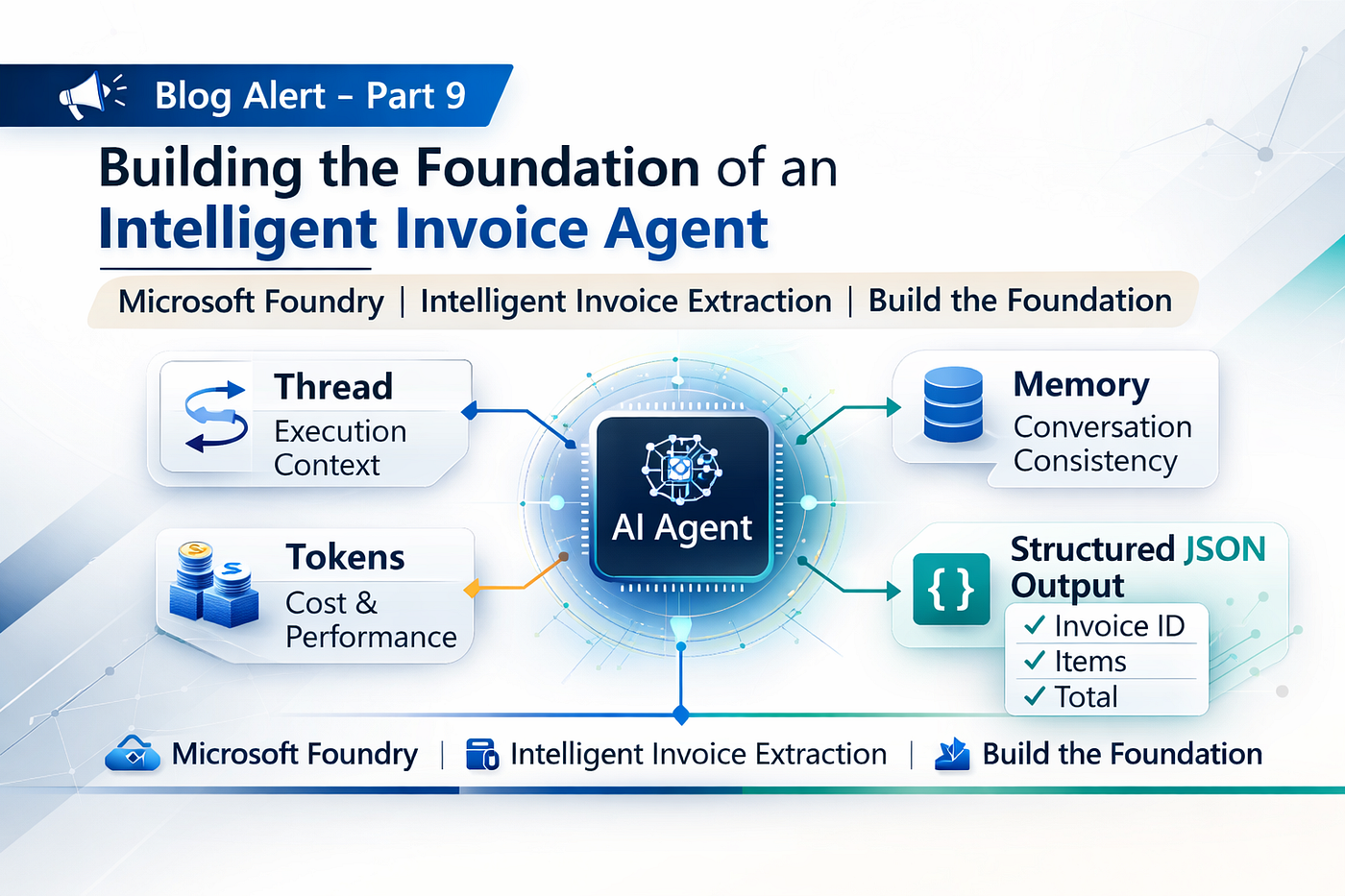
Part 10 — Building an Intelligent Invoice Processing System with Microsoft Foundry and AI Agents
From Workflow Component to Enterprise AI Architecture
Part 10 — Building an Intelligent Invoice Processing System with Microsoft Foundry and AI Agents
From Workflow Component to Enterprise AI Architecture
In Part 9, we built a functional invoice extraction agent. In Part 10, we elevate that foundation into an enterprise-ready architecture — introducing vision-based understanding, multi-agent orchestration, validation layers, storage, and governance. This is where a working demo evolves into a production-grade AI system.
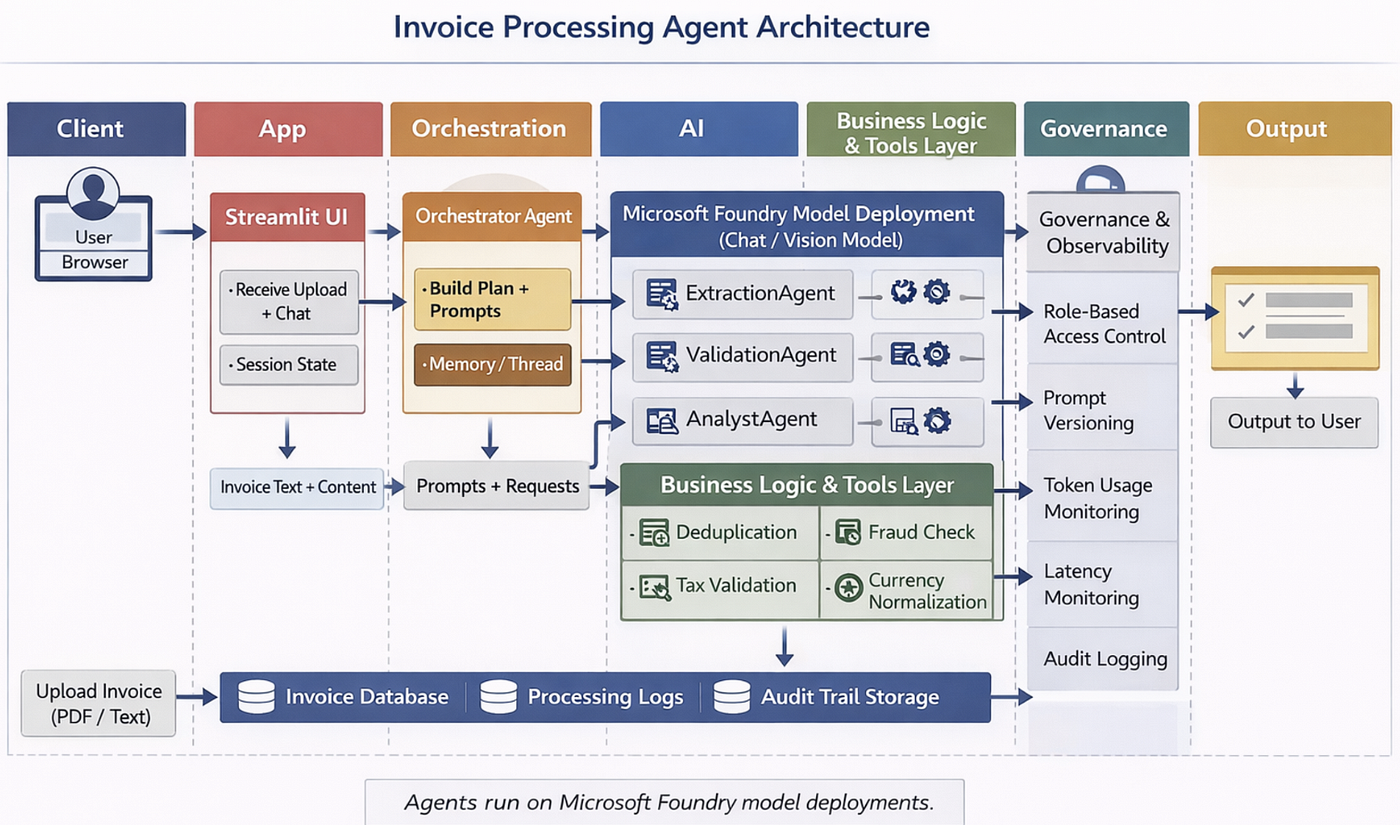
This is where intelligent automation becomes enterprise AI architecture. We are going to see
Streamlit collects files and shows outputs.
The backend preprocesses and calls an orchestrator.
The orchestrator coordinates Foundry agents (extract → validate → store → analyze).
Storage persists results and observability records everything for audit.
Problem statement:
Traditional invoice automation relies on OCR + rule-based parsing. These approaches break when layouts change, vendors vary formats, or documents contain mixed structure. The result? Fragile pipelines, manual reconciliation, and hidden operational risk.
Enterprise systems require separation of concerns. That’s where multi-agent architecture becomes critical.
Step 1: Vision-Based Extraction with Microsoft Foundry
OCR works — but struggles with:
- Complex layouts
- Scanned documents
- Tables with irregular spacing
- Mixed text + images
Microsoft Foundry supports multi-modal models capable of vision-based understanding.
Architecture:

Advantages:
- No OCR dependency
- Better layout understanding
- Semantic interpretation of tables
- Confidence-level reporting
Trade-offs:
- Higher token usage
- Slower than rule-based parsing
- More expensive per document
Best for:
- Complex invoices
- Handwritten notes
- Multi-format suppliers
Stage 2 — Designing Specialized Agent Roles
Instead of one general agent, we introduce specialists.
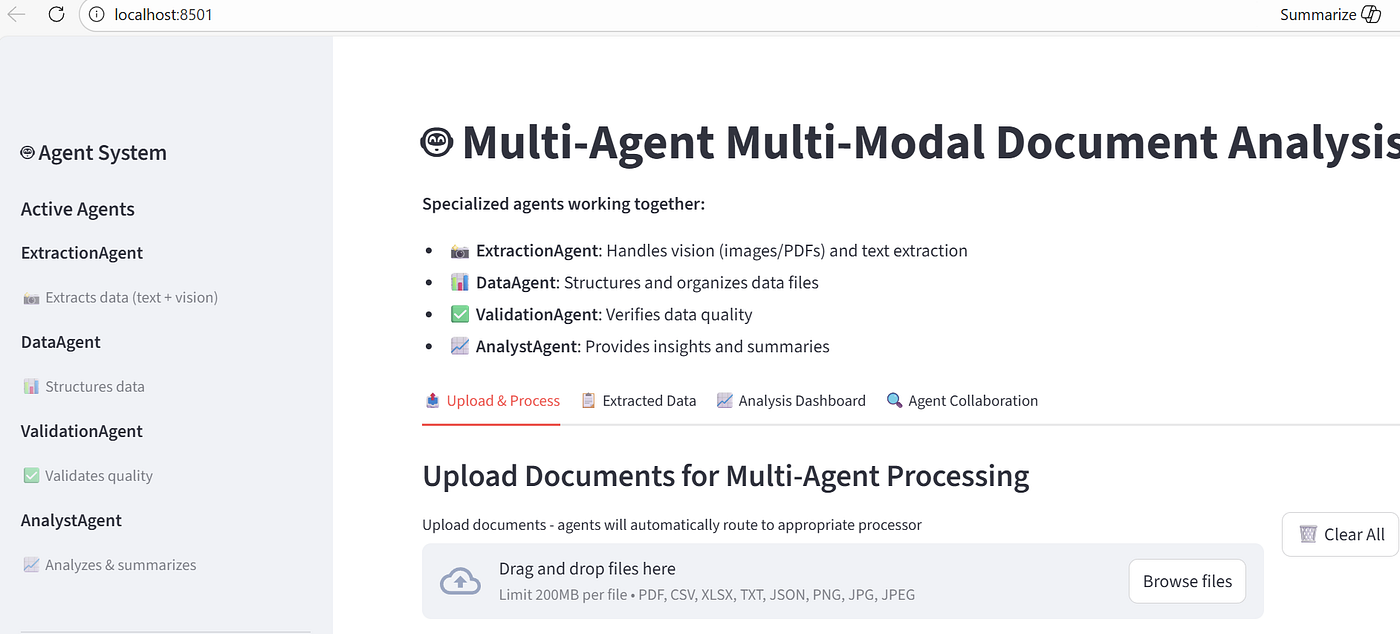
ExtractionAgent — Owns document understanding and structured data output.

DataAgent — Owns persistence, deduplication, and lineage.

ValidationAgent — Owns business rule enforcement and risk scoring.

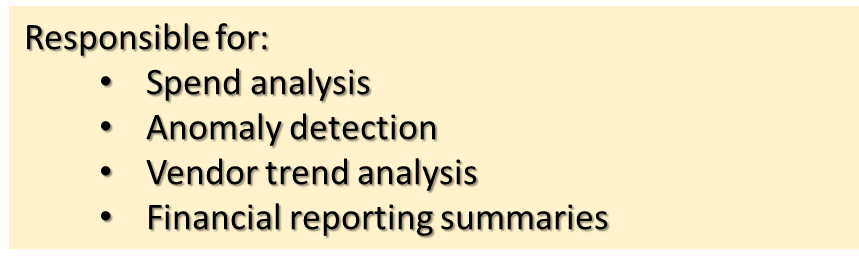
AnalystAgent — Owns derived insights and summarization.
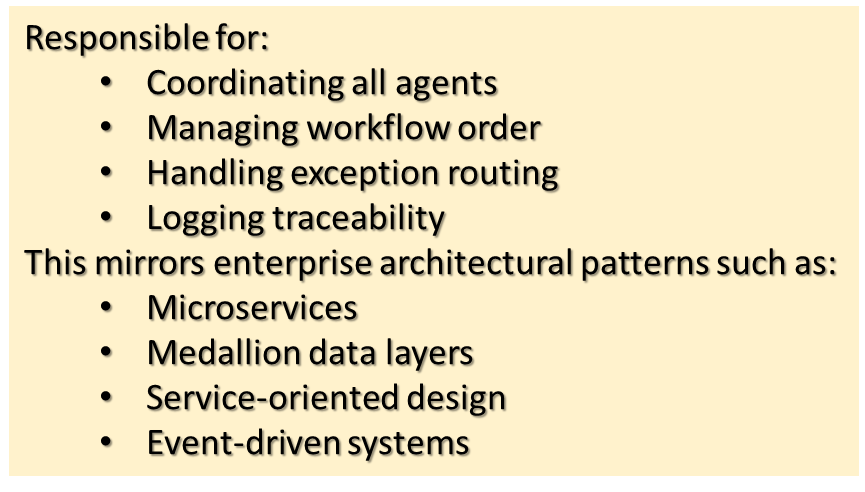
OrchestratorAgent — Owns workflow coordination and routing logic.
Stage 3 — Multi-Agent Workflow Architecture
The processing pipeline now becomes:
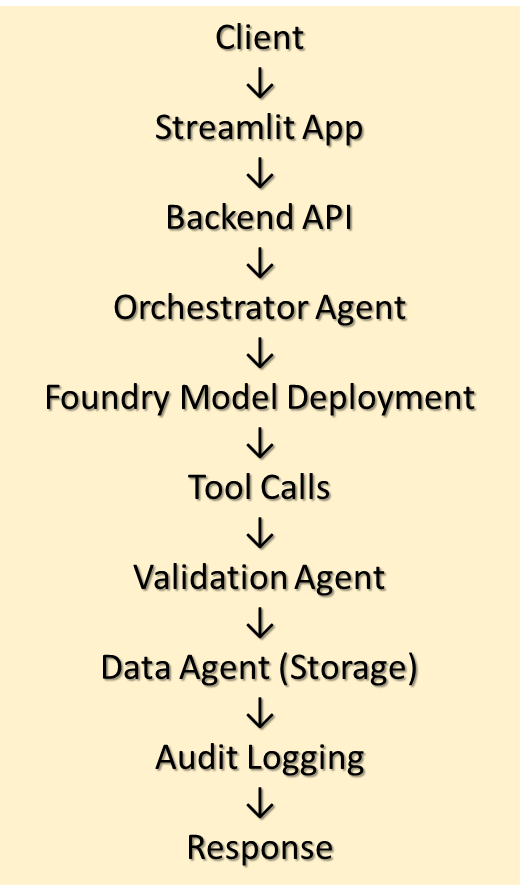
Each agent has:
- Clear responsibility
- Defined input/output contract
- Logging capability
- Version control
This creates:
- Traceable processing steps
- Easier debugging
- Independent testing
- Safer scaling
Instead of a monolithic AI blob, we now have modular intelligence.
GitHub Repo, Sample Data & steps to produce demo :
alpaBuddhabhatti/invoice-agent-demo (API key + Agent Framework (Azure OpenAI endpoint style))
alpaBuddhabhatti/invoice-agent-demo-Keyless (Keyless (Entra ID) + Microsoft Foundry Project endpoint + Managed Agents SDK )
File — streamlit_multi_agent_app.py
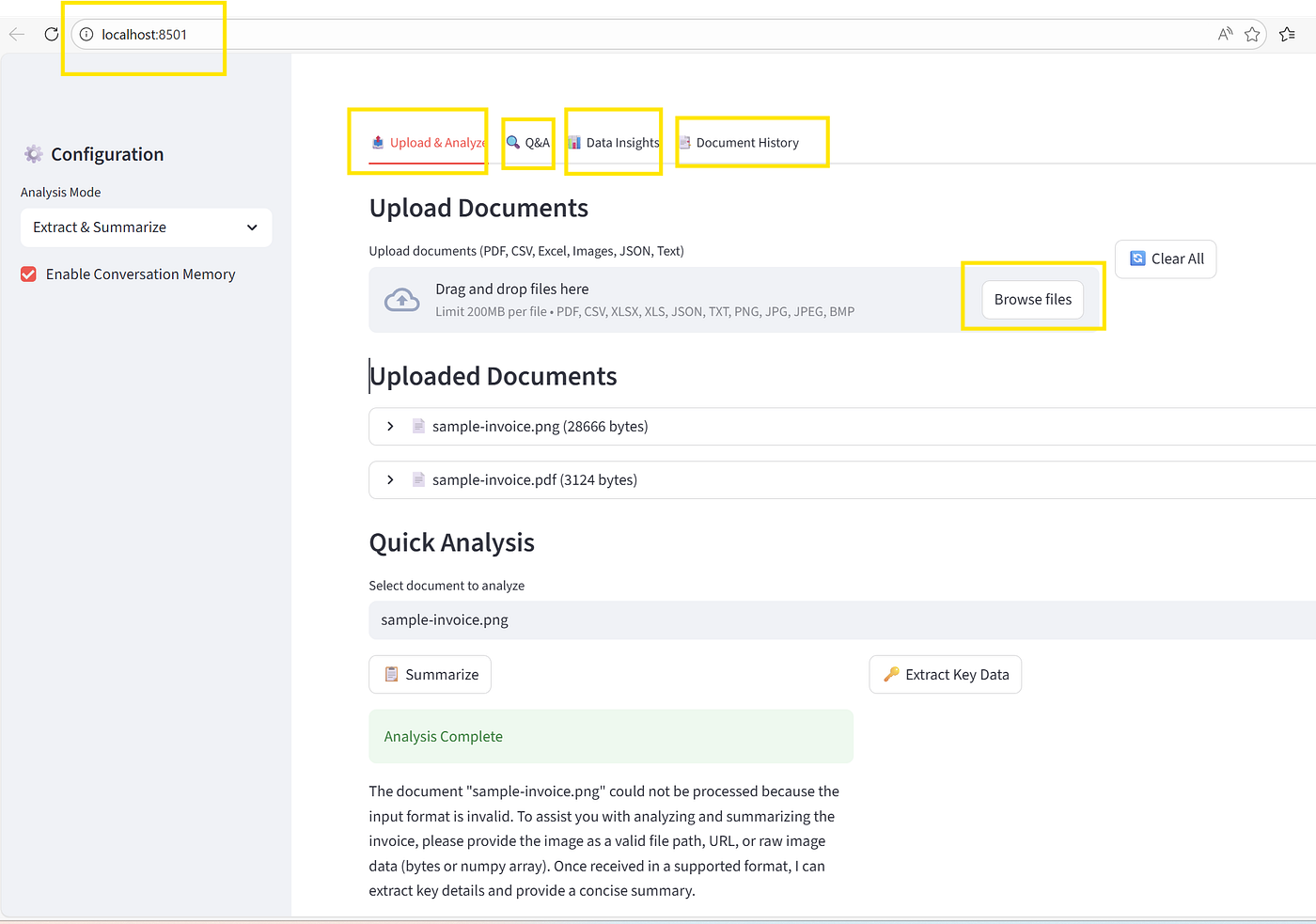
File — streamlit_advanced_app.py
Step 4 — End-to-end process flow (what happens)
This architecture does not implement Retrieval-Augmented Generation (RAG). Instead, it focuses on tool-augmented multi-agent orchestration for structured document processing.
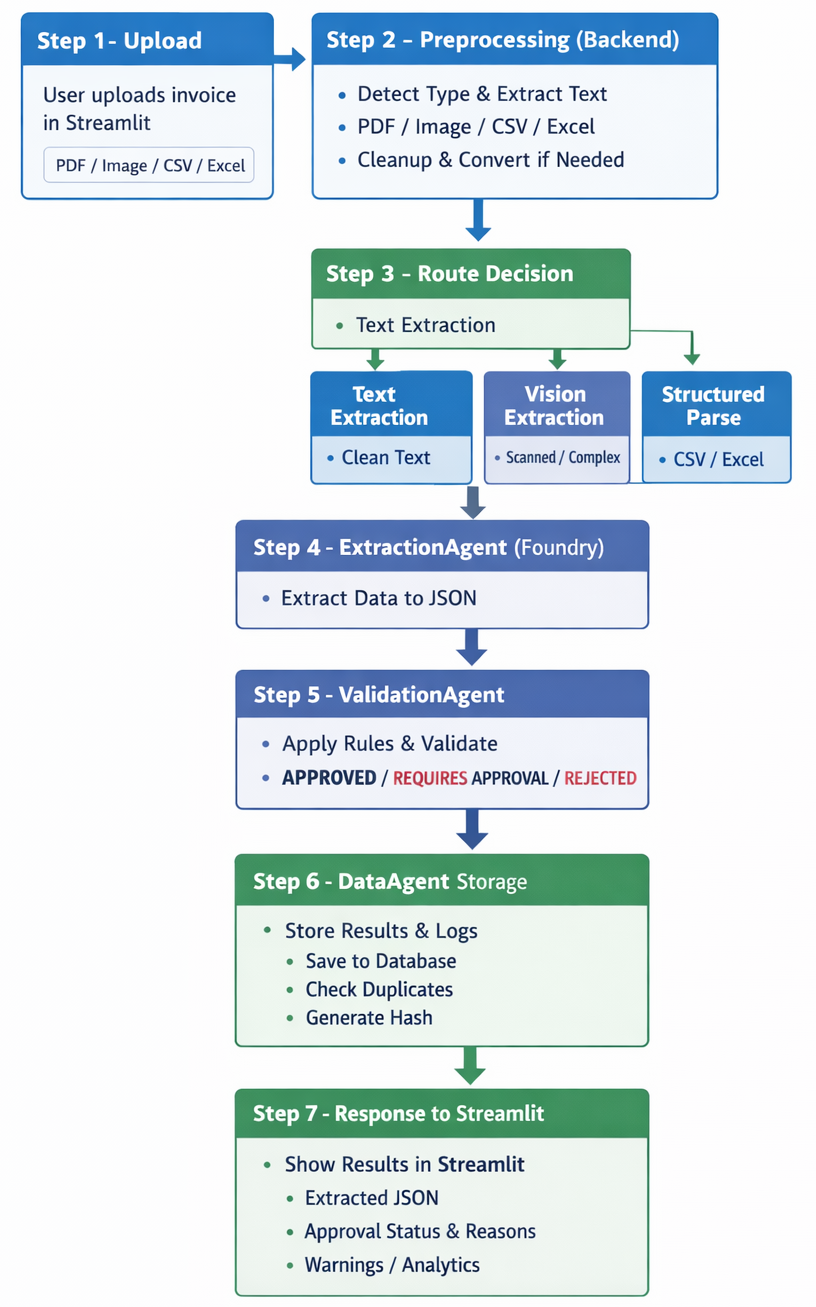
Step 4.1— Upload
User uploads invoice in Streamlit (PDF/image/CSV/Excel).
Step 4.2 — Preprocessing (Backend)
Backend detects type:
- PDF (text-based or scanned)
- Image
- CSV/Excel
May do:
- Extract embedded text from PDF
- Convert PDF pages to images if scanned
- Basic cleanup
Step 4.3 — Orchestrator decides route
- If clean text → Text extraction route
- If scanned/complex → Vision extraction route
- If CSV/Excel → Structured parse route
Step 4.4 — ExtractionAgent runs (Foundry)
Returns structured JSON (header + line items + totals).
Step 4.5 — ValidationAgent runs
Applies policy rules and returns:
- APPROVED / REQUIRES_APPROVAL / REJECTED
- reasons + missing fields + confidence warnings
Step 4.6 — DataAgent stores
- Generates hash/fingerprint
- Checks duplicates
- Saves to storage
- Saves processing logs/metadata
Step 4.7 — Response back to Streamlit
Streamlit shows:
- extracted JSON
- approval status + reasons
- warnings/errors
- optional analytics summary
This mirrors enterprise architecture patterns used in data platforms.
Stage 5 — Enterprise Controls & Governance
Governance is not a post-processing step. It is a cross-cutting concern embedded across every layer of the system. Enterprise AI is not just about models. It is about control.
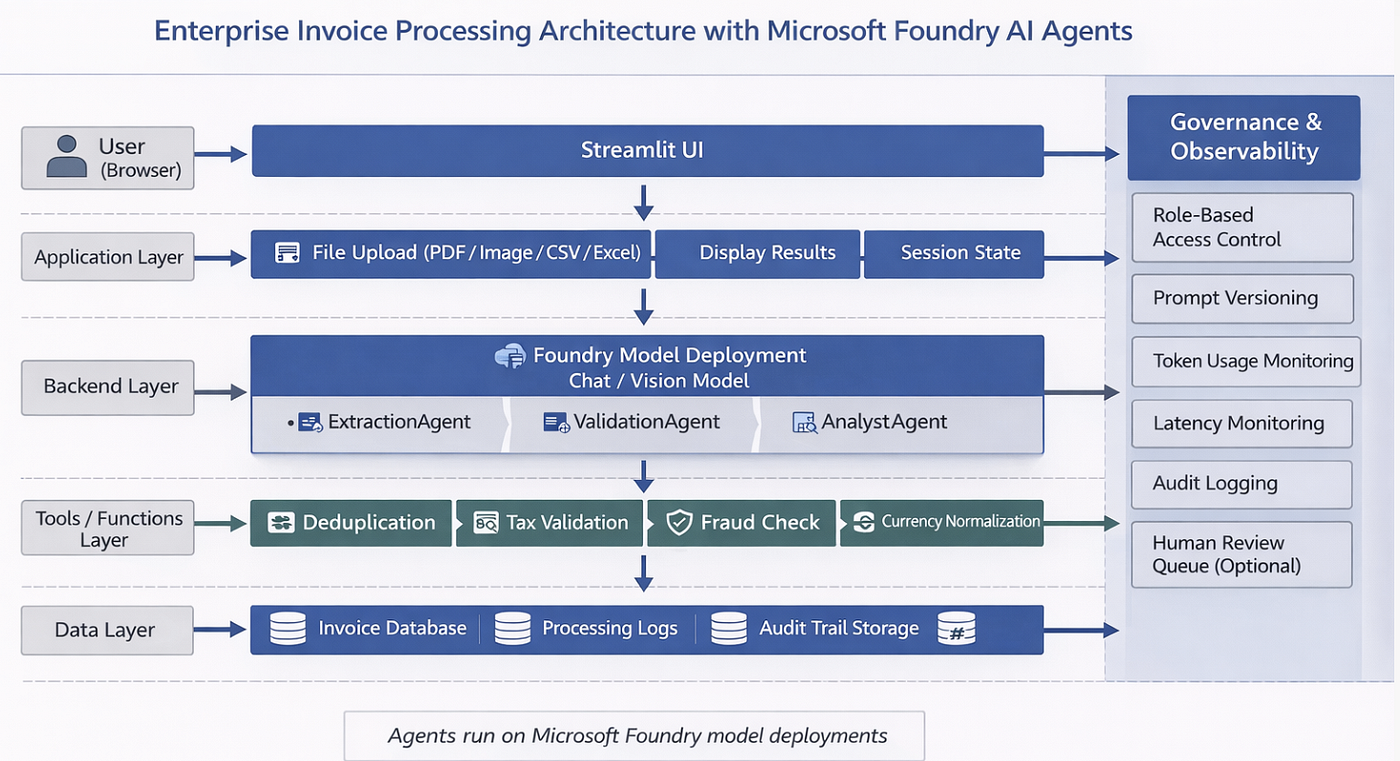
Security
- Store secrets in .env
- Never hardcode keys
- Use role-based access control
- Enable audit logging
Reliability
- Add retry logic
- Handle API failures
- Monitor rate limits
Observability
- Track token usage
- Monitor latency
- Log validation results
Governance
- Version prompts
- Document business rules
- Enable approval workflows
Enterprise AI is not just about model quality — it is about operational discipline.
Stage 6— Handling Real-World Enterprise Scenarios
Let’s go beyond the demo.
Duplicate Invoice Prevention
Use invoice hashing:
- Hash vendor + invoice ID + amount
- Prevent reprocessing duplicates
- Flag suspicious submissions
Multi-Currency Normalization
- Convert to base currency
- Validate FX rate consistency
- Log exchange rate used
Tax Validation
- Validate tax percentage consistency
- Compare against vendor region rules
- Flag anomalies
Exception Routing
If:
- Confidence < threshold
- Validation fails
- Missing required fields
Route to: Human review queue. This keeps automation safe.
Moving to production requires:
“From Demo to Production Checklist”
Bullet list:
- Replace local storage with managed database
- Add authentication & RBAC
- Add monitoring dashboards
- Configure alerting thresholds
- Add approval workflow integration
- Implement CI/CD for prompts
Real Business Impact : When implemented properly, this architecture delivers:
🚀 Faster Processing : Organizations implementing similar architectures typically report 5–10x reduction in manual review time, depending on invoice complexity and exception rates.
🎯 Higher Accuracy : Validation agent reduces reconciliation errors
💰 Lower Operational Cost : Less manual accounting overhead
🛡 Improved Compliance : Structured audit trail with validation logs
📊 Better Insights : Spend analytics and anomaly detection built-in
메타데이터
- post_id
- 0cd181df4b2e
- slug
- part-9-building-an-intelligent-invoice-processing-system-with-microsoft-foundry-and-ai-agents-0cd181df4b2e
- url
- https://medium.com/@meetalpa/part-9-building-an-intelligent-invoice-processing-system-with-microsoft-foundry-and-ai-agents-0cd181df4b2e
- canonical_url
- https://medium.com/@meetalpa/part-9-building-an-intelligent-invoice-processing-system-with-microsoft-foundry-and-ai-agents-0cd181df4b2e
- author_url
- https://medium.com/@meetalpa
- status
- ok
- fetched_at
- 2026-06-23 03:48:11