Run AI Evals for Free on Your Own Prompts
EvalPulse scores LLMs on the work you actually do. MIT-licensed, runs locally, set up in about a minute.
Stop guessing which LLM works best for your task.
Run AI Evals for Free on Your Own Prompts
EvalPulse scores LLMs on the work you actually do. MIT-licensed, runs locally, set up in about a minute.
In March I wrote about why AI evals are needed — and promised we’d share our evaluation framework for free.
Here it is: EvalPulse.
Nic Romanos and I build AI that generates safety documents for high-risk construction work in Australia. A wrong SWMS isn’t a bad user experience — it’s a regulatory liability and a safety risk.
EvalPulse is the system we use to answer one question: which model should I actually be paying for?
It’s open source, MIT-licensed, runs locally or in CI, and you bring your own API keys. As of June 2026 there is nothing to buy — your only cost is your own API calls.
What it does
You test language models against the prompts you actually run in production, then see which one is fastest, cheapest, and most accurate — on one dashboard you can hand to your team.
Three steps. If you can write a prompt, you can run an evaluation.
- Define your test cases. Write test cases from your real production prompts, with validation rules — required terms, minimum length, structured item counts.
- Run the evaluation. EvalPulse sends each prompt to every model, runs multiple passes to measure consistency, and grades every output automatically.
- Compare the results. A ranked leaderboard with dimension-by-dimension breakdowns, reliability scores, and side-by-side comparisons across runs.
Your models get judged on your product’s work — a compliance-doc generator gets compliance prompts, not academic trivia.
How a score is made
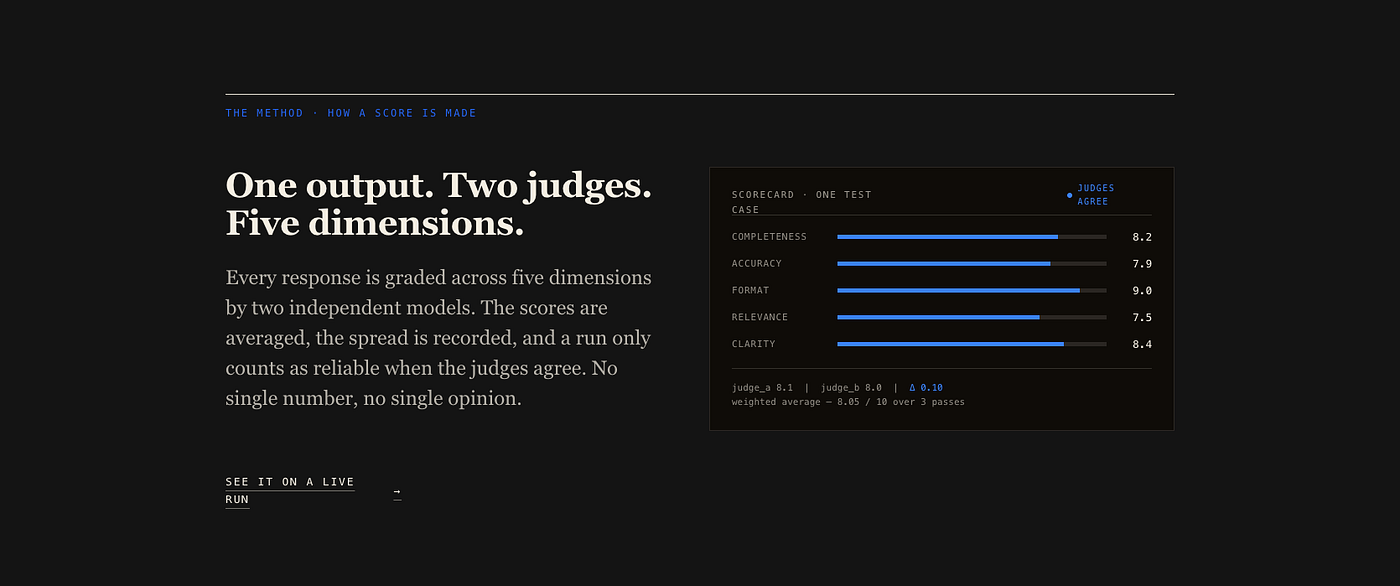
One output, two judges, five dimensions — the scorecard for a single test case.
Every output is graded across five weighted dimensions: completeness, accuracy, format, relevance, and clarity. A safety document and a chatbot are held to different standards. The weights are yours to set.
And no model gets to mark its own homework:
- Two judges. Every output is scored by two independent models from different providers. Scores are averaged, so no single provider’s bias can skew the leaderboard. I chose Claude-Sonnet-4.6 and GPT-5.4-mini.
- Multiple passes. Each test case runs three times per model. A model that scores 9 once and 6 the next gets flagged as unreliable.
- Judge agreement. A run only counts as reliable when the judges agree — the spread between them is recorded, not hidden.
See it before you install it
The live demo dashboard lets you click through a full evaluation result — leaderboard, quality-vs-speed trade-offs, cost-vs-intelligence — across text generation, text classification, and a vision safety gate. No install required. (The demo runs on seeded, illustrative data; your dashboard runs on your prompts.)
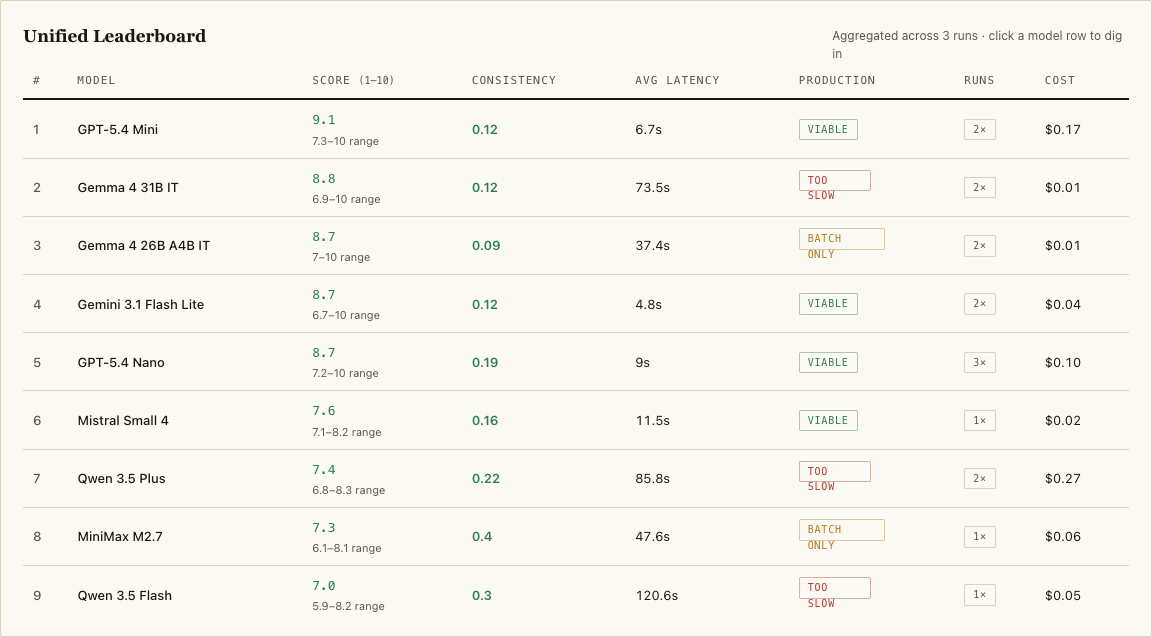
The unified leaderboard from the live demo — seeded example data.
The leaderboard makes the trade-off visible. In the example suite, the top model scores 9.1/10 at $0.17 per run with 6.7s latency. The runner-up scores 8.8 and costs a penny — but takes 73.5 seconds. Too slow for production, fine for batch.
That’s the decision evals exist for.
Up and running before the kettle boils
You need Python 3.10+ and an OpenRouter API key.
# 1. Clone and install
git clone https://github.com/aristidesnakos/model-evals-framework && cd model-evals-framework
pip install -r requirements.txt
# 2. Add your API key
cp .env.example .env  # then add OPENROUTER_API_KEY
# 3. Create your first evaluation suite
python evalpulse.py init
# 4. Dry-run to verify (no cost), then evaluate
python evalpulse.py --dry-run --suite getting_started
python evalpulse.py --run-eval --suite getting_started --dashboard
The dry run costs nothing — it verifies your suite before you spend a cent on API calls.
The takeaway
A demo needs to work once. A production system needs to work every time, prove it, and catch itself when it doesn’t.
EvalPulse is how we do that. Now it’s yours!
Try the live demo, or clone it from GitHub and run it on your own prompts. If you find something broken (or build something great with it), open an issue — contributions are welcome.
메타데이터
- post_id
- 0ce2c8ebcacd
- slug
- run-ai-evals-for-free-on-your-own-prompts-0ce2c8ebcacd
- url
- https://medium.com/my-ai-colleague/run-ai-evals-for-free-on-your-own-prompts-0ce2c8ebcacd
- canonical_url
- https://medium.com/my-ai-colleague/run-ai-evals-for-free-on-your-own-prompts-0ce2c8ebcacd
- author_url
- https://medium.com/@just-aristides
- status
- ok
- fetched_at
- 2026-06-16 19:09:56