Step-by-Step Guide to Prevent Account Takeover Fraud with FraudLabs Pro
Account takeover (ATO) fraud is no longer just a technical issue — it’s a growing threat across digital platforms. Whether you run an…
New Feature
Step-by-Step Guide to Prevent Account Takeover Fraud with FraudLabs Pro

Account takeover (ATO) fraud is no longer just a technical issue — it’s a growing threat across digital platforms. Whether you run an eCommerce store, a SaaS product, or any online service, attackers are constantly looking for ways to gain unauthorized access to user accounts.
Once they succeed, the consequences can be serious. Unauthorized transactions, data breaches, and loss of customer trust can all happen within minutes. That’s why prevention needs to happen early — ideally before an attacker ever gains access.
In this guide, we’ll walk through how you can prevent account takeover fraud using FraudLabs Pro Account Takeover Fraud Prevention.
[embed]
Getting Started with the Right Setup
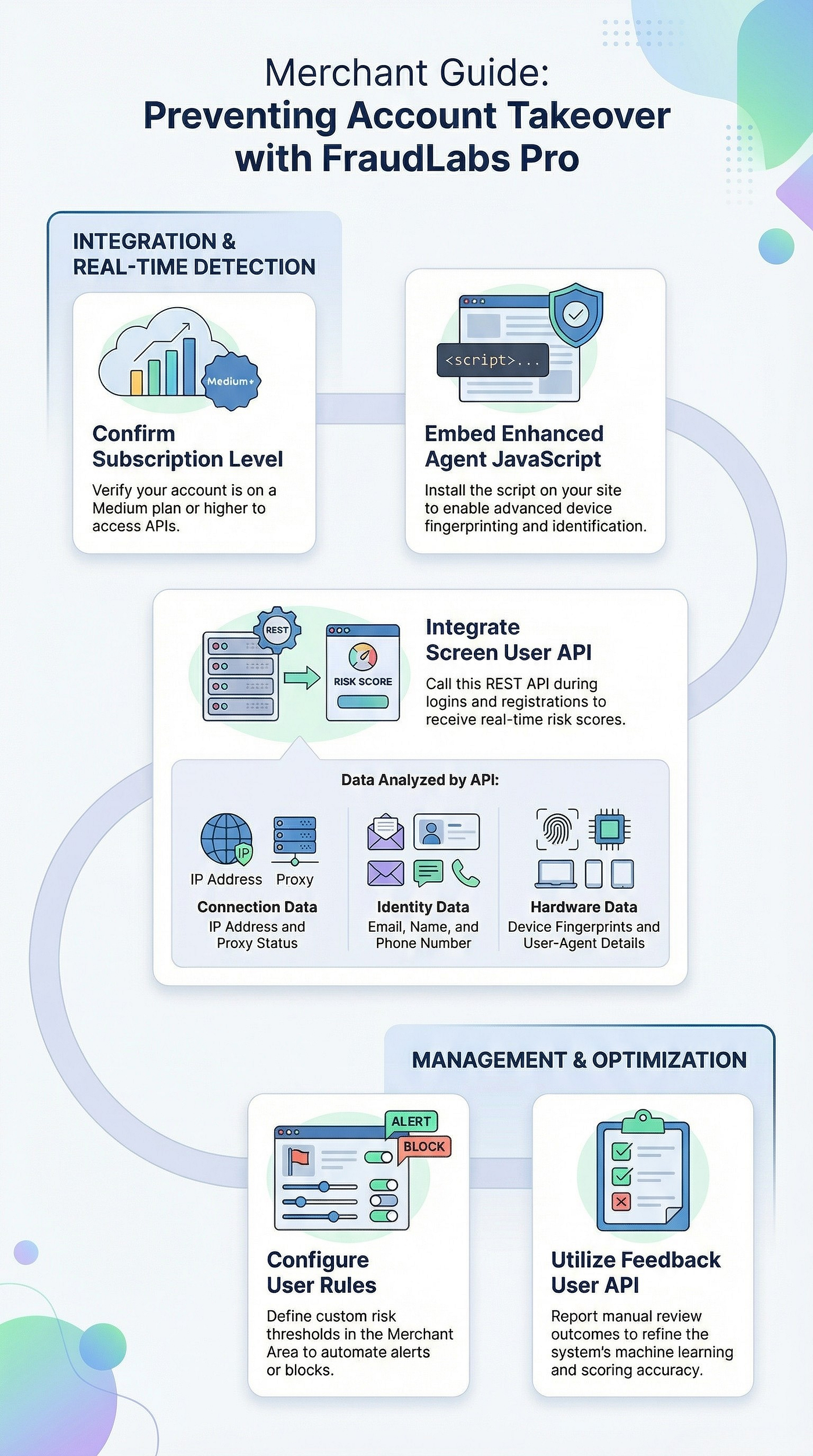
Before implementing any protection, it’s important to ensure your FraudLabs Pro account is on a Medium plan or higher. This unlocks access to the APIs required for account takeover prevention.
If you’re new to the platform, getting started is straightforward. You can create an account by visiting fraudlabspro.com and begin setting up your protection right away.
Adding Visibility with Agent JavaScript
One of the first steps in strengthening your defenses is embedding the Enhanced Agent JavaScript into your website. This script works quietly in the background, collecting valuable signals about user devices and behavior.
By placing it on key pages — such as login, checkout, profile, or billing — you gain better visibility into how users interact with your platform. This additional context makes it much easier to distinguish between legitimate users and suspicious activity.
How to add the Enhanced Agent JavaScript?
Simply navigate to the FraudLabs Pro **Merchant dashboard > Settings > Agent JavaScript**. Then, copy the script and paste it directly into the HTML of each landing page that you specified.
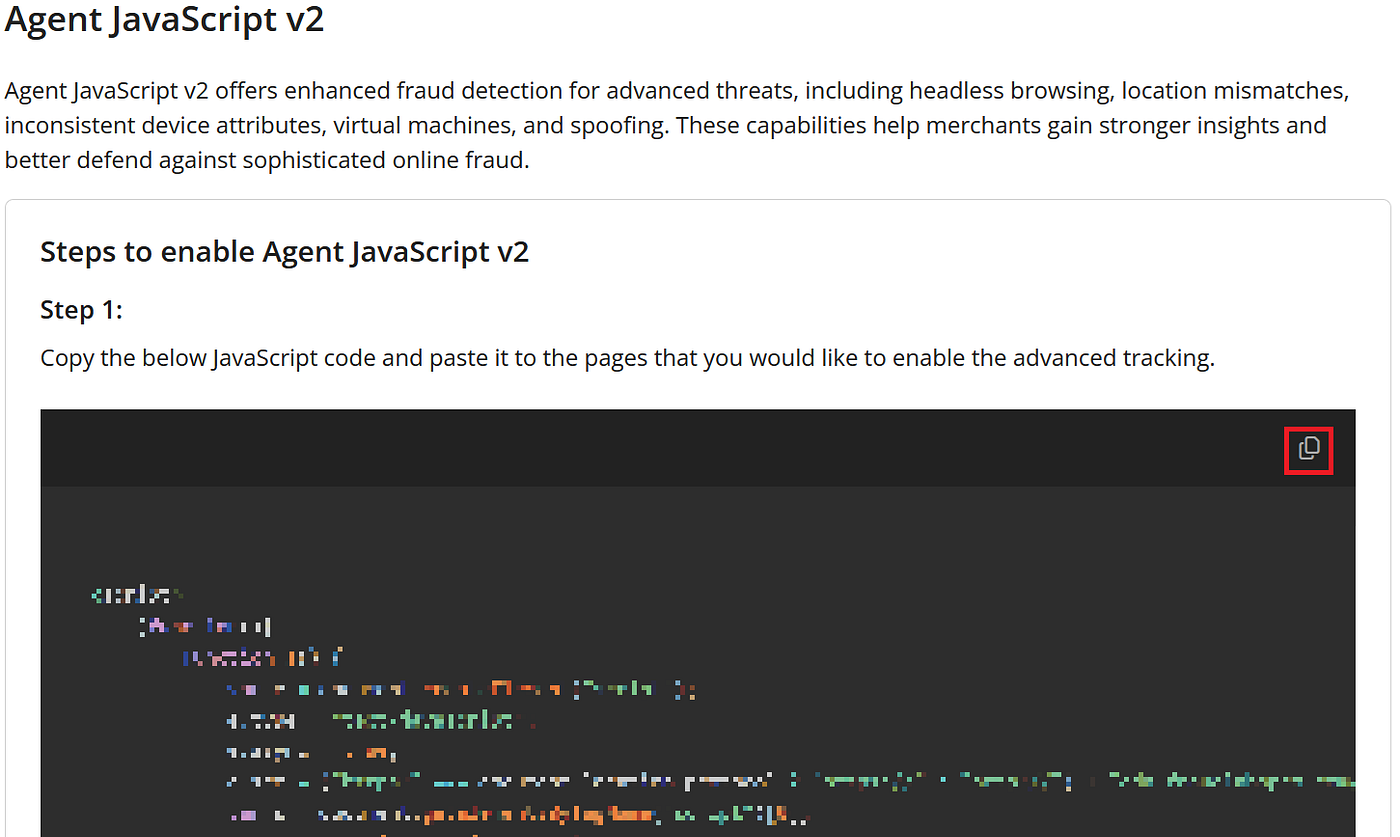
Next, you can define up to five landing pages where you want to enable the updated Agent JavaScript detection and click on the “Save Changes” button.
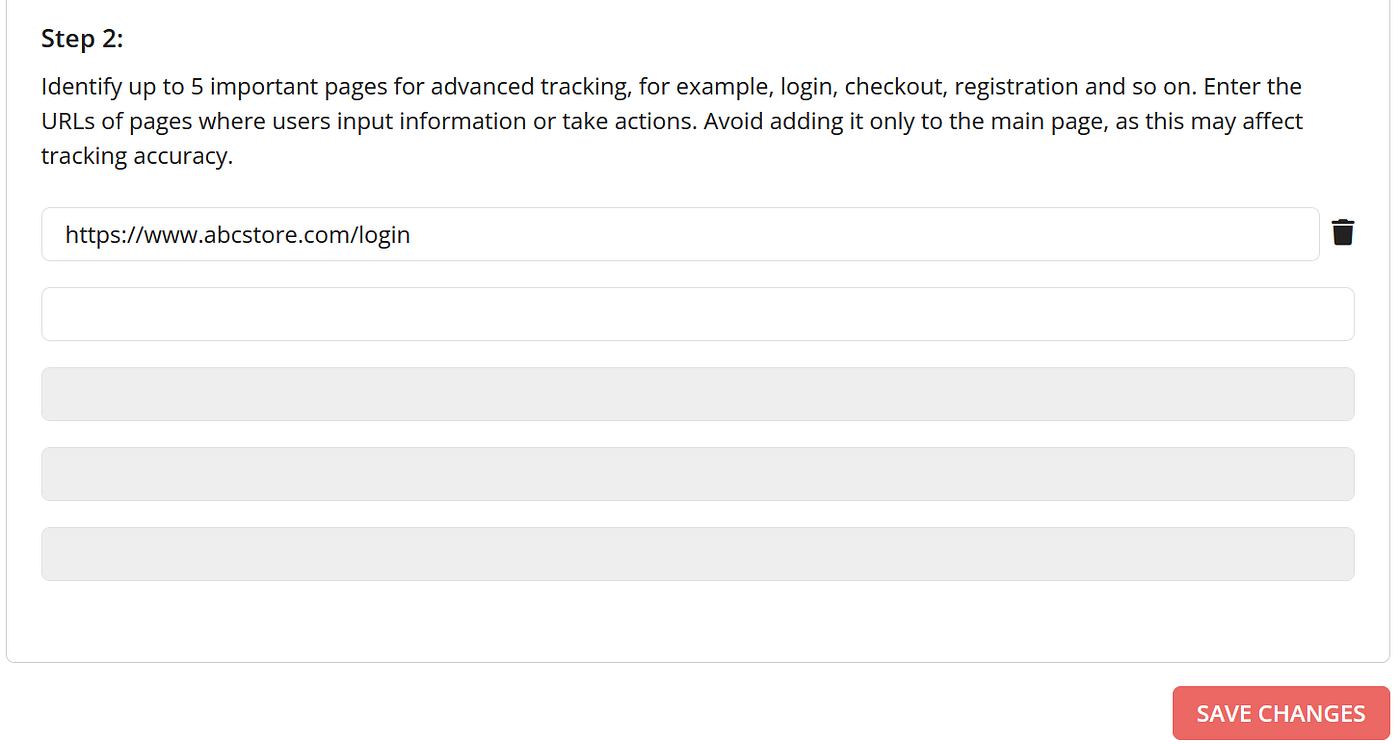
Once installed, the script will automatically collect device data when visitors interact with those pages.
Detecting Risk in Real Time
Once your website is collecting the right data, the next step is to make sense of it in real time. This is where the Screen User API comes in.
By integrating this API into your login and registration flows, every user interaction can be evaluated instantly. Each request generates a user score based on a combination of signals, including IP address, proxy usage, contact details, and device fingerprints.
Instead of relying on guesswork, you now have a clear, data-driven way to assess whether a login attempt is trustworthy or potentially fraudulent.
Secure your platform with FraudLabs Pro ATO Fraud Prevention
Turning Insights into Action
Detection alone isn’t enough — you also need to decide how your system should respond.
Within the User Rules Management page, you can define risk thresholds that match your business needs. For example, you might choose to allow low-risk users to proceed without interruption, while flagging or blocking those with higher risk scores.
Just login to your FraudLabs Pro Merchant Area, then go to Rules > User Transaction. You can configure your rules based on your business needs.
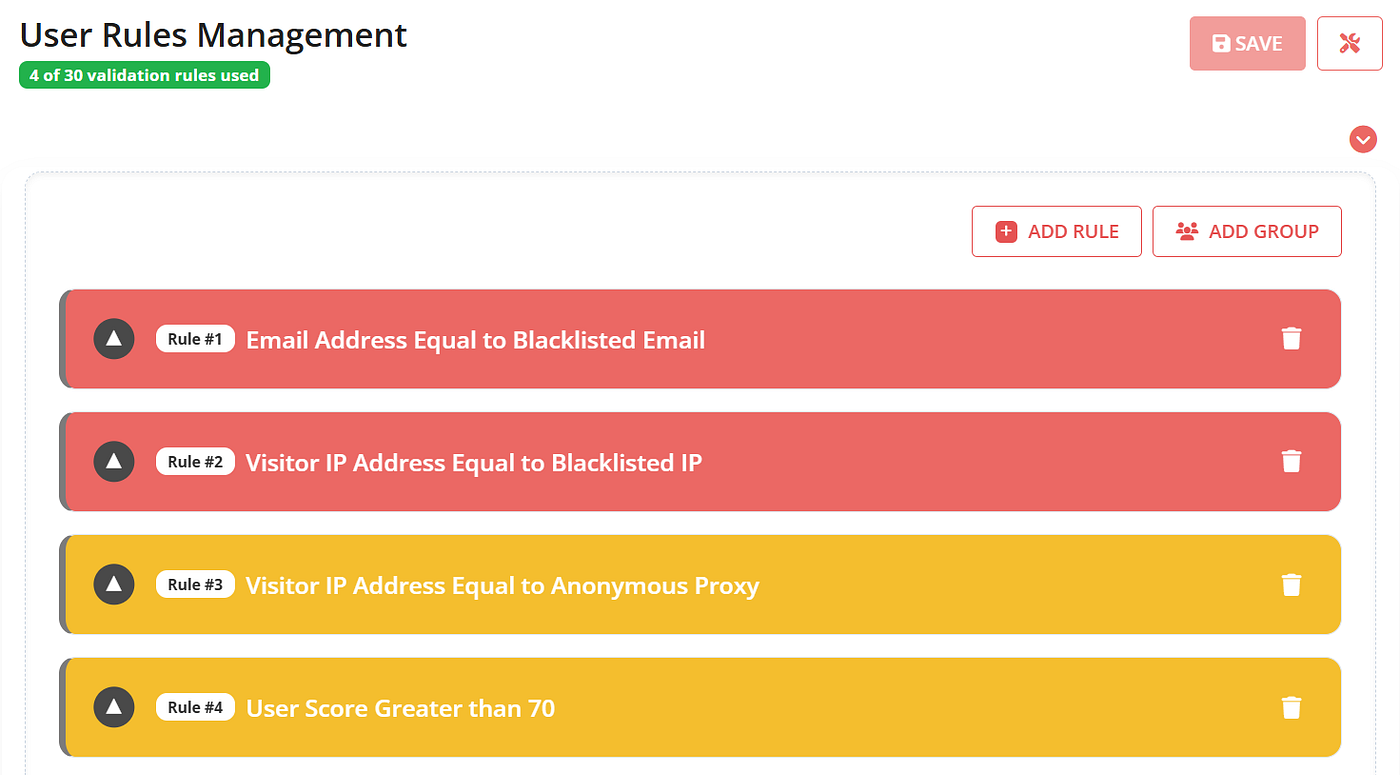
This level of control allows you to strike the right balance between security and user experience.
Staying Alert to Suspicious Activity
Even with automation in place, visibility remains crucial. FraudLabs Pro allows you to configure real-time alerts so you’re never left in the dark. Whenever suspicious activity is detected or a user exceeds your defined risk threshold, you’ll receive an immediate notification via email or Slack.
Go to FraudLabs Pro Settings page, then scroll to the User Transaction Notification. You can configure the notification for email and slack when the transaction is either Approved, Rejected or In Review.
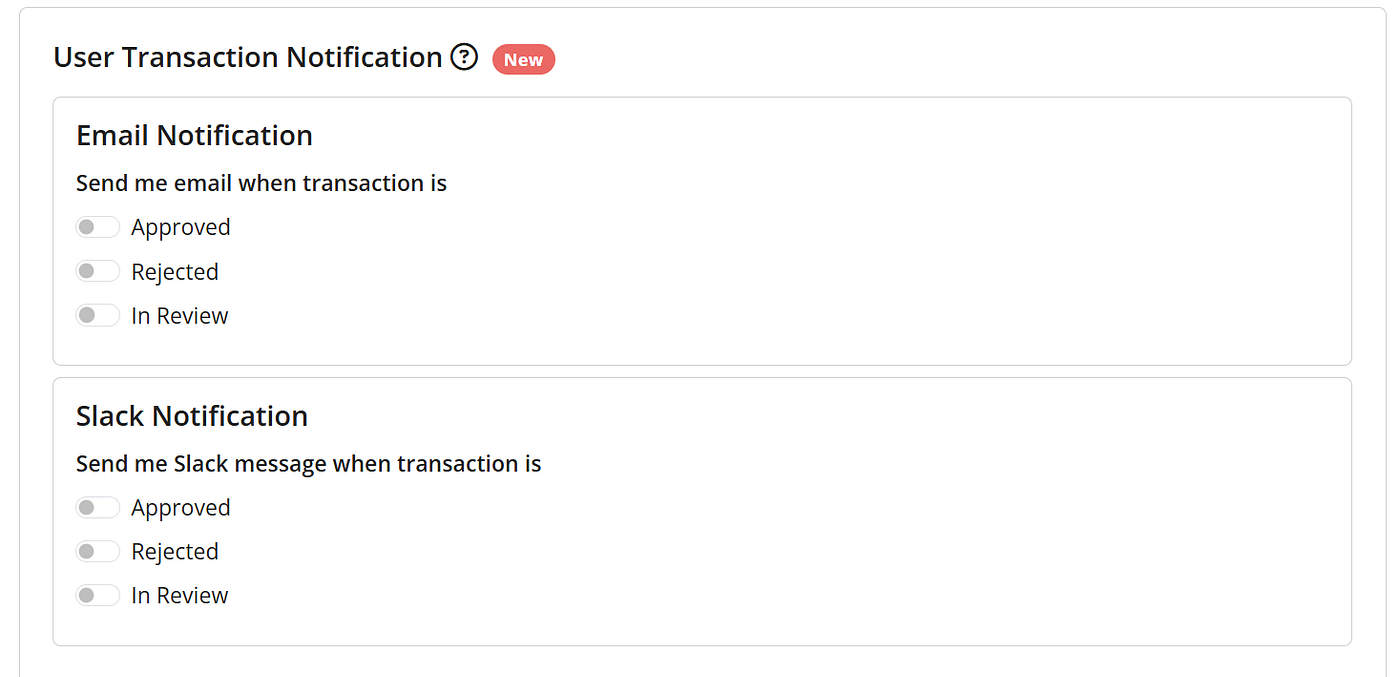
This ensures that you can respond quickly, investigate further, or take action before any real damage occurs.
Improving Over Time
Fraud prevention isn’t a one-time setup — it’s an ongoing process.
With the Feedback User API, you can feed your manual review outcomes back into the system. Over time, this helps refine the underlying machine learning models, improving accuracy and reducing false positives.
The more your system learns, the better it becomes at identifying real threats while allowing legitimate users through.
Final Thoughts
Account takeover fraud continues to evolve, but so do the tools available to stop it.
By combining device intelligence, real-time risk analysis, and flexible automation, FraudLabs Pro provides a practical and effective way to protect your users. More importantly, it allows you to stay proactive — detecting and stopping threats before they escalate.
Want to Secure Your Platform or Business From Account Takeover Fraud?
메타데이터
- post_id
- 0d28b258617a
- slug
- step-by-step-guide-to-prevent-account-takeover-fraud-with-fraudlabs-pro-0d28b258617a
- url
- https://medium.com/fraudlabs-pro-fraud-prevention/step-by-step-guide-to-prevent-account-takeover-fraud-with-fraudlabs-pro-0d28b258617a
- canonical_url
- https://medium.com/fraudlabs-pro-fraud-prevention/step-by-step-guide-to-prevent-account-takeover-fraud-with-fraudlabs-pro-0d28b258617a
- author_url
- https://medium.com/@fraudlabspro
- status
- ok
- fetched_at
- 2026-06-15 20:49:13