Introduction to Data Directory (PE)-Nir(9)
Hello, Cybersecurity enthusiasts and white hat hackers!!
Introduction to Data Directory (PE)-Nir(9)
Hello, Cybersecurity enthusiasts and white hat hackers!!
In our previous blog, we explored the NT Header in detail and understood its critical role in the structure of a Portable Executable (PE) file. However, one of the most important parts is still remaining — the Data Directory, which is a part of the Optional Header.
In today’s blog, we are going to dive deep into the Data Directory, which plays a crucial role in helping the Windows loader locate essential components such as imports, exports, resources, and more within a PE file.
Where is Data Directory Located?
Inside the IMAGE_OPTIONAL_HEADER64 structure:
typedef struct _IMAGE_OPTIONAL_HEADER64 {
 WORD Magic;
 BYTE MajorLinkerVersion;
 BYTE MinorLinkerVersion;
 DWORD SizeOfCode;
 DWORD SizeOfInitializedData;
 DWORD SizeOfUninitializedData;
 DWORD AddressOfEntryPoint;
 DWORD BaseOfCode;
 ULONGLONG ImageBase;
 DWORD SectionAlignment;
 DWORD FileAlignment;
 WORD MajorOperatingSystemVersion;
 WORD MinorOperatingSystemVersion;
 WORD MajorImageVersion;
 WORD MinorImageVersion;
 WORD MajorSubsystemVersion;
 WORD MinorSubsystemVersion;
 DWORD Win32VersionValue;
 DWORD SizeOfImage;
 DWORD SizeOfHeaders;
 DWORD CheckSum;
 WORD Subsystem;
 WORD DllCharacteristics;
 ULONGLONG SizeOfStackReserve;
 ULONGLONG SizeOfStackCommit;
 ULONGLONG SizeOfHeapReserve;
 ULONGLONG SizeOfHeapCommit;
 DWORD LoaderFlags;
 DWORD NumberOfRvaAndSizes;
 IMAGE_DATA_DIRECTORY DataDirectory[IMAGE_NUMBEROF_DIRECTORY_ENTRIES]; // Here
} IMAGE_OPTIONAL_HEADER64, *PIMAGE_OPTIONAL_HEADER64;
IMAGE_DATA_DIRECTORY DataDirectory[IMAGE_NUMBEROF_DIRECTORY_ENTRIES];This is the exact place where the Data Directory exists.
What is Data Directory?
The Data Directory is a fixed-size array of 16 entries inside the Optional Header. Each entry does not store actual data; instead, it stores a pointer to another structure (such as export, import, etc.) along with its size, which indicates how large the structure it is pointing to is.
Each entry is represented by the [IMAGE_DATA_DIRECTORY](https://learn.microsoft.com/en-us/windows/win32/api/winnt/ns-winnt-image_data_directory) structure, defined in winnt.h as:
typedef struct _IMAGE_DATA_DIRECTORY {
    DWORD VirtualAddress; // RVA that points to the location of another structure (tells where the structure is located (as an RVA, not a full address))
    DWORD Size;           // Size of that structure in bytes (tells how big that structure is)
} IMAGE_DATA_DIRECTORY, *PIMAGE_DATA_DIRECTORY;
This structure has only two fields:
VirtualAddress— the RVA that points to the actual structure inside the PE fileSize— the size of that structure in bytes
Note: Despite being named
VirtualAddress, this field stores an RVA, not an absolute virtual address. The actual memory address is calculated as:
Actual Address = ImageBase + VirtualAddress
And the full array is declared inside the Optional Header as:
IMAGE_DATA_DIRECTORY DataDirectory[IMAGE_NUMBEROF_DIRECTORY_ENTRIES];Where:
#define IMAGE_NUMBEROF_DIRECTORY_ENTRIES 16So this is simply 16 entries of the same IMAGE_DATA_DIRECTORY structure, each pointing to a different and specific structure inside the PE file.
For example:
DataDirectory[0] → VirtualAddress points to → IMAGE_EXPORT_DIRECTORY
DataDirectory[1] → VirtualAddress points to → IMAGE_IMPORT_DESCRIPTOR
DataDirectory[5] → VirtualAddress points to → IMAGE_BASE_RELOCATION
DataDirectory[9] → VirtualAddress points to → IMAGE_TLS_DIRECTORY
So the IMAGE_DATA_DIRECTORY structure is always the same — but the structure it points to is different for each index.
Now, as I already told you, there are 16 entries in the Data Directory, which is defined in winnt.h like this:
#define IMAGE_NUMBEROF_DIRECTORY_ENTRIES 16But the main question is — how do we know which structure each entry is pointing to?
For that, we use the predefined indexes (also given in winnt.h). Each index is fixed for a specific structure. For example, if we use DataDirectory[0], it will always point to the Export Directory. Even though every entry has the same format (VirtualAddress and Size), what it points to depends on the index.
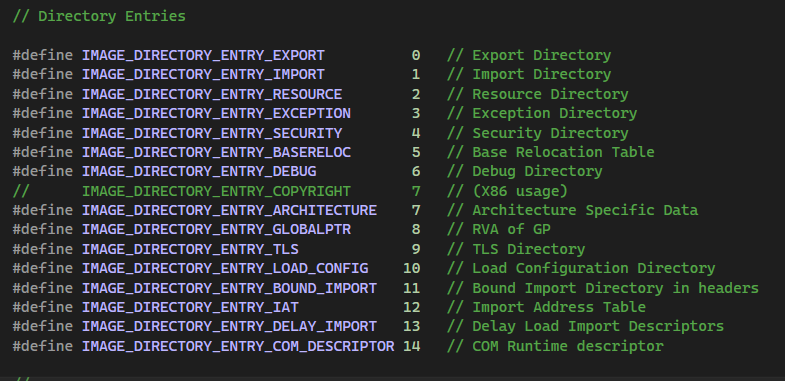
The image above (taken from winnt.h) shows all these entries. It clearly tells which index is used for which directory. The table below makes it even easier to understand.
| Index | Name           | Points To                               |
| ----- | -------------- | ----------------------------------------|
| 0     | EXPORT         | IMAGE_EXPORT_DIRECTORY                  |
| 1     | IMPORT         | IMAGE_IMPORT_DESCRIPTOR                 |
| 2     | RESOURCE       | IMAGE_RESOURCE_DIRECTORY                |
| 3     | EXCEPTION      | IMAGE_RUNTIME_FUNCTION_ENTRY            |
| 4     | SECURITY       | WIN_CERTIFICATE                         |
| 5     | BASERELOC      | IMAGE_BASE_RELOCATION                   |
| 6     | DEBUG          | IMAGE_DEBUG_DIRECTORY                   |
| 7     | ARCHITECTURE   | Reserved (deprecated)                   |
| 8     | GLOBALPTR      | RVA of global pointer                   |
| 9     | TLS            | IMAGE_TLS_DIRECTORY                     |
| 10    | LOAD_CONFIG    | IMAGE_LOAD_CONFIG_DIRECTORY             |
| 11    | BOUND_IMPORT   | IMAGE_BOUND_IMPORT_DESCRIPTOR           |
| 12    | IAT            | IMAGE_THUNK_DATA (Import Address Table) |
| 13    | DELAY_IMPORT   | IMAGE_DELAYLOAD_DESCRIPTOR              |
| 14    | COM_DESCRIPTOR | IMAGE_COR20_HEADER (.NET)               |
| 15    | RESERVED       | Must be 0                               |
This table shows all 16 entries and what each one points to inside the PE file. So even though the structure (IMAGE_DATA_DIRECTORY) is always the same, its meaning changes based on its position (index). For example, index 0 → Export, index 1 → Import, index 5 → Base Relocation, and so on.
In simple words, the Data Directory works like a lookup table. Each index is reserved for a specific type of data. This helps the Windows loader quickly find things like imports, exports, resources, TLS, etc.
Now I assume that you have a good idea about these concepts, but to make it even clearer, we will go through an example. I know this topic can be confusing at first — even I was confused when I first learned it — so let’s break it down step by step.
We already know that the Data Directory is an array of 16 entries, and each entry is represented by the IMAGE_DATA_DIRECTORY structure:
typedef struct _IMAGE_DATA_DIRECTORY {
    DWORD VirtualAddress;
    DWORD Size;
} IMAGE_DATA_DIRECTORY, *PIMAGE_DATA_DIRECTORY;
Now the important question is — how does this simple two-field structure know what it is pointing to? . These pointer values are inserted by the linker at compile time.
Let’s understand this with an example.
The full array declaration inside the Optional Header is:
IMAGE_DATA_DIRECTORY DataDirectory[16];Now assume we are looking at DataDirectory[0], which corresponds to IMAGE_DIRECTORY_ENTRY_EXPORT. For this specific slot, the same IMAGE_DATA_DIRECTORY structure now looks like this internally:
typedef struct _IMAGE_DATA_DIRECTORY {
    DWORD VirtualAddress;  // RVA pointing to IMAGE_EXPORT_DIRECTORY
    DWORD Size;            // Size of IMAGE_EXPORT_DIRECTORY
} IMAGE_DATA_DIRECTORY;
The VirtualAddress here is the RVA of IMAGE_EXPORT_DIRECTORY, which is a completely separate and detailed structure that lives somewhere inside the PE file. The Size is how large that IMAGE_EXPORT_DIRECTORY structure is.
The same logic applies to every other index:
// DataDirectory[1] - Import Table
IMAGE_DATA_DIRECTORY {
    DWORD VirtualAddress;  // RVA of IMAGE_IMPORT_DESCRIPTOR
    DWORD Size;            // Size of IMAGE_IMPORT_DESCRIPTOR
}

// DataDirectory[5] - Base Relocation Table
IMAGE_DATA_DIRECTORY {
    DWORD VirtualAddress;  // RVA of IMAGE_BASE_RELOCATION
    DWORD Size;            // Size of IMAGE_BASE_RELOCATION
}

// DataDirectory[9] - TLS Table
IMAGE_DATA_DIRECTORY {
    DWORD VirtualAddress;  // RVA of IMAGE_TLS_DIRECTORY
    DWORD Size;            // Size of IMAGE_TLS_DIRECTORY
}
So in simple terms:
- The
IMAGE_DATA_DIRECTORYstructure is always the same — justVirtualAddress + Size - The index decides what structure the
VirtualAddressis pointing to - The actual detailed structure (like
IMAGE_EXPORT_DIRECTORYorIMAGE_IMPORT_DESCRIPTOR) lives separately inside the PE file VirtualAddressis always an RVA, so to reach the actual structure in memory:
Actual Address = ImageBase + VirtualAddressAnd if VirtualAddress = 0, it simply means that particular structure does not exist in the PE file. For example, if a PE file has no exports, DataDirectory[0].VirtualAddress will be 0. This is the foundation of how Windows loader navigates through a PE file — it goes to a specific index in the Data Directory, reads the VirtualAddress, adds the ImageBase, and reaches the actual structure it needs.

Example with PE-bear (DataDirectory)
Understanding this is very important in reverse engineering and malware analysis, because it helps you know where important parts of a PE file are located and how they are used during execution. It also helps when writing your own functions, and you will see it used many times in techniques like Hell’s Gate and SysWhispers.
Till now you have idea of data directory now we will learn about all the 16 entry in detail
IMAGE_EXPORT_DIRECTORY
IMAGE_EXPORT_DIRECTORY is a structure in a PE file that contains information about all the functions and data that a program (DLL or EXE) exports, meaning the functions that can be used by other programs. It basically stores the details needed to find exported function names, their addresses, and their ordinals.
Now, to understand this better, connect it with what we learned earlier.
If you remember our previous blog on **Windows API Execution Flow, we saw how a simple API call travels through multiple layers — from the user process, through kernel32.dll, kernelbase.dll, and finally ntdll.dll before reaching the kernel via a syscall. In that flow, we noticed that DLLs like kernel32.dll and kernelbase.dll export functions** such as CreateFile and CreateFileW that our application can call. But have you ever wondered — how does Windows actually know where those functions are located inside the DLL? When your program calls CreateFileW, it does not hardcode the memory address of that function. Instead, Windows finds it automatically at runtime.
Every DLL that exports functions contains this special structure inside its PE file. It acts like a directory or a lookup table that stores two critical pieces of information — the name of every exported function and the RVA (Relative Virtual Address) pointing to where that function actually lives in memory. So when Windows loads kernel32.dll and your process needs CreateFileW, the loader walks through the IMAGE_EXPORT_DIRECTORY of that DLL, searches for the name CreateFileW, finds its corresponding address, and hands it back to your program. You never had to remember or hardcode any address — Windows did all of that using IMAGE_EXPORT_DIRECTORY behind the scenes.
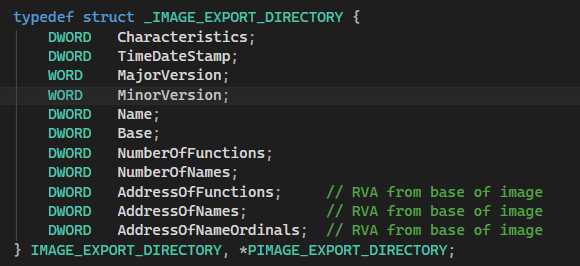
IMAGE_EXPORT_DIRECTORY
IMAGE_EXPORT_DIRECTORY is a structure that stores all the key information about exported functions in a DLL. It includes basic details like the DLL name (Name), the starting ordinal (Base), the total number of exported functions (NumberOfFunctions), and how many of them have names (NumberOfNames). The most important part of this structure is the three arrays: AddressOfFunctions, AddressOfNames, and AddressOfNameOrdinals. These work together to map a function name to its actual memory address by following the flow: name → ordinal → function address. In simple terms, this structure helps Windows locate exported functions inside a DLL. I will cover this in much more detail in a future module.
IMAGE_IMPORT_DESCRIPTOR
IMAGE_IMPORT_DESCRIPTOR is a structure in a PE file that contains information about all the functions that a program (EXE or DLL) imports, meaning the functions it needs to borrow from other DLLs in order to work. It basically stores the details needed to find which DLL is being used and which functions are being called from it.
Now, to understand this better, connect it with what we learned earlier.
If you remember our previous blog on Windows API Execution Flow, we saw how our user process FILE.exe called CreateFileW from kernel32.dll. But have you ever wondered — how did FILE.exe even know that it needed kernel32.dll in the first place? And how did Windows know which functions to load from that DLL before the program even started running? The answer lies in the import table.
This is exactly where IMAGE_IMPORT_DESCRIPTOR comes into the picture. Every EXE or DLL that uses functions from another DLL contains this structure inside its PE file. It acts like a shopping list — it tells Windows which DLLs the program depends on and which functions it needs from each of them. So when Windows loads FILE.exe, before execution even begins, the loader reads through the IMAGE_IMPORT_DESCRIPTOR, finds that the program needs CreateFileW from kernel32.dll, loads that DLL into memory, finds the function address using the IMAGE_EXPORT_DIRECTORY of kernel32.dll, and writes it into the program so it is ready to use. You never had to manually load any DLL or find any address yourself — Windows did all of that using IMAGE_IMPORT_DESCRIPTOR behind the scenes.
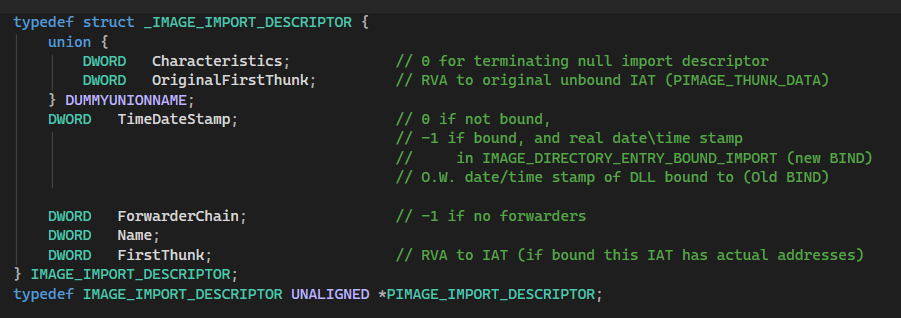
IMAGE_IMPORT_DESCRIPTOR is a structure that stores all the key information about the DLLs a program imports from. Looking at the structure definition in above image, it contains the following fields. OriginalFirstThunk points to the Import Lookup Table (ILT), which is a backup copy that stores the original function names or ordinals and never gets modified by Windows. TimeDateStamp is 0 when imports are not yet bound, meaning Windows has not resolved the addresses yet. ForwarderChain is used when one DLL forwards a function call to another DLL, and is -1 when there are no forwarders. Name is an RVA pointing to the ASCII name of the DLL being imported from, for example KERNEL32.dll. FirstThunk points to the Import Address Table (IAT) array (array of IMAGE_THUNK_DATA entries), which is where Windows writes the actual memory addresses of functions at load time. Specifically, the FirstThunk field inside the descriptor points directly to the IAT, which is where Windows patches in the real function addresses when the DLL is loaded. Before the program runs, these entries hold function name references. The moment Windows loads the program, it replaces every single one of them with the real memory address of that function.
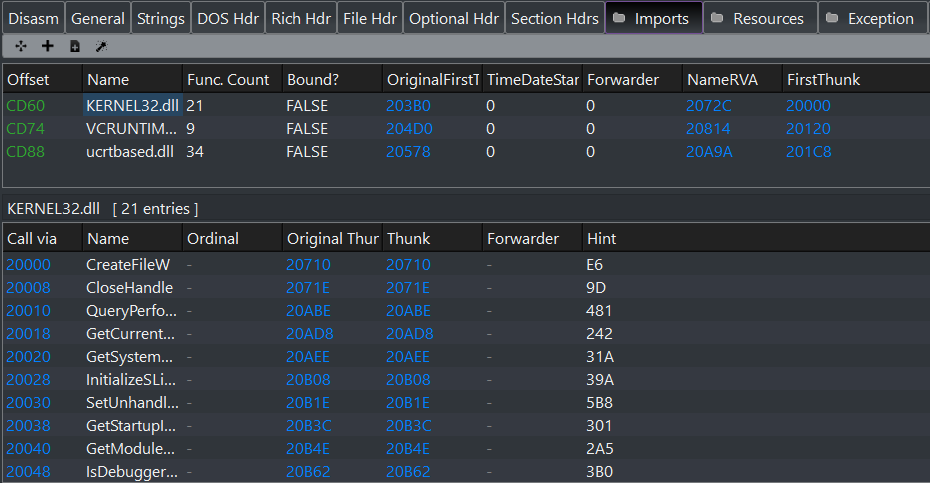
Example of IMAGE_IMPORT_DESCRIPTOR
There is one IMAGE_IMPORT_DESCRIPTOR entry for each DLL the program depends on, and the list ends with a null entry. In simple terms, this structure tells Windows everything it needs to know to wire up a program's dependencies before it starts running. I will cover this in much more detail in a future module.
IMAGE_RESOURCE_DIRECTORY
IMAGE_RESOURCE_DIRECTORY is a structure in a PE file that contains information about all the resources embedded inside a program, meaning things like icons, images, dialog boxes, string tables, version information, and menus that the program carries within itself. It basically stores the details needed to organize and locate these embedded resources at runtime.
Now, to understand this better, think about something simple. When you open any Windows application like Notepad or Chrome, you see an icon in the taskbar and title bar. That icon is not loaded from some external file — it is embedded directly inside the EXE itself. Similarly, when an application shows an error message dialog or a menu, those are also not stored separately outside the program. They are embedded as resources inside the PE file, and IMAGE_RESOURCE_DIRECTORY is the structure that keeps track of all of them.
Every EXE or DLL that contains embedded resources has this structure inside its PE file. The first level represents the resource type, such as icon, dialog, string table, or version info. The second level represents the resource ID or name, which identifies the specific resource within that type. The third level represents the language, allowing the same resource to exist in multiple languages for localization purposes. Windows walks down this tree whenever it needs to find and load a specific resource.
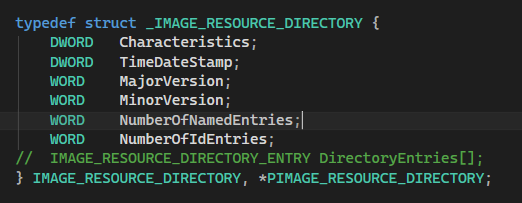
Looking at the structure definition, it contains the following fields. Characteristics is reserved and always zero. TimeDateStamp records when the resource directory was created. MajorVersion and MinorVersion are version numbers that are almost always zero in practice. The two most important fields are NumberOfNamedEntries and NumberOfIdEntries — NumberOfNamedEntries tells you how many resources in this directory are identified by a string name, while NumberOfIdEntries tells you how many are identified by a numeric ID. After the structure itself comes an array of IMAGE_RESOURCE_DIRECTORY_ENTRY entries, one for each resource, which point deeper into the tree until you finally reach the actual raw resource data.
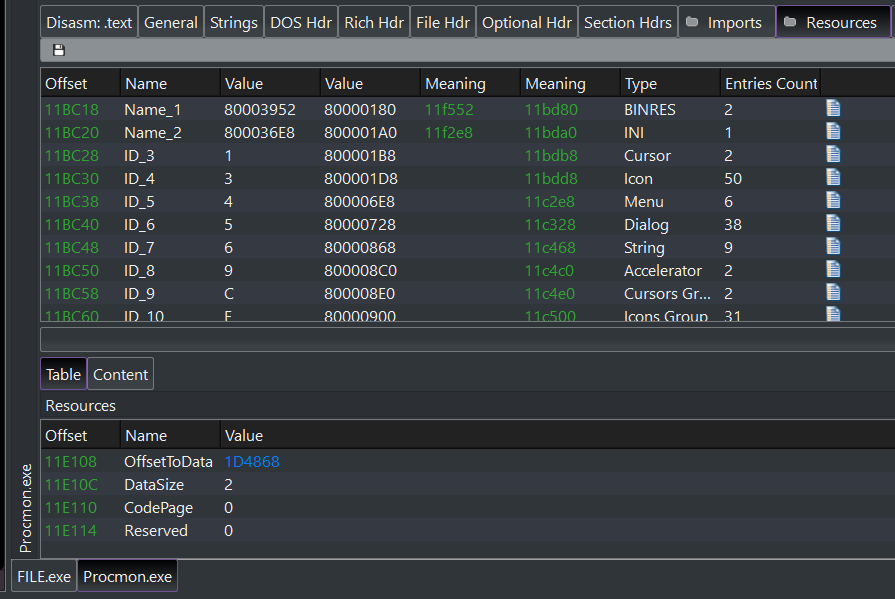
Example of IMAGE_RESOURCE_DIRECTORY
In simple terms, this structure is how Windows knows what resources are packed inside a program and where to find each one of them.
IMAGE_THUNK_DATA / IAT
IMAGE_THUNK_DATA is a structure in a PE file that represents a single entry inside either the Import Lookup Table (ILT) or the Import Address Table (IAT). In simple words, if the IAT is a table with multiple rows, then one IMAGE_THUNK_DATA is just one single row of that table. It stores the information needed to identify a specific imported function — either by its name or by its ordinal number.
Every function that a program imports from a DLL has its own dedicated IMAGE_THUNK_DATA entry. It is a union, meaning the same structure holds different things depending on the situation. Before Windows loads the program, each entry holds either an RVA pointing to an IMAGE_IMPORT_BY_NAME structure which contains the function name and a hint value, or a direct ordinal number if the function is imported by ordinal rather than name. The moment Windows loads the program, it replaces each entry with the real runtime memory address of that function. From that point on, every time your program calls an imported function, it jumps through that IMAGE_THUNK_DATA entry in the IAT to reach the actual function in memory.
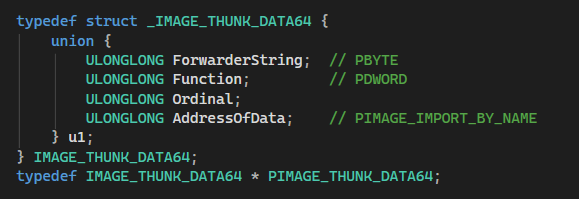
IMAGE_THUNK_DATA is a union that can hold one of three things depending on the context. Before loading, it holds either AddressOfData, which is an RVA pointing to an IMAGE_IMPORT_BY_NAME structure containing the function name and hint, or an ordinal number stored in the lower bits with the highest bit set as a flag to indicate it is an ordinal import. After loading, it holds Function, which is the actual runtime virtual address of the imported function that Windows has resolved and patched in. The IAT itself is simply the full array of these IMAGE_THUNK_DATA entries sitting sequentially in the .idata or .rdata section of the PE file, terminated by a null entry. So IMAGE_IMPORT_DESCRIPTOR tells Windows which DLL to load, and IMAGE_THUNK_DATA tells Windows which specific functions to find inside that DLL.
IAT (Import Address Table) IMP
The Import Address Table (IAT) is simply a collection of IMAGE_THUNK_DATA entries arranged sequentially in memory, terminated by a null entry. Each entry in this collection represents one single imported function. Before Windows loads the program, each IMAGE_THUNK_DATA entry inside the IAT holds either a function name reference or an ordinal number. The moment Windows loads the program, it walks through every single entry in the IAT and replaces each one with the real runtime memory address of that function. From that point on, every time your program calls an imported function, it jumps through the corresponding entry in the IAT to reach the actual function in memory.

Import Address Table
The IAT physically lives inside the .idata or .rdata section of the PE file and can be located in two ways — either through the FirstThunk field inside IMAGE_IMPORT_DESCRIPTOR, or directly through DataDirectory[12] in the Optional Header. Both point to the same location in memory. There is one IAT per imported DLL, meaning if your program imports from three DLLs, there are three separate IAT arrays — one for each DLL. In simple terms, the IAT is the final destination where Windows writes all the real function addresses, making it possible for your program to actually call imported functions at runtime. I will cover this in much more detail in a future module.
WIN_CERTIFICATE
WIN_CERTIFICATE is a structure in a PE file that stores the digital signature attached to an executable, meaning it contains the cryptographic proof that verifies who created the program and that it has not been tampered with since it was signed. It basically stores the certificate data that Windows uses to decide whether a program can be trusted before running it. Unlike most other PE structures which are defined in <winnt.h>, WIN_CERTIFICATE is defined in **<wintrust.h>** because it belongs to the Windows Trust and Verification subsystem — the part of Windows responsible for handling code signing, certificate validation, and publisher trust decisions.
Now, to understand this better, think about something simple. When you download software from the internet and run it, Windows sometimes shows a UAC prompt saying “Verified publisher: Microsoft Corporation” with a blue shield, or sometimes shows a warning saying “Unknown Publisher” with an Red shield. That difference comes entirely from whether the executable has a valid digital signature stored in its WIN_CERTIFICATE structure or not.
When a software company wants to sign their executable, they generate a cryptographic hash of the entire file contents and encrypt it using their private key. This signature, along with their certificate information, is then stored in the WIN_CERTIFICATE structure and embedded into the PE file. When Windows or a security tool loads that executable, it reads this structure, decrypts the signature using the publisher's public key, recomputes the hash of the file, and compares the two. If they match, the file is verified as authentic and untampered. If they do not match, it means the file was modified after signing.

Looking at the structure definition in the above image, WIN_CERTIFICATE contains the following fields. dwLength is the total size of the entire certificate structure in bytes. wRevision indicates the certificate version. wCertificateType tells what kind of certificate data is stored — the most common value is WIN_CERT_TYPE_PKCS_SIGNED_DATA meaning the signature follows the PKCS7 standard. And finally bCertificate[ANYSIZE_ARRAY] is a flexible array that holds the actual raw certificate data itself — its real size is determined by dwLength at runtime.
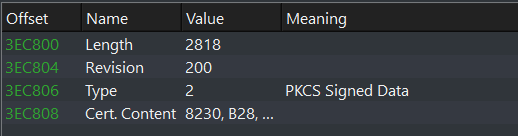
One important thing that makes WIN_CERTIFICATE different from every other Data Directory entry is that its value in DataDirectory[4] is a file offset, not an RVA like all the other entries. This is because the certificate data is appended at the very end of the PE file after all the sections, and it is never mapped into memory when the image is loaded — Windows reads it directly from disk for verification purposes only.
Till now, we have covered the most important Data Directory entries that are directly relevant to malware development and reverse engineering. The remaining directories are equally interesting and will be covered in future blogs when we reach the techniques that actually use them.
For now, let’s take what we have learned and see how it actually looks inside a real PE file. The image below shows the Data Directory as viewed in PE-bear:
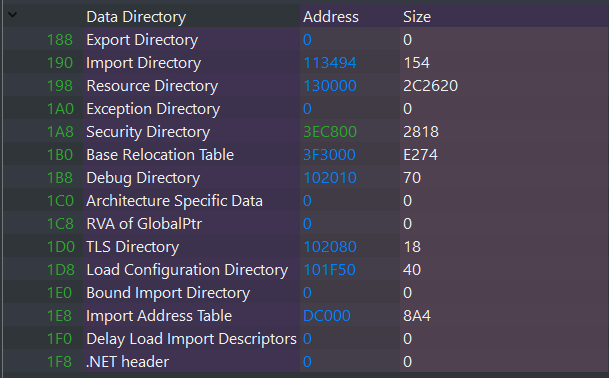
At this point, we have walked through the most critical Data Directory entries from a malware development and reverse engineering perspective. But you might be wondering — why did we skip several entries and focus only on specific ones? The answer is simple: not all 16 entries are equally relevant to what we are building toward.
Each directory we covered was chosen deliberately because it plays a direct role in real-world offensive and defensive techniques:
- IMAGE_EXPORT_DIRECTORY — Essential when writing custom GetProcAddress-style functions. Techniques like Hell’s Gate and SysWhispers walk the export directory of ntdll.dll manually to resolve syscall stubs without calling the standard Windows API, which helps avoid userland hooks placed by EDRs and AVs.
- IMAGE_IMPORT_DESCRIPTOR & IAT — The Import Address Table is one of the primary things Antivirus and EDR solutions inspect to detect malicious behavior. By analyzing which functions a PE imports, security tools can flag suspicious activity before the program even runs. Understanding the IAT is also the foundation for IAT hooking, a technique used both by malware and security products alike.
- WIN_CERTIFICATE — Understanding the certificate structure is important when working with techniques like Reflective PE Loading or when stripping/spoofing signatures to bypass trust-based verification checks that some security solutions rely on.
The remaining directories — such as Exception, TLS, Load Config, and Base Relocation — are equally important and will be covered in upcoming modules when we reach the techniques that actually use them. Everything in this series is built intentionally, so when those topics arrive, you will already have the PE knowledge needed to understand them deeply.
For now, what you have learned about the Data Directory is more than enough to move forward. Let’s take a look at how all of this looks inside a real PE file.
In this blog, we explored the Data Directory in detail, which is one of the most critical components of the Optional Header inside a Portable Executable (PE) file. We began by understanding its overall layout, including what the IMAGE_DATA_DIRECTORY structure is, how it works as a fixed array of 16 entries, and how each entry uses a VirtualAddress and Size to point to a completely different and specific structure inside the PE file.
We then focused on the most important entries individually. We covered the Export Directory and how Windows uses it to locate exported functions inside a DLL at runtime. We explored the Import Descriptor and the Import Address Table and saw how Windows wires up a program’s dependencies before execution even begins. We also looked at the Resource Directory and how embedded resources like icons and dialogs are organized, and finally the WIN_CERTIFICATE structure and how digital signatures are stored and verified.
Through both theoretical explanation and practical analysis using real PE-bear values, we saw how these entries act as a lookup table that the Windows loader relies on to navigate through a PE file efficiently.
This blog was designed to build a strong and clear foundation around the Data Directory. However, the remaining entries such as Base Relocation, TLS, Exception, and Load Config will be covered in future blogs when we reach the techniques that directly use them.
This knowledge becomes especially powerful when analyzing malware samples, bypassing security checks, understanding EDR detection logic, or writing your own low-level tools and loaders.
Note: This content is intended for educational and defensive cybersecurity purposes only. Always use this knowledge ethically.
— Nirvana
메타데이터
- post_id
- 0d2d26cfbcbe
- slug
- introduction-to-data-directory-pe-nir-9-0d2d26cfbcbe
- url
- https://medium.com/@0xnirsec/introduction-to-data-directory-pe-nir-9-0d2d26cfbcbe
- canonical_url
- https://medium.com/@0xnirsec/introduction-to-data-directory-pe-nir-9-0d2d26cfbcbe
- author_url
- https://medium.com/@0xnirsec
- status
- ok
- fetched_at
- 2026-08-09 03:06:14