A Release Monitoring Workflow for DevRel Teams
Every product release creates follow-up work for Developer Relations teams. I built a Kestra workflow to make that process more consistent…
A Release Monitoring Workflow for DevRel Teams
How to retrieve GitHub release data, generate action checklists, and deliver briefings automatically with Kestra
Introduction
A new product release often creates work beyond engineering. Someone needs to review the release notes, documentation may need updates, and developer-facing communication has to be planned. For Developer Relations teams, these activities are routine, but keeping them consistent across every release is not always easy.
The challenge is rarely discovering that a release exists. GitHub notifications, release feeds, and changelog updates already provide that information. The harder problem is ensuring that every release triggers the same follow-up process and that important tasks are not forgotten when teams are busy.
I wanted to explore whether workflow orchestration could help make that process more repeatable. Instead of treating release monitoring as a standalone activity, I wanted a workflow that could retrieve release information, generate recommended actions, and produce a reusable briefing report.
To test that idea, I built a Developer Advocate Release Assistant using Kestra. The workflow retrieves release information from GitHub, generates DevRel-focused recommendations, and creates a Markdown report that can be shared with a team. While intentionally simple, it demonstrates how orchestration can transform release monitoring into a structured process.
The Problem
For many Developer Relations teams, product releases create a predictable sequence of work.
When a new version is released, someone needs to review the release notes and understand what changed. If the release introduces new features or improvements, those updates may need to be communicated to developers through blog posts, social media announcements, newsletters, or community channels. Documentation may also need to be reviewed to ensure that it reflects the latest product behavior.
None of these activities are particularly difficult on their own. The challenge comes from consistency.
As products grow and release cycles become more frequent, it becomes harder to ensure that every release receives the same level of attention. A release might be noticed immediately by one team member while another update could remain buried in notifications until someone remembers to check for it.
This is where automation becomes valuable. Instead of relying on manual monitoring and ad hoc follow-up processes, teams can use orchestration to create a repeatable workflow. The workflow can retrieve release information, perform predefined actions, and generate outputs that help teams move quickly from awareness to execution.
For this project, I focused on a simple question:
Can a workflow automatically retrieve release information and generate a useful set of next steps for a Developer Relations team?
That question became the foundation for the Developer Advocate Release Assistant.
Why This Needed Orchestration
At first glance, release monitoring does not seem like a complex problem. GitHub already provides release notifications, and most teams have some way of tracking product updates.
However, the goal of this project was not simply to detect a new release. The goal was to create a repeatable workflow that could take release information and turn it into something useful for a Developer Relations team.
That workflow involves multiple steps:
- Retrieve release information from an external system.
- Process the information.
- Generate recommended actions.
- Create a report that can be shared with the team.
While each step is relatively simple, combining them into a reliable process is where orchestration becomes valuable.
Without orchestration, these tasks often exist as disconnected activities. Someone checks GitHub, someone else reviews the release notes, and another team member drafts an announcement. The process works, but it depends heavily on manual effort and individual follow-through.
Workflow orchestration allows these steps to be connected into a single process. Instead of treating release monitoring as a one-time activity, it becomes a workflow that can be executed consistently whenever a new release is published.
For this project, I used Kestra because it provides a straightforward way to define workflows using YAML. Tasks can be connected together, execution history is visible through the UI, and integrations with external systems can be added without writing a large amount of custom code.
The result is a workflow that is easier to understand, easier to maintain, and easier to extend in the future.
Workflow Overview
At a high level, the Developer Advocate Release Assistant consists of three stages: collecting release information, generating recommended follow-up actions, and producing a shareable report.
The workflow starts by retrieving the latest release data from GitHub through the GitHub Releases API. Once the release information is available, Kestra processes that data and generates a set of recommendations that can help a Developer Relations team decide what actions to take next.
The final stage creates a Markdown briefing report that can be reviewed, shared with stakeholders, or incorporated into existing communication workflows. Rather than simply detecting that a release occurred, the workflow produces an output that can be used as the starting point for release-related activities.
The workflow architecture looks like this:
Figure 1: High-level architecture of the Developer Advocate Release Assistant workflow.
The workflow intentionally follows a simple linear design. Each task depends on the output of the previous task, making the execution path easy to understand and troubleshoot. GitHub acts as the source of release information, while Kestra orchestrates how that information is processed and transformed into actionable outputs.
This separation of responsibilities was a deliberate design choice. By keeping data retrieval, recommendation generation, and report creation as independent tasks, the workflow becomes easier to maintain and extend. Additional steps such as Slack notifications, approval workflows, or AI-generated summaries could be added without changing the overall architecture.
Although this implementation focuses on GitHub releases, the same pattern can be applied to many other DevRel workflows. For example, a team could monitor documentation updates, product announcements, changelog entries, or community activity and route that information through similar workflows.
One reason I like this approach is that it separates the source of information from the actions that follow. GitHub becomes the source of release information, while Kestra becomes the system responsible for orchestrating what happens next.
This makes the workflow flexible. New steps can be added without changing the overall structure. Notifications, Slack messages, Discord updates, or AI-generated summaries could all be integrated later while keeping the same workflow foundation.
With the overall architecture defined, the next step was building the workflow itself.
Building the Workflow
After defining the workflow architecture, I started building the Developer Advocate Release Assistant in Kestra.
The workflow consists of three main tasks: retrieving release information from GitHub, generating DevRel-focused recommendations, and creating a Markdown briefing report. Each task has a clearly defined responsibility, which makes the workflow easy to understand and extend.
Creating the Flow
The first step was creating a new flow in Kestra. I defined a namespace and created a workflow called devrel-content-assistant.
Kestra workflows are defined using YAML, which provides a clear and declarative way to describe workflow logic. Instead of writing application code to manage execution, dependencies, and task orchestration, I could define the workflow structure directly in YAML.
The flow begins with an HTTP request task that retrieves release information from the GitHub Releases API.
id: devrel-content-assistant
namespace: shivani

tasks:
  - id: fetch_release
    type: io.kestra.plugin.core.http.Request

  - id: show_release
    type: io.kestra.plugin.core.log.Log

  - id: generate_report
    type: io.kestra.plugin.scripts.shell.Commands
The workflow is intentionally simple. It consists of three tasks: retrieving release information from GitHub, generating DevRel recommendations, and creating a Markdown briefing report.
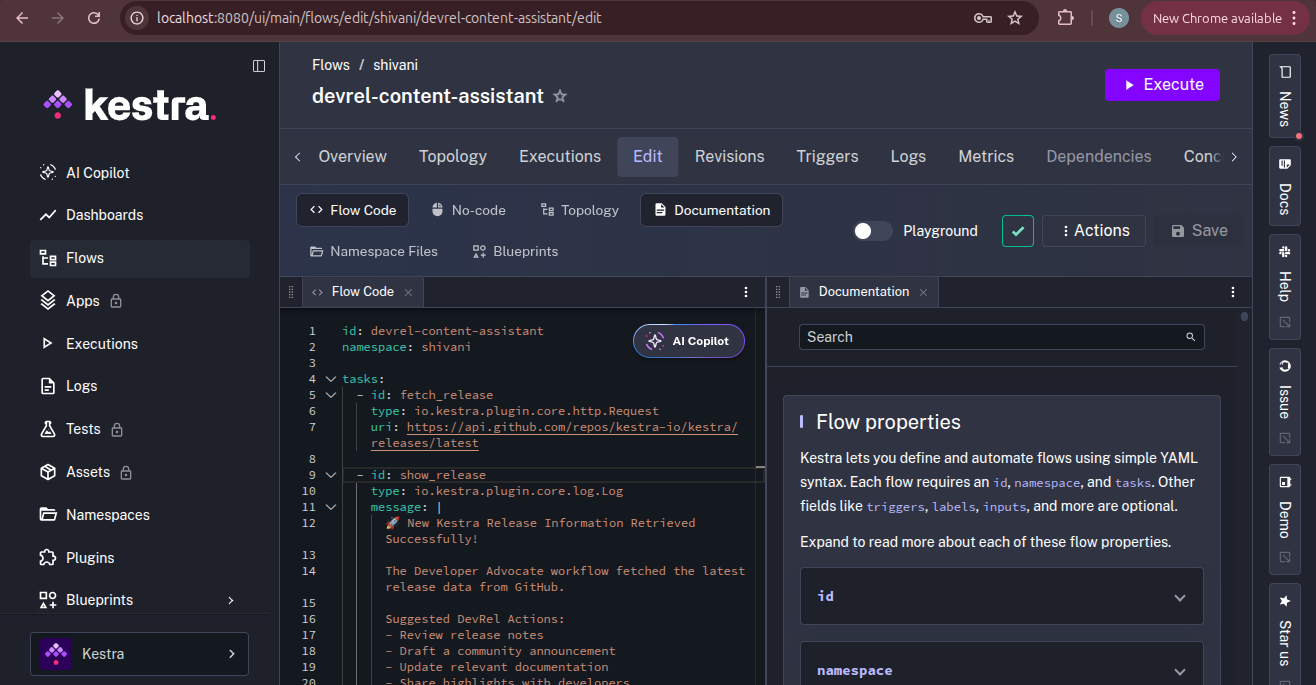
Figure 2: The complete Developer Advocate Release Assistant workflow defined in Kestra.
One thing I appreciated during development was how much functionality could be expressed in a relatively small YAML definition. The workflow consists of three tasks with clearly defined responsibilities: fetching release information, generating DevRel recommendations, and creating a briefing report.
Rather than writing custom scripts to manage execution flow, task dependencies, and workflow state, I could define the orchestration logic declaratively. This made the workflow easier to read and easier to modify as the project evolved.
Retrieving Release Information
To monitor product releases, the workflow uses Kestra’s HTTP Request task.
The task sends a request to the GitHub Releases API:
https://api.github.com/repos/kestra-io/kestra/releases/latestThis endpoint returns information about the most recent release available in the repository.
Rather than manually checking GitHub for updates, the workflow retrieves release information automatically whenever it executes. This task serves as the foundation of the workflow because every downstream action depends on release data being available.
Using an API-based approach also makes the workflow flexible. The same pattern could be applied to other repositories, products, or release sources without changing the overall workflow design.
Generating DevRel Recommendations
Once the release information is retrieved, the workflow moves to the second task.
Instead of displaying raw API output, I wanted the workflow to generate a set of actionable recommendations that a Developer Relations team could immediately use.
The workflow generates recommendations such as:
- Review release notes
- Draft a community announcement
- Update relevant documentation
- Share highlights with developers
These recommendations represent common activities that typically follow a product release. By converting release events into suggested actions, the workflow provides context rather than simply presenting data.
While the current implementation uses predefined recommendations, the same approach could be extended with rules-based logic or AI-generated suggestions in the future.

Figure 3: DevRel-focused recommendations generated by the workflow.
Creating the Release Report
The final task in the workflow is responsible for generating a Markdown report.
While the recommendation logs are useful during workflow execution, I wanted the workflow to produce an artifact that could be reviewed independently of Kestra. In a real-world Developer Relations workflow, release-related information is often shared across teams, making a report more useful than execution logs alone.
To achieve this, I added a generate_report task that creates a Markdown file as part of the workflow execution.
The generated report contains:
- Confirmation that release information was retrieved successfully
- A summary of the workflow execution
- Recommended DevRel follow-up actions
This report acts as a lightweight briefing document that can help Developer Relations teams quickly understand what needs attention after a new release becomes available.
One reason I found this approach useful is that it separates workflow execution from workflow consumption. The workflow performs the orchestration, while the generated report becomes an output that can be reviewed, shared, or incorporated into existing communication processes.
Although the current implementation generates a simple Markdown file, the same pattern could be extended to create richer outputs such as release summaries, documentation review checklists, communication templates, or stakeholder reports.
Running the Workflow
After configuring all three tasks, I executed the workflow in Kestra.
The execution process consisted of retrieving release information from GitHub, generating DevRel recommendations, and creating the Markdown briefing report.
One feature that stood out during development was Kestra’s execution visibility. Each task can be inspected independently, making it easy to understand what happened during a workflow run and troubleshoot issues when necessary.

Figure 4: Successful execution of the workflow in Kestra.
The execution view provided a useful way to validate each stage of the workflow independently. During development, it made troubleshooting easier by showing exactly where data was being processed and how tasks were connected.
Generated Output
The final output of the workflow is a Markdown briefing report.
The report serves as a lightweight summary that can be reviewed by a Developer Relations team and used as a starting point for release-related communication activities. Instead of manually collecting information and creating a checklist, the workflow generates the report automatically as part of the execution process.
This output demonstrates how orchestration can go beyond monitoring and help produce artifacts that are immediately useful to people.

Figure 5: The workflow generated a downloadable Markdown report as an output artifact.

Figure 6: Generated Developer Advocate Release Briefing report.
What I Learned
Before starting this project, I assumed that working with the GitHub API would take most of my time. It turned out to be the easiest part of the workflow. The bigger question was what to do with the information after retrieving it. Simply displaying release data did not feel very useful, which is why I ended up adding DevRel recommendations and a Markdown report.
I also found Kestra’s execution view more useful than I expected. While building the workflow, I frequently checked individual task outputs to make sure everything was working as intended. Being able to see each step separately made it much easier to understand what was happening during execution.
Perhaps the biggest takeaway from this project is that useful automation does not always need to be complicated. The workflow only contains a few tasks, but it still turns a manual process into something more structured and repeatable. For me, that was a good reminder that starting with a simple solution is often better than trying to build the most advanced version on day one.
Future Improvements
If I continued working on this project, the first thing I would add is notifications. Having the generated report delivered directly to Slack, Discord, or email would make it much easier for teams to act on release information without manually checking workflow executions.
I would also like to support multiple repositories. Most Developer Relations teams work across more than one product, so monitoring several repositories from a single workflow would make the solution more practical.
Another area I would explore is generating recommendations based on release content instead of relying on a predefined list. That would allow the workflow to provide more context-specific guidance for each release.
Longer term, I think the report could become the starting point for additional workflows, such as documentation reviews, content creation tasks, or community announcements.
For now, though, I wanted to keep the workflow focused on a single goal: turning release information into something that a Developer Relations team can immediately use.
Conclusion
In this project, I built a Developer Advocate Release Assistant using Kestra to automate part of the release follow-up process. The workflow retrieves release information from GitHub, generates DevRel-focused recommendations, and produces a Markdown briefing report that can be shared with a team.
What stood out to me was that none of the individual tasks were particularly complex. Fetching release data, generating recommendations, and creating a report are all fairly simple steps on their own. The value came from connecting them into a workflow that can be executed consistently.
For Developer Relations teams, even small automations like this can help reduce repetitive work and bring more structure to release-related activities. Sometimes, building a simple solution is enough to make a manual process much easier to manage.
About the Author
Shivani Tiwari is a Technical Writer and Developer Relations professional focused on cloud, DevOps, APIs, and developer tooling. She creates technical content, documentation, and developer-focused resources that help teams adopt and understand complex technologies.
메타데이터
- post_id
- 0d3fee9775c2
- slug
- a-release-monitoring-workflow-for-devrel-teams-0d3fee9775c2
- url
- https://medium.com/kestra-engineering/a-release-monitoring-workflow-for-devrel-teams-0d3fee9775c2
- canonical_url
- https://medium.com/kestra-engineering/a-release-monitoring-workflow-for-devrel-teams-0d3fee9775c2
- author_url
- https://medium.com/@shivanitiwari.1702
- status
- ok
- fetched_at
- 2026-06-14 11:28:49