Angular 21 Monorepo Micro Frontends with Native Federation
Learn how to build a micro frontend architecture in an Angular 21 monorepo using Native Federation.
Angular 21 Monorepo Micro Frontends with Native Federation
Angular 21 Monorepo Micro Frontends with Native Federation
H ey devs 👋
As a frontend developer, a micro frontend architecture plays a major role in modern web applications. There are multiple ways to achieve it in Angular apps, but one of the best ways to do it is native federation.
What is native federation? Native Federation is a community-driven, browser-native implementation of the micro-frontend architecture pattern for Angular.
Not a Medium member? You can read the full article for free by clicking here 🔗
Core Concept of Native Federation:
- Architecture Pattern: It enables a micro-frontend architecture where large Angular applications are broken down into smaller, independently developed, built, and deployed applications (called “remotes”) that are then composed at runtime by a main “host” application.
- Web Standards: Unlike the original Module Federation, which relies on Webpack-specific plugins, Native Federation uses standard browser features. This makes it future-proof and independent of specific build tools.
- Seamless Angular Integration: The @angular-architects/native-federation package provides a seamless integration with the Angular CLI’s modern esbuild-based application builder, ensuring high performance, faster builds, and support for features like Server-Side Rendering (SSR) and hydration
How to achieve native federation in Angular
Step 1: Let’s create an Angular monorepo using the CLI
ng new <workspace_name> --create-application=falseThis will create an Angular workspace without an application. Now we can add multiple Angular applications inside the workspace using the below command.
ng g application <application-name>Consider that we created a host application. Same, we need to create one more application for remote as well.
Step 2: Install the npm library required for the native federation.
npm install @angular-architects/native-federation -DOnce the dependency installation process is done. We can see the changes in the package.json.
"devDependencies": {
  "@angular-architects/native-federation": "^21.1.0",
}
Now that the basic requirements are ready, let's do the microfrontend architecture.
Step 3: Run the native federation init on the host and the remote applications as well. By using the command below
ng g @angular-architects/native-federation:init --project <project_name> --type host --port 4200The above command will install the required library and update the configuration as well. Below are the files that got changed by the native federation
Switching project to the application builder using esbuild ...
CREATE projects/host-app/federation.config.js (678 bytes)
CREATE projects/host-app/src/bootstrap.ts (222 bytes)
UPDATE angular.json (3884 bytes)
UPDATE package.json (1283 bytes)
UPDATE projects/host-app/src/main.ts (258 bytes)
Step 4: Repeat the above process for the remote applications as well. But the only change is that you need to change the type to remote and the port to a different one.
ng g @angular-architects/native-federation:init --project <application-name> --type remote --port 4201Step 5 : Check the federation.config.js file of the remote application and expose the routes.
const { withNativeFederation, shareAll } = require('@angular-architects/native-federation/config');

module.exports = withNativeFederation({
  name: 'remoteApp',
  exposes: {
    './routes': './projects/remoteApp/src/app/app.routes.ts'
  },

  shared: {
    ...shareAll({ singleton: true, strictVersion: true, requiredVersion: 'auto' }),
  },

  skip: [
    'rxjs/ajax',
    'rxjs/fetch',
    'rxjs/testing',
    'rxjs/webSocket',
    // Add further packages you don't need at runtime
  ],

  // Please read our FAQ about sharing libs:
  // https://shorturl.at/jmzH0

  features: {
    // New feature for more performance and avoiding
    // issues with node libs. Comment this out to
    // get the traditional behavior:
    // ignoreUnusedDeps: true,
  },
});
Step 6: Make sure the main.ts file in the host application points to the remote application's remoteEntry.json file.
import { initFederation } from '@angular-architects/native-federation';

initFederation({
  'remoteApp': 'http://localhost:4201/remoteEntry.json'
})
  .catch(err => console.error(err))
  .then(_ => import('./bootstrap'))
  .catch(err => console.error(err));
Step 7: Run the remote application first and then run the host application.
Launch the host application. I create a menu bar to load the remote screen as well.
In the host application, I have docs and a contact screen. And in the remote application, just to explain the concept, I created a country flag list screen. To load the remote page, you need to configure the routes as below in the host application.
/app.route.ts
import { loadRemoteModule } from '@angular-architects/native-federation';
import { Routes } from '@angular/router';

export const routes: Routes = [
    {
        path : 'remote',
        loadChildren : () => loadRemoteModule({
        remoteName: 'remoteApp',
        exposedModule: './routes',
      }).then((m) => { console.log(m); return m.routes}),
    },
    {
      path : 'docs',
      loadComponent : () => import('./page/docs/docs').then((m) => m.Docs)
    },
    {
      path: 'contact',
      loadComponent: () => import('./page/contact/contact').then((m) => m.Contact)
    }
];
loadRemoteModule is the function provided by the native federation library to load the remote application routes. Make sure it will return the Routes[].
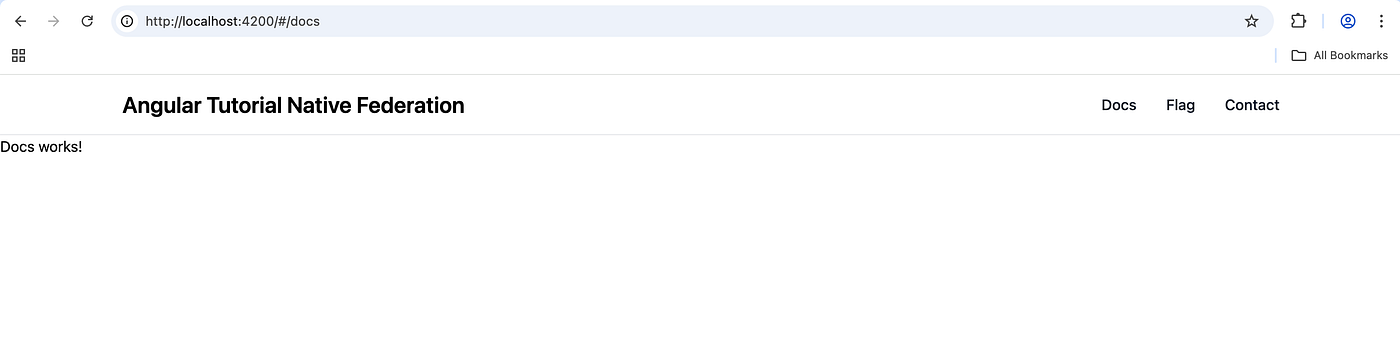
Landing page
Now in the remote application, I’m defining the routes in the app.route.ts.
import { Routes } from '@angular/router';

export const routes: Routes = [
  {
    path: 'flag',
    loadComponent: () => import('./page/flag-list/flag-list').then((m) => m.FlagList),
  },
];
Let’s create the menu bar component. I’m using Tailwind CSS to design the screen.
import { Component, signal } from '@angular/core';
import { RouterLink } from "@angular/router";

@Component({
  selector: 'app-menu-bar',
  imports: [RouterLink],
  template: `
    <nav class="bg-white border-gray-200 dark:bg-gray-900 border-b">
      <div class="max-w-screen-xl flex flex-wrap items-center justify-between mx-auto p-4">
        <a href="/" class="flex items-center space-x-3 rtl:space-x-reverse">
          <span class="self-center text-2xl font-semibold whitespace-nowrap dark:text-white"
            >Angular Tutorial Native Federation</span
          >
        </a>
        <button
          (click)="toggleMenu()"
          type="button"
          class="inline-flex items-center p-2 w-10 h-10 justify-center text-sm text-gray-500 rounded-lg md:hidden hover:bg-gray-100 focus:outline-none focus:ring-2 focus:ring-gray-200 dark:text-gray-400 dark:hover:bg-gray-700 dark:focus:ring-gray-600"
          aria-controls="navbar-default"
          [attr.aria-expanded]="isMenuOpen()"
        >
          <span class="sr-only">Open main menu</span>
          <svg
            class="w-5 h-5"
            aria-hidden="true"
            xmlns="http://www.w3.org/2000/svg"
            fill="none"
            viewBox="0 0 17 14"
          >
            <path
              stroke="currentColor"
              stroke-linecap="round"
              stroke-linejoin="round"
              stroke-width="2"
              d="M1 1h15M1 7h15M1 13h15"
            />
          </svg>
        </button>
        <div [class.hidden]="!isMenuOpen()" class="w-full md:block md:w-auto" id="navbar-default">
          <ul
            class="font-medium flex flex-col p-4 md:p-0 mt-4 border border-gray-100 rounded-lg bg-gray-50 md:flex-row md:space-x-8 rtl:space-x-reverse md:mt-0 md:border-0 md:bg-white dark:bg-gray-800 md:dark:bg-gray-900 dark:border-gray-700"
          >
            @for (item of menuItems(); track item.label) {
              <li>
                <a
                  [routerLink]="item.link"
                  class="block py-2 px-3 text-gray-900 rounded-sm hover:bg-gray-100 md:hover:bg-transparent md:border-0 md:hover:text-blue-700 md:p-0 dark:text-white md:dark:hover:text-blue-500 dark:hover:bg-gray-700 dark:hover:text-white md:dark:hover:bg-transparent"
                  [class.text-blue-700]="item.active"
                  [attr.aria-current]="item.active ? 'page' : null"
                >
                  {{ item.label }}
                </a>
              </li>
            }
          </ul>
        </div>
      </div>
    </nav>
  `,
  styles: `
    :host {
      display: block;
    }
  `,
})
export class MenuBarComponent {
  isMenuOpen = signal(false);

  menuItems = signal([
    { label: 'Docs', link: '/docs', active: true },
    { label: 'Flag', link: '/remote/flag', active: false },
    { label: 'Contact', link: '/contact', active: false },
  ]);

  toggleMenu() {
    this.isMenuOpen.update((open) => !open);
  }
}
Here, if you see the routerLink, it will be remote/flag, which means it will be loaded from the remote path.
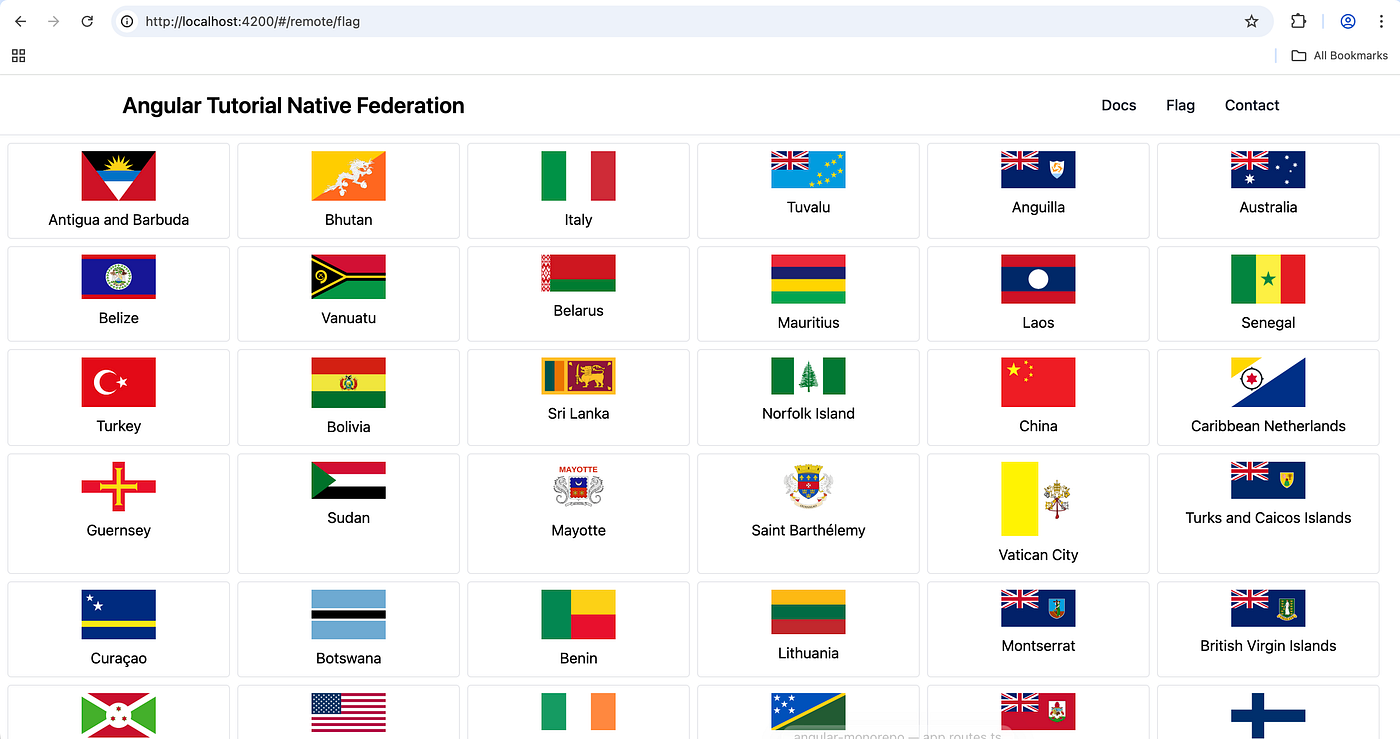
remote screen
Final Result
You now have a fully working native federation using an Angular monorepo.
Want to explore the code in detail or try it out locally? Check out the full working example on GitHub: 👉 Source Code: Angular 21 Native Federation
Thanks for reading! If this was helpful, consider clapping 👏 and following for more full-stack tips. Got questions or suggestions? Drop them in the comments below!
✍️ Author: **Vetriselvan Panneerselvam**
👨💻 Full Stack Developer | 💡 Code Enthusiast | 📚 Lifelong Learner | ✍️ Tech Blogger | 🌍 Freelance Developer
메타데이터
- post_id
- 0d9db7d30fbb
- slug
- angular-21-monorepo-micro-frontends-with-native-federation-0d9db7d30fbb
- url
- https://medium.com/@vetriselvan_11/angular-21-monorepo-micro-frontends-with-native-federation-0d9db7d30fbb
- canonical_url
- https://medium.com/@vetriselvan_11/angular-21-monorepo-micro-frontends-with-native-federation-0d9db7d30fbb
- author_url
- https://medium.com/@vetriselvan_11
- status
- ok
- fetched_at
- 2026-07-28 02:32:30