Managing Relational Data in Python with SQLite and Pandas
Relational databases form the backbone of many backend systems and data platforms. This article, in a tutorial format, demonstrates how to…
Managing Relational Data in Python with SQLite and Pandas
Relational databases form the backbone of many backend systems and data platforms. This article, in a tutorial format, demonstrates how to model and query relational data using SQLite in Python, using pandas’ simplicity for effective data manipulation. We will refresh SQL knowledge and cover schema creation, joins, set operations, views, and indexing with practical insights.
Let’s start with creating a table.
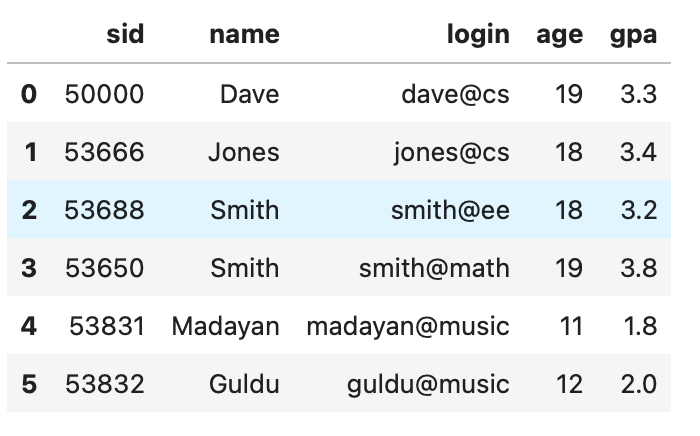
Creating the students Table
import pandas as pd
import sqlite3

# Define student records
students_list = pd.DataFrame([
    [50000, 'Dave','dave@cs',19, 3.3],
    [53666, 'Jones', 'jones@cs', 18, 3.4],
    [53688, 'Smith', 'smith@ee', 18, 3.2],
    [53650, 'Smith', 'smith@math', 19, 3.8],
    [53831, 'Madayan', 'madayan@music', 11, 1.8],
    [53832, 'Guldu', 'guldu@music', 12, 2.0]
], columns=['sid','name','login','age','gpa'])

# Connect to database
conn = sqlite3.connect('students.db')

# Create table
conn.execute("DROP TABLE IF EXISTS students")
conn.execute("""
CREATE TABLE students (
    sid INTEGER PRIMARY KEY,
    name TEXT,
    login TEXT,
    age INTEGER,
    gpa REAL
)
""")

# Insert data
for _, row in students_list.iterrows():
    conn.execute(f"""
        INSERT INTO students(sid,name,login,age,gpa)
        VALUES ({row.sid}, \"{row.name}\", \"{row.login}\", {row.age}, {row.gpa});
    """)
    conn.commit()

students_list
This step creates a foundational table to represent our student body.
Defining Courses with Primary Keys
We follow the same pattern to define the courses table, ensuring each course has a unique identifier (cid).
courses_list = pd.DataFrame([
    ['Carnatic101', 'Jane','Fall 06','Music'],
    ['Reggae203', 'Bob', 'Summer 06', 'Music'],
    ['Topology101', 'Mary', 'Spring 06', 'Math'],
    ['History105', 'Alice', 'Fall 06', 'History']
], columns=['cid','instructor','quarter','dept'])

conn.execute("DROP TABLE IF EXISTS courses")
conn.execute("""
CREATE TABLE courses (
    cid TEXT PRIMARY KEY,
    instructor TEXT,
    quarter TEXT,
    dept TEXT
)
""")

for _, row in courses_list.iterrows():
    conn.execute(f"""
        INSERT INTO courses(cid, instructor, quarter, dept)
        VALUES (\"{row.cid}\", \"{row.instructor}\", \"{row.quarter}\", \"{row.dept}\");
    """)
    conn.commit()
courses_list
Modeling Relationships: The enrollment Join Table
To link students and courses, we create a join table with foreign key constraints.
conn.execute("DROP TABLE IF EXISTS enrollment")
conn.execute("""
CREATE TABLE enrollment (
    cid TEXT,
    sid INTEGER,
    grade TEXT,
    FOREIGN KEY (cid) REFERENCES courses(cid),
    FOREIGN KEY (sid) REFERENCES students(sid)
)
""")

enrollments = [
    ["Carnatic101", 53831, "C"],
    ["Reggae203", 53832, "B"],
    ["Topology101", 53650, "A"],
    ["History105", 53666, "B"]
]

for cid, sid, grade in enrollments:
    conn.execute(f"""
        INSERT INTO enrollment (cid, sid, grade)
        VALUES (\"{cid}\", {sid}, \"{grade}\")
    """)
    conn.commit()
This establishes a many-to-many relationship between students and courses.
We can now run SQL queries to retrieve and analyze data.
Filtering Students by GPA
conn.execute("SELECT * FROM students WHERE gpa > 3.3").fetchall()
Output:
[(53650, '3', 'smith@math', 19, 3.8), (53666, '1', 'jones@cs', 18, 3.4)]Selecting Specific Columns
conn.execute("SELECT name, gpa FROM students").fetchall()Output:
[('0', 3.3), ('3', 3.8), ('1', 3.4), ('2', 3.2), ('4', 1.8), ('5', 2.0)]Sorting and Aggregation
conn.execute("SELECT * FROM students ORDER BY gpa DESC").fetchall()
Output:
[(53650, '3', 'smith@math', 19, 3.8), (53666, '1', 'jones@cs', 18, 3.4), (50000, '0', 'dave@cs', 19, 3.3), (53688, '2', 'smith@ee', 18, 3.2), (53832, '5', 'guldu@music', 12, 2.0), (53831, '4', 'madayan@music', 11, 1.8)]conn.execute("SELECT COUNT(cid), quarter FROM courses GROUP BY quarter").fetchall()output:
[(2, 'Fall 06'), (1, 'Spring 06'), (1, 'Summer 06')]Set Operations with Extra Student Data
Let’s demonstrate INTERSECT, UNION, and EXCEPT operations using a second students table.
students_extra = pd.DataFrame([
    [53666, 'Jones','jones@cs',19, 3.4],
    [53688, 'Smith', 'smith@cs', 18, 3.2],
    [53700, 'Tom', 'tom@ee', 18, 3.5],
    [53777, 'Jerry', 'jerry@ee', 18, 2.8],
    [53832, 'Guldu', 'guildu@music', 18, 2.0]
], columns=['sid','name','login','age','gpa'])

conn.execute("DROP TABLE IF EXISTS students_extra")
conn.execute("""
CREATE TABLE students_extra (
    sid INTEGER PRIMARY KEY,
    name TEXT,
    login TEXT,
    age INTEGER,
    gpa REAL
)
""")

for _, row in students_extra.iterrows():
    conn.execute(f"""
        INSERT INTO students_extra(sid,name,login,age,gpa)
        VALUES ({row.sid}, \"{row.name}\", \"{row.login}\", {row.age}, {row.gpa});
    """)
    conn.commit()
students_extra
Let’s see the table students_extra,

Set Operations
conn.execute("SELECT sid, name FROM students INTERSECT SELECT sid, name FROM students_extra").fetchall()
Output:
[]conn.execute("SELECT sid, name FROM students UNION SELECT sid, name FROM students_extra").fetchall()
Output:
[(50000, '0'), (53650, '3'), (53666, '0'), (53666, '1'), (53688, '1'), (53688, '2'), (53700, '2'), (53777, '3'), (53831, '4'), (53832, '4'), (53832, '5')]print(conn.execute("SELECT sid, name FROM students EXCEPT SELECT sid, name FROM students_extra").fetchall())Output:
[(50000, '0'), (53650, '3'), (53666, '1'), (53688, '2'), (53831, '4'), (53832, '5')]Joins and Cross Products
print(conn.execute("SELECT * FROM students CROSS JOIN courses").fetchall())
Output:
[(50000, '0', 'dave@cs', 19, 3.3, 'Carnatic101', 'Jane', 'Fall 06', 'Music'), (50000, '0', 'dave@cs', 19, 3.3, 'Reggae203', 'Bob', 'Summer 06', 'Music'), (50000, '0', 'dave@cs', 19, 3.3, 'Topology101', 'Mary', 'Spring 06', 'Math'), (50000, '0', 'dave@cs', 19, 3.3, 'History105', 'Alice', 'Fall 06', 'History'), (53650, '3', 'smith@math', 19, 3.8, 'Carnatic101', 'Jane', 'Fall 06', 'Music'), (53650, '3', 'smith@math', 19, 3.8, 'Reggae203', 'Bob', 'Summer 06', 'Music'), (53650, '3', 'smith@math', 19, 3.8, 'Topology101', 'Mary', 'Spring 06', 'Math'), (53650, '3', 'smith@math', 19, 3.8, 'History105', 'Alice', 'Fall 06', 'History'), (53666, '1', 'jones@cs', 18, 3.4, 'Carnatic101', 'Jane', 'Fall 06', 'Music'), (53666, '1', 'jones@cs', 18, 3.4, 'Reggae203', 'Bob', 'Summer 06', 'Music'), (53666, '1', 'jones@cs', 18, 3.4, 'Topology101', 'Mary', 'Spring 06', 'Math'), (53666, '1', 'jones@cs', 18, 3.4, 'History105', 'Alice', 'Fall 06', 'History'), (53688, '2', 'smith@ee', 18, 3.2, 'Carnatic101', 'Jane', 'Fall 06', 'Music'), (53688, '2', 'smith@ee', 18, 3.2, 'Reggae203', 'Bob', 'Summer 06', 'Music'), (53688, '2', 'smith@ee', 18, 3.2, 'Topology101', 'Mary', 'Spring 06', 'Math'), (53688, '2', 'smith@ee', 18, 3.2, 'History105', 'Alice', 'Fall 06', 'History'), (53831, '4', 'madayan@music', 11, 1.8, 'Carnatic101', 'Jane', 'Fall 06', 'Music'), (53831, '4', 'madayan@music', 11, 1.8, 'Reggae203', 'Bob', 'Summer 06', 'Music'), (53831, '4', 'madayan@music', 11, 1.8, 'Topology101', 'Mary', 'Spring 06', 'Math'), (53831, '4', 'madayan@music', 11, 1.8, 'History105', 'Alice', 'Fall 06', 'History'), (53832, '5', 'guldu@music', 12, 2.0, 'Carnatic101', 'Jane', 'Fall 06', 'Music'), (53832, '5', 'guldu@music', 12, 2.0, 'Reggae203', 'Bob', 'Summer 06', 'Music'), (53832, '5', 'guldu@music', 12, 2.0, 'Topology101', 'Mary', 'Spring 06', 'Math'), (53832, '5', 'guldu@music', 12, 2.0, 'History105', 'Alice', 'Fall 06', 'History')]print(conn.execute("SELECT * FROM students JOIN enrollment ON students.sid = enrollment.sid").fetchall())Output:
[(53831, '4', 'madayan@music', 11, 1.8, 'Carnatic101', 53831, 'C'), (53832, '5', 'guldu@music', 12, 2.0, 'Reggae203', 53832, 'B'), (53650, '3', 'smith@math', 19, 3.8, 'Topology101', 53650, 'A'), (53666, '1', 'jones@cs', 18, 3.4, 'History105', 53666, 'B')]Creating and Using Views
conn.execute("DROP VIEW IF EXISTS B_Students")
conn.execute("""
CREATE VIEW B_Students(sid, name, course) AS
SELECT S.sid, S.name, E.cid
FROM students S JOIN enrollment E ON S.sid = E.sid
WHERE E.grade = \"B\"
""")

print(conn.execute("SELECT * FROM B_Students").fetchall())
Output:
[(53832, '5', 'Reggae203'), (53666, '1', 'History105')]Indexing and Optimization
print(conn.execute("EXPLAIN QUERY PLAN SELECT * FROM students WHERE name = 'Madayan'").fetchall())
Output:
[(2, 0, 0, 'SCAN students')]print(conn.execute("CREATE INDEX student_name_index ON students(name)"))
Output:
<sqlite3.Cursor object at 0x1079653c0>print(conn.execute("EXPLAIN QUERY PLAN SELECT * FROM students WHERE name = 'Madayan'").fetchall())Output:
[(3, 0, 0, 'SEARCH students USING INDEX student_name_index (name=?)')]Creating indexes significantly speeds up lookup queries, as shown by the query plan.
This article demonstrates how Python, SQLite, and pandas together can be implemented to simulate core relational database operations, including joins, constraints, and query planning. This is a toold to blend Pythonic scripting with SQL for local or educational data projects. For large-scale production environments, tools like PostgreSQL or MySQL would be the next step, but for learning and prototyping, SQLite is a powerful and accessible option.
About me:
Thank you for reading the article! If you find this article useful, check out my other articles relevant to data science. Also, like, clap, comment, and follow me on Medium, LinkedIn, and GitHub.
메타데이터
- post_id
- 0dd60e5c2fa4
- slug
- managing-relational-data-in-python-with-sqlite-and-pandas-0dd60e5c2fa4
- url
- https://medium.com/@nivedita.home/managing-relational-data-in-python-with-sqlite-and-pandas-0dd60e5c2fa4
- canonical_url
- https://medium.com/@nivedita.home/managing-relational-data-in-python-with-sqlite-and-pandas-0dd60e5c2fa4
- author_url
- https://medium.com/@nivedita.home
- status
- ok
- fetched_at
- 2026-07-19 01:25:31