Build Work-Ready AI Agents with Microsoft Foundry and Work IQ, Govern Them with Agent 365
Learn how to build a Microsoft Foundry AI agent grounded in Work IQ context and Foundry IQ knowledge, test it with evals, and govern it…
Build Work-Ready AI Agents with Microsoft Foundry and Work IQ, Govern Them with Agent 365
Learn how to build a Microsoft Foundry AI agent grounded in Work IQ context and Foundry IQ knowledge, test it with evals, and govern it with Agent 365.
Build Work-Ready AI Agents with Microsoft Foundry and Work IQ, Govern Them with Agent 365
In this article, I walk through how to build an enterprise AI agent that actually knows about your work, proves that it works, and keeps it under control. We connect a Microsoft Foundry agent to Work IQ over MCP so it can reason over real Microsoft 365 context, add a Foundry IQ knowledge base so it answers from your own documents with citations, run evaluations to measure quality, and then govern the whole thing with Agent 365. By the end, you will understand each component, how they fit into a single architecture, and the order in which to assemble them. I assume you know your way around Azure and Microsoft 365, but no prior agent-building experience is required.
Reference *here*.
The real problem: context is the king
You build an agent, then spend so long feeding it context by hand that you would have been faster doing the task yourself. The reason is simple: the knowledge an agent needs almost never lives in the model. It lives in your organization, locked inside SQL databases, SAP systems, email threads, meeting chats, and documents.
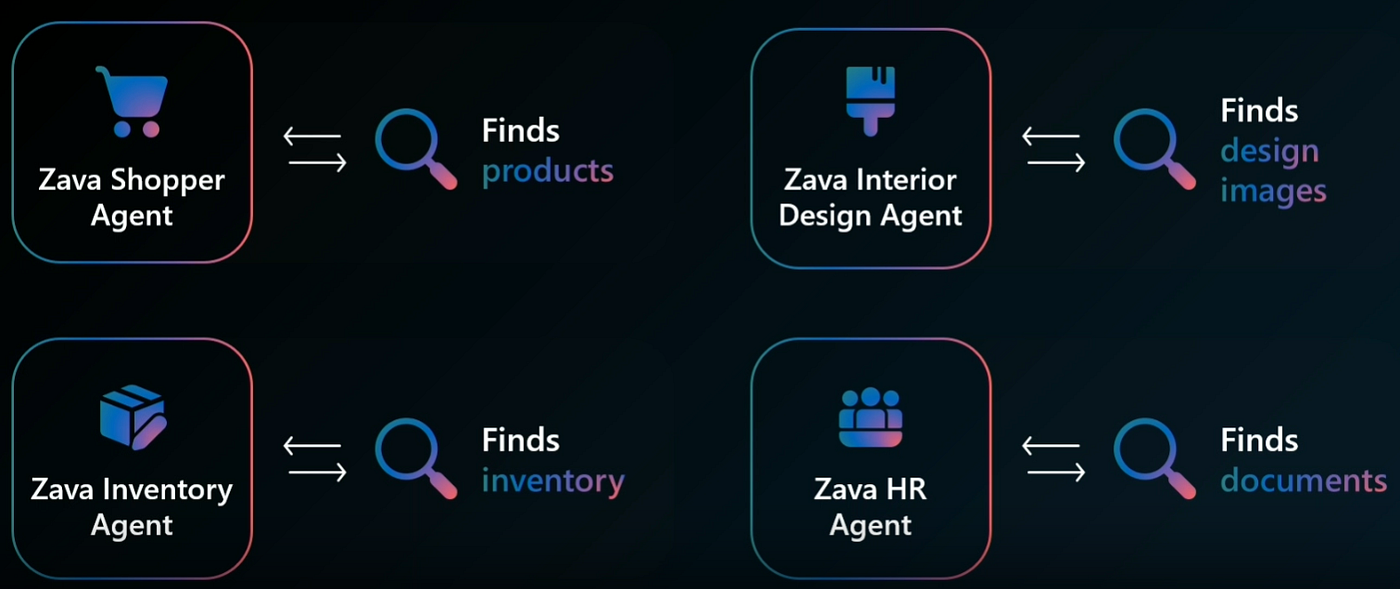
So the agent equation has three inputs, not one: the right instructions, the right tools, and most importantly, the right context. The model is the cheap part now.
The expensive parts are getting real context in, proving the agent is good, and keeping it governed. The Foundry plus Agent 365 stack is built around exactly those three problems, so that is how I will structure this walkthrough.
The architecture at a glance
Before the components, here is the mental model I keep in my head. Four layers, each owning one job.
        +--------------------------------------------------+
        |   AGENT 365  (govern + observe + secure)         |
        |   Entra Agent ID  |  Registry + Map  |  Defender |
        |   Intune sandbox  |  Purview labels  |  Tool gov |
        +--------------------------------------------------+
                 ^                ^                ^
                 |                |                |
        +--------------------------------------------------+
        |   FOUNDRY AGENT RUNTIME                           |
        |   instructions + tools + evals + publishing       |
        +--------------------------------------------------+
                 ^                                 ^
                 |                                 |
   +----------------------+         +-----------------------------+
   |  WORK IQ             |         |  FOUNDRY IQ                 |
   |  context layer (M365)|         |  knowledge layer (your data)|
   |  MCP / A2A / REST    |         |  Azure AI Search retrieval  |
   +----------------------+         +-----------------------------+
Read it bottom up. Work IQ supplies live Microsoft 365 context. Foundry IQ supplies retrievable knowledge from your own data stores.
The Foundry agent runtime composes both, runs the reasoning, gets evaluated, and ships. Agent 365 wraps the whole thing in identity, observability, and security. Replace this ASCII sketch with a designed diagram before you publish, and give it real ALT text.
Component 1: Work IQ, the enterprise context layer
Work IQ is the intelligence layer that grounds Microsoft 365 Copilot, and now your own agents, in real, shared organizational context. Instead of an agent calling raw Microsoft Graph and stitching together emails, calendar items, files, people, and chats by itself, it calls Work IQ, and Work IQ returns pre-digested, permission-trimmed context the agent can actually use.
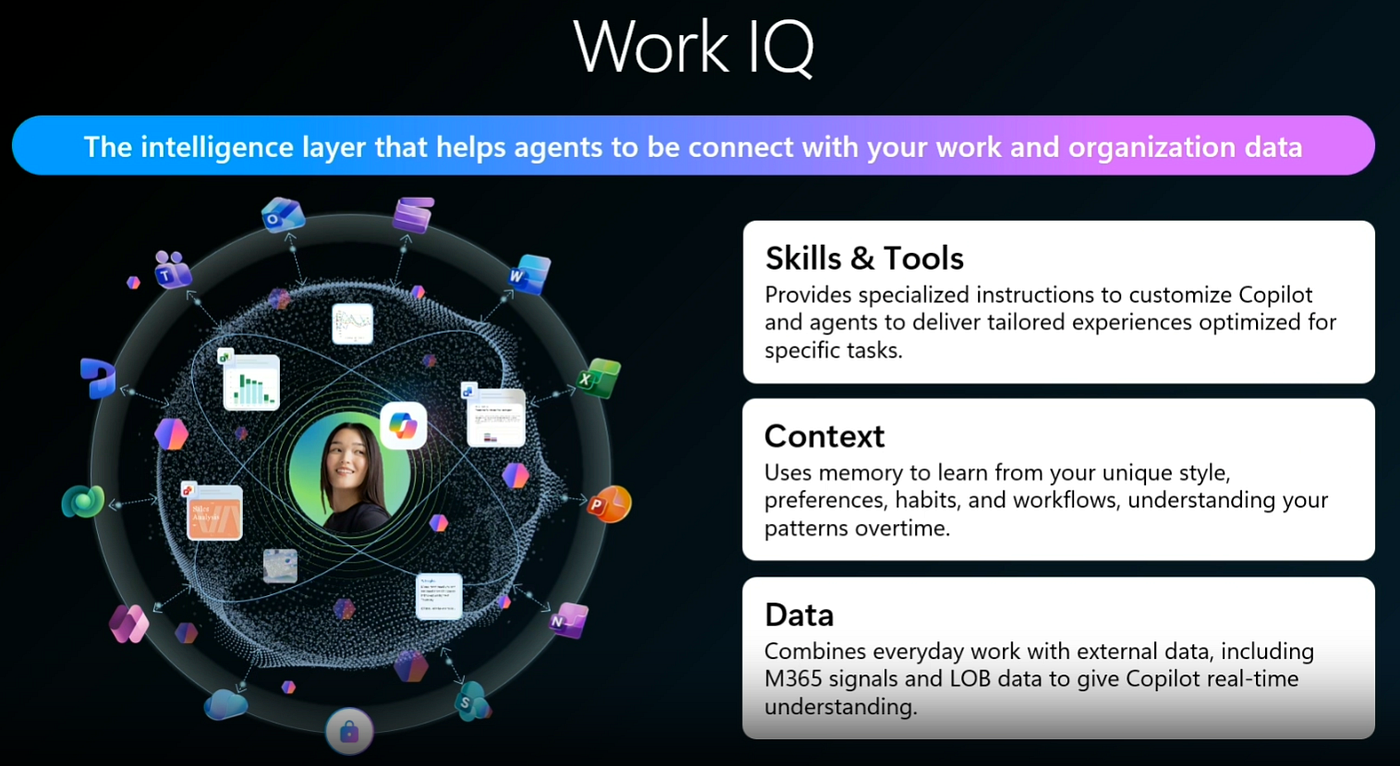
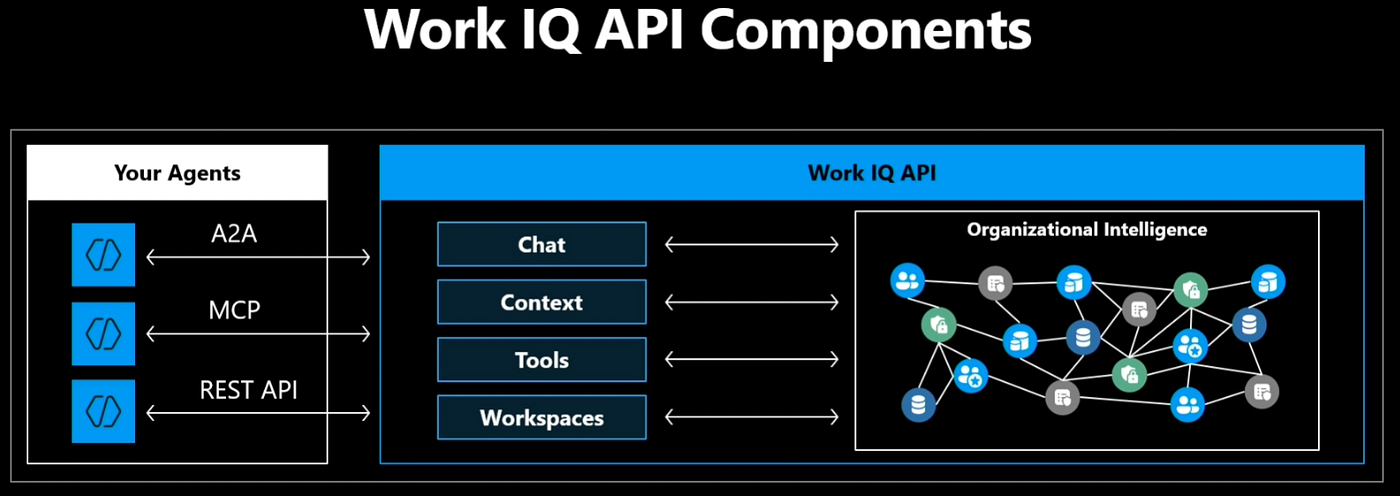
Architecturally, Work IQ is organized around four domains: Chat, Context, Tools, and Workspaces. It exposes them over three protocols so it fits any agent harness:
- MCP, the Model Context Protocol, for tool-based access inside agent frameworks.
- A2A, agent-to-agent, for delegation and continuity between agents.
- REST, for classic web application integration.
A design detail worth internalizing: the Work IQ MCP server collapses hundreds of Microsoft 365 operations into a compact set of roughly ten generic tools that operate on resource paths across mail, calendar, files, people, chat, and sites.
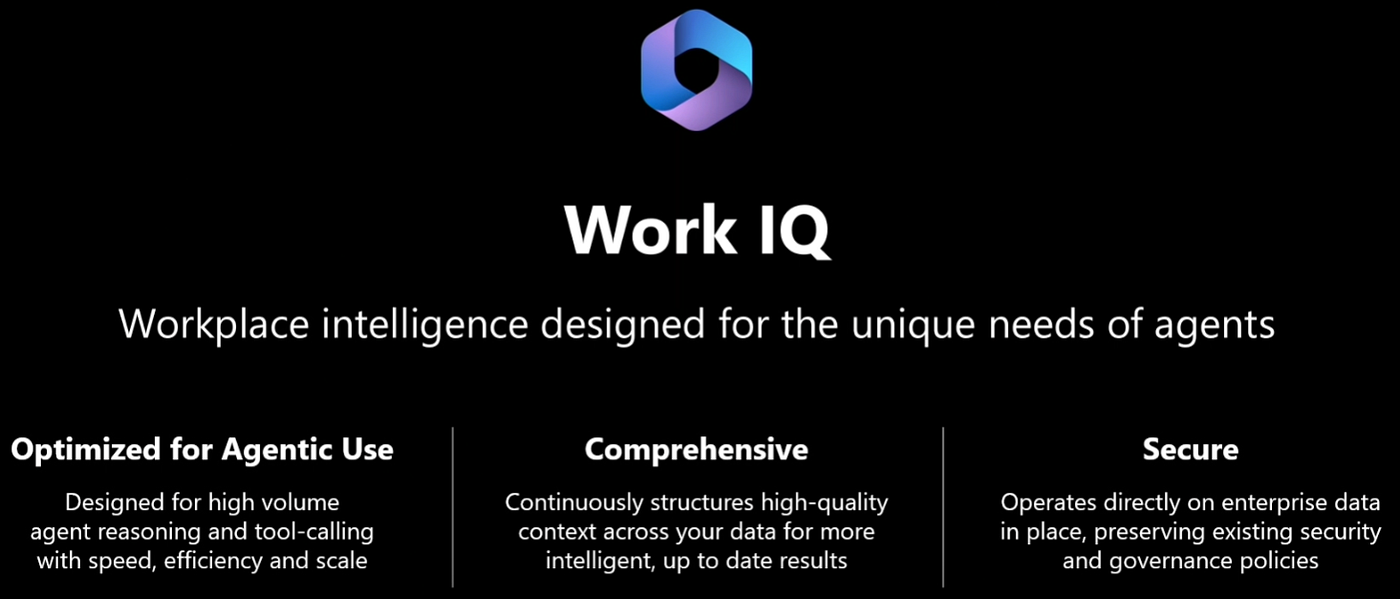
New workloads add paths, not tools, so the tool surface never bloats your context window. Agents discover schemas at runtime instead of preloading thousands of type definitions. This is “fewer tools, more paths,” and it is why Work IQ stays light on tokens.
Security is not bolted on. Every request runs under Microsoft Entra ID delegated authentication, so an agent sees only what the signed-in identity is allowed to see. You only get the SharePoint documents you should get, and you only see the emails you are supposed to see, and the same holds when the caller is an agent identity rather than a person.
There is one more piece many people miss: Workspaces. Long-running agents need somewhere safe to stash intermediate state. Work IQ Workspaces give the agent a scratch pad, backed by SharePoint Embedded storage that stays inside your Microsoft 365 tenant boundary. The agent keeps its working files and progress there during a run, and the workspace can be cleared when the run ends so nothing lingers forever.
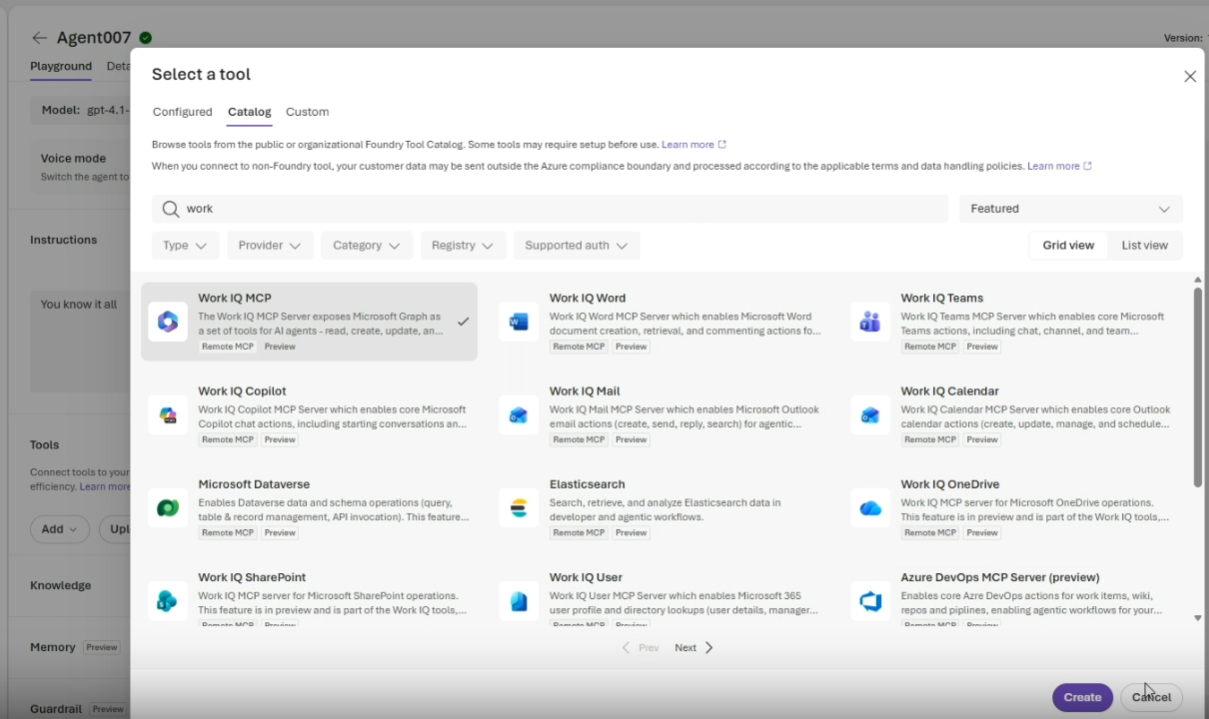
In practice, this reduces to one action. You build an agent, open the tool catalog, and Work IQ is simply there. One click attaches the endpoint, the connection credentials, and the Entra ID wiring automatically. Ask it something like “what was the last email from David,” and the Work IQ MCP tool is invoked at runtime, a human-in-the-loop prompt asks whether to approve the tool call, and the agent answers from real mailbox context. The win is the speed: enterprise context that used to take weeks of plumbing becomes a single catalog add.
Work IQ reached general availability on June 16, 2026, with consumption-based pricing in Copilot Credits, a fixed component for Tools and a variable component for Chat and Context. You can build against it today.
Component 2: Foundry IQ, the knowledge backbone
If Work IQ is the live context of how your organization works, Foundry IQ is the deep, retrievable knowledge of what your organization knows.
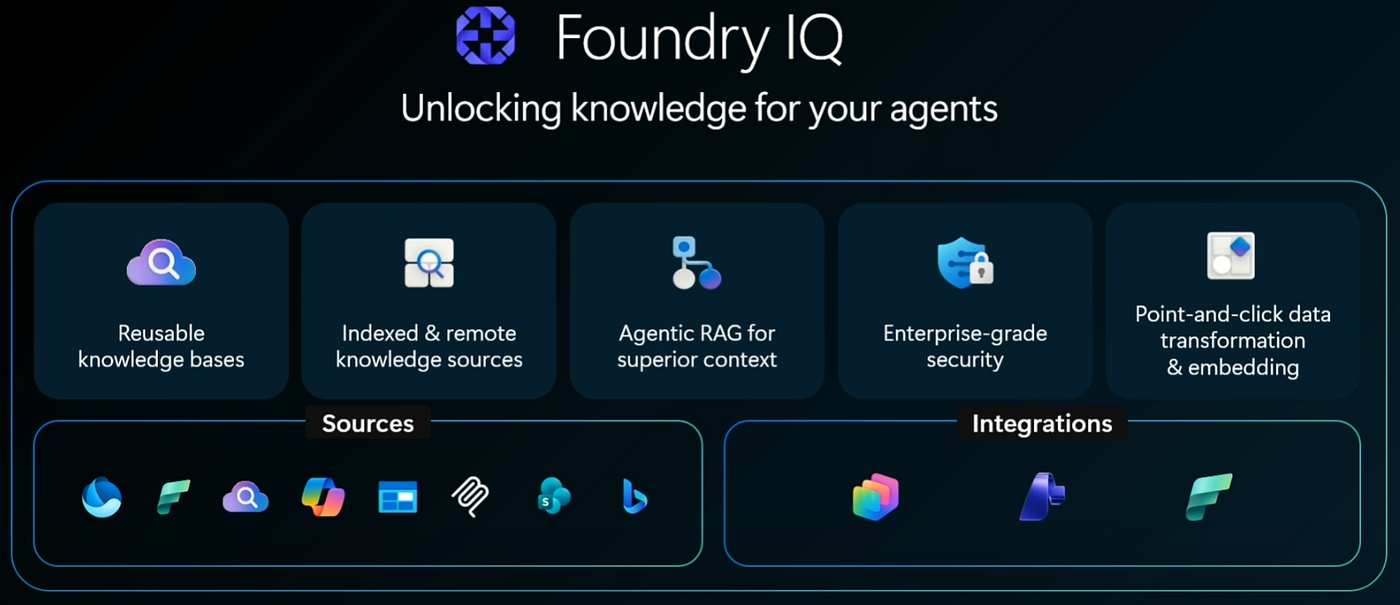
Think of the documents you have already parked in storage: pricing guides, battle cards, product specifications, RFPs, RFQs, sales orders, invoices. Foundry IQ turns those into a knowledge layer your agent can reason over.
Under the hood, Foundry IQ is built on the agentic retrieval capabilities of Azure AI Search. The two core concepts are knowledge sources and knowledge bases.
A knowledge source wraps indexed content, for example an Azure Blob Storage container or a SharePoint location, or it points at a supported remote source. A knowledge base is the orchestrator that sits on top of one or more sources and exposes a single endpoint. You define a knowledge base once, around a topic, and plug it into many agents, instead of wiring retrieval logic into every project.
The “agentic” in agentic retrieval is the important part. This is not one query hitting one index once. An optional model plans the query, decides which sources to hit, runs the search, evaluates whether the results are good enough, and iterates if they are not, all tuned by a retrieval reasoning effort setting. The result is richer, more semantic grounding without burning tokens on context the agent does not need.
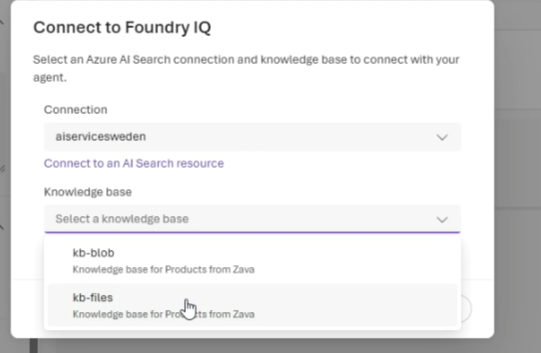
Setup is simple. You create a container, drop your files in, and Foundry handles the rest: content is ingested, chunked, vectorized, and indexed for hybrid retrieval automatically.
Agentic RAG is enabled for you. It is also enterprise-grade, so it honors the permissions already set on the storage containers, and Microsoft Purview sensitivity labels are respected through the indexing and retrieval pipeline. Classified content stays governed as it flows into the knowledge base.
When you ask the agent for something like “the guidance on discounts for these products,” the answer comes back grounded, with a citation traced through answer synthesis back to the Foundry IQ source. That citation is the whole game: the agent is not guessing, it is retrieving and attributing.
Component 3: composing the agent in Foundry Agent Service
With both layers attached, the agent is genuinely enriched. Work IQ gives it the live context of emails, Teams, and SharePoint. Foundry IQ gives it the deep knowledge of your pricing and product corpus. The Foundry Agent Service is the turnkey runtime that hosts the agent, orchestrates the tool calls, manages the human-in-the-loop approvals, and produces grounded, cited responses.
This is the architectural payoff. You do not manage retrieval pipelines, vector stores, permission trimming, or credential wiring. The platform owns those. You compose instructions plus tools plus knowledge, and the runtime does the rest. Foundry also treats the agent harness itself as a flex point, so investments in frameworks such as LangGraph, the GitHub Copilot SDK, or the Claude Agent SDK carry forward rather than locking you in.
Component 4: evals, the part most teams skip
Now the question that separates a demo from a production agent: how do you know it works? You test it. This is the discipline gap I see teams skip most often, and Foundry builds it in.
You create an evaluation by picking the target agent, choosing single-turn or multi-turn simulation, and supplying data. You can use existing human conversations as eval data, simulate new ones, or hand-write a small dataset. The schema is simple on purpose: each test case has a prompt, a description, an expected output, and a desired number of turns. You can author it by hand and upload it as plain CSV or JSON.
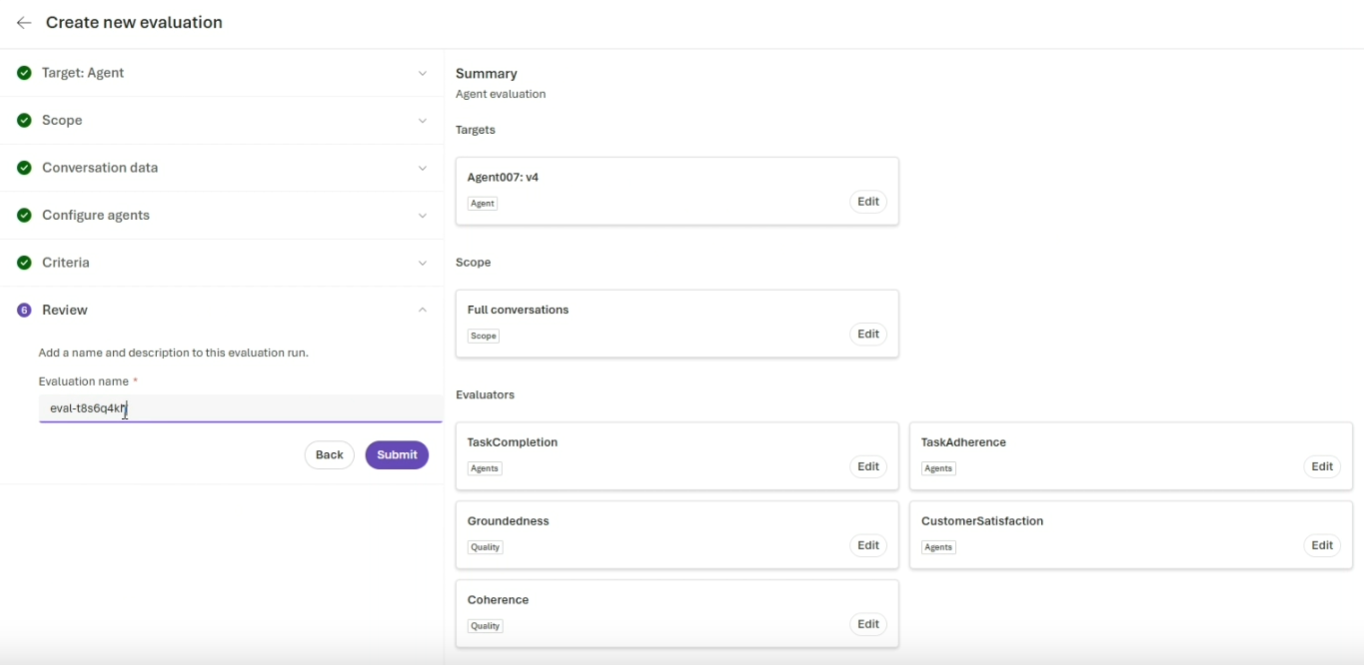
The evaluators are where it gets serious. Foundry runs a suite that includes:
- Intent resolution: did the agent correctly understand what was asked?
- Tool selection and tool call accuracy: did it pick the right tools and call them with correct parameters, without redundancy?
- Tool output utilization: did it actually use the tool output well?
- Task adherence: did it follow its instructions and constraints?
- Groundedness: is the response faithful to the provided knowledge rather than hallucinated?
- Coherence and relevance, plus customer satisfaction.
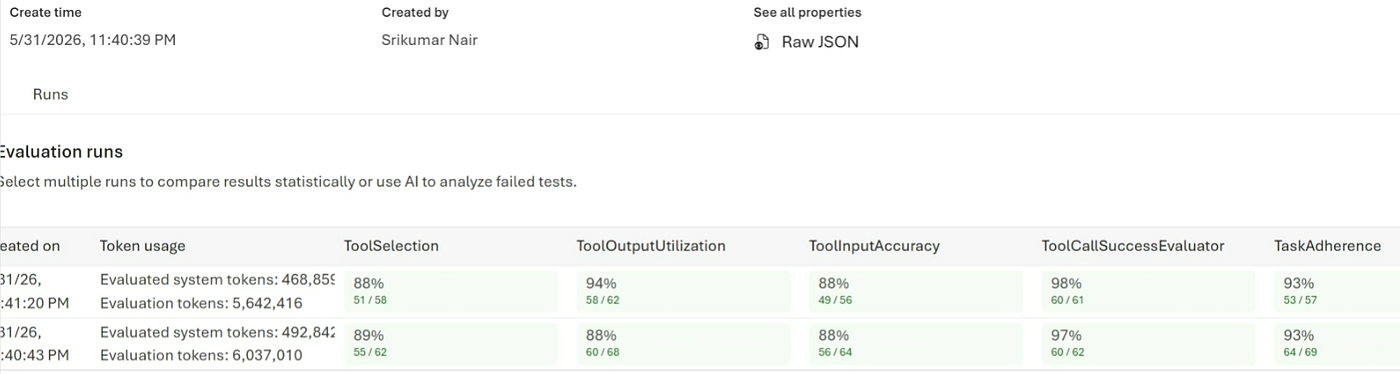
I want to single out groundedness. The moment you give an agent Work IQ and Foundry IQ, you need proof that its answers come from your knowledge and not from the model’s general bias to always produce an answer, right or wrong. Groundedness is the metric that catches confident fiction, and it is the one I would never ship without.
When the run completes, you get quantitative scores out of 100, for example tool selection in the mid-90s and overall accuracy in the high 80s and up. Foundry also offers a Rubric evaluator that auto-generates custom criteria from your agent’s own definition and feeds an Agent Optimizer, turning failures into ranked, reviewable improvements. That closes the loop: build, evaluate, optimize, repeat. The most useful experiment you can run here is context-aware versus context-blind, scored side by side. Groundedness is the number that makes the difference visible.
Component 5: publishing without the plumbing
Once the scores say the agent is ready, publishing is a click. You publish to the company store, a central registry where employees can use the agent, and to Microsoft Teams and Microsoft 365 Copilot channels.
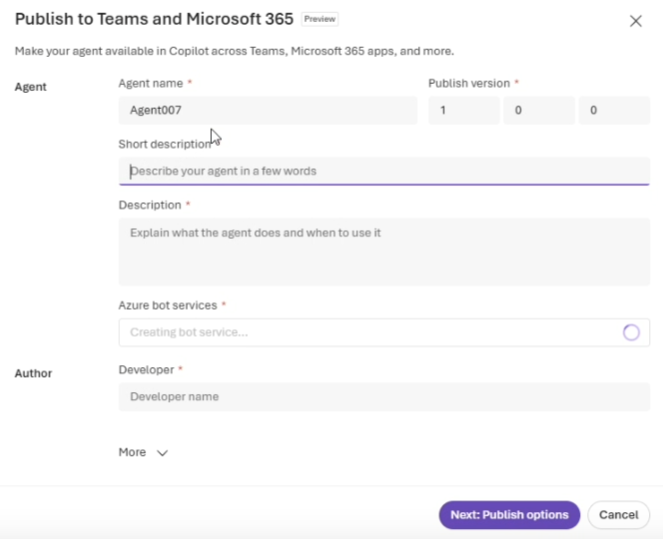
Foundry automatically provisions the bot service and assigns the agent an identity. You are not visiting Azure Bot Service, creating a bot, and granting it permissions by hand. The same publish action also registers the agent in the Agent 365 registry, which is where the story shifts from builder to admin.
Component 6: Agent 365, observe then govern then secure
Now switch hats from developer to IT admin. The enterprise objection is always the same: “I do not know what AI is doing in my system, so I would rather govern it, and shut it down if I do not like it.” Agent 365 is the control plane that answers that objection.
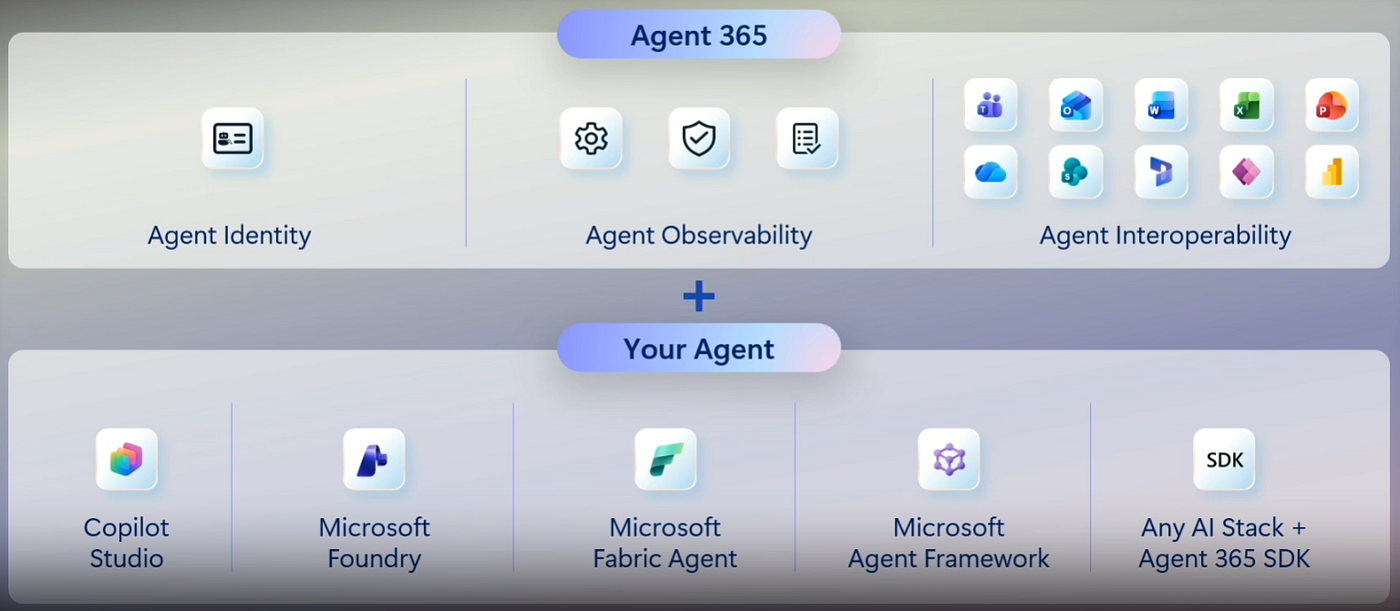
The gap it targets is real: there is a wide spread between how many agents are running in production and how many are mature enough to deserve to run in an enterprise. Agent 365 exists to close that gap across three verbs: observe, govern, secure.
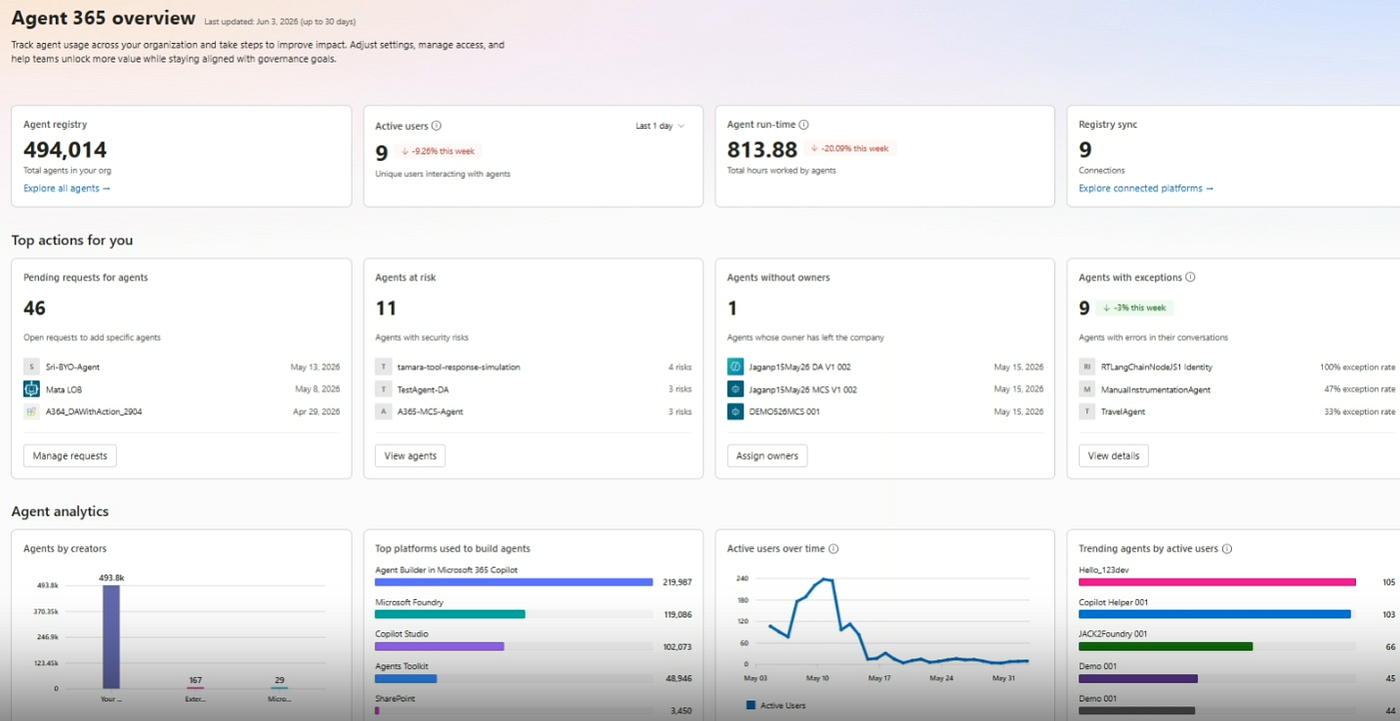
Agent identity
The newly published agent shows up in the admin view, and the admin can inspect what it is, when it was published, and what permissions it holds. The keystone is agent identity, delivered by Microsoft Entra Agent ID.
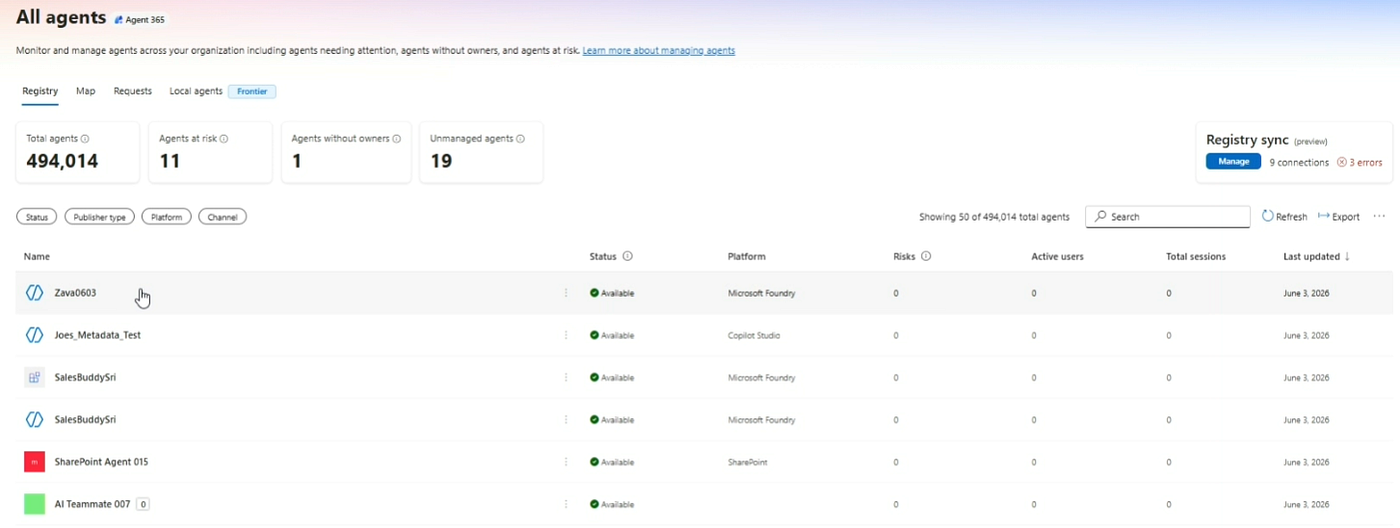
Every agent gets a first-class identity with two things that matter: a unique principal that identifies the agent no matter where it is deployed or running in the tenant, and identity permissions that work just like a human user’s, so you can scope access, grant or revoke, and govern lifecycle.
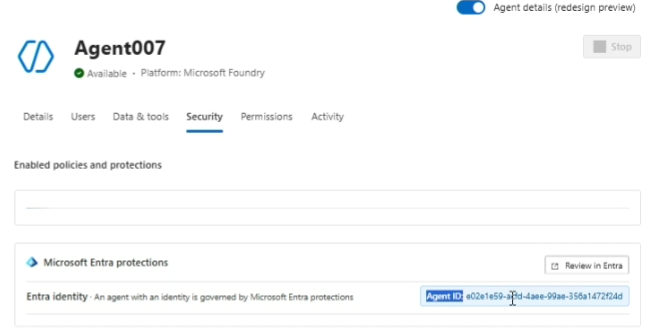
Entra adds blueprints as templates, sponsors as accountable owners, and access packages to scope an agent to only the resources it needs. Agents become first-class principals, not anonymous scripts.
The registry and the map
The Agent 365 registry is the unified inventory of every agent in the tenant, across Copilot, Foundry, and more. It also syncs external agents from other platforms, including Amazon, Google, Databricks, and Agentforce, so they are visible alongside Microsoft-built ones. A map view visualizes how those platforms interact, and a request queue lets admins approve each newly published agent.
The most striking capability is local agent detection: Agent 365 surfaces tools like GitHub Copilot running on actual devices, and detects shadow agents through Intune and Microsoft Entra technology plus Microsoft Defender endpoint signals. You cannot govern what you cannot see, and this is the seeing.
The security stack under the hood
Agent 365 brings four enforcement engines to bear, and the key philosophy is this: in an enterprise, the model does not decide what an agent is allowed to do. Your policies do.
- Intune provides the sandbox. A policy is pushed out and Intune makes devices sandbox-enabled, so local agents like a Copilot CLI or other code agents run inside the Microsoft Execution Container. The admin can isolate an agent into that container and even control which folder paths it may touch.
- Purview enforces data sensitivity. Labels you applied to sensitive data are honored by agents, and DSPM AI observability continuously assesses agent data risk.
- Defender protects at runtime. With the Agent 365 SDK, agent traffic passes through a tooling gateway with deep Defender integration that guards against data exfiltration, provides real-time prompt injection protection, and blocks agents from visiting harmful sites or replying to phishing emails. Prompt injection is the defining AI security problem, and this is the layer built to absorb it.
- Entra provides the identity backbone described above.
Tool governance and bring your own MCP
The subtlest and most powerful idea comes last. You do not only govern agents, you govern tools. The MCP servers, connectors, and plugins are the actual doors through which data leaves. Lock those down and the agent side of the risk shrinks dramatically. So the Work IQ MCP you attached earlier shows up here too, and an admin can see every agent in the company that uses it, set Rego policies to enforce how it behaves, or block it entirely so no agent can be built with it.
That is the extreme end of the dial, and it is there to prove the dial exists. Teams can also bring their own MCP servers, publish them through the SDK, and route them to admins for approval or rejection.
The SDK is the reach multiplier
Crucially, Agent 365 does not force you back onto the Microsoft stack. If you built an agent in LangChain or AWS Bedrock, you instrument it with the Agent 365 SDK and get the same observability, governance, and security story. The SDK is what extends this control plane across a heterogeneous agent estate. For accuracy: the Agent 365 control plane reached general availability on May 1, 2026, and the deeper runtime security integration has been rolling out since.
Final Thoughts
Build the smart half, then build the governed half, and you ship something real. The smart half is Foundry, where Work IQ grounds the agent in live context, Foundry IQ grounds it in your own knowledge, and evals prove it actually works.
The governed half is Agent 365, where identity, observability, and security turn an experiment into something an enterprise can run with confidence. Skip the governed half and IT will, correctly, hold it back. Skip the smart half and you have a safe agent nobody wants to use. You need both.
Context plus governance gets you a safe agent. Adding groundedness scoring is what gets you a safe agent you can prove is good, and that proof is what lets you ship without crossing your fingers.
Start small: build one grounded agent, write a handful of test cases by hand, run the evals, and read the scores. Once you have seen a low groundedness score catch a confident wrong answer, you will never build an agent without it again. The tooling is here, it is approachable, and the path from idea to a governed, production-ready agent is shorter than it has ever been.
Resources and further reading
Microsoft Learn:
Work IQ overview: https://learn.microsoft.com/en-us/microsoft-365/copilot/extensibility/work-iq/?WT.mc_id=AZ-MVP-5000671
Work IQ MCP overview: https://learn.microsoft.com/en-us/microsoft-365/copilot/extensibility/work-iq/mcp/overview?WT.mc_id=AZ-MVP-5000671
Work IQ API quickstart: https://learn.microsoft.com/en-us/microsoft-365/copilot/extensibility/work-iq-api-quickstart?WT.mc_id=AZ-MVP-5000671
Use Work IQ in Copilot Studio: https://learn.microsoft.com/en-us/microsoft-copilot-studio/use-work-iq?WT.mc_id=AZ-MVP-5000671
What is Foundry IQ: https://learn.microsoft.com/en-us/azure/foundry/agents/concepts/what-is-foundry-iq?WT.mc_id=AZ-MVP-5000671
Foundry IQ FAQ: https://learn.microsoft.com/en-us/azure/foundry/agents/concepts/foundry-iq-faq?WT.mc_id=AZ-MVP-5000671
Built-in evaluators reference: https://learn.microsoft.com/en-us/azure/foundry/concepts/built-in-evaluators?WT.mc_id=AZ-MVP-5000671
Agent evaluators for generative AI: https://learn.microsoft.com/en-us/azure/foundry/concepts/evaluation-evaluators/agent-evaluators?WT.mc_id=AZ-MVP-5000671
Observability in generative AI: https://learn.microsoft.com/en-us/azure/foundry/concepts/observability?WT.mc_id=AZ-MVP-5000671
What is Microsoft Entra Agent ID: https://learn.microsoft.com/en-us/entra/agent-id/what-is-microsoft-entra-agent-id?WT.mc_id=AZ-MVP-5000671
Governing agent identities: https://learn.microsoft.com/en-us/entra/id-governance/agent-id-governance-overview?WT.mc_id=AZ-MVP-5000671
Agent 365 capabilities with Entra: https://learn.microsoft.com/en-us/microsoft-agent-365/admin/capabilities-entra?WT.mc_id=AZ-MVP-5000671
Agent registry convergence with Agent 365: https://learn.microsoft.com/en-us/entra/agent-id/agent-registry-convergence?WT.mc_id=AZ-MVP-5000671
GitHub repositories:
Work IQ MCP server and CLI: https://github.com/microsoft/work-iq
Work IQ API samples: https://github.com/microsoft/work-iq-samples
메타데이터
- post_id
- 0e1d8b6a934a
- slug
- build-work-ready-ai-agents-with-microsoft-foundry-and-work-iq-govern-them-with-agent-365-0e1d8b6a934a
- url
- https://itnext.io/build-work-ready-ai-agents-with-microsoft-foundry-and-work-iq-govern-them-with-agent-365-0e1d8b6a934a
- canonical_url
- https://itnext.io/build-work-ready-ai-agents-with-microsoft-foundry-and-work-iq-govern-them-with-agent-365-0e1d8b6a934a
- author_url
- https://medium.com/@daverendon
- status
- ok
- fetched_at
- 2026-06-25 07:00:49